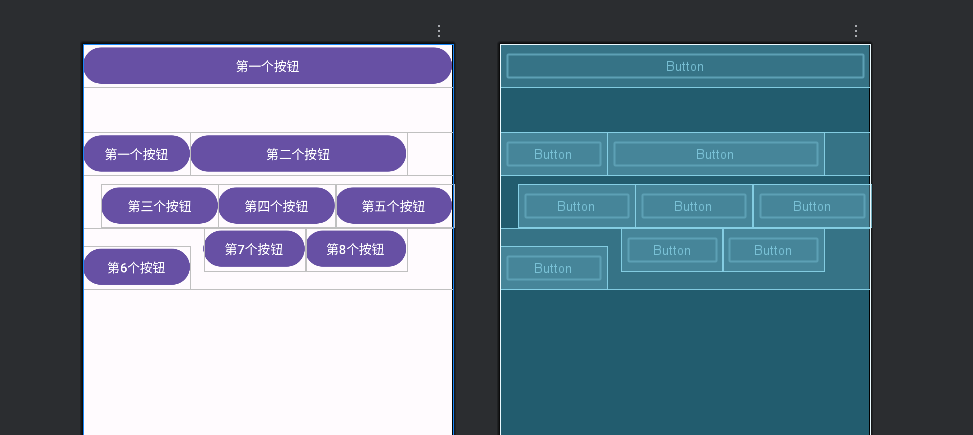
表格布局(Tablelayout)
表格布局与常见的表格类似,它以行、列的形式来管理放入其中的视图,表格布局使用<TableLayout>标记定义,在布局中,可以添加多个<TableRow>标记,每个<TableRow>标记占用一行,由于<TableRow>标记也是容器,所以在该标记中还可以添加其他视图,在<TableRow>标记中,每添加一个视图,表格就会增加一列。在表格布局中,列可以被隐藏,也可以被设置为伸展,从而填充可利用的屏幕空间,也可设置为强制收缩,直到表格匹配屏幕大小。
如果在表格布局<TableLayout>中直接添加视图,那么这个视图将独占一行。
表格布局TableLayout继承了线性布局LinearLayout,所以表格布局完全支持线性布局所支持的全部XML属性。
TableLayout的列数
等于含有最多子控件的TableRow的列数。
如第一(行)TableRow含2个子控件,第二(行)TableRow含3个,第三(行)TableRow含4个,那么这个表格布局的列数就是4列。
TableLayout可设置的属性
表格布局可以设置的属性有两种:全局属性、单元格属性。
全局属性(列属性): 全局属性有三个属性
Android:stretchColumns 设置可伸展的列,让列填满表格剩余宽度。该列可以向行方向伸展,最多可占据一整行。
Android:shrinkColumns 设置可收缩的列,内容太长自动换行 / 缩小。(当该列子控件里的内容太多,行内显示不完的时候会向列的方向显示内容)。
Android:collapseColumns 设置要隐藏的列。
例如:
Android:stretchColumns="0″ 第0列可伸展
Android:stretchColumns="*″ =*伸展全部列
Android:shrinkColumns="1,2″ 第1,2列皆可收缩
Android:collapseColumns="1″ 隐藏第一行
单元格属性:有两个
Android:layout_column 指定该单元格在第几列显示
Android:layout_span 指定该单元格占据的列数(如果我们在使用中没有指定,那么默认值将为1)
例如:
Android:layout_column="1″ 该控件在第1列
Android:layout_span="2″ 该控件占了2列
XML
<?xml version="1.0" encoding="utf-8"?>
<TableLayout xmlns:android="http://schemas.android.com/apk/res/android"
    android:layout_width="match_parent"
    android:layout_height="match_parent">
    <Button
        android:layout_width="wrap_content"
        android:layout_height="wrap_content"
        android:text="第一个按钮" />
    <TableRow
        android:layout_marginTop="50dp">
        <Button
            android:layout_width="wrap_content"
            android:layout_height="wrap_content"
            android:text="第一个按钮" />

        <Button
            android:layout_width="wrap_content"
            android:layout_height="wrap_content"
            android:text="第二个按钮"
            android:layout_span="2"/>
    </TableRow>

    <TableRow
        android:layout_marginTop="10dp"
        android:layout_marginStart="20dp">
        <Button
            android:layout_width="0dp"
            android:layout_height="wrap_content"
            android:layout_weight="1"
            android:text="第三个按钮" />

        <Button
            android:layout_width="0dp"
            android:layout_height="wrap_content"
            android:layout_weight="1"
            android:text="第四个按钮" />

        <Button
            android:layout_width="0dp"
            android:layout_height="wrap_content"
            android:layout_weight="1"
            android:text="第五个按钮" />
    </TableRow>
    <TableRow>

        <Button
            android:layout_width="wrap_content"
            android:layout_height="wrap_content"
            android:layout_marginTop="20dp"
            android:text="第6个按钮" />

        <Button
            android:layout_width="wrap_content"
            android:layout_height="wrap_content"
            android:layout_marginLeft="15dp"
            android:text="第7个按钮" />

        <Button
            android:layout_width="wrap_content"
            android:layout_height="wrap_content"
            android:text="第8个按钮" />
    </TableRow>
</TableLayout>