1 概念定义
命令模式是一种行为型设计模式,它将一个请求封装为一个对象,从而允许用户使用不同的请求、队列或日志请求来参数化其他对象,并且支持可撤销的操作。
2 核心思想
-
请求封装:将请求(操作)封装成对象
-
参数化:可以用不同的请求对客户端进行参数化
-
队列化:支持请求的排队、记录和撤销
-
解耦:将请求的发送者和接收者解耦
3 主要角色
-
Command(抽象命令):声明执行操作的接口
-
ConcreteCommand(具体命令):实现Command接口,绑定接收者
-
Invoker(调用者):要求命令执行请求
-
Receiver(接收者):知道如何执行与请求相关的操作
-
Client(客户端):创建具体命令对象并设置其接收者
4 应用场景
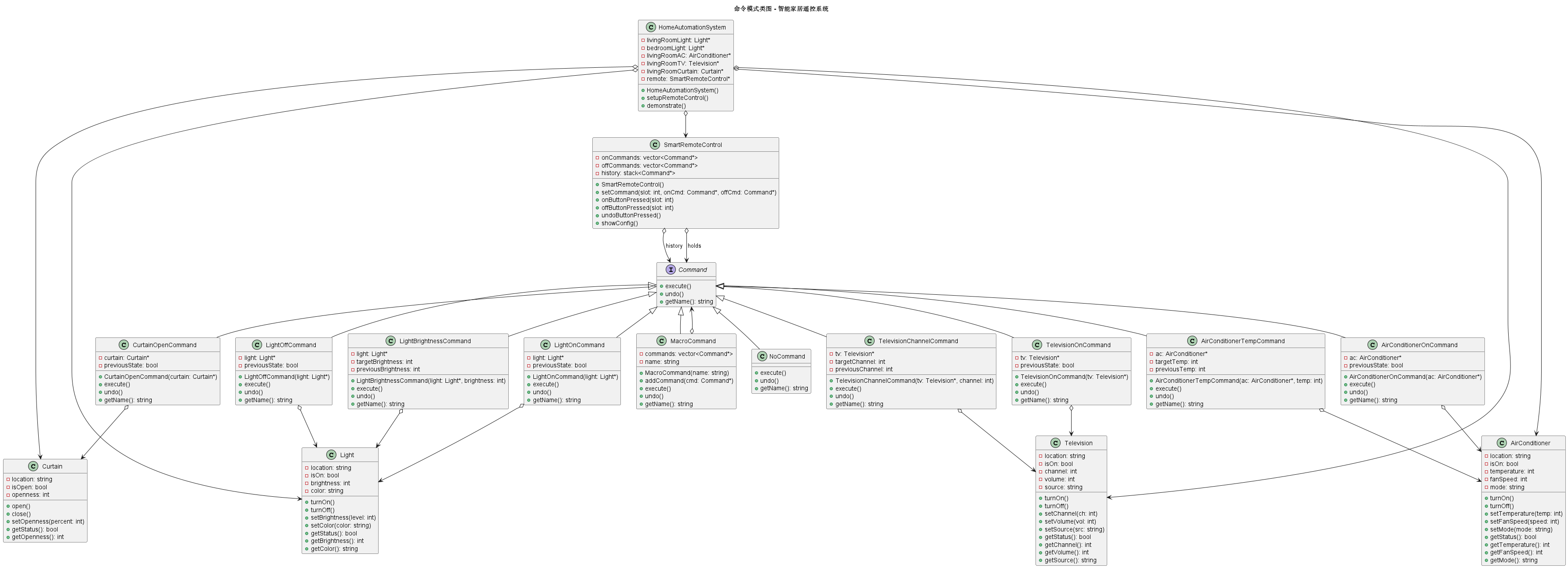
以智能家居遥控系统为例:
有多种智能设备:灯光、空调、电视、窗帘等
每个设备有多个操作:开/关、调节温度、换台等
遥控器有多个可编程按钮
需要支持宏命令(一键执行多个操作)
需要支持撤销/重做功能
5 UML
6 C++代码实现
cpp
#include <iostream>
#include <string>
#include <vector>
#include <memory>
#include <stack>
#include <map>
#include <functional>
using namespace std;

// ========== 前向声明 ==========
class Command;

// ========== 接收者:灯光 ==========
class Light {
private:
    string location;
    bool isOn;
    int brightness;  // 0-100
    string color;

public:
    Light(const string& loc) : location(loc), isOn(false), brightness(50), color("暖白") {}

    void turnOn() {
        isOn = true;
        cout << location << "灯光: 已开启" << endl;
    }

    void turnOff() {
        isOn = false;
        cout << location << "灯光: 已关闭" << endl;
    }

    void setBrightness(int level) {
        brightness = level;
        cout << location << "灯光: 亮度设置为 " << level << "%" << endl;
    }

    void setColor(const string& newColor) {
        color = newColor;
        cout << location << "灯光: 颜色设置为 " << newColor << endl;
    }

    bool getStatus() const { return isOn; }
    int getBrightness() const { return brightness; }
    string getColor() const { return color; }
};

// ========== 接收者:空调 ==========
class AirConditioner {
private:
    string location;
    bool isOn;
    int temperature;  // 16-30度
    int fanSpeed;     // 1-5档
    string mode;      // 制冷/制热/除湿

public:
    AirConditioner(const string& loc) : location(loc), isOn(false),
                                        temperature(24), fanSpeed(3), mode("制冷") {}

    void turnOn() {
        isOn = true;
        cout << location << "空调: 已开启" << endl;
    }

    void turnOff() {
        isOn = false;
        cout << location << "空调: 已关闭" << endl;
    }

    void setTemperature(int temp) {
        temperature = temp;
        cout << location << "空调: 温度设置为 " << temp << "度" << endl;
    }

    void setFanSpeed(int speed) {
        fanSpeed = speed;
        cout << location << "空调: 风速设置为 " << speed << "档" << endl;
    }

    void setMode(const string& newMode) {
        mode = newMode;
        cout << location << "空调: 模式设置为 " << newMode << endl;
    }

    bool getStatus() const { return isOn; }
    int getTemperature() const { return temperature; }
    int getFanSpeed() const { return fanSpeed; }
    string getMode() const { return mode; }
};

// ========== 接收者:电视 ==========
class Television {
private:
    string location;
    bool isOn;
    int channel;
    int volume;
    string source;

public:
    Television(const string& loc) : location(loc), isOn(false),
                                    channel(1), volume(20), source("TV") {}

    void turnOn() {
        isOn = true;
        cout << location << "电视: 已开启" << endl;
    }

    void turnOff() {
        isOn = false;
        cout << location << "电视: 已关闭" << endl;
    }

    void setChannel(int ch) {
        channel = ch;
        cout << location << "电视: 频道切换到 " << ch << endl;
    }

    void setVolume(int vol) {
        volume = vol;
        cout << location << "电视: 音量设置为 " << vol << endl;
    }

    void setSource(const string& src) {
        source = src;
        cout << location << "电视: 信号源切换到 " << src << endl;
    }

    bool getStatus() const { return isOn; }
    int getChannel() const { return channel; }
    int getVolume() const { return volume; }
    string getSource() const { return source; }
};

// ========== 接收者:窗帘 ==========
class Curtain {
private:
    string location;
    bool isOpen;
    int openness;  // 0-100%

public:
    Curtain(const string& loc) : location(loc), isOpen(true), openness(100) {}

    void open() {
        isOpen = true;
        openness = 100;
        cout << location << "窗帘: 已打开" << endl;
    }

    void close() {
        isOpen = false;
        openness = 0;
        cout << location << "窗帘: 已关闭" << endl;
    }

    void setOpenness(int percent) {
        openness = percent;
        isOpen = (percent > 0);
        cout << location << "窗帘: 开合度设置为 " << percent << "%" << endl;
    }

    bool getStatus() const { return isOpen; }
    int getOpenness() const { return openness; }
};

// ========== 抽象命令接口 ==========
class Command {
public:
    virtual ~Command() = default;

    // 执行命令
    virtual void execute() = 0;

    // 撤销命令
    virtual void undo() = 0;

    // 获取命令名称
    virtual string getName() const = 0;
};

// ========== 具体命令:开灯命令 ==========
class LightOnCommand : public Command {
private:
    Light* light;
    bool previousState;

public:
    LightOnCommand(Light* l) : light(l), previousState(false) {}

    void execute() override {
        previousState = light->getStatus();
        light->turnOn();
    }

    void undo() override {
        if (!previousState) {
            light->turnOff();
        } else {
            light->turnOn();
        }
    }

    string getName() const override {
        return "开灯";
    }
};

// ========== 具体命令:关灯命令 ==========
class LightOffCommand : public Command {
private:
    Light* light;
    bool previousState;

public:
    LightOffCommand(Light* l) : light(l), previousState(false) {}

    void execute() override {
        previousState = light->getStatus();
        light->turnOff();
    }

    void undo() override {
        if (previousState) {
            light->turnOn();
        } else {
            light->turnOff();
        }
    }

    string getName() const override {
        return "关灯";
    }
};

// ========== 具体命令:调节灯光亮度命令 ==========
class LightBrightnessCommand : public Command {
private:
    Light* light;
    int targetBrightness;
    int previousBrightness;

public:
    LightBrightnessCommand(Light* l, int brightness)
        : light(l), targetBrightness(brightness), previousBrightness(0) {}

    void execute() override {
        previousBrightness = light->getBrightness();
        light->setBrightness(targetBrightness);
    }

    void undo() override {
        light->setBrightness(previousBrightness);
    }

    string getName() const override {
        return "调节亮度至" + to_string(targetBrightness) + "%";
    }
};

// ========== 具体命令:开空调命令 ==========
class AirConditionerOnCommand : public Command {
private:
    AirConditioner* ac;
    bool previousState;

public:
    AirConditionerOnCommand(AirConditioner* a) : ac(a), previousState(false) {}

    void execute() override {
        previousState = ac->getStatus();
        ac->turnOn();
    }

    void undo() override {
        if (!previousState) {
            ac->turnOff();
        }
    }

    string getName() const override {
        return "开空调";
    }
};

// ========== 具体命令:设置空调温度命令 ==========
class AirConditionerTempCommand : public Command {
private:
    AirConditioner* ac;
    int targetTemp;
    int previousTemp;

public:
    AirConditionerTempCommand(AirConditioner* a, int temp)
        : ac(a), targetTemp(temp), previousTemp(0) {}

    void execute() override {
        previousTemp = ac->getTemperature();
        ac->setTemperature(targetTemp);
    }

    void undo() override {
        ac->setTemperature(previousTemp);
    }

    string getName() const override {
        return "设置温度至" + to_string(targetTemp) + "度";
    }
};

// ========== 具体命令:开电视命令 ==========
class TelevisionOnCommand : public Command {
private:
    Television* tv;
    bool previousState;

public:
    TelevisionOnCommand(Television* t) : tv(t), previousState(false) {}

    void execute() override {
        previousState = tv->getStatus();
        tv->turnOn();
    }

    void undo() override {
        if (!previousState) {
            tv->turnOff();
        }
    }

    string getName() const override {
        return "开电视";
    }
};

// ========== 具体命令:切换电视频道命令 ==========
class TelevisionChannelCommand : public Command {
private:
    Television* tv;
    int targetChannel;
    int previousChannel;

public:
    TelevisionChannelCommand(Television* t, int channel)
        : tv(t), targetChannel(channel), previousChannel(0) {}

    void execute() override {
        previousChannel = tv->getChannel();
        tv->setChannel(targetChannel);
    }

    void undo() override {
        tv->setChannel(previousChannel);
    }

    string getName() const override {
        return "切换频道至" + to_string(targetChannel);
    }
};

// ========== 具体命令:开窗帘命令 ==========
class CurtainOpenCommand : public Command {
private:
    Curtain* curtain;
    bool previousState;

public:
    CurtainOpenCommand(Curtain* c) : curtain(c), previousState(false) {}

    void execute() override {
        previousState = curtain->getStatus();
        curtain->open();
    }

    void undo() override {
        if (!previousState) {
            curtain->close();
        }
    }

    string getName() const override {
        return "开窗帘";
    }
};

// ========== 宏命令:组合多个命令 ==========
class MacroCommand : public Command {
private:
    vector<Command*> commands;
    string name;

public:
    MacroCommand(const string& n) : name(n) {}

    void addCommand(Command* cmd) {
        commands.push_back(cmd);
    }

    void execute() override {
        cout << "\n执行宏命令: " << name << endl;
        for (auto cmd : commands) {
            cmd->execute();
        }
    }

    void undo() override {
        cout << "\n撤销宏命令: " << name << endl;
        // 逆序撤销
        for (auto it = commands.rbegin(); it != commands.rend(); ++it) {
            (*it)->undo();
        }
    }

    string getName() const override {
        return "宏:" + name;
    }
};

// ========== 空命令(用于初始化,避免空指针检查) ==========
class NoCommand : public Command {
public:
    void execute() override {
        // 什么都不做
    }

    void undo() override {
        // 什么都不做
    }

    string getName() const override {
        return "无命令";
    }
};

// ========== 调用者:智能遥控器 ==========
class SmartRemoteControl {
private:
    static const int SLOT_COUNT = 10;
    vector<Command*> onCommands;
    vector<Command*> offCommands;
    stack<Command*> history;  // 操作历史,用于撤销

public:
    SmartRemoteControl() {
        // 初始化所有插槽为空命令
        for (int i = 0; i < SLOT_COUNT; ++i) {
            onCommands.push_back(new NoCommand());
            offCommands.push_back(new NoCommand());
        }
    }

    ~SmartRemoteControl() {
        for (auto cmd : onCommands) delete cmd;
        for (auto cmd : offCommands) delete cmd;
    }

    // 设置命令到指定插槽
    void setCommand(int slot, Command* onCommand, Command* offCommand) {
        delete onCommands[slot];
        delete offCommands[slot];

        onCommands[slot] = onCommand;
        offCommands[slot] = offCommand;
    }

    // 按下开按钮
    void onButtonPressed(int slot) {
        cout << "\n[按下开按钮 插槽" << slot << "]" << endl;
        Command* cmd = onCommands[slot];
        cmd->execute();
        history.push(cmd);
    }

    // 按无关按钮
    void offButtonPressed(int slot) {
        cout << "\n[按下关按钮 插槽" << slot << "]" << endl;
        Command* cmd = offCommands[slot];
        cmd->execute();
        history.push(cmd);
    }

    // 撤销上一次操作
    void undoButtonPressed() {
        cout << "\n[按下撤销按钮]" << endl;
        if (!history.empty()) {
            Command* lastCmd = history.top();
            lastCmd->undo();
            history.pop();
        } else {
            cout << "没有可撤销的操作" << endl;
        }
    }

    // 显示所有插槽的命令配置
    void showConfig() const {
        cout << "\n=== 遥控器配置 ===" << endl;
        for (int i = 0; i < SLOT_COUNT; ++i) {
            cout << "[插槽" << i << "] 开:" << onCommands[i]->getName()
                 << " 关:" << offCommands[i]->getName() << endl;
        }
    }
};

// ========== 客户端:家庭自动化系统 ==========
class HomeAutomationSystem {
private:
    // 设备
    Light* livingRoomLight;
    Light* bedroomLight;
    AirConditioner* livingRoomAC;
    Television* livingRoomTV;
    Curtain* livingRoomCurtain;

    // 遥控器
    SmartRemoteControl* remote;

public:
    HomeAutomationSystem() {
        // 创建设备
        livingRoomLight = new Light("客厅");
        bedroomLight = new Light("卧室");
        livingRoomAC = new AirConditioner("客厅");
        livingRoomTV = new Television("客厅");
        livingRoomCurtain = new Curtain("客厅");

        // 创建遥控器
        remote = new SmartRemoteControl();

        // 配置遥控器
        setupRemoteControl();
    }

    ~HomeAutomationSystem() {
        delete livingRoomLight;
        delete bedroomLight;
        delete livingRoomAC;
        delete livingRoomTV;
        delete livingRoomCurtain;
        delete remote;
    }

    void setupRemoteControl() {
        // 插槽0:客厅灯
        remote->setCommand(0,
            new LightOnCommand(livingRoomLight),
            new LightOffCommand(livingRoomLight));

        // 插槽1:卧室灯
        remote->setCommand(1,
            new LightOnCommand(bedroomLight),
            new LightOffCommand(bedroomLight));

        // 插槽2:空调
        remote->setCommand(2,
            new AirConditionerOnCommand(livingRoomAC),
            new AirConditionerTempCommand(livingRoomAC, 16));  // 关按钮设置为16度

        // 插槽3:电视
        remote->setCommand(3,
            new TelevisionOnCommand(livingRoomTV),
            new TelevisionChannelCommand(livingRoomTV, 1));  // 关按钮设置为频道1

        // 插槽4:窗帘
        remote->setCommand(4,
            new CurtainOpenCommand(livingRoomCurtain),
            new LightOnCommand(livingRoomLight));  // 演示:关按钮误设为开灯

        // 插槽5:调节客厅灯亮度
        remote->setCommand(5,
            new LightBrightnessCommand(livingRoomLight, 80),
            new LightBrightnessCommand(livingRoomLight, 20));

        // 插槽6:调节空调温度
        remote->setCommand(6,
            new AirConditionerTempCommand(livingRoomAC, 26),
            new AirConditionerTempCommand(livingRoomAC, 20));

        // 创建宏命令:观影模式
        MacroCommand* movieMode = new MacroCommand("观影模式");
        movieMode->addCommand(new LightBrightnessCommand(livingRoomLight, 20));
        movieMode->addCommand(new CurtainOpenCommand(livingRoomCurtain));
        movieMode->addCommand(new TelevisionOnCommand(livingRoomTV));
        movieMode->addCommand(new AirConditionerTempCommand(livingRoomAC, 25));

        // 插槽7:观影模式宏命令
        remote->setCommand(7, movieMode, new NoCommand());  // 没有对应的关命令

        // 插槽8:空
        remote->setCommand(8, new NoCommand(), new NoCommand());

        // 插槽9:全部关闭
        MacroCommand* allOff = new MacroCommand("全部关闭");
        allOff->addCommand(new LightOffCommand(livingRoomLight));
        allOff->addCommand(new LightOffCommand(bedroomLight));
        allOff->addCommand(new LightOnCommand(livingRoomAC));  // 错误演示:应该是关空调
        allOff->addCommand(new TelevisionOffCommand(livingRoomTV));
        allOff->addCommand(new CurtainCloseCommand(livingRoomCurtain));

        remote->setCommand(9, new NoCommand(), allOff);  // 关按钮执行全部关闭
    }

    void demonstrate() {
        cout << "=== 智能家居遥控系统演示 ===" << endl;

        // 显示遥控器配置
        remote->showConfig();

        // 测试基本命令
        cout << "\n【基本命令测试】" << endl;
        remote->onButtonPressed(0);   // 开客厅灯
        remote->onButtonPressed(1);   // 开卧室灯
        remote->offButtonPressed(0);  // 关客厅灯

        // 测试撤销
        cout << "\n【撤销测试】" << endl;
        remote->undoButtonPressed();  // 撤销关客厅灯
        remote->undoButtonPressed();  // 撤销开卧室灯

        // 测试参数化命令
        cout << "\n【参数化命令测试】" << endl;
        remote->onButtonPressed(5);   // 客厅灯亮度80%
        remote->onButtonPressed(6);   // 空调温度26度

        // 测试宏命令
        cout << "\n【宏命令测试】" << endl;
        remote->onButtonPressed(7);   // 观影模式

        // 测试全部关闭
        cout << "\n【全部关闭测试】" << endl;
        remote->offButtonPressed(9);  // 全部关闭

        // 多次撤销
        cout << "\n【多次撤销测试】" << endl;
        for (int i = 0; i < 3; ++i) {
            remote->undoButtonPressed();
        }
    }
};

// ========== 电视关命令(需要定义,上面未定义) ==========
class TelevisionOffCommand : public Command {
private:
    Television* tv;
    bool previousState;

public:
    TelevisionOffCommand(Television* t) : tv(t), previousState(false) {}

    void execute() override {
        previousState = tv->getStatus();
        tv->turnOff();
    }

    void undo() override {
        if (previousState) {
            tv->turnOn();
        }
    }

    string getName() const override {
        return "关电视";
    }
};

// ========== 窗帘关命令 ==========
class CurtainCloseCommand : public Command {
private:
    Curtain* curtain;
    bool previousState;

public:
    CurtainCloseCommand(Curtain* c) : curtain(c), previousState(false) {}

    void execute() override {
        previousState = curtain->getStatus();
        curtain->close();
    }

    void undo() override {
        if (previousState) {
            curtain->open();
        }
    }

    string getName() const override {
        return "关窗帘";
    }
};

// ========== 不使用命令模式的实现(对比) ==========
class BadRemoteControl {
private:
    Light* livingRoomLight;
    AirConditioner* ac;
    Television* tv;

    // 问题1:需要知道所有设备的具体接口
    // 问题2:按钮功能固定,无法动态改变
    // 问题3:无法实现撤销功能
    // 问题4:难以实现宏命令
    // 问题5:添加新设备需要修改类

public:
    BadRemoteControl() {
        livingRoomLight = new Light("客厅");
        ac = new AirConditioner("客厅");
        tv = new Television("客厅");
    }

    ~BadRemoteControl() {
        delete livingRoomLight;
        delete ac;
        delete tv;
    }

    // 按钮功能硬编码
    void button1Pressed() {
        livingRoomLight->turnOn();
    }

    void button2Pressed() {
        livingRoomLight->turnOff();
    }

    void button3Pressed() {
        ac->turnOn();
    }

    void button4Pressed() {
        ac->setTemperature(24);
    }

    void button5Pressed() {
        tv->turnOn();
    }

    void button6Pressed() {
        tv->setChannel(5);
    }

    // 问题:每个新功能都需要新按钮
    // 问题:无法动态重映射按钮
    // 问题:没有撤销功能
};

// ========== 主函数 ==========
int main() {
    HomeAutomationSystem home;
    home.demonstrate();

    cout << "\n=== 对比:不使用命令模式 ===" << endl;
    cout << "不使用命令模式的问题:" << endl;
    cout << "1. 请求发送者和接收者紧耦合" << endl;
    cout << "2. 无法参数化请求(如设置不同温度)" << endl;
    cout << "3. 无法实现撤销/重做功能" << endl;
    cout << "4. 难以实现宏命令" << endl;
    cout << "5. 添加新设备需要修改遥控器类" << endl;
    cout << "6. 无法记录操作日志" << endl;
    cout << "7. 无法支持事务性操作" << endl;

    return 0;
}
6 总结
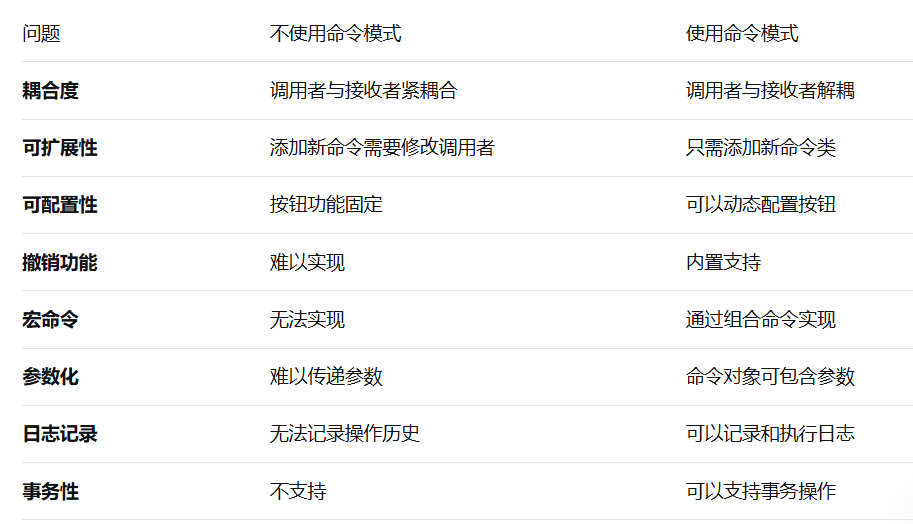
不使用命令模式的坏处
如果不使用命令模式,通常会采用硬编码的方式实现遥控器:
方式1:硬编码按钮功能
cpp
// 问题:按钮功能固定,无法动态改变
class FixedRemoteControl {
private:
    Light* light;
    AirConditioner* ac;

public:
    void button1Pressed() { light->turnOn(); }
    void button2Pressed() { light->turnOff(); }
    void button3Pressed() { ac->turnOn(); }
    void button4Pressed() { ac->setTemperature(24); }

    // 问题1:每个按钮功能固定
    // 问题2:无法重新配置按钮
    // 问题3:添加新设备需要添加新按钮
    // 问题4:无法实现撤销
    // 问题5:无法实现宏命令
    // 问题6:代码重复(每个设备都要类似的方法)
};
方式2:使用if-else判断
cpp
// 问题:大量的条件判断
class IfElseRemote {
private:
    map<int, string> buttonMappings;  // 按钮到操作的映射

public:
    void buttonPressed(int buttonId) {
        string operation = buttonMappings[buttonId];

        if (operation == "light_on") {
            light->turnOn();
        }
        else if (operation == "light_off") {
            light->turnOff();
        }
        else if (operation == "ac_on") {
            ac->turnOn();
        }
        else if (operation == "ac_temp_24") {
            ac->setTemperature(24);
        }
        // 更多的else-if

        // 问题1:难以维护,每添加一个操作就要加一个else-if
        // 问题2:无法参数化(比如设置不同温度)
        // 问题3:无法实现撤销
        // 问题4:违反开闭原则
    }
};
方式3:使用函数指针(C风格)
cpp
// 问题:类型不安全,难以管理状态
typedef void (*CommandFunction)();

class FunctionPointerRemote {
private:
    CommandFunction buttons[10];

public:
    void setButton(int index, CommandFunction func) {
        buttons[index] = func;
    }

    void buttonPressed(int index) {
        if (buttons[index]) {
            buttons[index]();
        }
    }

    // 问题1:无法处理带参数的函数
    // 问题2:无法保存状态(如之前的亮度)
    // 问题3:无法实现撤销
    // 问题4:无法组合命令
};
命令模式的优势
-
解耦:请求发送者和接收者完全解耦
-
可扩展性:添加新命令很容易,无需修改现有代码
-
可组合性:可以组合简单命令形成复杂命令
-
可撤销性:每个命令都知道如何撤销自己
-
可队列化:命令可以被排队、调度、延迟执行
-
可日志化:可以记录所有命令执行日志
-
事务支持:可以支持事务(全部成功或全部回滚)
8 命令模式的使用场景
-
GUI按钮/菜单:每个按钮对应一个命令
-
遥控器:可编程按钮
-
多级撤销:编辑器撤销/重做
-
事务处理:数据库事务
-
任务队列:工作队列、线程池
-
宏录制:录制和回放操作序列
-
网络请求:请求封装为命令传输
-
定时任务:延迟执行命令
命令模式通过将请求封装为对象,为处理请求提供了极大的灵活性和可扩展性。它不仅解耦了请求的发送者和接收者,还支持各种高级特性如撤销、重做、宏命令、事务处理等,是构建灵活、可扩展系统的重要工具。