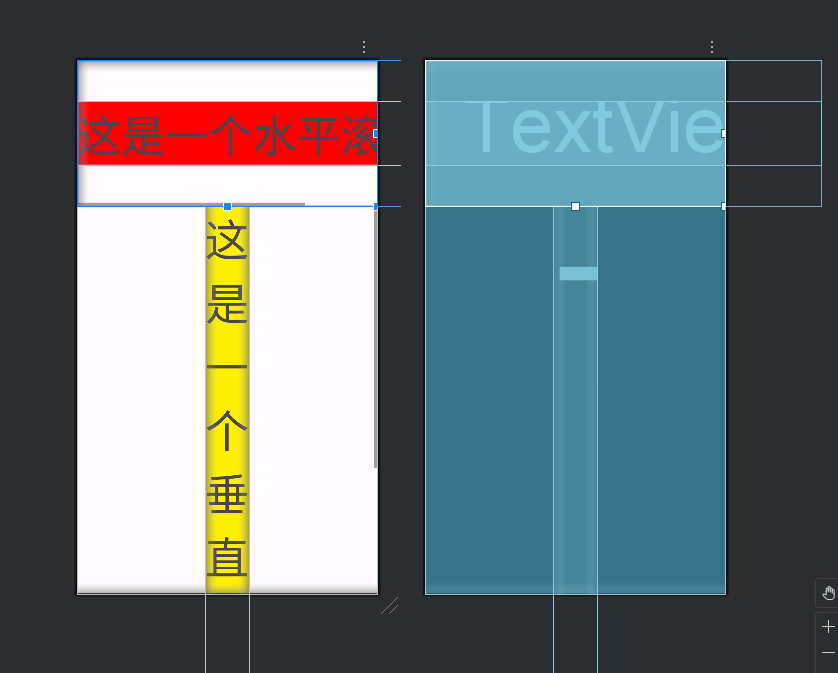
滚动视图分为水平滚动(HorizontalScrollView)和垂直滚动(ScrollView);
在默认情况下,当视图中的内容比较多而屏幕显示不下时,超出的部分无法看到,Android本身没有提供屏幕滚动的功能。如果需要滚动就需要使用滚动视图,滚动视图是帧布局(FrameLayout)的子类,所以在滚动视图中可以添加任何子视图。但是一个滚动视图只能放一个子视图。如果想要放多个子视图,就需要先放一个子布局管理器,在子布局管理器中在放置其他子视图。
使用参数:
在水平滚动(HorizontalScrollView)视图中,需要将宽度设置为自适应(wrap_content),或使用权重设置内容视图的宽度。
在垂直滚动(ScrollView)视图中,需要将高度设置为自适应(wrap_content),或使用权重设置内容视图的高度。
常见属性:
android:fillViewport:
<1>HorizontalScrollView:设置子视图是否填充HorizontalScrollView的可视区域。默认值为true。
<2>ScrollView:设置子视图是否填充ScrollView的可视区域。设置为true表示内容将充满整个ScrollView,默认为false。
android:overScrollMode:设置滚动边界效果模式
="always"(总是显示边界阴影效果)
="never"(永不显示边界阴影效果)
="ifContentScrolls"(仅当内容发生滚动时显示边界阴影效果)
android:scrollbars:设置滚动条的显示方式
="horizontal"(只显示水平滚动条)
="vertical"(只显示垂直滚动条)
="none"(不显示滚动条)
android:scrollbarStyle:自定义滚动条的风格
="default"(系统默认风格)
="insideInset"(滚动条在内部偏移位置显示)
="outsideInset"(滚动条在外部偏移位置显示)
常用方法:
scrollTo(int x, int y):滚动到指定的坐标位置。
其中x表示水平方向上的滚动位置,y表示垂直方向上的滚动位置。
smoothScrollTo(int x, int y):平滑地滚动到指定的坐标位置。
与scrollTo()相比,该方法会有一个过渡效果,使得滚动更加平滑。
fullScroll(int direction):滚动到指定方向的边界。
=View.FOCUS_LEFT(滚动到最左边)
=View.FOCUS_RIGHT(滚动到最右边)
=View.FOCUS_FORWARD(按照指定方向进行滚动)
computeHorizontalScrollRange():获取水平滚动范围的总长度。
setSmoothScrollingEnabled(boolean enabled):设置是否启用平滑滚动效果。
onScrollChanged(int l, int t, int oldl, int oldt):当滚动位置发生变化时被调用的回调方法。
XML
<?xml version="1.0" encoding="utf-8"?>
<LinearLayout xmlns:android="http://schemas.android.com/apk/res/android"
    android:layout_width="match_parent"
    android:layout_height="match_parent"
    android:orientation="vertical">
    <!--这是一个水平滚动条-->
    <HorizontalScrollView
        android:layout_width="wrap_content"
        android:layout_height="200dp"
        android:fadeScrollbars="false">

        <LinearLayout
            android:layout_width="wrap_content"
            android:layout_height="match_parent"
            android:gravity="center_vertical">

            <TextView
                android:layout_width="match_parent"
                android:layout_height="wrap_content"
                android:background="#ff0000"
                android:text="这是一个水平滚动条"
                android:textSize="60dp" />
        </LinearLayout>
    </HorizontalScrollView>
    <!--这是一个垂直滚动进度条-->
    <ScrollView
        android:layout_width="match_parent"
        android:layout_height="wrap_content"
        android:fadeScrollbars="false"
        android:overScrollMode="ifContentScrolls">

        <LinearLayout
            android:layout_width="wrap_content"
            android:layout_height="match_parent"
            android:layout_gravity="center_horizontal">

            <TextView
                android:layout_width="match_parent"
                android:layout_height="match_parent"
                android:background="#fff000"
                android:text="这\n是\n一\n个\n垂\n直\n滚\n动\n条"
                android:textSize="60dp" />
        </LinearLayout>
    </ScrollView>
</LinearLayout>