这篇文章的基础上是你已经搭建并启动了Carte服务。
我之前是通过pan.sh来执行的ETL任务,但是占用内存比较多,于是考虑使用http来调用。
网上一搜索,要么是收费文章,要么是http调用写的很粗糙,说什么自己定制过,要么就是虽然是使用的http调,但是调用的是自己本地的任务。
我这里记录一下,使用http调用我资源库中的任务,我的资源库是Pentaho repository,但是这个不影响,你其他DB类型的也是同样的XML元素,修改对应内容即可。
1、修改你启动的对应的/opt/ETLDesigner/data-integration/pwd/下的文件,我使用的是/opt/ETLDesigner/data-integration/pwd/carte-config-master-18080.xml,你的路径可能一样,但是最后的那个文件名字可能不同,关注下内容,红色为新增内容:
<slave_config>
<!--
Document description...
- masters: You can list the slave servers to which this slave has to report back to.
If this is a master, we will contact the other masters to get a list of all the slaves in the cluster.
-
report_to_masters : send a message to the defined masters to let them know we exist (Y/N)
-
slaveserver : specify the slave server details of this carte instance.
IMPORTANT : the username and password specified here are used by the master instances to connect to this slave.
-->
<repository>
<id>PentahoEnterpriseRepository</id>
<name>etl_repositories</name>
<description>Pentaho repository | http://10.2x.x.22:28080/pentaho/Home\</description>
<is_default>true</is_default>
<repository_location_url>http:// 10.2x.x.22: 28080/pentaho</repository_location_url>
<version_comment_mandatory>N</version_comment_mandatory>
<username>admin</username>
<password>xxx@1xx56</password>
</repository>
<slaveserver>
<name>master1</name>
<hostname>10.233.110.22</hostname>
<port>18080</port>
<master>Y</master>
</slaveserver>
</slave_config>
处理好这个文件后,重启Carte服务即可,目的就是为了http调用的时候,让知道从哪个资源库找对应文档。
2、调用KTR
POSTMAN:
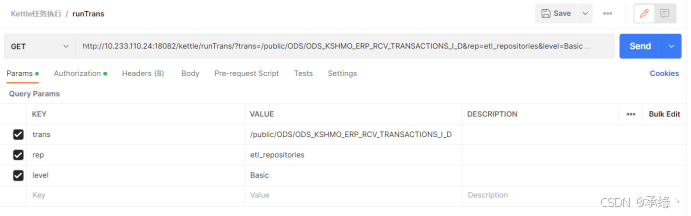
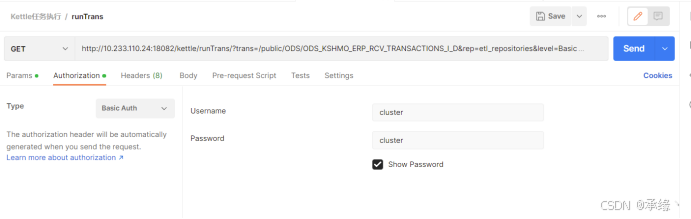
CURL:
curl --location --request GET 'http://10.233.110.24:18082/kettle/runTrans/?trans=/public/ODS/ODS_KSHMO_ERP_RCV_TRANSACTIONS_I_D\&rep=etl_repositories\&level=Basic' \
--header 'Authorization: Basic Y2x1c3RlcjpjbHVzdGVy'
3、调用KJB
POSTMAN:
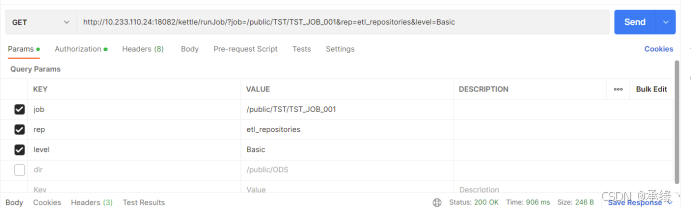
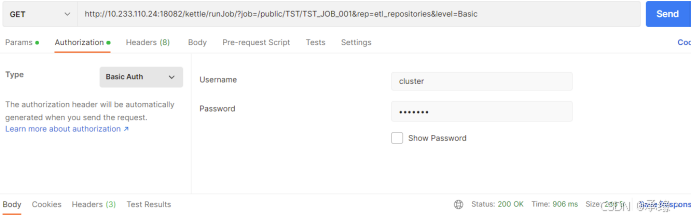
CURL:
curl --location --request GET 'http://10.233.110.24:18082/kettle/runJob/?job=/public/TST/TST_JOB_001\&rep=etl_repositories\&level=Basic' \
--header 'Authorization: Basic Y2x1c3RlcjpjbHVzdGVy'
- 调用我都亲试了,可以的,访问http://10.233.110.22:18080/kettle/status/获取信息,例如:
后面再尝试其他的。