面向AI编码,经过deepseek多次调试,调试出可处理日期格式VBA代码,可以直接使用
如何使用这段代码
步骤1:打开VBA编辑器
- 在Excel中按
Alt + F11打开VBA编辑器 - 点击菜单
插入→模块
步骤2:粘贴代码
将上面的完整代码复制粘贴到新建的模块中,然后点击 关闭并返回Microsoft excel
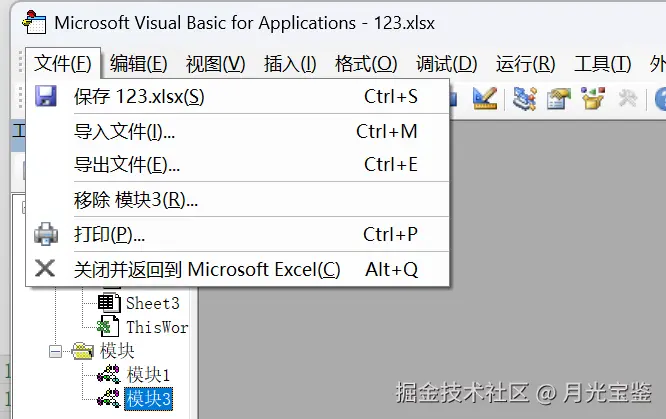
步骤3:准备数据
确保你的Excel数据格式如下:
- 第一行是表头(字段名)
- 后续行是数据记录
- 避免有空行(代码会自动处理)
步骤4:运行代码
方法A:转换选中的区域
- 在Excel中选中你要转换的数据区域(包含表头)
- 按
Alt + F8打开宏对话框 - 选择
ExportSelectionToJSON,点击运行
方法B:转换整个工作表
- 激活要转换的工作表
- 按
Alt + F8打开宏对话框 - 选择
ExportWorksheetToJSON,点击运行
Option
' 主函数:将选中的Excel区域转换为JSON并保存
Sub ExportSelectionToJSON()
    ' 变量声明
    Dim selectedRange As Range
    Dim jsonString As String
    Dim savePath As Variant
    Dim headers As Variant
    Dim dataArray As Variant
    Dim rowDict As Object
    Dim jsonCollection As Object
    Dim i As Long, j As Long

    ' 检查是否有选中区域
    If TypeName(Selection) <> "Range" Then
        MsgBox "请先选中包含表头的数据区域!", vbExclamation, "提示"
        Exit Sub
    End If

    Set selectedRange = Selection
    On Error GoTo ErrorHandler

    ' 将区域数据读入数组(提高性能)
    dataArray = selectedRange.Value

    ' 检查是否有足够的数据(至少需要1行表头)
    If UBound(dataArray, 1) < 1 Then
        MsgBox "数据区域至少需要包含一行表头!", vbExclamation, "提示"
        Exit Sub
    End If

    ' 获取表头(第一行)
    ReDim headers(1 To UBound(dataArray, 2))
    For j = 1 To UBound(dataArray, 2)
        ' 处理可能的错误值
        On Error Resume Next
        headers(j) = Trim(CStr(dataArray(1, j)))
        On Error GoTo 0

        ' 如果表头为空或错误,使用默认名称
        If headers(j) = "" Or IsError(headers(j)) Then
            headers(j) = "Column_" & j
        End If
    Next j

    ' 创建JSON集合对象
    Set jsonCollection = New Collection

    ' 遍历数据行(从第2行开始)
    For i = 2 To UBound(dataArray, 1)
        ' 检查是否是空行
        If IsEmptyRow(dataArray, i) Then GoTo NextIteration

        ' 创建行字典
        Set rowDict = CreateObject("Scripting.Dictionary")

        ' 遍历列
        For j = 1 To UBound(dataArray, 2)
            Dim rawValue As Variant
            rawValue = dataArray(i, j)

            ' 根据数据类型处理
            Dim processedValue As Variant
            processedValue = ProcessCellValue(rawValue)

            ' 添加到字典
            rowDict.Add headers(j), processedValue
        Next j

        ' 将行字典添加到集合
        jsonCollection.Add rowDict

NextIteration:
        Set rowDict = Nothing
    Next i

    ' 生成JSON字符串
    jsonString = CollectionToJSON(jsonCollection)

    ' 选择保存位置
    savePath = Application.GetSaveAsFilename( _
        InitialFileName:="data.json", _
        FileFilter:="JSON文件 (*.json),*.json", _
        Title:="保存JSON文件")

    ' 如果用户没有取消,则保存文件
    If savePath <> False Then
        SaveJSONToFile jsonString, CStr(savePath)
        MsgBox "JSON文件已成功保存到:" & vbCrLf & savePath, vbInformation, "完成"
    End If

    Exit Sub

ErrorHandler:
    MsgBox "处理数据时出错:" & Err.Description, vbCritical, "错误"
    If Not jsonCollection Is Nothing Then Set jsonCollection = Nothing
End Sub

' 处理单元格值的主函数
Function ProcessCellValue(value As Variant) As Variant
    ' 处理空值
    If IsEmpty(value) Then
        ProcessCellValue = Null
        Exit Function
    End If

    ' 处理错误值
    If IsError(value) Then
        ProcessCellValue = "#ERROR"
        Exit Function
    End If

    ' 先尝试作为日期时间处理
    Dim dateResult As Variant
    dateResult = TryParseDateTime(value)
    If Not IsNull(dateResult) Then
        ProcessCellValue = dateResult
        Exit Function
    End If

    ' 再尝试作为数字处理
    If IsNumeric(value) Then
        ProcessCellValue = value
        Exit Function
    End If

    ' 最后作为字符串处理
    ProcessCellValue = EscapeJSONString(CStr(value))
End Function

' 尝试解析各种日期时间格式
Function TryParseDateTime(value As Variant) As Variant
    On Error GoTo NotDate

    Dim strValue As String
    strValue = Trim(CStr(value))

    ' 如果字符串为空,不是日期
    If strValue = "" Then
        TryParseDateTime = Null
        Exit Function
    End If

    ' 方法1:使用IsDate判断
    If IsDate(value) Then
        Dim dateObj As Date
        dateObj = CDate(value)

        ' 检查是否包含时间部分
        If Hour(dateObj) = 0 And Minute(dateObj) = 0 And Second(dateObj) = 0 Then
            ' 只有日期
            TryParseDateTime = Format(dateObj, "yyyy-mm-dd")
        Else
            ' 包含时间
            TryParseDateTime = Format(dateObj, "yyyy-mm-dd HH:MM:SS")
        End If
        Exit Function
    End If

    ' 方法2:手动解析常见格式
    Dim yearPart As String, monthPart As String, dayPart As String
    Dim hourPart As String, minutePart As String, secondPart As String
    Dim hasTime As Boolean
    Dim datePart As String, timePart As String
    Dim parts() As String

    ' 尝试分割日期和时间(支持空格或T分隔)
    If InStr(strValue, " ") > 0 Then
        parts = Split(strValue, " ")
        datePart = parts(0)
        timePart = parts(1)
        hasTime = True
    ElseIf InStr(strValue, "T") > 0 Then
        parts = Split(strValue, "T")
        datePart = parts(0)
        timePart = parts(1)
        hasTime = True
    Else
        datePart = strValue
        hasTime = False
    End If

    ' 解析日期部分(支持多种分隔符)
    Dim dateParts() As String
    If InStr(datePart, "-") > 0 Then
        dateParts = Split(datePart, "-")
    ElseIf InStr(datePart, "/") > 0 Then
        dateParts = Split(datePart, "/")
    ElseIf InStr(datePart, ".") > 0 Then
        dateParts = Split(datePart, ".")
    Else
        GoTo NotDate
    End If

    If UBound(dateParts) <> 2 Then GoTo NotDate

    ' 根据长度判断年月日顺序(假设常见格式)
    If Len(dateParts(0)) = 4 Then
        ' yyyy-mm-dd 格式
        yearPart = dateParts(0)
        monthPart = Format(Val(dateParts(1)), "00")
        dayPart = Format(Val(dateParts(2)), "00")
    ElseIf Len(dateParts(2)) = 4 Then
        ' dd-mm-yyyy 格式
        yearPart = dateParts(2)
        monthPart = Format(Val(dateParts(1)), "00")
        dayPart = Format(Val(dateParts(0)), "00")
    Else
        ' 默认假设为 yyyy-mm-dd
        yearPart = dateParts(0)
        monthPart = Format(Val(dateParts(1)), "00")
        dayPart = Format(Val(dateParts(2)), "00")
    End If

    ' 验证年月日有效性
    If Val(yearPart) < 1900 Or Val(yearPart) > 2100 Then GoTo NotDate
    If Val(monthPart) < 1 Or Val(monthPart) > 12 Then GoTo NotDate
    If Val(dayPart) < 1 Or Val(dayPart) > 31 Then GoTo NotDate

    ' 如果有时间部分,解析时间
    If hasTime Then
        Dim timeParts() As String
        If InStr(timePart, ":") > 0 Then
            timeParts = Split(timePart, ":")
            hourPart = Format(Val(timeParts(0)), "00")
            minutePart = Format(Val(timeParts(1)), "00")
            secondPart = Format(Val(timeParts(2)), "00")
        Else
            hourPart = "00"
            minutePart = "00"
            secondPart = "00"
        End If

        TryParseDateTime = yearPart & "-" & monthPart & "-" & dayPart & " " & hourPart & ":" & minutePart & ":" & secondPart
    Else
        TryParseDateTime = yearPart & "-" & monthPart & "-" & dayPart
    End If

    Exit Function

NotDate:
    TryParseDateTime = Null
End Function

' 检查行是否为空
Function IsEmptyRow(dataArray As Variant, rowIndex As Long) As Boolean
    Dim j As Long
    For j = 1 To UBound(dataArray, 2)
        On Error Resume Next
        If Not IsEmpty(dataArray(rowIndex, j)) Then
            Dim cellValue As String
            cellValue = Trim(CStr(dataArray(rowIndex, j)))
            If cellValue <> "" And Not IsError(dataArray(rowIndex, j)) Then
                IsEmptyRow = False
                Exit Function
            End If
        End If
    Next j
    IsEmptyRow = True
End Function

' 转义JSON字符串中的特殊字符
Function EscapeJSONString(ByVal str As String) As String
    Dim result As String
    result = str

    ' 转义特殊字符
    result = Replace(result, "\", "\\")
    result = Replace(result, """", "\""")
    result = Replace(result, vbCrLf, "\n")
    result = Replace(result, vbCr, "\r")
    result = Replace(result, vbLf, "\n")
    result = Replace(result, vbTab, "\t")

    EscapeJSONString = result
End Function

' 将Collection对象转换为JSON字符串
Function CollectionToJSON(collection As Object) As String
    Dim item As Object
    Dim key As Variant
    Dim jsonStr As String
    Dim i As Long

    jsonStr = "["

    For Each item In collection
        jsonStr = jsonStr & "{"

        ' 遍历字典的所有键
        Dim first As Boolean
        first = True
        For Each key In item.Keys()
            If Not first Then
                jsonStr = jsonStr & ","
            End If

            ' 添加键值对
            jsonStr = jsonStr & """" & key & """:"

            ' 根据值类型处理
            If IsNull(item(key)) Then
                jsonStr = jsonStr & "null"
            ElseIf IsNumeric(item(key)) And Not IsDate(item(key)) Then
                jsonStr = jsonStr & item(key)
            Else
                jsonStr = jsonStr & """" & CStr(item(key)) & """"
            End If

            first = False
        Next key

        jsonStr = jsonStr & "},"
    Next item

    ' 移除最后一个逗号并添加结束括号
    If Len(jsonStr) > 1 Then
        jsonStr = Left(jsonStr, Len(jsonStr) - 1)
    End If
    jsonStr = jsonStr & "]"

    CollectionToJSON = jsonStr
End Function

' 保存JSON字符串到文件(UTF-8编码)
Sub SaveJSONToFile(jsonText As String, filePath As String)
    Dim fileStream As Object
    Dim utf8Bytes() As Byte

    On Error GoTo FileError

    ' 创建ADODB.Stream对象
    Set fileStream = CreateObject("ADODB.Stream")

    With fileStream
        .Type = 2 ' 文本类型
        .Charset = "utf-8"
        .Open
        .WriteText jsonText
        .Position = 0
        .Type = 1 ' 二进制类型
        .SaveToFile filePath, 2 ' 2表示覆盖
        .Close
    End With

    Set fileStream = Nothing
    Exit Sub

FileError:
    MsgBox "保存文件时出错:" & Err.Description, vbCritical, "错误"
End Sub

' 额外功能:导出整个工作表为JSON
Sub ExportWorksheetToJSON()
    Dim ws As Worksheet
    Dim lastRow As Long
    Dim lastCol As Long
    Dim dataRange As Range

    Set ws = ActiveSheet

    ' 自动检测数据范围
    lastRow = ws.Cells(ws.Rows.Count, 1).End(xlUp).Row
    lastCol = ws.Cells(1, ws.Columns.Count).End(xlToLeft).Column

    ' 选择数据范围
    Set dataRange = ws.Range(ws.Cells(1, 1), ws.Cells(lastRow, lastCol))
    dataRange.Select

    ' 调用主函数
    ExportSelectionToJSON
End Sub
然后就可以出现想要的json了保存到本地。
一、打开apifox 点击自动化测试,新建测试场景 点击添加步骤,从接口导入,导入要测试的接口 以下是post json体请求模板:
{
    "name": "{{name}}",
    "age":{{handleTime}},
    "id": "{{id}}",
    "status": 5
}
二、点击新增测试数据
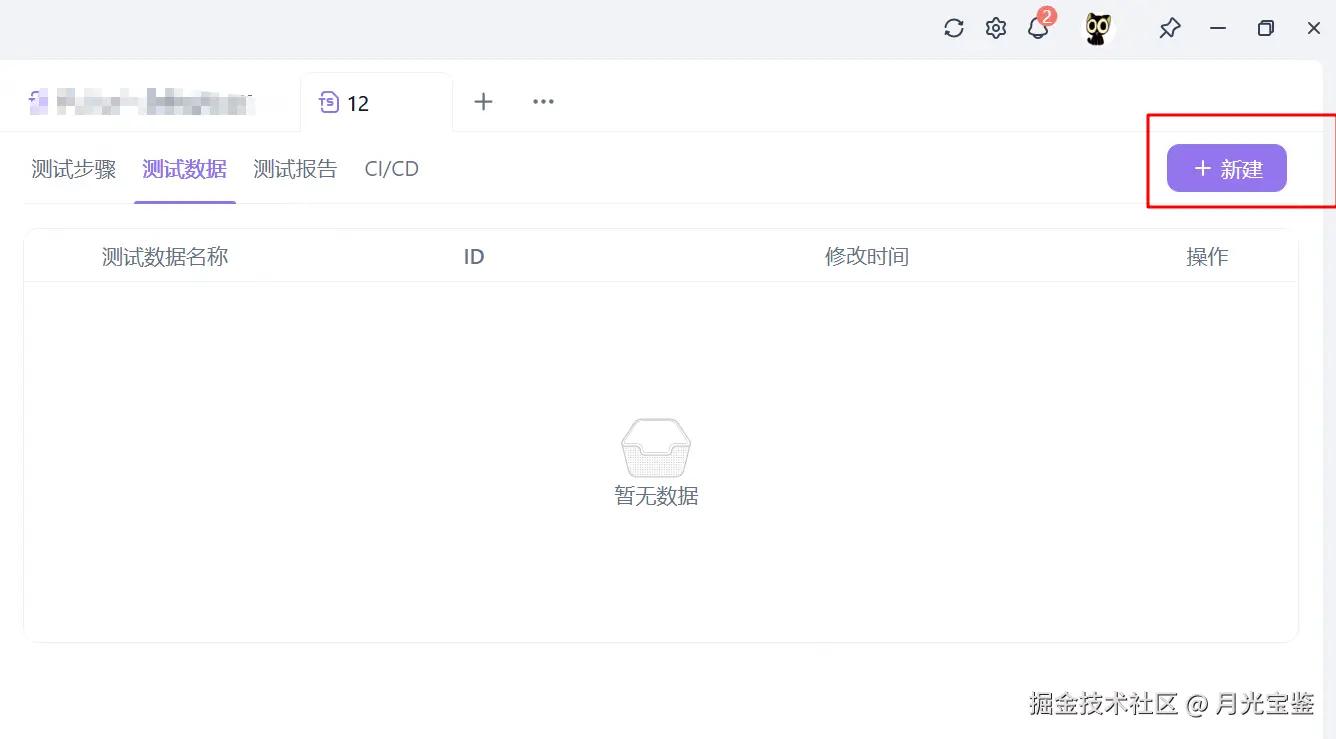
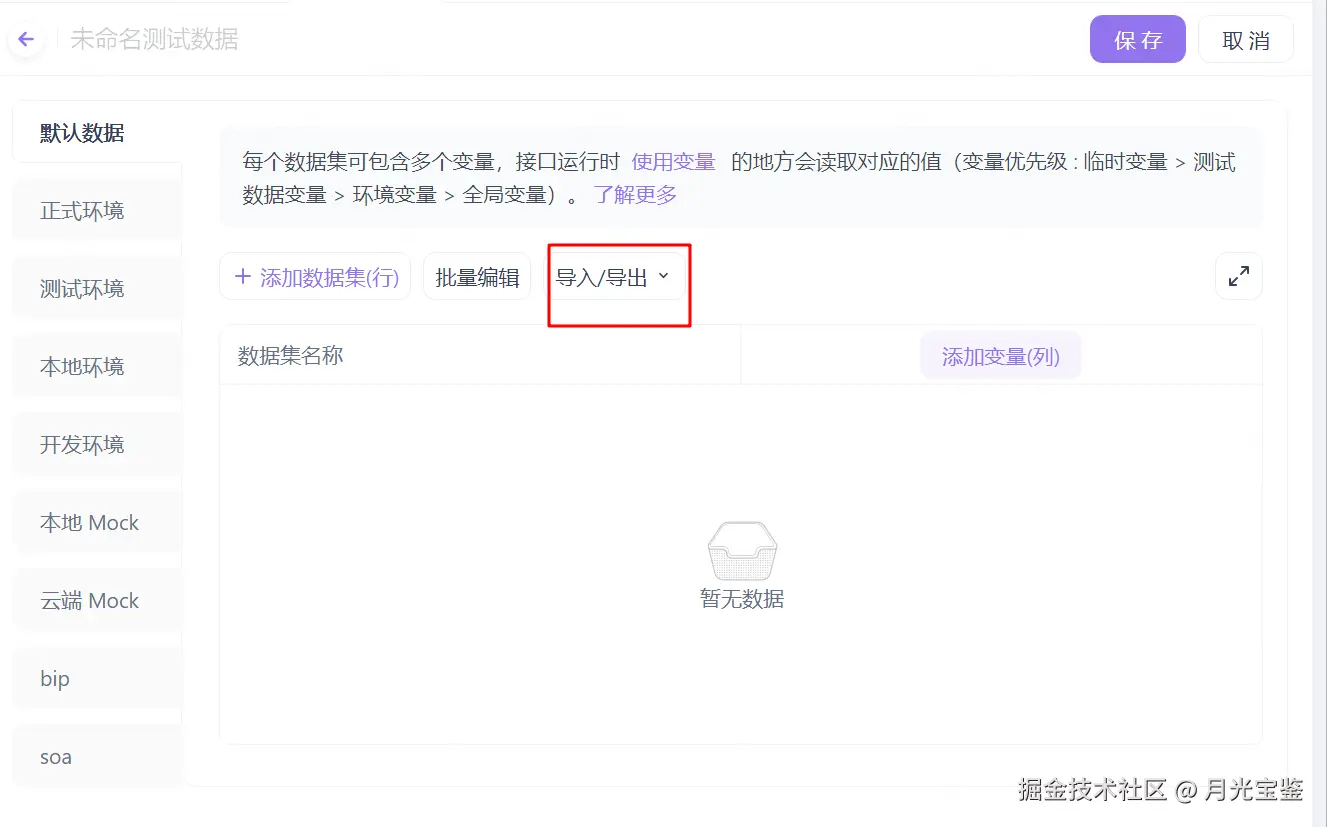
点击导入json,点击保存,进行测试json数据保存,默认保存为数据1
回到测试步骤,测试数据选择使用数据1
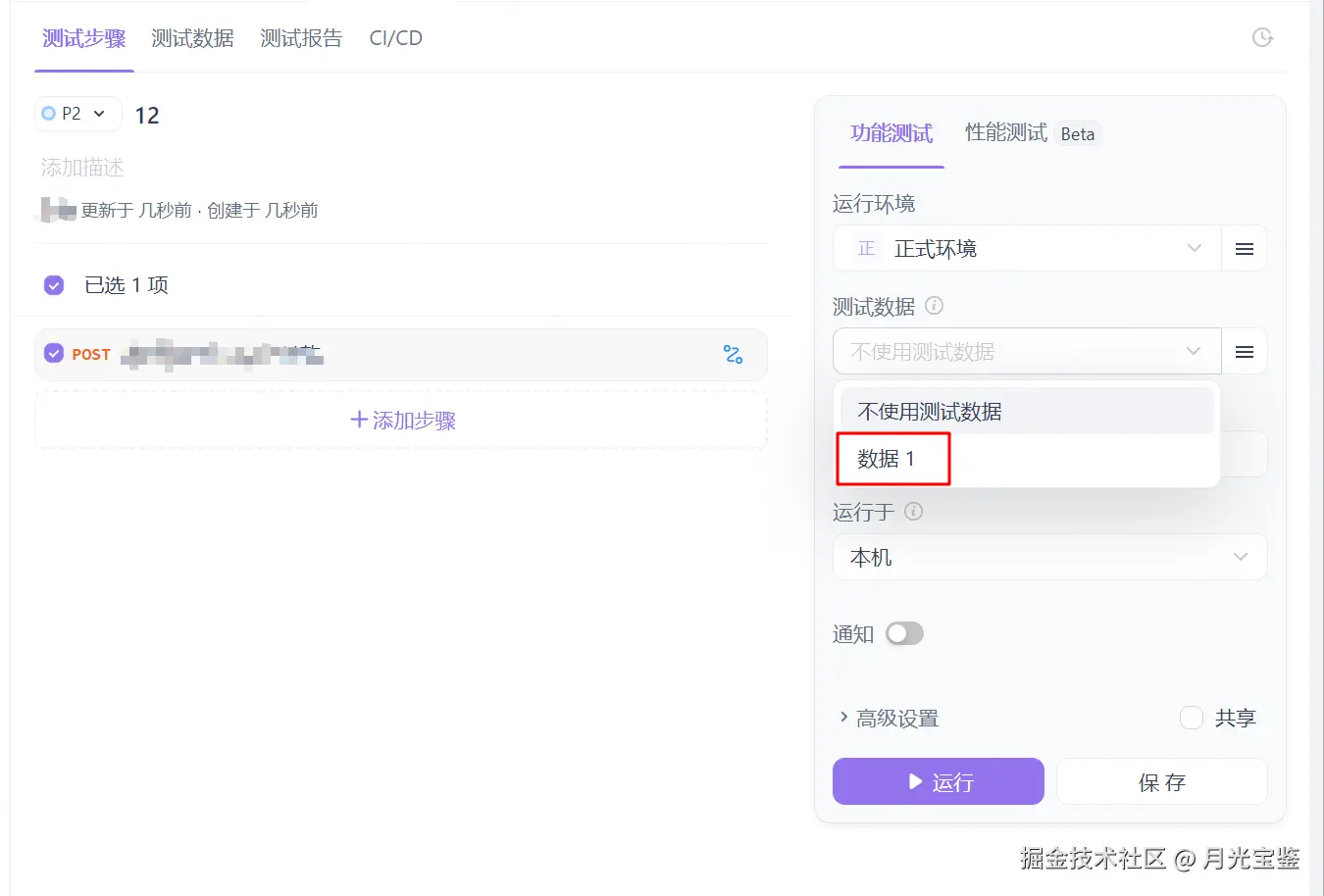
点击运行,就可以了!!