vue-router 初始化方法 createRouter。
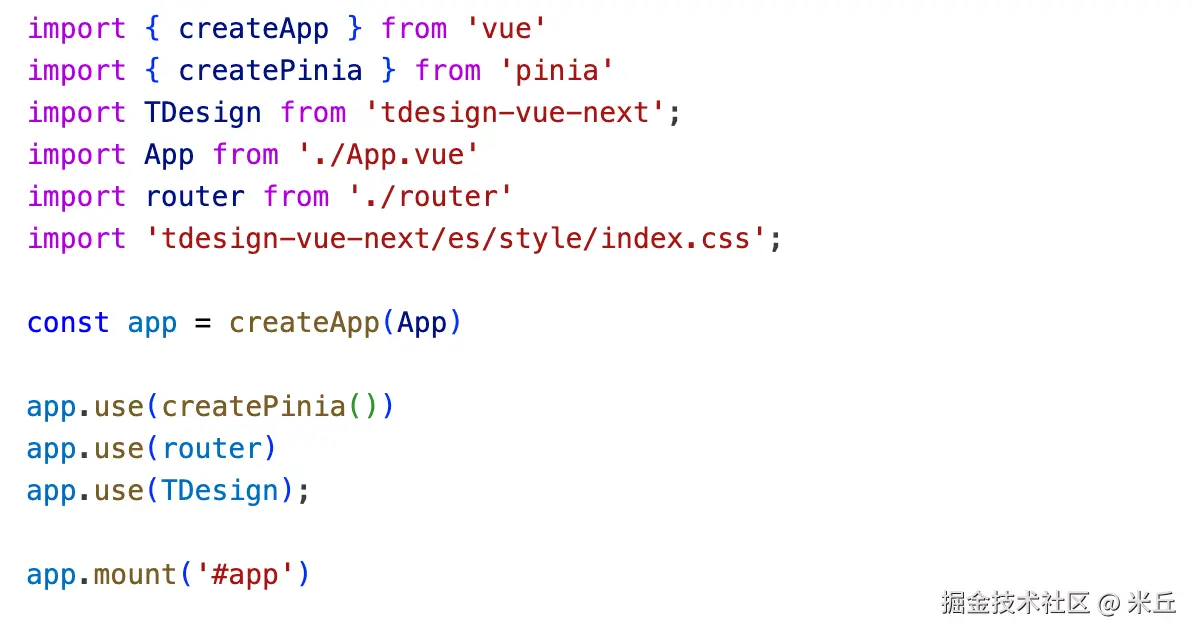
createRouter
1、做了什么?
createRouterMatcher初始化路由匹配系统。- 初始化 URL 处理,设置 URL 查询参数的解析和序列化函数。
- 初始化历史管理器,初始化路由历史管理(Hash/History 模式)。
- 初始化导航守卫系统,创建全局导航守卫的回调队列,
beforeGuards,beforeResolveGuardsafterGuards。 - 初始化路由状态,创建响应式的当前路由状态
currentRoute和待处理路由pendingLocation。 - 浏览器寒假配置滚动行为。
- 定义核心的路由管理、路由导航方法。
2、函数返回?
返回 Router 实例。
js
/**
 * Creates a Router instance that can be used by a Vue app.
 * 负责组装路由的所有核心能力(路由匹配、导航守卫、历史记录管理、滚动行为、URL 解析 / 生成等),
 * 最终返回一个可安装到 Vue 应用的 Router 实例
 * @param options - {@link RouterOptions}
 */
export function createRouter(options: RouterOptions): Router {
  // 创建路由匹配器:解析 routes 配置,生成匹配规则(核心)
  const matcher = createRouterMatcher(options.routes, options)

  // 初始化 URL 查询参数解析/序列化函数(默认/自定义)
  const parseQuery = options.parseQuery || originalParseQuery
  const stringifyQuery = options.stringifyQuery || originalStringifyQuery

  // 初始化历史管理器(Hash/History 模式),开发环境校验必传
  const routerHistory = options.history

  if (__DEV__ && !routerHistory)
    throw new Error(
      'Provide the "history" option when calling "createRouter()":' +
        ' https://router.vuejs.org/api/interfaces/RouterOptions.html#history'
    )

  // 初始化导航守卫队列(全局前置/解析后/后置守卫)
  const beforeGuards = useCallbacks<NavigationGuardWithThis<undefined>>()
  const beforeResolveGuards = useCallbacks<NavigationGuardWithThis<undefined>>()
  const afterGuards = useCallbacks<NavigationHookAfter>()

  // 初始化当前路由(响应式)和待处理路由
  const currentRoute = shallowRef<RouteLocationNormalizedLoaded>(
    START_LOCATION_NORMALIZED
  )
  // 待处理路由(当前导航目标),初始值为起始路由
  let pendingLocation: RouteLocation = START_LOCATION_NORMALIZED

  // 滚动行为初始化:有自定义 scrollBehavior 时,禁用浏览器默认滚动恢复
  // leave the scrollRestoration if no scrollBehavior is provided
  if (isBrowser && options.scrollBehavior && 'scrollRestoration' in history) {
    history.scrollRestoration = 'manual'
  }

  const normalizeParams = applyToParams.bind(
    null,
    paramValue => '' + paramValue
  )
  // 遍历路由参数对象的所有值,对每个值应用指定的处理函数,并返回新的参数对象
  const encodeParams = applyToParams.bind(null, encodeParam)
  const decodeParams: (params: RouteParams | undefined) => RouteParams =
    // @ts-expect-error: intentionally avoid the type check
    applyToParams.bind(null, decode)

  let removeHistoryListener: undefined | null | (() => void)

  let readyHandlers = useCallbacks<_OnReadyCallback>()
  let errorListeners = useCallbacks<_ErrorListener>()
  let ready: boolean

  const go = (delta: number) => routerHistory.go(delta)

  let started: boolean | undefined
  const installedApps = new Set<App>()

    // NOTE: we need to cast router as Router because the experimental
  // data-loaders add many properties that aren't available here. We might want
  // to add them later on instead of having declare module in experimental
  const router = {
    currentRoute,
    listening: true, // 监听路由

    addRoute,
    removeRoute,
    clearRoutes: matcher.clearRoutes,
    hasRoute,
    getRoutes,
    resolve,
    options,

    push,
    replace,
    go,
    back: () => go(-1),
    forward: () => go(1),

    beforeEach: beforeGuards.add,
    beforeResolve: beforeResolveGuards.add,
    afterEach: afterGuards.add,

    onError: errorListeners.add,
    isReady,

    /**
     * Vue 应用集成(install 方法)
     * @param app
     */
    install(app: App) {
      // 注册全局组件 RouterLink 和 RouterView
      app.component('RouterLink', RouterLink)
      app.component('RouterView', RouterView)

      // 暴露 $router/$route 到全局
      app.config.globalProperties.$router = router as Router
      Object.defineProperty(app.config.globalProperties, '$route', {
        enumerable: true,
        get: () => unref(currentRoute),
      })

      // this initial navigation is only necessary on client, on server it doesn't
      // make sense because it will create an extra unnecessary navigation and could
      // lead to problems
      // 初始化首次导航(客户端)
      if (
        isBrowser &&
        // used for the initial navigation client side to avoid pushing
        // multiple times when the router is used in multiple apps
        !started &&
        currentRoute.value === START_LOCATION_NORMALIZED
      ) {
        // see above
        started = true
        push(routerHistory.location).catch(err => {
          if (__DEV__) warn('Unexpected error when starting the router:', err)
        })
      }

      const reactiveRoute = {} as RouteLocationNormalizedLoaded
      for (const key in START_LOCATION_NORMALIZED) {
        Object.defineProperty(reactiveRoute, key, {
          get: () => currentRoute.value[key as keyof RouteLocationNormalized],
          enumerable: true,
        })
      }

      // 提供路由注入(useRouter/useRoute)
      app.provide(routerKey, router as Router)
      app.provide(routeLocationKey, shallowReactive(reactiveRoute))
      app.provide(routerViewLocationKey, currentRoute)

      const unmountApp = app.unmount
      installedApps.add(app)

      // 应用卸载时清理
      app.unmount = function () {
        installedApps.delete(app)
        // the router is not attached to an app anymore
        if (installedApps.size < 1) {
          // invalidate the current navigation
          pendingLocation = START_LOCATION_NORMALIZED
          removeHistoryListener && removeHistoryListener()
          removeHistoryListener = null
          currentRoute.value = START_LOCATION_NORMALIZED
          started = false
          ready = false
        }
        unmountApp()
      }

      // TODO: this probably needs to be updated so it can be used by vue-termui
      if (
        (__DEV__ || __FEATURE_PROD_DEVTOOLS__) &&
        isBrowser &&
        !__STRIP_DEVTOOLS__
      ) {
        addDevtools(app, router as Router, matcher)
      }
    },
  } satisfies Pick<Router, Extract<keyof Router, string>>

  return router as Router
}
参数 options 有哪些属性?
js
/**
 * Options to initialize a {@link Router} instance.
 */
export interface RouterOptions extends EXPERIMENTAL_RouterOptions_Base {
  /**
   * Initial list of routes that should be added to the router.
   */
  routes: Readonly<RouteRecordRaw[]>
}
js
/**
 * Options to initialize a {@link Router} instance.
 */
export interface EXPERIMENTAL_RouterOptions_Base extends PathParserOptions {
  /**
   * History implementation used by the router. Most web applications should use
   * `createWebHistory` but it requires the server to be properly configured.
   * You can also use a _hash_ based history with `createWebHashHistory` that
   * does not require any configuration on the server but isn't handled at all
   * by search engines and does poorly on SEO.
   *
   * @example
   * ```js
   * createRouter({
   *   history: createWebHistory(),
   *   // other options...
   * })
   * ```
   */
  history: RouterHistory // 指定路由使用的「历史记录管理器」,决定路由模式(Hash/History)

  /**
   * Function to control scrolling when navigating between pages. Can return a
   * Promise to delay scrolling.
   *
   * @see {@link RouterScrollBehavior}.
   *
   * @example
   * ```js
   * function scrollBehavior(to, from, savedPosition) {
   *   // `to` and `from` are both route locations
   *   // `savedPosition` can be null if there isn't one
   * }
   * ```
   */
  scrollBehavior?: RouterScrollBehavior // 自定义路由切换时的页面滚动行为(如返回顶部、恢复滚动位置)

  /**
   * Custom implementation to parse a query. See its counterpart,
   * {@link EXPERIMENTAL_RouterOptions_Base.stringifyQuery}.
   *
   * @example
   * Let's say you want to use the [qs package](https://github.com/ljharb/qs)
   * to parse queries, you can provide both `parseQuery` and `stringifyQuery`:
   * ```js
   * import qs from 'qs'
   *
   * createRouter({
   *   // other options...
   *   parseQuery: qs.parse,
   *   stringifyQuery: qs.stringify,
   * })
   * ```
   */
  parseQuery?: typeof originalParseQuery // 将 URL 中的查询参数字符串(如 a=1&b=2)解析为对象({ a: '1', b: '2' })

  /**
   * Custom implementation to stringify a query object. Should not prepend a leading `?`.
   * {@link parseQuery} counterpart to handle query parsing.
   * 将查询参数对象({ a: '1', b: '2' })序列化为字符串(a=1&b=2),无需手动加 ?
   */

  stringifyQuery?: typeof originalStringifyQuery

  /**
   * Default class applied to active {@link RouterLink}. If none is provided,
   * `router-link-active` will be applied.
   * 设置 <RouterLink> 「部分匹配激活」时的默认类名(如 /home 匹配 /home/child)
   */
  linkActiveClass?: string

  /**
   * Default class applied to exact active {@link RouterLink}. If none is provided,
   * `router-link-exact-active` will be applied.
   * 设置 <RouterLink> 「精确匹配激活」时的默认类名(仅 /home 匹配 /home)
   */
  linkExactActiveClass?: string

  /**
   * Default class applied to non-active {@link RouterLink}. If none is provided,
   * `router-link-inactive` will be applied.
   * 预留配置,用于设置 <RouterLink> 「非激活状态」的默认类名,当前版本未启用
   */
  // linkInactiveClass?: string
}
js
/**
 * @internal
 */
export interface _PathParserOptions {
  /**
   * Makes the RegExp case-sensitive.
   * 控制路由路径匹配时是否区分大小写(影响生成的正则表达式是否添加 i 标志)
   * @defaultValue `false` false(不区分大小写,如 /Home 和 /home 视为同一路由)
   */
  sensitive?: boolean

  /**
   * Whether to disallow a trailing slash or not.
   * 控制是否严格匹配路径末尾的斜杠(/)
   * @defaultValue `false` false(允许末尾斜杠,如 /home 和 /home/ 视为同一路由)
   */
  strict?: boolean

  /**
   * Should the RegExp match from the beginning by prepending a `^` to it.
   * @internal
   * 控制生成的路径匹配正则是否添加 ^ 前缀(即是否从字符串开头开始匹配)
   * @defaultValue `true` true(必须从路径开头匹配,符合路由匹配的基本逻辑)
   */
  start?: boolean

  /**
   * Should the RegExp match until the end by appending a `$` to it.
   * 控制生成的路径匹配正则是否添加 $ 后缀(即是否完整匹配路径末尾)
   * @deprecated this option will alsways be `true` in the future. Open a discussion in vuejs/router if you need this to be `false`
   * 已废弃
   * @defaultValue `true`
   */
  end?: boolean
}
js
export type PathParserOptions = Pick<
  _PathParserOptions,
  'end' | 'sensitive' | 'strict'
>
routes 配置
js
export type RouteRecordRaw =
  | RouteRecordSingleView // 最基础的路由配置,对应「一个路径匹配一个组件」的场景,无嵌套子路由
  // 基础单视图路由 + 嵌套子路由(对应 <RouterView> 嵌套渲染)
  | RouteRecordSingleViewWithChildren
  // 一个路径匹配多个组件,对应 <RouterView name="xxx"> 命名视图
  | RouteRecordMultipleViews
  // 多视图路由 + 嵌套子路由,是 RouteRecordMultipleViews 的扩展
  | RouteRecordMultipleViewsWithChildren
  // 仅用于路由重定向,无组件 / 视图配置,匹配路径后跳转到目标路由
  | RouteRecordRedirect
1、RouteRecordSingleView
基础单视图,一个路径匹配一个组件。禁止components、children、redirect。
js
/**
 * Route Record defining one single component with the `component` option.
 */
export interface RouteRecordSingleView extends _RouteRecordBase {
  /**
   * Component to display when the URL matches this route.
   * 指定路由匹配时要渲染的单个组件,是单视图路由的核心标识
   */
  component: RawRouteComponent
  // 明确禁止在单视图路由中使用 components 字段(多视图路由的核心字段)
  components?: never
  // 明确禁止在单视图路由中使用 children 字段(嵌套路由的核心字段)
  children?: never
  // 明确禁止在单视图路由中使用 redirect 字段(重定向路由的核心字段)
  redirect?: never

  /**
   * Allow passing down params as props to the component rendered by `router-view`.
   * 控制是否将路由参数(params/query)作为 props 传递给路由组件,避免组件直接依赖 $route
   */
  props?: _RouteRecordProps
}
js
// TODO: could this be moved to matcher? YES, it's on the way
/**
 * Internal type for common properties among all kind of {@link RouteRecordRaw}.
 */
export interface _RouteRecordBase extends PathParserOptions {
  /**
   * Path of the record. Should start with `/` unless the record is the child of
   * another record.
   * 路由路径
   * @example `/users/:id` matches `/users/1` as well as `/users/posva`.
   */
  path: string

  /**
   * Where to redirect if the route is directly matched. The redirection happens
   * before any navigation guard and triggers a new navigation with the new
   * target location.
   * 路由重定向选项,用于定义路由跳转目标
   */
  redirect?: RouteRecordRedirectOption

  /**
   * Aliases for the record. Allows defining extra paths that will behave like a
   * copy of the record. Allows having paths shorthands like `/users/:id` and
   * `/u/:id`. All `alias` and `path` values must share the same params.
   * 路由别名数组,用于定义额外的路径
   */
  alias?: string | string[]

  /**
   * Name for the route record. Must be unique.
   * 路由名称,必须唯一
   */
  name?: RouteRecordNameGeneric

  /**
   * Before Enter guard specific to this record. Note `beforeEnter` has no
   * effect if the record has a `redirect` property.
   */
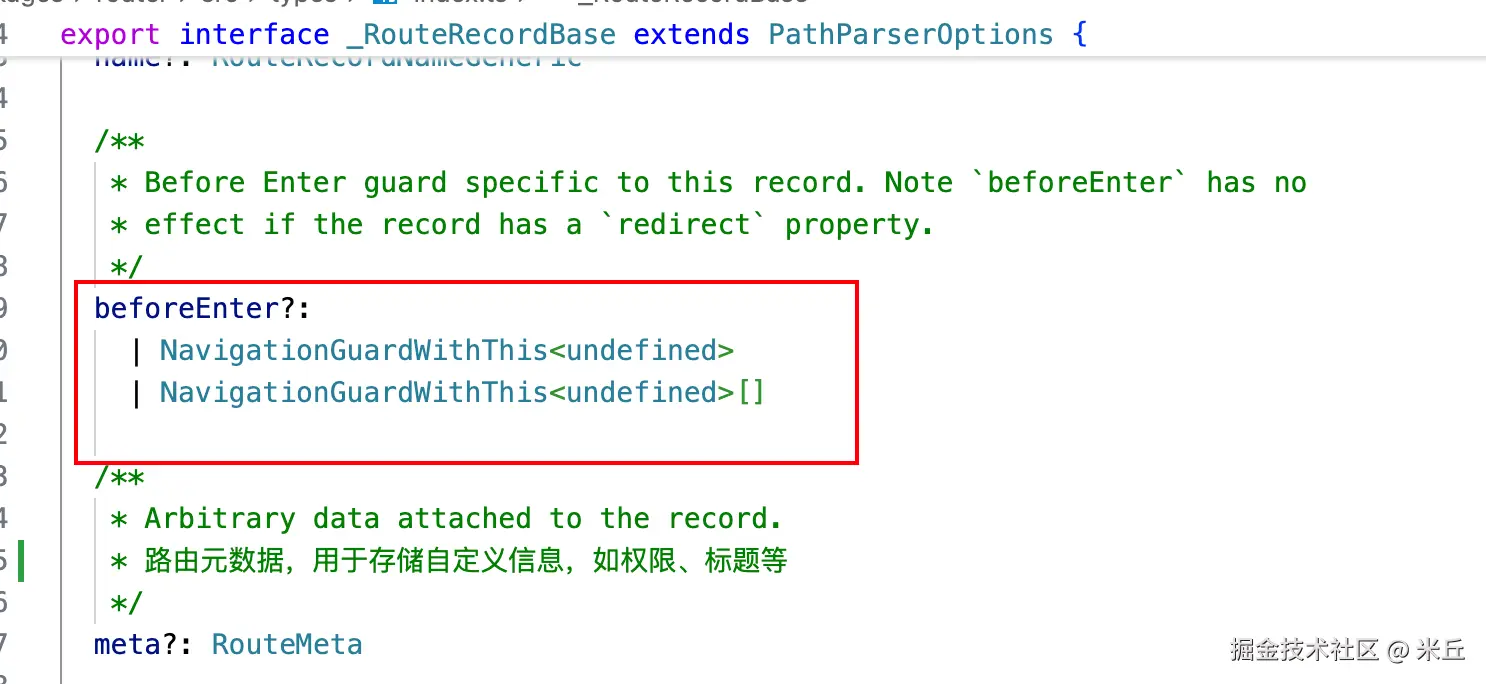
  beforeEnter?:
    | NavigationGuardWithThis<undefined>
    | NavigationGuardWithThis<undefined>[]

  /**
   * Arbitrary data attached to the record.
   * 路由元数据,用于存储自定义信息,如权限、标题等
   */
  meta?: RouteMeta

  /**
   * Array of nested routes.
   * 子路由数组,用于定义嵌套路由结构
   */
  children?: RouteRecordRaw[]

  /**
   * Allow passing down params as props to the component rendered by `router-view`.
   */
  props?: _RouteRecordProps | Record<string, _RouteRecordProps>
}
2、RouteRecordSingleViewWithChildren
单视图嵌套子路由。禁止配置components。
js
/**
 * Route Record defining one single component with a nested view. Differently
 * from {@link RouteRecordSingleView}, this record has children and allows a
 * `redirect` option.
 */
export interface RouteRecordSingleViewWithChildren extends _RouteRecordBase {
  /**
   * Component to display when the URL matches this route.
   * 指定父路由匹配时渲染的布局组件(需包含 <RouterView> 用于渲染子路由)
   */
  component?: RawRouteComponent | null | undefined
  // 与 RouteRecordSingleView 一致,禁止使用 components(多视图字段),保证父路由为「单视图布局」
  components?: never

  // 定义父路由下的嵌套子路由,是该接口的核心标识(区别于 RouteRecordSingleView)
  children: RouteRecordRaw[]

  /**
   * Allow passing down params as props to the component rendered by `router-view`.
   * 控制是否将父路由的参数传递给父布局组件(而非子路由组件)
   */
  props?: _RouteRecordProps
}
3、RouteRecordMultipleViews
多视图。禁止配置component、children、redirect。
js
/**
 * Route Record defining multiple named components with the `components` option.
 */
export interface RouteRecordMultipleViews extends _RouteRecordBase {
  /**
   * Components to display when the URL matches this route. Allow using named views.
   * 指定路由匹配时要渲染的多个命名组件,键为「视图名称」,值为「组件」,是多视图路由的核心标识
   * 示例  components: {
            default: () => import('./DashboardMain.vue'), // 对应 <RouterView>(默认视图)
            header: () => import('./DashboardHeader.vue'), // 对应 <RouterView name="header">
            sidebar: () => import('./DashboardSidebar.vue'), // 对应 <RouterView name="sidebar">
          },
   */
  components: Record<string, RawRouteComponent>
  component?: never // 明确禁止使用 component 字段(单视图路由的核心字段)
  // 禁止使用 children 字段,多视图 + 嵌套子路由需使用 RouteRecordMultipleViewsWithChildren 类型
  children?: never
  // 禁止使用 redirect 字段,重定向路由需使用 RouteRecordRedirect 类型
  redirect?: never

  /**
   * Allow passing down params as props to the component rendered by
   * `router-view`. Should be an object with the same keys as `components` or a
   * boolean to be applied to every component.
   * 控制是否将路由参数传递给每个命名视图组件,是单视图 props 字段的多视图扩展
   */
  props?: Record<string, _RouteRecordProps> | boolean
}
4、RouteRecordMultipleViewsWithChildren
多视图嵌套子路由。禁止配置component。
js
/**
 * Route Record defining multiple named components with the `components` option and children.
 */
export interface RouteRecordMultipleViewsWithChildren extends _RouteRecordBase {
  /**
   * Components to display when the URL matches this route. Allow using named views.
   * 指定父路由匹配时渲染的多命名视图布局组件(需包含多个 <RouterView name="xxx"> 用于渲染子路由);
   * 1、有布局组件:父路由渲染多视图布局(如 header + sidebar + main),子路由可覆盖 / 扩展父视图;
   * 2、无布局组件:父路由仅用于路径分组(如 /admin/* 下的多视图子路由,无可视化布局);
   */
  components?: Record<string, RawRouteComponent> | null | undefined
  // 与 RouteRecordMultipleViews 一致,禁止使用 component 字段(单视图路由的核心字段)
  component?: never

  // 定义父多视图路由下的嵌套子路由,是该接口的核心标识(区别于 RouteRecordMultipleViews)
  children: RouteRecordRaw[]

  /**
   * Allow passing down params as props to the component rendered by
   * `router-view`. Should be an object with the same keys as `components` or a
   * boolean to be applied to every component.
   * 控制是否将父路由的参数传递给父多视图组件(而非子路由组件)
   */
  props?: Record<string, _RouteRecordProps> | boolean
}
路由独享守卫 beforeEnter
beforeEnter 守卫 只在进入路由时触发 ,不会在 params、query 或 hash 改变时触发。
js
{
  path: '/dashboard',
  name: 'dashboard',
  component: () => import('@/views/dashboard/DashBoard.vue'),
  meta: {
    title: '看板',
    icon: 'dashboard',
    roles: ['admin', 'user']
  },
  // beforeEnter: (to, from) => {
  //   console.log('beforeEnter-to', to)
  //   console.log('beforeEnter-from', from)
  //   return true
  // },
  beforeEnter: [(to, from) => {
    console.log('beforeEnter-111to', to)
    console.log('beforeEnter-f111rom', from)
    return true
  }, (to, from) => {
    console.log('beforeEnter-222to', to)
    console.log('beforeEnter-222from', from)
    return true
  }]

},
Router 实例有哪些属性?
js
/**
 * Router instance.
 * 路由实例
 */
export interface Router extends EXPERIMENTAL_Router_Base<RouteRecordNormalized> {
  /**
   * Original options object passed to create the Router
   * 存储创建路由实例时传入的原始配置项
   */
  readonly options: RouterOptions

  /**
   * Add a new {@link RouteRecordRaw | route record} as the child of an existing route.
   * 动态路由方法
   * 重载 1:添加嵌套路由
   * 返回值:一个「移除该动态路由的函数」,调用后可删除本次添加的路由
   * @param parentName - Parent Route Record where `route` should be appended at
   * @param route - Route Record to add
   */
  addRoute(
    // NOTE: it could be `keyof RouteMap` but the point of dynamic routes is not knowing the routes at build
    parentName: NonNullable<RouteRecordNameGeneric>,
    route: RouteRecordRaw
  ): () => void
  /**
   * Add a new {@link RouteRecordRaw | route record} to the router.
   *
   * @param route - Route Record to add
   * 重载 2:添加顶级路由
   * 返回值:一个「移除该动态路由的函数」,调用后可删除本次添加的路由
   */
  addRoute(route: RouteRecordRaw): () => void

  /**
   * Remove an existing route by its name.
   *
   * @param name - Name of the route to remove 路由名称(非空),注意只能通过名称删除,不能通过路径
   * 根据路由名称删除已存在的路由(包括静态路由和动态添加的路由)
   *
   */
  removeRoute(name: NonNullable<RouteRecordNameGeneric>): void

  /**
   * Delete all routes from the router.
   * 清空路由表中所有路由(包括静态路由和动态添加的路由)
   * 注意:清空后路由表为空,需重新调用 addRoute 添加路由,否则导航会失效
   */
  clearRoutes(): void
}
js
/**
 * Router base instance.
 *
 * @experimental This version is not stable, it's meant to replace {@link Router} in the future.
 */
export interface EXPERIMENTAL_Router_Base<TRecord> {
  // NOTE: for dynamic routing we need this
  // <TRouteRecordRaw, TRouteRecord>
  /**
   * Current {@link RouteLocationNormalized}
   * 存储当前激活的标准化路由信息(响应式)
   */
  readonly currentRoute: ShallowRef<RouteLocationNormalizedLoaded>

  /**
   * Allows turning off the listening of history events. This is a low level api for micro-frontend.
   * 控制是否监听浏览器历史事件,专为「微前端」场景设计
   */
  listening: boolean

  // TODO: deprecate in favor of getRoute(name) and add it
  /**
   * Checks if a route with a given name exists
   * 根据路由名称判断路由是否存在(静态 / 动态添加的路由均可检测)
   * @param name - Name of the route to check
   */
  hasRoute(name: NonNullable<RouteRecordNameGeneric>): boolean

  /**
   * Get a full list of all the {@link RouteRecord | route records}.
   * 返回路由表中所有标准化路由记录
   */
  getRoutes(): TRecord[]

  /**
   * Returns the {@link RouteLocation | normalized version} of a
   * {@link RouteLocationRaw | route location}. Also includes an `href` property
   * that includes any existing `base`. By default, the `currentLocation` used is
   * `router.currentRoute` and should only be overridden in advanced use cases.
   * 将原始路由地址(如字符串、对象)解析为标准化的路由对象(包含 href、fullPath 等)
   * @param to - Raw route location to resolve
   * @param currentLocation - Optional current location to resolve against
   */
  resolve<Name extends keyof RouteMap = keyof RouteMap>(
    to: RouteLocationAsRelativeTyped<RouteMap, Name>,
    // NOTE: This version doesn't work probably because it infers the type too early
    // | RouteLocationAsRelative<Name>
    currentLocation?: RouteLocationNormalizedLoaded
  ): RouteLocationResolved<Name>
  resolve(
    // not having the overload produces errors in RouterLink calls to router.resolve()
    to: RouteLocationAsString | RouteLocationAsRelative | RouteLocationAsPath,
    currentLocation?: RouteLocationNormalizedLoaded
  ): RouteLocationResolved

  /**
   * Programmatically navigate to a new URL by pushing an entry in the history
   * stack.
   * 通过「新增历史记录」实现无刷新导
   *
   * @param to - Route location to navigate to
   */
  push(to: RouteLocationRaw): Promise<NavigationFailure | void | undefined>

  /**
   * Programmatically navigate to a new URL by replacing the current entry in
   * the history stack.
   * 通过「替换当前历史记录」实现导航(对应 history.replaceState),无历史记录回溯
   *
   * @param to - Route location to navigate to
   */
  replace(to: RouteLocationRaw): Promise<NavigationFailure | void | undefined>

  /**
   * Go back in history if possible by calling `history.back()`. Equivalent to
   * `router.go(-1)`.
   * 历史记录回溯
   */
  back(): void

  /**
   * Go forward in history if possible by calling `history.forward()`.
   * Equivalent to `router.go(1)`.
   * 历史记录回溯
   */
  forward(): void

  /**
   * Allows you to move forward or backward through the history. Calls
   * `history.go()`.
   *
   * @param delta - The position in the history to which you want to move,
   * relative to the current page
   * 历史记录回溯
   */
  go(delta: number): void

  /**
   * Add a navigation guard that executes before any navigation. Returns a
   * function that removes the registered guard.
   *
   * 注册全局前置守卫,导航触发时最先执行(可拦截、重定向导航)
   * @param guard - navigation guard to add
   */
  beforeEach(guard: NavigationGuardWithThis<undefined>): () => void

  /**
   * Add a navigation guard that executes before navigation is about to be
   * resolved. At this state all component have been fetched and other
   * navigation guards have been successful. Returns a function that removes the
   * registered guard.
   *
   * @param guard - navigation guard to add
   * @returns a function that removes the registered guard
   * 在所有组件内守卫、异步路由组件解析完成后,导航确认前执行
   * @example
   * ```js
   * router.beforeResolve(to => {
   *   if (to.meta.requiresAuth && !isAuthenticated) return false
   * })
   * ```
   *
   */
  beforeResolve(guard: _NavigationGuardResolved): () => void

  /**
   * Add a navigation hook that is executed after every navigation. Returns a
   * function that removes the registered hook.
   *
   * 导航完成后(成功 / 失败均执行),无法拦截导航
   *
   * @param guard - navigation hook to add
   * @returns a function that removes the registered hook
   *
   * @example
   * ```js
   * router.afterEach((to, from, failure) => {
   *   if (isNavigationFailure(failure)) {
   *     console.log('failed navigation', failure)
   *   }
   * })
   * ```
   */
  afterEach(guard: NavigationHookAfter): () => void

  /**
   * Adds an error handler that is called every time a non caught error happens
   * during navigation. This includes errors thrown synchronously and
   * asynchronously, errors returned or passed to `next` in any navigation
   * guard, and errors occurred when trying to resolve an async component that
   * is required to render a route.
   * 注册导航错误监听器,捕获导航过程中的所有未处理错误
   *
   * @param handler - error handler to register
   */
  onError(handler: _ErrorListener): () => void

  /**
   * Returns a Promise that resolves when the router has completed the initial
   * navigation, which means it has resolved all async enter hooks and async
   * components that are associated with the initial route. If the initial
   * navigation already happened, the promise resolves immediately.
   *
   * This is useful in server-side rendering to ensure consistent output on both
   * the server and the client. Note that on server side, you need to manually
   * push the initial location while on client side, the router automatically
   * picks it up from the URL.
   */
  isReady(): Promise<void> // 等待初始导航完成

  /**
   * Called automatically by `app.use(router)`. Should not be called manually by
   * the user. This will trigger the initial navigation when on client side.
   * 安装路由到 Vue 应用
   * 由 app.use(router) 自动调用,完成路由的初始化(注册全局组件、注入路由实例、触发初始导航)
   * @internal
   * @param app - Application that uses the router
   */
  install(app: App): void
}
实例方法 router.replace
js
  function replace(to: RouteLocationRaw) {
    return push(assign(locationAsObject(to), { replace: true }))
  }
实例方法 router.push
js
  function push(to: RouteLocationRaw) {
    return pushWithRedirect(to)
  }
pushWithRedirect
js
  /**
   * 负责处理「路由跳转 + 重定向 + 守卫执行 + 历史记录更新 + 错误处理」的全流程
   * @param to 目标路由位置(可以是字符串路径、命名路由对象或路径对象)
   * @param redirectedFrom 重定向来源路由位置(可选)
   * @returns 导航失败原因、成功时无返回值或 undefined
   */
  function pushWithRedirect(
    to: RouteLocationRaw | RouteLocation,
    redirectedFrom?: RouteLocation
  ): Promise<NavigationFailure | void | undefined> {

    // 解析目标路由为标准化 RouteLocation 对象
    const targetLocation: RouteLocation = (pendingLocation = resolve(to))
    const from = currentRoute.value // 获取当前路由(响应式的 currentRoute)

    // 获取历史记录状态(state)
    const data: HistoryState | undefined = (to as RouteLocationOptions).state
    // 获取强制跳转标志(force)
    const force: boolean | undefined = (to as RouteLocationOptions).force
    // to could be a string where `replace` is a function
    // 获取替换标志(replace)
    const replace = (to as RouteLocationOptions).replace === true

    // 检查目标路由是否配置了 redirect,返回重定向后的路由
    const shouldRedirect = handleRedirectRecord(targetLocation, from)

    // 若存在重定向,递归调用 pushWithRedirect 处理重定向后的路由
    if (shouldRedirect)
      return pushWithRedirect(
        // 合并重定向路由与原配置
        assign(locationAsObject(shouldRedirect), {
          state:
            typeof shouldRedirect === 'object'
              ? assign({}, data, shouldRedirect.state)
              : data,
          force,
          replace,
        }),
        // keep original redirectedFrom if it exists
        redirectedFrom || targetLocation
      )

    // if it was a redirect we already called `pushWithRedirect` above
    const toLocation = targetLocation as RouteLocationNormalized // 标准化目标路由

    toLocation.redirectedFrom = redirectedFrom // 标记重定向来源

    let failure: NavigationFailure | void | undefined // 声明导航失败变量

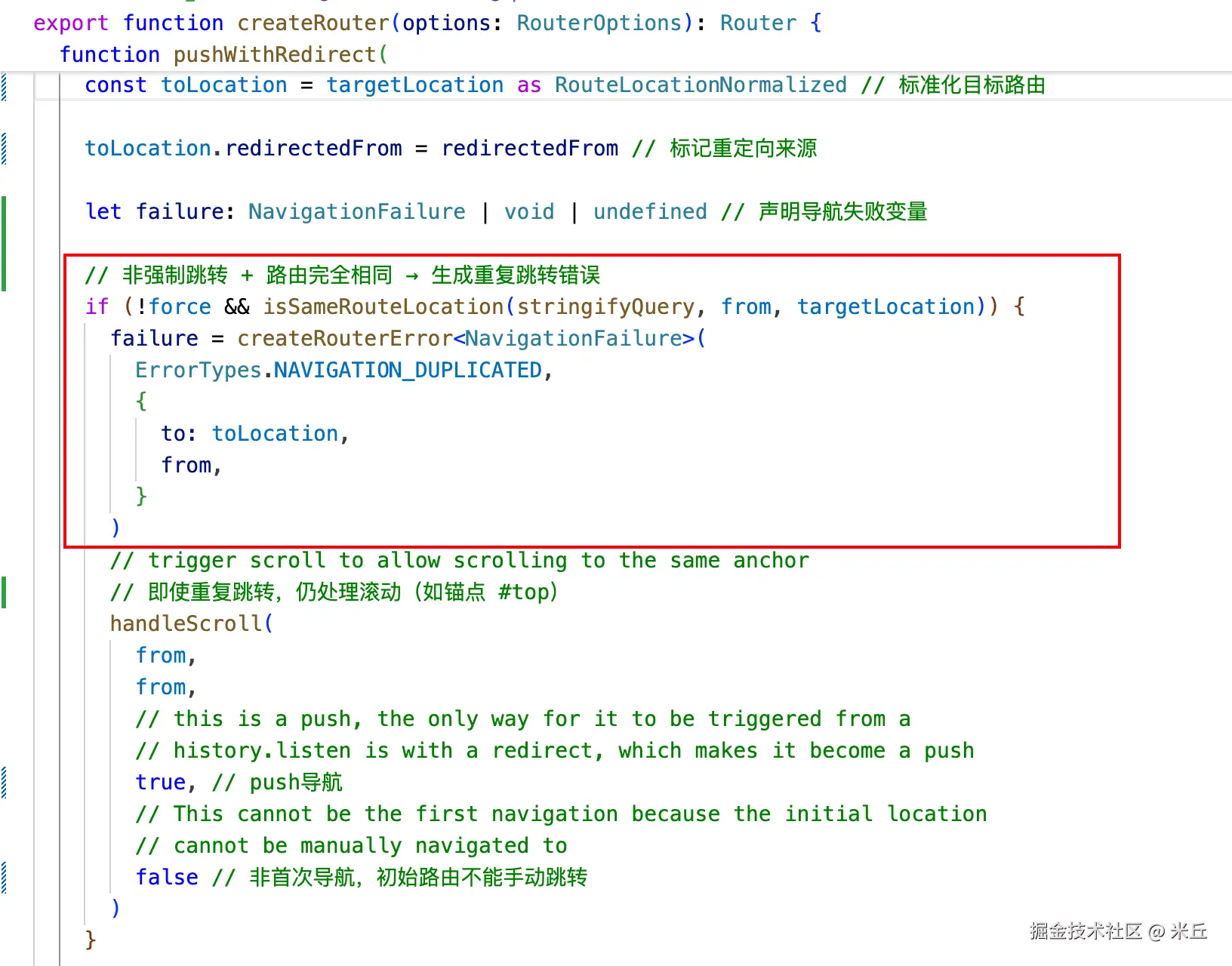
    // 非强制跳转 + 路由完全相同 → 生成重复跳转错误
    if (!force && isSameRouteLocation(stringifyQuery, from, targetLocation)) {
      failure = createRouterError<NavigationFailure>(
        ErrorTypes.NAVIGATION_DUPLICATED,
        {
          to: toLocation,
          from,
        }
      )
      // trigger scroll to allow scrolling to the same anchor
      // 即使重复跳转,仍处理滚动(如锚点 #top)
      handleScroll(
        from,
        from,
        // this is a push, the only way for it to be triggered from a
        // history.listen is with a redirect, which makes it become a push
        true, // push导航
        // This cannot be the first navigation because the initial location
        // cannot be manually navigated to
        false // 非首次导航,初始路由不能手动跳转
      )
    }

    // 有失败则返回 resolved 的 failure,否则调用 navigate 执行真正的导航
    return (failure ? Promise.resolve(failure) : navigate(toLocation, from))
      .catch((error: NavigationFailure | NavigationRedirectError) =>
        isNavigationFailure(error)
          ? // navigation redirects still mark the router as ready
          // 导航守卫重定向 → 仅返回错误,不标记 ready
            isNavigationFailure(error, ErrorTypes.NAVIGATION_GUARD_REDIRECT)
            ? error
            // 其他导航失败 → 标记 router 为 ready 并返回错误
            : markAsReady(error) // also returns the error
          : // reject any unknown error
          // 未知错误 → 触发全局错误并抛出
            triggerError(error, toLocation, from)
      )
      .then((failure: NavigationFailure | NavigationRedirectError | void) => {
        if (failure) {
          if (
            isNavigationFailure(failure, ErrorTypes.NAVIGATION_GUARD_REDIRECT)
          ) {
            if (
              __DEV__ &&
              // we are redirecting to the same location we were already at
              // 开发环境:检测无限重定向(超过30次)并报警
              isSameRouteLocation(
                stringifyQuery,
                resolve(failure.to),
                toLocation
              ) &&
              // and we have done it a couple of times
              redirectedFrom &&
              // @ts-expect-error: added only in dev
              (redirectedFrom._count = redirectedFrom._count
                ? // @ts-expect-error
                  redirectedFrom._count + 1
                : 1) > 30
            ) {
              warn(
                `Detected a possibly infinite redirection in a navigation guard when going from "${from.fullPath}" to "${toLocation.fullPath}". Aborting to avoid a Stack Overflow.\n Are you always returning a new location within a navigation guard? That would lead to this error. Only return when redirecting or aborting, that should fix this. This might break in production if not fixed.`
              )
              return Promise.reject(
                new Error('Infinite redirect in navigation guard')
              )
            }

            return pushWithRedirect(
              // keep options
              assign(
                {
                  // preserve an existing replacement but allow the redirect to override it
                  replace,
                },
                locationAsObject(failure.to),
                {
                  state:
                    typeof failure.to === 'object'
                      ? assign({}, data, failure.to.state)
                      : data,
                  force,
                }
              ),
              // preserve the original redirectedFrom if any
              redirectedFrom || toLocation
            )
          }
        } else {
          // if we fail we don't finalize the navigation
          // 导航成功 → 最终化导航(更新历史记录/滚动/路由状态)
          failure = finalizeNavigation(
            toLocation as RouteLocationNormalizedLoaded,
            from,
            true,
            replace,
            data
          )
        }
        // 触发 afterEach 后置钩子
        triggerAfterEach(
          toLocation as RouteLocationNormalizedLoaded,
          from,
          failure
        )
        return failure
      })
  }
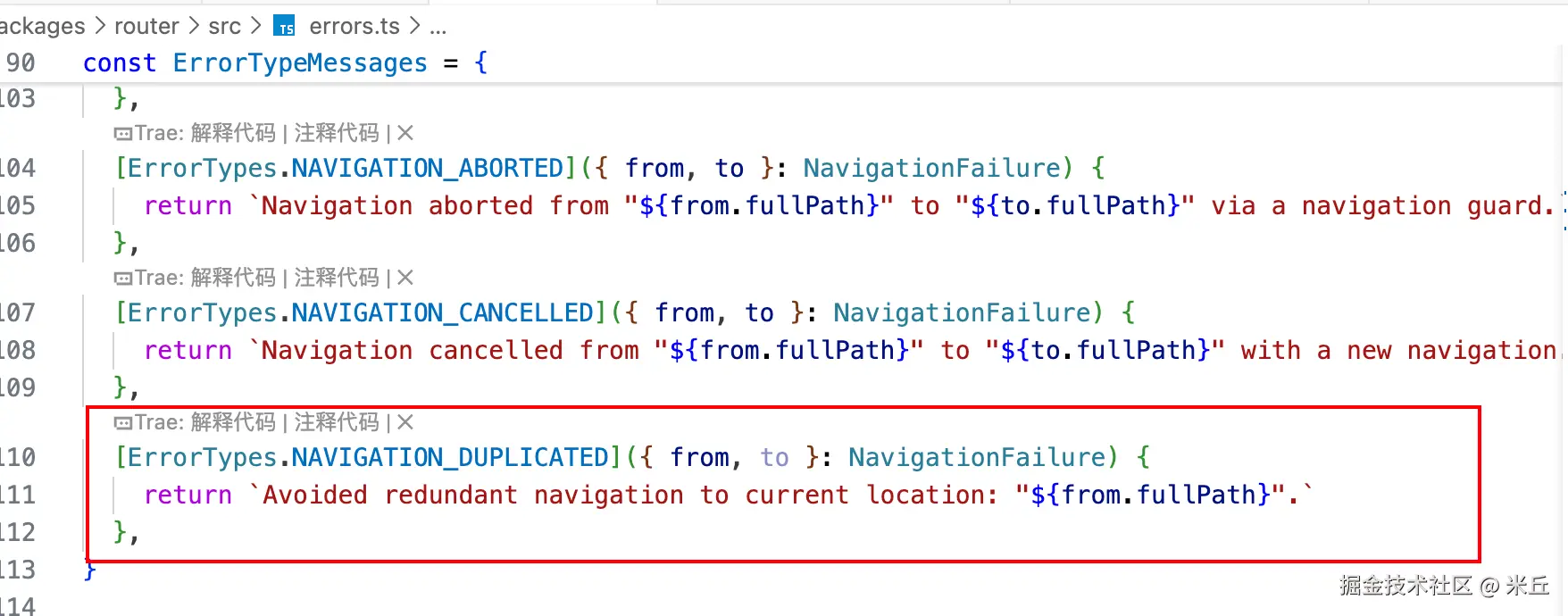
当待处理路由 与 当前路由完全一致,会出现以下问题

handleRedirectRecord
js
  /**
   * 「解析目标路由匹配记录中最后一条的 redirect 配置
   *  →标准化重定向目标格式→校验重定向合法性→合并原路由的 query/hash 等参数→返回最终的重定向目标」
   * @param to 目标路由对象
   * @param from 来源路由对象
   * @returns
   */
  function handleRedirectRecord(
    to: RouteLocation,
    from: RouteLocationNormalizedLoaded
  ): RouteLocationRaw | void {

    const lastMatched = to.matched[to.matched.length - 1] // 获取最后一条匹配记录

    if (lastMatched && lastMatched.redirect) {
      const { redirect } = lastMatched // 获取 redirect 配置

      // 解析 redirect,目标重定向位置
      let newTargetLocation =
        typeof redirect === 'function' ? redirect(to, from) : redirect

      // 标准化字符串格式的 redirect → 对象格式
      if (typeof newTargetLocation === 'string') {
        newTargetLocation =
          // 字符串含 ?/# → 解析为完整对象(包含 query/hash)
          newTargetLocation.includes('?') || newTargetLocation.includes('#')
            ? (newTargetLocation = locationAsObject(newTargetLocation))
            : // force empty params
              { path: newTargetLocation }

        // @ts-expect-error: force empty params when a string is passed to let
        // the router parse them again
        // 强制清空 params,避免原路由 params 污染重定向目标
        newTargetLocation.params = {}
      }

      if (
        __DEV__ &&
        newTargetLocation.path == null &&
        !('name' in newTargetLocation)
      ) {
        warn(
          `Invalid redirect found:\n${JSON.stringify(
            newTargetLocation,
            null,
            2
          )}\n when navigating to "${
            to.fullPath
          }". A redirect must contain a name or path. This will break in production.`
        )
        throw new Error('Invalid redirect')
      }

      return assign(
        {
          query: to.query, // 继承原路由的 query 参数
          hash: to.hash, // 继承原路由的 hash 锚点
          // avoid transferring params if the redirect has a path
          // 重定向目标有 path → 清空 params;无 path(用 name 跳转)→ 继承原 params
          params: newTargetLocation.path != null ? {} : to.params,
        },
        newTargetLocation
      )
    }
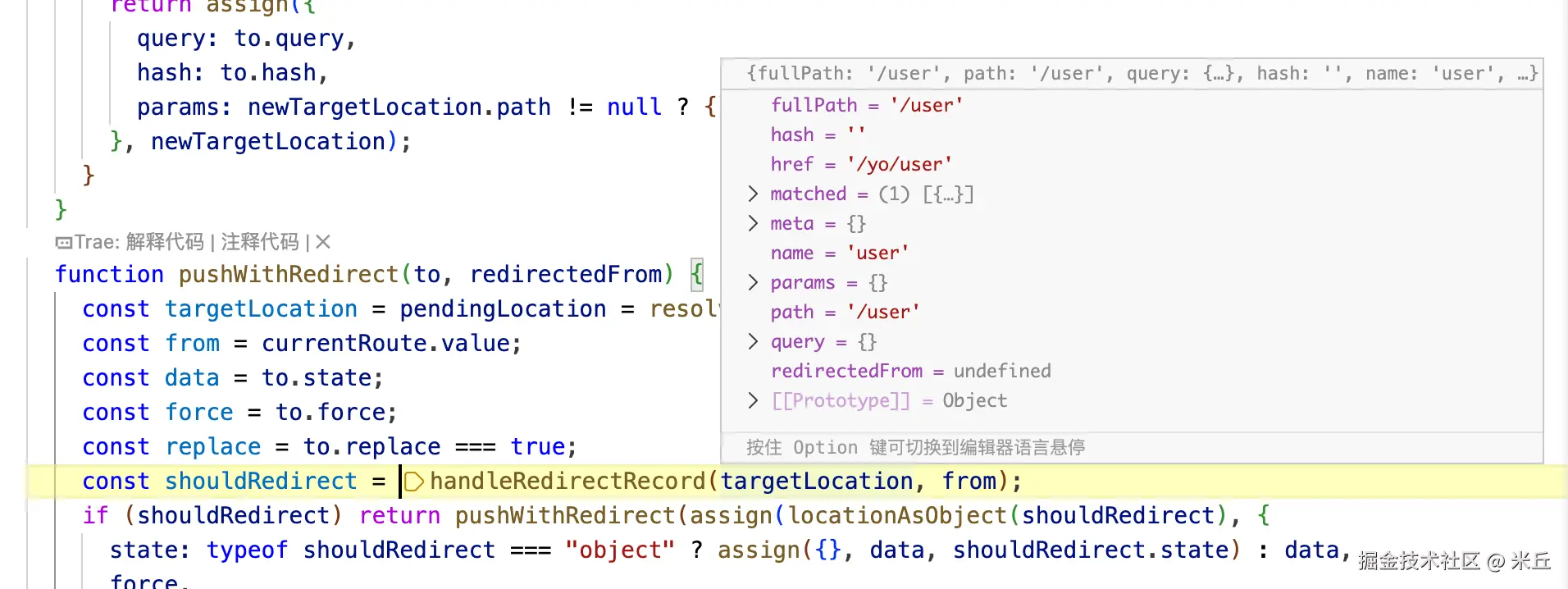
  }
handleScroll
js
  // Scroll behavior
  function handleScroll(
    to: RouteLocationNormalizedLoaded, // 目标路由
    from: RouteLocationNormalizedLoaded, // 来源路由
    isPush: boolean, // 是否为 push 导航
    isFirstNavigation: boolean // 是否是应用首次导航(如页面初始化时的路由)
  ): // the return is not meant to be used
  Promise<unknown> {

    const { scrollBehavior } = options
    // 非浏览器环境(如SSR) 或 未配置 scrollBehavior → 直接返回成功 Promise
    if (!isBrowser || !scrollBehavior) return Promise.resolve()

    // 计算初始滚动位置(scrollPosition)
    const scrollPosition: _ScrollPositionNormalized | null =
      // 非 push 跳转(replace/后退)→ 读取保存的滚动位置
      (!isPush && getSavedScrollPosition(getScrollKey(to.fullPath, 0))) ||
      // 首次导航 或 非 push 跳转 → 读取 history.state 中的滚动位置
      ((isFirstNavigation || !isPush) &&
        (history.state as HistoryState) &&
        history.state.scroll) ||
      null // 其他情况 → 无滚动位置

    // 等待 DOM 更新完成后再执行滚动(路由跳转后组件渲染需要时间,避免滚动到未渲染的元素)
    return nextTick()
      // 调用用户配置的 scrollBehavior,获取目标滚动位置
      .then(() => scrollBehavior(to, from, scrollPosition))
      // 若返回了滚动位置,执行实际的滚动操作
      .then(position => position && scrollToPosition(position))
      // 捕获滚动过程中的错误,触发全局错误处理
      .catch(err => triggerError(err, to, from))
  }
scrollToPosition
最终调用原生 API window.scrollTo 实现。
js
export function scrollToPosition(position: ScrollPosition): void {
  let scrollToOptions: ScrollPositionCoordinates

  // 元素锚点型(包含 el 字段)
  if ('el' in position) {
    const positionEl = position.el
    const isIdSelector =
      typeof positionEl === 'string' && positionEl.startsWith('#')
    /**
     * `id`s can accept pretty much any characters, including CSS combinators
     * like `>` or `~`. It's still possible to retrieve elements using
     * `document.getElementById('~')` but it needs to be escaped when using
     * `document.querySelector('#\\~')` for it to be valid. The only
     * requirements for `id`s are them to be unique on the page and to not be
     * empty (`id=""`). Because of that, when passing an id selector, it should
     * be properly escaped for it to work with `querySelector`. We could check
     * for the id selector to be simple (no CSS combinators `+ >~`) but that
     * would make things inconsistent since they are valid characters for an
     * `id` but would need to be escaped when using `querySelector`, breaking
     * their usage and ending up in no selector returned. Selectors need to be
     * escaped:
     *
     * - `#1-thing` becomes `#\31 -thing`
     * - `#with~symbols` becomes `#with\\~symbols`
     *
     * - More information about  the topic can be found at
     *   https://mathiasbynens.be/notes/html5-id-class.
     * - Practical example: https://mathiasbynens.be/demo/html5-id
     */
    if (__DEV__ && typeof position.el === 'string') {
      // 场景1:是 ID 选择器但对应元素不存在,或不是 ID 选择器
      if (!isIdSelector || !document.getElementById(position.el.slice(1))) {
        try {
          const foundEl = document.querySelector(position.el)
          // 场景1.1:是 ID 选择器但通过 querySelector 找到了元素 → 警告(建议用 getElementById)
          if (isIdSelector && foundEl) {
            warn(
              `The selector "${position.el}" should be passed as "el: document.querySelector('${position.el}')" because it starts with "#".`
            )
            // return to avoid other warnings
            return
          }
        } catch (err) {
           // 场景1.2:选择器语法错误 → 警告(提示转义字符)
          warn(
            `The selector "${position.el}" is invalid. If you are using an id selector, make sure to escape it. You can find more information about escaping characters in selectors at https://mathiasbynens.be/notes/css-escapes or use CSS.escape (https://developer.mozilla.org/en-US/docs/Web/API/CSS/escape).`
          )
          // return to avoid other warnings
          return
        }
      }
    }

    // 查找目标 DOM 元素
    const el =
      typeof positionEl === 'string'
        ? isIdSelector
          ? document.getElementById(positionEl.slice(1)) // ID 选择器:直接用 getElementById
          : document.querySelector(positionEl)  // 其他选择器:用 querySelector
        : positionEl // 非字符串:直接使用传入的 HTMLElement

    // 元素不存在 → 开发环境警告并返回
    if (!el) {
      __DEV__ &&
        warn(
          `Couldn't find element using selector "${position.el}" returned by scrollBehavior.`
        )
      return
    }
    // 计算元素的滚动坐标
    scrollToOptions = getElementPosition(el, position)

    // 坐标型(直接使用)
  } else {
    scrollToOptions = position
  }

  // 浏览器支持平滑滚动(scrollBehavior API)
  // 判断浏览器是否支持 window.scrollTo 的配置项(如 { behavior: 'smooth' })
  if ('scrollBehavior' in document.documentElement.style)
    window.scrollTo(scrollToOptions)

  // 不支持平滑滚动 → 降级使用基础 scrollTo
  else {
    window.scrollTo(
      scrollToOptions.left != null ? scrollToOptions.left : window.scrollX,
      scrollToOptions.top != null ? scrollToOptions.top : window.scrollY
    )
  }
}
finalizeNavigation
js
  /**
   * - Cleans up any navigation guards
   * - Changes the url if necessary
   * - Calls the scrollBehavior
   */
  /**
   * 导航最终化
   * @param toLocation 目标路由
   * @param from 当前路由
   * @param isPush 是否为 push 导航
   * @param replace 是否为 replace 导航
   * @param data 导航状态数据
   * @returns
   */
  function finalizeNavigation(
    toLocation: RouteLocationNormalizedLoaded,
    from: RouteLocationNormalizedLoaded,
    isPush: boolean,
    replace?: boolean,
    data?: HistoryState
  ): NavigationFailure | void {
    // a more recent navigation took place
    // 校验导航是否被取消(并发导航冲突)
    const error = checkCanceledNavigation(toLocation, from)
    if (error) return error

    // only consider as push if it's not the first navigation
    // 判断是否为首次导航
    const isFirstNavigation = from === START_LOCATION_NORMALIZED
    const state: Partial<HistoryState> | null = !isBrowser ? {} : history.state

    // change URL only if the user did a push/replace and if it's not the initial navigation because
    // it's just reflecting the url
    // 仅在「主动 push 跳转」时更新 URL
    if (isPush) {
      // on the initial navigation, we want to reuse the scroll position from
      // history state if it exists
      // replace 模式 或 首次导航 → 使用 replaceState 更新 URL
      if (replace || isFirstNavigation)
        routerHistory.replace(
          toLocation.fullPath,
          assign(
            {
              scroll: isFirstNavigation && state && state.scroll,
            },
            data
          )
        )
        // 普通 push 跳转 → 使用 pushState 新增历史记录
      else routerHistory.push(toLocation.fullPath, data)
    }

    // accept current navigation
    // 更新响应式的当前路由 → 触发组件重新渲染
    currentRoute.value = toLocation
    handleScroll(toLocation, from, isPush, isFirstNavigation) // 触发滚动

    markAsReady() // 标记就绪
  }
实例方法 router.resolve
router.resolve 是 Vue Router 提供的路由地址解析 API ,用于将任意格式的路由地址(字符串 / 对象 / 命名路由)解析为标准化的 RouteLocationResolved 对象。
js
  /**
   * 路由地址解析器
   * @param rawLocation 原始路由地址(字符串或对象)
   * @param currentLocation 当前路由状态(可选)
   * @returns 解析后的路由地址对象
   */
  function resolve(
    rawLocation: RouteLocationRaw,
    currentLocation?: RouteLocationNormalizedLoaded
  ): RouteLocationResolved {
    // const resolve: Router['resolve'] = (rawLocation: RouteLocationRaw, currentLocation) => {
    // const objectLocation = routerLocationAsObject(rawLocation)
    // we create a copy to modify it later
    currentLocation = assign({}, currentLocation || currentRoute.value)

    // 解析字符串路由地址(包含 query/hash)
    if (typeof rawLocation === 'string') {
      const locationNormalized = parseURL(
        parseQuery,
        rawLocation,
        currentLocation.path
      )
      const matchedRoute = matcher.resolve(
        { path: locationNormalized.path },
        currentLocation
      )

      const href = routerHistory.createHref(locationNormalized.fullPath)
      if (__DEV__) {
        if (href.startsWith('//'))
          warn(
            `Location "${rawLocation}" resolved to "${href}". A resolved location cannot start with multiple slashes.`
          )
        else if (!matchedRoute.matched.length) {
          warn(`No match found for location with path "${rawLocation}"`)
        }
      }

      // locationNormalized is always a new object
      return assign(locationNormalized, matchedRoute, {
        params: decodeParams(matchedRoute.params),
        hash: decode(locationNormalized.hash),
        redirectedFrom: undefined,
        href,
      })
    }

    // 校验 rawLocation 是否为合法的路由对象(包含 path/name 至少其一)
    if (__DEV__ && !isRouteLocation(rawLocation)) {
      warn(
        `router.resolve() was passed an invalid location. This will fail in production.\n- Location:`,
        rawLocation
      )
      return resolve({})
    }

    let matcherLocation: MatcherLocationRaw

    // path could be relative in object as well
    // 解析对象路由地址(包含 path/params/query/hash)
    // 含 path 的对象路由
    if (rawLocation.path != null) {
      // 开发环境警告:path 与 params 混用(params 会被忽略)
      // path 与 params 不兼容:通过 path 跳转时,params 会被忽略(因 path 已包含参数,如 /user/1)
      if (
        __DEV__ &&
        'params' in rawLocation &&
        !('name' in rawLocation) &&
        // @ts-expect-error: the type is never
        Object.keys(rawLocation.params).length
      ) {
        warn(
          `Path "${rawLocation.path}" was passed with params but they will be ignored. Use a named route alongside params instead.`
        )
      }
      matcherLocation = assign({}, rawLocation, {
        path: parseURL(parseQuery, rawLocation.path, currentLocation.path).path,
      })

      // 解析命名路由地址(包含 name/params)
    } else {
      // remove any nullish param
      const targetParams = assign({}, rawLocation.params)
      for (const key in targetParams) {
         // 移除 null/undefined 的 params(避免匹配错误)
        if (targetParams[key] == null) {
          delete targetParams[key]
        }
      }
      // pass encoded values to the matcher, so it can produce encoded path and fullPath
      matcherLocation = assign({}, rawLocation, {
        params: encodeParams(targetParams),
      })
      // current location params are decoded, we need to encode them in case the
      // matcher merges the params
      currentLocation.params = encodeParams(currentLocation.params)
    }

    const matchedRoute = matcher.resolve(matcherLocation, currentLocation)
    const hash = rawLocation.hash || ''

    // 开发环境警告:hash 未以 # 开头
    if (__DEV__ && hash && !hash.startsWith('#')) {
      warn(
        `A \`hash\` should always start with the character "#". Replace "${hash}" with "#${hash}".`
      )
    }

    // the matcher might have merged current location params, so
    // we need to run the decoding again
    matchedRoute.params = normalizeParams(decodeParams(matchedRoute.params))

    // 生成 fullPath(合并 path/query/hash)
    const fullPath = stringifyURL(
      stringifyQuery,
      assign({}, rawLocation, {
        hash: encodeHash(hash),
        path: matchedRoute.path,
      })
    )

    const href = routerHistory.createHref(fullPath)
    if (__DEV__) {
      if (href.startsWith('//')) {
        warn(
          `Location "${rawLocation}" resolved to "${href}". A resolved location cannot start with multiple slashes.`
        )
      } else if (!matchedRoute.matched.length) {
        warn(
          `No match found for location with path "${
            rawLocation.path != null ? rawLocation.path : rawLocation
          }"`
        )
      }
    }

    return assign(
      {
        fullPath,
        // keep the hash encoded so fullPath is effectively path + encodedQuery +
        // hash
        hash,
        query:
          // if the user is using a custom query lib like qs, we might have
          // nested objects, so we keep the query as is, meaning it can contain
          // numbers at `$route.query`, but at the point, the user will have to
          // use their own type anyway.
          // https://github.com/vuejs/router/issues/328#issuecomment-649481567
          stringifyQuery === originalStringifyQuery
            ? normalizeQuery(rawLocation.query)
            : ((rawLocation.query || {}) as LocationQuery),
      },
      matchedRoute,
      {
        redirectedFrom: undefined,
        href,
      }
    )
  }
js
{
  path: '/dashboard',
  name: 'dashboard',
  component: () => import('@/views/dashboard/DashBoard.vue'),
  meta: {
    title: '看板',
    icon: 'dashboard',
    roles: ['admin', 'user']
  }
}
router.resolve 支持哪些输入格式?
- 字符串格式(含绝对 / 相对路径、query/hash)。
- 对象格式(path 模式),path 模式下传入
params会被忽略(开发环境会警告)。 - 对象格式(命名路由模式)。
js
// 解析 path 模式
console.log('router.resolve', router.resolve({
  path: '/dashboard'
}))

// 解析命名路由
console.log('router.resolve', router.resolve({
  name: 'dashboard'
}))

// 解析路径
console.log('router.resolve', router.resolve('/dashboard'))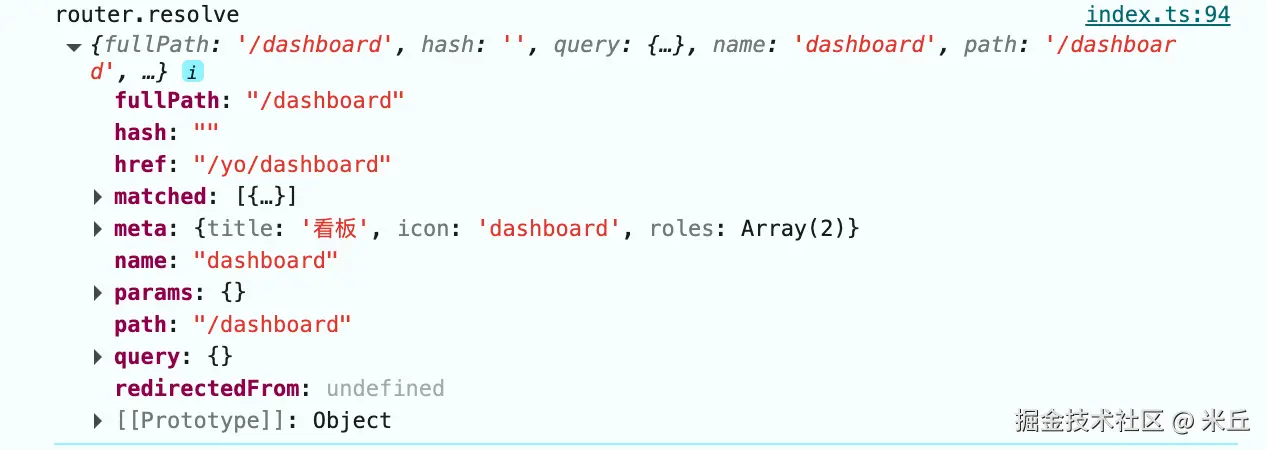
实例方法 addRoute
js
  /**
   * 新增路由(支持嵌套)
   * 格式 1:addRoute(父路由名称, 子路由配置)
   * 格式 2:addRoute(路由配置)
   * @param parentOrRoute 父路由记录名或路由记录对象
   * @param route 子路由记录(可选)
   * @returns 移除路由的函数
   */
  function addRoute(
    parentOrRoute: NonNullable<RouteRecordNameGeneric> | RouteRecordRaw,
    route?: RouteRecordRaw
  ) {
    let parent: Parameters<(typeof matcher)['addRoute']>[1] | undefined
    let record: RouteRecordRaw

    // 判断第一个参数是否为「路由名称」(而非路由配置对象)
    if (isRouteName(parentOrRoute)) {
      // 根据路由名称从底层匹配器中获取对应的「路由记录匹配器」
      parent = matcher.getRecordMatcher(parentOrRoute)
      if (__DEV__ && !parent) {
        warn(
          `Parent route "${String(parentOrRoute)}" not found when adding child route`,
          route
        )
      }
      record = route!
    } else {
      record = parentOrRoute
    }

    return matcher.addRoute(record, parent)
  }
实例方法 removeRoute
js
  /**
   * 删除路由(根据路由记录名)
   * @param name 路由记录名称
   */
  function removeRoute(name: NonNullable<RouteRecordNameGeneric>) {
    const recordMatcher = matcher.getRecordMatcher(name)
    if (recordMatcher) {
      matcher.removeRoute(recordMatcher)
    } else if (__DEV__) {
      warn(`Cannot remove non-existent route "${String(name)}"`)
    }
  }
实例方法 getRoutes
js
  /**
   * 获取所有路由记录
   * @returns
   */
  function getRoutes() {
    return matcher.getRoutes().map(routeMatcher => routeMatcher.record)
  }
实例方法 hasRoute
js
  /**
   * 判断路由是否存在
   * @param name
   * @returns
   */
  function hasRoute(name: NonNullable<RouteRecordNameGeneric>): boolean {
    return !!matcher.getRecordMatcher(name)
  }
vue-router 是如何安装的?
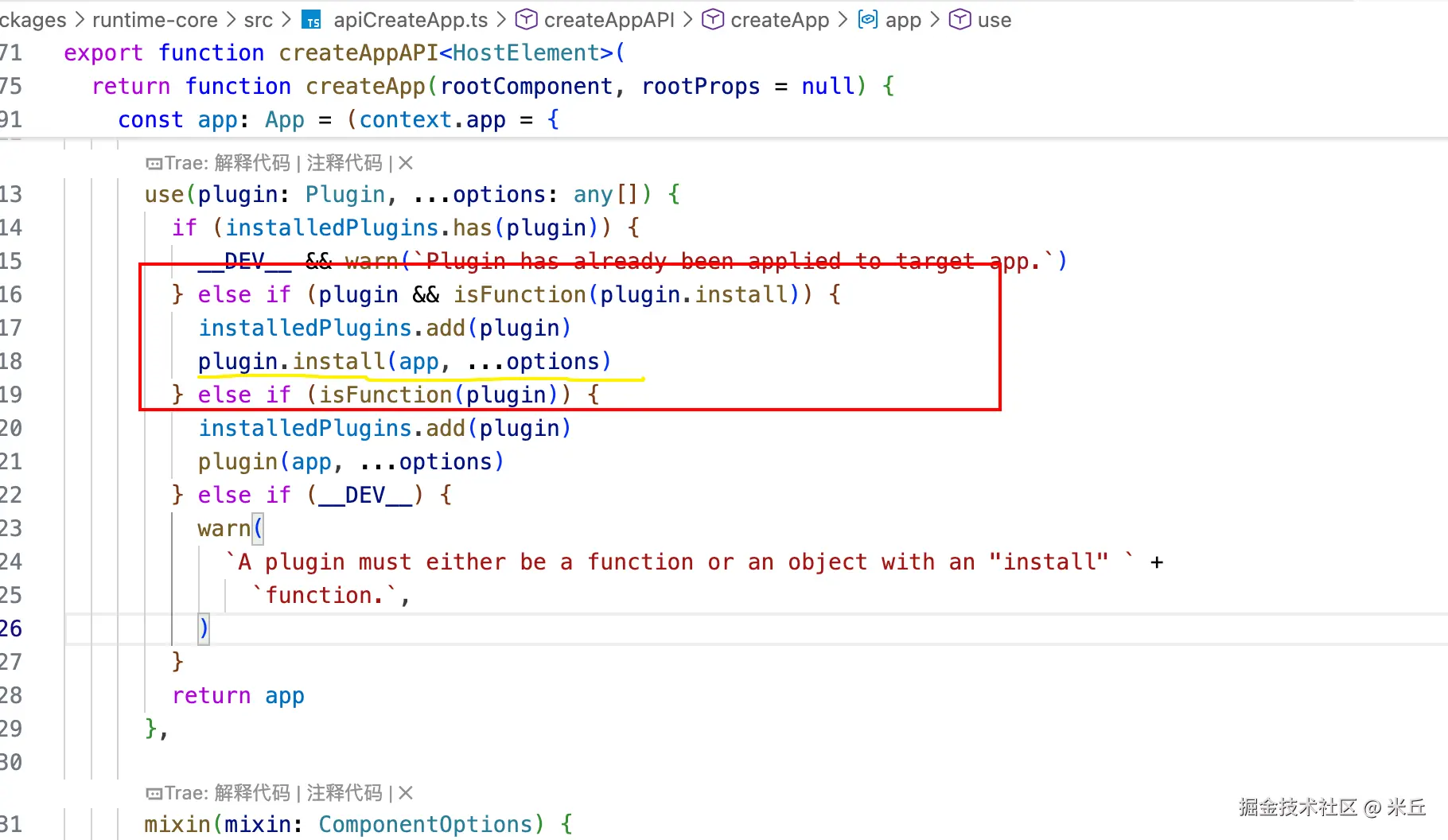
router 实例的 install 是一个函数,vue 利用 vue 实例 app app.use(router) 引入 vue-router 。
vue-router 全局路由守卫有哪些?
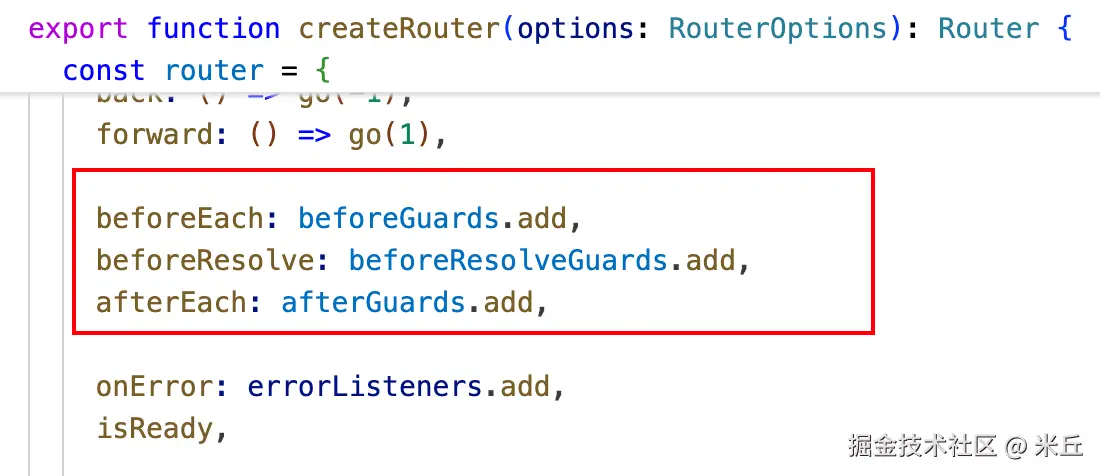
js
beforeEach(guard: NavigationGuardWithThis<undefined>): () => void
beforeResolve(guard: _NavigationGuardResolved): () => void
afterEach(guard: NavigationHookAfter): () => void
v5 版本,已废弃 next() 写法,建议使用 return 返回替代。
js
// 已废弃写法
// 全局前置守卫
router.beforeEach((to, from, next) => {
  console.log('router.beforeEach-to', to)
  console.log('router.beforeEach-from', from)
  next()
})

// 全局解析守卫
router.beforeResolve((to, from, next) => {
  console.log('router.beforeResolve-to', to)
  console.log('router.beforeResolve-from', from)
  next()
})
js
// 建议写法
// 全局前置守卫
router.beforeEach((to, from) => {
  console.log('router.beforeEach-to', to)
  console.log('router.beforeEach-from', from)
  return true
})

// 全局解析守卫
router.beforeResolve((to, from) => {
  console.log('router.beforeResolve-to', to)
  console.log('router.beforeResolve-from', from)
  return true
})
js
export interface NavigationGuardWithThis<T> {
  (
    this: T,
    to: RouteLocationNormalized, // 目标路由对象
    from: RouteLocationNormalizedLoaded, // 来源路由对象
    /**
     * @deprecated Return a value from the guard instead of calling `next(value)`.
     * The callback will be removed in a future version of Vue Router.
     * 未来版本将移除对 `next(value)` 的调用,建议直接返回值。
     */
    next: NavigationGuardNext // 导航守卫回调函数
  ): _Awaitable<NavigationGuardReturn>
}

export interface _NavigationGuardResolved {
  (
    this: undefined,
    to: RouteLocationNormalizedLoaded,
    from: RouteLocationNormalizedLoaded,
    /**
     * @deprecated Return a value from the guard instead of calling `next(value)`.
     * The callback will be removed in a future version of Vue Router.
     */
    next: NavigationGuardNext
  ): _Awaitable<NavigationGuardReturn>
}

export interface NavigationHookAfter {
  (
    to: RouteLocationNormalizedLoaded,
    from: RouteLocationNormalizedLoaded,
    failure?: NavigationFailure | void
  ): unknown
}
router.push 接收参数的 3 种方式
js
/**
 * Route location that can be passed to `router.push()` and other user-facing APIs.
 */
export type RouteLocationRaw<Name extends keyof RouteMap = keyof RouteMap> =
  RouteMapGeneric extends RouteMap
    ?
        | RouteLocationAsString // 字符串路径(如 "/home")
        | RouteLocationAsRelativeGeneric // 命名路由泛型对象(如 { name: 'Home' })
        | RouteLocationAsPathGeneric  // 路径对象泛型(如 { path: '/home' })
    : // 强类型约束(开启 TS 强校验)
        | _LiteralUnion<RouteLocationAsStringTypedList<RouteMap>[Name], string>
        | RouteLocationAsRelativeTypedList<RouteMap>[Name]
        | RouteLocationAsPathTypedList<RouteMap>[Name]
js
const handleClick = () => {
  // 命名路由
  router.push({
    name: "user-list",
  });
};

const handleClick2 = () => {
  // 对象路由(path模式)
  router.push({
    path: "/user/123",
  });
};

const handleClick3 = () => {
  // 字符路由
  router.push("/data-view");
};