iOS26 系统适配-直接隐藏 UIBarButtonItem 的 Liquid glass 效果

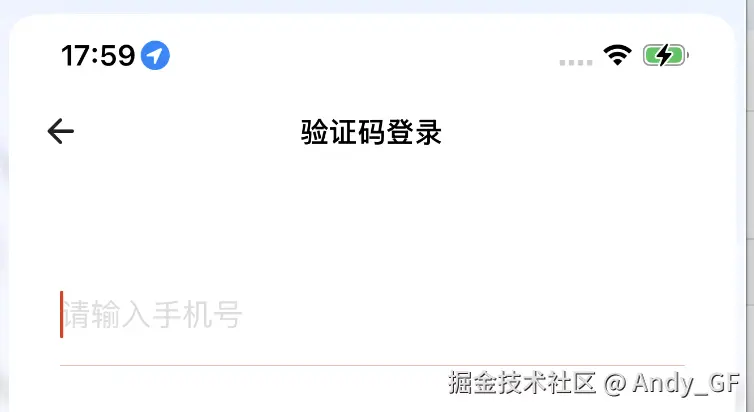
iOS26 UINavigationBar 导航栏返回按钮, 被系统默认加了 Liquid glass 效果, 个人认为这个效果并不好看, 主要是为了保证App整体风格 和 减少工作量,所以需要去掉这个所谓的液态玻璃效果.经过一下午的研究,终于找到一个最简单直接的方法.就是直接将 UIBarButtonItem 的属性 hidesSharedBackground 设置为 YES, 就神奇般的被隐藏了.

液态玻璃效果
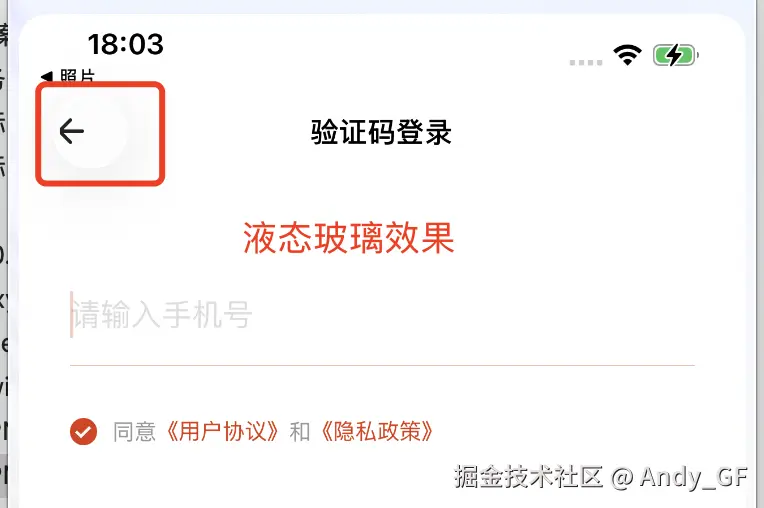
修改属性 hidesSharedBackground

ini 复制代码
UIButton *btn = [[UIButton alloc] init];
UIBarButtonItem *item = [[UIBarButtonItem alloc] initWithCustomView:btn];
item.hidesSharedBackground = YES;

隐藏效果 - 恢复
相关推荐
麦客奥德彪11 小时前
客户端 Trace Benchmark 体系设计
ios·数据分析
Digitally19 小时前
6 种简易方法轻松连接 iPad 与电脑
ios·电脑·ipad
2501_915921431 天前
uni-app一键生成iOS安装包并上传TestFlight全流程
android·ios·小程序·https·uni-app·iphone·webview
sp42a1 天前
如何在 NativeScript 中使用 iOS 的 Metal 着色器
ios·着色器·nativescript
Mr_CrazyPeter2 天前
iONSPlayer 1.1.1版本发布
游戏·ios·模拟器
秋雨梧桐叶落莳2 天前
iOS——UI入门
ui·ios·cocoa
zhensherlock2 天前
Protocol Launcher 系列:Agenda 优雅组织你的想法与日程
javascript·macos·ios·typescript·node.js·mac·ipad
Rhys..2 天前
webdriveragent setup教程
ios
报错小能手2 天前
ios开发方向——swift内存基础
开发语言·ios·swift
SY.ZHOU2 天前
移动端架构体系(二):本地持久化与动态部署
flutter·ios·安卓