index.html
html
<!DOCTYPE html>
<html lang="en">
	<head>
		<title>点云库PCL从入门到精通-PCD浏览器端可视化</title>
		<meta charset="utf-8">
		<meta name="viewport" content="width=device-width, user-scalable=no, minimum-scale=1.0, maximum-scale=1.0">
		<style>
			body {
				margin: 0px;
				overflow: auto;
			}
			.header {
			background-color: #f1f1f1;
			margin: 0px;
			text-align: center;
			}
			#column {
				width: 100%;
				margin:auto;
				background-color:#f1f1f1;
			}
		</style>
	</head>
	<body>
		<div class="header">
		  <h2 style="padding-top:10px;margin-top:0px;">点云库PCL从入门到精通-PCD浏览器端可视化</h2>
		  <a style="margin:100px" href="https://threejs.org/">ThreeJS</a>
		  <a style="margin:100px" href="http://www.pclcn.org/">PCL中国</a>
		  <div style="text-align:left">
		   <p style="padding:10px;margin:0px"><span style="background-color:Orange">鼠标事件:</span>鼠标左键按住进行旋转、鼠标中间键滑动进行缩放、鼠标右键按住进行移动</p>
		  <p style="padding:10px;margin:0px"><span style="background-color:Orange">键盘事件:</span>+或-改变渲染点的大小、c键改变点云渲染颜色</p>
		  </div>

		</div>
		<div id="column">

		</div>

		<script src="js/three.min.js"></script>
		<script src="js/PCDLoader.js"></script>
		<script src="js/TrackballControls.js"></script>

		<script>
		var camera, controls, scene, renderer;
		init();
		animate();
function init() {

scene = new THREE.Scene();
camera = new THREE.PerspectiveCamera( 15, window.innerWidth / window.innerHeight, 0.01, 40 );
camera.position.z = -5;
camera.up.set(0,0,1);

controls = new THREE.TrackballControls( camera );

controls.rotateSpeed = 5.0;
controls.zoomSpeed = 2;
controls.panSpeed = 3;

controls.noZoom = false;
controls.noPan = false;

controls.staticMoving = true;
controls.dynamicDampingFactor = 0.3;

controls.minDistance = 0.3;
controls.maxDistance = 0.3 * 100;

scene.add( camera );
renderer = new THREE.WebGLRenderer( { antialias: true } );
renderer.setClearColor( 0xffffff );
renderer.setPixelRatio( window.devicePixelRatio );


renderer.setSize( window.innerWidth*0.8, window.innerHeight*0.8 );
var loader = new THREE.PCDLoader();
loader.load( './pcd/pig.pcd', function ( mesh ) {

scene.add( mesh );
var center = mesh.geometry.boundingSphere.center;
controls.target.set( center.x, center.y, center.z);
controls.update();

} );

object = new THREE.AxisHelper( 0.5 );
object.position.set( 0, 0, 0 );
scene.add( object );


container = document.getElementById("column");
renderer.domElement.style.display ="block";
renderer.domElement.style.margin ="auto";
container.appendChild(renderer.domElement);
window.addEventListener( 'resize', onWindowResize, false );
window.addEventListener('keydown', keyboard);
}

function onWindowResize() {

camera.aspect = window.innerWidth / window.innerHeight;
camera.updateProjectionMatrix();
renderer.setSize( window.innerWidth*0.8, window.innerHeight*0.8 );
controls.handleResize();

}

			function keyboard ( ev ) {

				var pigmesh = scene.getObjectByName( "pig.pcd" );

				switch ( ev.key ) {

					case '+':
						pigmesh.material.size*=1.2;
						pigmesh.material.needsUpdate = true;
						break;

					case '-':
						pigmesh.material.size/=1.2;
						pigmesh.material.needsUpdate = true;
						break;

					case 'c':
						pigmesh.material.color.setHex(Math.random()*0xffffff);
						pigmesh.material.needsUpdate = true;
						break;

				}

			}

		function animate() {
				requestAnimationFrame( animate );
				controls.update();
				renderer.render( scene, camera );
			}
		</script>
	</body>
</html>
打开命令行运行
bash
python -m http.server 8080若输出
bash
Serving HTTP on :: port 8080 (http://[::]:8080/) ...说明本地http服务器正常启动。
此时在浏览器中输入http://127.0.0.1:8080/,若命令行打印
bash
::ffff:127.0.0.1 - - [17/Mar/2026 18:53:38] "GET / HTTP/1.1" 304 -则一般可以正常显示如下画面:
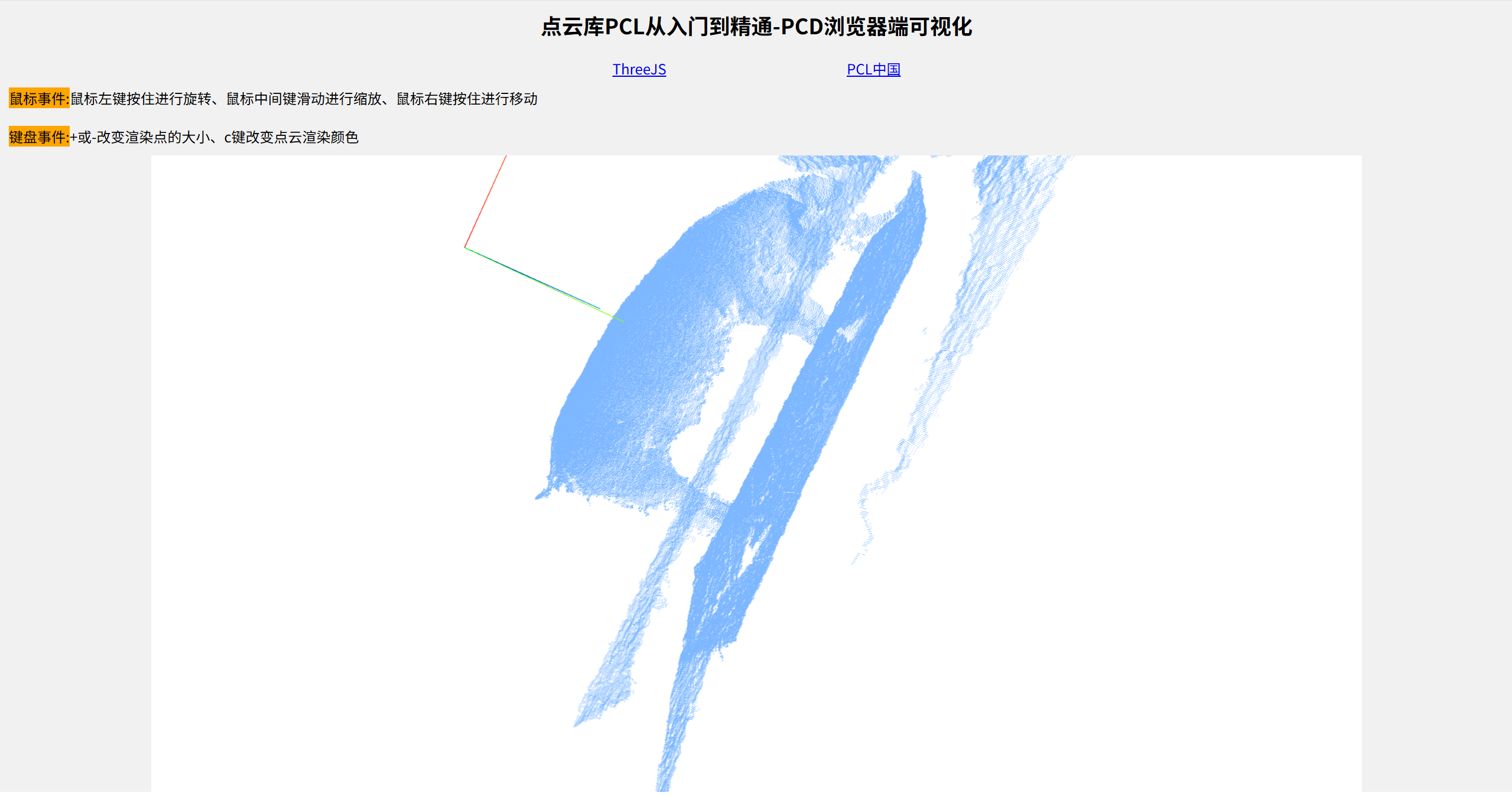
完整代码后续会贴出。