文章目录
1.Debug位置
s02_tool_use.py#120 #132
python
def agent_loop(messages: list):
    while True:
        response = client.messages.create(
            model=MODEL, system=SYSTEM, messages=messages,
            tools=TOOLS, max_tokens=8000,
        )
        print("assistant response:", response.to_json())
        messages.append({"role": "assistant", "content": [b.to_dict() for b in response.content]})
        if response.stop_reason != "tool_use":
            return
        results = []
        for block in response.content:
            if block.type == "tool_use":
                handler = TOOL_HANDLERS.get(block.name)
                output = handler(**block.input) if handler else f"Unknown tool: {block.name}"
                print(f"> {block.name}: {output[:200]}")
                results.append({"type": "tool_result", "tool_use_id": block.id, "content": output})
        messages.append({"role": "user", "content": results})
        print("messages:", json.dumps(messages, indent=2, ensure_ascii=False))
2.工具
One Handler Per Tool 每个工具一个处理器
The loop stays the same; new tools register into the dispatch map
循环保持不变;新工具注册到调度映射
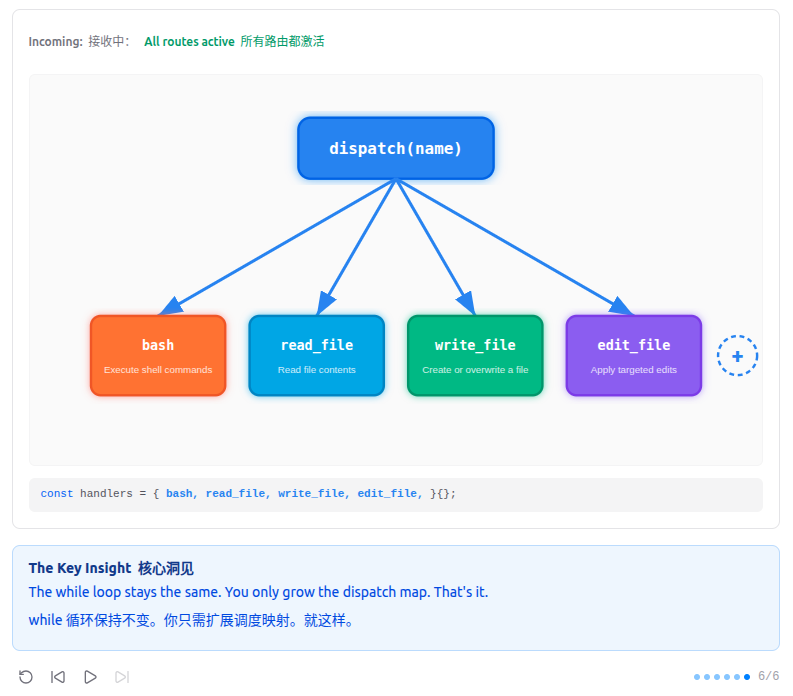
"加一个工具, 只加一个 handler" -- 循环不用动, 新工具注册进 dispatch map 就行。
Harness 层: 工具分发 -- 扩展模型能触达的边界。
3.问题
只有 bash 时, 所有操作都走 shell。cat 截断不可预测, sed 遇到特殊字符就崩, 每次 bash
调用都是不受约束的安全面。专用工具 (read_file, write_file) 可以在工具层面做路径沙箱。
关键洞察: 加工具不需要改循环。
4.设计决策
- 为什么恰好四个工具?
四个工具分别是 bash、read_file、write_file 和 edit_file,覆盖了大约 95% 的编程任务。Bash 处理执行和任意命令;read_file
提供带行号的精确文件读取;write_file 创建或覆盖文件;edit_file
做精确的字符串替换。工具越多,模型的认知负担越重------它必须在更多选项中做选择,选错的概率也随之增加。更少的工具也意味着更少的
schema 需要维护、更少的边界情况需要处理。
我们可以添加专门的工具(list_directory、search_files、http_request),后续版本也确实添加了。但在这个阶段,bash 已经涵盖了这些用例。从
v0 的单个工具到 v1 的四个工具的分离,特别是为了给模型提供结构化的文件操作 I/O,而 bash 的引号和转义常常让模型出错。
- 模型本身就是代理
核心 agent 循环极其简单:不断调用 LLM,如果返回 tool_use
块就执行并回传结果,如果只返回文本就停止。没有路由器,没有决策树,没有工作流引擎。模型自己决定做什么、何时停止、如何从错误中恢复。代码只是连接模型和工具的管道。这是一种设计哲学:agent
行为从模型中涌现,而非由框架定义。
许多代理框架添加了复杂的编排层:带有明确的思想/行动/观察解析的 ReAct 循环、LangChain 风格的链、AutoGPT
风格的目标分解。这些框架假设模型需要脚手架才能表现得像代理。我们的方法假设模型已经知道如何成为代理------它只需要工具来作用于世界。
- 每个工具都有 JSON Schema
每个工具都为输入参数定义了严格的 JSON schema。例如,edit_file 要求 old_string 和 new_string
是精确的字符串,而非正则表达式。这消除了一整类错误:模型无法传递格式错误的输入,因为 API 会在执行前校验
schema。这也使模型的意图变得明确------当它用特定字符串调用 edit_file 时,不存在关于它想修改什么的解析歧义。
有些代理系统允许模型输出自由形式的文本,这些文本通过正则表达式或启发式方法进行解析(例如,从 markdown
代码块中提取代码)。这是脆弱的------模型可能会稍微改变输出格式并破坏解析器。JSON 模式用灵活性换取了可靠性。
5.解决方案
markdown
    +----------+      +-------+      +------------------+
    |   User   | ---> |  LLM  | ---> | Tool Dispatch    |
    |  prompt  |      |       |      | {                |
    +----------+      +---+---+      |   bash: run_bash |
                          ^          |   read: run_read |
                          |          |   write: run_wr  |
                          +----------+   edit: run_edit |
                          tool_result| }                |
                                     +------------------+

The dispatch map is a dict: {tool_name: handler_function}.
One lookup replaces any if/elif chain.
6.工作原理
- 每个工具有一个处理函数。路径沙箱防止逃逸工作区。
python
def safe_path(p: str) -> Path:
    path = (WORKDIR / p).resolve()
    if not path.is_relative_to(WORKDIR):
        raise ValueError(f"Path escapes workspace: {p}")
    return path


def run_read(path: str, limit: int = None) -> str:
    try:
        text = safe_path(path).read_text()
        lines = text.splitlines()
        if limit and limit < len(lines):
            lines = lines[:limit] + [f"... ({len(lines) - limit} more lines)"]
        return "\n".join(lines)[:50000]
    except Exception as e:
return f"Error: {e}"- dispatch map 将工具名映射到处理函数。
python
TOOL_HANDLERS = {
    "bash": lambda **kw: run_bash(kw["command"]),
    "read_file": lambda **kw: run_read(kw["path"], kw.get("limit")),
    "write_file": lambda **kw: run_write(kw["path"], kw["content"]),
    "edit_file": lambda **kw: run_edit(kw["path"], kw["old_text"], kw["new_text"]),
}- 循环中按名称查找处理函数。循环体本身与 s01 完全一致。
python
for block in response.content:
    if block.type == "tool_use":
        handler = TOOL_HANDLERS.get(block.name)
        output = handler(**block.input) if handler else f"Unknown tool: {block.name}"
        print(f"> {block.name}: {output[:200]}")
        results.append({"type": "tool_result", "tool_use_id": block.id, "content": output})
加工具 = 加 handler + 加 schema。循环永远不变。
7.相对 s01 的变更
| 组件 | 之前 (s01) | 之后 (s02) |
|---|---|---|
| Tools 工具 | 1 (仅 bash) | 4 (bash, read, write, edit) |
| Dispatch | 硬编码 bash 调用 | TOOL_HANDLERS 字典 |
| 路径安全 | 无 | safe_path()沙箱 |
| Agent loop代理循环 | 不变 | 不变 |
8.试一试
bash
cd learn-claude-code
python agents/s02_tool_use.py
试试这些 prompt (英文 prompt 对 LLM 效果更好, 也可以用中文):
- Add a function called greet(name) to hello.py
- Read the file requirements.txt
- Create a file called greet.py with a greet(name) function
- Edit greet.py to add a docstring to the function
- Read greet.py to verify the edit worked
9.示例
9.1 Add a function called greet(name) to hello.py
在 hello.py 中添加一个名为 greet(name)的函数
- assistant request:
用户请求代码修改
python
from agents.s02_tool_use import TOOLS

request = {
    "max_tokens": 8000,
    "messages": [
        {
            "role": "user",
            "content": "Add a function called greet(name) to hello.py"
        }
    ],
    "model": "aws-claude-sonnet-4-6",
    "system": "You are a coding agent at /home/xiangli/SourceCode/learn-claude-code. Use tools to solve tasks. Act, don't explain.",
    "tools": TOOLS
}- assistant response:
模型选择了 read_file 而不是 bash cat
json
{
  "id": "msg_bdrk_017U4mxo8ja6xitbbZvMYyC8",
  "content": [
    {
      "text": "Let me first check if `hello.py` exists and review its current contents.",
      "type": "text"
    },
    {
      "id": "toolu_bdrk_01AQKsfx69xNnaeSBdbbG7uv",
      "input": {
        "path": "/home/xiangli/SourceCode/learn-claude-code/hello.py"
      },
      "name": "read_file",
      "type": "tool_use"
    }
  ],
  "model": "claude-sonnet-4-6",
  "role": "assistant",
  "stop_reason": "tool_use",
  "type": "message",
  "usage": {
    "cache_creation": {
      "ephemeral_1h_input_tokens": 0,
      "ephemeral_5m_input_tokens": 0
    },
    "cache_creation_input_tokens": 0,
    "cache_read_input_tokens": 0,
    "input_tokens": 816,
    "output_tokens": 90
  }
}
read_file: print("Hello, World!")
- messages:
专用的读取工具提供更干净的文件访问
json
[
  {
    "role": "user",
    "content": "Add a function called greet(name) to hello.py"
  },
  {
    "role": "assistant",
    "content": [
      {
        "text": "Let me first check if `hello.py` exists and review its current contents.",
        "type": "text"
      },
      {
        "id": "toolu_bdrk_01AQKsfx69xNnaeSBdbbG7uv",
        "input": {
          "path": "/home/xiangli/SourceCode/learn-claude-code/hello.py"
        },
        "name": "read_file",
        "type": "tool_use"
      }
    ]
  },
  {
    "role": "user",
    "content": [
      {
        "type": "tool_result",
        "tool_use_id": "toolu_bdrk_01AQKsfx69xNnaeSBdbbG7uv",
        "content": "print(\"Hello, World!\")"
      }
    ]
  }
]- assistant request:
文件内容返回给模型
python
from agents.s02_tool_use import TOOLS

request = {
    "max_tokens": 8000,
    "messages": [
        {
            "role": "user",
            "content": "Add a function called greet(name) to hello.py"
        },
        {
            "role": "assistant",
            "content": [
                {
                    "text": "Let me first check if `hello.py` exists and review its current contents.",
                    "type": "text"
                },
                {
                    "id": "toolu_bdrk_01AQKsfx69xNnaeSBdbbG7uv",
                    "input": {
                        "path": "/home/xiangli/SourceCode/learn-claude-code/hello.py"
                    },
                    "name": "read_file",
                    "type": "tool_use"
                }
            ]
        },
        {
            "role": "user",
            "content": [
                {
                    "type": "tool_result",
                    "tool_use_id": "toolu_bdrk_01AQKsfx69xNnaeSBdbbG7uv",
                    "content": "print(\"Hello, World!\")"
                }
            ]
        }
    ],
    "model": "aws-claude-sonnet-4-6",
    "system": "You are a coding agent at /home/xiangli/SourceCode/learn-claude-code. Use tools to solve tasks. Act, don't explain.",
    "tools": TOOLS
}- assistant response:
write_file 替换整个文件内容
json
{
  "id": "msg_bdrk_01UFq2BGC9buDtuSAzy9wEU9",
  "content": [
    {
      "text": "Now I'll add the `greet(name)` function to the file.",
      "type": "text"
    },
    {
      "id": "toolu_bdrk_01VJcPaD7M7nRsahJFStqss2",
      "input": {
        "path": "/home/xiangli/SourceCode/learn-claude-code/hello.py",
        "old_text": "print(\"Hello, World!\")",
        "new_text": "print(\"Hello, World!\")\n\n\ndef greet(name):\n    \"\"\"Greet a person by name.\"\"\"\n    print(f\"Hello, {name}!\")\n"
      },
      "name": "edit_file",
      "type": "tool_use"
    }
  ],
  "model": "claude-sonnet-4-6",
  "role": "assistant",
  "stop_reason": "tool_use",
  "type": "message",
  "usage": {
    "cache_creation": {
      "ephemeral_1h_input_tokens": 0,
      "ephemeral_5m_input_tokens": 0
    },
    "cache_creation_input_tokens": 0,
    "cache_read_input_tokens": 0,
    "input_tokens": 924,
    "output_tokens": 169
  }
}
edit_file: Edited /home/xiangli/SourceCode/learn-claude-code/hello.py
- messages:
Write confirmed 写入确认
json
[
  {
    "role": "user",
    "content": "Add a function called greet(name) to hello.py"
  },
  {
    "role": "assistant",
    "content": [
      {
        "text": "Let me first check if `hello.py` exists and review its current contents.",
        "type": "text"
      },
      {
        "id": "toolu_bdrk_01AQKsfx69xNnaeSBdbbG7uv",
        "input": {
          "path": "/home/xiangli/SourceCode/learn-claude-code/hello.py"
        },
        "name": "read_file",
        "type": "tool_use"
      }
    ]
  },
  {
    "role": "user",
    "content": [
      {
        "type": "tool_result",
        "tool_use_id": "toolu_bdrk_01AQKsfx69xNnaeSBdbbG7uv",
        "content": "print(\"Hello, World!\")"
      }
    ]
  },
  {
    "role": "assistant",
    "content": [
      {
        "text": "Now I'll add the `greet(name)` function to the file.",
        "type": "text"
      },
      {
        "id": "toolu_bdrk_01VJcPaD7M7nRsahJFStqss2",
        "input": {
          "path": "/home/xiangli/SourceCode/learn-claude-code/hello.py",
          "old_text": "print(\"Hello, World!\")",
          "new_text": "print(\"Hello, World!\")\n\n\ndef greet(name):\n    \"\"\"Greet a person by name.\"\"\"\n    print(f\"Hello, {name}!\")\n"
        },
        "name": "edit_file",
        "type": "tool_use"
      }
    ]
  },
  {
    "role": "user",
    "content": [
      {
        "type": "tool_result",
        "tool_use_id": "toolu_bdrk_01VJcPaD7M7nRsahJFStqss2",
        "content": "Edited /home/xiangli/SourceCode/learn-claude-code/hello.py"
      }
    ]
  }
]- assistant request:
python
from agents.s02_tool_use import TOOLS

request = {
    "max_tokens": 8000,
    "messages": [
        {
            "role": "user",
            "content": "Add a function called greet(name) to hello.py"
        },
        {
            "role": "assistant",
            "content": [
                {
                    "text": "Let me first check if `hello.py` exists and review its current contents.",
                    "type": "text"
                },
                {
                    "id": "toolu_bdrk_01AQKsfx69xNnaeSBdbbG7uv",
                    "input": {
                        "path": "/home/xiangli/SourceCode/learn-claude-code/hello.py"
                    },
                    "name": "read_file",
                    "type": "tool_use"
                }
            ]
        },
        {
            "role": "user",
            "content": [
                {
                    "type": "tool_result",
                    "tool_use_id": "toolu_bdrk_01AQKsfx69xNnaeSBdbbG7uv",
                    "content": "print(\"Hello, World!\")"
                }
            ]
        },
        {
            "role": "assistant",
            "content": [
                {
                    "text": "Now I'll add the `greet(name)` function to the file.",
                    "type": "text"
                },
                {
                    "id": "toolu_bdrk_01VJcPaD7M7nRsahJFStqss2",
                    "input": {
                        "path": "/home/xiangli/SourceCode/learn-claude-code/hello.py",
                        "old_text": "print(\"Hello, World!\")",
                        "new_text": "print(\"Hello, World!\")\n\n\ndef greet(name):\n    \"\"\"Greet a person by name.\"\"\"\n    print(f\"Hello, {name}!\")\n"
                    },
                    "name": "edit_file",
                    "type": "tool_use"
                }
            ]
        },
        {
            "role": "user",
            "content": [
                {
                    "type": "tool_result",
                    "tool_use_id": "toolu_bdrk_01VJcPaD7M7nRsahJFStqss2",
                    "content": "Edited /home/xiangli/SourceCode/learn-claude-code/hello.py"
                }
            ]
        }
    ],
    "model": "aws-claude-sonnet-4-6",
    "system": "You are a coding agent at /home/xiangli/SourceCode/learn-claude-code. Use tools to solve tasks. Act, don't explain.",
    "tools": TOOLS
}- assistant response:
I've updated hello.py with a greet(name) function that takes a name parameter.
我已更新 hello.py,添加了一个 greet(name)函数,该函数接受一个 name 参数。
4 个工具胜过 1 个:每个工具都有明确、专注的目的
json
{
  "id": "msg_bdrk_0163TdXNMpLi2Qb2mJVitr3J",
  "content": [
    {
      "text": "The `greet(name)` function has been added to `hello.py`. Here's a summary of the change:\n\n- **`greet(name)`** --- Takes a single `name` parameter and prints a personalized greeting, e.g., calling `greet(\"Alice\")` will output `Hello, Alice!`.",
      "type": "text"
    }
  ],
  "model": "claude-sonnet-4-6",
  "role": "assistant",
  "stop_reason": "end_turn",
  "type": "message",
  "usage": {
    "cache_creation": {
      "ephemeral_1h_input_tokens": 0,
      "ephemeral_5m_input_tokens": 0
    },
    "cache_creation_input_tokens": 0,
    "cache_read_input_tokens": 0,
    "input_tokens": 1127,
    "output_tokens": 74
  }
}
9.2 Read the file requirements.txt
- assistant request
python
from agents.s02_tool_use import TOOLS

request = {
    "max_tokens": 8000,
    "messages": [
        {
            "role": "user",
            "content": "Read the file requirements.txt"
        }
    ],
    "model": "aws-claude-sonnet-4-6",
    "system": "You are a coding agent at /home/xiangli/SourceCode/learn-claude-code/agents. Use tools to solve tasks. Act, don't explain.",
    "tools": TOOLS
}- assistant response
json
{
  "id": "msg_bdrk_01NvuCmmn2VXafLXeJ924krY",
  "content": [
    {
      "text": "I'll read the requirements.txt file for you right away!",
      "type": "text"
    },
    {
      "id": "toolu_bdrk_015TrEn3nLoNATsbbwY69x4D",
      "input": {
        "path": "requirements.txt"
      },
      "name": "read_file",
      "type": "tool_use"
    }
  ],
  "model": "claude-sonnet-4-6",
  "role": "assistant",
  "stop_reason": "tool_use",
  "type": "message",
  "usage": {
    "cache_creation": {
      "ephemeral_1h_input_tokens": 0,
      "ephemeral_5m_input_tokens": 0
    },
    "cache_creation_input_tokens": 0,
    "cache_read_input_tokens": 0,
    "input_tokens": 811,
    "output_tokens": 69
  }
}- messages append
json
 [
  {
    "role": "user",
    "content": "Read the file requirements.txt"
  },
  {
    "role": "assistant",
    "content": [
      {
        "text": "I'll read the file right away!",
        "type": "text"
      },
      {
        "id": "toolu_bdrk_01HkLDUs8cSRneny1ZMt7Vbq",
        "input": {
          "path": "/home/xiangli/SourceCode/learn-claude-code/requirements.txt"
        },
        "name": "read_file",
        "type": "tool_use"
      }
    ]
  },
  {
    "role": "user",
    "content": [
      {
        "type": "tool_result",
        "tool_use_id": "toolu_bdrk_01HkLDUs8cSRneny1ZMt7Vbq",
        "content": "anthropic>=0.25.0\npython-dotenv>=1.0.0"
      }
    ]
  }
]- assistant request
python
from agents.s02_tool_use import TOOLS

request = {
    "max_tokens": 8000,
    "messages": [
        {
            "role": "user",
            "content": "Read the file requirements.txt"
        },
        {
            "role": "assistant",
            "content": [
                {
                    "text": "I'll read the file right away!",
                    "type": "text"
                },
                {
                    "id": "toolu_bdrk_01HkLDUs8cSRneny1ZMt7Vbq",
                    "input": {
                        "path": "/home/xiangli/SourceCode/learn-claude-code/requirements.txt"
                    },
                    "name": "read_file",
                    "type": "tool_use"
                }
            ]
        },
        {
            "role": "user",
            "content": [
                {
                    "type": "tool_result",
                    "tool_use_id": "toolu_bdrk_01HkLDUs8cSRneny1ZMt7Vbq",
                    "content": "anthropic>=0.25.0\npython-dotenv>=1.0.0"
                }
            ]
        }
    ],
    "model": "aws-claude-sonnet-4-6",
    "system": "You are a coding agent at /home/xiangli/SourceCode/learn-claude-code. Use tools to solve tasks. Act, don't explain.",
    "tools": TOOLS
}- assistant response
json
{
  "id": "msg_bdrk_01UGMYjZfW4kFCDhuyK7412k",
  "content": [
    {
      "text": "Here are the contents of `requirements.txt`:\n\n| Package | Version Requirement |\n|---|---|\n| `anthropic` | `>= 0.25.0` |\n| `python-dotenv` | `>= 1.0.0` |\n\nThe file lists **two dependencies**:\n1. **`anthropic`** -- The official Anthropic Python SDK (version 0.25.0 or higher), used for interacting with Claude's API.\n2. **`python-dotenv`** -- A package for loading environment variables from `.env` files (version 1.0.0 or higher), commonly used to manage API keys and configuration securely.",
      "type": "text"
    }
  ],
  "model": "claude-sonnet-4-6",
  "role": "assistant",
  "stop_reason": "end_turn",
  "type": "message",
  "usage": {
    "cache_creation": {
      "ephemeral_1h_input_tokens": 0,
      "ephemeral_5m_input_tokens": 0
    },
    "cache_creation_input_tokens": 0,
    "cache_read_input_tokens": 0,
    "input_tokens": 921,
    "output_tokens": 156
  }
}
10.完整代码
python
#!/usr/bin/env python3
# Harness: tool dispatch -- expanding what the model can reach.
"""
s02_tool_use.py - Tools

The agent loop from s01 didn't change. We just added tools to the array
and a dispatch map to route calls.

    +----------+      +-------+      +------------------+
    |   User   | ---> |  LLM  | ---> | Tool Dispatch    |
    |  prompt  |      |       |      | {                |
    +----------+      +---+---+      |   bash: run_bash |
                          ^          |   read: run_read |
                          |          |   write: run_wr  |
                          +----------+   edit: run_edit |
                          tool_result| }                |
                                     +------------------+

Key insight: "The loop didn't change at all. I just added tools."
"""
import json
import os
import subprocess
from pathlib import Path

from anthropic import Anthropic
from dotenv import load_dotenv

load_dotenv(override=True)

if os.getenv("ANTHROPIC_BASE_URL"):
    os.environ.pop("ANTHROPIC_AUTH_TOKEN", None)

WORKDIR = Path.cwd()
client = Anthropic(base_url=os.getenv("ANTHROPIC_BASE_URL"))
MODEL = os.environ["MODEL_ID"]

SYSTEM = f"You are a coding agent at {WORKDIR}. Use tools to solve tasks. Act, don't explain."


def safe_path(p: str) -> Path:
    path = (WORKDIR / p).resolve()
    if not path.is_relative_to(WORKDIR):
        raise ValueError(f"Path escapes workspace: {p}")
    return path


def run_bash(command: str) -> str:
    dangerous = ["rm -rf /", "sudo", "shutdown", "reboot", "> /dev/"]
    if any(d in command for d in dangerous):
        return "Error: Dangerous command blocked"
    try:
        r = subprocess.run(command, shell=True, cwd=WORKDIR,
                           capture_output=True, text=True, timeout=120)
        out = (r.stdout + r.stderr).strip()
        return out[:50000] if out else "(no output)"
    except subprocess.TimeoutExpired:
        return "Error: Timeout (120s)"


def run_read(path: str, limit: int = None) -> str:
    try:
        text = safe_path(path).read_text()
        lines = text.splitlines()
        if limit and limit < len(lines):
            lines = lines[:limit] + [f"... ({len(lines) - limit} more lines)"]
        return "\n".join(lines)[:50000]
    except Exception as e:
        return f"Error: {e}"


def run_write(path: str, content: str) -> str:
    try:
        fp = safe_path(path)
        fp.parent.mkdir(parents=True, exist_ok=True)
        fp.write_text(content)
        return f"Wrote {len(content)} bytes to {path}"
    except Exception as e:
        return f"Error: {e}"


def run_edit(path: str, old_text: str, new_text: str) -> str:
    try:
        fp = safe_path(path)
        content = fp.read_text()
        if old_text not in content:
            return f"Error: Text not found in {path}"
        fp.write_text(content.replace(old_text, new_text, 1))
        return f"Edited {path}"
    except Exception as e:
        return f"Error: {e}"


# -- The dispatch map: {tool_name: handler} --
TOOL_HANDLERS = {
    "bash":       lambda **kw: run_bash(kw["command"]),
    "read_file":  lambda **kw: run_read(kw["path"], kw.get("limit")),
    "write_file": lambda **kw: run_write(kw["path"], kw["content"]),
    "edit_file":  lambda **kw: run_edit(kw["path"], kw["old_text"], kw["new_text"]),
}

TOOLS = [
    {"name": "bash", "description": "Run a shell command.",
     "input_schema": {"type": "object", "properties": {"command": {"type": "string"}}, "required": ["command"]}},
    {"name": "read_file", "description": "Read file contents.",
     "input_schema": {"type": "object", "properties": {"path": {"type": "string"}, "limit": {"type": "integer"}}, "required": ["path"]}},
    {"name": "write_file", "description": "Write content to file.",
     "input_schema": {"type": "object", "properties": {"path": {"type": "string"}, "content": {"type": "string"}}, "required": ["path", "content"]}},
    {"name": "edit_file", "description": "Replace exact text in file.",
     "input_schema": {"type": "object", "properties": {"path": {"type": "string"}, "old_text": {"type": "string"}, "new_text": {"type": "string"}}, "required": ["path", "old_text", "new_text"]}},
]


def agent_loop(messages: list):
    while True:
        response = client.messages.create(
            model=MODEL, system=SYSTEM, messages=messages,
            tools=TOOLS, max_tokens=8000,
        )
        print("assistant response:", response.to_json())
        messages.append({"role": "assistant", "content": [b.to_dict() for b in response.content]})
        if response.stop_reason != "tool_use":
            return
        results = []
        for block in response.content:
            if block.type == "tool_use":
                handler = TOOL_HANDLERS.get(block.name)
                output = handler(**block.input) if handler else f"Unknown tool: {block.name}"
                print(f"> {block.name}: {output[:200]}")
                results.append({"type": "tool_result", "tool_use_id": block.id, "content": output})
        messages.append({"role": "user", "content": results})
        print("messages:", json.dumps(messages, indent=2, ensure_ascii=False))

if __name__ == "__main__":
    history = []
    while True:
        try:
            query = input("\033[36ms02 >> \033[0m")
        except (EOFError, KeyboardInterrupt):
            break
        if query.strip().lower() in ("q", "exit", ""):
            break
        history.append({"role": "user", "content": query})
        agent_loop(history)
        response_content = history[-1]["content"]
        if isinstance(response_content, list):
            for block in response_content:
                if hasattr(block, "text"):
                    print(block.text)
        print()