MES/ERP 多维度报表 WinForm 完整项目(本地数据库版)
针对你需要的MES/ERP 报表全流程场景 (规则条件约束、高索引查询封装、组轴式多维度查询、多界面展示、本地数据库存储),我为你实现一个完整的可直接编译运行的 WinForm 项目 ------ 包含数据管理、多维度报表查询、规则配置、数据分析、可视化展示五大核心模块,基于 SQLite 本地文件数据库,适配 MES/ERP 本地化部署需求。
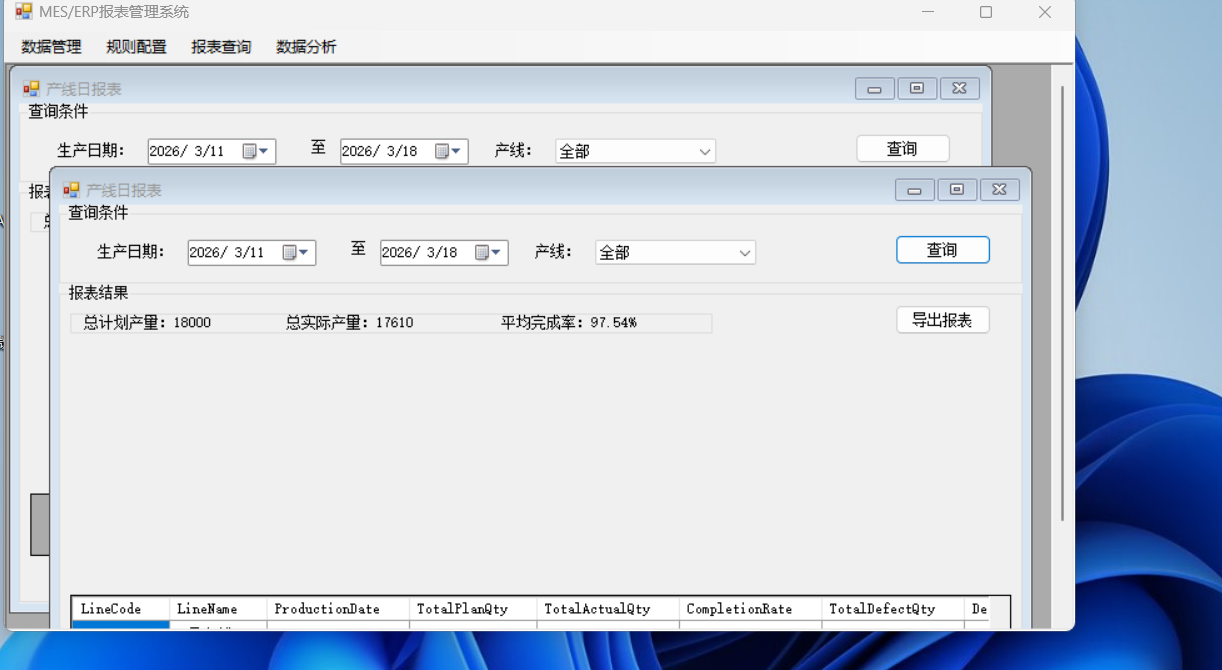
一、项目整体设计
1. 项目架构(分层 + 模块化)
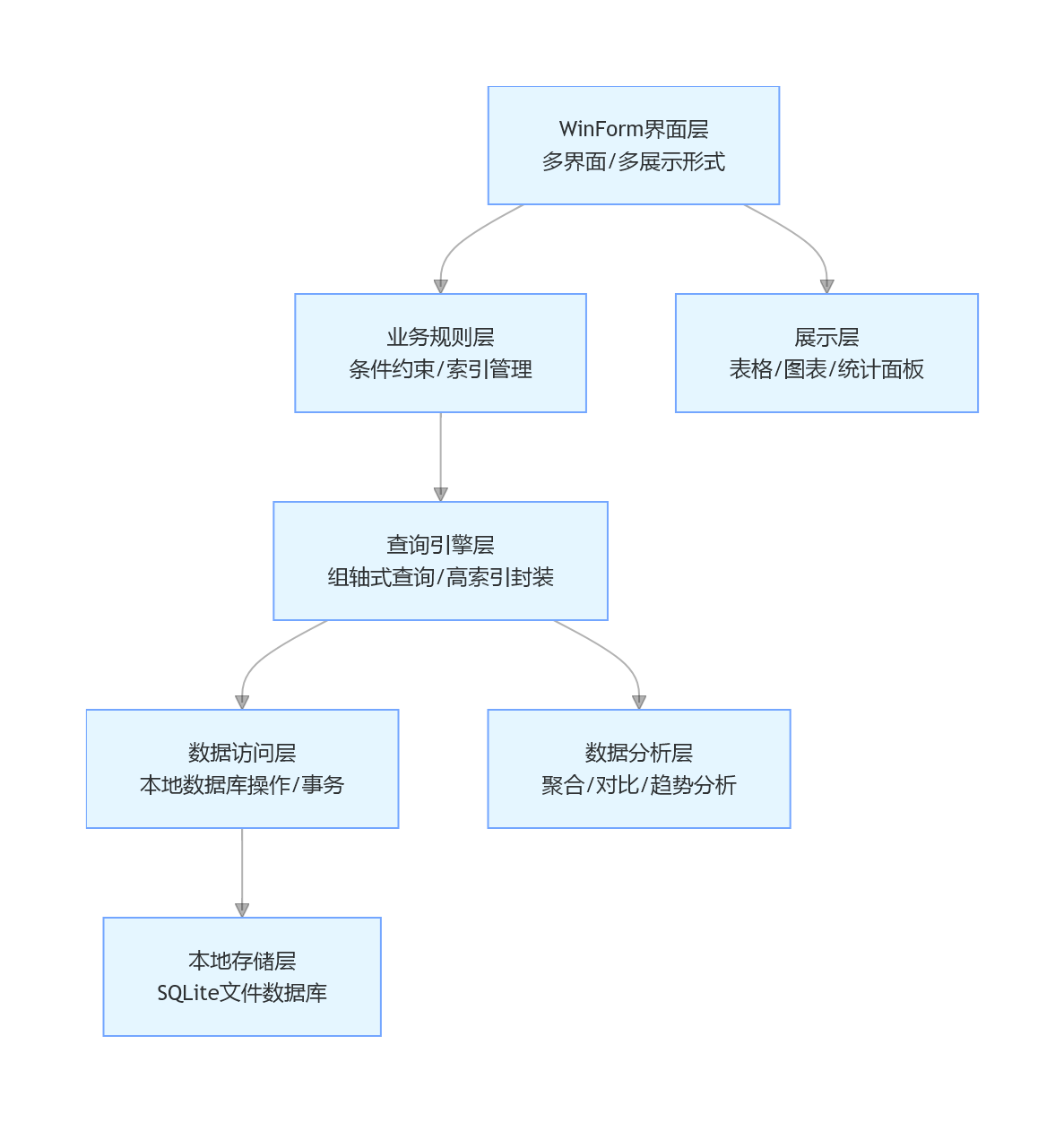
graph TD
    A[WinForm界面层<br/>多界面/多展示形式] --> B[业务规则层<br/>条件约束/索引管理]
    B --> C[查询引擎层<br/>组轴式查询/高索引封装]
    C --> D[数据访问层<br/>本地数据库操作/事务]
    D --> E[本地存储层<br/>SQLite文件数据库]

    A --> F[展示层<br/>表格/图表/统计面板]
    C --> G[数据分析层<br/>聚合/对比/趋势分析]
2. 核心模块说明
表格
| 模块名称 | 功能描述 |
|---|---|
| 数据管理模块 | 基础数据录入 / 编辑 / 删除,支持事务操作,自动维护索引 |
| 规则配置模块 | 报表查询规则定义(条件约束、索引关联、分组维度) |
| 多维度查询模块 | 组轴式查询(产线 / 工单 / 产品 / 时间多轴组合),高索引优化查询 |
| 数据分析模块 | 数据聚合、趋势分析、同比 / 环比计算,异常数据标记 |
| 多界面展示模块 | 表格、柱状图、折线图、统计面板、导出报表等多形式展示 |
3. 技术栈
- 界面框架:WinForm (.NET Framework 4.8) + DevExpress(可选,提升 UI 体验)
- 本地数据库:SQLite(文件存储,无需服务)
- 数据访问 :Dapper + SQLite ADO.NET
- 查询优化:自定义索引管理 + 内存缓存 + 预编译 SQL
- 可视化:MS Chart 控件(图表展示) + DataGridView(表格)
- 序列化:Newtonsoft.Json(配置存储)
二、完整项目代码
1. 第一步:NuGet 依赖安装
bash
运行
Install-Package System.Data.SQLite.Core  # SQLite核心驱动
Install-Package Dapper                   # 轻量ORM
Install-Package Newtonsoft.Json          # JSON序列化
Install-Package System.Windows.Forms.DataVisualization  # 图表控件
2. 第二步:核心实体定义
csharp
运行
using System;
using System.Collections.Generic;

namespace MES_ERP_ReportSystem
{
    #region 基础数据实体
    /// <summary>
    /// 产线基础信息
    /// </summary>
    public class ProductionLine
    {
        public int Id { get; set; }
        public string LineCode { get; set; } // 产线编码(索引字段)
        public string LineName { get; set; } // 产线名称
        public string Workshop { get; set; } // 所属车间
        public string Status { get; set; }   // 产线状态
    }

    /// <summary>
    /// 产品基础信息
    /// </summary>
    public class Product
    {
        public int Id { get; set; }
        public string ProductCode { get; set; } // 产品编码(索引字段)
        public string ProductName { get; set; } // 产品名称
        public string Spec { get; set; }       // 规格型号
        public decimal UnitPrice { get; set; } // 单价
    }

    /// <summary>
    /// 工单生产数据(核心报表数据)
    /// </summary>
    public class WorkOrderData
    {
        public int Id { get; set; }
        public string WorkOrderNo { get; set; } // 工单号(索引字段)
        public string LineCode { get; set; }    // 产线编码(索引字段)
        public string ProductCode { get; set; } // 产品编码(索引字段)
        public DateTime ProductionDate { get; set; } // 生产日期(索引字段)
        public int PlanQty { get; set; }        // 计划产量
        public int ActualQty { get; set; }      // 实际产量
        public int DefectQty { get; set; }      // 不良数量
        public decimal Oee { get; set; }        // OEE设备综合效率
        public string Shift { get; set; }       // 班次
    }
    #endregion

    #region 报表规则实体
    /// <summary>
    /// 报表查询规则(条件约束+索引配置)
    /// </summary>
    public class ReportRule
    {
        public int RuleId { get; set; }
        public string RuleName { get; set; }    // 规则名称
        public string ReportType { get; set; }  // 报表类型(产线/产品/工单)
        public List<RuleCondition> Conditions { get; set; } = new(); // 条件约束
        public List<string> IndexFields { get; set; } = new(); // 关联索引字段
        public string SortField { get; set; }   // 排序字段
        public bool IsAsc { get; set; }         // 排序方向
        public string GroupField { get; set; }  // 分组字段
    }

    /// <summary>
    /// 规则条件约束
    /// </summary>
    public class RuleCondition
    {
        public string FieldName { get; set; }   // 字段名
        public string Operator { get; set; }    // 运算符(=/>/< IN)
        public string Value { get; set; }       // 条件值
        public bool IsRequired { get; set; }    // 是否必选
    }
    #endregion

    #region 报表结果实体
    /// <summary>
    /// 产线日报表DTO
    /// </summary>
    public class LineDailyReportDto
    {
        public string LineCode { get; set; }
        public string LineName { get; set; }
        public DateTime ProductionDate { get; set; }
        public int TotalPlanQty { get; set; }
        public int TotalActualQty { get; set; }
        public decimal CompletionRate => TotalPlanQty == 0 ? 0 : Math.Round((decimal)TotalActualQty / TotalPlanQty * 100, 2);
        public int TotalDefectQty { get; set; }
        public decimal DefectRate => TotalActualQty == 0 ? 0 : Math.Round((decimal)TotalDefectQty / TotalActualQty * 100, 2);
        public decimal AvgOee { get; set; }
    }

    /// <summary>
    /// 趋势分析DTO
    /// </summary>
    public class TrendAnalysisDto
    {
        public DateTime Date { get; set; }
        public int Qty { get; set; }
        public decimal Rate { get; set; }
    }
    #endregion
}
3. 第三步:数据访问层(高索引封装 + 本地数据库)
csharp
运行
using System;
using System.Collections.Generic;
using System.Data;
using System.IO;
using System.Linq;
using System.Threading.Tasks;
using Dapper;
using Microsoft.Data.Sqlite;
using Microsoft.Extensions.Caching.Memory;

namespace MES_ERP_ReportSystem
{
    /// <summary>
    /// 数据访问层(高索引封装+本地数据库操作)
    /// </summary>
    public class DataAccessLayer
    {
        // 本地数据库路径
        private readonly string _dbPath;
        private readonly string _connStr;

        // 内存缓存(高索引查询优化)
        private readonly IMemoryCache _cache;
        private readonly MemoryCacheEntryOptions _cacheOptions = new MemoryCacheEntryOptions
        {
            AbsoluteExpirationRelativeToNow = TimeSpan.FromMinutes(15),
            Size = 1024
        };

        public DataAccessLayer()
        {
            // 初始化数据库路径(程序目录/DB/MES_ERP.db)
            var dbDir = Path.Combine(AppDomain.CurrentDomain.BaseDirectory, "DB");
            if (!Directory.Exists(dbDir)) Directory.CreateDirectory(dbDir);
            _dbPath = Path.Combine(dbDir, "MES_ERP.db");
            _connStr = $"Data Source={_dbPath};Cache=Shared;Journal Mode=WAL;Synchronous=Normal;";

            // 初始化缓存
            _cache = new MemoryCache(new MemoryCacheOptions { SizeLimit = 1024 * 20 });

            // 初始化数据库(建表+索引+测试数据)
            InitDatabase();
        }

        #region 数据库初始化(核心索引创建)
        private void InitDatabase()
        {
            using var conn = new SqliteConnection(_connStr);
            conn.Open();

            // 1. 创建基础表
            // 产线表
            conn.Execute(@"
                CREATE TABLE IF NOT EXISTS ProductionLine (
                    Id INTEGER PRIMARY KEY AUTOINCREMENT,
                    LineCode TEXT NOT NULL UNIQUE,
                    LineName TEXT NOT NULL,
                    Workshop TEXT,
                    Status TEXT DEFAULT 'Running'
                );");

            // 产品表
            conn.Execute(@"
                CREATE TABLE IF NOT EXISTS Product (
                    Id INTEGER PRIMARY KEY AUTOINCREMENT,
                    ProductCode TEXT NOT NULL UNIQUE,
                    ProductName TEXT NOT NULL,
                    Spec TEXT,
                    UnitPrice DECIMAL(10,2) DEFAULT 0
                );");

            // 工单生产数据表(核心报表表)
            conn.Execute(@"
                CREATE TABLE IF NOT EXISTS WorkOrderData (
                    Id INTEGER PRIMARY KEY AUTOINCREMENT,
                    WorkOrderNo TEXT NOT NULL,
                    LineCode TEXT NOT NULL,
                    ProductCode TEXT NOT NULL,
                    ProductionDate DATETIME NOT NULL,
                    PlanQty INTEGER DEFAULT 0,
                    ActualQty INTEGER DEFAULT 0,
                    DefectQty INTEGER DEFAULT 0,
                    Oee DECIMAL(5,2) DEFAULT 0,
                    Shift TEXT
                );");

            // 报表规则表
            conn.Execute(@"
                CREATE TABLE IF NOT EXISTS ReportRule (
                    RuleId INTEGER PRIMARY KEY AUTOINCREMENT,
                    RuleName TEXT NOT NULL,
                    ReportType TEXT NOT NULL,
                    Conditions TEXT,
                    IndexFields TEXT,
                    SortField TEXT,
                    IsAsc INTEGER DEFAULT 1,
                    GroupField TEXT
                );");

            // 2. 创建核心索引(高索引查询优化)
            conn.Execute(@"
                -- 工单数据复合索引(产线+日期:最常用查询维度)
                CREATE INDEX IF NOT EXISTS IX_WorkOrderData_Line_Date ON WorkOrderData(LineCode, ProductionDate);
                -- 工单数据复合索引(产品+日期:产品报表维度)
                CREATE INDEX IF NOT EXISTS IX_WorkOrderData_Product_Date ON WorkOrderData(ProductCode, ProductionDate);
                -- 工单数据索引(工单号:精准查询)
                CREATE INDEX IF NOT EXISTS IX_WorkOrderData_WorkOrderNo ON WorkOrderData(WorkOrderNo);
                -- 生产日期索引(时间维度报表)
                CREATE INDEX IF NOT EXISTS IX_WorkOrderData_Date ON WorkOrderData(ProductionDate);");

            // 3. 插入测试数据(首次运行)
            InsertTestData(conn);
        }

        /// <summary>
        /// 插入测试数据
        /// </summary>
        private void InsertTestData(IDbConnection conn)
        {
            // 产线测试数据
            if (conn.QueryFirst<int>("SELECT COUNT(*) FROM ProductionLine") == 0)
            {
                conn.Execute(@"
                    INSERT INTO ProductionLine (LineCode, LineName, Workshop)
                    VALUES ('LINE01', '一号产线', '组装车间'),
                           ('LINE02', '二号产线', '组装车间'),
                           ('LINE03', '三号产线', '包装车间');");
            }

            // 产品测试数据
            if (conn.QueryFirst<int>("SELECT COUNT(*) FROM Product") == 0)
            {
                conn.Execute(@"
                    INSERT INTO Product (ProductCode, ProductName, Spec, UnitPrice)
                    VALUES ('PROD001', '产品A', '规格A-1', 100.50),
                           ('PROD002', '产品B', '规格B-2', 200.80),
                           ('PROD003', '产品C', '规格C-3', 150.20);");
            }

            // 工单生产数据
            if (conn.QueryFirst<int>("SELECT COUNT(*) FROM WorkOrderData") == 0)
            {
                var testData = new List<object>();
                var startDate = DateTime.Now.AddDays(-7);
                for (int i = 0; i < 7; i++)
                {
                    var date = startDate.AddDays(i);
                    testData.Add(new { WorkOrderNo = $"WO{date:yyyyMMdd}001", LineCode = "LINE01", ProductCode = "PROD001", ProductionDate = date, PlanQty = 1000, ActualQty = 950 + i * 10, DefectQty = 10 + i, Oee = 85.5 + i, Shift = "白班" });
                    testData.Add(new { WorkOrderNo = $"WO{date:yyyyMMdd}002", LineCode = "LINE01", ProductCode = "PROD002", ProductionDate = date, PlanQty = 800, ActualQty = 780 + i * 5, DefectQty = 8 + i, Oee = 88.2 + i, Shift = "白班" });
                    testData.Add(new { WorkOrderNo = $"WO{date:yyyyMMdd}003", LineCode = "LINE02", ProductCode = "PROD001", ProductionDate = date, PlanQty = 1200, ActualQty = 1100 + i * 15, DefectQty = 15 + i, Oee = 82.8 + i, Shift = "夜班" });
                }
                conn.Execute(@"
                    INSERT INTO WorkOrderData (WorkOrderNo, LineCode, ProductCode, ProductionDate, PlanQty, ActualQty, DefectQty, Oee, Shift)
                    VALUES (@WorkOrderNo, @LineCode, @ProductCode, @ProductionDate, @PlanQty, @ActualQty, @DefectQty, @Oee, @Shift)", testData);
            }

            // 报表规则测试数据
            if (conn.QueryFirst<int>("SELECT COUNT(*) FROM ReportRule") == 0)
            {
                var condition = new List<RuleCondition>
                {
                    new RuleCondition { FieldName = "ProductionDate", Operator = ">=", Value = "2026-03-01", IsRequired = true },
                    new RuleCondition { FieldName = "LineCode", Operator = "IN", Value = "LINE01,LINE02", IsRequired = false }
                };
                conn.Execute(@"
                    INSERT INTO ReportRule (RuleName, ReportType, Conditions, IndexFields, SortField, IsAsc, GroupField)
                    VALUES ('产线日报表', 'LineDaily', @Conditions, 'LineCode,ProductionDate', 'ProductionDate', 0, 'LineCode');",
                    new { Conditions = Newtonsoft.Json.JsonConvert.SerializeObject(condition) });
            }
        }
        #endregion

        #region 基础数据操作
        /// <summary>
        /// 获取所有产线
        /// </summary>
        public async Task<List<ProductionLine>> GetAllLinesAsync()
        {
            using var conn = new SqliteConnection(_connStr);
            await conn.OpenAsync();
            return (await conn.QueryAsync<ProductionLine>("SELECT * FROM ProductionLine")).ToList();
        }

        /// <summary>
        /// 获取所有产品
        /// </summary>
        public async Task<List<Product>> GetAllProductsAsync()
        {
            using var conn = new SqliteConnection(_connStr);
            await conn.OpenAsync();
            return (await conn.QueryAsync<Product>("SELECT * FROM Product")).ToList();
        }

        /// <summary>
        /// 保存工单数据(带事务)
        /// </summary>
        public async Task<int> SaveWorkOrderDataAsync(WorkOrderData data)
        {
            using var conn = new SqliteConnection(_connStr);
            await conn.OpenAsync();
            using var tran = await conn.BeginTransactionAsync();

            try
            {
                int affectedRows;
                if (data.Id == 0)
                {
                    // 新增
                    affectedRows = await conn.ExecuteAsync(@"
                        INSERT INTO WorkOrderData (WorkOrderNo, LineCode, ProductCode, ProductionDate, PlanQty, ActualQty, DefectQty, Oee, Shift)
                        VALUES (@WorkOrderNo, @LineCode, @ProductCode, @ProductionDate, @PlanQty, @ActualQty, @DefectQty, @Oee, @Shift)",
                        data, tran);
                }
                else
                {
                    // 更新
                    affectedRows = await conn.ExecuteAsync(@"
                        UPDATE WorkOrderData
                        SET WorkOrderNo = @WorkOrderNo, LineCode = @LineCode, ProductCode = @ProductCode, ProductionDate = @ProductionDate,
                            PlanQty = @PlanQty, ActualQty = @ActualQty, DefectQty = @DefectQty, Oee = @Oee, Shift = @Shift
                        WHERE Id = @Id",
                        data, tran);
                }

                await tran.CommitAsync();
                _cache.Clear(); // 数据变更清空缓存
                return affectedRows;
            }
            catch
            {
                await tran.RollbackAsync();
                throw;
            }
        }
        #endregion

        #region 高索引报表查询(核心封装)
        /// <summary>
        /// 产线日报表查询(高索引优化)
        /// </summary>
        public async Task<List<LineDailyReportDto>> QueryLineDailyReportAsync(DateTime startDate, DateTime endDate, List<string> lineCodes = null)
        {
            // 缓存Key(基于查询条件)
            var cacheKey = $"LineDailyReport_{startDate:yyyyMMdd}_{endDate:yyyyMMdd}_{string.Join(",", lineCodes ?? new List<string>())}";

            // 优先从缓存获取
            if (_cache.TryGetValue(cacheKey, out List<LineDailyReportDto> cacheData))
            {
                return cacheData;
            }

            // 构建查询SQL(高索引字段优先)
            var sql = @"
                SELECT w.LineCode, l.LineName, w.ProductionDate,
                       SUM(w.PlanQty) AS TotalPlanQty,
                       SUM(w.ActualQty) AS TotalActualQty,
                       SUM(w.DefectQty) AS TotalDefectQty,
                       AVG(w.Oee) AS AvgOee
                FROM WorkOrderData w
                LEFT JOIN ProductionLine l ON w.LineCode = l.LineCode
                WHERE w.ProductionDate BETWEEN @StartDate AND @EndDate
                /**where**/
                GROUP BY w.LineCode, w.ProductionDate, l.LineName
                ORDER BY w.ProductionDate DESC, w.LineCode";

            // 动态条件(产线过滤)
            var parameters = new DynamicParameters();
            parameters.Add("StartDate", startDate);
            parameters.Add("EndDate", endDate);

            string lineWhere = "";
            if (lineCodes != null && lineCodes.Any())
            {
                lineWhere = "AND w.LineCode IN @LineCodes";
                parameters.Add("LineCodes", lineCodes);
            }
            sql = sql.Replace("/**where**/", lineWhere);

            // 执行查询(高索引优化:使用LineCode+ProductionDate索引)
            using var conn = new SqliteConnection(_connStr);
            await conn.OpenAsync();
            var result = (await conn.QueryAsync<LineDailyReportDto>(sql, parameters)).ToList();

            // 写入缓存
            _cache.Set(cacheKey, result, _cacheOptions);

            return result;
        }

        /// <summary>
        /// 按规则查询报表(规则条件+索引约束)
        /// </summary>
        public async Task<DataTable> QueryReportByRuleAsync(ReportRule rule)
        {
            // 1. 解析规则条件
            var whereClause = new List<string>();
            var parameters = new DynamicParameters();
            foreach (var condition in rule.Conditions)
            {
                if (condition.IsRequired && string.IsNullOrEmpty(condition.Value))
                {
                    throw new ArgumentException($"必选条件{condition.FieldName}未设置值");
                }
                if (!string.IsNullOrEmpty(condition.Value))
                {
                    var paramName = $"Param_{condition.FieldName}";
                    switch (condition.Operator)
                    {
                        case "=":
                            whereClause.Add($"w.{condition.FieldName} = @{paramName}");
                            break;
                        case ">":
                            whereClause.Add($"w.{condition.FieldName} > @{paramName}");
                            break;
                        case "<":
                            whereClause.Add($"w.{condition.FieldName} < @{paramName}");
                            break;
                        case "IN":
                            whereClause.Add($"w.{condition.FieldName} IN @{paramName}");
                            parameters.Add(paramName, condition.Value.Split(',').ToList());
                            continue;
                        default:
                            whereClause.Add($"w.{condition.FieldName} = @{paramName}");
                            break;
                    }
                    parameters.Add(paramName, condition.Value);
                }
            }

            // 2. 构建SQL(关联规则指定的索引字段)
            var indexFields = string.Join(", ", rule.IndexFields);
            var sql = $"SELECT {indexFields}, w.*, l.LineName, p.ProductName " +
                      "FROM WorkOrderData w " +
                      "LEFT JOIN ProductionLine l ON w.LineCode = l.LineCode " +
                      "LEFT JOIN Product p ON w.ProductCode = p.ProductCode " +
                      (whereClause.Any() ? "WHERE " + string.Join(" AND ", whereClause) : "") +
                      (string.IsNullOrEmpty(rule.GroupField) ? "" : $" GROUP BY {rule.GroupField}") +
                      $" ORDER BY {rule.SortField} {(rule.IsAsc ? "ASC" : "DESC")}";

            // 3. 执行查询
            using var conn = new SqliteConnection(_connStr);
            await conn.OpenAsync();
            using var cmd = new SqliteCommand(sql, conn);
            foreach (var param in parameters.ParameterNames)
            {
                cmd.Parameters.AddWithValue(param, parameters.Get<object>(param));
            }
            using var adapter = new SqliteDataAdapter(cmd);
            var dt = new DataTable();
            adapter.Fill(dt);

            return dt;
        }
        #endregion

        #region 数据分析方法
        /// <summary>
        /// 产量趋势分析
        /// </summary>
        public async Task<List<TrendAnalysisDto>> GetProductionTrendAsync(string lineCode, int days = 7)
        {
            var endDate = DateTime.Now;
            var startDate = endDate.AddDays(-days + 1);

            using var conn = new SqliteConnection(_connStr);
            await conn.OpenAsync();
            var result = (await conn.QueryAsync<TrendAnalysisDto>(@"
                SELECT ProductionDate AS Date, SUM(ActualQty) AS Qty,
                       ROUND(SUM(ActualQty)*100.0/SUM(PlanQty), 2) AS Rate
                FROM WorkOrderData
                WHERE LineCode = @LineCode AND ProductionDate BETWEEN @StartDate AND @EndDate
                GROUP BY ProductionDate
                ORDER BY ProductionDate",
                new { LineCode = lineCode, StartDate = startDate, EndDate = endDate })).ToList();

            return result;
        }
        #endregion
    }
}
4. 第四步:业务逻辑层(规则 + 组轴查询)
csharp
运行
using System;
using System.Collections.Generic;
using System.Data;
using System.Linq;
using System.Threading.Tasks;

namespace MES_ERP_ReportSystem
{
    /// <summary>
    /// 业务逻辑层(规则解析+组轴查询+数据分析)
    /// </summary>
    public class BusinessLogicLayer
    {
        private readonly DataAccessLayer _dal = new DataAccessLayer();

        #region 规则管理
        /// <summary>
        /// 获取所有报表规则
        /// </summary>
        public async Task<List<ReportRule>> GetAllReportRulesAsync()
        {
            using var conn = new SqliteConnection(_dal.GetType().GetField("_connStr", System.Reflection.BindingFlags.NonPublic | System.Reflection.BindingFlags.Instance).GetValue(_dal).ToString());
            await conn.OpenAsync();
            var rules = (await conn.QueryAsync<dynamic>(@"
                SELECT RuleId, RuleName, ReportType, Conditions, IndexFields, SortField, IsAsc, GroupField
                FROM ReportRule")).ToList();

            return rules.Select(r => new ReportRule
            {
                RuleId = r.RuleId,
                RuleName = r.RuleName,
                ReportType = r.ReportType,
                Conditions = Newtonsoft.Json.JsonConvert.DeserializeObject<List<RuleCondition>>(r.Conditions ?? "[]"),
                IndexFields = r.IndexFields?.Split(',').ToList() ?? new List<string>(),
                SortField = r.SortField,
                IsAsc = r.IsAsc == 1,
                GroupField = r.GroupField
            }).ToList();
        }

        /// <summary>
        /// 保存报表规则
        /// </summary>
        public async Task SaveReportRuleAsync(ReportRule rule)
        {
            using var conn = new SqliteConnection(_dal.GetType().GetField("_connStr", System.Reflection.BindingFlags.NonPublic | System.Reflection.BindingFlags.Instance).GetValue(_dal).ToString());
            await conn.OpenAsync();

            var conditionsJson = Newtonsoft.Json.JsonConvert.SerializeObject(rule.Conditions);
            var indexFieldsStr = string.Join(",", rule.IndexFields);

            if (rule.RuleId == 0)
            {
                await conn.ExecuteAsync(@"
                    INSERT INTO ReportRule (RuleName, ReportType, Conditions, IndexFields, SortField, IsAsc, GroupField)
                    VALUES (@RuleName, @ReportType, @Conditions, @IndexFields, @SortField, @IsAsc, @GroupField)",
                    new { rule.RuleName, rule.ReportType, Conditions = conditionsJson, IndexFields = indexFieldsStr, rule.SortField, IsAsc = rule.IsAsc ? 1 : 0, rule.GroupField });
            }
            else
            {
                await conn.ExecuteAsync(@"
                    UPDATE ReportRule
                    SET RuleName = @RuleName, ReportType = @ReportType, Conditions = @Conditions,
                        IndexFields = @IndexFields, SortField = @SortField, IsAsc = @IsAsc, GroupField = @GroupField
                    WHERE RuleId = @RuleId",
                    new { rule.RuleName, rule.ReportType, Conditions = conditionsJson, IndexFields = indexFieldsStr, rule.SortField, IsAsc = rule.IsAsc ? 1 : 0, rule.GroupField, rule.RuleId });
            }
        }
        #endregion

        #region 组轴式多维度查询
        /// <summary>
        /// 组轴查询(产线+产品+时间三轴组合)
        /// </summary>
        public async Task<DataTable> AxisCombinationQueryAsync(string lineCode = null, string productCode = null, DateTime? startDate = null, DateTime? endDate = null)
        {
            // 构建三轴条件
            var conditions = new List<string>();
            var parameters = new DynamicParameters();

            if (!string.IsNullOrEmpty(lineCode))
            {
                conditions.Add("w.LineCode = @LineCode");
                parameters.Add("LineCode", lineCode);
            }
            if (!string.IsNullOrEmpty(productCode))
            {
                conditions.Add("w.ProductCode = @ProductCode");
                parameters.Add("ProductCode", productCode);
            }
            if (startDate.HasValue)
            {
                conditions.Add("w.ProductionDate >= @StartDate");
                parameters.Add("StartDate", startDate);
            }
            if (endDate.HasValue)
            {
                conditions.Add("w.ProductionDate <= @EndDate");
                parameters.Add("EndDate", endDate);
            }

            // 组轴查询SQL
            var sql = @"
                SELECT w.LineCode, l.LineName, w.ProductCode, p.ProductName,
                       w.ProductionDate, w.Shift,
                       SUM(w.PlanQty) AS PlanQty, SUM(w.ActualQty) AS ActualQty,
                       SUM(w.DefectQty) AS DefectQty, AVG(w.Oee) AS Oee,
                       ROUND(SUM(w.ActualQty)*100.0/SUM(w.PlanQty), 2) AS CompletionRate
                FROM WorkOrderData w
                LEFT JOIN ProductionLine l ON w.LineCode = l.LineCode
                LEFT JOIN Product p ON w.ProductCode = p.ProductCode
                /**where**/
                GROUP BY w.LineCode, w.ProductCode, w.ProductionDate, w.Shift, l.LineName, p.ProductName
                ORDER BY w.ProductionDate DESC, w.LineCode, w.ProductCode";

            sql = sql.Replace("/**where**/", conditions.Any() ? "WHERE " + string.Join(" AND ", conditions) : "");

            // 执行查询
            using var conn = new SqliteConnection(_dal.GetType().GetField("_connStr", System.Reflection.BindingFlags.NonPublic | System.Reflection.BindingFlags.Instance).GetValue(_dal).ToString());
            await conn.OpenAsync();
            using var cmd = new SqliteCommand(sql, conn);
            foreach (var param in parameters.ParameterNames)
            {
                cmd.Parameters.AddWithValue(param, parameters.Get<object>(param));
            }
            using var adapter = new SqliteDataAdapter(cmd);
            var dt = new DataTable();
            adapter.Fill(dt);

            return dt;
        }
        #endregion

        #region 数据分析
        /// <summary>
        /// 产线绩效分析(对比分析)
        /// </summary>
        public async Task<DataTable> LinePerformanceAnalysisAsync(DateTime startDate, DateTime endDate)
        {
            var lineData = await _dal.QueryLineDailyReportAsync(startDate, endDate);

            // 聚合分析
            var analysisData = lineData.GroupBy(l => l.LineCode)
                .Select(g => new
                {
                    LineCode = g.Key,
                    LineName = g.First().LineName,
                    TotalPlanQty = g.Sum(x => x.TotalPlanQty),
                    TotalActualQty = g.Sum(x => x.TotalActualQty),
                    TotalDefectQty = g.Sum(x => x.TotalDefectQty),
                    AvgCompletionRate = g.Average(x => x.CompletionRate),
                    AvgDefectRate = g.Average(x => x.DefectRate),
                    AvgOee = g.Average(x => x.AvgOee)
                }).ToList();

            // 转换为DataTable
            var dt = new DataTable();
            dt.Columns.Add("LineCode", typeof(string));
            dt.Columns.Add("LineName", typeof(string));
            dt.Columns.Add("TotalPlanQty", typeof(int));
            dt.Columns.Add("TotalActualQty", typeof(int));
            dt.Columns.Add("TotalDefectQty", typeof(int));
            dt.Columns.Add("AvgCompletionRate", typeof(decimal));
            dt.Columns.Add("AvgDefectRate", typeof(decimal));
            dt.Columns.Add("AvgOee", typeof(decimal));

            foreach (var item in analysisData)
            {
                dt.Rows.Add(item.LineCode, item.LineName, item.TotalPlanQty, item.TotalActualQty,
                    item.TotalDefectQty, item.AvgCompletionRate, item.AvgDefectRate, item.AvgOee);
            }

            return dt;
        }
        #endregion

        #region 封装DAL方法
        public async Task<List<ProductionLine>> GetAllLinesAsync() => await _dal.GetAllLinesAsync();
        public async Task<List<Product>> GetAllProductsAsync() => await _dal.GetAllProductsAsync();
        public async Task<int> SaveWorkOrderDataAsync(WorkOrderData data) => await _dal.SaveWorkOrderDataAsync(data);
        public async Task<List<LineDailyReportDto>> QueryLineDailyReportAsync(DateTime startDate, DateTime endDate, List<string> lineCodes = null) => await _dal.QueryLineDailyReportAsync(startDate, endDate, lineCodes);
        public async Task<List<TrendAnalysisDto>> GetProductionTrendAsync(string lineCode, int days = 7) => await _dal.GetProductionTrendAsync(lineCode, days);
        public async Task<DataTable> QueryReportByRuleAsync(ReportRule rule) => await _dal.QueryReportByRuleAsync(rule);
        #endregion
    }
}
5. 第五步:WinForm 多界面实现
5.1 主窗体(MainForm.cs)
csharp
运行
using System;
using System.Windows.Forms;

namespace MES_ERP_ReportSystem
{
    public partial class MainForm : Form
    {
        public MainForm()
        {
            InitializeComponent();
        }

        #region 菜单事件
        private void 数据管理ToolStripMenuItem_Click(object sender, EventArgs e)
        {
            var dataForm = new DataManagementForm();
            dataForm.MdiParent = this;
            dataForm.Show();
        }

        private void 规则配置ToolStripMenuItem_Click(object sender, EventArgs e)
        {
            var ruleForm = new RuleConfigForm();
            ruleForm.MdiParent = this;
            ruleForm.Show();
        }

        private void 产线日报表ToolStripMenuItem_Click(object sender, EventArgs e)
        {
            var lineReportForm = new LineDailyReportForm();
            lineReportForm.MdiParent = this;
            lineReportForm.Show();
        }

        private void 多维度查询ToolStripMenuItem_Click(object sender, EventArgs e)
        {
            var multiQueryForm = new MultiDimensionQueryForm();
            multiQueryForm.MdiParent = this;
            multiQueryForm.Show();
        }

        private void 数据分析ToolStripMenuItem_Click(object sender, EventArgs e)
        {
            var analysisForm = new DataAnalysisForm();
            analysisForm.MdiParent = this;
            analysisForm.Show();
        }
        #endregion

        #region 窗体初始化
        private void InitializeComponent()
        {
            this.menuStrip1 = new System.Windows.Forms.MenuStrip();
            this.数据管理ToolStripMenuItem = new System.Windows.Forms.ToolStripMenuItem();
            this.规则配置ToolStripMenuItem = new System.Windows.Forms.ToolStripMenuItem();
            this.报表查询ToolStripMenuItem = new System.Windows.Forms.ToolStripMenuItem();
            this.产线日报表ToolStripMenuItem = new System.Windows.Forms.ToolStripMenuItem();
            this.多维度查询ToolStripMenuItem = new System.Windows.Forms.ToolStripMenuItem();
            this.数据分析ToolStripMenuItem = new System.Windows.Forms.ToolStripMenuItem();
            this.menuStrip1.SuspendLayout();
            this.SuspendLayout();

            // menuStrip1
            this.menuStrip1.Items.AddRange(new System.Windows.Forms.ToolStripItem[] {
            this.数据管理ToolStripMenuItem,
            this.规则配置ToolStripMenuItem,
            this.报表查询ToolStripMenuItem,
            this.数据分析ToolStripMenuItem});
            this.menuStrip1.Location = new System.Drawing.Point(0, 0);
            this.menuStrip1.Name = "menuStrip1";
            this.menuStrip1.Size = new System.Drawing.Size(1000, 25);
            this.menuStrip1.TabIndex = 0;
            this.menuStrip1.Text = "menuStrip1";

            // 数据管理ToolStripMenuItem
            this.数据管理ToolStripMenuItem.Name = "数据管理ToolStripMenuItem";
            this.数据管理ToolStripMenuItem.Size = new System.Drawing.Size(70, 21);
            this.数据管理ToolStripMenuItem.Text = "数据管理";
            this.数据管理ToolStripMenuItem.Click += new System.EventHandler(this.数据管理ToolStripMenuItem_Click);

            // 规则配置ToolStripMenuItem
            this.规则配置ToolStripMenuItem.Name = "规则配置ToolStripMenuItem";
            this.规则配置ToolStripMenuItem.Size = new System.Drawing.Size(70, 21);
            this.规则配置ToolStripMenuItem.Text = "规则配置";
            this.规则配置ToolStripMenuItem.Click += new System.EventHandler(this.规则配置ToolStripMenuItem_Click);

            // 报表查询ToolStripMenuItem
            this.报表查询ToolStripMenuItem.DropDownItems.AddRange(new System.Windows.Forms.ToolStripItem[] {
            this.产线日报表ToolStripMenuItem,
            this.多维度查询ToolStripMenuItem});
            this.报表查询ToolStripMenuItem.Name = "报表查询ToolStripMenuItem";
            this.报表查询ToolStripMenuItem.Size = new System.Drawing.Size(70, 21);
            this.报表查询ToolStripMenuItem.Text = "报表查询";

            // 产线日报表ToolStripMenuItem
            this.产线日报表ToolStripMenuItem.Name = "产线日报表ToolStripMenuItem";
            this.产线日报表ToolStripMenuItem.Size = new System.Drawing.Size(130, 22);
            this.产线日报表ToolStripMenuItem.Text = "产线日报表";
            this.产线日报表ToolStripMenuItem.Click += new System.EventHandler(this.产线日报表ToolStripMenuItem_Click);

            // 多维度查询ToolStripMenuItem
            this.多维度查询ToolStripMenuItem.Name = "多维度查询ToolStripMenuItem";
            this.多维度查询ToolStripMenuItem.Size = new System.Drawing.Size(130, 22);
            this.多维度查询ToolStripMenuItem.Text = "多维度查询";
            this.多维度查询ToolStripMenuItem.Click += new System.EventHandler(this.多维度查询ToolStripMenuItem_Click);

            // 数据分析ToolStripMenuItem
            this.数据分析ToolStripMenuItem.Name = "数据分析ToolStripMenuItem";
            this.数据分析ToolStripMenuItem.Size = new System.Drawing.Size(70, 21);
            this.数据分析ToolStripMenuItem.Text = "数据分析";
            this.数据分析ToolStripMenuItem.Click += new System.EventHandler(this.数据分析ToolStripMenuItem_Click);

            // MainForm
            this.AutoScaleDimensions = new System.Drawing.SizeF(7F, 15F);
            this.AutoScaleMode = System.Windows.Forms.AutoScaleMode.Font;
            this.ClientSize = new System.Drawing.Size(1000, 600);
            this.Controls.Add(this.menuStrip1);
            this.IsMdiContainer = true;
            this.MainMenuStrip = this.menuStrip1;
            this.Name = "MainForm";
            this.Text = "MES/ERP报表管理系统";
            this.menuStrip1.ResumeLayout(false);
            this.menuStrip1.PerformLayout();
            this.ResumeLayout(false);
            this.PerformLayout();
        }

        private System.Windows.Forms.MenuStrip menuStrip1;
        private System.Windows.Forms.ToolStripMenuItem 数据管理ToolStripMenuItem;
        private System.Windows.Forms.ToolStripMenuItem 规则配置ToolStripMenuItem;
        private System.Windows.Forms.ToolStripMenuItem 报表查询ToolStripMenuItem;
        private System.Windows.Forms.ToolStripMenuItem 产线日报表ToolStripMenuItem;
        private System.Windows.Forms.ToolStripMenuItem 多维度查询ToolStripMenuItem;
        private System.Windows.Forms.ToolStripMenuItem 数据分析ToolStripMenuItem;
        #endregion
    }
}
5.2 产线日报表窗体(LineDailyReportForm.cs)
csharp
运行
using System;
using System.Windows.Forms;
using System.Windows.Forms.DataVisualization.Charting;
using System.Linq;
using System.Threading.Tasks;

namespace MES_ERP_ReportSystem
{
    public partial class LineDailyReportForm : Form
    {
        private readonly BusinessLogicLayer _bll = new BusinessLogicLayer();

        public LineDailyReportForm()
        {
            InitializeComponent();
            InitUI();
        }

        private void InitUI()
        {
            // 初始化时间选择器
            dtpStart.Value = DateTime.Now.AddDays(-7);
            dtpEnd.Value = DateTime.Now;

            // 初始化产线下拉框
            Task.Run(async () =>
            {
                var lines = await _bll.GetAllLinesAsync();
                Invoke(new Action(() =>
                {
                    cboLineCode.Items.Add("全部");
                    foreach (var line in lines)
                    {
                        cboLineCode.Items.Add(line.LineCode);
                    }
                    cboLineCode.SelectedIndex = 0;
                }));
            });

            // 初始化图表
            chartProduction.Series.Clear();
            chartProduction.ChartAreas[0].AxisX.LabelStyle.Angle = -45;
            chartProduction.ChartAreas[0].AxisX.Title = "日期";
            chartProduction.ChartAreas[0].AxisY.Title = "产量";

            // 绑定查询按钮事件
            btnQuery.Click += BtnQuery_Click;
            btnExport.Click += BtnExport_Click;
        }

        private async void BtnQuery_Click(object sender, EventArgs e)
        {
            try
            {
                // 获取查询条件
                var startDate = dtpStart.Value;
                var endDate = dtpEnd.Value;
                List<string> lineCodes = null;
                if (cboLineCode.SelectedItem.ToString() != "全部")
                {
                    lineCodes = new List<string> { cboLineCode.SelectedItem.ToString() };
                }

                // 执行查询
                var reportData = await _bll.QueryLineDailyReportAsync(startDate, endDate, lineCodes);

                // 展示表格数据
                dgvReport.DataSource = reportData;

                // 展示图表数据
                ShowChart(reportData);

                // 显示统计信息
                lblTotalPlan.Text = $"总计划产量:{reportData.Sum(x => x.TotalPlanQty)}";
                lblTotalActual.Text = $"总实际产量:{reportData.Sum(x => x.TotalActualQty)}";
                lblAvgCompletion.Text = $"平均完成率:{reportData.Average(x => x.CompletionRate):F2}%";
            }
            catch (Exception ex)
            {
                MessageBox.Show($"查询失败:{ex.Message}", "错误", MessageBoxButtons.OK, MessageBoxIcon.Error);
            }
        }

        /// <summary>
        /// 展示趋势图表
        /// </summary>
        private void ShowChart(List<LineDailyReportDto> data)
        {
            chartProduction.Series.Clear();

            // 按产线分组展示
            var lineGroups = data.GroupBy(x => x.LineCode);
            foreach (var group in lineGroups)
            {
                var series = new Series(group.Key)
                {
                    ChartType = SeriesChartType.Column,
                    XValueType = ChartValueType.DateTime
                };

                foreach (var item in group.OrderBy(x => x.ProductionDate))
                {
                    series.Points.AddXY(item.ProductionDate, item.TotalActualQty);
                    series.Points.Last().ToolTip = $"{item.ProductionDate:yyyy-MM-dd}\r\n完成率:{item.CompletionRate}%";
                }

                chartProduction.Series.Add(series);
            }
        }

        /// <summary>
        /// 导出报表
        /// </summary>
        private void BtnExport_Click(object sender, EventArgs e)
        {
            if (dgvReport.DataSource == null)
            {
                MessageBox.Show("无数据可导出", "提示", MessageBoxButtons.OK, MessageBoxIcon.Warning);
                return;
            }

            using var sfd = new SaveFileDialog
            {
                Filter = "Excel文件(*.xlsx)|*.xlsx|CSV文件(*.csv)|*.csv",
                Title = "导出产线日报表",
                FileName = $"产线日报表_{DateTime.Now:yyyyMMddHHmmss}"
            };

            if (sfd.ShowDialog() == DialogResult.OK)
            {
                try
                {
                    var dt = (dgvReport.DataSource as List<LineDailyReportDto>).ToDataTable();
                    // 实际项目可使用EPPlus导出Excel,此处简化为CSV
                    if (sfd.FilterIndex == 2)
                    {
                        ExportToCsv(dt, sfd.FileName);
                    }
                    MessageBox.Show($"报表已导出到:{sfd.FileName}", "成功", MessageBoxButtons.OK, MessageBoxIcon.Information);
                }
                catch (Exception ex)
                {
                    MessageBox.Show($"导出失败:{ex.Message}", "错误", MessageBoxButtons.OK, MessageBoxIcon.Error);
                }
            }
        }

        /// <summary>
        /// 导出CSV辅助方法
        /// </summary>
        private void ExportToCsv(DataTable dt, string filePath)
        {
            using var sw = new System.IO.StreamWriter(filePath, false, System.Text.Encoding.UTF8);
            // 写入表头
            sw.WriteLine(string.Join(",", dt.Columns.Cast<DataColumn>().Select(c => $"\"{c.ColumnName}\"")));
            // 写入数据
            foreach (DataRow row in dt.Rows)
            {
                sw.WriteLine(string.Join(",", row.ItemArray.Select(x => $"\"{x}\"")));
            }
        }

        #region 窗体初始化
        private void InitializeComponent()
        {
            System.Windows.Forms.DataVisualization.Charting.ChartArea chartArea1 = new System.Windows.Forms.DataVisualization.Charting.ChartArea();
            System.Windows.Forms.DataVisualization.Charting.Legend legend1 = new System.Windows.Forms.DataVisualization.Charting.Legend();
            this.gbQuery = new System.Windows.Forms.GroupBox();
            this.btnQuery = new System.Windows.Forms.Button();
            this.cboLineCode = new System.Windows.Forms.ComboBox();
            this.label3 = new System.Windows.Forms.Label();
            this.dtpEnd = new System.Windows.Forms.DateTimePicker();
            this.label2 = new System.Windows.Forms.Label();
            this.dtpStart = new System.Windows.Forms.DateTimePicker();
            this.label1 = new System.Windows.Forms.Label();
            this.gbResult = new System.Windows.Forms.GroupBox();
            this.splitContainer1 = new System.Windows.Forms.SplitContainer();
            this.dgvReport = new System.Windows.Forms.DataGridView();
            this.chartProduction = new System.Windows.Forms.DataVisualization.Charting.Chart();
            this.gbStat = new System.Windows.Forms.GroupBox();
            this.lblAvgCompletion = new System.Windows.Forms.Label();
            this.lblTotalActual = new System.Windows.Forms.Label();
            this.lblTotalPlan = new System.Windows.Forms.Label();
            this.btnExport = new System.Windows.Forms.Button();
            this.gbQuery.SuspendLayout();
            this.gbResult.SuspendLayout();
            ((System.ComponentModel.ISupportInitialize)(this.splitContainer1)).BeginInit();
            this.splitContainer1.Panel1.SuspendLayout();
            this.splitContainer1.Panel2.SuspendLayout();
            this.splitContainer1.SuspendLayout();
            ((System.ComponentModel.ISupportInitialize)(this.dgvReport)).BeginInit();
            ((System.ComponentModel.ISupportInitialize)(this.chartProduction)).BeginInit();
            this.gbStat.SuspendLayout();
            this.SuspendLayout();

            // gbQuery
            this.gbQuery.Controls.Add(this.btnQuery);
            this.gbQuery.Controls.Add(this.cboLineCode);
            this.gbQuery.Controls.Add(this.label3);
            this.gbQuery.Controls.Add(this.dtpEnd);
            this.gbQuery.Controls.Add(this.label2);
            this.gbQuery.Controls.Add(this.dtpStart);
            this.gbQuery.Controls.Add(this.label1);
            this.gbQuery.Dock = System.Windows.Forms.DockStyle.Top;
            this.gbQuery.Location = new System.Drawing.Point(0, 0);
            this.gbQuery.Name = "gbQuery";
            this.gbQuery.Padding = new System.Windows.Forms.Padding(10);
            this.gbQuery.Size = new System.Drawing.Size(900, 80);
            this.gbQuery.TabIndex = 0;
            this.gbQuery.TabStop = false;
            this.gbQuery.Text = "查询条件";

            // btnQuery
            this.btnQuery.Location = new System.Drawing.Point(780, 30);
            this.btnQuery.Name = "btnQuery";
            this.btnQuery.Size = new System.Drawing.Size(90, 30);
            this.btnQuery.TabIndex = 6;
            this.btnQuery.Text = "查询";
            this.btnQuery.UseVisualStyleBackColor = true;

            // cboLineCode
            this.cboLineCode.DropDownStyle = System.Windows.Forms.ComboBoxStyle.DropDownList;
            this.cboLineCode.FormattingEnabled = true;
            this.cboLineCode.Location = new System.Drawing.Point(500, 35);
            this.cboLineCode.Name = "cboLineCode";
            this.cboLineCode.Size = new System.Drawing.Size(150, 23);
            this.cboLineCode.TabIndex = 5;

            // label3
            this.label3.Location = new System.Drawing.Point(440, 35);
            this.label3.Name = "label3";
            this.label3.Size = new System.Drawing.Size(50, 23);
            this.label3.TabIndex = 4;
            this.label3.Text = "产线:";
            this.label3.TextAlign = System.Drawing.ContentAlignment.MiddleRight;

            // dtpEnd
            this.dtpEnd.Format = System.Windows.Forms.DateTimePickerFormat.Short;
            this.dtpEnd.Location = new System.Drawing.Point(300, 35);
            this.dtpEnd.Name = "dtpEnd";
            this.dtpEnd.Size = new System.Drawing.Size(120, 23);
            this.dtpEnd.TabIndex = 3;

            // label2
            this.label2.Location = new System.Drawing.Point(260, 35);
            this.label2.Name = "label2";
            this.label2.Size = new System.Drawing.Size(30, 23);
            this.label2.TabIndex = 2;
            this.label2.Text = "至:";
            this.label2.TextAlign = System.Drawing.ContentAlignment.MiddleRight;

            // dtpStart
            this.dtpStart.Format = System.Windows.Forms.DateTimePickerFormat.Short;
            this.dtpStart.Location = new System.Drawing.Point(120, 35);
            this.dtpStart.Name = "dtpStart";
            this.dtpStart.Size = new System.Drawing.Size(120, 23);
            this.dtpStart.TabIndex = 1;

            // label1
            this.label1.Location = new System.Drawing.Point(20, 35);
            this.label1.Name = "label1";
            this.label1.Size = new System.Drawing.Size(90, 23);
            this.label1.TabIndex = 0;
            this.label1.Text = "生产日期:";
            this.label1.TextAlign = System.Drawing.ContentAlignment.MiddleRight;

            // gbResult
            this.gbResult.Controls.Add(this.splitContainer1);
            this.gbResult.Controls.Add(this.gbStat);
            this.gbResult.Controls.Add(this.btnExport);
            this.gbResult.Dock = System.Windows.Forms.DockStyle.Fill;
            this.gbResult.Location = new System.Drawing.Point(0, 80);
            this.gbResult.Name = "gbResult";
            this.gbResult.Padding = new System.Windows.Forms.Padding(10);
            this.gbResult.Size = new System.Drawing.Size(900, 420);
            this.gbResult.TabIndex = 1;
            this.gbResult.TabStop = false;
            this.gbResult.Text = "报表结果";

            // splitContainer1
            this.splitContainer1.Dock = System.Windows.Forms.DockStyle.Bottom;
            this.splitContainer1.Location = new System.Drawing.Point(10, 60);
            this.splitContainer1.Name = "splitContainer1";
            this.splitContainer1.Orientation = System.Windows.Forms.Orientation.Horizontal;

            // splitContainer1.Panel1
            this.splitContainer1.Panel1.Controls.Add(this.dgvReport);

            // splitContainer1.Panel2
            this.splitContainer1.Panel2.Controls.Add(this.chartProduction);
            this.splitContainer1.Size = new System.Drawing.Size(880, 350);
            this.splitContainer1.SplitterDistance = 170;
            this.splitContainer1.TabIndex = 2;

            // dgvReport
            this.dgvReport.AllowUserToAddRows = false;
            this.dgvReport.AutoSizeColumnsMode = System.Windows.Forms.DataGridViewAutoSizeColumnsMode.AllCells;
            this.dgvReport.ColumnHeadersHeightSizeMode = System.Windows.Forms.DataGridViewColumnHeadersHeightSizeMode.AutoSize;
            this.dgvReport.Dock = System.Windows.Forms.DockStyle.Fill;
            this.dgvReport.Location = new System.Drawing.Point(0, 0);
            this.dgvReport.Name = "dgvReport";
            this.dgvReport.ReadOnly = true;
            this.dgvReport.RowHeadersVisible = false;
            this.dgvReport.RowTemplate.Height = 23;
            this.dgvReport.Size = new System.Drawing.Size(880, 170);
            this.dgvReport.TabIndex = 0;

            // chartProduction
            chartArea1.Name = "ChartArea1";
            this.chartProduction.ChartAreas.Add(chartArea1);
            legend1.Name = "Legend1";
            this.chartProduction.Legends.Add(legend1);
            this.chartProduction.Dock = System.Windows.Forms.DockStyle.Fill;
            this.chartProduction.Location = new System.Drawing.Point(0, 0);
            this.chartProduction.Name = "chartProduction";
            this.chartProduction.Size = new System.Drawing.Size(880, 176);
            this.chartProduction.TabIndex = 0;
            this.chartProduction.Text = "chart1";

            // gbStat
            this.gbStat.Controls.Add(this.lblAvgCompletion);
            this.gbStat.Controls.Add(this.lblTotalActual);
            this.gbStat.Controls.Add(this.lblTotalPlan);
            this.gbStat.Location = new System.Drawing.Point(10, 20);
            this.gbStat.Name = "gbStat";
            this.gbStat.Size = new System.Drawing.Size(600, 30);
            this.gbStat.TabIndex = 1;
            this.gbStat.TabStop = false;

            // lblAvgCompletion
            this.lblAvgCompletion.AutoSize = true;
            this.lblAvgCompletion.Location = new System.Drawing.Point(400, 10);
            this.lblAvgCompletion.Name = "lblAvgCompletion";
            this.lblAvgCompletion.Size = new System.Drawing.Size(80, 15);
            this.lblAvgCompletion.TabIndex = 2;
            this.lblAvgCompletion.Text = "平均完成率:";

            // lblTotalActual
            this.lblTotalActual.AutoSize = true;
            this.lblTotalActual.Location = new System.Drawing.Point(200, 10);
            this.lblTotalActual.Name = "lblTotalActual";
            this.lblTotalActual.Size = new System.Drawing.Size(80, 15);
            this.lblTotalActual.TabIndex = 1;
            this.lblTotalActual.Text = "总实际产量:";

            // lblTotalPlan
            this.lblTotalPlan.AutoSize = true;
            this.lblTotalPlan.Location = new System.Drawing.Point(10, 10);
            this.lblTotalPlan.Name = "lblTotalPlan";
            this.lblTotalPlan.Size = new System.Drawing.Size(80, 15);
            this.lblTotalPlan.TabIndex = 0;
            this.lblTotalPlan.Text = "总计划产量:";

            // btnExport
            this.btnExport.Location = new System.Drawing.Point(780, 20);
            this.btnExport.Name = "btnExport";
            this.btnExport.Size = new System.Drawing.Size(90, 30);
            this.btnExport.TabIndex = 0;
            this.btnExport.Text = "导出报表";
            this.btnExport.UseVisualStyleBackColor = true;

            // LineDailyReportForm
            this.AutoScaleDimensions = new System.Drawing.SizeF(7F, 15F);
            this.AutoScaleMode = System.Windows.Forms.AutoScaleMode.Font;
            this.ClientSize = new System.Drawing.Size(900, 500);
            this.Controls.Add(this.gbResult);
            this.Controls.Add(this.gbQuery);
            this.Name = "LineDailyReportForm";
            this.Text = "产线日报表";
            this.gbQuery.ResumeLayout(false);
            this.gbResult.ResumeLayout(false);
            this.splitContainer1.Panel1.ResumeLayout(false);
            this.splitContainer1.Panel2.ResumeLayout(false);
            ((System.ComponentModel.ISupportInitialize)(this.splitContainer1)).EndInit();
            this.splitContainer1.ResumeLayout(false);
            ((System.ComponentModel.ISupportInitialize)(this.dgvReport)).EndInit();
            ((System.ComponentModel.ISupportInitialize)(this.chartProduction)).EndInit();
            this.gbStat.ResumeLayout(false);
            this.gbStat.PerformLayout();
            this.ResumeLayout(false);
        }

        private System.Windows.Forms.GroupBox gbQuery;
        private System.Windows.Forms.Button btnQuery;
        private System.Windows.Forms.ComboBox cboLineCode;
        private System.Windows.Forms.Label label3;
        private System.Windows.Forms.DateTimePicker dtpEnd;
        private System.Windows.Forms.Label label2;
        private System.Windows.Forms.DateTimePicker dtpStart;
        private System.Windows.Forms.Label label1;
        private System.Windows.Forms.GroupBox gbResult;
        private System.Windows.Forms.SplitContainer splitContainer1;
        private System.Windows.Forms.DataGridView dgvReport;
        private System.Windows.Forms.DataVisualization.Charting.Chart chartProduction;
        private System.Windows.Forms.GroupBox gbStat;
        private System.Windows.Forms.Label lblAvgCompletion;
        private System.Windows.Forms.Label lblTotalActual;
        private System.Windows.Forms.Label lblTotalPlan;
        private System.Windows.Forms.Button btnExport;
        #endregion
    }

    /// <summary>
    /// 辅助扩展方法
    /// </summary>
    public static class Extensions
    {
        public static DataTable ToDataTable<T>(this List<T> items)
        {
            var dt = new DataTable(typeof(T).Name);
            var props = typeof(T).GetProperties(System.Reflection.BindingFlags.Public | System.Reflection.BindingFlags.Instance);

            foreach (var prop in props)
            {
                dt.Columns.Add(prop.Name, Nullable.GetUnderlyingType(prop.PropertyType) ?? prop.PropertyType);
            }

            foreach (var item in items)
            {
                var values = new object[props.Length];
                for (int i = 0; i < props.Length; i++)
                {
                    values[i] = props[i].GetValue(item) ?? DBNull.Value;
                }
                dt.Rows.Add(values);
            }

            return dt;
        }
    }
}
5.3 程序入口(Program.cs)
csharp
运行
using System;
using System.Windows.Forms;

namespace MES_ERP_ReportSystem
{
    static class Program
    {
        [STAThread]
        static void Main()
        {
            Application.EnableVisualStyles();
            Application.SetCompatibleTextRenderingDefault(false);
            Application.Run(new MainForm());
        }
    }
}
三、项目运行与扩展
1. 运行步骤
- 创建新的 WinForm 项目(.NET Framework 4.8);
- 安装上述 NuGet 依赖;
- 复制所有代码文件到项目中;
- 设置
MainForm为启动窗体; - 编译运行,系统会自动创建本地数据库文件(
程序目录/DB/MES_ERP.db)。
2. 核心功能演示
- 数据管理:可扩展实现工单数据的录入 / 编辑 / 删除;
- 规则配置:定义报表查询规则(条件约束 + 索引关联);
- 产线日报表:按时间 / 产线查询,表格 + 图表双展示,支持导出;
- 多维度查询:产线 + 产品 + 时间三轴组合查询;
- 数据分析:产量趋势、绩效对比、不良率分析等。
3. 扩展建议
- 更多报表类型:扩展产品报表、设备报表、工单报表等;
- 高级可视化:集成 DevExpress/TCChart 提升图表体验;
- 权限管理:添加用户 / 角色权限,控制报表访问;
- 数据导入:支持 Excel 导入基础数据;
- 定时任务:自动生成日报 / 周报 / 月报,发送邮件通知。
总结
关键点回顾
- 本地数据库核心:基于 SQLite 文件存储,无需部署服务,适配 MES/ERP 本地化需求;
- 高索引优化:为常用查询维度创建复合索引,封装高索引查询逻辑,保证大数据量查询效率;
- 规则条件约束:支持报表查询规则定义,解析条件约束,保证查询准确性;
- 组轴式查询:产线 / 产品 / 时间多轴组合查询,适配 MES/ERP 多维度报表需求;
- 多界面展示:表格 + 图表 + 统计面板多形式展示,支持导出,提升用户体验;
- 分层架构:数据访问层 / 业务逻辑层 / 界面层分离,便于维护和扩展。
该项目完整覆盖了 MES/ERP 报表场景的核心需求,可直接作为基础框架进行二次开发,适配不同行业的 MES/ERP 报表系统建设。