1. webui界面导出
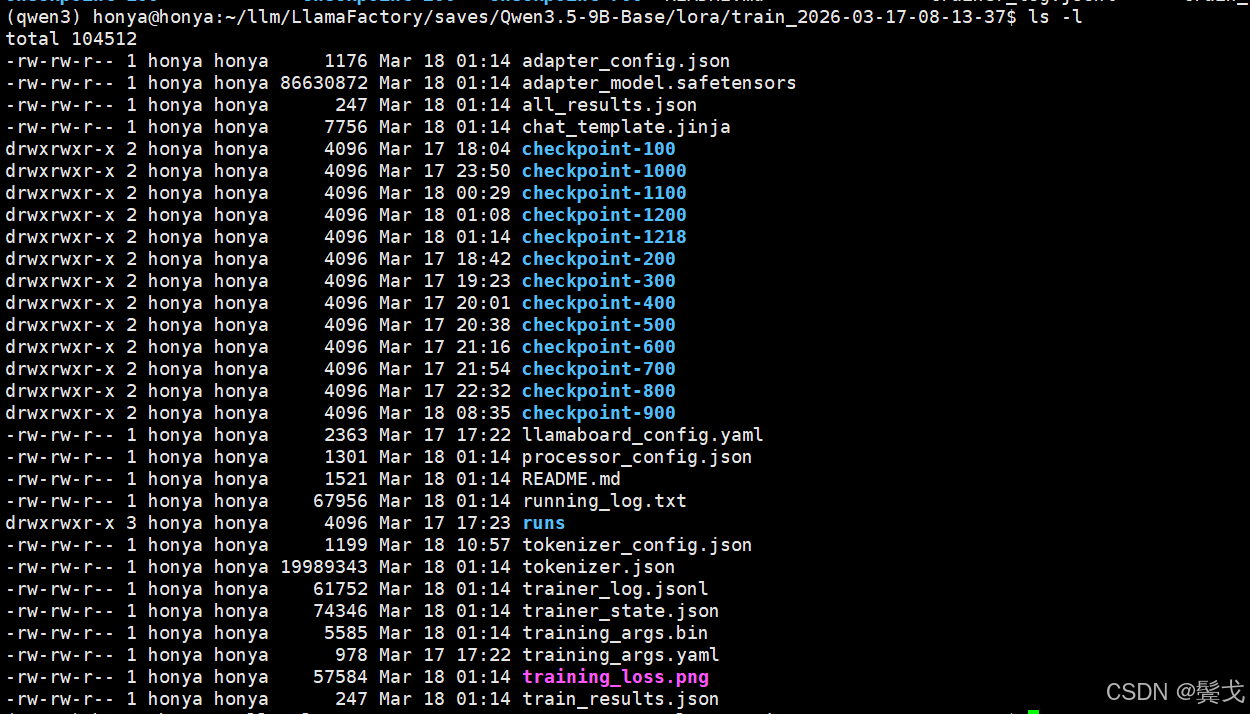
微调训练完成,在指定的Output dir目录下,有如下文件:
访问http://192.168.0.24:7860/, 选择"Export"版面,如下:
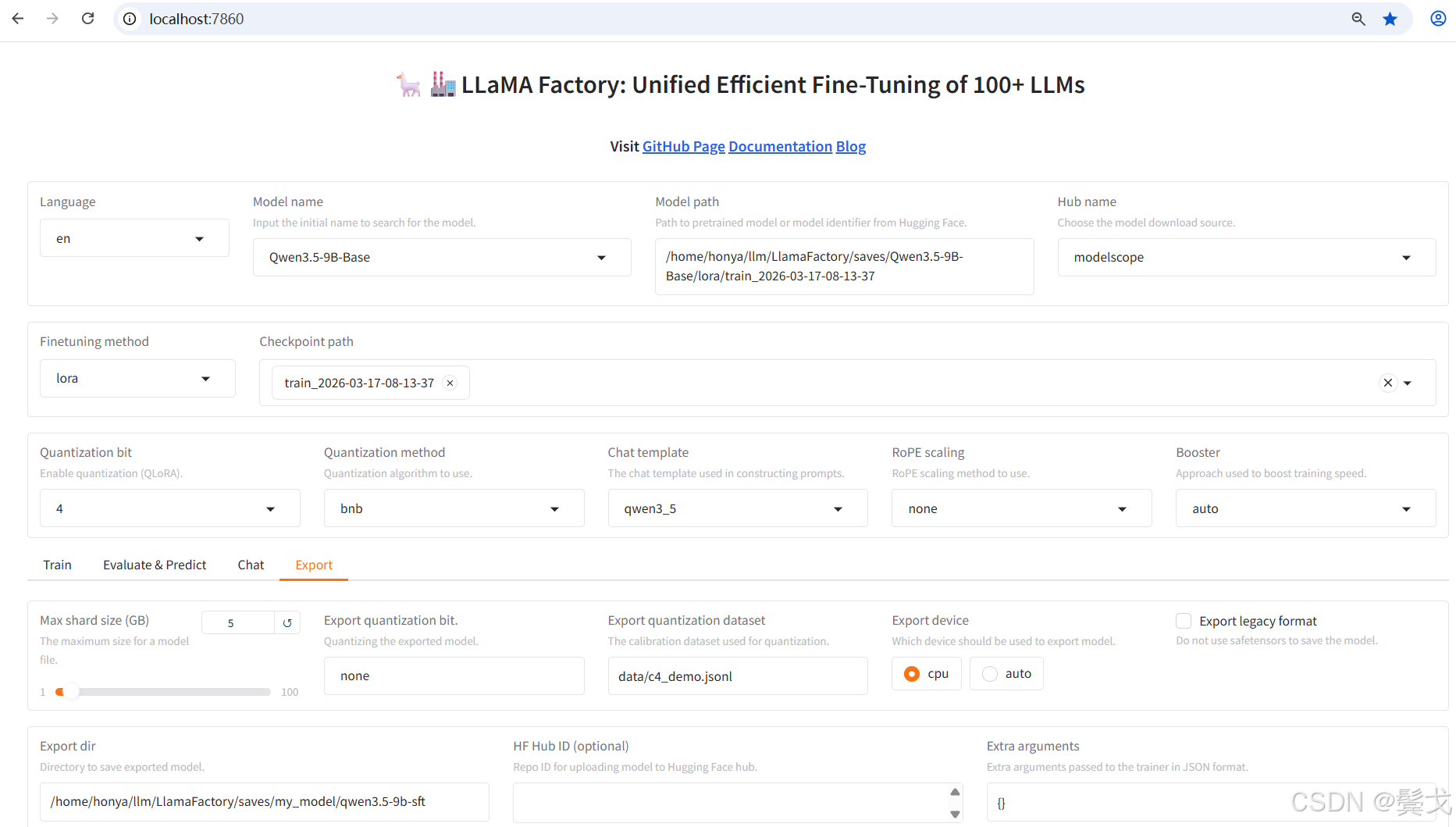

按上图"Export"就可以执行模型合并和导出,中间有很多错误,下面再具体说。
2. 命令行导出
其实习惯Linux系统上开发和运维的人,是喜欢编写脚本来操作的,如下:
vim export_model.sh
bash
#!/bin/bash

export DISABLE_VERSION_CHECK=1

llamafactory-cli export \
    --model_name_or_path /home/honya/.cache/modelscope/hub/models/Qwen/Qwen3.5-9B-Base \
    --adapter_name_or_path /home/honya/llm/LlamaFactory/saves/Qwen3.5-9B-Base/lora/train_2026-03-17-08-13-37 \
    --template qwen3 \
    --export_dir /home/honya/llm/LlamaFactory/saves/my_model/qwen3.5-9b-sft \
    --export_size 2 \
    --export_legacy_format False \
    --trust_remote_code
3. 执行中出现的错误
今天有强大的LLM chat, 有问题看错误日志,把错误日志截取去问AI好了,基本上都能解决。
File "/data/llm/qwen3/lib/python3.12/site-packages/transformers/models/auto/configuration_auto.py", line 1380, in from_pretrained raise ValueError( ValueError: Unrecognized model in /home/honya/llm/LlamaFactory/saves/Qwen3.5-9B-Base/lora/train_2026-03-17-08-13-37. Should have a `model_type` key in its config.json,
原因:开始把--model_name_or_path写成训练导出的目录了。
解决:下面2个地址要写清楚,不能反。
--model_name_or_path /home/honya/.cache/modelscope/hub/models/Qwen/Qwen3.5-9B-Base \
--adapter_name_or_path /home/honya/llm/LlamaFactory/saves/Qwen3.5-9B-Base/lora/train_2026-03-17-08-13-37 \
还有,界面上就没找到adapter_name_or_path这个选项,所以界面上执行总是不成功。
Traceback (most recent call last): File "/data/llm/qwen3/lib/python3.12/site-packages/transformers/models/auto/configuration_auto.py", line 1360, in from_pretrained config_class = CONFIG_MAPPINGconfig_dict\["model_type"] ~~~~~~~~~~~~~~^^^^^^^^^^^^^^^^^^^^^^^^^^^ File "/data/llm/qwen3/lib/python3.12/site-packages/transformers/models/auto/configuration_auto.py", line 1048, in getitem raise KeyError(key) KeyError: 'qwen3_5'
原因:开始选择的是 --template qwen3_5;
解决:改为qwen3。
File "/data/llm/LlamaFactory/src/llamafactory/model/loader.py", line 142, in load_model patch_config(config, tokenizer, model_args, init_kwargs, is_trainable) File "/data/llm/LlamaFactory/src/llamafactory/model/patcher.py", line 146, in patch_config configure_kv_cache(config, model_args, is_trainable) File "/data/llm/LlamaFactory/src/llamafactory/model/model_utils/kv_cache.py", line 33, in configure_kv_cache setattr(config.text_config, "use_cache", model_args.use_kv_cache) AttributeError: 'dict' object has no attribute 'use_cache'
原因:config.json中配置和库版本问题。
解决:执行命令加参数:
--trust_remote_code
Traceback (most recent call last): File "/data/llm/LlamaFactory/src/llamafactory/model/loader.py", line 79, in load_tokenizer tokenizer = AutoTokenizer.from_pretrained( ^^^^^^^^^^^^^^^^^^^^^^^^^^^^^^ File "/data/llm/qwen3/lib/python3.12/site-packages/transformers/models/auto/tokenization_auto.py", line 1153, in from_pretrained ValueError: Tokenizer class TokenizersBackend does not exist or is not currently imported.
原因:这个很扯淡,在webui上训练时,transformers不能用最新版本,我降了版本,但是低版本没有TokenizersBackend啊。
解决:pip install tokenizers --upgrade,直接安装到最新版本,最后就成功了:
transformers 5.3.0
成功的日志如下:
WARNING\|logging.py:330 2026-03-18 13:37:46,330 >> The fast path is not available because one of the required library is not installed. Falling back to torch implementation. To install follow https://github.com/fla-org/flash-linear-attention#installation and https://github.com/Dao-AILab/causal-conv1d Loading weights: 100%|████████████████████████████████████████████████████████████████████████████████████████████████| 760/760 00:03\<00:00, 234.64it/s INFO\|utils.py:410 2026-03-18 13:37:50,909 >> Generation config file not found, using a generation config created from the model config. INFO\|configuration_utils.py:965 2026-03-18 13:37:50,909 >> loading configuration file /home/honya/.cache/modelscope/hub/models/Qwen/Qwen3.5-9B-Base/config.json INFO\|configuration_utils.py:1014 2026-03-18 13:37:50,909 >> Generate config GenerationConfig {} INFO\|dynamic_module_utils.py:406 2026-03-18 13:37:50,910 >> Could not locate the custom_generate/generate.py inside /home/honya/.cache/modelscope/hub/models/Qwen/Qwen3.5-9B-Base. INFO\|2026-03-18 13:37:50 llamafactory.model.model_utils.attention:144 >> Using torch SDPA for faster training and inference. INFO\|2026-03-18 13:39:25 llamafactory.model.adapter:144 >> Merged 1 adapter(s). INFO\|2026-03-18 13:39:25 llamafactory.model.adapter:144 >> Loaded adapter(s): /home/honya/llm/LlamaFactory/saves/Qwen3.5-9B-Base/lora/train_2026-03-17-08-13-37 INFO\|2026-03-18 13:39:25 llamafactory.model.loader:144 >> all params: 9,409,813,744 INFO\|2026-03-18 13:39:25 llamafactory.train.tuner:144 >> Convert model dtype to: torch.bfloat16. INFO\|configuration_utils.py:434 2026-03-18 13:39:27,984 >> Configuration saved in /home/honya/llm/LlamaFactory/saves/my_model/qwen3.5-9b-sft/config.json INFO\|configuration_utils.py:803 2026-03-18 13:39:27,985 >> Configuration saved in /home/honya/llm/LlamaFactory/saves/my_model/qwen3.5-9b-sft/generation_config.json Writing model shards: 100%|██████████████████████████████████████████████████████████████████████████████████████████████| 10/10 00:58\<00:00, 5.86s/it INFO\|modeling_utils.py:3446 2026-03-18 13:40:26,659 >> The model is bigger than the maximum size per checkpoint (2GB) and is going to be split in 10 checkpoint shards. You can find where each parameters has been saved in the index located at /home/honya/llm/LlamaFactory/saves/my_model/qwen3.5-9b-sft/model.safetensors.index.json. INFO\|tokenization_utils_base.py:3258 2026-03-18 13:40:26,661 >> chat template saved in /home/honya/llm/LlamaFactory/saves/my_model/qwen3.5-9b-sft/chat_template.jinja INFO\|tokenization_utils_base.py:2091 2026-03-18 13:40:26,661 >> tokenizer config file saved in /home/honya/llm/LlamaFactory/saves/my_model/qwen3.5-9b-sft/tokenizer_config.json INFO\|tokenization_utils_base.py:3258 2026-03-18 13:40:26,942 >> chat template saved in /home/honya/llm/LlamaFactory/saves/my_model/qwen3.5-9b-sft/chat_template.jinja INFO\|tokenization_utils_base.py:2091 2026-03-18 13:40:26,954 >> tokenizer config file saved in /home/honya/llm/LlamaFactory/saves/my_model/qwen3.5-9b-sft/tokenizer_config.json INFO\|processing_utils.py:873 2026-03-18 13:40:28,623 >> processor saved in /home/honya/llm/LlamaFactory/saves/my_model/qwen3.5-9b-sft/processor_config.json INFO\|2026-03-18 13:40:28 llamafactory.train.tuner:144 >> Ollama modelfile saved in /home/honya/llm/LlamaFactory/saves/my_model/qwen3.5-9b-sft/Modelfile
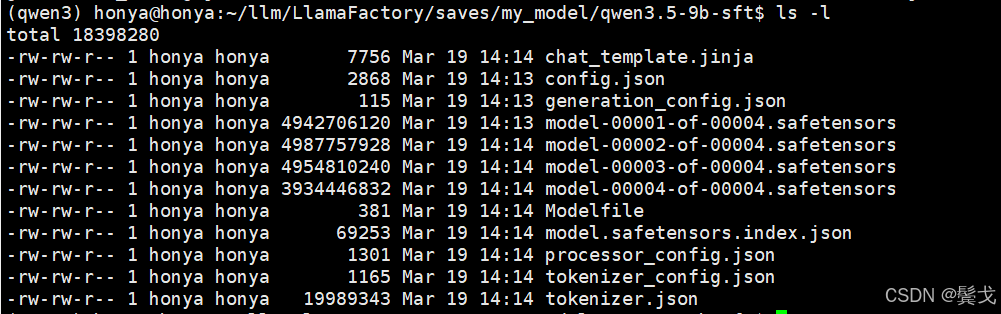
新导出的微调模型在这个目录下:
4. 部署
采用vLLM来部署刚导出的模型,新创建一个虚拟环境:
cd ~/llm
python3 -m venv vLLM
source ./vLLM/bin/activate
pip install vllm
pip list
由于cuda硬件是最新的,依赖库都用最新的,没出现什么错误。
编写一个启动脚本: vim run_vllm.sh
bash
#!/bin/bash


# 安装vLLM
# pip install vllm

# 启动服务
rm -f ./nohup_vllm.out

nohup python -m vllm.entrypoints.openai.api_server \
  --model /home/honya/llm/LlamaFactory/saves/my_model/qwen3.5-9b-sft \
  --served-model-name my-qwen3.5-9b-sft \
  --tensor-parallel-size 1 \
  --trust-remote-code \
  --max-model-len 65536 \
  --enable-auto-tool-choice \
  --tool-call-parser qwen3_xml \
  --port 38080 \
  --host 0.0.0.0 >./nohup_vllm.out 2>&1 &
要提供openapi兼容的服务接口,故需要vllm.entrypoints.openai.api_server,不要用网上说的默认的;
要主动设置模型id:--served-model-name my-qwen3.5-9b-sft
--max-model-len 65536 要足够大,如果是2048,openclaw连接会提示上下文窗口太小的错误,访问失败。
--model 设置的目录就是我们导出的新模型目录。
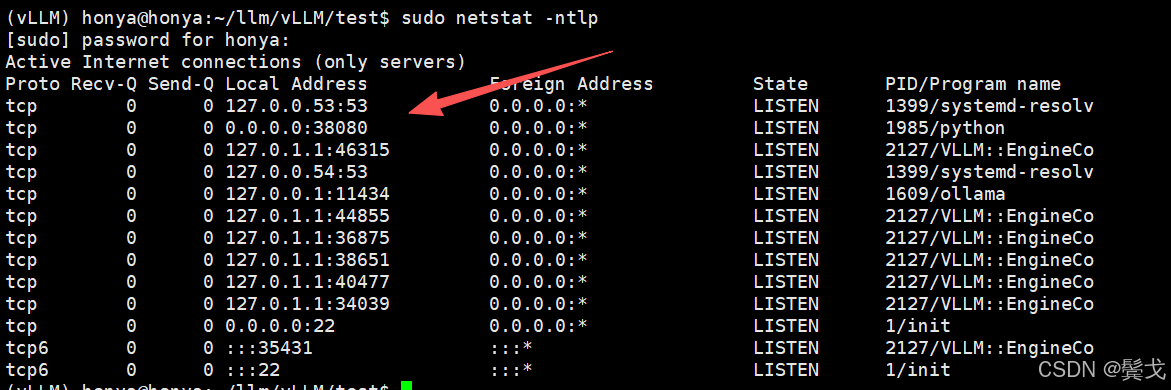
执行很慢,执行成功后会有38080端口侦听:
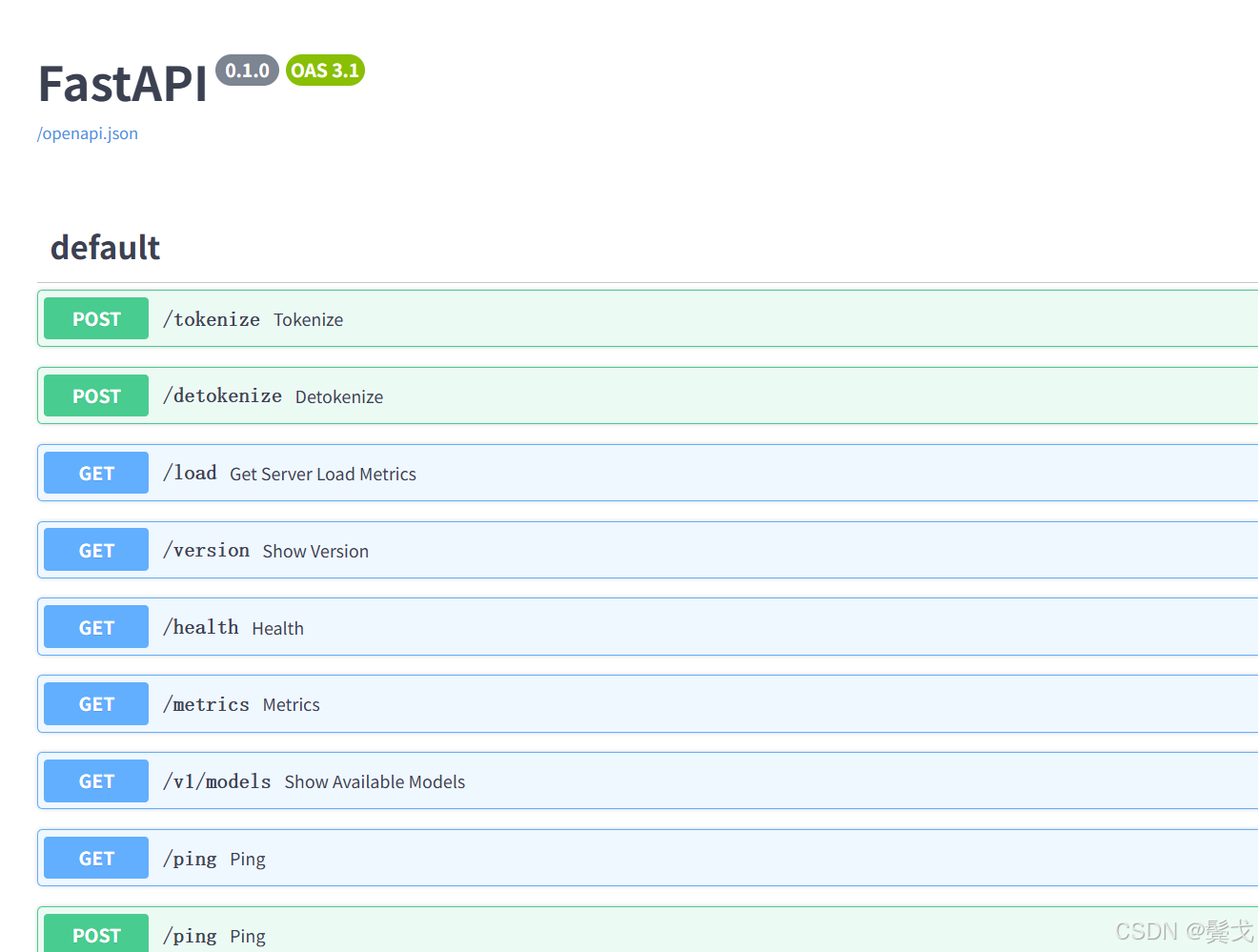
访问swagger文档:http://192.168.0.24:38080/docs
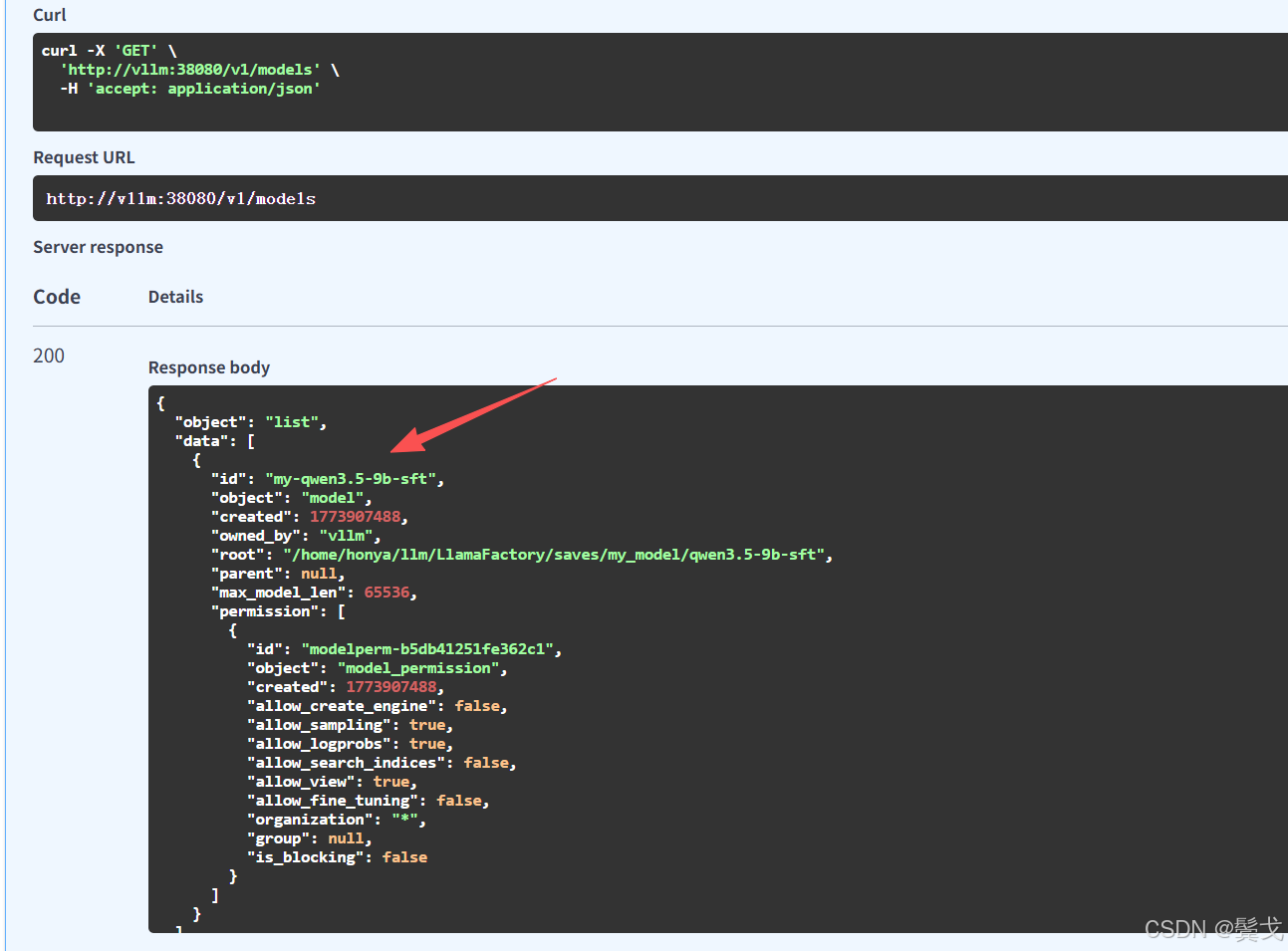
上面的id就是模型ID, 在openclaw配置接入时必须填写正确的。
5. 测试
5.1 编写脚本访问
python
#!/usr/bin/env python
# -*- coding: utf-8 -*-
import sys
import requests


def main():
    content = sys.argv[1]

    # 注意 URL 变成了 /v1/chat/completions
    url = "http://vllm:38080/v1/chat/completions"

    payload = {
        "model": "my-qwen3.5-9b-sft",  # 这里填你在 vLLM 启动时指定的模型名称
        "messages": [
            {"role": "user", "content": content}
        ],
        "max_tokens": 2048,
        "temperature": 0.7,  # 适当调高温度,让回答更自然
        "top_p": 0.9
    }

    resp = requests.post(url, json=payload)
    result = resp.json()

    # 解析 chat 接口的返回结构
    if "choices" in result and len(result["choices"]) > 0:
        print(result["choices"][0]["message"]["content"])
    else:
        print("Error:", result)


if __name__ == "__main__":
    main()
能正常聊天返回信息就是成功了。
5.2 openclaw接入
在.openclaw/openclaw.json添加配置:
"my-vllm": {
"baseUrl": "http://vllm:38080/v1",
"apiKey": "local-key",
"api": "openai-completions",
"models": [
{
"id": "my-qwen3.5-9b-sft",
"name": "Qwen3.5-9B-SFT",
"reasoning": false,
"input": [
"text"
],
"cost": {
"input": 0,
"output": 0,
"cacheRead": 0,
"cacheWrite": 0
},
"contextWindow": 32768,
"maxTokens": 32768
}
]
}
}
能在openclaw界面上聊天成功,就是接入成功了。