问题描述
生产过程中总会出现客服反馈,用户连接的时候出现黑屏问题,要排查问题比较麻烦,如果测试能复现还好,测试不能跟复现就很难有头绪了
解决方案
全链路埋点上报
因为整个连接过程中会涉及服务接口,信令服务,用户客户端,云测P2P服务器,所以逐个上报日志是不方便排查的,最好整合整个链路,连接的请求服务上面生成一个TraceID, 在后续的连接过程中,一步步传递这个ID,这个ID的链路最后通过接口来上报到服务侧
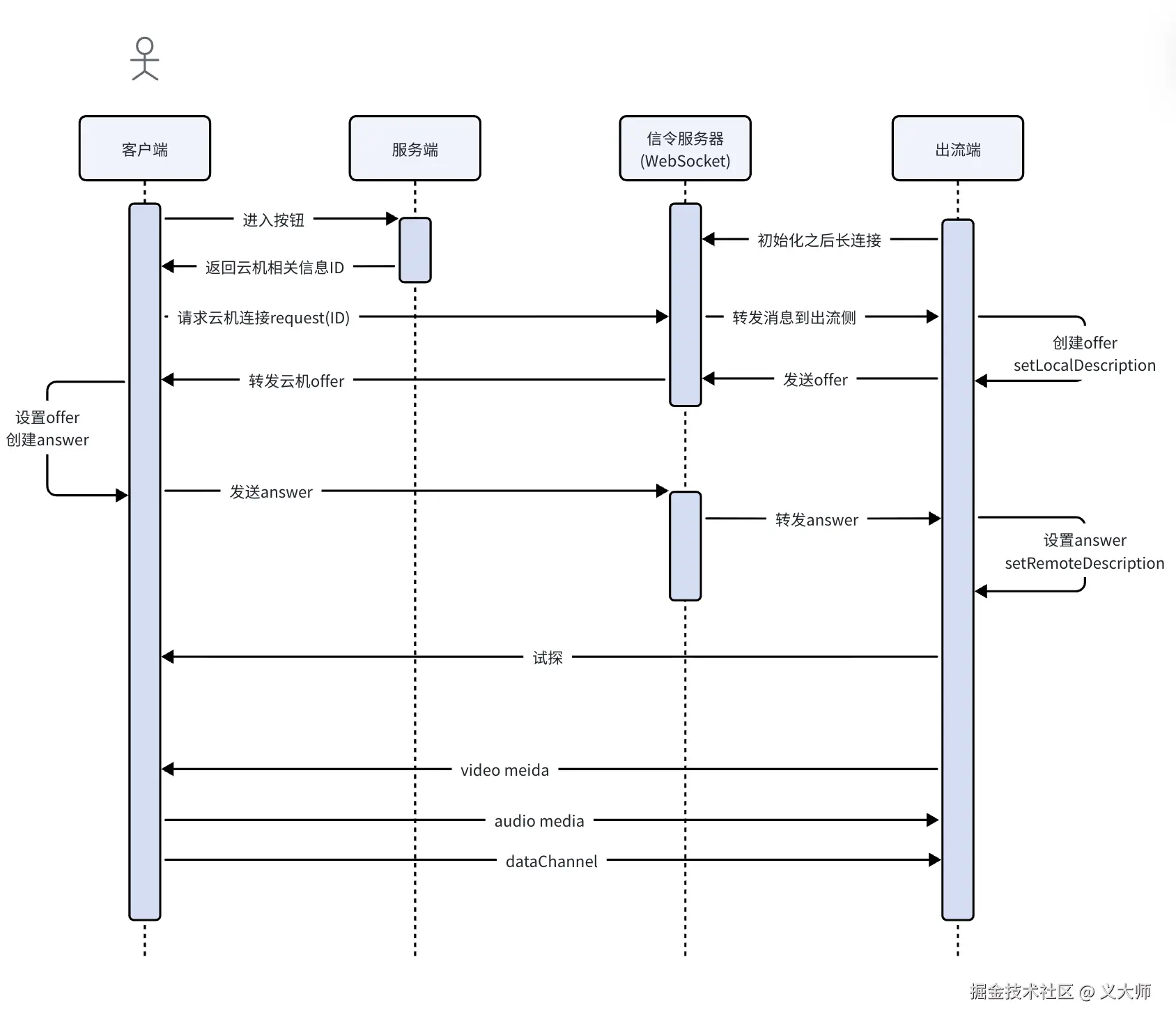
上面是我们一个简单的时序图,因为我这边出流端在服务器上面,有公网ip,所以这里跳过了一个stun打洞的流程。我们将预期的连接链路的链路打印一下
text
------------- 汇总流程 ---------------
TraceID: 1773995428832

连接链路:请求出流接口成功(190ms) => 信令通道建立成功, 开始发送拉流请求(178ms) => 云机响应拉流请求成功(offer), 开始协商流程(55ms) => 协商信息(sdp)设置成功,开始候选者流程(37ms) => 候选者逻辑完成,开始出流(100ms) => 视频出流正常,连接无异常(541ms) => 结束

------------- 连接结果 ---------------

总耗时:1119ms、连接结果:成功
代码实现
设计一个基础类,用于抽象收集链路信息
typescript
export class BaseInfo extends EventEmitter<PeerConnectionEventType> {
    public prometheus: Prometheus = new Prometheus();

    public phoneLinkInfo: Map<string, LinkLogMessage> = new Map();

    public iceGatherLog: string;

    public iceConnectionLog: string;

    public signalingLog: string;

    public websocketLogs: Array<string> = [];

    public sdpLog: string;

    public answerLog: string;

    public dataChannelLog: string;

    public candidatePair: string;

    constructor() {
        super();
        this.iceGatherLog = '';
        this.iceConnectionLog = '';
        this.signalingLog = '';
        this.sdpLog = '';
        this.answerLog = '';
        this.dataChannelLog = '';
        this.candidatePair = '';
    }

    public logBaseInfo = {
        peerOption: undefined as PeerOption | undefined,
        clientinfo: Util.getClientinfo(),
        sdkVersion: ''
    };

    setLinkBaseInfo(name: string, info: LinkLogMessage) {
        if (!info?.name) info.name = name;
        info.startTime = performance.now();
        this.phoneLinkInfo.set(name, info);
        info.currentTime = `${new Date().toLocaleString()}.${new Date().getMilliseconds().toString().padStart(3, '0')}`;
        this.emit('linkUpdate', info);

        if (typeof info.code === 'undefined') {
            info.timeObj = setTimeout(() => {
                info.code = -1;
                info.message = '等待超时';
                info.end = true;
                info.endTime = performance.now();
                info.currentTime = `${new Date().toLocaleString()}.${new Date().getMilliseconds().toString().padStart(3, '0')}`;
                if (info.startTime) info.spellTime = Math.round(info.endTime - info.startTime);
                this.emit('linkUpdate', info);
            }, info.timeout || 5000);
        }
    }

    setLInkResponse(name: string, response: LinkResponse) {
        const info = this.phoneLinkInfo.get(name);
        if (info) {
            if (info.timeObj) clearTimeout(info.timeObj);
            Object.assign(info, response);
            info.endTime = performance.now();
            info.currentTime = `${new Date().toLocaleString()}.${new Date().getMilliseconds().toString().padStart(3, '0')}`;
            if (info.startTime) info.spellTime = Math.round(info.endTime - info.startTime);
            if (info.name === 'VideoStatus' && typeof info.code !== 'undefined') info.end = true;
            this.emit('linkUpdate', info);
        }
    }

    getLinkInfoData() {
        const linkInfoArr = Array.from(this.phoneLinkInfo.values());
        let totalSpellTime;
        let isSuccess = false;
        const firstStep = linkInfoArr[0];
        const lastStep = linkInfoArr[linkInfoArr.length - 1];
        const lastEndTime = lastStep?.endTime;
        if (lastStep?.endTime && lastEndTime) {
            totalSpellTime = Math.round(lastStep.endTime - (firstStep?.startTime || 0));
        }

        if (lastStep.name === 'VideoStatus' && lastStep.code === 0) isSuccess = true;

        const linkRouter = linkInfoArr.reduce(function (acc, cur, index) {
            return `${acc + (cur?.message || String(cur?.title))}(${cur?.spellTime || '0'}ms) => ${cur.end ? '结束' : ''}`;
        }, '连接链路:');

        const failReason = isSuccess ? '' : lastStep.message;

        return {
            isSuccess,
            baseInfo: this.logBaseInfo,
            failReason,
            linkInfoArr,
            totalSpellTime,
            linkRouter,
            candidatePair: this.candidatePair
        };
    }

    getPeerCandidateInfo(pc: RTCPeerConnection) {
        const receives = pc.getReceivers();
        receives.forEach(receiver => {
            if (receiver.track.kind === 'audio') return;
            const transport = receiver.transport;
            transport?.iceTransport?.addEventListener('selectedcandidatepairchange', e => {
                const candidatePair = (transport.iceTransport as any).getSelectedCandidatePair();
                if (candidatePair) {
                    const local = candidatePair.local;
                    const remote = candidatePair.remote;
                    this.setLInkResponse('CandidateStatus', {
                        code: -1,
                        message: `候选者对:${local.address}:${local.port} <===> ${remote.address}:${remote.port}`
                    });
                    this.candidatePair = `${local.address}:${local.port} <===> ${remote.address}:${remote.port}`;
                }
            });
        });
    }
}

export default BaseInfo;
埋点示例
kotlin
   peerConnection.addEventListener('iceconnectionstatechange', () => {
            this.iceConnectionLog += ` -> ${peerConnection?.iceConnectionState}`;

            if (peerConnection.iceConnectionState === 'connected') {
                this.setLInkResponse('CandidateStatus', { code: 0, message: '候选者逻辑完成,开始出流' });
                this.setLinkBaseInfo('VideoStatus', { title: '视频流出流检测', desc: '该步骤用于检测是否有视频出流' });
                if (!this.#staticInterval) this.#staticInterval = setInterval(() => this.#initStaticDataGather(), 1000);
                this.handleVideoCodeToH264();
            } else if (peerConnection.iceConnectionState === 'disconnected') {
                if (Date.now() - this.#lastNegotiationTime > 3000) this.emit('Error', { code: PeerErrCode.ICEDisconnect, msg: '候选者连接断开,可能是网络波动断开' });
                this.setLInkResponse('CandidateStatus', { code: -1, message: `候选者(IP地址)连接异常,流程:${this.iceConnectionLog}`, end: true });
            } else {
                this.setLInkResponse('CandidateStatus', { code: -1, message: `候选者逻辑检查,${this.iceConnectionLog}` });
            }
        });
        peerConnection.addEventListener('icegatheringstatechange', () => {
            this.iceGatherLog += ` -> ${peerConnection?.iceGatheringState}`;
        });
        peerConnection.addEventListener('icecandidateerror', error => Log.warn('候选者警告', error));
        peerConnection.addEventListener('signalingstatechange', () => {
            this.signalingLog += ` -> ${peerConnection?.signalingState}`;
            if (peerConnection.signalingState === 'have-remote-offer') {
                this.setLInkResponse('SignalStatus', { code: -1, message: `信令流程行至${this.signalingLog}` });
            } else {
                this.setLInkResponse('SignalStatus', { code: -1, message: `信令流程出现变化${this.signalingLog}` });
            }
        });
实际效果
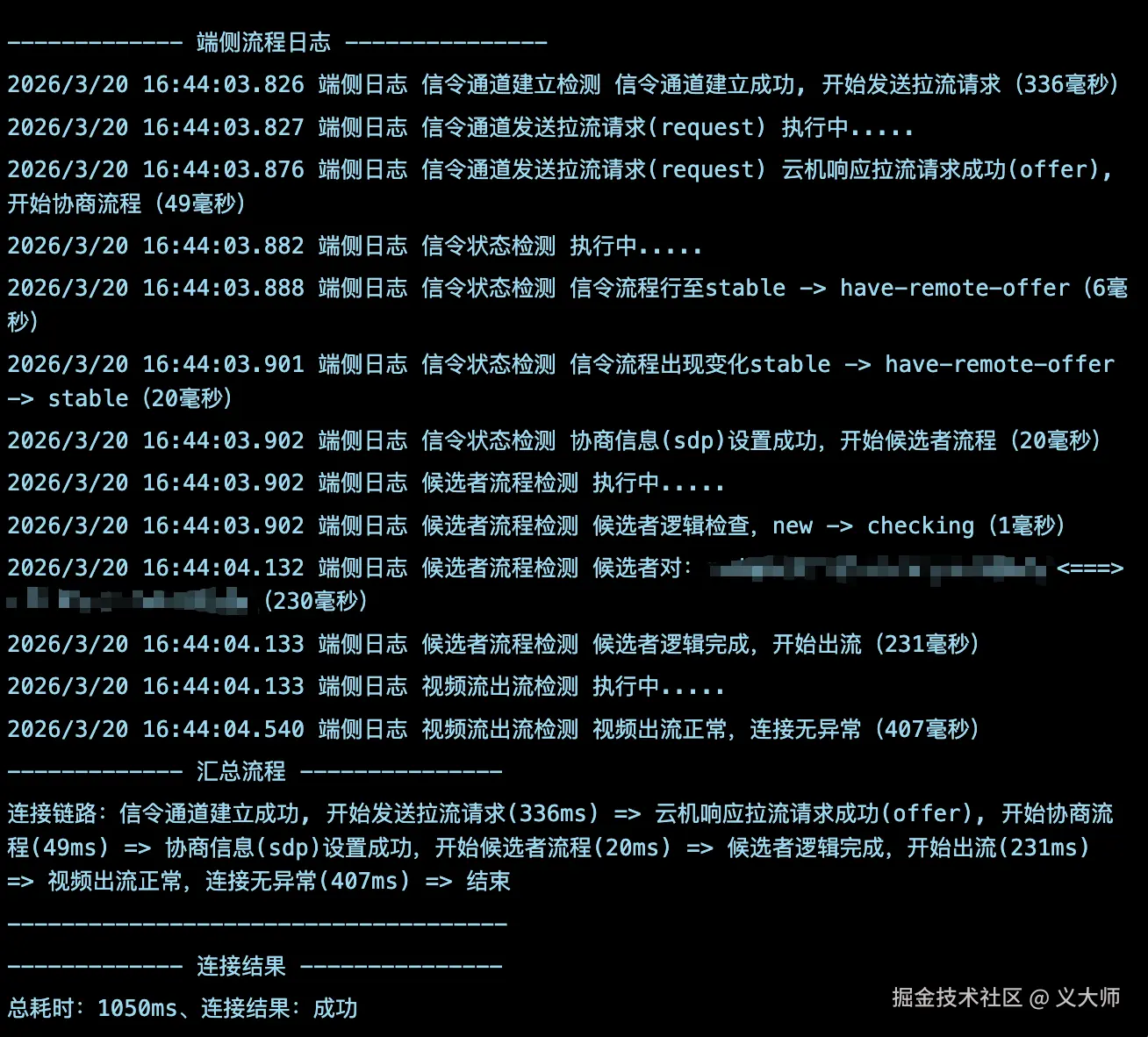
有了这些链路信息,我们就可以很好的分析用户的连接逻辑具体在哪一步出现问题了,并反馈给相应链路的人员去进一步跟踪问题