NodeJS极简后端服务
极简版本:纯前端页面 + Node.js 后端 API,没有任何鉴权、数据库或复杂逻辑,只有最基础的交互。
一、后端(Node.js + Express)
1. 初始化项目
bash
mkdir simple-app && cd simple-app
npm init -y
npm install express cors
2. 后端代码(server.js)
javascript
const express = require('express');
const cors = require('cors');
const path = require('path');

const app = express();
app.use(cors());
app.use(express.json());

// 模拟数据存储(内存中)
let todos = [
  { id: 1, text: '学习 Node.js', done: false },
  { id: 2, text: '写前端页面', done: true }
];

// ===== API 路由 =====

// 获取所有待办
app.get('/api/todos', (req, res) => {
  res.json(todos);
});

// 添加待办
app.post('/api/todos', (req, res) => {
  const todo = {
    id: Date.now(),
    text: req.body.text,
    done: false
  };
  todos.push(todo);
  res.json(todo);
});

// 切换完成状态
app.put('/api/todos/:id', (req, res) => {
  const todo = todos.find(t => t.id === parseInt(req.params.id));
  if (todo) {
    todo.done = !todo.done;
    res.json(todo);
  } else {
    res.status(404).json({ error: 'Not found' });
  }
});

// 删除待办
app.delete('/api/todos/:id', (req, res) => {
  todos = todos.filter(t => t.id !== parseInt(req.params.id));
  res.json({ success: true });
});

// 启动服务
app.listen(3000, () => {
  console.log('后端运行在 http://localhost:3000');
});
启动后端:
bash
node server.js二、前端页面(纯 HTML + JavaScript)
创建 index.html(直接双击打开,无需服务器):
html
<!DOCTYPE html>
<html lang="zh">
<head>
  <meta charset="UTF-8">
  <title>待办事项</title>
  <style>
    * { margin: 0; padding: 0; box-sizing: border-box; }
    body {
      font-family: -apple-system, BlinkMacSystemFont, 'Segoe UI', Roboto, sans-serif;
      background: #f5f5f5;
      padding: 40px 20px;
    }
    .container {
      max-width: 500px;
      margin: 0 auto;
      background: white;
      border-radius: 12px;
      box-shadow: 0 2px 10px rgba(0,0,0,0.1);
      padding: 30px;
    }
    h1 {
      text-align: center;
      color: #333;
      margin-bottom: 20px;
    }
    .input-box {
      display: flex;
      gap: 10px;
      margin-bottom: 20px;
    }
    input {
      flex: 1;
      padding: 12px 16px;
      border: 2px solid #e0e0e0;
      border-radius: 8px;
      font-size: 16px;
    }
    input:focus {
      outline: none;
      border-color: #4CAF50;
    }
    button {
      padding: 12px 24px;
      background: #4CAF50;
      color: white;
      border: none;
      border-radius: 8px;
      cursor: pointer;
      font-size: 16px;
    }
    button:hover {
      background: #45a049;
    }
    .todo-list {
      list-style: none;
    }
    .todo-item {
      display: flex;
      align-items: center;
      padding: 15px;
      border-bottom: 1px solid #f0f0f0;
      gap: 12px;
    }
    .todo-item:last-child {
      border-bottom: none;
    }
    .checkbox {
      width: 22px;
      height: 22px;
      cursor: pointer;
    }
    .todo-text {
      flex: 1;
      font-size: 16px;
    }
    .todo-text.done {
      text-decoration: line-through;
      color: #999;
    }
    .delete-btn {
      background: #ff4444;
      padding: 6px 12px;
      font-size: 14px;
    }
    .delete-btn:hover {
      background: #cc0000;
    }
    .loading {
      text-align: center;
      color: #999;
      padding: 20px;
    }
  </style>
</head>
<body>
  <div class="container">
    <h1>📝 待办事项</h1>

    <div class="input-box">
      <input type="text" id="todoInput" placeholder="输入待办事项..." />
      <button onclick="addTodo()">添加</button>
    </div>

    <ul class="todo-list" id="todoList">
      <div class="loading">加载中...</div>
    </ul>
  </div>

  <script>
    const API_URL = 'http://localhost:3000/api/todos';

    // 获取待办列表
    async function loadTodos() {
      const res = await fetch(API_URL);
      const todos = await res.json();
      renderTodos(todos);
    }

    // 渲染列表
    function renderTodos(todos) {
      const list = document.getElementById('todoList');
      if (todos.length === 0) {
        list.innerHTML = '<div class="loading">暂无待办事项</div>';
        return;
      }

      list.innerHTML = todos.map(todo => `
        <li class="todo-item">
          <input type="checkbox" class="checkbox"
            ${todo.done ? 'checked' : ''}
            onchange="toggleTodo(${todo.id})">
          <span class="todo-text ${todo.done ? 'done' : ''}">${todo.text}</span>
          <button class="delete-btn" onclick="deleteTodo(${todo.id})">删除</button>
        </li>
      `).join('');
    }

    // 添加待办
    async function addTodo() {
      const input = document.getElementById('todoInput');
      const text = input.value.trim();
      if (!text) return;

      await fetch(API_URL, {
        method: 'POST',
        headers: { 'Content-Type': 'application/json' },
        body: JSON.stringify({ text })
      });

      input.value = '';
      loadTodos();
    }

    // 切换状态
    async function toggleTodo(id) {
      await fetch(`${API_URL}/${id}`, { method: 'PUT' });
      loadTodos();
    }

    // 删除待办
    async function deleteTodo(id) {
      await fetch(`${API_URL}/${id}`, { method: 'DELETE' });
      loadTodos();
    }

    // 回车键添加
    document.getElementById('todoInput').addEventListener('keypress', (e) => {
      if (e.key === 'Enter') addTodo();
    });

    // 页面加载时获取数据
    loadTodos();
  </script>
</body>
</html>
三、运行步骤
bash
# 1. 启动后端(终端1)
node server.js
# 显示:后端运行在 http://localhost:3000

# 2. 打开前端
# 直接用浏览器打开 index.html 文件(双击即可)
# 或者用简易服务器:
npx serve .  # 需要安装:npm install -g serve
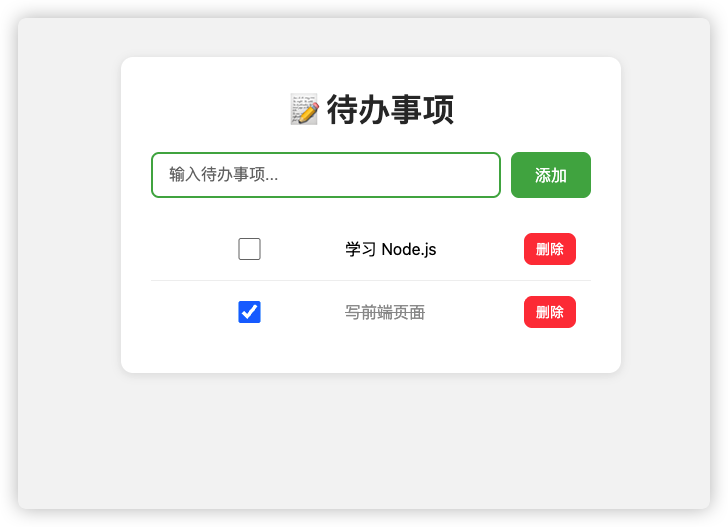
四、效果
- ✅ 添加待办 → POST
/api/todos - ✅ 勾选完成 → PUT
/api/todos/:id - ✅ 删除待办 → DELETE
/api/todos/:id - ✅ 页面自动刷新列表
极简架构:
前端 (HTML + fetch API)  ←→  后端 (Express + 内存数据)
     ↑___________________________________________↓
没有任何数据库、鉴权、TypeScript,纯 JavaScript 实现,适合快速原型开发!