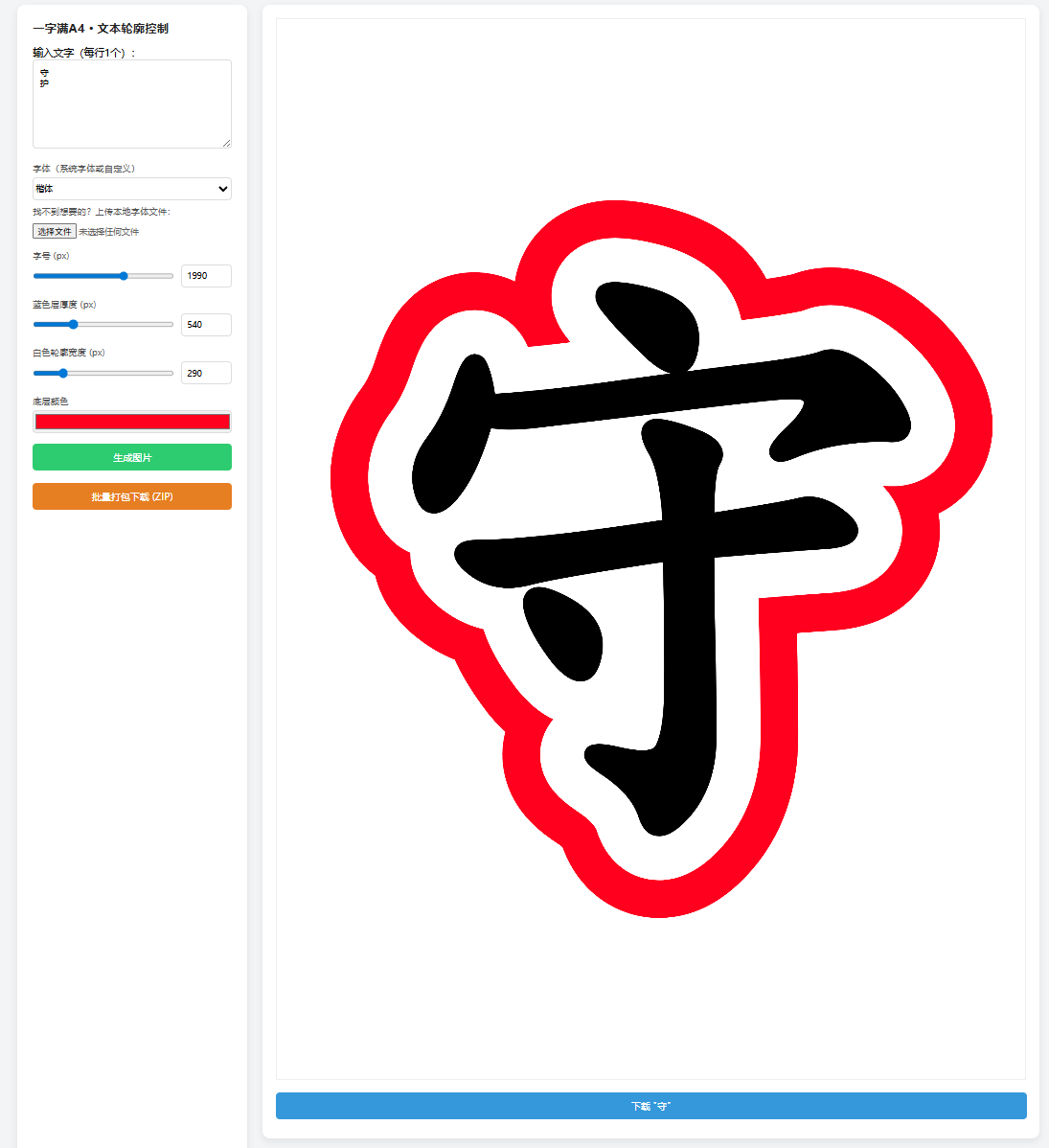
<!DOCTYPE html>
<html lang="zh-CN">
<head>
<meta charset="utf-8">
<title>一字满A4·文本轮廓控制</title>
<script src="https://cdnjs.cloudflare.com/ajax/libs/jszip/3.10.1/jszip.min.js"></script>
<style>
*{box-sizing:border-box;margin:0;padding:0;font-family:Microsoft YaHei,sans-serif}
body{background:#f2f4f6;padding:20px}
.container{display:flex;gap:24px;max-width:1600px;margin:0 auto}
.panel{width:360px;background:#fff;border-radius:12px;padding:24px;box-shadow:0 4px 12px rgba(0,0,0,.08)}
.panel h3{margin-bottom:16px;color:#222}
textarea{width:100%;height:140px;padding:10px;border:1px solid #ddd;border-radius:6px;resize:vertical;margin-bottom:16px}
.setting-item{margin-bottom:16px}
.setting-item label{display:block;margin-bottom:6px;font-size:14px;color:#555}
select,input[type=color]{width:100%;height:36px;border:1px solid #ddd;border-radius:6px}
.input-group { display: flex; gap: 10px; align-items: center; }
.input-group input[type=range] { flex: 1; cursor: pointer; }
.input-group input[type=number] { width: 80px; height: 36px; border: 1px solid #ddd; border-radius: 6px; padding: 0 8px; font-family: inherit; }
.file-upload { margin-top: 8px; font-size: 13px; color: #666; }
.file-upload input[type=file] { margin-top: 4px; border: none; padding: 0; height: auto; width: 100%; }
.btn{width:100%;height:42px;border:none;border-radius:6px;color:#fff;font-size:15px;cursor:pointer;margin-bottom:10px;transition: all 0.2s;}
.btn:hover{opacity: 0.9;}
.btn:disabled{opacity: 0.5; cursor: not-allowed;}
.btn.gen{background:#2ecc71}
.btn.dl{background:#3498db}
.btn.dl-all{background:#e67e22; margin-top: 10px;}
.preview-area{flex:1;display:flex;flex-direction:column;gap:20px}
.preview-card{background:#fff;border-radius:12px;padding:20px;box-shadow:0 4px 12px rgba(0,0,0,.08);text-align:center}
.preview-card canvas{max-width:100%;border:1px solid #eee;background:#fff;margin-bottom:16px}
</style>
</head>
<body>
<div class="container">
  <div class="panel">
    <h3>一字满A4 · 文本轮廓控制</h3>
    <label>输入文字(每行1个):</label>
    <textarea id="text">守
护
</textarea>

    <div class="setting-item">
      <label>字体(系统字体或自定义)</label>
      <select id="fontFamily"></select>
      <div class="file-upload">
        <label>找不到想要的?上传本地字体文件:</label>
        <input type="file" id="customFontFile" accept=".ttf,.otf,.woff,.woff2">
      </div>
    </div>

    <div class="setting-item">
      <label>字号 (px)</label>
      <div class="input-group">
        <input type="range" id="fontSizeRange" min="100" max="3000" value="1990">
        <input type="number" id="fontSizeNum" min="100" max="3000" value="1990">
      </div>
    </div>

    <div class="setting-item">
      <label>蓝色层厚度 (px)</label>
      <div class="input-group">
        <input type="range" id="outerWidthRange" min="0" max="2000" value="540">
        <input type="number" id="outerWidthNum" min="0" max="2000" value="540">
      </div>
    </div>

    <div class="setting-item">
      <label>白色轮廓宽度 (px)</label>
      <div class="input-group">
        <input type="range" id="middleWidthRange" min="0" max="1500" value="290">
        <input type="number" id="middleWidthNum" min="0" max="1500" value="290">
      </div>
    </div>

    <div class="setting-item">
      <label>底层颜色</label>
      <input type="color" id="outerColor" value="#ff001e">
    </div>

    <button class="btn gen" id="gen">生成图片</button>
    <button class="btn dl-all" id="dlAll" disabled>批量打包下载 (ZIP)</button>
  </div>

  <div class="preview-area" id="preview"></div>
</div>

<script>
// 全局变量,用于存储当前生成的画布数据,方便打包
let currentGeneratedData = [];

// --- 1. UI 双向绑定(滑动条与数字输入框) ---
const binds = [
  { range: 'fontSizeRange', num: 'fontSizeNum' },
  { range: 'outerWidthRange', num: 'outerWidthNum' },
  { range: 'middleWidthRange', num: 'middleWidthNum' }
];

binds.forEach(({ range, num }) => {
  const r = document.getElementById(range);
  const n = document.getElementById(num);
  r.addEventListener('input', () => n.value = r.value);
  n.addEventListener('change', () => {
    let val = Number(n.value);
    const min = Number(r.min), max = Number(r.max);
    if (val < min) val = min;
    if (val > max) val = max;
    n.value = val;
    r.value = val;
  });
});

// --- 2. 字体加载逻辑 ---
async function loadFonts(){
  const sel=document.getElementById('fontFamily');
  sel.innerHTML = '';
  const commonFonts = [
    "SimHei","Microsoft YaHei","KaiTi","SimSun","FangSong",
    "Arial","Times New Roman","微软雅黑","黑体","宋体","楷体","仿宋"
  ];
  let fontSet = new Set(commonFonts);
  try {
    if ('queryLocalFonts' in window) {
      const localFonts = await window.queryLocalFonts();
      localFonts.forEach(x => fontSet.add(x.family));
    }
  } catch(e) { console.warn("无法获取全部系统字体权限"); }

  const fontList = Array.from(fontSet).sort();
  fontList.forEach(f=>{
    const o=document.createElement('option');
    o.value=f; o.textContent=f; sel.appendChild(o);
  });
}

document.getElementById('customFontFile').addEventListener('change', async (e) => {
  const file = e.target.files[0];
  if (!file) return;
  try {
    const customFontName = 'CustomFont_' + Date.now();
    const arrayBuffer = await file.arrayBuffer();
    const customFont = new FontFace(customFontName, arrayBuffer);
    await customFont.load();
    document.fonts.add(customFont);

    const sel = document.getElementById('fontFamily');
    const opt = document.createElement('option');
    opt.value = customFontName;
    opt.textContent = `[自定义] ${file.name.split('.')[0]}`;
    sel.insertBefore(opt, sel.firstChild);
    sel.value = customFontName;
    alert(`自定义字体 "${file.name}" 加载成功!`);
  } catch (err) {
    alert('字体加载失败,请检查文件。');
  }
});

const A4_W = 2480, A4_H = 3508;

// --- 3. 核心渲染引擎 ---
function getSolidOutlineCanvas(text, opt, outlineWidth, colorHex) {
  const c = document.createElement('canvas');
  c.width = A4_W; c.height = A4_H;
  const g = c.getContext('2d');

  const fontSize = Math.max(100, Number(opt.fontSize));
  g.font = `bold ${fontSize}px "${opt.fontFamily}"`;
  const x = A4_W / 2, y = A4_H / 2;

  g.textAlign = 'center'; g.textBaseline = 'middle';
  g.lineJoin = 'round'; g.lineCap = 'round';

  g.fillStyle = '#000000';
  g.fillText(text, x, y);

  if (outlineWidth > 0) {
    g.strokeStyle = '#000000';
    g.lineWidth = outlineWidth;
    for(let offset = -0.5; offset <= 0.5; offset += 0.5) {
      g.strokeText(text, x + offset, y + offset);
    }
  }

  const imgData = g.getImageData(0, 0, A4_W, A4_H);
  const data = imgData.data;
  const width = A4_W, height = A4_H;

  const visited = new Uint8Array(width * height);
  const q = new Uint32Array(width * height);
  let head = 0, tail = 0;

  for (let x = 0; x < width; x++) {
    if (data[x * 4 + 3] === 0) { q[tail++] = x; visited[x] = 1; }
    const bottomIdx = (height - 1) * width + x;
    if (data[bottomIdx * 4 + 3] === 0) { q[tail++] = bottomIdx; visited[bottomIdx] = 1; }
  }
  for (let y = 0; y < height; y++) {
    const leftIdx = y * width;
    if (data[leftIdx * 4 + 3] === 0 && !visited[leftIdx]) { q[tail++] = leftIdx; visited[leftIdx] = 1; }
    const rightIdx = y * width + width - 1;
    if (data[rightIdx * 4 + 3] === 0 && !visited[rightIdx]) { q[tail++] = rightIdx; visited[rightIdx] = 1; }
  }

  while (head < tail) {
    const idx = q[head++];
    const cx = idx % width, cy = (idx / width) | 0;
    if (cy > 0) { const nIdx = idx - width; if (!visited[nIdx] && data[nIdx * 4 + 3] === 0) { visited[nIdx] = 1; q[tail++] = nIdx; } }
    if (cy < height - 1) { const nIdx = idx + width; if (!visited[nIdx] && data[nIdx * 4 + 3] === 0) { visited[nIdx] = 1; q[tail++] = nIdx; } }
    if (cx > 0) { const nIdx = idx - 1; if (!visited[nIdx] && data[nIdx * 4 + 3] === 0) { visited[nIdx] = 1; q[tail++] = nIdx; } }
    if (cx < width - 1) { const nIdx = idx + 1; if (!visited[nIdx] && data[nIdx * 4 + 3] === 0) { visited[nIdx] = 1; q[tail++] = nIdx; } }
  }

  let r_col = 255, g_col = 255, b_col = 255;
  if (colorHex && colorHex.startsWith('#') && colorHex.length === 7) {
    r_col = parseInt(colorHex.slice(1, 3), 16);
    g_col = parseInt(colorHex.slice(3, 5), 16);
    b_col = parseInt(colorHex.slice(5, 7), 16);
  }

  const radius = 3;
  for (let y = 0; y < height; y++) {
    for (let x = 0; x < width; x++) {
      const i = y * width + x;
      if (visited[i] === 0) {
        let alpha = data[i * 4 + 3];
        if (alpha === 0) {
          alpha = 255;
        } else if (alpha > 0 && alpha < 255) {
          let isOuterEdge = false;
          const minY = Math.max(0, y - radius), maxY = Math.min(height - 1, y + radius);
          const minX = Math.max(0, x - radius), maxX = Math.min(width - 1, x + radius);
          search: for (let cy = minY; cy <= maxY; cy++) {
            for (let cx = minX; cx <= maxX; cx++) {
              if (visited[cy * width + cx] === 1) { isOuterEdge = true; break search; }
            }
          }
          if (!isOuterEdge) alpha = 255;
        }
        data[i * 4] = r_col; data[i * 4 + 1] = g_col; data[i * 4 + 2] = b_col; data[i * 4 + 3] = alpha;
      } else {
        data[i * 4 + 3] = 0;
      }
    }
  }

  g.putImageData(imgData, 0, 0);
  return c;
}

function drawSolidText(text, opt) {
  const c = document.createElement('canvas');
  c.width = A4_W; c.height = A4_H;
  const g = c.getContext('2d');

  g.fillStyle = '#ffffff';
  g.fillRect(0, 0, A4_W, A4_H);

  const fontSize = Math.max(100, Number(opt.fontSize));
  const blueThickness = Math.max(0, Number(opt.outerWidth));
  const whiteOutlineWidth = Math.max(0, Number(opt.middleWidth));
  const blueColor = opt.outerColor;

  if (blueThickness > 0) {
    const blueLayer = getSolidOutlineCanvas(text, opt, blueThickness, blueColor);
    g.drawImage(blueLayer, 0, 0);
  }

  if (whiteOutlineWidth > 0) {
    const whiteLayer = getSolidOutlineCanvas(text, opt, whiteOutlineWidth, '#ffffff');
    g.drawImage(whiteLayer, 0, 0);
  }

  g.font = `bold ${fontSize}px "${opt.fontFamily}"`;
  g.textAlign = 'center'; g.textBaseline = 'middle';
  g.fillStyle = '#000000';
  g.fillText(text, A4_W / 2, A4_H / 2);

  return c;
}

function render(){
  const box = document.getElementById('preview');
  box.innerHTML = '';
  const lines = document.getElementById('text').value.split('\n').map(s=>s.trim()).filter(Boolean);

  const opt = {
    fontFamily: document.getElementById('fontFamily').value,
    fontSize: document.getElementById('fontSizeNum').value,
    outerWidth: document.getElementById('outerWidthNum').value,
    middleWidth: document.getElementById('middleWidthNum').value,
    outerColor: document.getElementById('outerColor').value
  };

  if (lines.length === 0) {
    alert('请输入至少一个文字!');
    return;
  }

  const genBtn = document.getElementById('gen');
  const dlAllBtn = document.getElementById('dlAll');

  genBtn.textContent = '生成中...';
  genBtn.disabled = true;
  dlAllBtn.disabled = true;

  // 清空之前的记录
  currentGeneratedData = [];

  setTimeout(() => {
    lines.forEach(txt => {
      const card = document.createElement('div');
      card.className = 'preview-card';
      const cv = drawSolidText(txt, opt);

      // 保存到全局数组,供打包下载使用
      currentGeneratedData.push({ text: txt, canvas: cv });

      const d = document.createElement('button');
      d.className = 'btn dl';
      d.textContent = `下载 "${txt}"`;
      d.onclick = () => {
        const a = document.createElement('a');
        a.download = `${txt}_A4.png`;
        a.href = cv.toDataURL('image/png', 1.0);
        a.click();
      };

      card.appendChild(cv);
      card.appendChild(d);
      box.appendChild(card);
    });

    genBtn.textContent = '生成图片';
    genBtn.disabled = false;

    // 如果有生成内容,启用批量下载按钮
    if(currentGeneratedData.length > 0) {
      dlAllBtn.disabled = false;
    }
  }, 50);
}

// --- 4. 批量打包 ZIP 下载功能 ---
document.getElementById('dlAll').addEventListener('click', async () => {
  if(currentGeneratedData.length === 0) return;

  const btn = document.getElementById('dlAll');
  btn.textContent = '正在打包,请稍候...';
  btn.disabled = true;

  try {
    const zip = new JSZip();

    // 将所有 canvas 转换为 Blob 并塞入压缩包
    const promises = currentGeneratedData.map((item, index) => {
      return new Promise((resolve) => {
        item.canvas.toBlob((blob) => {
          // 给文件名加上序号,防止用户输入了重复的文字导致文件被覆盖
          const fileName = `${String(index + 1).padStart(3, '0')}_${item.text}_A4.png`;
          zip.file(fileName, blob);
          resolve();
        }, 'image/png', 1.0);
      });
    });

    await Promise.all(promises);

    // 生成 ZIP 文件并触发下载
    const content = await zip.generateAsync({ type: 'blob' });
    const url = URL.createObjectURL(content);

    const a = document.createElement('a');
    a.href = url;
    a.download = `批量文字A4打印图_${new Date().getTime()}.zip`;
    a.click();

    URL.revokeObjectURL(url); // 清理内存
  } catch (error) {
    console.error("打包失败:", error);
    alert("打包下载过程中出现错误,请检查控制台。");
  } finally {
    btn.textContent = '批量打包下载 (ZIP)';
    btn.disabled = false;
  }
});

document.getElementById('gen').onclick = render;
window.addEventListener('load',async ()=>{
  await loadFonts();
  render();
});
</script>
</body>
</html>