区域(Region)
在Prism中,引入了一个新的概念,叫Region(区域)。
Region 可以理解为 WPF 界面上的 "占位容器",可以把不同的 View(视图)动态加载到这个容器中,无需在 XAML 中硬编码绑定,这是 Prism 实现模块化、松耦合 UI 的关键。
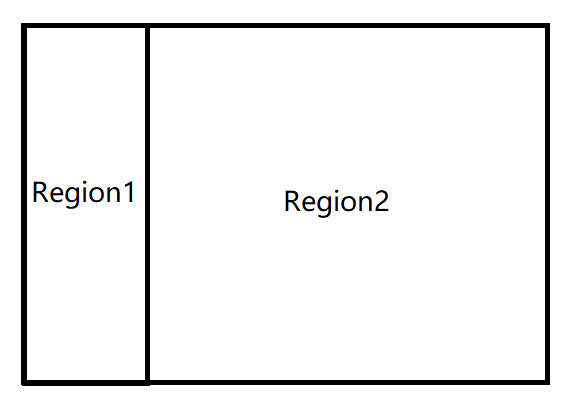
假设我们定义了两个Region,分别为Region1和Region2。
我们可以动态加载View(视图)到这两个Region里。
肯定有小伙伴会问,在WPF中,Frame控件也可以实现导航的功能,
是的,所以这里我们对比一下Frame和Region的区别
| 对比维度 | Frame(WPF原生) | Region(Prism) |
|---|---|---|
| 核心定位 | 页面(Page)导航控件 | 任意View的动态加载/切换容器 |
| 支持的视图类型 | 仅支持Page类型 |
支持任意UIElement(UserControl、Grid等) |
| 导航方式 | 基于XAML文件路径(如frame.Navigate(new Uri("Page1.xaml", UriKind.Relative))) |
基于View名称/类型(松耦合,无硬编码路径) |
| 模块化支持 | 弱,需手动管理页面与模块的关联 | 强,与Prism Module深度集成,天然支持模块化 |
| 生命周期 | 仅简单的导航事件(Navigated、Navigating) | 完整的导航生命周期(INavigationAware接口) |
| 多视图管理 | 仅支持单页面显示,无多视图激活/切换机制 | 支持多视图(TabControl/ItemsControl作为Region),可激活/停用指定View |
| 依赖注入 | 原生不支持,需手动实例化Page并传参 | 与Prism容器(Unity/DryIoc)深度集成,自动注入ViewModel/服务 |
| 参数传递 | 仅支持简单对象传参(Navigate的object参数) | 支持强类型参数(NavigationParameters),可在生命周期中获取 |
| 复用性 | 页面实例默认每次导航重建(可手动缓存) | 可通过IsNavigationTarget控制View实例复用 |
如何创建Region
1、引入Prism命名空间
1 xmlns:prism="http://prismlibrary.com/"2、增加一个ContentControl
使用RegionManager.RegionName附加属性给区域命名
1 <ContentControl prism:RegionManager.RegionName="ContentRegion" />完整代码如下所示
1 <Window x:Class="Regions.Views.MainWindow"
2         xmlns="http://schemas.microsoft.com/winfx/2006/xaml/presentation"
3         xmlns:x="http://schemas.microsoft.com/winfx/2006/xaml"
4         xmlns:prism="http://prismlibrary.com/"
5         Title="Shell" Height="350" Width="525">
6     <Grid>
7         <ContentControl prism:RegionManager.RegionName="ContentRegion" />
8     </Grid>
9 </Window>
如何实现区域导航
在前面介绍Bootstrapper启动器时,我们提到了Prism提供的一些服务,
其中就包括了IRegionManager:管理视图区域(Region),它能实现视图的动态加载 / 切换;
只需要通过构造函数注入IRegionManager,就可以使用IRegionManager接口进行区域导航
如下所示
1 public class MainWindowViewModel : BindableBase
2 {
3     private readonly IRegionManager regionManager;
4
5     public MainWindowViewModel(IRegionManager regionManager)
6     {
7         this.regionManager = regionManager;
8     }
9 }IRegionManager提供了RequestNavigate函数用于导航 ,RequestNavigate有多种重载,较为完整的一种重载定义如下
1  /// <summary>
2  /// 此方法允许IRegionManager定位指定区域,并在其中导航至指定的目标URI,同时传递一个导航回调函数和一个NavigationParameters实例,该实例包含一组对象参数。
3  /// </summary>
4  /// <param name="regionName">区域名称</param>
5  /// <param name="target">一个表示区域将导航到的目标的URI。</param>
6  /// <param name="navigationCallback">导航完成后将执行的导航回调函数。</param>
7  /// <param name="navigationParameters">一个NavigationParameters实例,其中包含一组对象参数。</param>
8  void RequestNavigate(string regionName, Uri target, Action<NavigationResult> navigationCallback, INavigationParameters navigationParameters);
接下来我们演示一下
1、首先我们定义主界面,在界面顶部放置两个按钮,用于导航。然后在中间放置一个ContentControl,用于动态显示内容。
我们使用RegionManager.RegionName附加属性给区域命名
MainWindow.xaml
 1 <Grid>
 2     <Grid.RowDefinitions>
 3         <RowDefinition Height="60"/>
 4         <RowDefinition/>
 5     </Grid.RowDefinitions>
 6
 7     <StackPanel Orientation="Horizontal">
 8         <Button Content="切换到ViewA" Width="88" Height="28" Margin="10" VerticalAlignment="Center" Command="{Binding NavigationToViewCommand}" CommandParameter="ViewA"></Button>
 9         <Button Content="切换到ViewB" Width="88" Height="28" Margin="10" VerticalAlignment="Center" Command="{Binding NavigationToViewCommand}" CommandParameter="ViewB"></Button>
10     </StackPanel>
11
12     <ContentControl Grid.Row="1" prism:RegionManager.RegionName="NavigationArea"></ContentControl>
13 </Grid>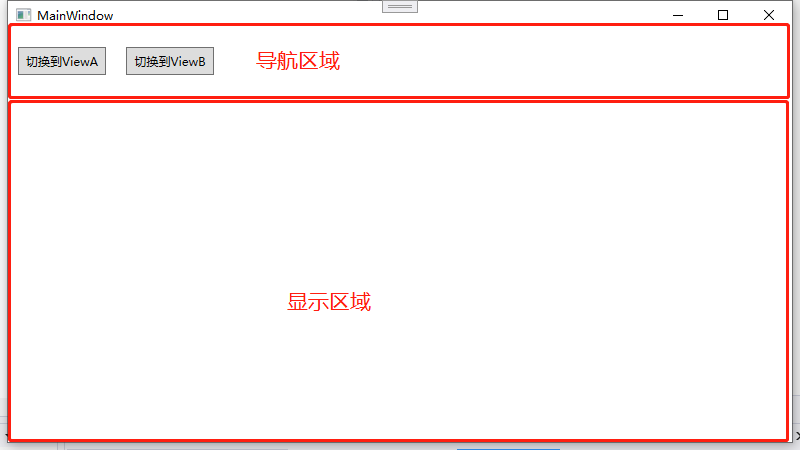
2、然后我们定义两个用户控件,命名为ViewA和ViewB,并分别创建对应的ViewModel
ViewA.xaml
 1 <UserControl x:Class="_14_Prism_Region.Views.ViewA"
 2              xmlns="http://schemas.microsoft.com/winfx/2006/xaml/presentation"
 3              xmlns:x="http://schemas.microsoft.com/winfx/2006/xaml"
 4              xmlns:mc="http://schemas.openxmlformats.org/markup-compatibility/2006"
 5              xmlns:d="http://schemas.microsoft.com/expression/blend/2008"
 6              xmlns:local="clr-namespace:_14_Prism_Region.Views"
 7              mc:Ignorable="d"
 8              d:DesignHeight="450" d:DesignWidth="800">
 9     <Grid>
10         <TextBlock Text="{Binding ViewName}" HorizontalAlignment="Center" VerticalAlignment="Center" FontSize="30"></TextBlock>
11     </Grid>
12 </UserControl>
ViewAViewModel.cs
 1 public class ViewAViewModel : BindableBase
 2 {
 3     private string viewName = "ViewA";
 4
 5     public string ViewName
 6     {
 7         get => this.viewName;
 8         set => SetProperty(ref this.viewName, value);
 9     }
10 }
ViewB.xaml
 1 <UserControl x:Class="_14_Prism_Region.Views.ViewB"
 2              xmlns="http://schemas.microsoft.com/winfx/2006/xaml/presentation"
 3              xmlns:x="http://schemas.microsoft.com/winfx/2006/xaml"
 4              xmlns:mc="http://schemas.openxmlformats.org/markup-compatibility/2006"
 5              xmlns:d="http://schemas.microsoft.com/expression/blend/2008"
 6              xmlns:local="clr-namespace:_14_Prism_Region.Views"
 7              mc:Ignorable="d"
 8              d:DesignHeight="450" d:DesignWidth="800">
 9     <Grid>
10         <TextBlock Text="{Binding ViewName}" HorizontalAlignment="Center" VerticalAlignment="Center" FontSize="30"></TextBlock>
11     </Grid>
12 </UserControl>
ViewBViewModel.cs
 1  public class ViewBViewModel : BindableBase
 2  {
 3      private string viewName = "ViewB";
 4
 5      public string ViewName
 6      {
 7          get => this.viewName;
 8          set => SetProperty(ref this.viewName, value);
 9      }
10 }3、然后我们在Bootstrapper中注册需要进行导航的View,这一步很关键
这里可以只注册View,然后通过ViewModelLocator.AutoWireViewModel自动绑定ViewModel
1 containerRegistry.RegisterForNavigation<ViewA>();
2 containerRegistry.RegisterForNavigation<ViewB>();
也可以在注册View的时候,同步绑定ViewModel(推荐)
1 containerRegistry.RegisterForNavigation<ViewA, ViewAViewModel>();
2 containerRegistry.RegisterForNavigation<ViewB, ViewBViewModel>();4、此时我们就可以在MainWindowViewModel中进行动态导航
MainWindowViewModel.cs
 1  public class MainWindowViewModel : BindableBase
 2  {
 3      private IRegionManager regionManager;
 4
 5      public DelegateCommand<string> NavigationToViewCommand { get; private set; }
 6
 7
 8      public MainWindowViewModel(IRegionManager regionManager)
 9      {
10          //构造函数注入IRegionManager
11          this.regionManager = regionManager;
12
13          NavigationToViewCommand = new DelegateCommand<string>(NavigationToView);
14      }
15
16      private void NavigationToView(string viewName)
17      {
18          //导航
19          this.regionManager.RequestNavigate("NavigationArea", viewName);
20      }
21  }
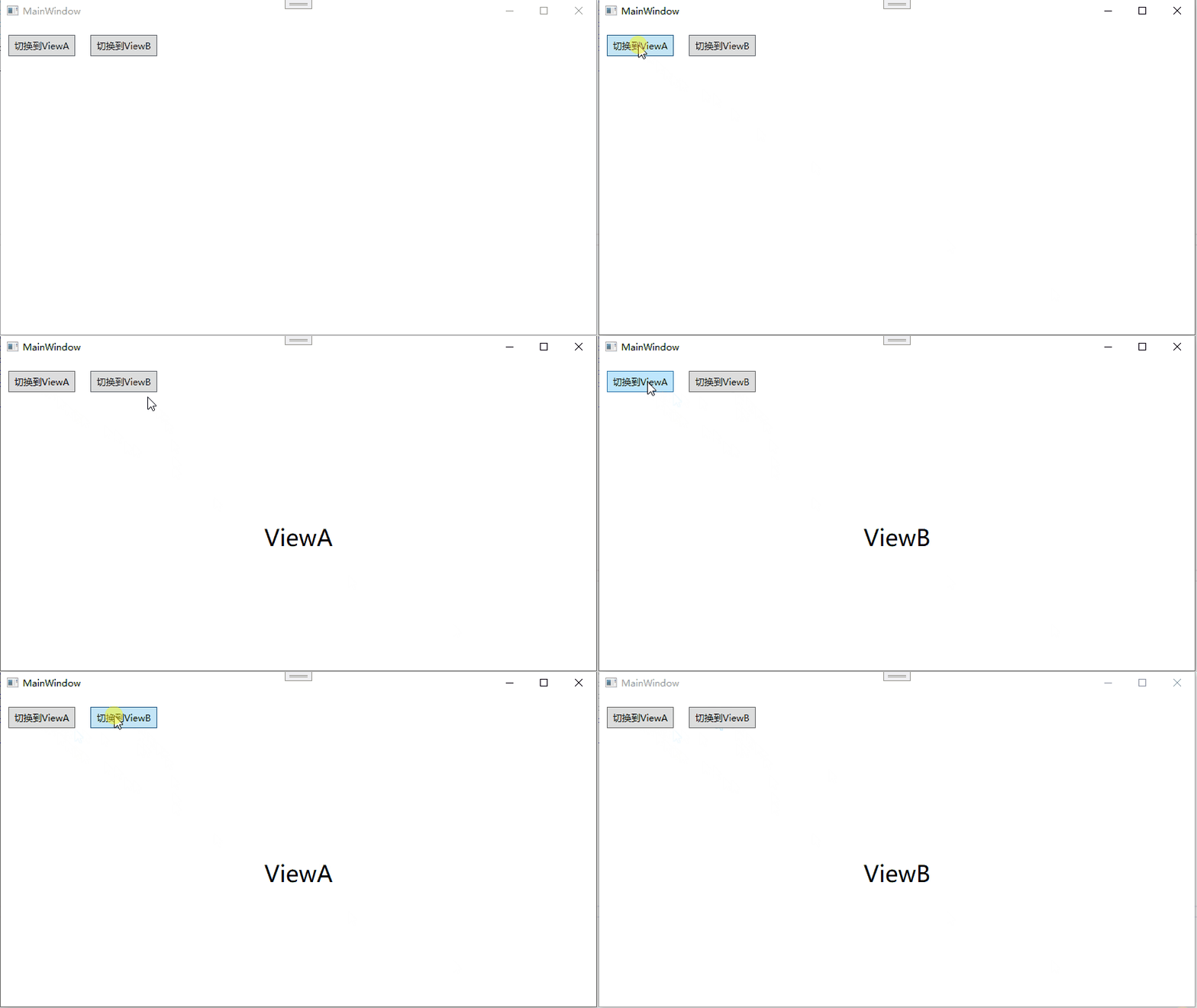
运行效果
如何设置默认视图
如果我们想给某个区域设置默认设置,可以在Bootstrapper里重写OnInitialized函数,然后从容器中解析IRegionManager,再手动导航到指定的视图即可
 1  public class Bootstrapper : PrismBootstrapper
 2  {
 3      protected override DependencyObject CreateShell()
 4      {
 5          return Container.Resolve<MainWindow>();
 6      }
 7
 8      protected override void RegisterTypes(IContainerRegistry containerRegistry)
 9      {
10          containerRegistry.RegisterForNavigation<ViewA, ViewAViewModel>();
11          containerRegistry.RegisterForNavigation<ViewB, ViewBViewModel>();
12      }
13
14      protected override void OnInitialized()
15      {
16          base.OnInitialized();
17
18          //设置默认视图
19          var regionManager = this.Container.Resolve<IRegionManager>();
20          regionManager.RequestNavigate("NavigationArea", nameof(ViewA));
21      }
22 }也可以使用IRegionManager提供的 RegisterViewWithRegion函数,初始化时,给区域绑定一个默认视图。
1 regionManager.RegisterViewWithRegion("NavigationArea", typeof(ViewA));导航通知
如果我们想在导航完成后,或者导航离开时,做出一些响应,应该如何处理呢?
Prism提供了INavigationAware接口,它为参与导航的对象提供了一种获取导航活动通知的方式。
定义如下:
 1 //
 2 // 摘要:
 3 //     提供了一种方式,使参与导航的对象能够接收到导航的通知
 4 //     activities.
 5 public interface INavigationAware
 6 {
 7     //
 8     // 摘要:
 9     //     被导航到时调用。
10     //
11     // 参数:
12     //   navigationContext:
13     //     The navigation context.
14     void OnNavigatedTo(NavigationContext navigationContext);
15
16     //
17     // 摘要:
18     //     被调用以确定此实例是否能够处理导航请求。(是否创建新实例)
19     //
20     // 参数:
21     //   navigationContext:
22     //     The navigation context.
23     //
24     // 返回结果:
25     //     true if this instance accepts the navigation request; otherwise, false.
26     bool IsNavigationTarget(NavigationContext navigationContext);
27
28     //
29     // 摘要:
30     //     被导航离开时调用。
31     //
32     // 参数:
33     //   navigationContext:
34     //     The navigation context.
35     void OnNavigatedFrom(NavigationContext navigationContext);
36 }我们只需要将需要处理导航事件View绑定的ViewModel继承自INavigationAware接口,然后做出相应的实现即可
 1  public class ViewAViewModel : BindableBase, INavigationAware
 2   {
 3       ...
 4
 5       public void OnNavigatedTo(NavigationContext navigationContext)
 6       {
 7           //导航进入
 8       }
 9
10        public bool IsNavigationTarget(NavigationContext navigationContext)
11        {
12             //仅当目标区域中已存在该视图的实例,且再次导航到该视图类型时触发。
13             //返回 true:复用已存在的视图实例(不创建新实例,仅调用 OnNavigatedTo 更新数据)。
14             //返回 false:销毁已存在的视图实例,创建新的视图实例并导航到它。
15            return true;
16        }
17
18        public void OnNavigatedFrom(NavigationContext navigationContext)
19        {
20            //导航离开
21        }
22
23        ...
24    }
如何在区域导航时传递参数
这里主要用到IRegionManager.RequestNavigate的重载,如下所示
1 void RequestNavigate(string regionName, string target, NavigationParameters navigationParameters);其中NavigationParameters是IEnumerable<keyvaluepair<string, object>>类型,也就是一个键值对列表
NavigationParameters使用方法如下所示:
1 NavigationParameters keyValuePairs = new NavigationParameters();
2 keyValuePairs.Add("key", value);
下面介绍一下如何实现区域导航时传递参数
1、为了方便演示,我们定义一个数据模型ImageItem(方便演示,没有定义成可通知类型)
1  public class ImageItem
2  {
3      public string Name { get; set; }
4
5      public string Image { get; set; }
6  }
2、然后在ViewList中增加一个ListBox,
当ListBox选中项时,再点切换到ViewDetail,就可以在ViewDetail显示ListBox选中的项。
ViewList.xaml
 1 <Grid>
 2     <ListBox ItemsSource="{Binding ImageList}">
 3         <i:Interaction.Triggers>
 4             <i:EventTrigger EventName="SelectionChanged">
 5                 <i:InvokeCommandAction Command="{Binding SelectImageItemCommand}" CommandParameter="{Binding RelativeSource={RelativeSource Mode=FindAncestor,AncestorType=ListBox},Path=SelectedItem}"></i:InvokeCommandAction>
 6             </i:EventTrigger>
 7         </i:Interaction.Triggers>
 8         <ListBox.ItemTemplate>
 9             <DataTemplate>
10                 <Grid Height="300" Width="400" Margin="10">
11                     <Grid.RowDefinitions>
12                         <RowDefinition/>
13                         <RowDefinition Height="30"/>
14                     </Grid.RowDefinitions>
15
16                     <Image Source="{Binding Image}"></Image>
17                     <Label Content="{Binding Name}" Grid.Row="1" HorizontalAlignment="Center" VerticalAlignment="Center" FontWeight="Bold"/>
18                 </Grid>
19             </DataTemplate>
20         </ListBox.ItemTemplate>
21     </ListBox>
22
23 </Grid>
ViewListViewModel.cs
 1   public class ViewListViewModel : BindableBase
 2   {
 3       private IRegionManager regionManager;
 4       private ObservableCollection<ImageItem> imageList;
 5
 6       public DelegateCommand<ImageItem> SelectImageItemCommand { get; private set; }
 7
 8       public ObservableCollection<ImageItem> ImageList
 9       {
10           get => this.imageList;
11           set => SetProperty(ref this.imageList, value);
12       }
13
14       public ViewListViewModel(IRegionManager regionManager)
15       {
16           SelectImageItemCommand = new DelegateCommand<ImageItem>(SelectImageItem);
17
18           //创建示例数据
19           CreateDemoData();
20
21           this.regionManager = regionManager;
22       }
23
24       private void SelectImageItem(ImageItem item)
25       {
26           //构造NavigationParameters
27           NavigationParameters keyValuePairs = new NavigationParameters();
28           keyValuePairs.Add("selected", item);
29
30           //传递参数
31           this.regionManager.RequestNavigate("NavigationArea", nameof(ViewDetail), keyValuePairs);
32
33           //不传递参数
34           //this.regionManager.RequestNavigate("NavigationArea", "ViewDetail");
35       }
36
37       private void CreateDemoData()
38       {
39           ImageList =
40           [
41               new ImageItem() {Name = "此情可待成追忆,只是当时已惘然",Image = "../imgs/1.jpg" },
42               new ImageItem() { Name = "纵使相逢应不识,尘满面,鬓如霜。", Image = "../imgs/2.jpg" },
43           ];
44       }
45   }
3、在ViewDetail中点击返回,返回到ViewList
ViewDetail.xaml
 1    <Grid>
 2        <Grid.RowDefinitions>
 3            <RowDefinition Height="40"/>
 4            <RowDefinition/>
 5            <RowDefinition Height="35"/>
 6        </Grid.RowDefinitions>
 7
 8        <Button Content="返回" HorizontalAlignment="Left" VerticalAlignment="Center" Margin="10,0,0,0" Width="88" Height="28" Command="{Binding ReturnCommand}"></Button>
 9        <Image Source="{Binding SelectedImageItem.Image}" Grid.Row="1"></Image>
10        <Label Content="{Binding SelectedImageItem.Name}" Grid.Row="2" HorizontalAlignment="Center" VerticalAlignment="Center" FontWeight="Bold"></Label>
11    </Grid>
ViewDetailViewModel.cs
 1   public class ViewDetailViewModel : BindableBase, INavigationAware
 2   {
 3       private IRegionManager regionManager;
 4       private ImageItem selectedImageItem;
 5
 6       public ICommand ReturnCommand { get; private set; }
 7
 8       public ImageItem SelectedImageItem
 9       {
10           get => selectedImageItem;
11           set => SetProperty(ref selectedImageItem,value);
12       }
13
14       public ViewDetailViewModel(IRegionManager regionManager)
15       {
16           this.regionManager = regionManager;
17
18           ReturnCommand = new DelegateCommand(Return);
19       }
20
21       private void Return()
22       {
23           //返回到列表界面
24           this.regionManager.RequestNavigate("NavigationArea", nameof(ViewList));
25       }
26
27       public void OnNavigatedTo(NavigationContext navigationContext)
28       {
29           //导航进入
30           System.Windows.MessageBox.Show("导航进入ViewDetail");
31
32           //获取传递过来的参数
33           this.SelectedImageItem = navigationContext.Parameters["selected"] as ImageItem;
34       }
35
36       public bool IsNavigationTarget(NavigationContext navigationContext)
37       {
38           //仅当目标区域中已存在该视图的实例,且再次导航到该视图类型时触发,返回 bool 值:
39           //返回 true:复用已存在的视图实例(不创建新实例,仅调用 OnNavigatedTo 更新数据)。
40           //返回 false:销毁已存在的视图实例,创建新的视图实例并导航到它。
41           return true;
42       }
43
44       public void OnNavigatedFrom(NavigationContext navigationContext)
45       {
46           //导航离开
47           System.Windows.MessageBox.Show("导航离开ViewDetail");
48       }
49   }
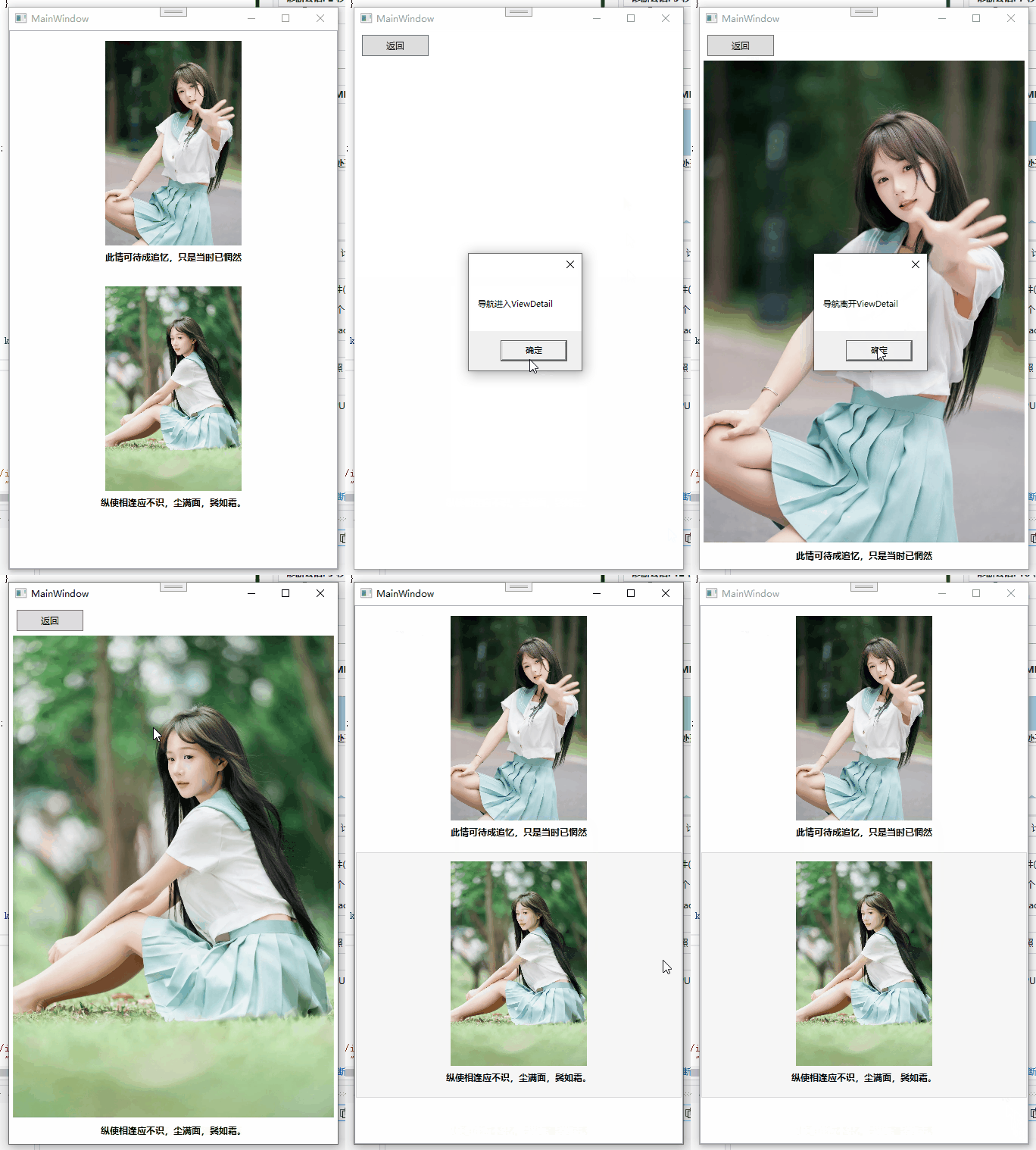
运行效果
示例代码
https://github.com/zhaotianff/WPF-MVVM-Beginner/tree/main/14_Prism_Region