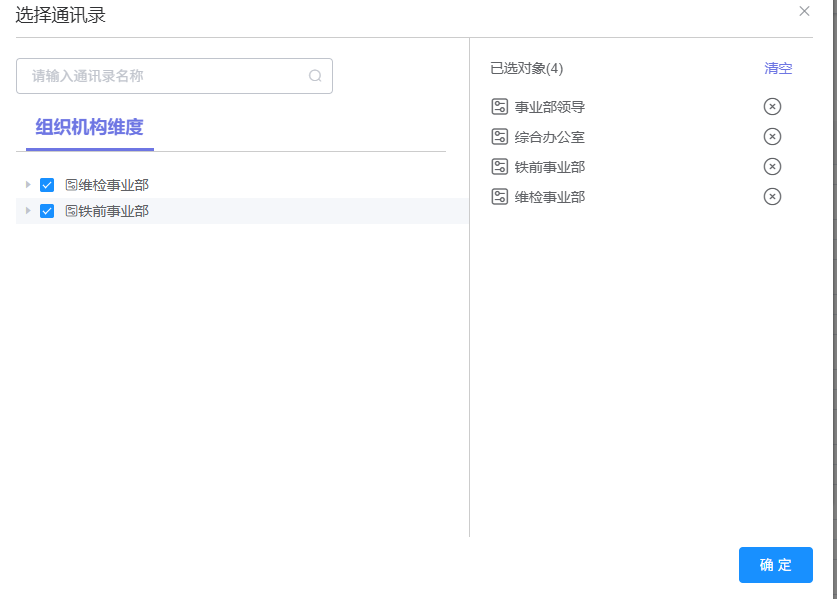
部门及人员联动处理效果功能,上面输入框可以输入人员名称,跟据防抖1秒后可调接口或用回车键调接口操作,选中的部门会放在右边显示,选中的父节点具备子节点的,子节点也进行选中操作且禁止更改,人员选择根据右边选中的部门进行匹配及右边的所选人员匹配,存在该部门下的人员进行默认勾选且禁止更改,及加载更多操作防止人员数据量过大,右边删除部门及人员时在数组中进行删除并取消勾选左边的复选框所有功能
javascript
<template>
  <el-button @click="handleSelectContact">选择通讯录</el-button>
   <el-dialog title="选择通讯录" :visible.sync="dialogVisible" width="50%" append-to-body>
      <div class="dialog-SelectContact">
        <div class="dialog-SelectContact-left">
          <el-input v-model="queryParams.nickName" @keyup.enter.native="handleSearch" @input="debounceSearch"
            placeholder="请输入通讯录名称" style="width: 70%;" suffix-icon="el-icon-search" clearable></el-input>
          <div class="SelectContact-title">组织机构维度</div>
          <div class="line"></div>
          <div style="height: 75%;overflow-y: auto;">
            <el-tree ref="tree" v-show="isTrue" :data="option" :props="defaultProps" node-key="id" @check="handleCheck"
              show-checkbox class="treeDataCss">
              <template #default="{ node, data, checked }">
                <div style="display: flex;align-items: center;padding: 3px 40px 3px 3px;cursor: pointer">
                  <i class="el-icon-set-up img-icon2"></i>
                  <span>{{ node.label }}</span>
                </div>
              </template>
            </el-tree>
            <div v-show="!isTrue">
              <div v-for="(item, index) in searchOption" class="person-item">
                <el-checkbox @change="handleChange(item, index)" v-model="item.checked" :label="item.id"
                  :disabled="item.checked"></el-checkbox>
                <div class="avator"><i class="el-icon-user" style="font-size: 20px;"></i></div>
                <div class="person-nickName">
                  <div>{{ item.nickName }}({{ item.userName }})</div>
                  <div style="font-size: 10px;color: #999999;">{{ item.deptFullName }}</div>
                </div>
              </div>
              <div v-show="!isLoading" class="more" @click="handleMore"><span v-show="!loading">加载更多...</span> <i
                  v-show="loading" class="el-icon-loading"></i></div>
            </div>
          </div>
        </div>
        <div class="dialog-SelectContact-right">
          <div class="SelectContact-right-top">
            <div>已选对象({{ treeArrayName.length + personArrayName.length }})</div>
            <div style="color:#6E76E3;cursor: pointer;" @click="clearAll">清空</div>
          </div>
          <div class="person-box">
            <div class="person-item" v-for="(item, index) in treeArrayName">
              <div style="display: flex;align-items: center;width: 90%;">
                <div class="avator"><i class="el-icon-set-up" style="font-size: 20px;"></i></div>
                <div class="person-nickName">{{ item.label }}</div>
              </div>
              <i class="el-icon-circle-close icon-close" @click="removetreeArrayItem(item, index)"></i>
            </div>
            <div class="person-item" v-for="(item, index) in personArrayName">
              <div style="display: flex;align-items: center;width: 90%;">
                <div class="avator"><i class="el-icon-user" style="font-size: 20px;"></i></div>
                <div class="person-nickName">{{ item.nickName }}({{ item.userName }})</div>
              </div>
              <i class="el-icon-circle-close icon-close" @click="removepersonArrayItem(item, index)"></i>
            </div>
          </div>
        </div>
      </div>
      <div slot="footer">
        <el-button type="primary" @click="handleOk">确 定</el-button>
      </div>
    </el-dialog>
</template>
<script>
  export default {
  data() {
    return {
      dialogVisibleId:null,
      treeArray: [],
      treeArrayName: [],
      personArray: [],
      personArrayName: [],
      loading: false,
      isLoading: false,
      isTrue: true,
      searchTimer: null,
      option: [],
      searchOption: [],
      searchTotal: 0,
      defaultProps: {
        label: 'label',
        children: 'children'
      },
      queryParams: {
        pageNum: 1,
        pageSize: 10,
        nickName: null
      },
    }
  },
   watch: {
    'queryParams.nickName': {
      handler(val) {
        console.log(val, 33)
        if (val == null || val == "") {
          this.isTrue = true
        } else {
          this.isTrue = false
        }
      }
    }
  },
  methods:{
    //输入防抖
    debounceSearch() {
      if (this.searchTimer) {
        clearTimeout(this.searchTimer)
      }
      this.searchTimer = setTimeout(() => {
        this.handleSearch()
      }, 1000)
    },
    //搜索
    handleSearch() {
      this.queryParams.pageNum = 1
      //listUser我自己的接口
      listUser(this.queryParams).then(response => {
        console.log(response)
        this.searchOption = response.rows
        this.searchTotal = response.total
        this.isLoading = this.searchTotal === this.searchOption.length
        //deptFullName这个字段后端返回我的是"维检事业部/综合办公室/虚拟工段"这样的部门,我需要自己做处理自己匹配
        this.searchOption.forEach(i => {
          //判断左面部门有没有存在相同的该部门人员
          const hasDept = this.treeArrayName.some(p => p.nodeList.includes(i.deptFullName));
          //判断左面有没有相同的userId
          const hasUser = this.personArrayName.some(p => p.userId === i.userId);
          i.checked = hasDept || hasUser;
        });
      })
    },
    //获取树级结构
    handleSelectContact() {
      this.treeArray = [];
      this.treeArrayName = [];
      this.personArray = [];
      this.personArrayName = [];
      this.dialogVisible = true
      //deptTreeForAlarmConfig我自己的树级接口数据
      deptTreeForAlarmConfig().then(response => {
        this.option = response.data
        this.queryParams.nickName = ""
      })
    },
    //加载更多(防止数据量过大)
    handleMore() {
      if (this.isLoading) return
      this.loading = true
      this.queryParams.pageNum++
      listUser(this.queryParams).then(response => {
        this.searchTotal = response.total
        if (this.queryParams.pageNum === 1) {
          this.searchOption = response.rows
          this.searchOption.forEach(i => {
            //判断左面部门有没有存在相同的该部门人员
            const hasDept = this.treeArrayName.some(p => p.nodeList.includes(i.deptFullName));
            //判断左面有没有相同的userId
            const hasUser = this.personArrayName.some(p => p.userId === i.userId);
            i.checked = hasDept || hasUser;
          });
        } else {
          this.searchOption = [...this.searchOption, ...response.rows]
          this.searchOption.forEach(i => {
            //判断左面部门有没有存在相同的该部门人员
            const hasDept = this.treeArrayName.some(p => p.nodeList.includes(i.deptFullName));
            //判断左面有没有相同的userId
            const hasUser = this.personArrayName.some(p => p.userId === i.userId);
            i.checked = hasDept || hasUser;
          });
        }
        this.isLoading = this.searchTotal === this.searchOption.length
        this.loading = false
      })
    },
    //节点选择
    handleCheck(node, checked) {
      const isChecked = checked.checkedKeys.some(item => item == node.id);
      const isStatus = this.$refs.tree.getNode(node).checked;
      if (!this.treeArray.includes(node.id) && isStatus) {
        this.treeArray.push(node.id);
        this.treeArrayName.push(
          {
            ...node,
            nodeList: this.getNodeFullPath(node)
          }
        );
        console.log(this.treeArrayName)
      } else {
        this.treeArray = this.treeArray.filter(item => item !== node.id);
        this.treeArrayName = this.treeArrayName.filter(item => item.id !== node.id);
      }
      if (node.children && node.children.length > 0) {
        if (isChecked) {
          this.setChildrenDisabled(node, true);
        } else {
          this.setChildrenDisabled(node, false);
        }
      }
    },
    //将所选数据变成后台返回给我的模式,好进行匹配
    getNodeFullPath(node) {
      let leafPathList = [];

      // 递归收集:只拿叶子节点的路径
      function collectLeaf(currentNode) {
        // 是叶子节点 → 把路径加入数组
        if (!currentNode.children || currentNode.children.length === 0) {
          const fullPath = this.getFullPath(this.$refs.tree.getNode(currentNode));
          leafPathList.push(fullPath);
          return;
        }
        // 不是叶子 → 递归子节点
        currentNode.children.forEach(child => collectLeaf.call(this, child));
      }

      collectLeaf.call(this, node);
      return leafPathList; // ✅ 返回新数组
    },
    getFullPath(node) {
      const pathArr = [];
      let temp = node;
      while (temp) {
        pathArr.unshift(temp.label);
        temp = temp.parent;
      }
      return pathArr.join('/').replace(/^\//, '');
    },
    //有子节点全部为禁止选中
    setChildrenDisabled(node, isDisabled) {
      node.children.forEach(child => {
        this.$refs.tree.setChecked(child, isDisabled);
        child.disabled = isDisabled;
        if (child.children && child.children.length) {
          this.setChildrenDisabled(child, isDisabled);
        }
      });
    },
    //删除已选部门对象
    removetreeArrayItem(row, index) {
      this.treeArray = this.treeArray.filter(item => item !== row.id);
      this.treeArrayName = this.treeArrayName.filter(item => item.id !== row.id);
      if (row.children && row.children.length > 0) {
        this.setChildrenDisabled(row, false);
      } else {
        this.$refs.tree.setChecked(row.id, false);
      }
      console.log(this.treeArrayName, this.treeArray)
    },
    //全部清空
    clearAll() {
      this.treeArray = [];
      this.treeArrayName = []
      this.personArray = []
      this.personArrayName = []
      this.$refs.tree.setCheckedKeys([])
      this.option.forEach(item => {
        this.setChildrenDisabled(item, false);
      })
      this.searchOption.forEach(item => {
        if (item) {
          item.checked = false;
        }
      })
    },
    //人员选择
    handleChange(node, index) {
      console.log(node, index)
      const isStatus = node.checked;
      if (!this.personArray.includes(node.userId) && isStatus) {
        this.personArray.push(node.userId);
        this.personArrayName.push(node)

      } else {
        this.personArray = this.personArray.filter(item => item !== node.userId);
        this.personArrayName = this.personArrayName.filter(item => item.userId !== node.userId);
      }
    },
    //删除已选人员对象
    removepersonArrayItem(row, index) {
      this.personArray = this.personArray.filter(item => item !== row.userId);
      this.personArrayName = this.personArrayName.filter(item => item.userId !== row.userId);
      const target = this.searchOption.find(item => item.userId === row.userId);
      if (target) {
        target.checked = false;
      }
    },
    //最终打印出来的数据,一个右边部门id数组,一个右边人员id数组,一个右边部门所包含的数据,一个右边人员所包含的数据
    handleOk() {
     console.log(this.treeArrayName,this.treeArray,this.personArrayName,this.personArray)
    }
  }
}
</script>
<style>
   .dialog-SelectContact {
  display: flex;
  height: 500px;
  border-top: 1px solid #ccc;

}

.dialog-SelectContact-left {
  width: 60%;
  border-right: 1px solid #ccc;
  padding-top: 20px;
}

.dialog-SelectContact-right {
  width: 40%;
  padding-top: 20px;
  margin: 0 20px;
}

.SelectContact-title {
  width: fit-content;
  margin: 20px 0 0 10px;
  padding: 0 10px 10px;
  border-bottom: 3px solid #6E76E3;
  font-size: 18px;
  color: #6E76E3;
  font-weight: 600;
}

.line {
  width: 95%;
  height: 1px;
  background-color: #ccc;
  margin-bottom: 20px;
}

.SelectContact-right-top {
  display: flex;
  align-items: center;
  justify-content: space-between;
  margin-bottom: 20px;
}

.person-box {
  height: 85%;
  overflow: auto;
  padding-right: 10px;
}

.person-item {
  display: flex;
  align-items: center;
  justify-content: space-between;
  margin-bottom: 10px;
  width: 100%;
}

.avator {
  /* width: 30px;
  height: 30px;
  border-radius: 50%;
  background-color: #6E76E3; */
  margin-right: 5px;
}

.person-nickName {
  width: 80%;
  overflow: hidden;
  text-overflow: ellipsis;
  white-space: nowrap;
}

.treeDataCss .el-tree-node {
  margin-bottom: 10px;
}

.treeDataCss .el-tree-node.is-expanded>.el-tree-node__children {
  margin-top: 10px;
}

.treeDataCss .el-tree-highlight-current.el-tree-node.is-current>.el-tree-node__content {
  background: transparent !important;
}

.treeDataCss .el-tree-node:focus>.el-tree-node__content {
  background: transparent !important;
}

.treeDataCss .el-tree-node__children {
  overflow: visible !important;
  max-height: none !important;
}

.more {
  margin-right: 10px;
  font-size: 20px;
  text-align: right;
  color: #999999;
  cursor: pointer;
}
</style>
树级结构部门与人员联动处理