@giszhc/arcgis-to-geojson
一个轻量级的 ArcGIS JSON 与 GeoJSON 双向转换工具库,支持点、线、面等多种几何类型,开箱即用,并针对现代前端开发进行了 Tree Shaking 优化。
支持以下特性:
- 双向转换:支持 ArcGIS JSON 转 GeoJSON 和 GeoJSON 转 ArcGIS JSON
- 几何类型:完整支持 Point、MultiPoint、LineString、MultiLineString、Polygon、MultiPolygon
- 环处理:自动处理多边形的内外环方向,符合 RFC 7946 和 ArcGIS 标准
- 坐标验证:智能判断外环与内环的包含关系,正确处理孔洞
- 要素支持:支持 Feature 和 FeatureCollection 结构,保留属性信息
- ID 映射:自动识别 OBJECTID、FID 等字段作为要素 ID
- 坐标系警告:检测非 WGS84 坐标系时发出警告
- TypeScript:完善的类型定义支持
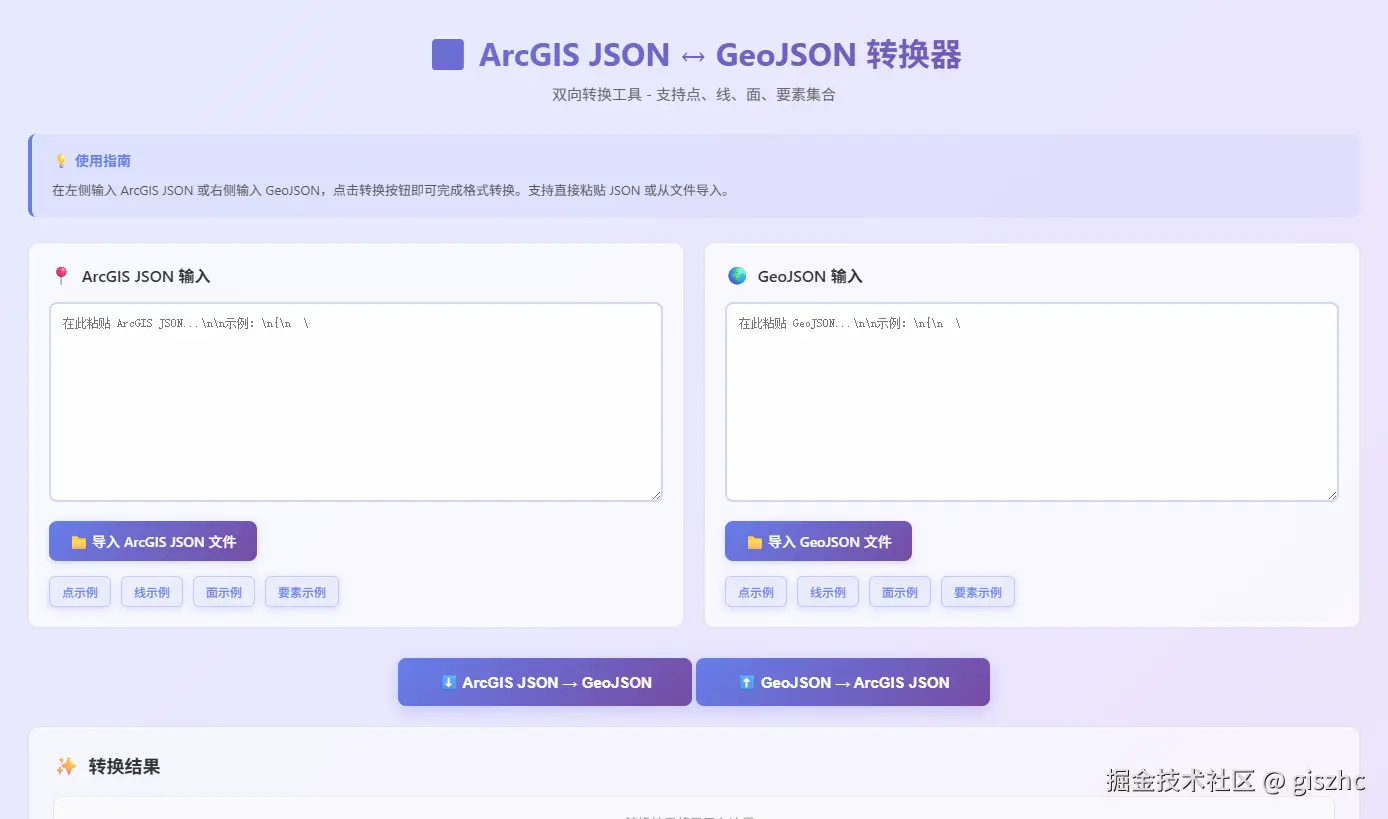
方法列表
ArcGIS JSON 转 GeoJSON
arcgisToGeoJSON- 将 ArcGIS JSON 转换为 GeoJSON 格式
GeoJSON 转 ArcGIS JSON
geojsonToArcGIS- 将 GeoJSON 转换为 ArcGIS JSON 格式
安装
你可以通过 npm 安装该库:
bash
pnpm install @giszhc/arcgis-to-geojson使用方法
arcgisToGeoJSON(arcgis: any, idAttribute?: string): any
将 ArcGIS JSON 转换为 GeoJSON 格式。支持点、线、面、要素集合等多种类型。
ts
import { arcgisToGeoJSON } from '@giszhc/arcgis-to-geojson';

// 转换点
const point = {
    x: 116.4,
    y: 39.9
};
const geojson = arcgisToGeoJSON(point);
console.log(geojson);
// { type: 'Point', coordinates: [116.4, 39.9] }

// 转换多边形(带孔洞)
const polygon = {
    rings: [
        [[116.0, 39.0], [117.0, 39.0], [117.0, 40.0], [116.0, 40.0], [116.0, 39.0]],
        [[116.5, 39.5], [116.8, 39.5], [116.8, 39.8], [116.5, 39.8], [116.5, 39.5]]
    ]
};
const geojson2 = arcgisToGeoJSON(polygon);
console.log(geojson2);
// { type: 'Polygon', coordinates: [...] }

// 转换要素集合
const featureCollection = {
    features: [
        {
            geometry: { x: 116.4, y: 39.9 },
            attributes: { name: '北京', OBJECTID: 1 }
        }
    ]
};
const fc = arcgisToGeoJSON(featureCollection);
console.log(fc);
// { type: 'FeatureCollection', features: [...] }

// 指定自定义 ID 字段
const feature = {
    geometry: { x: 116.4, y: 39.9 },
    attributes: { name: '北京', customId: 'BJ001' }
};
const geojson3 = arcgisToGeoJSON(feature, 'customId');
// id: 'BJ001'
geojsonToArcGIS(geojson: any, idAttribute?: string): any
将 GeoJSON 转换为 ArcGIS JSON 格式。自动处理环的方向和坐标系。
ts
import { geojsonToArcGIS } from '@giszhc/arcgis-to-geojson';

// 转换点
const point = {
    type: 'Point',
    coordinates: [116.4, 39.9]
};
const arcgis = geojsonToArcGIS(point);
console.log(arcgis);
// { x: 116.4, y: 39.9, spatialReference: { wkid: 4326 } }

// 转换多边形
const polygon = {
    type: 'Polygon',
    coordinates: [
        [
            [116.0, 39.0], [116.0, 40.0], [117.0, 40.0], [117.0, 39.0], [116.0, 39.0],
            [116.5, 39.5], [116.5, 39.8], [116.8, 39.8], [116.8, 39.5], [116.5, 39.5]
        ]
    ]
};
const arcgis2 = geojsonToArcGIS(polygon);
console.log(arcgis2);
// { rings: [...], spatialReference: { wkid: 4326 } }

// 转换 FeatureCollection
const featureCollection = {
    type: 'FeatureCollection',
    features: [
        {
            type: 'Feature',
            geometry: { type: 'Point', coordinates: [116.4, 39.9] },
            properties: { name: '北京' },
            id: 1
        }
    ]
};
const fc = geojsonToArcGIS(featureCollection);
console.log(fc);
// [{ geometry: {...}, attributes: {...} }]

// 指定自定义 ID 字段名
const feature = {
    type: 'Feature',
    geometry: { type: 'Point', coordinates: [116.4, 39.9] },
    properties: { name: '北京' },
    id: 100
};
const arcgis3 = geojsonToArcGIS(feature, 'FID');
// attributes: { name: '北京', FID: 100 }
注意事项
- 坐标系:转换后的 GeoJSON 默认为 WGS84 坐标系(EPSG:4326)。如果 ArcGIS JSON 使用其他坐标系,会发出警告
- 环方向 :
- ArcGIS:外环顺时针,内环(孔洞)逆时针
- GeoJSON:外环逆时针,内环(孔洞)顺时针(RFC 7946 标准)
- 库会自动处理方向转换
- ID 映射 :默认使用
OBJECTID或FID作为要素 ID,可通过idAttribute参数自定义 - 空几何 :支持处理空几何体,转换为
null - 三维坐标:支持 Z 坐标(高程)的转换
- 多部件几何:自动识别并转换为 MultiPoint、MultiLineString、MultiPolygon
完结,撒花✿✿ヽ(°▽°)ノ✿