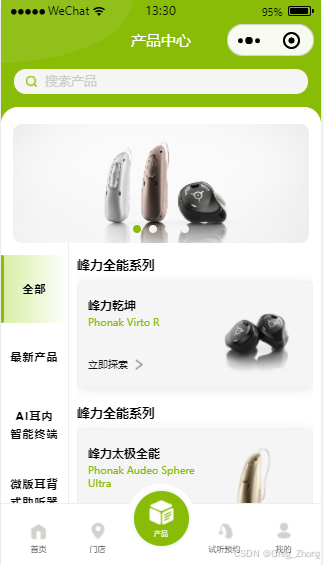
前言:最开始做静态页面是用的第二种效果去做的,因为项目中左侧分类,有个【全部】分类,而接口设计是给我查询所有右侧分类,导致不好使用右侧滑动左侧高亮效果,毕竟前者遵循点击左侧,请求右侧数据,而后者需要一次性渲染所有数据...
第一种:左右联动,点击左侧加载右侧数据,默认加载左侧分类数据和第一个分类的右侧数据【因为页面设计,有个全部的分类,导致不好使用右侧滑动左侧暂不介绍,可根据下面第二种进行改造去使用,】
第二种:左右联动,左侧选中右侧数据默认从顶部区域出现渲染,右侧滑动左侧对应分类高亮效果,数据结构是首次进入页面一次性加载或封装好数据结构进行渲染,【兼容点就是右侧最后一个分类如果小于4个,滑动右侧最后一个分类,左侧自动高亮效果失去,这个代码中做兼容,无法做到100%自适应效果!】
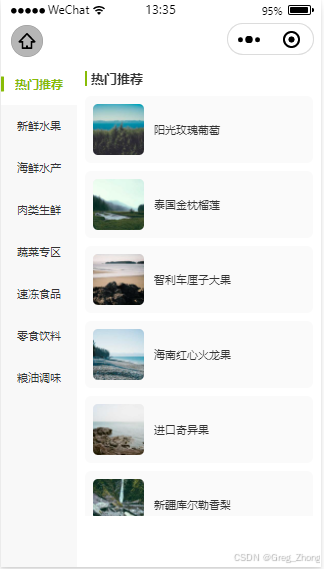
1.子组件代码
bash
Component({
  properties: {
    leftData: {
      type: Array,
      value: []
    },
    rightData: {
      type: Array,
      value: []
    },
    leftWidth: {
      type: String,
      value: '180rpx'
    }
  },

  data: {
    currentActive: '',
    clickActive: '',
    isForbidLink: false,
    leftScrollTop: 0,
    sectionTops: []
  },

  observers: {
    'leftData, rightData': function(leftData, rightData) {
      if (leftData.length > 0 && rightData.length > 0) {
        const initId = leftData[0].id;
        this.setData({
          currentActive: initId,
          clickActive: initId
        });
        // 延迟计算高度,确保DOM渲染完成
        setTimeout(() => {
          this._calculateSectionTops();
        }, 300);
      }
    }
  },

  lifetimes: {
    attached() {
      // 初始化
    }
  },

  methods: {
    // 预计算右侧每个分类的top值(性能优化核心)
    _calculateSectionTops() {
      const that = this;
      wx.createSelectorQuery().in(this)
        .selectAll('.right-section')
        .boundingClientRect()
        .select('.right-scroll')
        .boundingClientRect()
        .exec((res) => {
          if (!res || !res[0] || !res[1]) return;
          const rects = res[0];
          const scrollRect = res[1];
          const sectionTops = rects.map(rect => rect.top - scrollRect.top);
          that.setData({ sectionTops });
        });
    },

    // 右侧滚动联动
    onRightScroll(e) {
      if (this.data.isForbidLink) return;

      const scrollTop = e.detail.scrollTop;
      const { sectionTops, rightData, currentActive } = this.data;

      if (sectionTops.length === 0) return;

      // 找到当前滚动位置对应的分类
      let targetIndex = 0;
      for (let i = 0; i < sectionTops.length; i++) {
        if (scrollTop >= sectionTops[i] - 100) {
          targetIndex = i;
        }
      }

      const targetId = rightData[targetIndex]?.id;
      if (targetId && targetId !== currentActive) {
        this.setData({ currentActive: targetId });
        this._scrollLeftToView(targetId, targetIndex);
        this.triggerEvent('scrollLinkage', { cateId: targetId });
      }
    },

    // 左侧滚动到可视区
    _scrollLeftToView(cateId, index) {
      const that = this;
      const { leftData } = this.properties;

      wx.createSelectorQuery().in(this)
        .selectAll('.left-item')
        .boundingClientRect()
        .select('.left-scroll')
        .boundingClientRect()
        .select('.left-scroll')
        .scrollOffset()
        .exec((res) => {
          if (!res || !res[0] || !res[1] || !res[2]) return;

          const itemRects = res[0];
          const scrollRect = res[1];
          const scrollOffset = res[2];
          const targetRect = itemRects[index];

          if (!targetRect) return;

          const viewTop = scrollRect.top;
          const viewBottom = scrollRect.top + scrollRect.height;
          const itemTop = targetRect.top;
          const itemBottom = targetRect.top + targetRect.height;

          let finalScrollTop = scrollOffset.scrollTop;

          // 判断是否需要滚动
          if (itemTop < viewTop) {
            // 上面看不见,滚动到顶部对齐
            finalScrollTop += itemTop - viewTop;
          } else if (itemBottom > viewBottom) {
            // 下面看不见
            const isLast = index === leftData.length - 1;
            if (isLast) {
              // 最后一个,滚动到底部对齐
              finalScrollTop += itemBottom - viewBottom;
            } else {
              // 其他,滚动到居中
              finalScrollTop += itemTop - viewTop - (scrollRect.height - targetRect.height) / 2;
            }
          } else {
            // 完全可见,不滚动
            return;
          }

          finalScrollTop = Math.max(0, finalScrollTop);
          that.setData({ leftScrollTop: finalScrollTop });
        });
    },

    // 左侧点击
    onLeftSelect(e) {
      const cateId = e.currentTarget.dataset.id;
      const index = this.properties.leftData.findIndex(item => item.id === cateId);

      if (cateId === this.data.currentActive) return;

      this.setData({
        currentActive: cateId,
        clickActive: cateId,
        isForbidLink: true
      });

      // 点击时也滚动左侧
      this._scrollLeftToView(cateId, index);

      setTimeout(() => {
        this.setData({ isForbidLink: false });
      }, 300);

      this.triggerEvent('cateSelect', { cateId });
    },

    // 商品点击
    onGoodsClick(e) {
      const { goodsId, cateId } = e.currentTarget.dataset;
      this.triggerEvent('goodsClick', { cateId, goodsId });
    }
  }
});
bash
<view class="linkage-container">
  <!-- 左侧分类 -->
  <scroll-view
    class="left-scroll"
    scroll-y
    scroll-with-animation
    scroll-top="{{leftScrollTop}}"
    enhanced
    show-scrollbar="{{false}}"
  >
    <view
      wx:for="{{leftData}}"
      wx:key="id"
      class="left-item {{currentActive === item.id ? 'active' : ''}}"
      data-id="{{item.id}}"
      bindtap="onLeftSelect"
    >
      {{item.name}}
    </view>
    <view class="left-bottom-placeholder"></view>
  </scroll-view>

  <!-- 右侧内容 -->
  <scroll-view
    class="right-scroll"
    scroll-y
    scroll-with-animation
    scroll-into-view="right-{{clickActive}}"
    bindscroll="onRightScroll"
    enhanced
    show-scrollbar="{{false}}"
  >
    <view
      wx:for="{{rightData}}"
      wx:key="id"
      id="right-{{item.id}}"
      class="right-section"
    >
      <view class="section-title">{{item.name}}</view>
      <view
        wx:for="{{item.list}}"
        wx:for-item="goods"
        wx:key="goodsId"
        class="goods-item"
        bindtap="onGoodsClick"
        data-goods-id="{{goods.goodsId}}"
        data-cate-id="{{item.id}}"
      >
        <image class="goods-img" src="{{goods.image}}" mode="aspectFill" lazy-load />
        <view class="goods-name">{{goods.name}}</view>
      </view>
    </view>
    <view class="right-bottom-placeholder"></view>
  </scroll-view>
</view>
bash
/* 外层容器 */
.linkage-container {
  display: flex;
  width: 100%;
  height: 100vh;
  background: #f5f5f5;
  box-sizing: border-box;
}

/* 左侧分类 */
.left-scroll {
  width: var(--left-width, 180rpx);
  height: 100%;
  background: #f8f8f8;
  box-sizing: border-box;
}

.left-item {
  height: 100rpx;
  line-height: 100rpx;
  font-size: 28rpx;
  color: #333;
  text-align: center;
  box-sizing: border-box;
  position: relative;
  display: flex;
  align-items: center;
  justify-content: center;
  padding: 0 10rpx;
  transition: all 0.3s;
}

.left-item.active {
  background: #fff;
  color: #88BC07;
  font-weight: bold;
  font-size: 30rpx;
}

.left-item.active::before {
  content: '';
  position: absolute;
  left: 0;
  top: 50%;
  transform: translateY(-50%);
  width: 8rpx;
  height: 36rpx;
  background: #88BC07;
  border-radius: 0 4rpx 4rpx 0;
}

.left-bottom-placeholder {
  width: 100%;
  height: 100rpx;
}

/* 右侧内容 */
.right-scroll {
  flex: 1;
  height: 100%;
  background: #fff;
  box-sizing: border-box;
  padding: 20rpx;
  padding-bottom: 120rpx;
}

.right-section {
  padding-bottom: 20rpx;
}

.section-title {
  font-size: 32rpx;
  font-weight: bold;
  color: #333;
  margin-bottom: 24rpx;
  padding-left: 10rpx;
  border-left: 6rpx solid #88BC07;
  line-height: 1.2;
}

.goods-item {
  display: flex;
  align-items: center;
  padding: 20rpx;
  margin-bottom: 20rpx;
  background: #fafafa;
  border-radius: 16rpx;
  box-sizing: border-box;
}

.goods-img {
  width: 120rpx;
  height: 120rpx;
  border-radius: 12rpx;
  margin-right: 24rpx;
  flex-shrink: 0;
  background: #f0f0f0;
}

.goods-name {
  font-size: 28rpx;
  color: #333;
  flex: 1;
  line-height: 1.4;
  overflow: hidden;
  text-overflow: ellipsis;
  display: -webkit-box;
  -webkit-line-clamp: 2;
  -webkit-box-orient: vertical;
}

.right-bottom-placeholder {
  width: 100%;
  height: 120rpx;
}
2.父组件中使用、json中引入后【微信开发者工具,打开不校验合法域名,图片可显示】
bash
<left-right-contact-tree
  leftData="{{leftData}}"
  rightData="{{rightData}}"
  leftWidth="160rpx"
  bind:cateSelect="onCateSelect"
  bind:goodsClick="onGoodsClick"
/>
bash
Page({
  data: {
    // 左侧分类
    leftData: [
      { id: 1, name: "热门推荐" },
      { id: 2, name: "新鲜水果" },
      { id: 3, name: "海鲜水产" },
      { id: 4, name: "肉类生鲜" },
      { id: 5, name: "蔬菜专区" },
      { id: 6, name: "速冻食品" },
      { id: 7, name: "零食饮料" },
      { id: 8, name: "粮油调味" },
    ],

    // 右侧商品(带在线可访问图片)
		rightData: [
			{
				id: 1,
				name: "热门推荐",
				list: [
					{ goodsId: 101, name: "阳光玫瑰葡萄", image: "https://picsum.photos/id/10/200/200" },
					{ goodsId: 102, name: "泰国金枕榴莲", image: "https://picsum.photos/id/11/200/200" },
					{ goodsId: 103, name: "智利车厘子大果", image: "https://picsum.photos/id/12/200/200" },
					{ goodsId: 104, name: "海南红心火龙果", image: "https://picsum.photos/id/13/200/200" },
					{ goodsId: 105, name: "进口奇异果", image: "https://picsum.photos/id/14/200/200" },
					{ goodsId: 106, name: "新疆库尔勒香梨", image: "https://picsum.photos/id/15/200/200" }
				]
			},
			{
				id: 2,
				name: "新鲜水果",
				list: [
					{ goodsId: 201, name: "山东烟台红富士苹果", image: "https://picsum.photos/id/16/200/200" },
					{ goodsId: 202, name: "海南小米香蕉", image: "https://picsum.photos/id/17/200/200" },
					{ goodsId: 203, name: "四川蒲江猕猴桃", image: "https://picsum.photos/id/18/200/200" },
					{ goodsId: 204, name: "广西砂糖橘", image: "https://picsum.photos/id/19/200/200" },
					{ goodsId: 205, name: "广东冰糖心橙子", image: "https://picsum.photos/id/20/200/200" },
					{ goodsId: 206, name: "陕西脆甜冬枣", image: "https://picsum.photos/id/21/200/200" }
				]
			},
			{
				id: 3,
				name: "海鲜水产",
				list: [
					{ goodsId: 301, name: "鲜活青岛大虾", image: "https://picsum.photos/id/22/200/200" },
					{ goodsId: 302, name: "鲜活大闸蟹", image: "https://picsum.photos/id/23/200/200" },
					{ goodsId: 303, name: "冷冻深海鳕鱼", image: "https://picsum.photos/id/24/200/200" },
					{ goodsId: 304, name: "鲜活花甲蛤蜊", image: "https://picsum.photos/id/25/200/200" },
					{ goodsId: 305, name: "冷冻大虾仁", image: "https://picsum.photos/id/26/200/200" },
					{ goodsId: 306, name: "鲜活鲍鱼", image: "https://picsum.photos/id/27/200/200" }
				]
			},
			{
				id: 4,
				name: "肉类生鲜",
				list: [
					{ goodsId: 401, name: "精品五花肉", image: "https://picsum.photos/id/28/200/200" },
					{ goodsId: 402, name: "去皮鸡胸肉", image: "https://picsum.photos/id/29/200/200" },
					{ goodsId: 403, name: "农家土猪排骨", image: "https://picsum.photos/id/30/200/200" },
					{ goodsId: 404, name: "雪花肥牛卷", image: "https://picsum.photos/id/31/200/200" },
					{ goodsId: 405, name: "羔羊羊肉卷", image: "https://picsum.photos/id/32/200/200" },
					{ goodsId: 406, name: "黑猪瘦肉", image: "https://picsum.photos/id/33/200/200" }
				]
			},
			{
				id: 5,
				name: "蔬菜专区",
				list: [
					{ goodsId: 501, name: "沙瓤西红柿", image: "https://picsum.photos/id/34/200/200" },
					{ goodsId: 502, name: "本地脆嫩黄瓜", image: "https://picsum.photos/id/35/200/200" },
					{ goodsId: 503, name: "新鲜长茄子", image: "https://picsum.photos/id/36/200/200" },
					{ goodsId: 504, name: "西兰花", image: "https://picsum.photos/id/37/200/200" },
					{ goodsId: 505, name: "山东大白菜", image: "https://picsum.photos/id/38/200/200" },
					{ goodsId: 506, name: "精品土豆", image: "https://picsum.photos/id/39/200/200" }
				]
			},
			{
				id: 6,
				name: "速冻食品",
				list: [
					{ goodsId: 601, name: "猪肉大葱水饺", image: "https://picsum.photos/id/40/200/200" },
					{ goodsId: 602, name: "韭菜鸡蛋水饺", image: "https://picsum.photos/id/41/200/200" },
					{ goodsId: 603, name: "手工小笼包", image: "https://picsum.photos/id/42/200/200" },
					{ goodsId: 604, name: "奶香馒头", image: "https://picsum.photos/id/43/200/200" },
					{ goodsId: 605, name: "脆皮油条", image: "https://picsum.photos/id/44/200/200" },
					{ goodsId: 606, name: "火锅丸子组合", image: "https://picsum.photos/id/45/200/200" }
				]
			},
			{
				id: 7,
				name: "零食饮料",
				list: [
					{ goodsId: 701, name: "原味薯片", image: "https://picsum.photos/id/46/200/200" },
					{ goodsId: 702, name: "夹心饼干", image: "https://picsum.photos/id/47/200/200" },
					{ goodsId: 703, name: "果味果冻", image: "https://picsum.photos/id/48/200/200" },
					{ goodsId: 704, name: "碳酸饮料", image: "https://picsum.photos/id/49/200/200" },
					{ goodsId: 705, name: "纯牛奶", image: "https://picsum.photos/id/50/200/200" },
					{ goodsId: 706, name: "乳酸菌饮品", image: "https://picsum.photos/id/51/200/200" }
				]
			},
			{
				id: 8,
				name: "粮油调味",
				list: [
					{ goodsId: 801, name: "东北五常大米", image: "https://picsum.photos/id/52/200/200" },
					{ goodsId: 802, name: "压榨花生油", image: "https://picsum.photos/id/53/200/200" },
					{ goodsId: 803, name: "酿造生抽", image: "https://picsum.photos/id/54/200/200" },
					{ goodsId: 804, name: "食用盐", image: "https://picsum.photos/id/55/200/200" },
					{ goodsId: 805, name: "老陈醋", image: "https://picsum.photos/id/56/200/200" },
					{ goodsId: 806, name: "鸡精调味料", image: "https://picsum.photos/id/57/200/200" }
				]
			}
		]
  },

  // 左侧分类点击
  onCateSelect(e) {
    console.log("选中分类ID:", e.detail.cateId);
  },

  // 商品点击
  onGoodsClick(e) {
    console.log("选中商品:", e.detail);
  }
});