云计算基础与虚拟化技术
云计算服务模式
IaaS 基础设施即服务
PaaS 平台即服务
SaaS 软件即服务
双绞线制作线序:
橙白、橙、绿白、蓝、蓝白、绿、棕白、棕
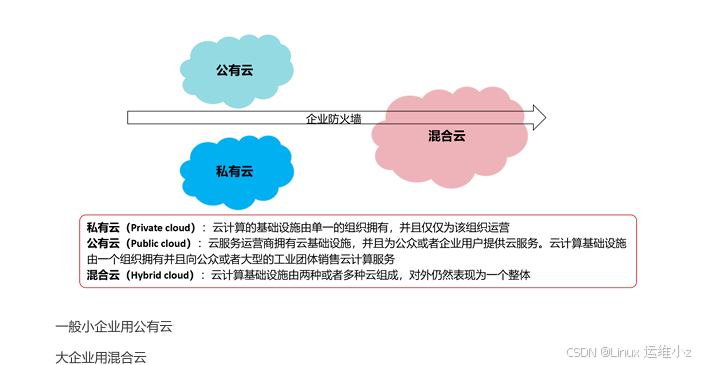
云计算部署模式
-
公有云
-
私有云
-
混合云
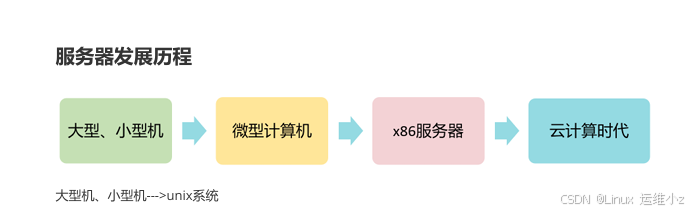
服务器发展历程
去IOE趋势 IBM(大型机、小型机) ORACLE(数据库) EMC(存储设备)
IBM--->X86服务器
ORACLE---->mysql
EMC---->ceph
虚拟化基础
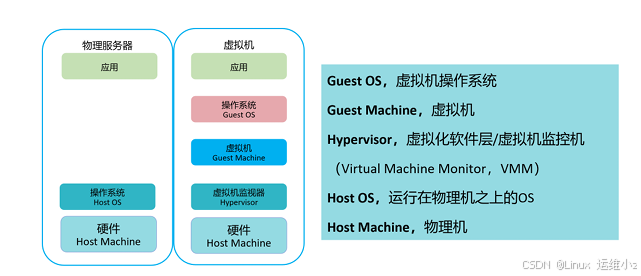
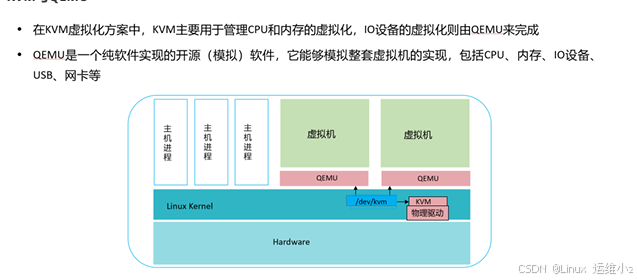
KVM与QEMU
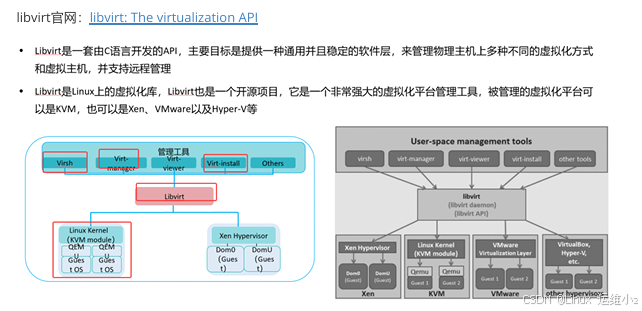
虚拟化平台管理工具 - Libvirt
virt-manager图形化管理
virsh 命令行管理
节点、Hypervisor和域之间的关系
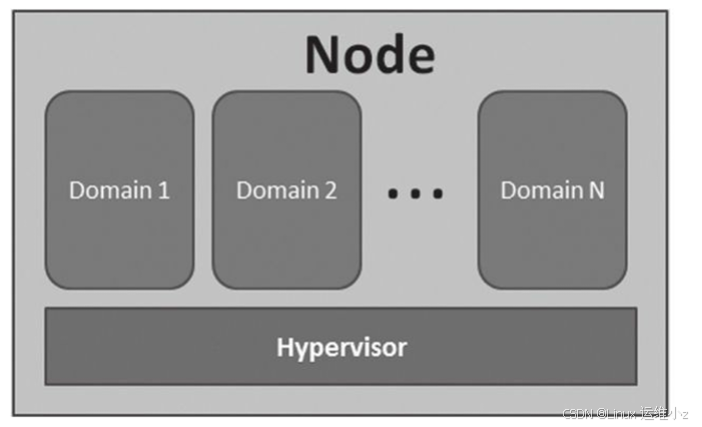
•在libvirt中涉及几个重要的概念, 解释如下:
•·节点(Node) 是一个物理机器, 上面可能运行着多个虚拟客户机。 Hypervisor和Domain都运行在节 点上。
•·Hypervisor也称虚拟机监控器(VMM) , 如KVM、 Xen、 VMware、 Hyper-V等, 是虚拟化中的一 个底层软件层, 它可以虚拟化一个节点让其运行多个虚拟客户机(不同客户机可能有不同的配置和操作 系统) 。
·域(Domain) 是在Hypervisor上运行的一个客户机操作系统实例。 域也被称为实例(instance, 如在 亚马逊的AWS云计算服务中客户机就被称为实例) 、 客户机操作系统(guest OS) 、 虚拟机(virtual machine) , 它们都是指同一个概念。
1型虚拟化与2型虚拟化
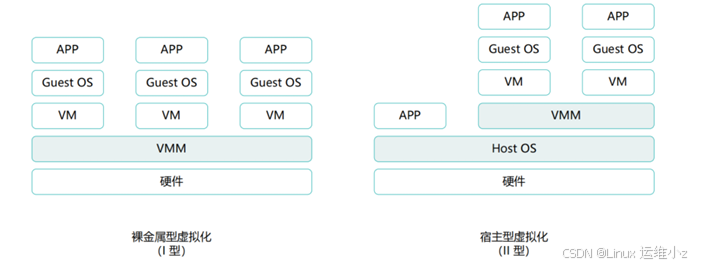
1型虚拟化(裸金属虚拟化)
2型虚拟化(宿主型虚拟化)
特点:
1型虚拟化性能强
2型虚拟化使用简单,开发难度低
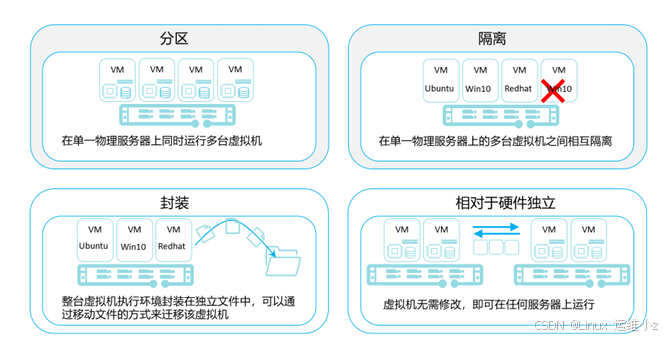
虚拟化特点
常见虚拟化磁盘后缀
vmdk vmware
qcow2 kvm
vdi oracl virtualbox
vhd hyper-v
kvm
kvm基本命令的使用
bash
[root@kvm1 ~]# virsh --help
virsh [options]... [<command_string>]
virsh [options]... <command> [args...]
options:
-c | --connect=URI hypervisor connection URI
-d | --debug=NUM debug level [0-4]
-e | --escape <char> set escape sequence for console
-h | --help this help
-k | --keepalive-interval=NUM
keepalive interval in seconds, 0 for disable
-K | --keepalive-count=NUM
number of possible missed keepalive messages
-l | --log=FILE output logging to file
-q | --quiet quiet mode
-r | --readonly connect readonly
-t | --timing print timing information
-v short version
-V long version
--version[=TYPE] version, TYPE is short or long (default short)
commands (non interactive mode):
Domain Management (help keyword 'domain')
attach-device attach device from an XML file
attach-disk attach disk device
attach-interface attach network interface
autostart autostart a domain
blkdeviotune Set or query a block device I/O tuning parameters.
blkiotune Get or set blkio parameters
blockcommit Start a block commit operation.
blockcopy Start a block copy operation.
blockjob Manage active block operations
blockpull Populate a disk from its backing image.
blockresize Resize block device of domain.
change-media Change media of CD or floppy drive
console connect to the guest console
cpu-stats show domain cpu statistics
create create a domain from an XML file
define define (but don't start) a domain from an XML file
desc show or set domain's description or title
destroy destroy (stop) a domain
detach-device detach device from an XML file
detach-device-alias detach device from an alias
detach-disk detach disk device
detach-interface detach network interface
domdisplay domain display connection URI
domfsfreeze Freeze domain's mounted filesystems.
domfsthaw Thaw domain's mounted filesystems.
domfsinfo Get information of domain's mounted filesystems.
domfstrim Invoke fstrim on domain's mounted filesystems.
domhostname print the domain's hostname
domid convert a domain name or UUID to domain id
domif-setlink set link state of a virtual interface
domiftune get/set parameters of a virtual interface
domjobabort abort active domain job
domjobinfo domain job information
domlaunchsecinfo Get domain launch security info
domsetlaunchsecstate Set domain launch security state
domname convert a domain id or UUID to domain name
domrename rename a domain
dompmsuspend suspend a domain gracefully using power management functions
dompmwakeup wakeup a domain from pmsuspended state
domuuid convert a domain name or id to domain UUID
domxml-from-native Convert native config to domain XML
domxml-to-native Convert domain XML to native config
dump dump the core of a domain to a file for analysis
dumpxml domain information in XML
edit edit XML configuration for a domain
event Domain Events
get-user-sshkeys list authorized SSH keys for given user (via agent)
inject-nmi Inject NMI to the guest
iothreadinfo view domain IOThreads
iothreadpin control domain IOThread affinity
iothreadadd add an IOThread to the guest domain
iothreadset modifies an existing IOThread of the guest domain
iothreaddel delete an IOThread from the guest domain
send-key Send keycodes to the guest
send-process-signal Send signals to processes
lxc-enter-namespace LXC Guest Enter Namespace
managedsave managed save of a domain state
managedsave-remove Remove managed save of a domain
managedsave-edit edit XML for a domain's managed save state file
managedsave-dumpxml Domain information of managed save state file in XML
managedsave-define redefine the XML for a domain's managed save state file
memtune Get or set memory parameters
perf Get or set perf event
metadata show or set domain's custom XML metadata
migrate migrate domain to another host
migrate-setmaxdowntime set maximum tolerable downtime
migrate-getmaxdowntime get maximum tolerable downtime
migrate-compcache get/set compression cache size
migrate-setspeed Set the maximum migration bandwidth
migrate-getspeed Get the maximum migration bandwidth
migrate-postcopy Switch running migration from pre-copy to post-copy
numatune Get or set numa parameters
qemu-attach QEMU Attach
qemu-monitor-command QEMU Monitor Command
qemu-monitor-event QEMU Monitor Events
qemu-agent-command QEMU Guest Agent Command
guest-agent-timeout Set the guest agent timeout
reboot reboot a domain
reset reset a domain
restore restore a domain from a saved state in a file
resume resume a domain
save save a domain state to a file
save-image-define redefine the XML for a domain's saved state file
save-image-dumpxml saved state domain information in XML
save-image-edit edit XML for a domain's saved state file
schedinfo show/set scheduler parameters
screenshot take a screenshot of a current domain console and store it into a file
set-lifecycle-action change lifecycle actions
set-user-sshkeys manipulate authorized SSH keys file for given user (via agent)
set-user-password set the user password inside the domain
setmaxmem change maximum memory limit
setmem change memory allocation
setvcpus change number of virtual CPUs
shutdown gracefully shutdown a domain
start start a (previously defined) inactive domain
suspend suspend a domain
ttyconsole tty console
undefine undefine a domain
update-device update device from an XML file
update-memory-device update memory device of a domain
vcpucount domain vcpu counts
vcpuinfo detailed domain vcpu information
vcpupin control or query domain vcpu affinity
emulatorpin control or query domain emulator affinity
vncdisplay vnc display
guestvcpus query or modify state of vcpu in the guest (via agent)
setvcpu attach/detach vcpu or groups of threads
domblkthreshold set the threshold for block-threshold event for a given block device or it's backing chain element
guestinfo query information about the guest (via agent)
domdirtyrate-calc Calculate a vm's memory dirty rate
Domain Monitoring (help keyword 'monitor')
domblkerror Show errors on block devices
domblkinfo domain block device size information
domblklist list all domain blocks
domblkstat get device block stats for a domain
domcontrol domain control interface state
domif-getlink get link state of a virtual interface
domifaddr Get network interfaces' addresses for a running domain
domiflist list all domain virtual interfaces
domifstat get network interface stats for a domain
dominfo domain information
dommemstat get memory statistics for a domain
domstate domain state
domstats get statistics about one or multiple domains
domtime domain time
list list domains
Host and Hypervisor (help keyword 'host')
allocpages Manipulate pages pool size
capabilities capabilities
cpu-baseline compute baseline CPU
cpu-compare compare host CPU with a CPU described by an XML file
cpu-models CPU models
domcapabilities domain capabilities
freecell NUMA free memory
freepages NUMA free pages
hostname print the hypervisor hostname
hypervisor-cpu-baseline compute baseline CPU usable by a specific hypervisor
hypervisor-cpu-compare compare a CPU with the CPU created by a hypervisor on the host
maxvcpus connection vcpu maximum
node-memory-tune Get or set node memory parameters
nodecpumap node cpu map
nodecpustats Prints cpu stats of the node.
nodeinfo node information
nodememstats Prints memory stats of the node.
nodesevinfo node SEV information
nodesuspend suspend the host node for a given time duration
sysinfo print the hypervisor sysinfo
uri print the hypervisor canonical URI
version show version
Checkpoint (help keyword 'checkpoint')
checkpoint-create Create a checkpoint from XML
checkpoint-create-as Create a checkpoint from a set of args
checkpoint-delete Delete a domain checkpoint
checkpoint-dumpxml Dump XML for a domain checkpoint
checkpoint-edit edit XML for a checkpoint
checkpoint-info checkpoint information
checkpoint-list List checkpoints for a domain
checkpoint-parent Get the name of the parent of a checkpoint
Interface (help keyword 'interface')
iface-begin create a snapshot of current interfaces settings, which can be later committed (iface-commit) or restored (iface-rollback)
iface-bridge create a bridge device and attach an existing network device to it
iface-commit commit changes made since iface-begin and free restore point
iface-define define an inactive persistent physical host interface or modify an existing persistent one from an XML file
iface-destroy destroy a physical host interface (disable it / "if-down")
iface-dumpxml interface information in XML
iface-edit edit XML configuration for a physical host interface
iface-list list physical host interfaces
iface-mac convert an interface name to interface MAC address
iface-name convert an interface MAC address to interface name
iface-rollback rollback to previous saved configuration created via iface-begin
iface-start start a physical host interface (enable it / "if-up")
iface-unbridge undefine a bridge device after detaching its device(s)
iface-undefine undefine a physical host interface (remove it from configuration)
Network Filter (help keyword 'filter')
nwfilter-define define or update a network filter from an XML file
nwfilter-dumpxml network filter information in XML
nwfilter-edit edit XML configuration for a network filter
nwfilter-list list network filters
nwfilter-undefine undefine a network filter
nwfilter-binding-create create a network filter binding from an XML file
nwfilter-binding-delete delete a network filter binding
nwfilter-binding-dumpxml network filter information in XML
nwfilter-binding-list list network filter bindings
Networking (help keyword 'network')
net-autostart autostart a network
net-create create a network from an XML file
net-define define an inactive persistent virtual network or modify an existing persistent one from an XML file
net-destroy destroy (stop) a network
net-dhcp-leases print lease info for a given network
net-dumpxml network information in XML
net-edit edit XML configuration for a network
net-event Network Events
net-info network information
net-list list networks
net-name convert a network UUID to network name
net-start start a (previously defined) inactive network
net-undefine undefine a persistent network
net-update update parts of an existing network's configuration
net-uuid convert a network name to network UUID
net-port-list list network ports
net-port-create create a network port from an XML file
net-port-dumpxml network port information in XML
net-port-delete delete the specified network port
Node Device (help keyword 'nodedev')
nodedev-create create a device defined by an XML file on the node
nodedev-destroy destroy (stop) a device on the node
nodedev-detach detach node device from its device driver
nodedev-dumpxml node device details in XML
nodedev-list enumerate devices on this host
nodedev-reattach reattach node device to its device driver
nodedev-reset reset node device
nodedev-event Node Device Events
nodedev-define Define a device by an xml file on a node
nodedev-undefine Undefine an inactive node device
nodedev-start Start an inactive node device
nodedev-autostart autostart a defined node device
nodedev-info node device information
Secret (help keyword 'secret')
secret-define define or modify a secret from an XML file
secret-dumpxml secret attributes in XML
secret-event Secret Events
secret-get-value Output a secret value
secret-list list secrets
secret-set-value set a secret value
secret-undefine undefine a secret
Snapshot (help keyword 'snapshot')
snapshot-create Create a snapshot from XML
snapshot-create-as Create a snapshot from a set of args
snapshot-current Get or set the current snapshot
snapshot-delete Delete a domain snapshot
snapshot-dumpxml Dump XML for a domain snapshot
snapshot-edit edit XML for a snapshot
snapshot-info snapshot information
snapshot-list List snapshots for a domain
snapshot-parent Get the name of the parent of a snapshot
snapshot-revert Revert a domain to a snapshot
Backup (help keyword 'backup')
backup-begin Start a disk backup of a live domain
backup-dumpxml Dump XML for an ongoing domain block backup job
Storage Pool (help keyword 'pool')
find-storage-pool-sources-as find potential storage pool sources
find-storage-pool-sources discover potential storage pool sources
pool-autostart autostart a pool
pool-build build a pool
pool-create-as create a pool from a set of args
pool-create create a pool from an XML file
pool-define-as define a pool from a set of args
pool-define define an inactive persistent storage pool or modify an existing persistent one from an XML file
pool-delete delete a pool
pool-destroy destroy (stop) a pool
pool-dumpxml pool information in XML
pool-edit edit XML configuration for a storage pool
pool-info storage pool information
pool-list list pools
pool-name convert a pool UUID to pool name
pool-refresh refresh a pool
pool-start start a (previously defined) inactive pool
pool-undefine undefine an inactive pool
pool-uuid convert a pool name to pool UUID
pool-event Storage Pool Events
pool-capabilities storage pool capabilities
Storage Volume (help keyword 'volume')
vol-clone clone a volume.
vol-create-as create a volume from a set of args
vol-create create a vol from an XML file
vol-create-from create a vol, using another volume as input
vol-delete delete a vol
vol-download download volume contents to a file
vol-dumpxml vol information in XML
vol-info storage vol information
vol-key returns the volume key for a given volume name or path
vol-list list vols
vol-name returns the volume name for a given volume key or path
vol-path returns the volume path for a given volume name or key
vol-pool returns the storage pool for a given volume key or path
vol-resize resize a vol
vol-upload upload file contents to a volume
vol-wipe wipe a vol
Virsh itself (help keyword 'virsh')
cd change the current directory
echo echo arguments. Used for internal testing.
exit quit this interactive terminal
help print help
pwd print the current directory
quit quit this interactive terminal
connect (re)connect to hypervisor
示例
bash
[root@KVM1 ~]# virsh shutdown win7           #关机

[root@KVM1 ~]# virt-manager             #图形化界面

[root@KVM1 ~]# virsh list --all           # 列出所有虚拟机

[root@KVM1 ~]# virsh start win7             #开机
Domain 'win7' started
[root@KVM1 ~]# virsh list                   #列出运行中的虚拟机
#用该虚拟机的ID"1"操作

[root@KVM1 ~]# virsh reboot win7          #重启


[root@KVM1 ~]# virsh destroy win7          #无办法再强制关机


[root@KVM1 ~]# virsh suspend win7          #挂起

[root@KVM1 ~]# virsh resume win7          #恢复
命令行创建虚拟机
bash
[root@kvm1 ~]# cd /var/lib/libvirt/images/
[root@kvm1 images]# ls
win7.qcow2
[root@kvm1 images]# qemu-img create -f qcow2 vm2.qcow2 20G
[root@kvm1 images]# qemu-img info vm2.qcow2
image: vm2.qcow2
file format: qcow2
virtual size: 20 GiB (21474836480 bytes)
disk size: 196 KiB
cluster_size: 65536
Format specific information:
    compat: 1.1
    compression type: zlib
    lazy refcounts: false
    refcount bits: 16
    corrupt: false
    extended l2: false
[root@kvm1 images]# virt-install --help
usage: virt-install --name NAME --memory MB STORAGE INSTALL [

Create a new virtual machine from specified install media.

optional arguments:
  -h, --help            show this help message and exit
  --version             show program's version number and exi
  --connect URI         Connect to hypervisor with libvirt UR

General Options:
  -n NAME, --name NAME  Name of the guest instance
  --memory MEMORY       Configure guest memory allocation. Ex
                        --memory 1024 (in MiB)
                        --memory memory=1024,currentMemory=51
  --vcpus VCPUS         Number of vCPUs to configure for your
                        --vcpus 5
                        --vcpus 5,maxvcpus=10,cpuset=1-4,6,8
                        --vcpus sockets=2,cores=4,threads=2
  --cpu CPU             CPU model and features. Ex:
                        --cpu coreduo,+x2apic
                        --cpu host-passthrough
                        --cpu host
  --metadata METADATA   Configure guest metadata. Ex:
                        --metadata name=foo,title="My pretty
                        --metadata description="My nice long
  --xml XML             Perform raw XML XPath options on the
                        --xml ./cpu/@mode=host-passthrough
                        --xml ./devices/disk[2]/serial=new-se
                        --xml xpath.delete=./clock

Installation Method Options:
  --cdrom CDROM         CD-ROM installation media
  -l LOCATION, --location LOCATION
                        Distro install URL, eg. https://host/
                        page for specific distro examples.
  --pxe                 Boot from the network using the PXE p
  --import              Build guest around an existing disk i
  -x EXTRA_ARGS, --extra-args EXTRA_ARGS
                        Additional arguments to pass to the i
                        booted from --location
  --initrd-inject INITRD_INJECT
                        Add given file to root of initrd from
  --unattended [UNATTENDED]
                        Perform an unattended installation
  --install INSTALL     Specify fine grained install options
  --reinstall DOMAIN    Reinstall existing VM. Only install o
                        applied, all other VM configuration o
                        ignored.
  --cloud-init [CLOUD_INIT]
                        Perform a cloud image installation, c
                        init
  --boot BOOT           Configure guest boot settings. Ex:
                        --boot hd,cdrom,menu=on
                        --boot init=/sbin/init (for container
  --idmap IDMAP         Enable user namespace for LXC contain
                        --idmap uid.start=0,uid.target=1000,u

OS options:
  --os-variant OS_VARIANT, --osinfo OS_VARIANT
                        The OS being installed in the guest.
                        This is used for deciding optimal def
                        Example values: fedora29, rhel7.0, wi
                        See 'osinfo-query os' for a full list

Device Options:
  --disk DISK           Specify storage with various options.
                        --disk size=10 (new 10GiB image in de
                        --disk /my/existing/disk,cache=none
                        --disk device=cdrom,bus=scsi
                        --disk=?
  -w NETWORK, --network NETWORK
                        Configure a guest network interface.
                        --network bridge=mybr0
                        --network network=my_libvirt_virtual_
                        --network network=mynet,model=virtio,
                        --network none
                        --network help
  --graphics GRAPHICS   Configure guest display settings. Ex:
                        --graphics spice
                        --graphics vnc,port=5901,listen=0.0.0
                        --graphics none
  --controller CONTROLLER
                        Configure a guest controller device.
                        --controller type=usb,model=qemu-xhci
                        --controller virtio-scsi
  --input INPUT         Configure a guest input device. Ex:
                        --input tablet
                        --input keyboard,bus=usb
  --serial SERIAL       Configure a guest serial device
  --parallel PARALLEL   Configure a guest parallel device
  --channel CHANNEL     Configure a guest communication chann
  --console CONSOLE     Configure a text console connection b
                        and host
  --hostdev HOSTDEV     Configure physical USB/PCI/etc host d
                        shared with the guest
  --filesystem FILESYSTEM
                        Pass host directory to the guest. Ex:
                        --filesystem /my/source/dir,/dir/in/g
                        --filesystem template_name,/,type=tem
  --sound [SOUND]       Configure guest sound device emulatio
  --watchdog WATCHDOG   Configure a guest watchdog device
  --video VIDEO         Configure guest video hardware.
  --smartcard SMARTCARD
                        Configure a guest smartcard device. E
                        --smartcard mode=passthrough
  --redirdev REDIRDEV   Configure a guest redirection device.
                        --redirdev usb,type=tcp,server=192.16
  --memballoon MEMBALLOON
                        Configure a guest memballoon device.
                        --memballoon model=virtio
  --tpm TPM             Configure a guest TPM device. Ex:
                        --tpm /dev/tpm
  --rng RNG             Configure a guest RNG device. Ex:
                        --rng /dev/urandom
  --panic PANIC         Configure a guest panic device. Ex:
                        --panic default
  --memdev MEMDEV       Configure a guest memory device. Ex:
                        --memdev dimm,target.size=1024
  --vsock VSOCK         Configure guest vsock sockets. Ex:
                        --vsock cid.auto=yes
                        --vsock cid.address=7
  --iommu IOMMU         Configure an IOMMU device. Ex:
                        --iommu model=intel,driver.aw_bits=48

Guest Configuration Options:
  --iothreads IOTHREADS
                        Set domain <iothreads> and <iothreadi
                        configuration.
  --seclabel SECLABEL, --security SECLABEL
                        Set domain seclabel configuration.
  --keywrap KEYWRAP     Set guest to perform the S390 cryptog
                        management operations.
  --cputune CPUTUNE     Tune CPU parameters for the domain pr
  --numatune NUMATUNE   Tune NUMA policy for the domain proce
  --memtune MEMTUNE     Tune memory policy for the domain pro
  --blkiotune BLKIOTUNE
                        Tune blkio policy for the domain proc
  --memorybacking MEMORYBACKING
                        Set memory backing policy for the dom
                        --memorybacking hugepages=on
  --features FEATURES   Set domain <features> XML. Ex:
                        --features acpi=off
                        --features apic=on,apic.eoi=on
  --clock CLOCK         Set domain <clock> XML. Ex:
                        --clock offset=localtime,rtc_tickpoli
  --pm PM               Configure VM power management feature
  --events EVENTS       Configure VM lifecycle management pol
  --resource RESOURCE   Configure VM resource partitioning (c
  --sysinfo SYSINFO     Configure SMBIOS System Information.
                        --sysinfo host
                        --sysinfo bios.vendor=MyVendor,bios.v
  --qemu-commandline QEMU_COMMANDLINE
                        Pass arguments directly to the QEMU e
                        --qemu-commandline='-display gtk,gl=o
                        --qemu-commandline env=DISPLAY=:0.1
  --launchSecurity LAUNCHSECURITY, --launchsecurity LAUNCHSEC
                        Configure VM launch security (e.g. SE
                        --launchSecurity type=sev,cbitpos=47,4CERT
                        --launchSecurity sev

Virtualization Platform Options:
  -v, --hvm             This guest should be a fully virtuali
  -p, --paravirt        This guest should be a paravirtualize
  --container           This guest should be a container gues
  --virt-type VIRT_TYPE
                        Hypervisor name to use (kvm, qemu, xe
  --arch ARCH           The CPU architecture to simulate
  --machine MACHINE     The machine type to emulate

Miscellaneous Options:
  --autostart           Have domain autostart on host boot up
  --transient           Create a transient domain.
  --destroy-on-exit     Force power off the domain when the c
                        closed.
  --wait [WAIT]         Minutes to wait for install to comple
  --autoconsole AUTOCONSOLE
                        Configure guest console auto connect.
                        --autoconsole text
                        --autoconsole graphical
                        --autoconsole none
  --noautoconsole       Don't automatically try to connect to
                        console
  --noreboot            Don't boot guest after completing ins
  --print-xml [XMLONLY]
                        Print the generated domain XML rather
                        guest.
  --dry-run             Run through install process, but do n
                        or define the guest.
  --check CHECK         Enable or disable validation checks.
                        --check path_in_use=off
                        --check all=off
  -q, --quiet           Suppress non-error output
  -d, --debug           Print debugging information

Use '--option=?' or '--option help' to see available suboptio
See man page for examples and full option syntax.
[root@kvm1 images]# mkdir /disk
[root@kvm1 ~]# cd iso/


[root@kvm1 iso]# qemu-img create -f qcow2 /disk/vm2.qcow2 20G

[root@kvm1 ~]# virt-install --name vm2 --memory 4096 --vcpus 2 --disk path=/disk/vm2.qcow2  --cdrom  ~/iso/cn_windows_7_enterprise_with_sp1_x64_dvd_u_677685.iso --network network=default --noautoconsole

[root@kvm1 ~]# virsh list
 Id   Name   State
----------------------
 7    win7   running
8 vm2 running| 错误用法 | 正确用法 | 原因 |
|---|---|---|
--location iso/xxx.iso |
--cdrom /绝对路径/xxx.iso |
--location 仅支持 Linux ISO(需安装树),Windows 只能用--cdrom模拟光驱 |
相对路径 iso/xxx.iso |
绝对路径 /root/iso/xxx.iso |
系统默认从当前目录(/root)找文件,相对路径易定位错误 |
未指定 --os-variant |
--os-variant win7 |
KVM 自动适配 Windows 7 的磁盘控制器、显卡等,避免安装异常 |
1.通过图形界面管理
bash
[root@kvm1 ~]# virt-manager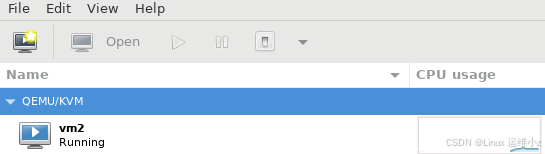
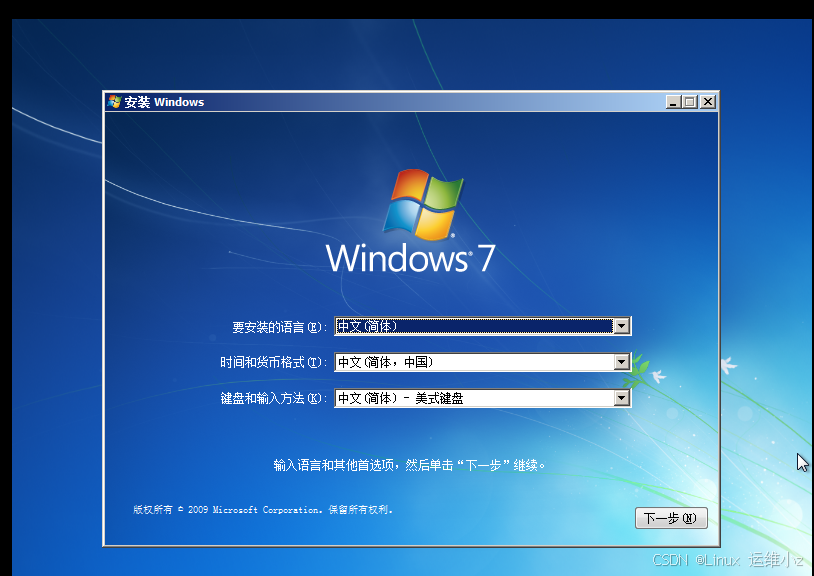
2.过VNC连到虚拟机中去
bash
[root@kvm1 ~]# qemu-img create -f qcow2 /disk/vm3.qcow2 20G
Formatting '/disk/vm3.qcow2', fmt=qcow2 cluster_size=65536 extended_l2=off compression_type=zlib size=21474836480 lazy_refcounts=off refcount_bits=16
[root@kvm1 ~]# virt-install --name vm3 --memory 2048 --vcpus 1 --disk path=/disk/vm3.qcow2 --cdrom ~/iso/cn_windows_7_enterprise_with_sp1_x64_dvd_u_677685.iso --network network=default --noautoconsole --vnclisten=0.0.0.0 --vncport=5903 --vnc

Starting install...

Domain is still running. Installation may be in progress.
You can reconnect to the console to complete the installation process.
[root@kvm1 ~]# systemctl stop firewalld.service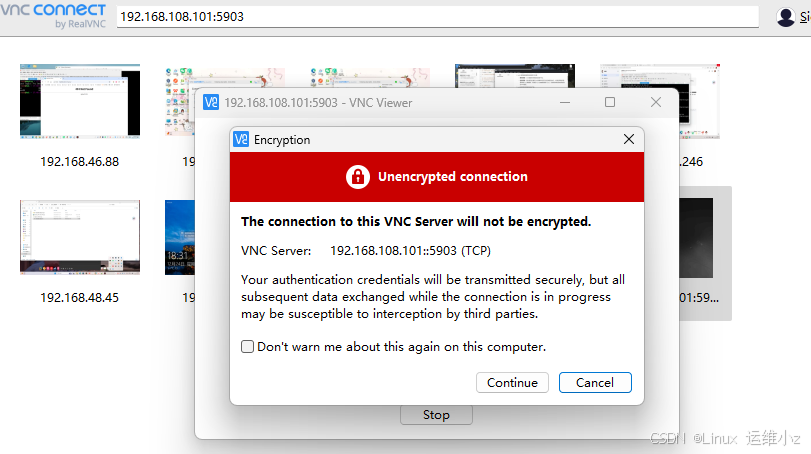
kvm 热迁移实验
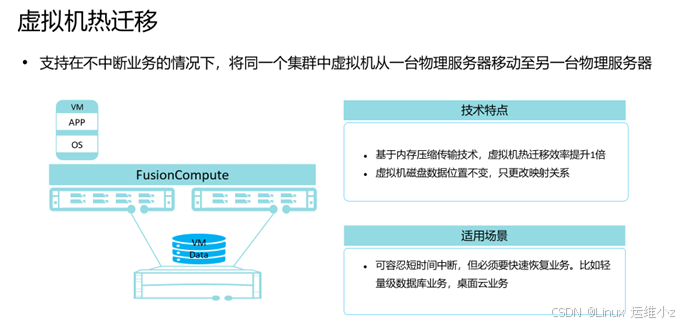
什么时候用热迁移
•在进行服务器操作维护前,系统维护人员将该服务器上的虚拟机迁移到其他服务器,降低操作维护过程 中业务中断的风险。
•在进行服务器升级操作前,系统维护人员将该服务器上的虚拟机迁移到其他服务器,升级完成后将所有 虚拟机迁回,降低服务器升级过程中业务中断的风险。
•将空闲服务器上的虚拟机迁移到其他服务器,将没有负载的服务器关闭,降低业务运行成本。
实验原理
前提条件:共享存储
创建的虚拟机硬盘,放在共享存储空间
1.在目的主机创建与源虚拟机同配置的空虚拟机
2.通过迭代迁移技术将源虚拟机内存迁移到目的虚拟机
3.原虚拟机停止,目的虚拟机拉起
实验步骤
kvm1
bash
[root@kvm1 ~]# cat >> /etc/hosts <<
bash: syntax error near unexpected token `newline'
[root@kvm1 ~]# cat >> /etc/hosts <<EOF
> 192.168.108.101 kvm1
> 192.168.108.102 KVM2
> 192.168.108.100 NFS
> EOF
kvm2
bash
[root@kvm1 ~]# hostnamectl set-hostname KVM2
[root@kvm1 ~]# bash
[root@KVM2 ~]# vim /etc/sysconfig/network-scripts/ifcfg-ens160
[root@KVM2 ~]# nmcli connection reload ens160
[root@KVM2 ~]# ip -br a
lo               UNKNOWN        127.0.0.1/8 ::1/128
ens160           UP             192.168.108.102/24 fe80::20c:29ff:fe04:8dac/64
virbr0           DOWN           192.168.122.1/24
[root@KVM2 ~]# scp root@192.168.108.101:/etc/hosts /etc/hosts
[root@KVM2 ~]# cat /etc/hosts
127.0.0.1   localhost localhost.localdomain localhost4 localhost4.localdomain4
::1         localhost localhost.localdomain localhost6 localhost6.localdomain6
192.168.108.101 kvm1
192.168.108.102 KVM2
192.168.108.100 NFS
nfs
bash
[root@kvm1 ~]# hostnamectl set-hostname NFS
[root@kvm1 ~]# bash
[root@NFS ~]# vim /etc/sysconfig/network-scripts/ifcfg-ens160
[root@NFS ~]# nmcli connection reload ens160
[root@NFS ~]# vim /etc/sysconfig/network-scripts/ifcfg-ens160
TYPE=Ethernet
PROXY_METHOD=none
BROWSER_ONLY=no
BOOTPROTO=none
DEFROUTE=yes
IPV4_FAILURE_FATAL=no
IPV6INIT=yes
IPV6_AUTOCONF=yes
IPV6_DEFROUTE=yes
IPV6_FAILURE_FATAL=no
IPV6_ADDR_GEN_MODE=eui64
NAME=ens160
DEVICE=ens160
ONBOOT=yes
IPADDR=192.168.108.100
PREFIX=24
GATEWAY=192.168.108.2
DNS1=192.168.108.2
UUID=ea74cf24-c2a2-ecee-3747-a2d76d46f93b


[root@NFS ~]# nmcli connection reload ens160
[root@NFS ~]# ip -br a
o               UNKNOWN        127.0.0.1/8 ::1/128
ens160           UP             192.168.108.100/24 fe80::20c:29ff:fe8d:ebb7/64
virbr0           DOWN           192.168.122.1/24
[root@NFS ~]# scp root@192.168.108.101:/etc/hosts /etc/hosts
云计算存储
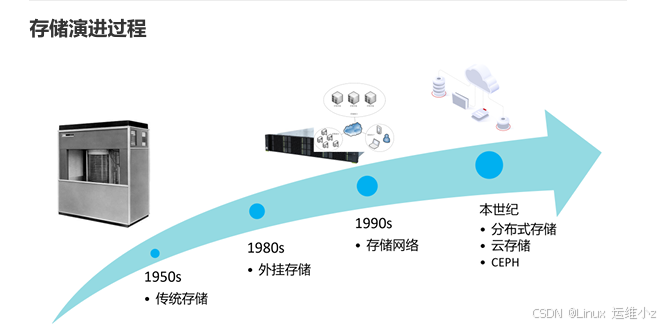
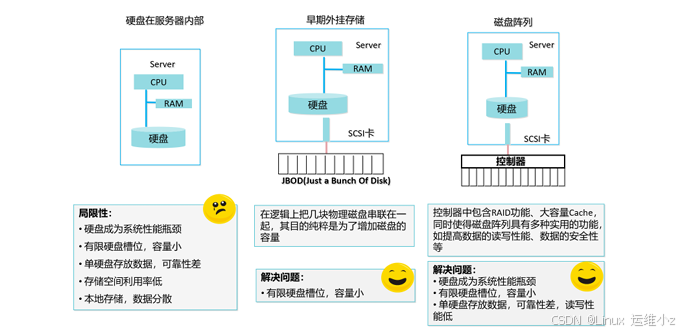
JBOD
JBOD 仅仅是一堆磁盘
第一块硬盘写满,写第二块,没有读写性能提升,没有可靠性提升,只是单纯的硬盘容量累加
RAID 独立磁盘冗余阵列(磁盘阵列)
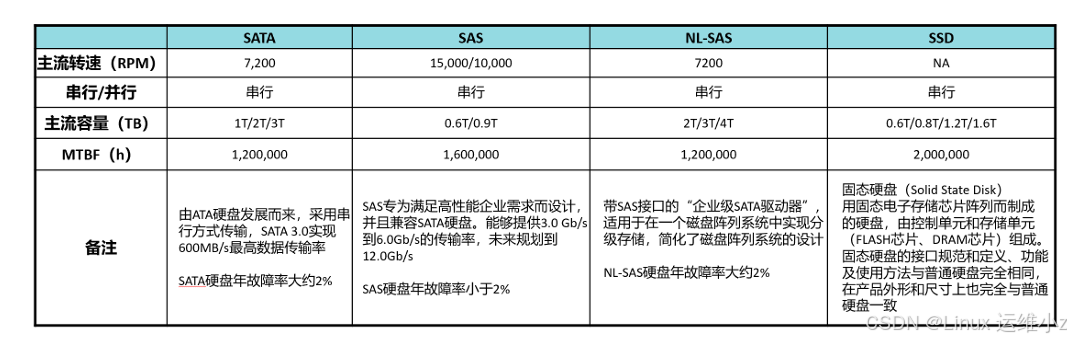
SATA 台式机
SAS 服务器
硬盘关键指标
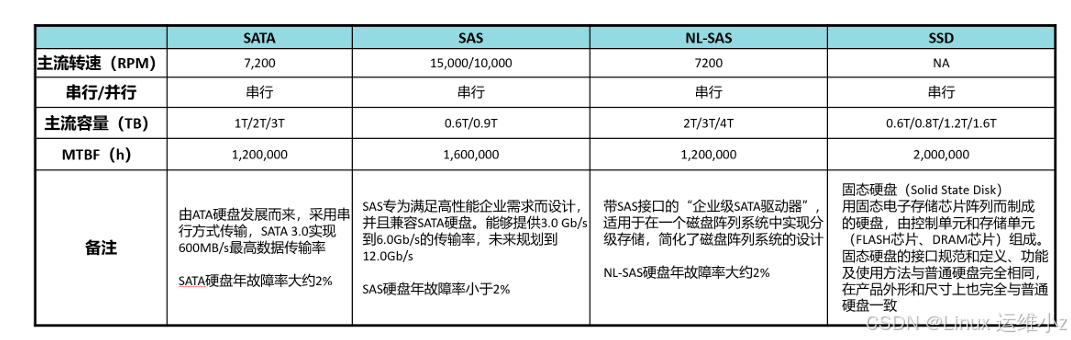
SSD(固态硬盘) 与 HDD(机械硬盘)带宽差距3倍,IOPS差距300倍
IOPS 每秒输入输出次数
带宽:影响连续大文件读写
IOPS:影响不连续小文件读写
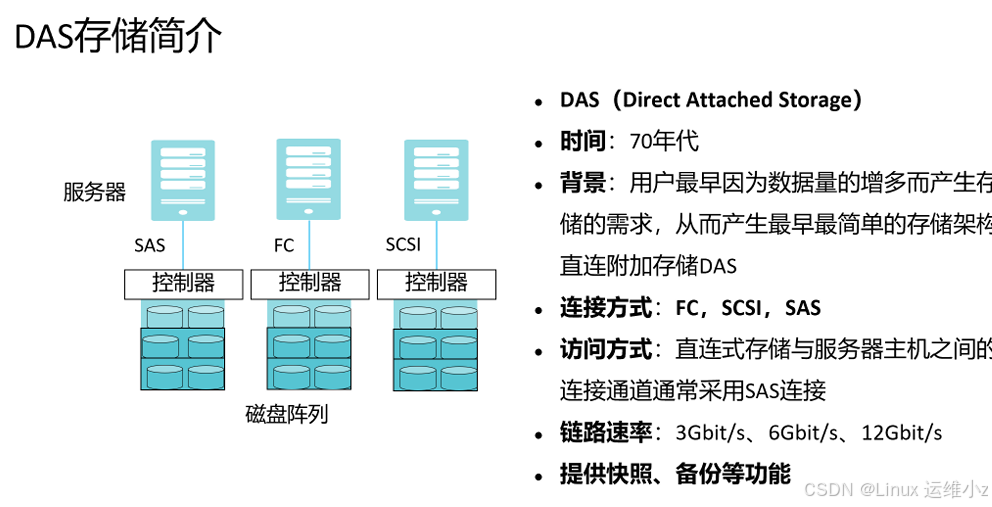
DAS 直连附加存储
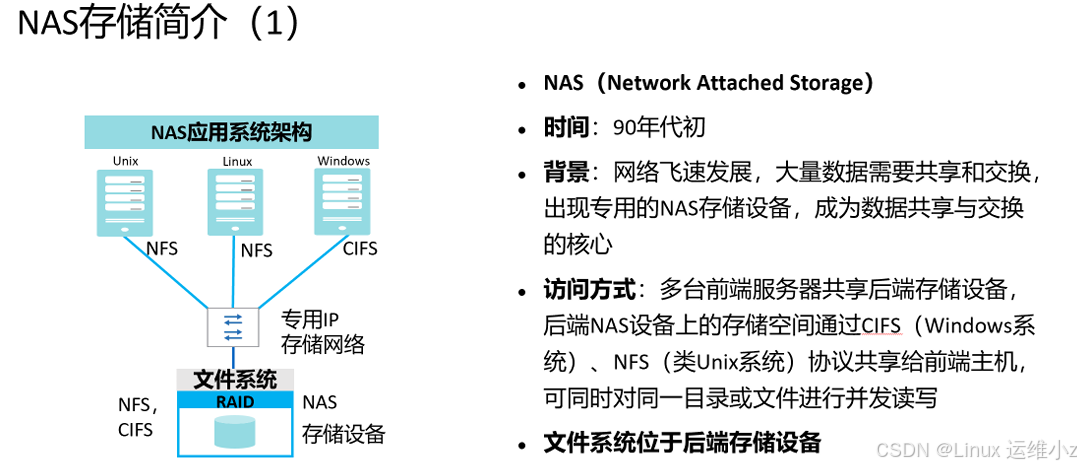
NAS 网络附加存储
SAN 存储区域网络
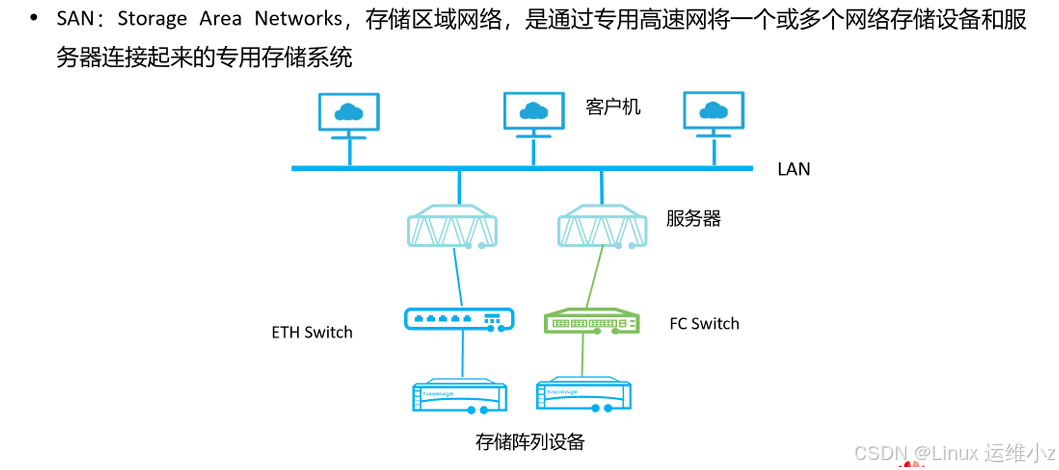
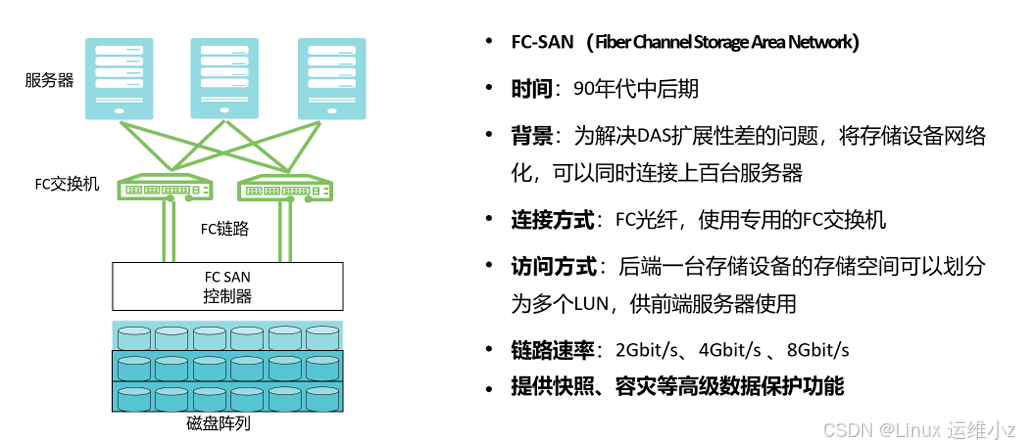
FC-SAN简介
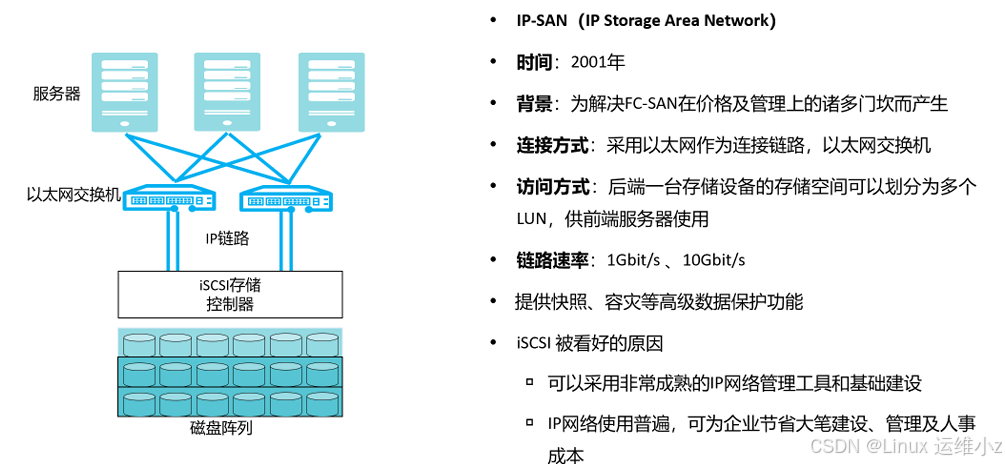
IP-SAN简介
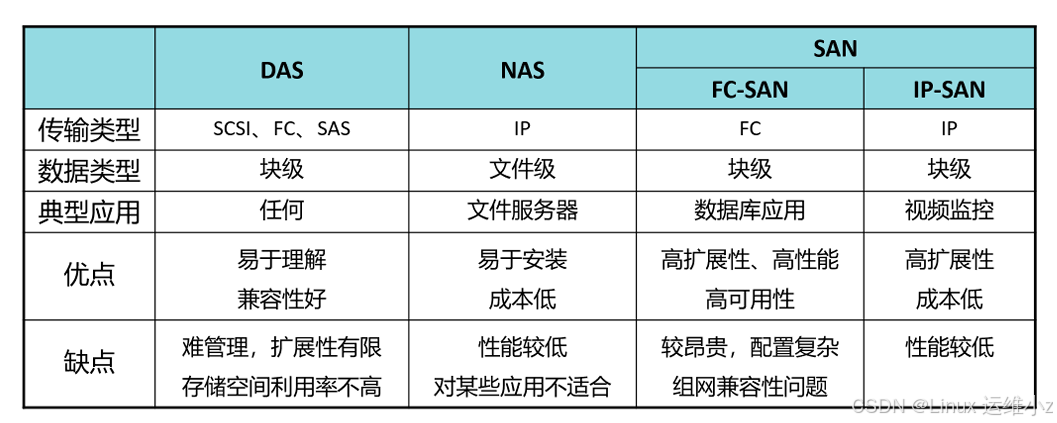
三种存储比较
RAID
RAID:Redundant Array of Independent Disks,独立硬盘冗余阵列,RAID技术将多个单独的物理硬盘 以不同的方式组合成一个逻辑硬盘,从而提高了硬盘的读写性能和数据安全性
RAID0: 带区卷
RAID1: 镜像卷
RAID5:
RAID10:
网络
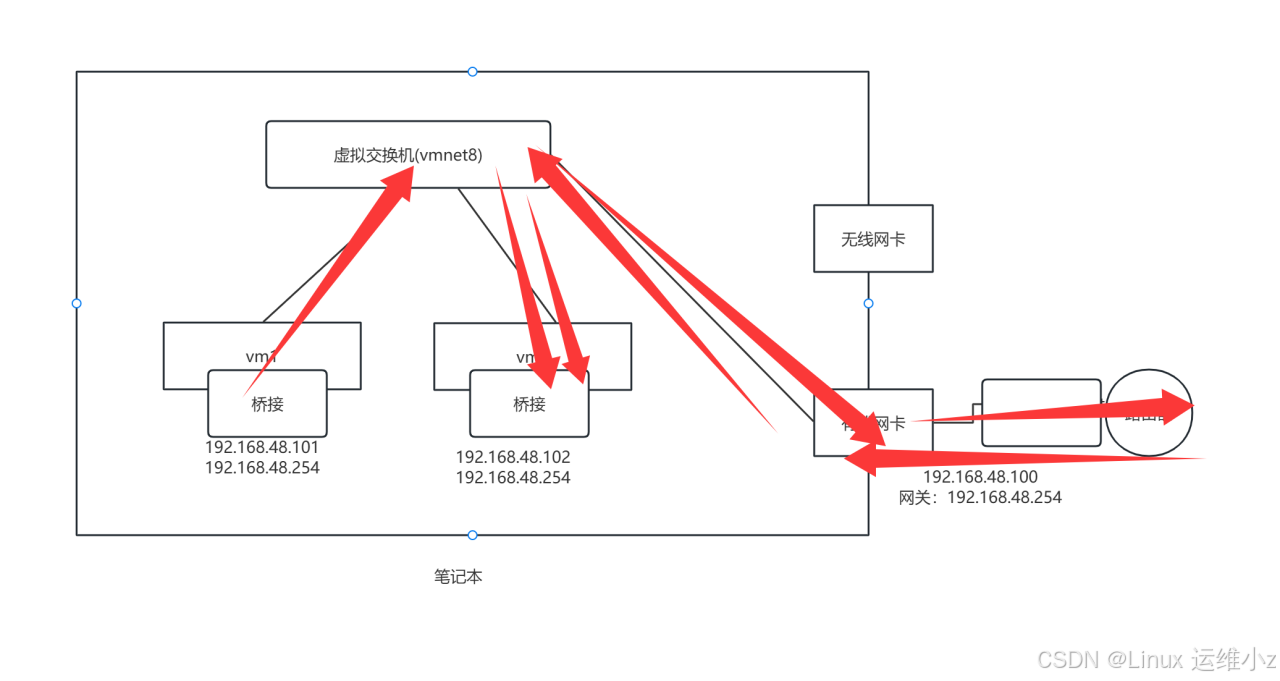
网络连接方式的区别
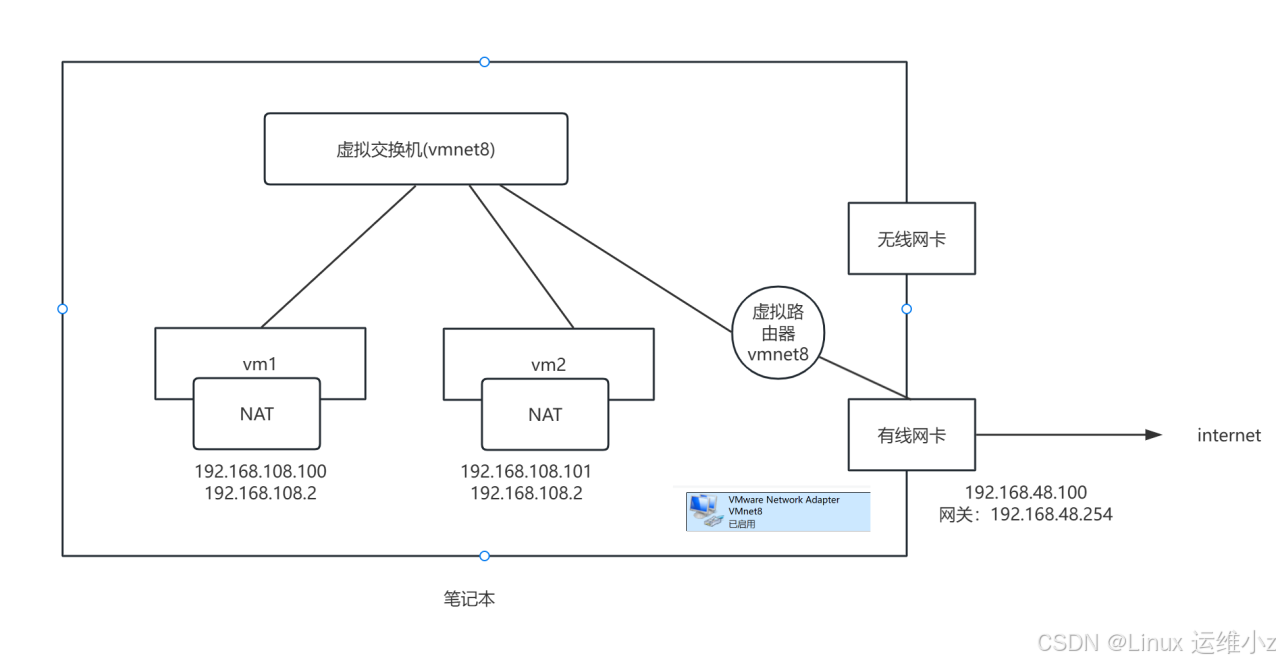
NAT
仅主机
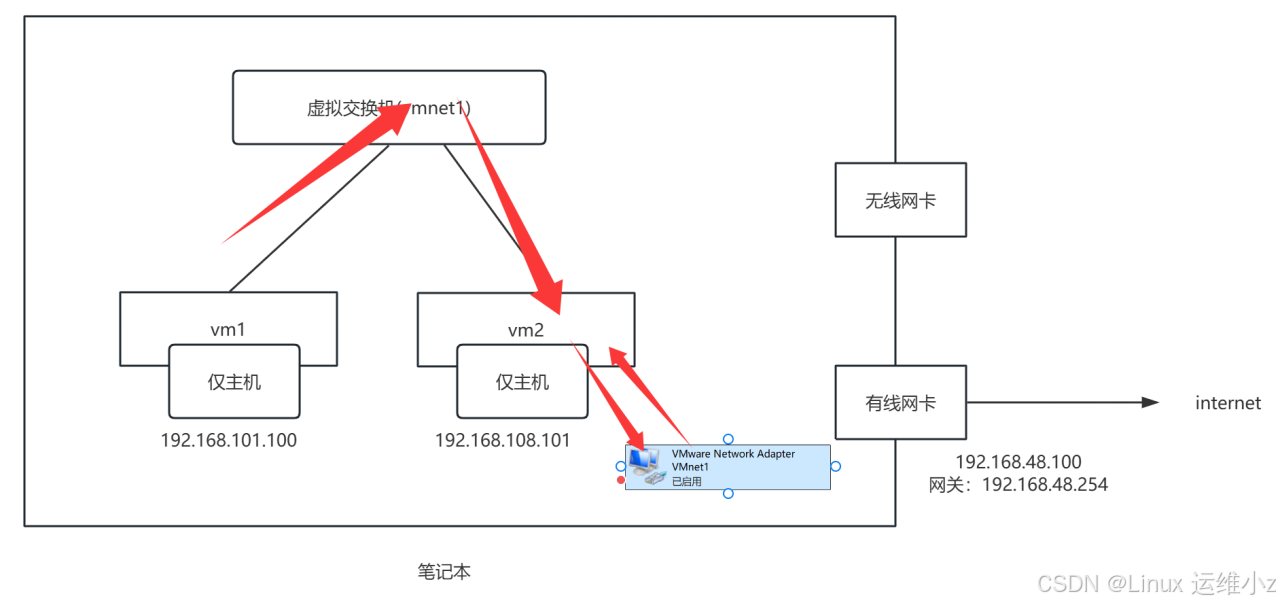
桥接