一、项目核心配置文件简介
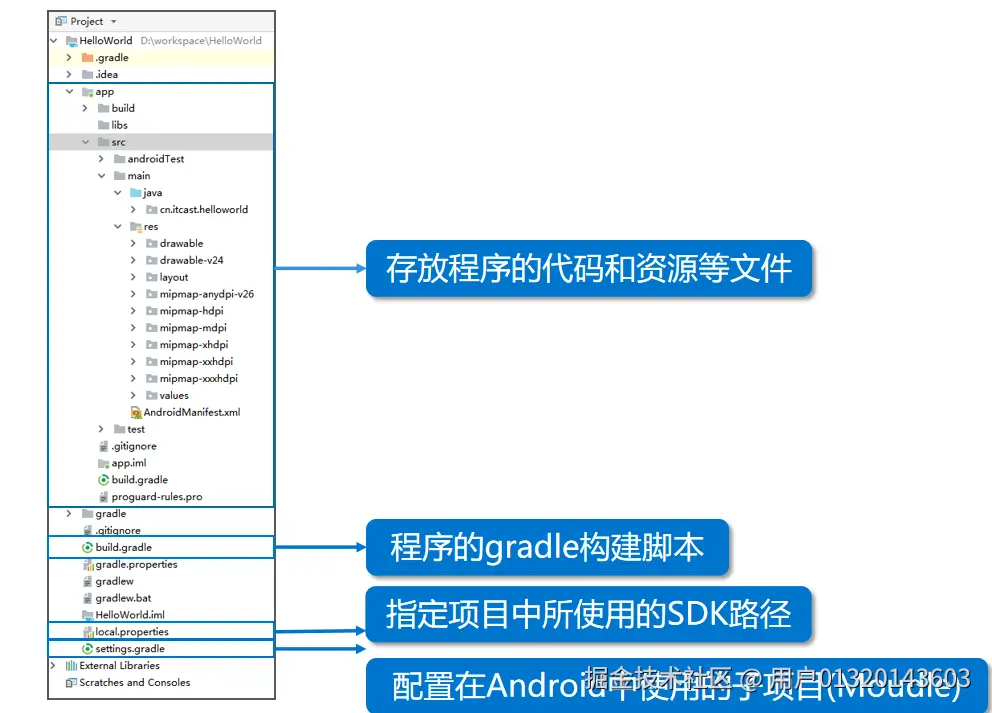
Android 项目中与资源、编译相关的关键文件:
app/build.gradle.kts:模块级构建配置,管理依赖与编译版本- 根目录
build.gradle.kts:项目全局构建配置 local.properties:指定本地 SDK 路径,自动生成无需修改settings.gradle.kts:管理项目模块(如include(":app"))>
二、Android 资源的管理与使用
Android 程序的外部资源会被编译进程序,统一存放在 res 文件夹下,通过 R 类在代码中引用。下面详细介绍各类核心资源:
2.1图片资源
Android 图片资源包括 .jpg/.gif/.png 等格式,分为应用图标资源 (mipmap 开头文件夹)和界面图片资源 (drawable 开头文件夹)。
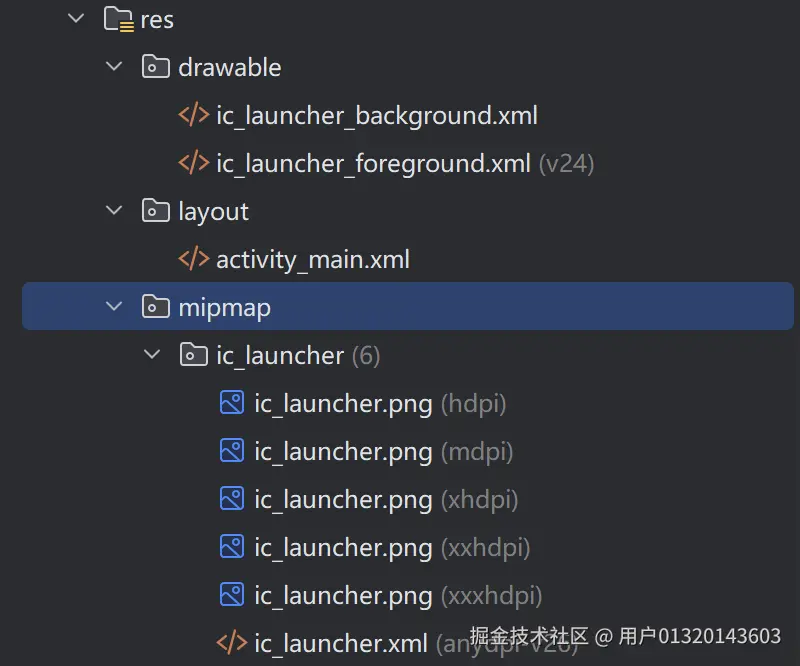 密度适配规则
系统会根据设备屏幕密度自动匹配对应文件夹的图片:
| 密度范围 /dpi | mipmap 文件夹 |
drawable 文件夹 |
|---|---|---|
| (120,160] | mipmap-mdpi | drawable-mdpi |
| (160,240] | mipmap-hdpi | drawable-hdpi |
| (240,320] | mipmap-xhdpi | drawable-xhdpi |
| (320,480] | mipmap-xxhdpi | drawable-xxhdpi |
| (480,640] | mipmap-xxxhdpi | drawable-xxxhdpi |
调用方式
-
Java 代码:
java
scss// 调用 mipmap 资源 getResources().getDrawable(R.mipmap.ic_launcher); // 调用 drawable 资源 getResources().getDrawable(R.drawable.icon); -
XML 布局:
xml
xml@mipmap/ic_launcher <!-- 引用 mipmap 图片 --> @drawable/icon <!-- 引用 drawable 图片 -->
2.2 主题和样式资源
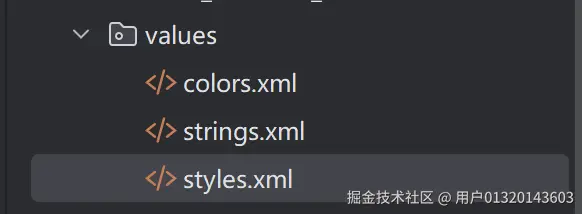
主题与样式用于美化界面,定义方式类似,均存放在 res/values/styles.xml 中。
1. 主题(Theme)
主题是格式化属性的集合,对整个应用或 Activity 生效,影响全局样式。
示例代码:
xml
xml
<resources>
    <!-- 基础应用主题 -->
    <style name="AppTheme" parent="Theme.AppCompat.Light.DarkActionBar">
        <!-- 自定义主题颜色 -->
        <item name="colorPrimary">@color/colorPrimary</item>
        <item name="colorPrimaryDark">@color/colorPrimaryDark</item>
        <item name="colorAccent">@color/colorAccent</item>
    </style>
</resources>name:主题名称parent:继承的系统父主题<item>:设置具体样式属性
2. 样式(Style)
样式用于美化单个 View 控件,可定义多个样式并复用。
示例代码:
xml
xml
<resources>
    <style name="TextViewStyle">
        <item name="android:layout_width">20dp</item>
        <item name="android:layout_height">20dp</item>
        <item name="android:background">#5f4e39</item>
    </style>
</resources>- 在 XML 中引用:
style="@style/TextViewStyle" - 在 Java 代码中设置:
setTextAppearance(R.style.TextViewStyle)
2.3布局资源
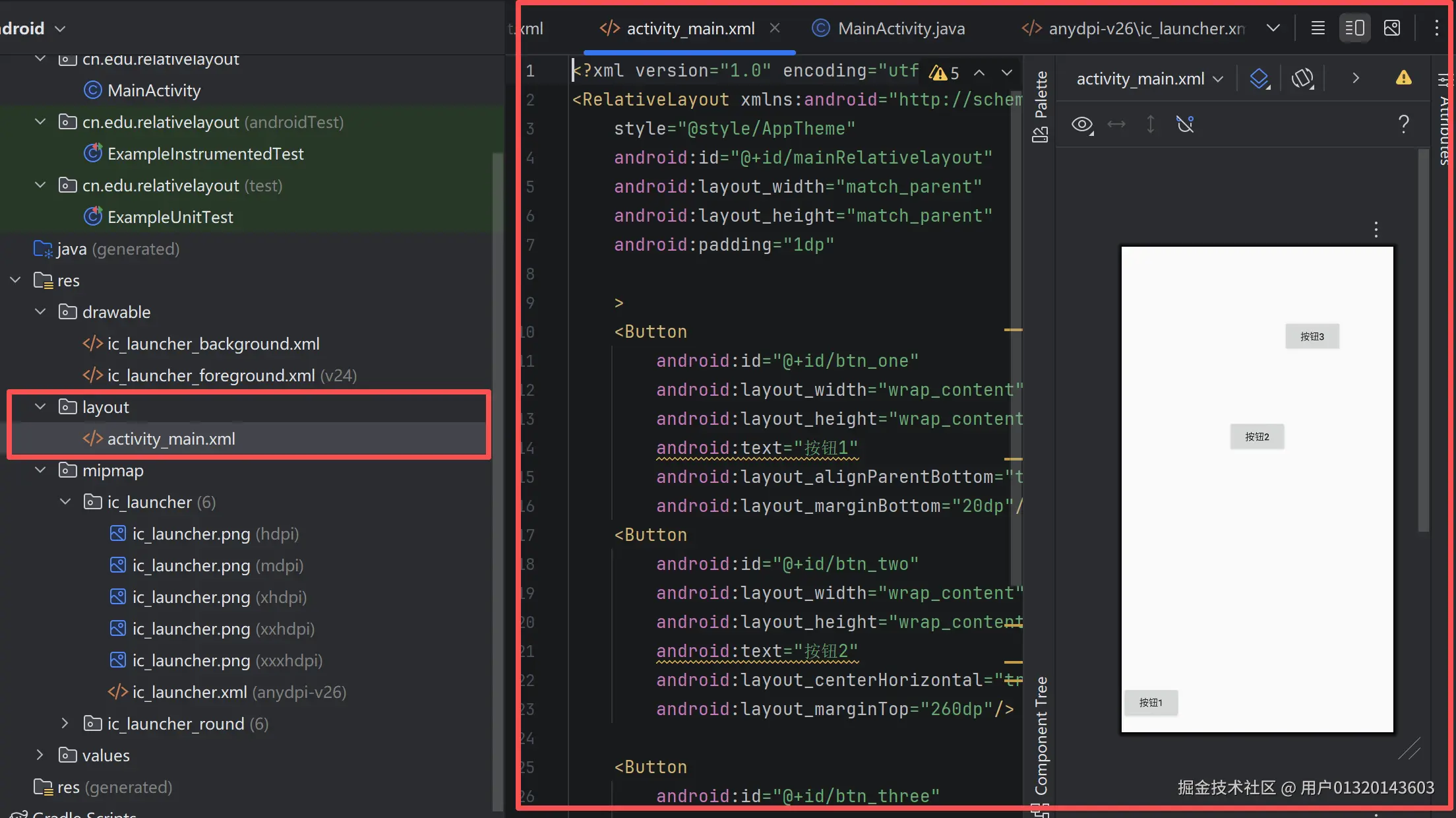
布局资源存放在 res/layout 文件夹下,用于搭建界面结构,默认生成 activity_main.xml。
调用方式
-
Java 代码 :在
onCreate()中调用java
scsssetContentView(R.layout.activity_main); -
XML 布局 :通过
<include>标签复用布局xml
ini<include layout="@layout/activity_main"/>
✨ 四种常用布局类型
表格
| 布局类型 | 核心特性 | 适用场景 |
|---|---|---|
| LinearLayout | 线性排列(水平 / 垂直),支持权重分配 | 表单、工具栏、列表项 |
| RelativeLayout | 相对父容器 / 其他控件定位,减少嵌套 | 复杂界面多元素定位 |
| FrameLayout | 层叠显示,后添加视图覆盖在前视图之上 | Fragment 容器、加载遮罩、悬浮按钮 |
| ConstraintLayout | 通过约束关系灵活定位,Google 推荐,性能最优 | 现代应用主流复杂布局 |
2.4 字符串资源
字符串是高频使用的资源,统一存放在 res/values/strings.xml 中,支持国际化。
示例代码:
xml
xml
<resources>
    <string name="app_name">字符串</string>
</resources>
调用方式
-
Java 代码:
java
scssgetResources().getString(R.string.app_name); -
XML 布局:
xml
bash@string/app_name
2.5 颜色资源
颜色资源存放在 res/values/colors.xml 中,用于统一管理界面颜色。
示例代码:
xml
ini
<resources>
    <color name="colorPrimary">#3F51B5</color>
    <color name="colorPrimaryDark">#303F9F</color>
    <color name="colorAccent">#FF4081</color>
</resources>
颜色定义格式
Android 颜色由 Alpha(透明度)+ RGB(三原色) 组成,支持 4 种写法:
#RGB:简写(如#F00代表红色)#ARGB:带透明度简写(如#8F00半透明红)#RRGGBB:完整色值(如#FF0000纯红)#AARRGGBB:带透明度完整色值(如#88FF0000半透明红)
调用方式
-
Java 代码:
java
scssgetResources().getColor(R.color.colorPrimary); -
XML 布局:
xml
bash@color/colorPrimary
2.6尺寸资源
尺寸资源存放在 res/values/dimens.xml 中,用于统一管理控件大小、间距。
示例代码:
xml
xml
<resources>
    <dimen name="activity_horizontal_margin">16dp</dimen>
    <dimen name="activity_vertical_margin">16dp</dimen>
</resources>
常用尺寸单位
表格
| 单位 | 全称 | 含义 | 适用场景 |
|---|---|---|---|
| px | Pixel | 像素,对应屏幕物理像素 | 不推荐,适配差 |
| dp | Density-independent Pixel | 设备独立像素,与密度无关 | 控件宽高、间距 |
| sp | Scaled Pixel | 比例像素,随系统字体大小变化 | 字体大小 |
| in | Inch | 英寸,物理长度单位 | 屏幕尺寸描述 |
| mm | Millimeter | 毫米,物理长度单位 | 极少使用 |
调用方式
-
Java 代码:
java
运行
scssgetResources().getDimension(R.dimen.activity_horizontal_margin); -
XML 布局:
xml
bash@dimen/activity_horizontal_margin
三、布局资源 & 四种常用布局(XML + Java)
布局文件存放于 res/layout/,Java 中通过 setContentView() 加载。
1. LinearLayout(线性布局)
特点 :水平 / 垂直线性排列,支持权重 layout_weight
XML(activity_linear.xml)
xml
ini
<?xml version="1.0" encoding="utf-8"?>
<LinearLayout
    xmlns:android="http://schemas.android.com/apk/res/android"
    android:layout_width="match_parent"
    android:layout_height="match_parent"
    android:orientation="vertical"
    android:gravity="center">

    <Button
        android:layout_width="match_parent"
        android:layout_height="wrap_content"
        android:text="@string/btn_text"/>

    <Button
        android:layout_width="match_parent"
        android:layout_height="wrap_content"
        android:text="按钮 2"
        android:layout_marginTop="10dp"/>

</LinearLayout>
Java 加载
java
运行
scala
public class LinearActivity extends AppCompatActivity {
    @Override
    protected void onCreate(Bundle savedInstanceState) {
        super.onCreate(savedInstanceState);
        setContentView(R.layout.activity_linear);
    }
}
2. RelativeLayout(相对布局)
特点:控件相对父容器 / 其他控件定位
XML(activity_relative.xml)
xml
ini
<?xml version="1.0" encoding="utf-8"?>
<RelativeLayout
    xmlns:android="http://schemas.android.com/apk/res/android"
    android:layout_width="match_parent"
    android:layout_height="match_parent">

    <Button
        android:id="@+id/btn_center"
        android:layout_width="wrap_content"
        android:layout_height="wrap_content"
        android:text="中间按钮"
        android:layout_centerInParent="true"/>

    <Button
        android:layout_width="wrap_content"
        android:layout_height="wrap_content"
        android:text="下方按钮"
        android:layout_below="@id/btn_center"
        android:layout_centerHorizontal="true"/>

</RelativeLayout>
Java 加载
java
scss
setContentView(R.layout.activity_relative);3. FrameLayout(帧布局)
特点:控件层叠叠加,默认左上角对齐
XML(activity_frame.xml)
xml
ini
<?xml version="1.0" encoding="utf-8"?>
<FrameLayout
    xmlns:android="http://schemas.android.com/apk/res/android"
    android:layout_width="match_parent"
    android:layout_height="match_parent">

    <ImageView
        android:layout_width="match_parent"
        android:layout_height="match_parent"
        android:background="@color/purple_500"/>

    <ProgressBar
        android:layout_width="wrap_content"
        android:layout_height="wrap_content"
        android:layout_gravity="center"/>

</FrameLayout>
Java 加载
java
scss
setContentView(R.layout.activity_frame);4. ConstraintLayout(约束布局)
特点:通过约束精确定位,官方推荐,减少嵌套
XML(activity_constraint.xml)
xml
ini
<?xml version="1.0" encoding="utf-8"?>
<androidx.constraintlayout.widget.ConstraintLayout
    xmlns:android="http://schemas.android.com/apk/res/android"
    xmlns:app="http://schemas.android.com/apk/res-auto"
    android:layout_width="match_parent"
    android:layout_height="match_parent">

    <Button
        android:id="@+id/btn1"
        android:layout_width="wrap_content"
        android:layout_height="wrap_content"
        android:text="按钮 1"
        app:layout_constraintLeft_toLeftOf="parent"
        app:layout_constraintTop_toTopOf="parent"/>

    <Button
        android:id="@+id/btn2"
        android:layout_width="wrap_content"
        android:layout_height="wrap_content"
        android:text="按钮 2"
        app:layout_constraintLeft_toRightOf="@id/btn1"
        app:layout_constraintTop_toTopOf="@id/btn1"/>

</androidx.constraintlayout.widget.ConstraintLayout>
Java 加载
java
scss
setContentView(R.layout.activity_constraint);四、总结
Android 资源管理是开发的核心基础,通过 res 文件夹分类存放各类资源,既保证了代码与界面的解耦,也方便了多设备适配与国际化。
- 核心优势:统一管理、便于复用、支持多设备适配、方便国际化
- 调用方式 :Java 代码通过
R.资源类型.资源名引用,XML 布局通过@资源类型/资源名引用 - 最佳实践 :优先使用
dp/sp单位,颜色 / 字符串 / 尺寸统一放入对应 XML 文件,复杂布局推荐使用ConstraintLayout