当前需要把安卓摄像头所生成的视频流通过 RTSP 协议传输到服务器上,也就是推流。最开始用 libstreaming,直接 source 引入,不知为何压根没有推流,故放弃。估计是太老 API 吧,都七年前最后更新的。于是再网上搜索下,结论是没啥好的安卓直播推流组件,要么就是老掉牙的。
最后 AI 推荐这款 RootEncoder github.com/pedroSG94/R...,持续更新的。但我先要批判它一番,因为问题确实多多,搞得我头发掉不少:
- 模块众多,甚至有 iOS 版本,比较混乱,文档也说不清楚的样子
- 没有文档,没有例子,要自己摸索,AI 的例子也跑不通
- 依赖是在 jitpack 的,你要另外配置,------我是安卓新手,这个搞半天
- API 混乱,差一个小版本就没了某个类,------作者重构的任意性太大,搞的例子都不通用
- 它的名字也换来换去,搞得我不好搜索。早期叫 rtmp-rtsp-stream-client-java 后来改为 RootEncoder
虽然搞起来没有一帆风顺,但通过不懈的努力,在老外一篇文章帮助下,终于调通 RSTP 推流,于是写就此外------以飨读者!
添加依赖
依赖是在 jitpack 的,其他地方没有。操作是:打开工程根目录下的settings.gradle加入maven { url 'https://jitpack.io' } 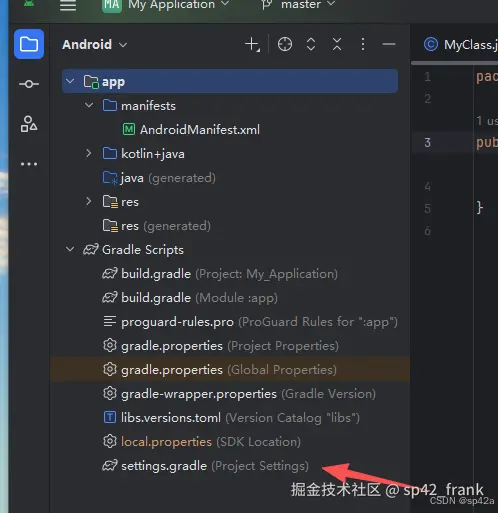 加入
加入maven { url 'https://jitpack.io' }依赖源。
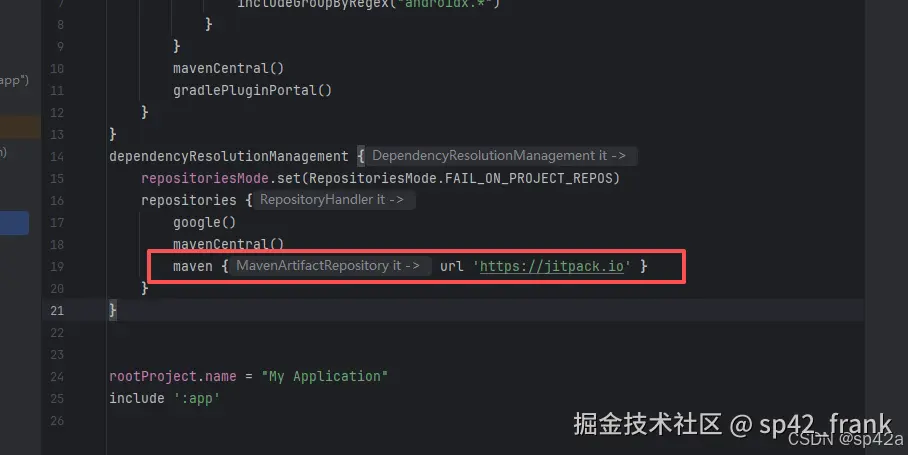 保存然后打开
app/build.gradle,加入rtmp-rtsp-stream-client的依赖,注意版本不能错。新版本 API 又不同,代码也不晓得怎么改(这货就是这样)。
arduino
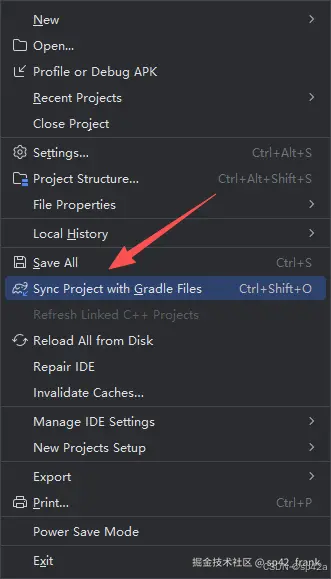
implementation 'com.github.pedroSG94.rtmp-rtsp-stream-client-java:rtplibrary:2.2.4'最后点击【File】菜单下面这里的才有效,执行网络远程下载相关的依赖。
安卓代码开发
添加权限
老操作了,对AndroidManifest.xml添加权限:
xml
<uses-permission android:name="android.permission.INTERNET" />
<uses-permission android:name="android.permission.RECORD_AUDIO" />
<uses-permission android:name="android.permission.CAMERA" />
<uses-permission android:name="android.permission.WRITE_EXTERNAL_STORAGE" />

<!--Optional for play store-->
<uses-feature android:name="android.hardware.camera" android:required="false" />
<uses-feature android:name="android.hardware.camera.autofocus" android:required="false" />
添加布局文件
目录res/layout下新建activity_open_gl_rtsp.xml:
ini
<?xml version="1.0" encoding="utf-8"?>
<RelativeLayout xmlns:android="http://schemas.android.com/apk/res/android"
    xmlns:app="http://schemas.android.com/apk/res-auto"
    xmlns:tools="http://schemas.android.com/tools"
    android:layout_width="match_parent"
    android:layout_height="match_parent"
    tools:context=".OpenGlRtspActivity">

    <com.pedro.rtplibrary.view.OpenGlView
        android:id="@+id/surfaceView"
        android:layout_width="match_parent"
        android:layout_height="match_parent" />

    <LinearLayout
        android:layout_width="match_parent"
        android:layout_height="wrap_content"
        android:layout_alignParentBottom="true"
        android:orientation="vertical"
        android:padding="16dp">

        <EditText
            android:id="@+id/et_rtp_url"
            android:layout_width="match_parent"
            android:layout_height="wrap_content"
            android:hint="RTSP URL"
            android:inputType="textUri"
            android:padding="8dp" />

        <LinearLayout
            android:layout_width="match_parent"
            android:layout_height="wrap_content"
            android:orientation="horizontal"
            android:layout_marginTop="16dp">

            <Button
                android:id="@+id/b_start_stop"
                android:layout_width="0dp"
                android:layout_height="wrap_content"
                android:layout_weight="1"
                android:text="Start"
                android:layout_marginEnd="8dp" />

            <Button
                android:id="@+id/switch_camera"
                android:layout_width="0dp"
                android:layout_height="wrap_content"
                android:layout_weight="1"
                android:text="Switch Camera" />
        </LinearLayout>

        <Button
            android:id="@+id/b_record"
            android:layout_width="match_parent"
            android:layout_height="wrap_content"
            android:text="Record"
            android:layout_marginTop="8dp" />

    </LinearLayout>
</RelativeLayout>
回到里面注册一下新布局:
xml
<activity
            android:name=".OpenGlRtspActivity"
            android:exported="false"
            android:theme="@style/Theme.MyApplication" />
页面逻辑
新建OpenGlRtspActivity.kt:
kotlin
import android.os.Bundle
import android.util.Log
import android.view.Menu
import android.view.MenuItem
import android.view.MotionEvent
import android.view.SurfaceHolder
import android.view.View
import android.view.View.OnTouchListener
import android.view.WindowManager
import android.widget.Button
import android.widget.EditText
import android.widget.Toast
import androidx.activity.ComponentActivity
import com.pedro.encoder.input.gl.SpriteGestureController
import com.pedro.encoder.input.video.CameraOpenException
import com.pedro.rtplibrary.rtsp.RtspCamera1
import com.pedro.rtplibrary.view.OpenGlView
import com.pedro.rtsp.utils.ConnectCheckerRtsp
import java.io.File

class OpenGlRtspActivity : ComponentActivity(), ConnectCheckerRtsp, View.OnClickListener,
    SurfaceHolder.Callback, OnTouchListener {
    private var rtspCamera1: RtspCamera1? = null
    private lateinit var button: Button
    private lateinit var bRecord: Button
    private lateinit var etUrl: EditText
    private var currentDateAndTime = ""
    private var folder: File? = null
    private lateinit var openGlView: OpenGlView
    private val spriteGestureController = SpriteGestureController()
    override fun onCreate(savedInstanceState: Bundle?) {
        super.onCreate(savedInstanceState)
        window.addFlags(WindowManager.LayoutParams.FLAG_KEEP_SCREEN_ON)
        setContentView(R.layout.activity_open_gl_rtsp)
        openGlView = findViewById<OpenGlView>(R.id.surfaceView)
        button = findViewById<Button>(R.id.b_start_stop)
        button.setOnClickListener(this)
        bRecord = findViewById<Button>(R.id.b_record)
        bRecord.setOnClickListener(this)
        etUrl = findViewById<EditText>(R.id.et_rtp_url)
        etUrl.setHint("RTSP")
        etUrl.setText("")
        val switchCamera = findViewById<Button>(R.id.switch_camera)
        switchCamera.setOnClickListener(this)
        rtspCamera1 = RtspCamera1(openGlView, this)
        openGlView.holder.addCallback(this)
        openGlView.setOnTouchListener(this)
    }

    override fun onCreateOptionsMenu(menu: Menu): Boolean {
        // I commented this line because I don't need this menu
        // menuInflater.inflate(R.menu.gl_menu, menu)
        return true
    }

    override fun onOptionsItemSelected(item: MenuItem): Boolean {
        //Stop listener for image, text and gif stream objects.
        spriteGestureController.stopListener()
        return false
    }


    override fun onConnectionStartedRtsp(rtspUrl: String) {}
    override fun onConnectionSuccessRtsp() {
        runOnUiThread {
            Toast.makeText(
                this@OpenGlRtspActivity,
                "Connection success",
                Toast.LENGTH_SHORT
            ).show()
        }
    }

    override fun onConnectionFailedRtsp(reason: String) {
        Log.e("RTTMA", reason)
        runOnUiThread {
            Toast.makeText(
                this@OpenGlRtspActivity,
                "Connection failed. $reason",
                Toast.LENGTH_SHORT
            )
                .show()
            rtspCamera1!!.stopStream()
            button.setText("Start")
        }
    }

    override fun onNewBitrateRtsp(bitrate: Long) {}
    override fun onDisconnectRtsp() {
        runOnUiThread {
            Toast.makeText(this@OpenGlRtspActivity, "Disconnected", Toast.LENGTH_SHORT).show()
        }
    }

    override fun onAuthErrorRtsp() {
        runOnUiThread {
            Toast.makeText(this@OpenGlRtspActivity, "Auth error", Toast.LENGTH_SHORT).show()
        }
    }

    override fun onAuthSuccessRtsp() {
        runOnUiThread {
            Toast.makeText(this@OpenGlRtspActivity, "Auth success", Toast.LENGTH_SHORT).show()
        }
    }

    override fun onClick(view: View) {
        when (view.id) {
            R.id.b_start_stop -> if (!rtspCamera1!!.isStreaming) {
                if (rtspCamera1!!.isRecording
                    || rtspCamera1!!.prepareAudio() && rtspCamera1!!.prepareVideo()
                ) {
                    button.text = "Stop"
                    rtspCamera1!!.startStream(etUrl!!.text.toString())
                } else {
                    Toast.makeText(
                        this, "Error preparing stream, This device cant do it",
                        Toast.LENGTH_SHORT
                    ).show()
                }
            } else {
                button.text = "Start"
                rtspCamera1!!.stopStream()
            }

            R.id.switch_camera -> try {
                rtspCamera1!!.switchCamera()
            } catch (e: CameraOpenException) {
                Toast.makeText(this, e.message, Toast.LENGTH_SHORT).show()
            }

            else -> {}
        }
    }

    override fun surfaceCreated(surfaceHolder: SurfaceHolder) {}
    override fun surfaceChanged(surfaceHolder: SurfaceHolder, i: Int, i1: Int, i2: Int) {
        rtspCamera1!!.startPreview()
    }

    override fun surfaceDestroyed(surfaceHolder: SurfaceHolder) {
        if (rtspCamera1!!.isStreaming) {
            rtspCamera1!!.stopStream()
            button.text = "Start"
        }
        rtspCamera1!!.stopPreview()
    }

    override fun onTouch(view: View, motionEvent: MotionEvent): Boolean {
        if (spriteGestureController.spriteTouched(view, motionEvent)) {
            spriteGestureController.moveSprite(view, motionEvent)
            spriteGestureController.scaleSprite(motionEvent)
            return true
        }
        return false
    }
}
最后制作一个按钮作为入口:
kt
Button(
    onClick = {
        val intent = Intent(context, OpenGlRtspActivity::class.java)
        context.startActivity(intent)
    },
    modifier = Modifier.padding(top = 16.dp)
) {
    Text(text = "RootEncoder推流")
}
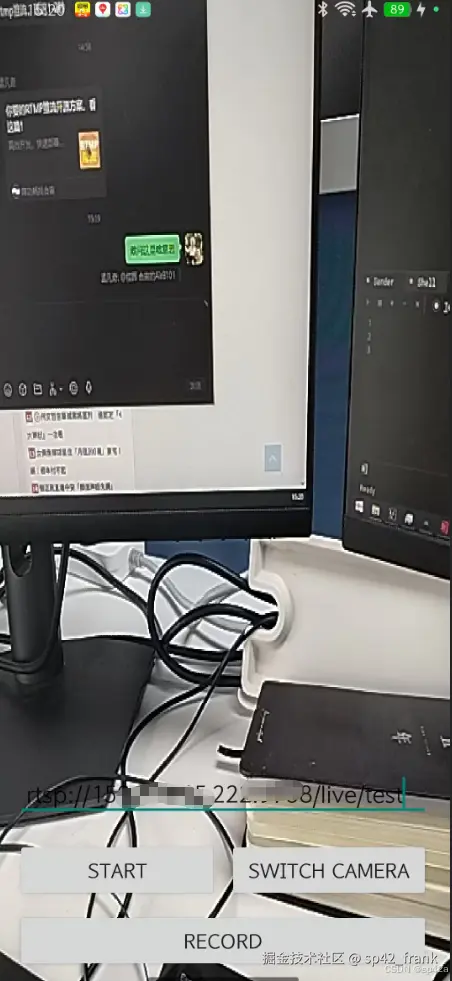
搞定~ 下面是安卓的运行界面:
其他开源
- Android端RTMP推流实现- RtmpPublishKit,挺不错的,作者有文章专门介绍实现思路,可惜的是不再开源; 博客文章《深度解析RTMP直播协议:从保姆级入门到高级优化!》
- 编写一个简单的RTSP协议-主流程 github.com/ImSjt/RtspS...
- ZLMediaKit-Android-Stream
- 播放器,不是推流 github.com/alexeyvasil...