Android中实现天猫/京东/抖音/咸鱼/拼多多等商品详情页面智能跳转APP商品页面功能
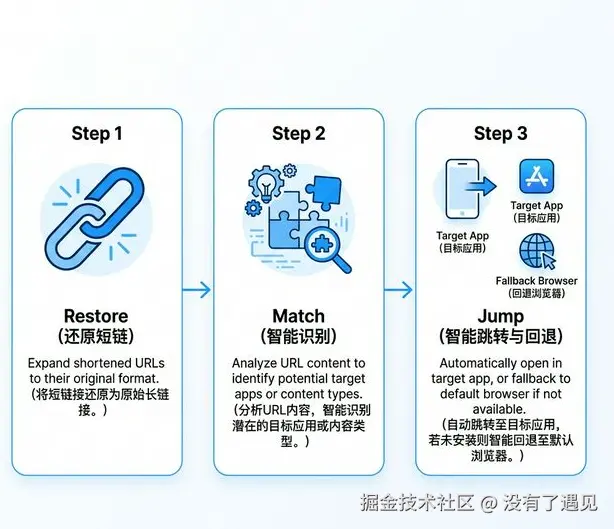
1.需求
商品URL跳转到对应的APP,不支持的跳转到浏览器
2.思路
- 还原 (Restore) : 短链变长链(重定向)。
- 识别 (Match) :长链变协议 (Scheme)。
- 跳转 (Jump) :跳 App 或回退浏览器。
关键定义:
- 重定向 (Redirect)就是通过各种方法将各种网络请求重新定个方向转到其它位置(
- Scheme 是Android中用于自定义URL协议的概念,它允许通过特定URI启动应用程序内的Activity,适用于实现点击链接打开应用、分享功能和集成第三方服务等场景
3:代码实现
3.1 AndroidManifest.xml 清单文件配置 Scheme 跳转平台的配置
xml
<?xml version="1.0" encoding="utf-8"?>
<manifest xmlns:android="http://schemas.android.com/apk/res/android">
    <uses-permission android:name="android.permission.INTERNET" />

    <!-- Android 11+ 软件包可见性声明 -->
    <queries>
        <!-- 淘宝 -->
        <intent>
            <action android:name="android.intent.action.VIEW" />
            <data android:scheme="taobao" />
        </intent>
        <!-- 京东 -->
        <intent>
            <action android:name="android.intent.action.VIEW" />
            <data android:scheme="openapp.jdmobile" />
        </intent>
        <!-- 拼多多 -->
        <intent>
            <action android:name="android.intent.action.VIEW" />
            <data android:scheme="pinduoduo" />
        </intent>
        <!-- 抖音 -->
        <intent>
            <action android:name="android.intent.action.VIEW" />
            <data android:scheme="snssdk1128" />
        </intent>
        <!-- 闲鱼 -->
        <intent>
            <action android:name="android.intent.action.VIEW" />
            <data android:scheme="fleamarket" />
        </intent>
        <!-- 通用浏览器支持 -->
        <intent>
            <action android:name="android.intent.action.VIEW" />
            <data android:scheme="https" />
        </intent>
    </queries>
    <application>
    </application>
</manifest>
3.2 SmartJumpUtils 主工具
kotlin
package com.wkq.util.jump

import android.content.Context
import android.content.Intent
import android.net.Uri
import com.wkq.util.log.ALog
import kotlinx.coroutines.Dispatchers
import kotlinx.coroutines.withContext

/**
 * 智能跳转工具类 (工程级重构版本)
 * 实现商品 URL 还原、多平台异步识别及安全跳转
 */
object SmartJumpUtils {

    private const val TAG = "SmartJumpUtils"

    /**
     * 智能跳转核心入口
     * 还原 URL -> 策略引擎转换 Scheme -> 尝试唤起 App -> 失败回退浏览器
     *
     * @param context Context
     * @param url 原始商品 URL
     */
    suspend fun jumpToAppOrBrowser(context: Context, url: String) = withContext(Dispatchers.Main) {
        ALog.d(TAG, "开始智能跳转处理: $url")

        // 1. 处理重定向获取最终 URL (IO 线程)
        val finalUrl = UrlUtils.getFinalUrl(url)
        ALog.d(TAG, "解析后的最终 URL: $finalUrl")

        // 2. 使用策略引擎获取目标 Scheme
        val schemeUrl = SmartJumpEngine.getScheme(finalUrl)

        if (schemeUrl != null) {
            try {
                ALog.d(TAG, "尝试通过策略 Scheme 跳转: $schemeUrl")
                val intent = Intent(Intent.ACTION_VIEW, Uri.parse(schemeUrl))
                intent.addFlags(Intent.FLAG_ACTIVITY_NEW_TASK)
                context.startActivity(intent)
                return@withContext
            } catch (e: Exception) {
                ALog.w(TAG, "策略 Scheme 跳转失败: ${e.message}")
            }
        }

        // 3. 兜底方案:使用系统浏览器
        ALog.d(TAG, "执行浏览器兜底跳转: $finalUrl")
        try {
            val browserIntent = Intent(Intent.ACTION_VIEW, Uri.parse(finalUrl))
            browserIntent.addFlags(Intent.FLAG_ACTIVITY_NEW_TASK)
            context.startActivity(browserIntent)
        } catch (e: Exception) {
            ALog.e(TAG, "兜底跳转失败: ${e.message}")
        }
    }
}
3.3 UrlUtils 重定向处理工具
重定向处理
- Url方式获取
- WebView 加载方式获取(开销大)
kotlin
package com.wkq.util.jump

import kotlinx.coroutines.Dispatchers
import kotlinx.coroutines.withContext
import java.net.HttpURLConnection
import java.net.URL

/**
 * URL 处理工具类
 */
object UrlUtils {

    /**
     * 获取重定向后的最终 URL
     *
     * @param urlString 原始 URL
     * @param maxRedirects 最大重定向次数,防止无限循环
     * @return 最终的 URL
     */
    suspend fun getFinalUrl(urlString: String, maxRedirects: Int = 10): String = withContext(Dispatchers.IO) {
        var currentUrl = urlString
        var redirects = 0

        try {
            while (redirects < maxRedirects) {
                val url = URL(currentUrl)
                val connection = url.openConnection() as HttpURLConnection
                connection.instanceFollowRedirects = false
                connection.requestMethod = "GET"
                connection.connectTimeout = 5000
                connection.readTimeout = 5000
                // 模拟浏览器 User-Agent,防止某些网站屏蔽爬虫
                connection.setRequestProperty("User-Agent", "Mozilla/5.0 (Windows NT 10.0; Win64; x64) AppleWebKit/537.36 (KHTML, like Gecko) Chrome/91.0.4472.124 Safari/537.36")

                val responseCode = connection.responseCode

                // 检查是否为重定向响应 (3xx)
                if (responseCode in 300..399) {
                    val location = connection.getHeaderField("Location")
                    if (location != null) {
                        // 处理相对路径重定向
                        currentUrl = if (location.startsWith("/")) {
                            val base = URL(currentUrl)
                            "${base.protocol}://${base.host}${if (base.port != -1) ":${base.port}" else ""}$location"
                        } else {
                            location
                        }
                        redirects++
                        continue
                    }
                }

                // 正常响应 (200) 或非重定向响应,返回当前 URL
                return@withContext currentUrl
            }
        } catch (e: Exception) {
            e.printStackTrace()
        }

        return@withContext currentUrl
    }
}
3.4 SmartJumpEngine 智能引擎 管理和转发策略
kotlin
package com.wkq.util.jump

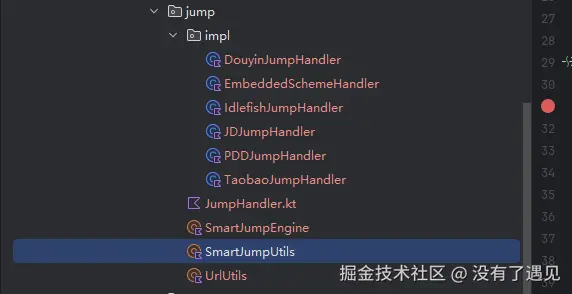
import com.wkq.util.jump.impl.*

/**
 * 智能跳转引擎
 * 管理跳转策略并执行分发
 */
object SmartJumpEngine {

    private val handlers = mutableListOf<JumpHandler>()

    init {
        // 注册所有处理器
        handlers.add(EmbeddedSchemeHandler()) // 优先级最高
        handlers.add(TaobaoJumpHandler())
        handlers.add(JDJumpHandler())
        handlers.add(PDDJumpHandler())
        handlers.add(DouyinJumpHandler())
        handlers.add(IdlefishJumpHandler())

        // 按优先级从高到低排序
        handlers.sortByDescending { it.getPriority() }
    }

    /**
     * 根据 URL 获取对应的跳转 Scheme
     */
    fun getScheme(url: String): String? {
        for (handler in handlers) {
            if (handler.canHandle(url)) {
                val scheme = handler.convertToScheme(url)
                if (scheme != null) return scheme
            }
        }
        return null
    }

    /**
     * 动态注册新的处理器
     */
    fun registerHandler(handler: JumpHandler) {
        handlers.add(handler)
        handlers.sortByDescending { it.getPriority() }
    }
}
3.5 JumpHandler 引擎接口 方便后期扩展和维护
kotlin
package com.wkq.util.jump

import android.net.Uri

/**
 * 智能跳转处理器接口
 */
interface JumpHandler {

    /**
     * 判断当前 Handler 是否能处理该 URL
     */
    fun canHandle(url: String): Boolean

    /**
     * 将 URL 转换为该平台特有的 Scheme
     */
    fun convertToScheme(url: String): String?

    /**
     * 优先级,数字越大优先级越高
     */
    fun getPriority(): Int = 0
}

/**
 * 基础处理器,提供常用辅助方法
 */
abstract class BaseJumpHandler : JumpHandler {

    protected fun getParam(url: String, name: String): String? {
        return try {
            val uri = Uri.parse(url)
            uri.getQueryParameter(name)
        } catch (_: Exception) {
            null
        }
    }
}
3.6 引擎实现类(京东、天猫,抖音,拼多多)
kotlin
package com.wkq.util.jump.impl

import com.wkq.util.jump.BaseJumpHandler

/**
 * 抖音 / 今日特卖处理器
 */
class DouyinJumpHandler : BaseJumpHandler() {

    override fun canHandle(url: String): Boolean {
        val lowUrl = url.lowercase()
        return lowUrl.contains("douyin.com") || lowUrl.contains("iesdouyin.com") || lowUrl.contains("jinritemai.com")
    }

    override fun convertToScheme(url: String): String? {
        val lowUrl = url.lowercase()
        val promotionId = getParam(url, "promotion_id") ?: getParam(url, "id")
        return if (promotionId != null && lowUrl.contains("detail")) {
            "snssdk1128://ec_goods_detail?promotion_id=$promotionId"
        } else {
            "snssdk1128://feed"
        }
    }
}


/**
 * 闲鱼处理器
 */
class IdlefishJumpHandler : BaseJumpHandler() {

    override fun canHandle(url: String): Boolean {
        val lowUrl = url.lowercase()
        return lowUrl.contains("goofish.com") || lowUrl.contains("21.cn") || lowUrl.contains("idlefish.com") || lowUrl.contains("2.taobao.com")
    }

    override fun convertToScheme(url: String): String? {
        val itemId = getParam(url, "id") ?: getParam(url, "item_id")
        return if (itemId != null) {
            "fleamarket://item?id=$itemId"
        } else {
            "fleamarket://home"
        }
    }
}


/**
 * 京东处理器
 */
class JDJumpHandler : BaseJumpHandler() {

    override fun canHandle(url: String): Boolean {
        val lowUrl = url.lowercase()
        return lowUrl.contains("jd.com") || lowUrl.contains("jd.hk") || lowUrl.contains("3.cn")
    }

    override fun convertToScheme(url: String): String? {
        return "openapp.jdmobile://virtual?params={"category":"jump","des":"productDetail","url":"$url"}"
    }
}


/**
 * 拼多多处理器
 */
class PDDJumpHandler : BaseJumpHandler() {

    override fun canHandle(url: String): Boolean {
        val lowUrl = url.lowercase()
        return lowUrl.contains("yangkeduo.com") || lowUrl.contains("pinduoduo.com")
    }

    override fun convertToScheme(url: String): String? {
        val goodsId = getParam(url, "goods_id")
        return if (goodsId != null) {
            "pinduoduo://com.xunmeng.pinduoduo/goods_detail.html?goods_id=$goodsId"
        } else {
            "pinduoduo://com.xunmeng.pinduoduo/"
        }
    }
}


/**
 * 淘宝 & 天猫处理器
 */
class TaobaoJumpHandler : BaseJumpHandler() {

    override fun canHandle(url: String): Boolean {
        val lowUrl = url.lowercase()
        return lowUrl.contains("taobao.com") || lowUrl.contains("tmall.com") || lowUrl.contains("tb.cn")
    }

    override fun convertToScheme(url: String): String? {
        return url.replace("https://", "taobao://").replace("http://", "taobao://")
    }
}
4.使用
less
// 调用 URL 实现 对应App的跳转
SmartJumpUtils.jumpToAppOrBrowser(this@SmartJumpTestActivity, url)
总结
通过重定向找到最终要跳转的Url,识别Scheme 通过配置Scheme 跳转到指定的App。实现了指定商品的Url智能跳转到对应的App或者浏览器功能
注意:
- 简单的思路实现,未经过复杂商品链接测试,使用的时候最好多测测
- 重定向机制WebView 也可实现,内存开销太大未选用