git中文显示不正确解决方法
问题描述
- 在当前文件夹下, 存在一些
中文文件名, 然而git却将其显示为数字
bash
Microsoft Windows [版本 10.0.19045.6466]
(c) Microsoft Corporation。保留所有权利。

F:\Leetcode>git status
On branch master

No commits yet

Untracked files:
  (use "git add <file>..." to include in what will be committed)
        "1.\344\270\244\346\225\260\344\271\213\345\222\214.cpp"
        "128.\346\234\200\351\225\277\350\277\236\347\273\255\345\272\217\345\210\227.cpp"
        "283.\347\247\273\345\212\250\351\233\266.cpp"
        "49.Gemini\350\247\243\346\263\225.cpp"
        "49.\345\255\227\346\257\215\345\274\202\344\275\215\350\257\215\345\210\206\347\273\204.cpp"
        start VScode.bat

nothing added to commit but untracked files present (use "git add" to track)

F:\Leetcode>
bash
F:\Leetcode>dir
 驱动器 F 中的卷是 资料盘
 卷的序列号是 100E-051C

 F:\Leetcode 的目录

2026/03/27  10:34    <DIR>          .
2026/03/27  10:34    <DIR>          ..
2026/03/24  18:37               660 1.两数之和.cpp
2026/03/25  19:05             1,314 128.最长连续序列.cpp
2026/03/26  21:23               154 283.移动零.cpp
2026/03/25  18:19             1,343 49.Gemini解法.cpp
2026/03/24  20:56             2,250 49.字母异位词分组.cpp
2026/03/25  18:11                31 start VScode.bat
               6 个文件          5,752 字节
               2 个目录 869,528,834,048 可用字节

F:\Leetcode>
原因分析
- UTF-8 字符被 Git 转义成了八进制(\xxx)显示;
- Git默认配置
core.quotepath = true; - 该配置的作用是: 遇到非 ASCII 字符(比如中文) → 用转义形式显示.
git配置文件路径
"C:\Users\bushuo\.gitconfig"
解决方法
- 执行命令
bash
git config --global core.quotepath false- 执行命令后, 显示正常
bash
F:\Leetcode>git config --global core.quotepath false

F:\Leetcode>git status
On branch master

No commits yet

Untracked files:
  (use "git add <file>..." to include in what will be committed)
        1.两数之和.cpp
        128.最长连续序列.cpp
        283.移动零.cpp
        49.Gemini解法.cpp
        49.字母异位词分组.cpp
        start VScode.bat

nothing added to commit but untracked files present (use "git add" to track)

F:\Leetcode>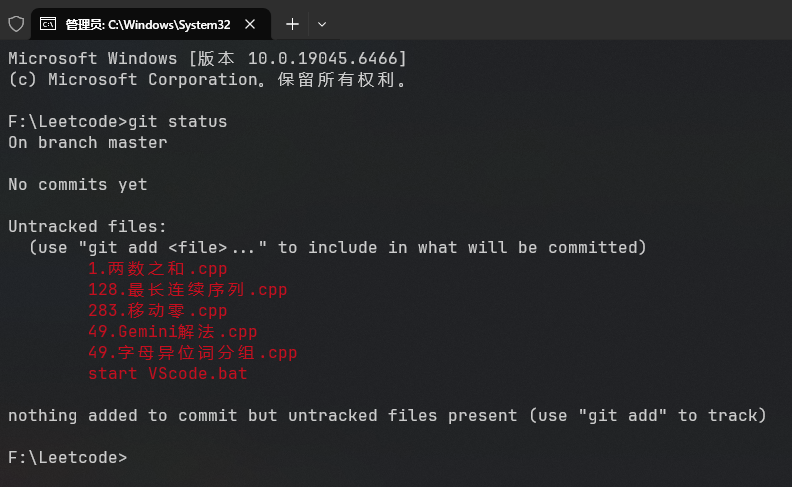
返回结果解释
On branch master, 当前分支在master(主分支);No commits yet, 还没有任何提交(这个仓库是刚初始化的);Untracked files:, 未被跟踪的文件(Git 还没有管理它们);(use "git add <file>..." to include in what will be committed), 使用 git add <文件> 可以把这些文件加入到待提交列表;nothing added to commit but untracked files present, 没有任何文件被加入提交,但存在未跟踪文件;(use "git add" to track), 用 git add 开始跟踪这些文件.