1.异步路由加载
bash
import Vue from 'vue'
import Router from 'vue-router'
// 之前的方案
// import Index from '@/pages/index/'
// import ChooseUser from '@/pages/detail/chooseUser'
// 异步加载方案
const Index = r =>
  require.ensure([], () => r(require('@/pages/index')), 'Index')
const ChooseUser = r =>
  require.ensure([], () => r(require('@/pages/detail/chooseUser')),'ChooseUser')
Vue.use(Router)

export default new Router({
  // mode:'history',// 开发阶段开启
  routes: [
    {
      path: '/board/index/:id?',
      name: 'Index',
      component: Index
    },
    {
      path: '/board/chooseUser',
      name: 'ChooseUser',
      component: ChooseUser
    }
  ]
})
2.不打包库文件
spa首屏加载慢,主要是打包后的js文件过大,阻塞加载所致。那么如何减小js的体积呢?
那就是把库文件单独拿出来加载,不要参与打包。
index.html
bash
<!DOCTYPE html>
<html>
  <head>
    <meta charset="utf-8">
    <meta name="viewport" content="width=device-width,minimum-scale=1,maximum-scale=1,initial-scale=1,user-scalable=no" />
    <meta http-equiv="Pragma" content="no-cache">
    <meta http-equiv="Cache-Control" content="no-cache">
    <meta http-equiv="Expires" content="0">
    <title>test</title>
    <link rel="icon" type="image/x-icon" href="/static/favicon.ico" />
    <link rel="stylesheet" href="/static/common/css/base.css">
  </head>
  <body style="margin:0;background:#f2f2f2;">
  <script src="/static/common/js/polyfill.min.js"></script>
  <!--vue-->
  <script src="/static/common/js/vue.min.js"></script>
  <!--vue-router-->
  <script src="/static/common/js/vue-router.min.js"></script>
  <!--axios-->
  <script src="/static/common/js/axios.min.js"></script>
  <!--element-ui-->
  <link href="/static/common/js/element-ui/lib/theme-chalk/index.css" rel="stylesheet">
  <script src="/static/common/js/element-ui/lib/index.js"></script>
  <!--echarts-->
  <script src="/static/common/js/echarts.min.js"></script>
    <div id="app"></div>
    <!-- built files will be auto injected -->
  </body>
</html>
webpack.base.config.js
bash
  externals: {
    'element-ui': 'ELEMENT',
    'vue': 'Vue',
    'axios': 'axios',
    'echarts': 'echarts',
    'vue-router': 'VueRouter'
  },
这个键值对大家需要重点关注一下,配置错了这些大文件仍旧参与打包,导致优化失败。
键(key),就是你用npm install命令装的插件名称,不确定的话,找一下package.json文件对一下。
值(value),就是对外提供的那个对象,这个你得打开库文件看看咯。
比如element UI:

element-ui是通过exports模块导出ELEMENT这个变量,所有的功能也应该追加到这个变量下面。
再比如vue-router
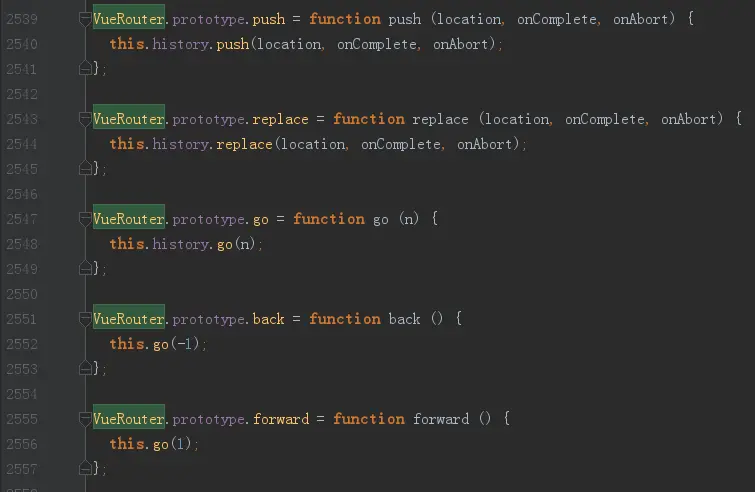
看一下未压缩过的代码,发现作者是在VueRouter.prototype下面追加了不少方法,因此基本可以确定对外导出的对象应该是VueRouter了。
这个办法可以极大的压缩js代码的体积,应重点掌握。
但有同学还会有这样的疑问:
既然在外部引入了库文件,那在main.js里面,是不是就不能这样引用库了:
main.js
bash
import Vue from 'vue'
import App from './App'
import router from './router' // 路由
import ElementUI from 'element-ui'// UI插件
import echarts from 'echarts'// 引入图表插件
Vue.prototype.$echarts = echarts // 追到全局
Vue.use(ElementUI)
Vue.config.productionTip = false
new Vue({
  el: '#app',
  router,
  components: { App },
  template: '<App/>'
})
是吗?
当然不是了!你该怎么import还是一样,否则怎么追加到Vue这个对象下面呢?
3.关闭sourcemap
sourcemap是为了方便线上调试用的,因为线上代码都是压缩过的,导致调试极为不便,而有了sourcemap,就等于加了个索引字典,出了问题可以定位到源代码的位置。
但是,这个玩意是每个js都带一个sourcemap,有时sourcemap会很大,拖累了整个项目加载速度,为了节省加载时间,我们将其关闭掉。
vue.config.js
bash
    /**
     * Source Maps
     */

    productionSourceMap: false,
就这一句话就可以关闭sourcemap了,很简单。
4.开启Gzip
这个优化是两方面的,前端将文件打包成.gz文件,然后通过nginx的配置,让浏览器直接解析.gz文件。
webpack 的配置
vue.config.js
bash
    // Gzip off by default as many popular static hosts such as
    // Surge or Netlify already gzip all static assets for you.
    // Before setting to `true`, make sure to:
    // npm install --save-dev compression-webpack-plugin
    productionGzip: true,
    productionGzipExtensions: ['js', 'css'],
build/webpack.prod.config.js
bash
if (config.build.productionGzip) {
  const CompressionWebpackPlugin = require('compression-webpack-plugin')

  webpackConfig.plugins.push(
    new CompressionWebpackPlugin({
      asset: '[path].gz[query]',
      algorithm: 'gzip',
      test: new RegExp(
        '\\.(' +
        config.build.productionGzipExtensions.join('|') +
        ')$'
      ),
      threshold: 10240,
      minRatio: 0.8
    })
  )
}
好了,做完这两步,打包后的代码就是酱紫的了:
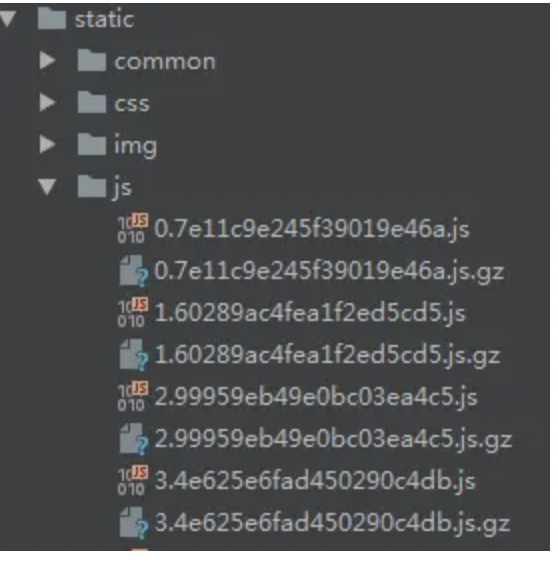
nginks 配置
修改服务器的nginx 配置,找到conf目录下的nginx.conf ,开启gzip,并设置gzip的类型,如下:
bash
gzip  on;
gzip_types text/plain application/x-javascript application/javascript text/css application/xml text/javascript application/x-httpd-php image/jpeg image/gif image/png;
重启nginx:
bash
nginx -s reload最后验证一下:
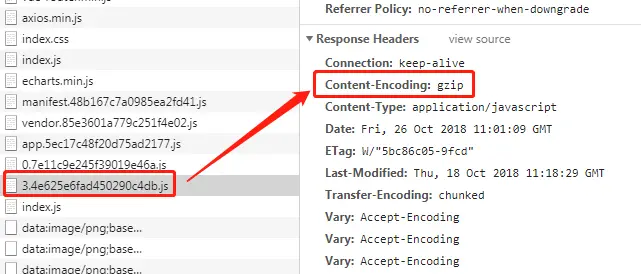
小结
以上几种优化方案较常用,效果也立竿见影,这是我们的一个项目优化过的代码:
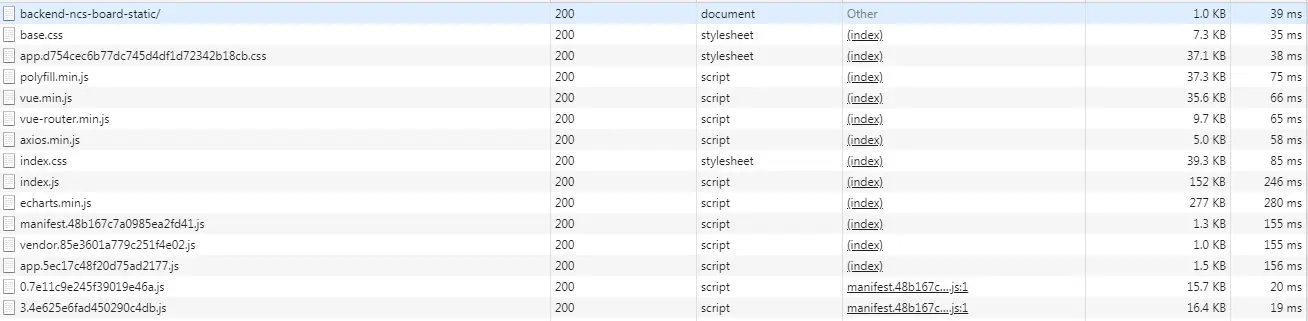
除了echart文件较大之外,其他的小文件基本不会造成太大影响,而如果让这些库文件参与打包,那至少得有个几m。
首屏较慢的处理办法
首屏加载过慢的问题如何解决呢?
如果做完以上的优化方案,仍嫌过慢的话,可以这样做:
1.loading效果
首页加个好看的loading阻塞一下,让用户别等的那么心焦。
2.首页单独做服务端渲染
如果首页真的有瓶颈,兼考虑seo问题,那还是用node的mvc框架(比如express)做首页渲染,而下面的子页面仍用spa单页(将vue打包的dist目录放在public目录下,当静态资源来访问)。
这里不推荐直接用nuxt.js服务端渲染方案。
因为一是增加了学习成本,二是本来渲染就是浏览器该做的事情啊,凭什么让服务端来掺和?
服务端组装页面需耗费巨大的内存资源,很容易把服务器搞死,而且这种方案对代码质量要求非常高,如果你不注意资源的回收而造成内存泄露,浏览器重新刷一下就可以了,而服务端呢?你重启一下?一次宕机事故是要记入绩效考核的,宕机几次你一个月工资就没了 !