一、参考资料
gdb+gdbserver远程调试 - lsgxeva - 博客园
嵌入式 程序调试之gdb和gdbserver的交叉编译及使用-CSDN博客
二、快速体验gdb
示例一
test.c
测试代码:
c
#include <stdio.h>
#include <string.h>

int main()
{
	char* p;

	memcpy(p, "hello", 5);

    return 0;
}
编译源码:
bash
arm-linux-gnueabihf-gcc test.c -o test -g用gdb调试代码时必须加上 -g 选项,如果没有 -g,你将看不见程序的函数名、变量名。
启动gdbserver
将编译好的程序拷贝到目标机中,并在目标机上启动gdbserver:
bash
gdbserver 192.168.10.90:1234 ./test连接调试
在宿主机上启动gdb:
bash
arm-linux-gnueabihf-gdb ./test连接gdbserver:
bash
(gdb) target remote 192.168.10.90:1234连接成功:

gdb调试
开始执行调试:
bash
(gdb) c
Continuing.
Reading /lib64/libc.so.6 from remote target...

Program received signal SIGSEGV, Segmentation fault.
0x0000007ff7ed40cc in memcpy () from target:/lib64/libc.so.6
查看堆栈信息(简易程序):
bash
(gdb) bt
#0  0x0000007ff7ed40cc in memcpy () from target:/lib64/libc.so.6
#1  0x00000000004005d4 in main () at test.c:8
查看堆栈信息(复杂程序):
bash
(gdb) where
#0  0x0000007ff7ed40cc in memcpy () from target:/lib64/libc.so.6
#1  0x00000000004005d4 in main () at test.c:8
抓取coredump文件
设置 ulimit
Linux系统默认coredump文件的大小限制为0,即产生 segmentation-fault 段错误时不会生成coredump文件,可以通过ulimit -c指令来查看系统限制。可以通过ulimit -c <filesize>命令来修改系统对coredump文件大小的限制,但如果coredump文件超过限制大小(filesize的单位为kbyte)将会被裁剪,最终生成一个不完整的coredump文件。在调试此core文件的时候,gdb会提示错误。所以一般情况下不会限制core文件的大小。
bash
# 查看coredump文件大小
ulimit -c

# 修改coredump文件大小
ulimit -c

# 不限制coredump文件大小
ulimit -c unlimited
生成core文件
当运行程序出现segmentation-fault段错误时,默认 ulimit=0,不产生core文件,输出示例:
bash
~ # ./test
Segmentation fault
当运行程序出现segmentation-fault段错误时,不限制core大小,则生成core文件,输出示例:
bash
~ # ulimit -c unlimited
~ # ulimit -c
unlimited
~ # ./test
Segmentation fault (core dumped)
调试core文件
core文件产生之后将其拷贝到宿主机,不需要连接目标机便可调试。
运行下列指令启动gdb:
bash
yoyo@yoyo:/media/sda3/share/cache$ arm-linux-gnueabihf-gdb test ./core
GNU gdb (GDB) 10.1
Copyright (C) 2020 Free Software Foundation, Inc.
License GPLv3+: GNU GPL version 3 or later <http://gnu.org/licenses/gpl.html>
This is free software: you are free to change and redistribute it.
There is NO WARRANTY, to the extent permitted by law.
Type "show copying" and "show warranty" for details.
This GDB was configured as "arm-linux-gnueabihf".
Type "show configuration" for configuration details.
For bug reporting instructions, please see:
<https://www.gnu.org/software/gdb/bugs/>.
Find the GDB manual and other documentation resources online at:
    <http://www.gnu.org/software/gdb/documentation/>.

For help, type "help".
Type "apropos word" to search for commands related to "word"...
Reading symbols from test...

warning: Can't open file /root/test during file-backed mapping note processing
[New LWP 8823]
Core was generated by `./test'.
Program terminated with signal SIGSEGV, Segmentation fault.
#0  0x0000007fa197c0cc in memcpy () from /lib64/libc.so.6
示例二
demo.c
测试代码:
c
#include <stdio.h>
#include <unistd.h>

int main(int argc, char *argv[])
{
	int i;
	printf("Hello gdb\n");
	for (i = 0; i < 5; i++) {
		printf("i=%d\n", i);
	}
	while(i < 10) {
		sleep(1);
	}
	printf("I am exit\n");
	return 0;
}
编译源码:
bash
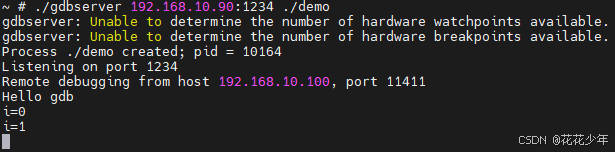
arm-linux-gnueabihf-gcc demo.c -o demo -g启动gdbserver
将编译好的程序拷贝到目标机中,并在目标机上启动gdbserver:
bash
gdbserver 192.168.10.90:1234 ./demo连接调试
在宿主机上启动gdb:
bash
arm-linux-gnueabihf-gdb ./demo连接gdbserver:
bash
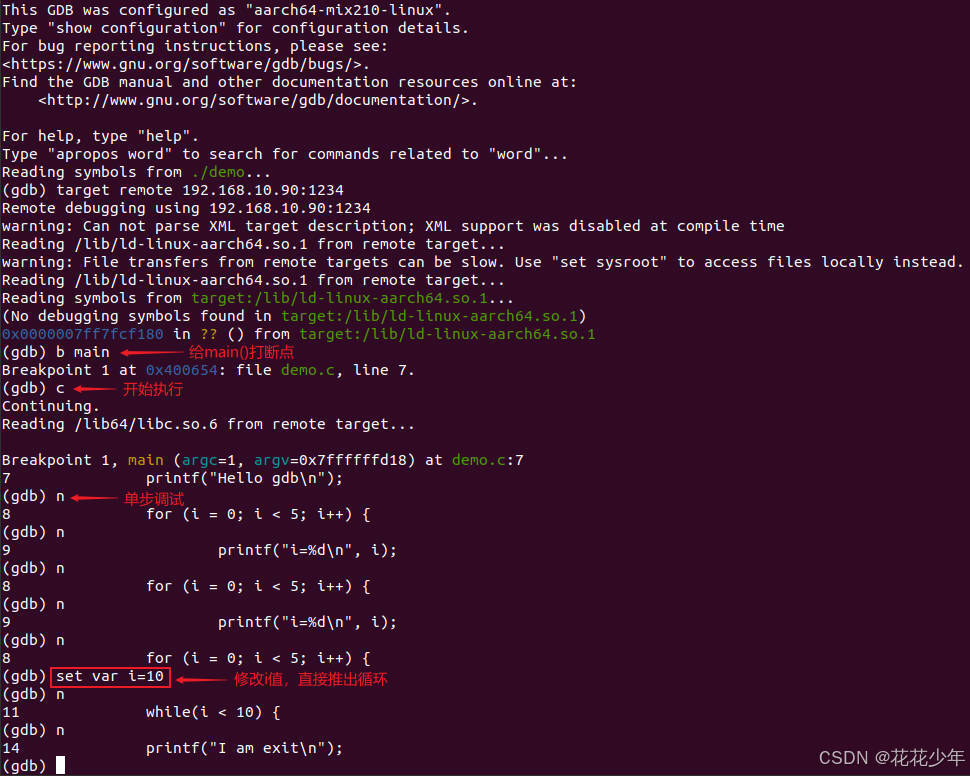
(gdb) target remote 192.168.10.90:1234gdb调试
bash
# 打断点
(gdb) b main

# 开始执行程序
(gdb) c

# 单步执行
(gdb) n

# 修改变量值
(gdb) set var i=10
宿主机输出:
目标机输出:
三、FAQ
Q:warning: Can't open file /lib64/libc-2.29.so during file-backed mapping note processing
bash
yoyo@yoyo:/media/sda3/share/cache$ arm-linux-gnueabihf-gdb test core
GNU gdb (GDB) 10.1
Copyright (C) 2020 Free Software Foundation, Inc.
License GPLv3+: GNU GPL version 3 or later <http://gnu.org/licenses/gpl.html>
This is free software: you are free to change and redistribute it.
There is NO WARRANTY, to the extent permitted by law.
Type "show copying" and "show warranty" for details.
This GDB was configured as "arm-linux-gnueabihf".
Type "show configuration" for configuration details.
For bug reporting instructions, please see:
<https://www.gnu.org/software/gdb/bugs/>.
Find the GDB manual and other documentation resources online at:
    <http://www.gnu.org/software/gdb/documentation/>.

For help, type "help".
Type "apropos word" to search for commands related to "word"...
Reading symbols from test...

warning: Can't open file /root/test during file-backed mapping note processing

warning: Can't open file /lib64/libc-2.29.so during file-backed mapping note processing

warning: Can't open file /lib/ld-2.29.so during file-backed mapping note processing
[New LWP 8823]

warning: Could not load shared library symbols for /lib64/libc.so.6.
Do you need "set solib-search-path" or "set sysroot"?
Core was generated by `./test'.
Program terminated with signal SIGSEGV, Segmentation fault.
#0  0x0000007fa197c0cc in ?? ()
解决方法:
bash
sudo ln -s /home/yoyo/360Downloads/toolchains/arm-linux-gnueabihf/target/lib/libc-2.29.so /lib64/

sudo ln -s /home/yoyo/360Downloads/toolchains/arm-linux-gnueabihf/target/lib/ld-2.29.so /lib/Q:arm-linux-gnueabihf-gdb: error while loading shared libraries: libstdc++.so.6: cannot open shared object file: No such file or directory
bash
yoyo@yoyo:/media/sda3/share/cache$ arm-linux-gnueabihf-gdb ./demo
/home/yoyo/360Downloads/toolchains/arm-linux-gnueabihf/bin/arm-linux-gnueabihf-gdb: error while loading shared libraries: libdl.so.2: cannot open shared object file: No such file or director
yoyo@yoyo:/media/sda3/share/cache$ arm-linux-gnueabihf-gdb ./demo
bash
/home/yoyo/360Downloads/toolchains/arm-linux-gnueabihf/bin/arm-linux-gnueabihf-gdb: error while loading shared libraries: libstdc++.so.6: cannot open shared object file: No such file or directory错误原因:未设置 LD_LIBRARY_PATH 环境变量,找不到lib库。
解决方法:设置 LD_LIBRARY_PATH 环境变量。
bash
yoyo@yoyo:/media/sda3/share/cache$ export LD_LIBRARY_PATH=/home/yoyo/360Downloads/toolchains/arm-linux-gnueabihf/target/lib:$LD_LIBRARY_PATH
yoyo@yoyo:/media/sda3/share/cache$ export LD_LIBRARY_PATH=/home/yoyo/360Downloads/toolchains/arm-linux-gnueabihf/aarch64-linux-gnu/lib64:$LD_LIBRARY_PATH