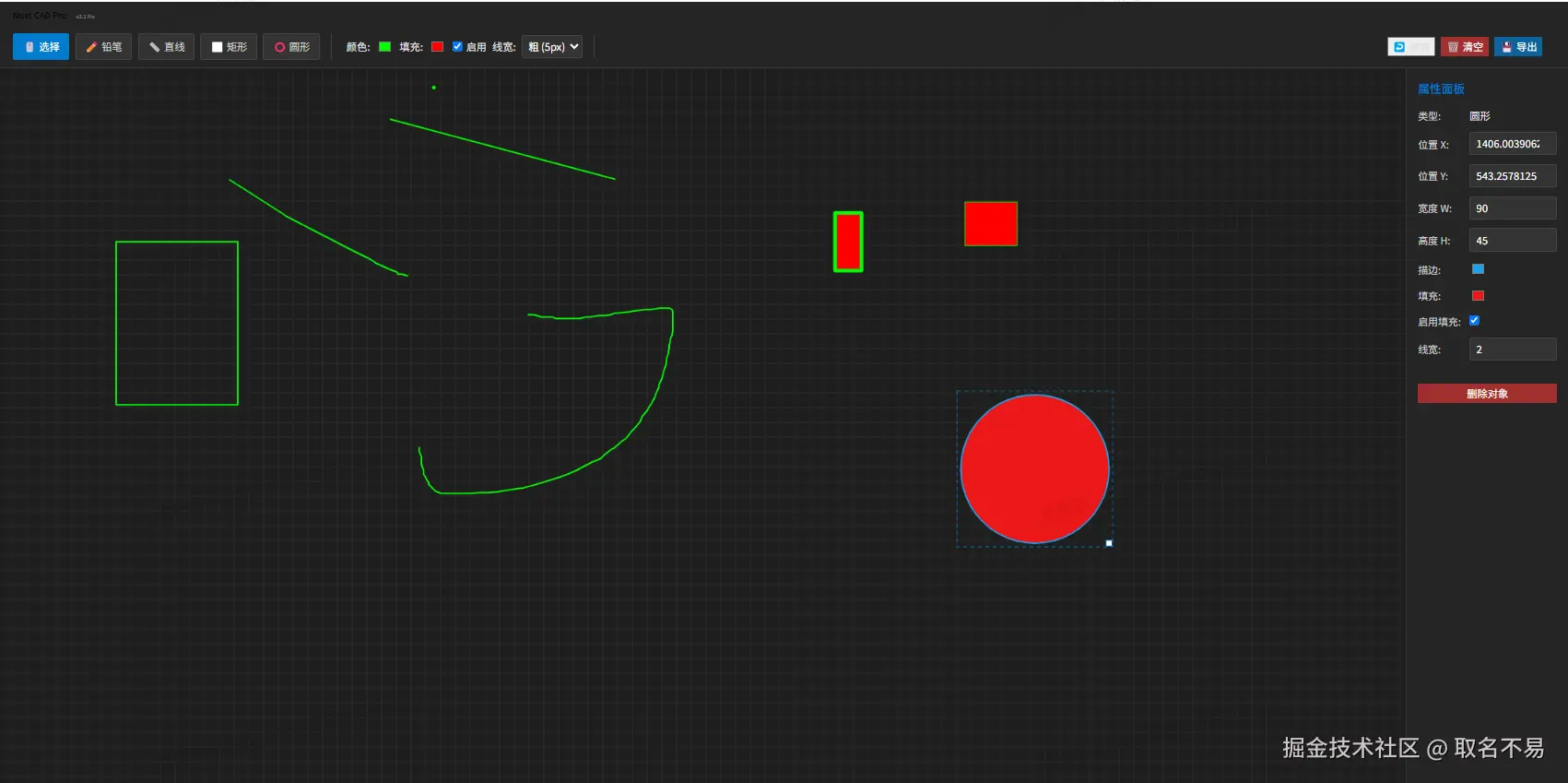
<template>
  <div class="cad-container">
    <!-- 顶部工具栏 -->
    <header class="cad-header">
      <div class="brand">
        <h1>Nuxt CAD Pro <span class="version">v2.1 Fix</span></h1>
      </div>
      <div class="toolbar">
        <!-- 工具选择 -->
        <div class="tool-group">
          <button
            v-for="t in tools"
            :key="t.value"
            :class="['tool-btn', { active: currentTool === t.value }]"
            @click="currentTool = t.value"
          >
            {{ t.label }}
          </button>
        </div>

        <!-- 绘图属性 -->
        <div class="tool-group">
          <label>颜色:</label>
          <input type="color" v-model="defaultStroke" />
          <label>填充:</label>
          <input type="color" v-model="defaultFill" />
          <label class="checkbox-label">
            <input type="checkbox" v-model="defaultEnableFill" />
            启用
          </label>
          <label>线宽:</label>
          <select v-model="defaultLineWidth">
            <option :value="1">细 (1px)</option>
            <option :value="3">中 (3px)</option>
            <option :value="5">粗 (5px)</option>
          </select>
        </div>

        <!-- 全局操作 -->
        <div class="tool-group">
          <button @click="undo" :disabled="history.length === 0">
            ↩️ 撤销
          </button>
          <button @click="clear" class="danger">🗑️ 清空</button>
          <button @click="save" class="primary">💾 导出</button>
        </div>
      </div>
    </header>

    <div class="workspace">
      <!-- 左侧画布 -->
      <main class="canvas-wrapper">
        <canvas
          ref="canvas"
          @mousedown="onMouseDown"
          @mousemove="onMouseMove"
          @mouseup="onMouseUp"
          @mouseleave="onMouseUp"
        ></canvas>
        <div class="coordinates">
          X: {{ Math.round(cursorX) }} Y: {{ Math.round(cursorY) }}
        </div>
      </main>

      <!-- 右侧属性面板 -->
      <aside class="properties-panel" v-if="selectedShape">
        <h3>属性面板</h3>
        <div class="prop-item">
          <label>类型:</label>
          <span>{{ getTypeName(selectedShape.type) }}</span>
        </div>
        <div class="prop-item">
          <label>位置 X:</label>
          <input
            type="number"
            v-model.number="selectedShape.x"
            @change="updateShapeAndRedraw"
          />
        </div>
        <div class="prop-item">
          <label>位置 Y:</label>
          <input
            type="number"
            v-model.number="selectedShape.y"
            @change="updateShapeAndRedraw"
          />
        </div>
        <div
          class="prop-item"
          v-if="
            selectedShape.type !== 'line' && selectedShape.type !== 'pencil'
          "
        >
          <label>宽度 W:</label>
          <input
            type="number"
            v-model.number="selectedShape.w"
            @change="updateShapeAndRedraw"
          />
        </div>
        <div
          class="prop-item"
          v-if="
            selectedShape.type !== 'line' && selectedShape.type !== 'pencil'
          "
        >
          <label>高度 H:</label>
          <input
            type="number"
            v-model.number="selectedShape.h"
            @change="updateShapeAndRedraw"
          />
        </div>

        <div class="prop-item">
          <label>描边:</label>
          <input
            type="color"
            v-model="selectedShape.stroke"
            @change="updateShapeAndRedraw"
          />
        </div>
        <div
          class="prop-item"
          v-if="['rect', 'circle'].includes(selectedShape.type)"
        >
          <label>填充:</label>
          <input
            type="color"
            v-model="selectedShape.fill"
            @change="updateShapeAndRedraw"
          />
        </div>
        <div
          class="prop-item"
          v-if="['rect', 'circle'].includes(selectedShape.type)"
        >
          <label>启用填充:</label>
          <input
            type="checkbox"
            v-model="selectedShape.enableFill"
            @change="updateShapeAndRedraw"
          />
        </div>
        <div class="prop-item">
          <label>线宽:</label>
          <input
            type="number"
            v-model.number="selectedShape.lineWidth"
            @change="updateShapeAndRedraw"
          />
        </div>

        <button @click="deleteSelected" class="danger full-width">
          删除对象
        </button>
      </aside>
    </div>
  </div>
</template>

<script lang="ts">
import { Vue, Component } from "nuxt-property-decorator";

type ToolType = "select" | "line" | "rect" | "circle" | "pencil";
type ShapeType = "line" | "rect" | "circle" | "pencil";

interface Point {
  x: number;
  y: number;
}

interface Shape {
  id: number;
  type: ShapeType;
  x: number;
  y: number;
  w: number;
  h: number;
  points?: Point[];
  stroke: string;
  fill: string;
  enableFill: boolean;
  lineWidth: number;
}

@Component
export default class CadSketcher extends Vue {
  currentTool: ToolType = "select";

  defaultStroke = "#00ff00";
  defaultFill = "#ff0000";
  defaultEnableFill = false;
  defaultLineWidth = 2;

  shapes: Shape[] = [];
  history: Shape[][] = [];
  selectedShapeId: number | null = null;

  isDrawing = false;
  isDragging = false;
  isResizing = false;
  startPos: Point = { x: 0, y: 0 };
  cursorX = 0;
  cursorY = 0;

  tools = [
    { label: "🖱️ 选择", value: "select" },
    { label: "✏️ 铅笔", value: "pencil" },
    { label: "📏 直线", value: "line" },
    { label: "⬜ 矩形", value: "rect" },
    { label: "⭕ 圆形", value: "circle" },
  ];

  get selectedShape(): Shape | undefined {
    return this.shapes.find((s) => s.id === this.selectedShapeId);
  }
  get canvasEl(): HTMLCanvasElement {
    return this.$refs.canvas as HTMLCanvasElement;
  }
  get ctx(): CanvasRenderingContext2D {
    return this.canvasEl.getContext("2d")!;
  }

  mounted() {
    this.resizeCanvas();
    this.drawGrid();
    window.addEventListener("resize", this.resizeCanvas);
    document.addEventListener("keydown", (e) => {
      if ((e.ctrlKey || e.metaKey) && e.key === "z") {
        this.undo();
      }
      if (e.key === "Delete") {
        this.deleteSelected();
      }
    });
  }

  resizeCanvas() {
    const parent = this.canvasEl.parentElement;
    if (parent) {
      this.canvasEl.width = parent.clientWidth;
      this.canvasEl.height = parent.clientHeight;
      this.redraw();
    }
  }

  redraw() {
    // 1. 清空画布
    this.ctx.fillStyle = "#1e1e1e";
    this.ctx.fillRect(0, 0, this.canvasEl.width, this.canvasEl.height);
    this.drawGrid();

    // 2. 绘制所有已保存的图形
    this.shapes.forEach((shape) => this.drawSingleShape(shape));

    // 3. 绘制选中框
    if (this.selectedShapeId) {
      const shape = this.shapes.find((s) => s.id === this.selectedShapeId);
      if (shape) this.drawSelectionBox(shape);
    }
  }

  drawGrid() {
    const { width, height } = this.canvasEl;
    this.ctx.strokeStyle = "#2a2a2a";
    this.ctx.lineWidth = 1;
    this.ctx.beginPath();
    for (let x = 0; x <= width; x += 20) {
      this.ctx.moveTo(x, 0);
      this.ctx.lineTo(x, height);
    }
    for (let y = 0; y <= height; y += 20) {
      this.ctx.moveTo(0, y);
      this.ctx.lineTo(width, y);
    }
    this.ctx.stroke();
  }

  drawSingleShape(shape: Shape) {
    this.ctx.beginPath();
    this.ctx.strokeStyle = shape.stroke;
    this.ctx.lineWidth = shape.lineWidth;
    this.ctx.lineCap = "round";
    this.ctx.lineJoin = "round";
    this.ctx.fillStyle = shape.fill;

    if (shape.type === "line") {
      this.ctx.moveTo(shape.x, shape.y);
      this.ctx.lineTo(shape.x + shape.w, shape.y + shape.h);
      this.ctx.stroke();
    } else if (shape.type === "rect") {
      this.ctx.rect(shape.x, shape.y, shape.w, shape.h);
      if (shape.enableFill) this.ctx.fill();
      this.ctx.stroke();
    } else if (shape.type === "circle") {
      const radius = Math.sqrt(shape.w * shape.w + shape.h * shape.h);
      this.ctx.arc(shape.x, shape.y, radius, 0, 2 * Math.PI);
      if (shape.enableFill) this.ctx.fill();
      this.ctx.stroke();
    } else if (shape.type === "pencil" && shape.points) {
      this.ctx.moveTo(shape.points[0].x, shape.points[0].y);
      for (let i = 1; i < shape.points.length; i++) {
        this.ctx.lineTo(shape.points[i].x, shape.points[i].y);
      }
      this.ctx.stroke();
    }
  }

  drawSelectionBox(shape: Shape) {
    const bounds = this.getShapeBounds(shape);
    this.ctx.strokeStyle = "#007acc";
    this.ctx.lineWidth = 1;
    this.ctx.setLineDash([5, 5]);
    this.ctx.strokeRect(
      bounds.x - 5,
      bounds.y - 5,
      bounds.w + 10,
      bounds.h + 10
    );
    this.ctx.setLineDash([]);

    this.ctx.fillStyle = "#fff";
    this.ctx.fillRect(bounds.x + bounds.w - 4, bounds.y + bounds.h - 4, 8, 8);
    this.ctx.strokeRect(bounds.x + bounds.w - 4, bounds.y + bounds.h - 4, 8, 8);
  }

  getShapeBounds(shape: Shape) {
    if (shape.type === "circle") {
      const r = Math.sqrt(shape.w * shape.w + shape.h * shape.h);
      return { x: shape.x - r, y: shape.y - r, w: r * 2, h: r * 2 };
    }
    if (shape.type === "line") {
      return {
        x: Math.min(shape.x, shape.x + shape.w),
        y: Math.min(shape.y, shape.y + shape.h),
        w: Math.abs(shape.w),
        h: Math.abs(shape.h),
      };
    }
    return { x: shape.x, y: shape.y, w: shape.w, h: shape.h };
  }

  getMousePos(e: MouseEvent): Point {
    const rect = this.canvasEl.getBoundingClientRect();
    return { x: e.clientX - rect.left, y: e.clientY - rect.top };
  }

  // --- 核心修复:鼠标按下 ---
  onMouseDown(e: MouseEvent) {
    const pos = this.getMousePos(e);
    this.startPos = pos;
    this.cursorX = pos.x;
    this.cursorY = pos.y;

    // 1. 选择工具逻辑
    if (this.currentTool === "select") {
      if (this.selectedShapeId) {
        const shape = this.shapes.find((s) => s.id === this.selectedShapeId);
        if (shape) {
          const bounds = this.getShapeBounds(shape);
          const handleX = bounds.x + bounds.w;
          const handleY = bounds.y + bounds.h;
          if (
            Math.abs(pos.x - handleX) < 10 &&
            Math.abs(pos.y - handleY) < 10
          ) {
            this.isResizing = true;
            return;
          }
        }
      }

      const clickedShape = this.shapes
        .slice()
        .reverse()
        .find((s) => this.isHitTest(s, pos));
      if (clickedShape) {
        this.selectedShapeId = clickedShape.id;
        this.isDragging = true;
        this.redraw();
        return;
      } else {
        this.selectedShapeId = null;
        this.redraw();
      }
    }

    // 2. 绘图工具逻辑
    if (["line", "rect", "circle", "pencil"].includes(this.currentTool)) {
      this.isDrawing = true;
      this.saveHistory(); // 保存历史是为了撤销操作

      // 铅笔工具比较特殊,需要立即创建对象以便实时绘制点
      if (this.currentTool === "pencil") {
        const newShape: Shape = {
          id: Date.now(),
          type: "pencil",
          x: 0,
          y: 0,
          w: 0,
          h: 0,
          points: [pos],
          stroke: this.defaultStroke,
          fill: this.defaultFill,
          enableFill: false,
          lineWidth: this.defaultLineWidth,
        };
        this.shapes.push(newShape);
      }
    }
  }

  // --- 核心修复:鼠标移动 ---
  onMouseMove(e: MouseEvent) {
    const pos = this.getMousePos(e);
    this.cursorX = pos.x;
    this.cursorY = pos.y;

    // 拖拽逻辑
    if (this.isDragging && this.selectedShapeId) {
      const shape = this.shapes.find((s) => s.id === this.selectedShapeId);
      if (shape) {
        const dx = pos.x - this.startPos.x;
        const dy = pos.y - this.startPos.y;
        shape.x += dx;
        shape.y += dy;
        if (shape.type === "pencil" && shape.points) {
          shape.points.forEach((p) => {
            p.x += dx;
            p.y += dy;
          });
        }
        this.startPos = pos;
        this.redraw();
      }
      return;
    }

    // 缩放逻辑
    if (this.isResizing && this.selectedShapeId) {
      const shape = this.shapes.find((s) => s.id === this.selectedShapeId);
      if (shape) {
        shape.w = pos.x - shape.x;
        shape.h = pos.y - shape.y;
        this.redraw();
      }
      return;
    }

    // 绘图预览逻辑
    if (this.isDrawing) {
      // 铅笔是实时添加点到数组,所以不需要重绘整个场景,只需要重绘最后一笔
      if (this.currentTool === "pencil") {
        const shape = this.shapes[this.shapes.length - 1];
        if (shape && shape.points) shape.points.push(pos);
        this.redraw();
      } else {
        // 其他工具(线、矩形、圆):
        // 1. 先重绘背景(清除上一帧的预览)
        this.redraw();
        // 2. 再绘制当前的"鬼影"图形
        const tempShape: Shape = {
          id: 0,
          type: this.currentTool as ShapeType,
          x: this.startPos.x,
          y: this.startPos.y,
          w: pos.x - this.startPos.x,
          h: pos.y - this.startPos.y,
          stroke: this.defaultStroke,
          fill: this.defaultFill,
          enableFill: this.defaultEnableFill,
          lineWidth: this.defaultLineWidth,
        };
        this.drawSingleShape(tempShape);
      }
    }
  }

  // --- 核心修复:鼠标抬起 (修复图形消失的关键) ---
  onMouseUp() {
    // 如果正在绘图且不是铅笔(铅笔已经在 MouseMove 中处理了)
    if (
      this.isDrawing &&
      ["line", "rect", "circle"].includes(this.currentTool)
    ) {
      // 1. 创建正式的形状对象
      const newShape: Shape = {
        id: Date.now(),
        type: this.currentTool as ShapeType,
        x: this.startPos.x,
        y: this.startPos.y,
        w: this.cursorX - this.startPos.x,
        h: this.cursorY - this.startPos.y,
        stroke: this.defaultStroke,
        fill: this.defaultFill,
        enableFill: this.defaultEnableFill,
        lineWidth: this.defaultLineWidth,
      };

      // 2. 将形状推入数组(这才是"固化"图形的关键)
      this.shapes.push(newShape);

      // 3. 自动选中新画的图形
      this.selectedShapeId = newShape.id;
    }

    // 重置状态
    this.isDrawing = false;
    this.isDragging = false;
    this.isResizing = false;

    // 4. 最终重绘一次,确保所有状态正确
    this.redraw();
  }

  isHitTest(shape: Shape, pos: Point): boolean {
    const padding = shape.lineWidth + 5;
    const bounds = this.getShapeBounds(shape);
    return (
      pos.x >= bounds.x - padding &&
      pos.x <= bounds.x + bounds.w + padding &&
      pos.y >= bounds.y - padding &&
      pos.y <= bounds.y + bounds.h + padding
    );
  }

  saveHistory() {
    this.history.push(JSON.parse(JSON.stringify(this.shapes)));
    if (this.history.length > 20) this.history.shift();
  }

  undo() {
    if (this.history.length > 0) {
      this.shapes = this.history.pop()!;
      this.selectedShapeId = null;
      this.redraw();
    }
  }

  deleteSelected() {
    if (this.selectedShapeId) {
      this.saveHistory();
      this.shapes = this.shapes.filter((s) => s.id !== this.selectedShapeId);
      this.selectedShapeId = null;
      this.redraw();
    }
  }

  updateShapeAndRedraw() {
    this.redraw();
  }

  clear() {
    this.saveHistory();
    this.shapes = [];
    this.selectedShapeId = null;
    this.redraw();
  }

  save() {
    const link = document.createElement("a");
    link.download = `cad-sketch-${Date.now()}.png`;
    link.href = this.canvasEl.toDataURL();
    link.click();
  }

  getTypeName(type: string) {
    const map: any = {
      line: "直线",
      rect: "矩形",
      circle: "圆形",
      pencil: "铅笔",
    };
    return map[type] || type;
  }
}
</script>

<style scoped>
.cad-container {
  display: flex;
  flex-direction: column;
  height: 100vh;
  background: #121212;
  color: #e0e0e0;
  font-family: sans-serif;
  overflow: hidden;
}
.cad-header {
  background: #252526;
  padding: 10px 20px;
  border-bottom: 1px solid #333;
  display: flex;
  flex-direction: column;
  gap: 10px;
}
.version {
  font-size: 0.6em;
  color: #888;
  margin-left: 10px;
}
.toolbar {
  display: flex;
  gap: 20px;
  align-items: center;
  flex-wrap: wrap;
}
.tool-group {
  display: flex;
  align-items: center;
  gap: 8px;
  padding-right: 15px;
  border-right: 1px solid #3e3e42;
}
.tool-group:last-child {
  border: none;
  margin-left: auto;
}
.tool-btn {
  background: #333;
  border: 1px solid #444;
  color: #ccc;
  padding: 6px 12px;
  cursor: pointer;
  border-radius: 3px;
}
.tool-btn.active {
  background: #007acc;
  color: white;
  border-color: #007acc;
}
button.primary {
  background: #0e639c;
  color: white;
  border: 1px solid #0e639c;
}
button.danger {
  background: #a13030;
  color: white;
  border: 1px solid #a13030;
}
button:disabled {
  opacity: 0.5;
  cursor: not-allowed;
}
input[type="color"] {
  border: none;
  width: 24px;
  height: 24px;
  background: none;
  cursor: pointer;
}
select {
  background: #333;
  color: white;
  border: 1px solid #444;
  padding: 4px;
  border-radius: 3px;
}
.checkbox-label {
  display: flex;
  align-items: center;
  gap: 5px;
  font-size: 0.85rem;
  cursor: pointer;
}
.workspace {
  display: flex;
  flex: 1;
  overflow: hidden;
}
.canvas-wrapper {
  flex: 1;
  position: relative;
  background: #121212;
  overflow: hidden;
}
canvas {
  display: block;
  cursor: crosshair;
}
.coordinates {
  position: absolute;
  bottom: 10px;
  right: 15px;
  background: rgba(0, 0, 0, 0.7);
  padding: 4px 8px;
  border-radius: 4px;
  font-family: monospace;
  font-size: 0.8rem;
  color: #00ff00;
}
.properties-panel {
  width: 220px;
  background: #252526;
  border-left: 1px solid #333;
  padding: 15px;
  overflow-y: auto;
}
.properties-panel h3 {
  margin: 0 0 15px 0;
  font-size: 1rem;
  color: #007acc;
}
.prop-item {
  display: flex;
  align-items: center;
  gap: 10px;
  margin-bottom: 12px;
}
.prop-item label {
  font-size: 0.85rem;
  color: #ccc;
  min-width: 60px;
}
.prop-item input[type="number"] {
  background: #333;
  border: 1px solid #444;
  color: white;
  padding: 4px 8px;
  border-radius: 3px;
  width: 100%;
}
.full-width {
  width: 100%;
  margin-top: 20px;
}
</style>