-
在
device目录新建下面目录hht\hht_x86_64,其中hht代表公司、hht_x86_64代表某台设备,即device/<vendor>/<TARGET_DEVICE>。 -
在
hht_x86_64目录下,分别创建AndroidProducts.mk、BoardConfig.mk、hht_x86_64.mk文件。 -
由于直接要在PC上通过emulator运行,所以拷贝
device\generic\goldfish\pc\sdk_pc_x86_64.mk内容到hht_x86_64.mk。修改
PRODUCT_DEVICE与第1步创建的<TARGET_DEVICE>名称一致,即hht_x86_64,其他三个属性随意。修改后文件:bash# # Copyright (C) 2021 The Android Open Source Project # # Licensed under the Apache License, Version 2.0 (the "License"); # you may not use this file except in compliance with the License. # You may obtain a copy of the License at # # http://www.apache.org/licenses/LICENSE-2.0 # # Unless required by applicable law or agreed to in writing, software # distributed under the License is distributed on an "AS IS" BASIS, # WITHOUT WARRANTIES OR CONDITIONS OF ANY KIND, either express or implied. # See the License for the specific language governing permissions and # limitations under the License. PRODUCT_COPY_FILES += device/generic/goldfish/pc/config.ini.pc:config.ini $(call inherit-product, $(SRC_TARGET_DIR)/product/sdk_x86_64.mk) PRODUCT_NAME := HHT Edu Phone PRODUCT_DEVICE := hht_x86_64 PRODUCT_BRAND := HHT PRODUCT_MODEL := 1st PRODUCT_PACKAGE_OVERLAYS := device/generic/goldfish/pc/overlay PRODUCT_COPY_FILES += \ device/generic/goldfish/pc/data/etc/pc.xml:$(TARGET_COPY_OUT_VENDOR)/etc/permissions/pc.xml PRODUCT_SDK_ADDON_SYS_IMG_SOURCE_PROP := device/generic/goldfish/pc/images_source.prop_template由于要在pc上直接运行emulator,所以参考
sdk_pc_x86_64.mk文件内容,其中sdk表示生成文件带userdata.img等文件,可以通过emulator执行。如果是aosp,生成标准系统GSI,不带userdata.img,无法直接通过emulator运行。通过下面命令查找目标配置文件:
bash# 进入源码根目录,查找该文件 find . -type f -name "sdk_pc_x86_64.mk" -
将
build\make\target\board\generic_x86_64\BoardConfig.mk拷贝到BoardConfig.mk。无需修改。 -
AndroidProduct.mk添加如下内容。bashPRODUCT_MAKEFILES := \ $(LOCAL_DIR)/hht_x86_64.mk COMMON_LUNCH_CHOICES := \ hht_x86_64-eng \ hht_x86_64-userdebug \ hht_x86_64-user -
重新编译
bashsource build/envsetup.mk lunch #得到下面选项 lunch 62 #编译等到结果 make -j24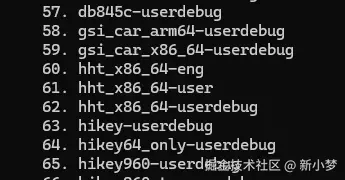
备注:
新产品的添加更多是参考现有配置文件,然后参考修改,且修改内容不多。例如可能在PC运行automatic,而现有产品,lunch menu不存在。