欢迎加入开源鸿蒙跨平台社区 :https://openharmonycrossplatform.csdn.net
项目基于 RN 0.72.90 开发
📋 前言
在移动应用开发中,定时器是一种常见的需求,用于实现倒计时、轮询请求、延时执行等功能。然而,当应用进入后台时,JavaScript 的定时器(setTimeout、setInterval)往往会被系统暂停或延迟执行,导致定时任务无法正常工作。react-native-background-timer 是一个专门解决此问题的库,它能够在应用后台运行时继续执行定时任务,确保定时功能的可靠性。
🎯 库简介
基本信息
- 库名称 :
react-native-background-timer - 版本信息 :
2.4.1-0.0.2+@react-native-oh-tpl/react-native-background-timer: 支持 RN 0.72 版本(已废弃)2.4.2+@react-native-ohos/react-native-background-timer: 支持 RN 0.72 版本2.5.0+@react-native-ohos/react-native-background-timer: 支持 RN 0.77 版本
- 官方仓库: https://github.com/ocetnik/react-native-background-timer
- 鸿蒙仓库: https://gitcode.com/openharmony-sig/rntpc_react-native-background-timer
- 主要功能 :
- ⏱️ 后台定时器
- 🔄 周期性任务执行
- ⏰ 延时执行
- 📱 跨平台支持(iOS、Android、HarmonyOS)
- 🧵 Worker 线程支持
为什么需要后台定时器?
| 特性 | JavaScript 定时器 | react-native-background-timer |
|---|---|---|
| 前台运行 | ✅ 正常工作 | ✅ 正常工作 |
| 后台运行 | ❌ 被暂停/延迟 | ✅ 继续执行 |
| 精确计时 | ⚠️ 可能不准确 | ✅ 精确计时 |
| 长时间任务 | ❌ 可能被终止 | ✅ 可靠执行 |
| 轮询请求 | ⚠️ 后台中断 | ✅ 持续轮询 |
| HarmonyOS 支持 | ❌ 无 | ✅ 完善适配 |
核心功能
| 功能 | 说明 | HarmonyOS 支持 |
|---|---|---|
| runBackgroundTimer | 开启后台定时器 | ✅ |
| stopBackgroundTimer | 停止后台定时器 | ✅ |
| setTimeout | 延时执行(一次性) | ✅ |
| clearTimeout | 清除延时定时器 | ✅ |
| setInterval | 周期执行 | ✅ |
| clearInterval | 清除周期定时器 | ✅ |
| start | 开启后台任务 | ❌ |
| stop | 停止后台任务 | ❌ |
兼容性验证
在以下环境验证通过:
- RNOH : 0.72.90; SDK : HarmonyOS 6.0.0 Release SDK; IDE : DevEco Studio 6.0.2; ROM: 6.0.0
📦 安装步骤
1. 安装依赖
bash
# RN 0.72 版本(本项目使用)
npm install @react-native-ohos/react-native-background-timer@2.4.2-rc.1

# RN 0.77 版本
npm install @react-native-ohos/react-native-background-timer@2.5.0-rc.1

# 或者使用 yarn
yarn add @react-native-ohos/react-native-background-timer
2. 验证安装
安装完成后,检查 package.json 文件:
json
{
  "dependencies": {
    "@react-native-ohos/react-native-background-timer": "^2.4.2"
  }
}
3. 类型定义配置(重要)
该库没有自带 TypeScript 类型声明文件,需要手动创建类型定义以避免 TypeScript 报错。在 src/types 目录下创建类型定义文件:
文件路径 : src/types/@react-native-ohos__react-native-background-timer.d.ts
typescript
declare module '@react-native-ohos/react-native-background-timer' {
  interface BackgroundTimerInterface {
    runBackgroundTimer(callback: () => void, delay: number): void;
    stopBackgroundTimer(): void;
    setTimeout(callback: () => void, delay: number): number;
    clearTimeout(timeoutId: number): void;
    setInterval(callback: () => void, delay: number): number;
    clearInterval(intervalId: number): void;
    start(): void;
    stop(): void;
  }

  const BackgroundTimer: BackgroundTimerInterface;
  export default BackgroundTimer;
}在tpconfig.json中添加配置:
json
{
  "include": [
    "**/*.ts",
    "**/*.tsx"
  ],
}
🔧 HarmonyOS 平台配置 ⭐
Link 配置
| 版本 | 是否支持 autolink | RN 框架版本 |
|---|---|---|
| ~2.5.0 | No | 0.77 |
| ~2.4.2 | Yes | 0.72 |
| <= 2.4.1-0.0.2 | No | 0.72 |
1. 在工程根目录的 oh-package.json5 添加 overrides 字段
打开 harmony/oh-package.json5,添加以下配置:
json
{
  // ... 其他配置
  "overrides": {
    "@rnoh/react-native-openharmony": "0.72.90"
  }
}
2. 引入原生端代码
打开 harmony/entry/oh-package.json5,添加以下依赖:
json
"dependencies": {
  "@react-native-ohos/react-native-background-timer": "file:../../node_modules/@react-native-ohos/react-native-background-timer/harmony/background_timer.har"
}
点击右上角的 sync 按钮,或者在终端执行:
bash
cd entry
ohpm install
3. 配置 CMakeLists
打开 entry/src/main/cpp/CMakeLists.txt,添加:
c
project(rnapp)
cmake_minimum_required(VERSION 3.4.1)
set(RNOH_APP_DIR "${CMAKE_CURRENT_SOURCE_DIR}")
+ set(OH_MODULES "${CMAKE_CURRENT_SOURCE_DIR}/../../../oh_modules")
set(RNOH_CPP_DIR "${CMAKE_CURRENT_SOURCE_DIR}/../../../../../../react-native-harmony/harmony/cpp")

add_subdirectory("${RNOH_CPP_DIR}" ./rn)

# RNOH_BEGIN: manual_package_linking_1
+ add_subdirectory("${OH_MODULES}/@react-native-ohos/react-native-background-timer/src/main/cpp" ./background_timer)
# RNOH_END: manual_package_linking_1

add_library(rnoh_app SHARED
    ${GENERATED_CPP_FILES}
    "./PackageProvider.cpp"
    "${RNOH_CPP_DIR}/RNOHAppNapiBridge.cpp"
)

target_link_libraries(rnoh_app PUBLIC rnoh)

# RNOH_BEGIN: manual_package_linking_2
+ target_link_libraries(rnoh_app PUBLIC rnoh_background_timer)
# RNOH_END: manual_package_linking_2
4. 引入 BackgroundTimerPackage
打开 entry/src/main/cpp/PackageProvider.cpp,添加:
cpp
#include "RNOH/PackageProvider.h"
#include "generated/RNOHGeneratedPackage.h"
+ #include "BackgroundTimerPackage.h"

using namespace rnoh;

std::vector<std::shared_ptr<Package>> PackageProvider::getPackages(Package::Context ctx) {
    return {
        std::make_shared<RNOHGeneratedPackage>(ctx),
        + std::make_shared<BackgroundTimerPackage>(ctx),
    };
}
5. 在 ArkTS 侧引入 BackgroundTimerPackage
打开 entry/src/main/ets/RNPackagesFactory.ts,添加:
typescript
import { BackgroundTimerTurboModulePackage } from '@react-native-ohos/react-native-background-timer/ts';

export function createRNPackages(ctx: RNPackageContext): RNPackage[] {
  return [
    new BackgroundTimerTurboModulePackage(ctx)
  ];
}
⚠️ 必要配置项(必须手动配置)
该模块的内容无法通过 autolink 自动生成,始终需要手动配置。
配置 TurboModule 运行在 Worker 线程
步骤 1 : 打开 entry/src/main/ets/entryability/EntryAbility.ets,添加:
typescript
import { RNAbility } from '@rnoh/react-native-openharmony';

export default class EntryAbility extends RNAbility {
  override getRNOHWorkerScriptUrl() {
    return "entry/ets/workers/RNOHWorker.ets"
  }
  // ... 其他代码
}
步骤 2: 创建 Worker 文件
在 ets 路径下右击,选择 New 选项,右侧展开菜单选择 Worker 选项:
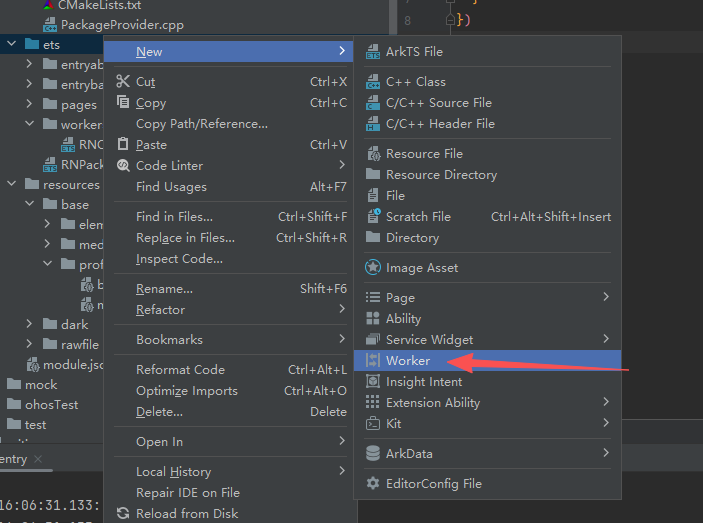
选择后在弹出的窗口中取名 RNOHWorker:
此时目录结构为:
└── ets
    ├── entryability
    ├── page
    └── workers
        └── RNOHWorker.ets
步骤 3 : 修改 RNOHWorker.ets 为下列代码:
typescript
import { setupRNOHWorker } from "@rnoh/react-native-openharmony/src/main/ets/setupRNOHWorker";
import { createRNPackages } from '../RNPackagesFactory';

setupRNOHWorker({
  createWorkerRNInstanceConfig: (_rnInstanceName) => {
    return { thirdPartyPackagesFactory: createRNPackages }
  }
})
然后编译、运行即可。
📖 API 详解
runBackgroundTimer - 开启后台定时器
开启一个后台定时器,以固定的时间间隔重复执行指定代码。
类型 :(callback: () => void, delay: number) => void
参数说明:
| 参数 | 类型 | 必填 | 说明 |
|---|---|---|---|
| callback | () => void | 是 | 定时执行的回调函数 |
| delay | number | 是 | 执行间隔(毫秒) |
使用场景:
- 周期性数据同步
- 位置追踪
- 后台轮询
ts
import React, { useState, useEffect } from "react";
import { View, Text, Button, StyleSheet } from "react-native";
import BackgroundTimer from "react-native-background-timer";

const BackgroundTimerExample = () => {
  const [count, setCount] = useState(0);
  const [isRunning, setIsRunning] = useState(false);

  const startTimer = () => {
    setIsRunning(true);
    BackgroundTimer.runBackgroundTimer(() => {
      setCount((prev) => prev + 1);
    }, 1000);
  };

  const stopTimer = () => {
    setIsRunning(false);
    BackgroundTimer.stopBackgroundTimer();
  };

  useEffect(() => {
    return () => {
      BackgroundTimer.stopBackgroundTimer();
    };
  }, []);

  return (
    <View style={styles.container}>
      <Text style={styles.countText}>计数: {count}</Text>
      <Text style={styles.statusText}>
        状态: {isRunning ? "运行中" : "已停止"}
      </Text>
      <View style={styles.buttonContainer}>
        <Button title="开始" onPress={startTimer} disabled={isRunning} />
        <Button title="停止" onPress={stopTimer} disabled={!isRunning} />
      </View>
    </View>
  );
};

const styles = StyleSheet.create({
  container: {
    padding: 20,
    alignItems: "center",
  },
  countText: {
    fontSize: 48,
    fontWeight: "700",
    color: "#333333",
  },
  statusText: {
    fontSize: 16,
    color: "#666666",
    marginTop: 8,
    marginBottom: 20,
  },
  buttonContainer: {
    flexDirection: "row",
    gap: 12,
  },
});

export default BackgroundTimerExample;
stopBackgroundTimer - 停止后台定时器
停止由 runBackgroundTimer 开启的定时器。
类型 :() => void
使用场景:
- 用户主动停止
- 组件卸载时清理
- 条件停止
ts
import React, { useState, useEffect } from "react";
import { View, Text, Button } from "react-native";
import BackgroundTimer from "react-native-background-timer";

const AutoStopExample = () => {
  const [seconds, setSeconds] = useState(0);

  useEffect(() => {
    BackgroundTimer.runBackgroundTimer(() => {
      setSeconds((prev) => {
        if (prev >= 10) {
          BackgroundTimer.stopBackgroundTimer();
          return prev;
        }
        return prev + 1;
      });
    }, 1000);

    return () => {
      BackgroundTimer.stopBackgroundTimer();
    };
  }, []);

  return (
    <View>
      <Text>倒计时: {seconds} / 10</Text>
    </View>
  );
};
setTimeout - 延时执行
开启一个延时定时器,在指定时间后执行一次回调函数。返回一个定时器 ID,可用于清除。
类型 :(callback: () => void, delay: number) => number
参数说明:
| 参数 | 类型 | 必填 | 说明 |
|---|---|---|---|
| callback | () => void | 是 | 延时执行的回调函数 |
| delay | number | 是 | 延时时间(毫秒) |
返回值:定时器 ID(number)
使用场景:
- 延时操作
- 超时处理
- 延时提示
ts
import React, { useState } from "react";
import { View, Text, Button, StyleSheet } from "react-native";
import BackgroundTimer from "react-native-background-timer";

const SetTimeoutExample = () => {
  const [message, setMessage] = useState("等待中...");
  const [timeoutIds, setTimeoutIds] = useState<number[]>([]);

  const startTimeout = (delay: number) => {
    const id = BackgroundTimer.setTimeout(() => {
      setMessage(`${delay}ms 延时执行完成`);
    }, delay);
    setTimeoutIds((prev) => [...prev, id]);
    setMessage(`将在 ${delay}ms 后执行...`);
  };

  const clearAllTimeouts = () => {
    timeoutIds.forEach((id) => BackgroundTimer.clearTimeout(id));
    setTimeoutIds([]);
    setMessage("已清除所有延时任务");
  };

  return (
    <View style={styles.container}>
      <Text style={styles.messageText}>{message}</Text>
      <View style={styles.buttonGroup}>
        <Button title="延时 1 秒" onPress={() => startTimeout(1000)} />
        <Button title="延时 3 秒" onPress={() => startTimeout(3000)} />
        <Button title="延时 5 秒" onPress={() => startTimeout(5000)} />
      </View>
      <Button title="清除所有" onPress={clearAllTimeouts} color="#FF3B30" />
    </View>
  );
};

const styles = StyleSheet.create({
  container: {
    padding: 20,
  },
  messageText: {
    fontSize: 16,
    color: "#333333",
    textAlign: "center",
    marginBottom: 20,
  },
  buttonGroup: {
    gap: 12,
    marginBottom: 12,
  },
});

export default SetTimeoutExample;
clearTimeout - 清除延时定时器
清除由 setTimeout 创建的延时定时器。
类型:(timeoutId: number) => void`
参数说明:
| 参数 | 类型 | 必填 | 说明 |
|---|---|---|---|
| timeoutId | number | 是 | 定时器 ID |
tsx
const clearTimeoutExample = () => {
  const timeoutId = BackgroundTimer.setTimeout(() => {
    console.log("这不会执行");
  }, 5000);

  // 3秒后清除定时器
  setTimeout(() => {
    BackgroundTimer.clearTimeout(timeoutId);
    console.log("定时器已清除");
  }, 3000);
};
setInterval - 周期执行
开启一个周期定时器,以固定的时间间隔重复执行回调函数。返回一个定时器 ID,可用于清除。
类型 :(callback: () => void, delay: number) => number
参数说明:
| 参数 | 类型 | 必填 | 说明 |
|---|---|---|---|
| callback | () => void | 是 | 周期执行的回调函数 |
| delay | number | 是 | 执行间隔(毫秒) |
返回值:定时器 ID(number)
使用场景:
- 定时刷新
- 心跳检测
- 进度更新
ts
import React, { useState, useEffect, useRef } from "react";
import { View, Text, Button, StyleSheet, ProgressBarAndroid } from "react-native";
import BackgroundTimer from "react-native-background-timer";

const SetIntervalExample = () => {
  const [progress, setProgress] = useState(0);
  const intervalIdRef = useRef<number | null>(null);

  const startProgress = () => {
    if (intervalIdRef.current !== null) return;

    intervalIdRef.current = BackgroundTimer.setInterval(() => {
      setProgress((prev) => {
        if (prev >= 100) {
          BackgroundTimer.clearInterval(intervalIdRef.current!);
          intervalIdRef.current = null;
          return 100;
        }
        return prev + 1;
      });
    }, 100);
  };

  const stopProgress = () => {
    if (intervalIdRef.current !== null) {
      BackgroundTimer.clearInterval(intervalIdRef.current);
      intervalIdRef.current = null;
    }
  };

  const resetProgress = () => {
    stopProgress();
    setProgress(0);
  };

  useEffect(() => {
    return () => {
      if (intervalIdRef.current !== null) {
        BackgroundTimer.clearInterval(intervalIdRef.current);
      }
    };
  }, []);

  return (
    <View style={styles.container}>
      <Text style={styles.progressText}>{progress}%</Text>
      <View style={styles.progressBar}>
        <View style={[styles.progressFill, { width: `${progress}%` }]} />
      </View>
      <View style={styles.buttonGroup}>
        <Button title="开始" onPress={startProgress} />
        <Button title="暂停" onPress={stopProgress} />
        <Button title="重置" onPress={resetProgress} />
      </View>
    </View>
  );
};

const styles = StyleSheet.create({
  container: {
    padding: 20,
    alignItems: "center",
  },
  progressText: {
    fontSize: 48,
    fontWeight: "700",
    color: "#007AFF",
    marginBottom: 20,
  },
  progressBar: {
    width: "100%",
    height: 8,
    backgroundColor: "#E5E5EA",
    borderRadius: 4,
    overflow: "hidden",
    marginBottom: 20,
  },
  progressFill: {
    height: "100%",
    backgroundColor: "#007AFF",
  },
  buttonGroup: {
    flexDirection: "row",
    gap: 12,
  },
});

export default SetIntervalExample;
clearInterval - 清除周期定时器
清除由 setInterval 创建的周期定时器。
类型 :(intervalId: number) => void
参数说明:
| 参数 | 类型 | 必填 | 说明 |
|---|---|---|---|
| intervalId | number | 是 | 定时器 ID |
tsx
const clearIntervalExample = () => {
  const intervalId = BackgroundTimer.setInterval(() => {
    console.log("周期执行");
  }, 1000);

  // 5秒后清除定时器
  setTimeout(() => {
    BackgroundTimer.clearInterval(intervalId);
    console.log("周期定时器已清除");
  }, 5000);
};
📋 完整示例
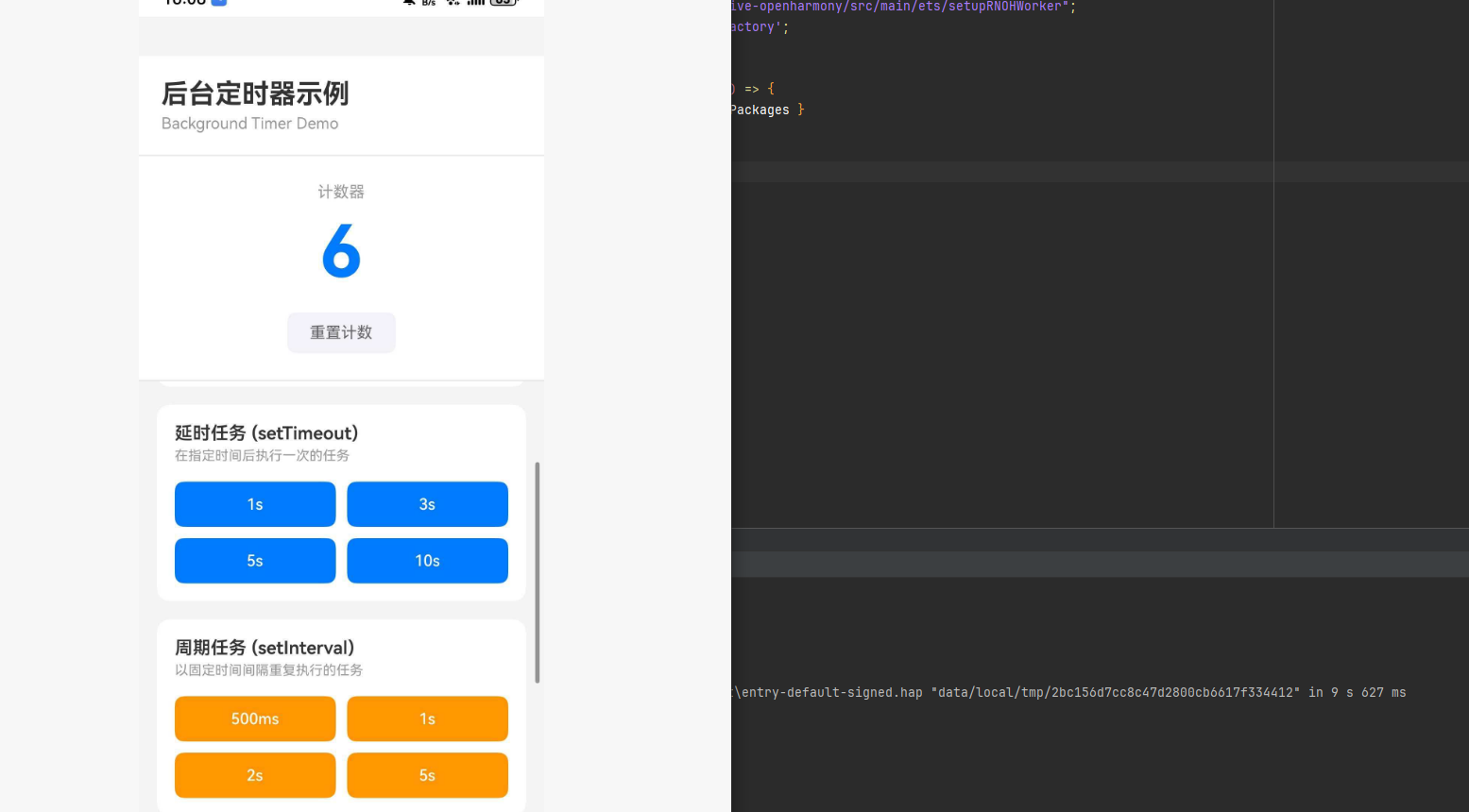
ts
import React, { useState, useEffect, useRef, useCallback } from "react";
import {
  View,
  Text,
  StyleSheet,
  ScrollView,
  TouchableOpacity,
  SafeAreaView,
  StatusBar,
  Alert,
} from "react-native";
import BackgroundTimer from "react-native-background-timer";

type TimerType = "background" | "timeout" | "interval";

type TimerInfo = {
  id: number;
  type: TimerType;
  startTime: number;
  delay: number;
  isActive: boolean;
};

const App: React.FC = () => {
  const [count, setCount] = useState(0);
  const [timers, setTimers] = useState<TimerInfo[]>([]);
  const [backgroundTimerRunning, setBackgroundTimerRunning] = useState(false);

  const timerIdCounterRef = useRef(0);
  const backgroundTimerRef = useRef<boolean>(false);

  useEffect(() => {
    return () => {
      BackgroundTimer.stopBackgroundTimer();
      timers.forEach((timer) => {
        if (timer.type === "timeout") {
          BackgroundTimer.clearTimeout(timer.id);
        } else if (timer.type === "interval") {
          BackgroundTimer.clearInterval(timer.id);
        }
      });
    };
  }, [timers]);

  const addTimer = useCallback((type: TimerType, delay: number, id: number) => {
    const newTimer: TimerInfo = {
      id,
      type,
      startTime: Date.now(),
      delay,
      isActive: true,
    };
    setTimers((prev) => [...prev, newTimer]);
  }, []);

  const removeTimer = useCallback((id: number) => {
    setTimers((prev) => prev.filter((t) => t.id !== id));
  }, []);

  const startBackgroundTimer = () => {
    if (backgroundTimerRef.current) {
      Alert.alert("提示", "后台定时器已在运行");
      return;
    }

    backgroundTimerRef.current = true;
    setBackgroundTimerRunning(true);

    BackgroundTimer.runBackgroundTimer(() => {
      setCount((prev) => prev + 1);
    }, 1000);

    Alert.alert("成功", "后台定时器已启动");
  };

  const stopBackgroundTimer = () => {
    BackgroundTimer.stopBackgroundTimer();
    backgroundTimerRef.current = false;
    setBackgroundTimerRunning(false);
    Alert.alert("成功", "后台定时器已停止");
  };

  const startTimeout = (delay: number) => {
    const id = BackgroundTimer.setTimeout(() => {
      setCount((prev) => prev + 1);
      removeTimer(id);
      Alert.alert("提示", `${delay / 1000}秒延时任务已完成`);
    }, delay);

    timerIdCounterRef.current += 1;
    addTimer("timeout", delay, id);
  };

  const startInterval = (delay: number) => {
    const id = BackgroundTimer.setInterval(() => {
      setCount((prev) => prev + 1);
    }, delay);

    timerIdCounterRef.current += 1;
    addTimer("interval", delay, id);
  };

  const clearTimer = (timer: TimerInfo) => {
    if (timer.type === "timeout") {
      BackgroundTimer.clearTimeout(timer.id);
    } else if (timer.type === "interval") {
      BackgroundTimer.clearInterval(timer.id);
    }
    removeTimer(timer.id);
  };

  const resetCount = () => {
    setCount(0);
  };

  const clearAllTimers = () => {
    timers.forEach((timer) => {
      if (timer.type === "timeout") {
        BackgroundTimer.clearTimeout(timer.id);
      } else if (timer.type === "interval") {
        BackgroundTimer.clearInterval(timer.id);
      }
    });
    setTimers([]);
    BackgroundTimer.stopBackgroundTimer();
    backgroundTimerRef.current = false;
    setBackgroundTimerRunning(false);
    Alert.alert("成功", "所有定时器已清除");
  };

  const formatTime = (ms: number) => {
    if (ms < 1000) return `${ms}ms`;
    return `${ms / 1000}s`;
  };

  const getTimerTypeLabel = (type: TimerType) => {
    switch (type) {
      case "background":
        return "后台定时器";
      case "timeout":
        return "延时任务";
      case "interval":
        return "周期任务";
    }
  };

  const getTimerTypeColor = (type: TimerType) => {
    switch (type) {
      case "background":
        return "#34C759";
      case "timeout":
        return "#007AFF";
      case "interval":
        return "#FF9500";
    }
  };

  return (
    <SafeAreaView style={styles.container}>
      <StatusBar barStyle="dark-content" backgroundColor="#FFFFFF" />
      <View style={styles.header}>
        <Text style={styles.headerTitle}>后台定时器示例</Text>
        <Text style={styles.headerSubtitle}>Background Timer Demo</Text>
      </View>

      <View style={styles.countSection}>
        <Text style={styles.countLabel}>计数器</Text>
        <Text style={styles.countValue}>{count}</Text>
        <TouchableOpacity style={styles.resetButton} onPress={resetCount}>
          <Text style={styles.resetButtonText}>重置计数</Text>
        </TouchableOpacity>
      </View>

      <ScrollView style={styles.scrollView}>
        <View style={styles.section}>
          <Text style={styles.sectionTitle}>后台定时器</Text>
          <Text style={styles.sectionDescription}>
            应用进入后台时仍可继续执行的定时器
          </Text>
          <View style={styles.buttonRow}>
            <TouchableOpacity
              style={[
                styles.actionButton,
                backgroundTimerRunning && styles.buttonDisabled,
              ]}
              onPress={startBackgroundTimer}
              disabled={backgroundTimerRunning}
            >
              <Text style={styles.actionButtonText}>开始</Text>
            </TouchableOpacity>
            <TouchableOpacity
              style={[
                styles.actionButton,
                styles.stopButton,
                !backgroundTimerRunning && styles.buttonDisabled,
              ]}
              onPress={stopBackgroundTimer}
              disabled={!backgroundTimerRunning}
            >
              <Text style={styles.actionButtonText}>停止</Text>
            </TouchableOpacity>
          </View>
        </View>

        <View style={styles.section}>
          <Text style={styles.sectionTitle}>延时任务 (setTimeout)</Text>
          <Text style={styles.sectionDescription}>
            在指定时间后执行一次的任务
          </Text>
          <View style={styles.buttonGrid}>
            {[1000, 3000, 5000, 10000].map((delay) => (
              <TouchableOpacity
                key={delay}
                style={styles.delayButton}
                onPress={() => startTimeout(delay)}
              >
                <Text style={styles.delayButtonText}>{formatTime(delay)}</Text>
              </TouchableOpacity>
            ))}
          </View>
        </View>

        <View style={styles.section}>
          <Text style={styles.sectionTitle}>周期任务 (setInterval)</Text>
          <Text style={styles.sectionDescription}>
            以固定时间间隔重复执行的任务
          </Text>
          <View style={styles.buttonGrid}>
            {[500, 1000, 2000, 5000].map((delay) => (
              <TouchableOpacity
                key={delay}
                style={[styles.delayButton, styles.intervalButton]}
                onPress={() => startInterval(delay)}
              >
                <Text style={styles.delayButtonText}>{formatTime(delay)}</Text>
              </TouchableOpacity>
            ))}
          </View>
        </View>

        <View style={styles.section}>
          <View style={styles.sectionHeader}>
            <Text style={styles.sectionTitle}>活动定时器</Text>
            <Text style={styles.timerCount}>{timers.length}</Text>
          </View>
          {timers.length === 0 ? (
            <Text style={styles.emptyText}>暂无活动定时器</Text>
          ) : (
            timers.map((timer) => (
              <View key={timer.id} style={styles.timerItem}>
                <View style={styles.timerInfo}>
                  <View
                    style={[
                      styles.timerBadge,
                      { backgroundColor: getTimerTypeColor(timer.type) },
                    ]}
                  >
                    <Text style={styles.timerBadgeText}>
                      {getTimerTypeLabel(timer.type)}
                    </Text>
                  </View>
                  <Text style={styles.timerDelay}>
                    间隔: {formatTime(timer.delay)}
                  </Text>
                </View>
                <TouchableOpacity
                  style={styles.clearButton}
                  onPress={() => clearTimer(timer)}
                >
                  <Text style={styles.clearButtonText}>清除</Text>
                </TouchableOpacity>
              </View>
            ))
          )}
        </View>

        <TouchableOpacity style={styles.clearAllButton} onPress={clearAllTimers}>
          <Text style={styles.clearAllButtonText}>清除所有定时器</Text>
        </TouchableOpacity>
      </ScrollView>
    </SafeAreaView>
  );
};

const styles = StyleSheet.create({
  container: {
    flex: 1,
    backgroundColor: "#F5F5F5",
  },
  header: {
    padding: 20,
    backgroundColor: "#FFFFFF",
    borderBottomWidth: 1,
    borderBottomColor: "#E5E5EA",
  },
  headerTitle: {
    fontSize: 24,
    fontWeight: "700",
    color: "#333333",
  },
  headerSubtitle: {
    fontSize: 14,
    color: "#999999",
    marginTop: 4,
  },
  countSection: {
    backgroundColor: "#FFFFFF",
    padding: 24,
    alignItems: "center",
    borderBottomWidth: 1,
    borderBottomColor: "#E5E5EA",
  },
  countLabel: {
    fontSize: 14,
    color: "#999999",
    marginBottom: 8,
  },
  countValue: {
    fontSize: 64,
    fontWeight: "700",
    color: "#007AFF",
  },
  resetButton: {
    marginTop: 16,
    paddingHorizontal: 20,
    paddingVertical: 10,
    backgroundColor: "#F2F2F7",
    borderRadius: 8,
  },
  resetButtonText: {
    fontSize: 14,
    color: "#666666",
  },
  scrollView: {
    flex: 1,
  },
  section: {
    backgroundColor: "#FFFFFF",
    margin: 16,
    marginBottom: 0,
    marginTop: 16,
    padding: 16,
    borderRadius: 12,
  },
  sectionHeader: {
    flexDirection: "row",
    alignItems: "center",
    justifyContent: "space-between",
    marginBottom: 12,
  },
  sectionTitle: {
    fontSize: 16,
    fontWeight: "600",
    color: "#333333",
    marginBottom: 4,
  },
  sectionDescription: {
    fontSize: 12,
    color: "#999999",
    marginBottom: 16,
  },
  timerCount: {
    fontSize: 14,
    fontWeight: "600",
    color: "#007AFF",
    backgroundColor: "#E3F2FD",
    paddingHorizontal: 10,
    paddingVertical: 4,
    borderRadius: 12,
  },
  buttonRow: {
    flexDirection: "row",
    gap: 12,
  },
  actionButton: {
    flex: 1,
    backgroundColor: "#007AFF",
    paddingVertical: 14,
    borderRadius: 8,
    alignItems: "center",
  },
  stopButton: {
    backgroundColor: "#FF3B30",
  },
  buttonDisabled: {
    opacity: 0.5,
  },
  actionButtonText: {
    color: "#FFFFFF",
    fontSize: 16,
    fontWeight: "500",
  },
  buttonGrid: {
    flexDirection: "row",
    flexWrap: "wrap",
    gap: 10,
  },
  delayButton: {
    flex: 1,
    minWidth: "45%",
    backgroundColor: "#007AFF",
    paddingVertical: 12,
    borderRadius: 8,
    alignItems: "center",
  },
  intervalButton: {
    backgroundColor: "#FF9500",
  },
  delayButtonText: {
    color: "#FFFFFF",
    fontSize: 14,
    fontWeight: "500",
  },
  emptyText: {
    fontSize: 14,
    color: "#999999",
    textAlign: "center",
    paddingVertical: 20,
  },
  timerItem: {
    flexDirection: "row",
    alignItems: "center",
    justifyContent: "space-between",
    paddingVertical: 12,
    borderBottomWidth: 1,
    borderBottomColor: "#E5E5EA",
  },
  timerInfo: {
    flexDirection: "row",
    alignItems: "center",
    flex: 1,
  },
  timerBadge: {
    paddingHorizontal: 8,
    paddingVertical: 4,
    borderRadius: 4,
    marginRight: 10,
  },
  timerBadgeText: {
    fontSize: 12,
    color: "#FFFFFF",
    fontWeight: "500",
  },
  timerDelay: {
    fontSize: 14,
    color: "#666666",
  },
  clearButton: {
    paddingHorizontal: 12,
    paddingVertical: 6,
    backgroundColor: "#FF3B30",
    borderRadius: 6,
  },
  clearButtonText: {
    color: "#FFFFFF",
    fontSize: 12,
    fontWeight: "500",
  },
  clearAllButton: {
    margin: 16,
    marginTop: 16,
    marginBottom: 32,
    backgroundColor: "#FF3B30",
    paddingVertical: 16,
    borderRadius: 12,
    alignItems: "center",
  },
  clearAllButtonText: {
    color: "#FFFFFF",
    fontSize: 16,
    fontWeight: "600",
  },
});

export default App;
⚠️ 注意事项
Worker 线程配置
本库需要配置 Worker 线程才能正常工作,请确保按照上述步骤完成配置:
- 在
EntryAbility.ets中配置getRNOHWorkerScriptUrl - 创建
RNOHWorker.ets文件 - 正确引入
createRNPackages
遗留问题
- start 和 stop 接口: HarmonyOS RN 框架暂不支持这两个接口
- Worker 线程限制: 使用 Worker 开启的新线程中不支持 RNOHContext 序列化传参,底层 OS 暂不支持,导致无法在新线程中发送事件
内存管理
记得在组件卸载时清除定时器:
tsx
useEffect(() => {
  const timerId = BackgroundTimer.setInterval(() => {
    // 执行任务
  }, 1000);

  return () => {
    BackgroundTimer.clearInterval(timerId);
  };
}, []);
常见问题
Q: 定时器不工作?
A: 检查是否正确配置了 Worker 线程,确保 RNOHWorker.ets 文件已创建并正确配置。
Q: 应用后台时定时器停止?
A: 确保使用的是 BackgroundTimer 的 API 而不是 JavaScript 原生的 setTimeout/setInterval。
Q: 如何在后台发送事件?
A: 目前 HarmonyOS 不支持在 Worker 线程中发送事件,需要在主线程中处理。