在实际业务中,主从表(Master-Detail)是一种常见的数据展示形式,例如产品列表下包含多个订单明细、项目下包含子任务等。vxe-table 提供了强大的展开行(Expand Row) 功能,允许用户通过点击展开按钮,在主行下方嵌入子表格或其他自定义内容,完美实现主从数据的关联展示。
-
本文将介绍两种典型场景:
- 产品列表 + 订单明细:主表展示产品基本信息,子表展示该产品对应的订单明细。
- 产品明细列表 + 订单明细:主表展示产品的 SKU 级别明细(含图片、库存等),子表同样展示订单明细。
-
通过这两个案例,你将掌握 vxe-grid 展开行的核心用法,包括:
- 配置 expandConfig 开启展开功能
- 使用 type: 'expand' 列定义展开触发器
- 利用 slots 自定义展开内容(主行展示与子表格渲染)
场景一:实现产品列表带明细
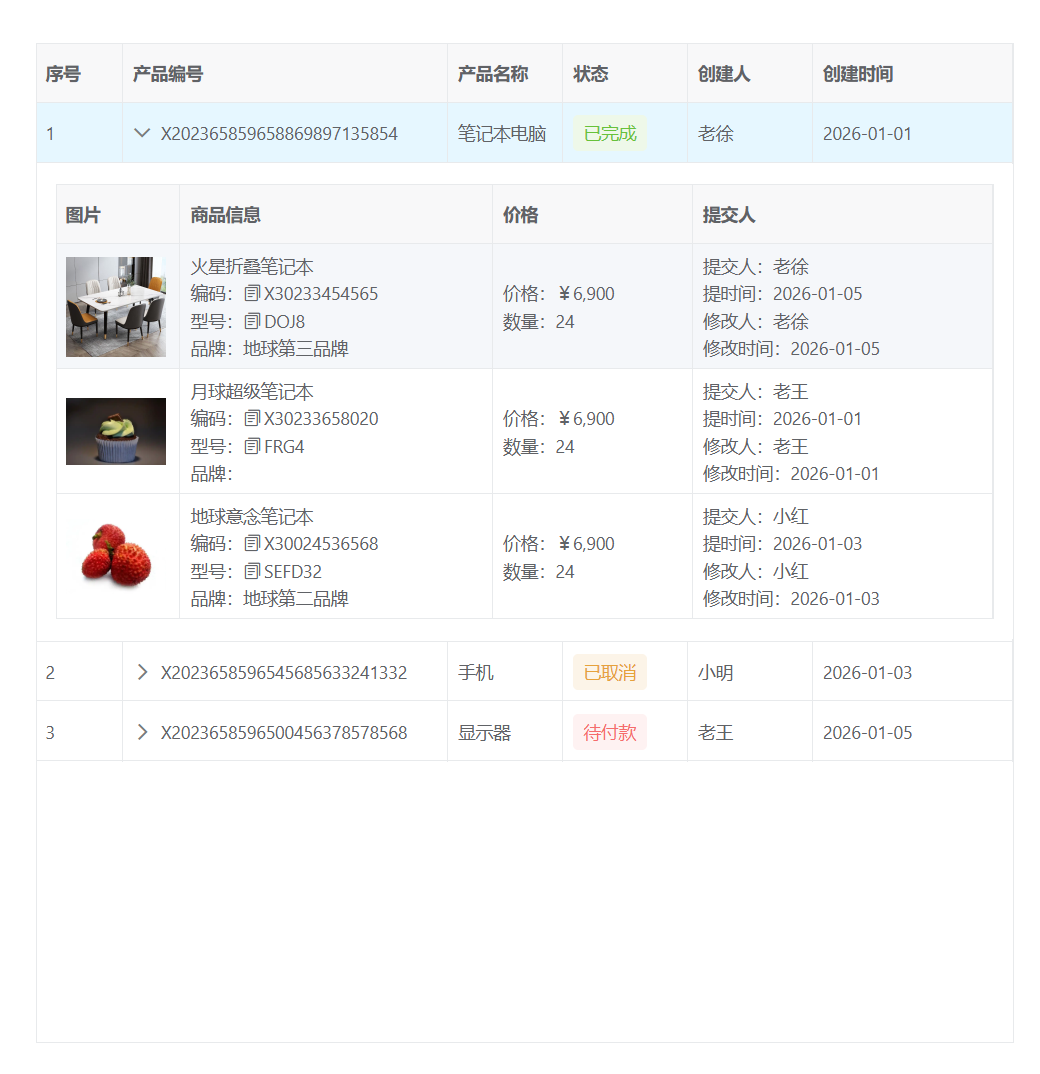
通过展开行方式实现实现产品列表带子产品明细表,子表展示显示信息
关键配置
| 配置项 | 作用 |
|---|---|
| expandConfig | 全局展开行为配置,如 labelField 指定展开按钮的提示字段,padding 控制内边距 |
| columns 中某列设置 type: 'expand' | 在该列显示展开/收起按钮,同时通过 slots.content 指定展开区域的内容模板 |
| slots 自定义插槽 | 可定义 default 插槽定制该列的默认显示内容(非展开时),以及 content 插槽定义子表格 |
代码
html
<template>
  <div>
    <vxe-grid v-bind="gridOptions">
      <template #status_default="{ row }">
        <vxe-tag v-if="row.status === 'complete'" status="success" content="已完成"></vxe-tag>
        <vxe-tag v-else-if="row.status === 'cancel'" status="warning" content="已取消"></vxe-tag>
        <vxe-tag v-else-if="row.status === 'pending'" status="error" content="待付款"></vxe-tag>
        <vxe-tag v-else status="info" content="未提交"></vxe-tag>
      </template>

      <template #expand_content="{ row }">
        <vxe-grid v-bind="subGridOptions" :data="row.detailedList">
          <template #order_name_default="{ row: subRow }">
            <div>{{ subRow.orderName }}</div>
            <div>编码:<vxe-text :content="subRow.orderNO" click-to-copy></vxe-text></div>
            <div>型号:<vxe-text :content="subRow.orderCode" click-to-copy></vxe-text></div>
            <div>品牌:{{ subRow.orderType }}</div>
          </template>

          <template #amount_default="{ row: subRow }">
            <div>价格:¥{{ formatAmount(subRow.amount) }}</div>
            <div>数量:{{ subRow.quantity }}</div>
          </template>

          <template #user_default="{ row: subRow }">
            <div>提交人:{{ subRow.createBy }}</div>
            <div>提时间:{{ subRow.createDate }}</div>
            <div>修改人:{{ subRow.createBy }}</div>
            <div>修改时间:{{ subRow.createDate }}</div>
          </template>
        </vxe-grid>
      </template>
    </vxe-grid>
  </div>
</template>

<script setup>
import { reactive } from 'vue'
import XEUtils from 'xe-utils'

const gridOptions = reactive({
  border: true,
  height: 800,
  rowConfig: {
    keyField: 'id',
    isHover: true,
    isCurrent: true
  },
  expandConfig: {
    labelField: 'productNO',
    padding: true
  },
  columns: [
    { type: 'seq', width: 70 },
    { field: 'productNO', title: '产品编号', type: 'expand', width: 260, slots: { content: 'expand_content' } },
    { field: 'productName', title: '产品名称' },
    { field: 'status', title: '状态', width: 100, slots: { default: 'status_default' } },
    { field: 'createBy', title: '创建人', width: 100 },
    { field: 'createDate', title: '创建时间', width: 160 }
  ],
    data: [
    {
      id: 10001,
      productName: '笔记本电脑',
      productNO: 'X202365859658869897135854',
      status: 'complete',
      updateBy: '老徐',
      updateDate: '2026-01-01',
      createBy: '老徐',
      createDate: '2026-01-01',
      detailedList: [
        { orderImg: 'https://vxeui.com/resource/productImg/product3.png', orderName: '火星折叠笔记本', orderNO: 'X30233454565', orderCode: 'DOJ8', orderType: '地球第三品牌', amount: 6900, quantity: 24, updateBy: '老徐', updateDate: '2026-01-05', createBy: '老徐', createDate: '2026-01-05' },
        { orderImg: 'https://vxeui.com/resource/productImg/product2.png', orderName: '月球超级笔记本', orderNO: 'X30233658020', orderCode: 'FRG4', orderType: '', amount: 6900, quantity: 24, updateBy: '老王', updateDate: '2026-01-01', createBy: '老王', createDate: '2026-01-01' },
        { orderImg: 'https://vxeui.com/resource/productImg/product4.png', orderName: '地球意念笔记本', orderNO: 'X30024536568', orderCode: 'SEFD32', orderType: '地球第二品牌', amount: 6900, quantity: 24, updateBy: '小红', updateDate: '2026-01-03', createBy: '小红', createDate: '2026-01-03' }
      ]
    },
    {
      id: 10002,
      productName: '手机',
      productNO: 'X2023658596545685633241332',
      status: 'cancel',
      updateBy: '小明',
      updateDate: '2026-01-03',
      createBy: '小明',
      createDate: '2026-01-03',
      detailedList: [
        { orderImg: 'https://vxeui.com/resource/productImg/product7.png', orderName: '火星透视手机', orderNO: 'X30207598632', orderCode: 'JUKI8', orderType: '地球第二品牌', amount: 4900, quantity: 68, updateBy: '小明', updateDate: '2026-01-08', createBy: '小明', createDate: '2026-01-08' },
        { orderImg: 'https://vxeui.com/resource/productImg/product12.png', orderName: '火星意念手机', orderNO: 'X30201254365', orderCode: 'DFGFDSG2', orderType: '地球第二品牌', amount: 4900, quantity: 68, updateBy: '李四', updateDate: '2026-01-01', createBy: '李四', createDate: '2026-01-01' },
        { orderImg: 'https://vxeui.com/resource/productImg/product10.png', orderName: '月球折叠手机', orderNO: 'X01235435454', orderCode: 'SDFSD5', orderType: '地球第三品牌', amount: 4900, quantity: 68, updateBy: '老徐', updateDate: '2026-01-03', createBy: '老徐', createDate: '2026-01-03' },
        { orderImg: 'https://vxeui.com/resource/productImg/product9.png', orderName: '地球触摸手机', orderNO: 'X75000525352', orderCode: 'QSDS3D', orderType: '地球第二品牌', amount: 4900, quantity: 68, updateBy: '老刘', updateDate: '2026-01-04', createBy: '老刘', createDate: '2026-01-04' },
        { orderImg: 'https://vxeui.com/resource/productImg/product8.png', orderName: '地球红外手机', orderNO: 'X20003545425', orderCode: 'BNMO90', orderType: '地球第三品牌', amount: 4900, quantity: 68, updateBy: '老徐', updateDate: '2026-01-02', createBy: '老徐', createDate: '2026-01-02' }
      ]
    },
    {
      id: 10003,
      productName: '显示器',
      productNO: 'X2023658596500456378578568',
      status: 'pending',
      updateBy: '老王',
      updateDate: '2026-01-05',
      createBy: '老王',
      createDate: '2026-01-05',
      detailedList: [
        { orderImg: 'https://vxeui.com/resource/productImg/product1.png', orderName: '火星128k超级显示器', orderNO: 'X96786522455', orderCode: 'DSFG34', orderType: '地球第三品牌', amount: 990, quantity: 43, updateBy: '老徐', updateDate: '2026-01-09', createBy: '老徐', createDate: '2026-01-09' },
        { orderImg: 'https://vxeui.com/resource/productImg/product6.png', orderName: '地球16k显示器', orderNO: 'X3478502552', orderCode: 'SDFG4', orderType: '地球第二品牌', amount: 990, quantity: 43, updateBy: '张三', updateDate: '2026-01-07', createBy: '张三', createDate: '2026-01-07' }
      ]
    }
  ]
})
const subGridOptions = reactive({
  border: true,
  cellConfig: {
    height: 100
  },
  rowConfig: {
    isHover: true
  },
  columns: [
    {
      field: 'orderImg',
      title: '图片',
      width: 100,
      cellRender: {
        name: 'VxeImage',
        props: {
          width: 80,
          height: 80
        }
      }
    },
    { field: 'orderName', title: '商品信息', slots: { default: 'order_name_default' } },
    { field: 'amount', title: '价格', width: 160, slots: { default: 'amount_default' } },
    { field: 'createBy', title: '提交人', width: 240, slots: { default: 'user_default' } }
  ]
})

const formatAmount = (num) => {
  return XEUtils.commafy(num)
}

</script>
场景二:产品明细列表(SKU级)+ 订单明细
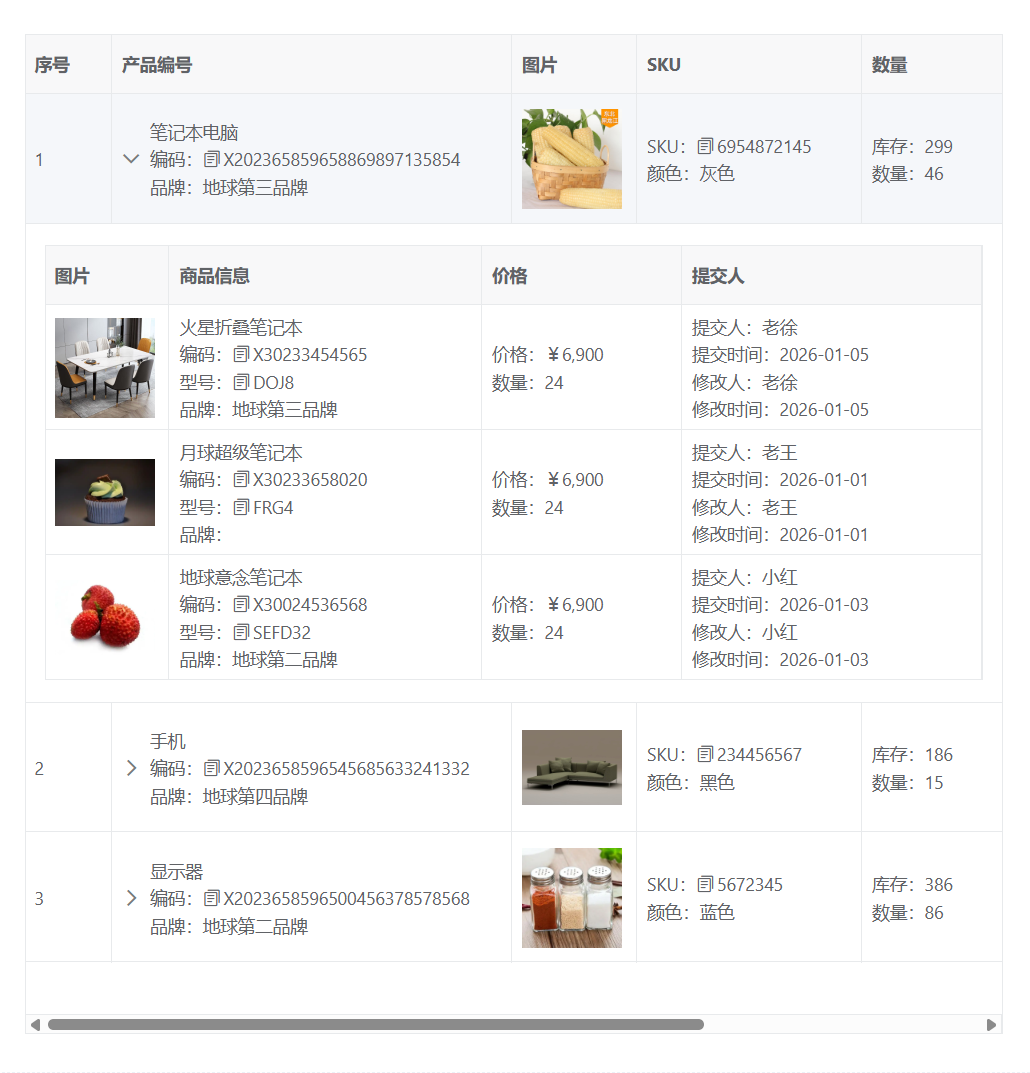
通过展开行方式实现实现产品明细列表,主表和子表都有详细详细
- 一个 type: 'expand' 的列可以同时定义 slots.default(折叠时显示的内容)和 slots.content(展开时显示的额外内容),且 default 插槽并不会覆盖原有的展开按钮,按钮依然会独立显示。
- 主表其他列也使用了自定义插槽,如 sku_default 展示 SKU 和颜色,quantity_default 展示库存和数量,user_default 展示负责人和时间等。
代码
html
<template>
  <div>
    <vxe-grid v-bind="gridOptions">
      <template #status_default="{ row }">
        <vxe-tag v-if="row.status === 'complete'" status="success" content="已完成"></vxe-tag>
        <vxe-tag v-else-if="row.status === 'cancel'" status="warning" content="已取消"></vxe-tag>
        <vxe-tag v-else-if="row.status === 'pending'" status="error" content="待付款"></vxe-tag>
        <vxe-tag v-else status="info" content="未提交"></vxe-tag>
      </template>

      <template #expand_default="{ row }">
        <div>{{ row.productName }}</div>
        <div>编码:<vxe-text :content="row.productNO" click-to-copy></vxe-text></div>
        <div>品牌:{{ row.brand }}</div>
      </template>

      <template #sku_default="{ row }">
        <div>SKU:<vxe-text :content="row.sku" click-to-copy></vxe-text></div>
        <div>颜色:{{ row.color }}</div>
      </template>

      <template #quantity_default="{ row }">
        <div>库存:{{ row.inventory }}</div>
        <div>数量:{{ row.quantity }}</div>
      </template>

      <template #user_default="{ row }">
        <div>负责人:{{ row.createBy }}</div>
        <div>提交时间:{{ row.createDate }}</div>
        <div>审批人:{{ row.createBy }}</div>
        <div>审批时间:{{ row.createDate }}</div>
      </template>

      <template #expand_content="{ row }">
        <vxe-grid v-bind="subGridOptions" :data="row.detailedList">
          <template #order_name_default="{ row: subRow }">
            <div>{{ subRow.orderName }}</div>
            <div>编码:<vxe-text :content="subRow.orderNO" click-to-copy></vxe-text></div>
            <div>型号:<vxe-text :content="subRow.orderCode" click-to-copy></vxe-text></div>
            <div>品牌:{{ subRow.orderType }}</div>
          </template>

          <template #amount_default="{ row: subRow }">
            <div>价格:¥{{ formatAmount(subRow.amount) }}</div>
            <div>数量:{{ subRow.quantity }}</div>
          </template>

          <template #user_default="{ row: subRow }">
            <div>提交人:{{ subRow.createBy }}</div>
            <div>提交时间:{{ subRow.createDate }}</div>
            <div>修改人:{{ subRow.createBy }}</div>
            <div>修改时间:{{ subRow.createDate }}</div>
          </template>
        </vxe-grid>
      </template>
    </vxe-grid>
  </div>
</template>

<script setup>
import { reactive } from 'vue'
import XEUtils from 'xe-utils'

const gridOptions = reactive({
  border: true,
  height: 800,
  rowConfig: {
    keyField: 'id',
    isHover: true,
    isCurrent: true
  },
  expandConfig: {
    padding: true
  },
  columns: [
    { type: 'seq', width: 70 },
    { field: 'productNO', title: '产品编号', type: 'expand', minWidth: 320, slots: { default: 'expand_default', content: 'expand_content' } },
    {
      field: 'productImg',
      title: '图片',
      width: 100,
      cellRender: {
        name: 'VxeImage',
        props: {
          width: 80,
          height: 80
        }
      }
    },
    { field: 'sku', title: 'SKU', minWidth: 180, slots: { default: 'sku_default' } },
    { field: 'quantity', title: '数量', width: 120, slots: { default: 'quantity_default' } },
    { field: 'status', title: '状态', width: 100, slots: { default: 'status_default' } },
    { field: 'createBy', title: '负责人', width: 220, slots: { default: 'user_default' } }
  ],
  data: [
    {
      id: 10001,
      productImg: 'https://vxeui.com/resource/productImg/product11.png',
      productName: '笔记本电脑',
      productNO: 'X202365859658869897135854',
      brand: '地球第三品牌',
      status: 'complete',
      sku: '6954872145',
      color: '灰色',
      quantity: 46,
      inventory: 299,
      updateBy: '老徐',
      updateDate: '2026-01-01',
      createBy: '老徐',
      createDate: '2026-01-01',
      detailedList: [
        { orderImg: 'https://vxeui.com/resource/productImg/product3.png', orderName: '火星折叠笔记本', orderNO: 'X30233454565', orderCode: 'DOJ8', orderType: '地球第三品牌', amount: 6900, quantity: 24, updateBy: '老徐', updateDate: '2026-01-05', createBy: '老徐', createDate: '2026-01-05' },
        { orderImg: 'https://vxeui.com/resource/productImg/product2.png', orderName: '月球超级笔记本', orderNO: 'X30233658020', orderCode: 'FRG4', orderType: '', amount: 6900, quantity: 24, updateBy: '老王', updateDate: '2026-01-01', createBy: '老王', createDate: '2026-01-01' },
        { orderImg: 'https://vxeui.com/resource/productImg/product4.png', orderName: '地球意念笔记本', orderNO: 'X30024536568', orderCode: 'SEFD32', orderType: '地球第二品牌', amount: 6900, quantity: 24, updateBy: '小红', updateDate: '2026-01-03', createBy: '小红', createDate: '2026-01-03' }
      ]
    },
    {
      id: 10002,
      productImg: 'https://vxeui.com/resource/productImg/product10.png',
      productName: '手机',
      productNO: 'X2023658596545685633241332',
      brand: '地球第四品牌',
      status: 'cancel',
      sku: '234456567',
      color: '黑色',
      quantity: 15,
      inventory: 186,
      updateBy: '小明',
      updateDate: '2026-01-03',
      createBy: '小明',
      createDate: '2026-01-03',
      detailedList: [
        { orderImg: 'https://vxeui.com/resource/productImg/product7.png', orderName: '火星透视手机', orderNO: 'X30207598632', orderCode: 'JUKI8', orderType: '地球第二品牌', amount: 4900, quantity: 68, updateBy: '小明', updateDate: '2026-01-08', createBy: '小明', createDate: '2026-01-08' },
        { orderImg: 'https://vxeui.com/resource/productImg/product12.png', orderName: '火星意念手机', orderNO: 'X30201254365', orderCode: 'DFGFDSG2', orderType: '地球第二品牌', amount: 4900, quantity: 68, updateBy: '李四', updateDate: '2026-01-01', createBy: '李四', createDate: '2026-01-01' },
        { orderImg: 'https://vxeui.com/resource/productImg/product10.png', orderName: '月球折叠手机', orderNO: 'X01235435454', orderCode: 'SDFSD5', orderType: '地球第三品牌', amount: 4900, quantity: 68, updateBy: '老徐', updateDate: '2026-01-03', createBy: '老徐', createDate: '2026-01-03' },
        { orderImg: 'https://vxeui.com/resource/productImg/product9.png', orderName: '地球触摸手机', orderNO: 'X75000525352', orderCode: 'QSDS3D', orderType: '地球第二品牌', amount: 4900, quantity: 68, updateBy: '老刘', updateDate: '2026-01-04', createBy: '老刘', createDate: '2026-01-04' },
        { orderImg: 'https://vxeui.com/resource/productImg/product8.png', orderName: '地球红外手机', orderNO: 'X20003545425', orderCode: 'BNMO90', orderType: '地球第三品牌', amount: 4900, quantity: 68, updateBy: '老徐', updateDate: '2026-01-02', createBy: '老徐', createDate: '2026-01-02' }
      ]
    },
    {
      id: 10003,
      productImg: 'https://vxeui.com/resource/productImg/product7.png',
      productName: '显示器',
      productNO: 'X2023658596500456378578568',
      brand: '地球第二品牌',
      status: 'pending',
      sku: '5672345',
      color: '蓝色',
      quantity: 86,
      inventory: 386,
      updateBy: '老王',
      updateDate: '2026-01-05',
      createBy: '老王',
      createDate: '2026-01-05',
      detailedList: [
        { orderImg: 'https://vxeui.com/resource/productImg/product1.png', orderName: '火星128k超级显示器', orderNO: 'X96786522455', orderCode: 'DSFG34', orderType: '地球第三品牌', amount: 990, quantity: 43, updateBy: '老徐', updateDate: '2026-01-09', createBy: '老徐', createDate: '2026-01-09' },
        { orderImg: 'https://vxeui.com/resource/productImg/product6.png', orderName: '地球16k显示器', orderNO: 'X3478502552', orderCode: 'SDFG4', orderType: '地球第二品牌', amount: 990, quantity: 43, updateBy: '张三', updateDate: '2026-01-07', createBy: '张三', createDate: '2026-01-07' }
      ]
    }
  ]
})

const subGridOptions = reactive({
  border: true,
  cellConfig: {
    height: 100
  },
  rowConfig: {
    isHover: true
  },
  columns: [
    {
      field: 'orderImg',
      title: '图片',
      width: 100,
      cellRender: {
        name: 'VxeImage',
        props: {
          width: 80,
          height: 80
        }
      }
    },
    { field: 'orderName', title: '商品信息', minWidth: 140, slots: { default: 'order_name_default' } },
    { field: 'amount', title: '价格', width: 160, slots: { default: 'amount_default' } },
    { field: 'createBy', title: '提交人', width: 240, slots: { default: 'user_default' } }
  ]
})

const formatAmount = (num) => {
  return XEUtils.commafy(num)
}
</script>
效果对比
-
场景一的主表展开列只显示了产品编号(未使用 default 插槽),场景二则通过 default 插槽丰富了折叠时的展示信息。
-
两种方式都能满足主从表的需求,你可以根据 UI 设计选择是否在展开列中显示额外信息。
-
利用 vxe-table 的展开行机制,我们可以优雅地实现产品列表与明细列表的关联展示。通过简单的配置:
- 设置 expandConfig
- 在列中定义 type: 'expand' 并关联插槽
- 在插槽中嵌入子表格
即可快速实现主从表效果,且子表格可以独立配置列、样式和交互,大大提升了数据展示的灵活性和用户体验。上述两个案例完整展示了从产品级到 SKU 级的明细关联,你可以根据实际业务需求直接复用或改造。 - 更多展开行的高级用法,请参考 vxe-table 官方文档 - 展开行