昨天看了篇Pretext项目的文章,于是产生了利用Canvas.measureText()实现HTML中文本双行合一效果的想法,基本思路是利用Canvas.measureText()手工测量文本宽度,将原始HTML文本切分为一系列span进行重排。当然我不会一行行敲代码,而是让AI根据这个思路试一下。跟通义千问奋战了一小时没有结果(鄙视,总是不能将注释排成双行),后来通过copilot调用了美帝的AI,两分钟出了初步效果(看来我们的遥遥领先只能相对于印度吹一吹😁),然后跟它沟通了一下,基本上实现了设想,效果如下:
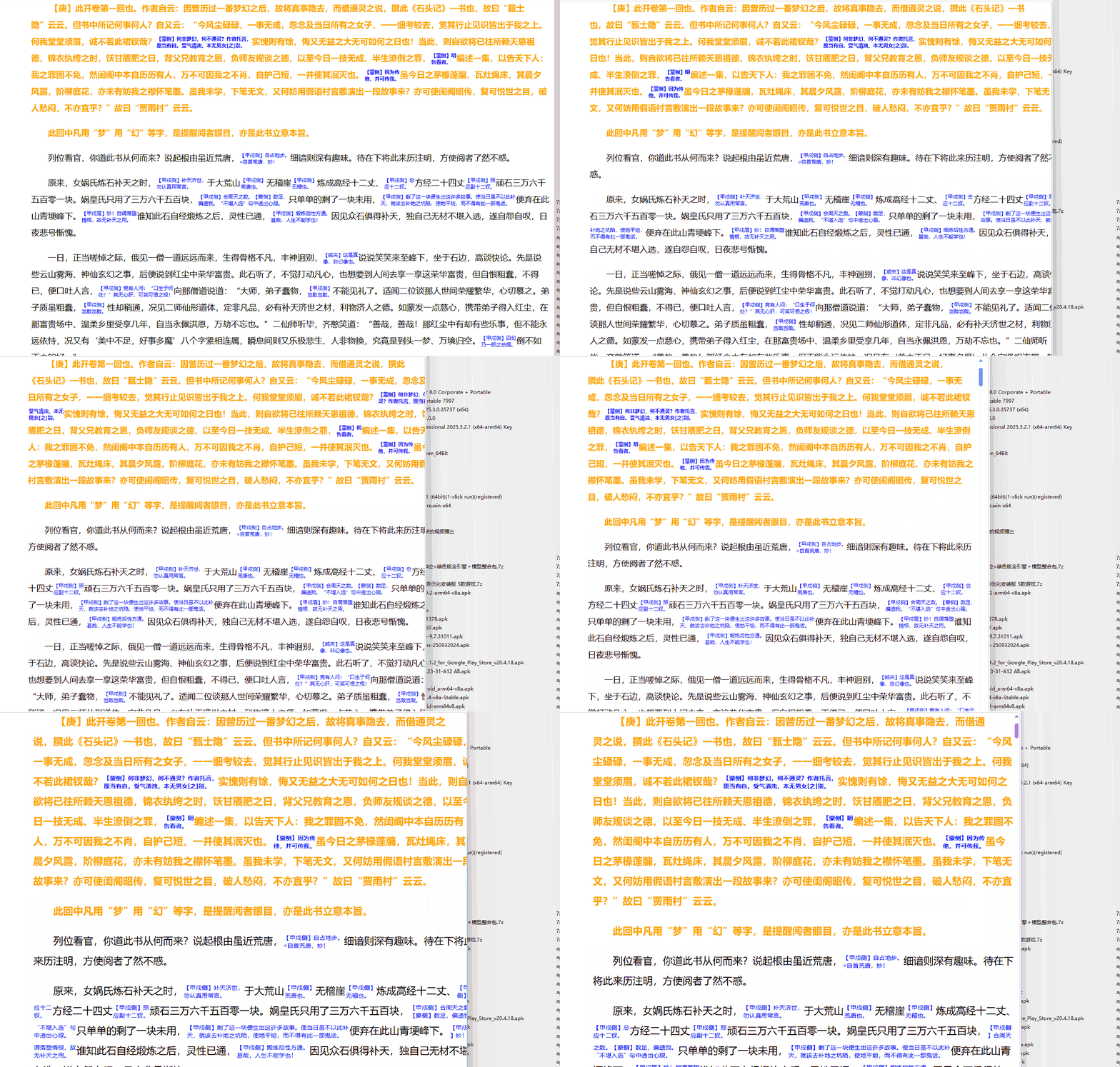
可以看到,在浏览器窗口大小变化以及浏览器中文字缩放时,都能完美实现自动双行排版。
测试代码如下,还是很容易看懂的:
html
<!DOCTYPE html>
<html lang="zh-CN">
<head>
<meta charset="UTF-8">
<title>多段落专业级双行合一排版</title>
<style>
:root { --anno-scale: 0.6; }
.container {
margin: 20px auto;
font-family: "PingFang SC", "Microsoft YaHei", sans-serif;
background: #fff;
}
.line {
display: block;
white-space: nowrap;
clear: both;
}
.dual-container {
display: inline-block;
vertical-align: middle;
line-height: max(calc(2 * var(--anno-scale)), 1.3);
background-color: rgba(210, 105, 30, 0.05);
border-bottom: 1px dotted #d2691e;
margin: 0 1px;
}
.dual-up, .dual-down {
display: block;
font-size: max(calc(1em * var(--anno-scale)), 0.6em);
color: #d2691e;
white-space: nowrap;
}
</style>
</head>
<body>
<div class="container" id="main-content">
<p class="dual-layout">    这是一段专业测试文本。《诗经》是中国古代诗歌的开端,其中<span class="annotation">包含一些较长的注释内容,我们想要让注释内容以"流式双行绕接"的形式显示。建立一个禁止出现在行首的字符集(如 。以及,)》)和禁止出现在行尾的字符集(如 (《")。</span>排版引擎应当自动处理这些复杂的换行边界。</p>
<p class="dual-layout">    第二段专业测试文本。其中<span class="annotation">包含一些较长的注释内容,测试多段落同时排版的效果。这里的注释如果很长很长很长很长很长很长,它会跨越多个行间距,但依然保持段落感。</span>核心优化思路:避头尾逻辑、响应式缩放、可见区计算。</p>
</div>
<script>
class ParagraphScanner {
constructor(element) {
this.element = element;
// 1. 备份该段落原始的HTML内容
this.originalHTML = element.innerHTML;
this.noLeading = "),。》、?!:;"'";
this.noTrailing = "(《"'";
this.ctx = document.createElement('canvas').getContext('2d');
this.ticking = false;
this.init();
}
init() {
const observer = new ResizeObserver(() => {
if (!this.ticking) {
requestAnimationFrame(() => {
this.render();
this.ticking = false;
});
this.ticking = true;
}
});
observer.observe(this.element);
this.render();
}
updateMetrics() {
const style = window.getComputedStyle(this.element);
this.fontSize = parseFloat(style.fontSize);
this.fontFamily = style.fontFamily;
const rate = getComputedStyle(document.documentElement).getPropertyValue('--anno-scale').trim() || "0.6";
this.annoSize = parseFloat(rate) < 0.6 ? this.fontSize * 0.6 : this.fontSize * parseFloat(rate);
// 获取当前段落的物理宽度
const rect = this.element.getBoundingClientRect();
this.maxWidth = rect.width - parseFloat(style.paddingLeft) - parseFloat(style.paddingRight) - 5;
}
measure(text, isAnno = false) {
this.ctx.font = `${isAnno ? this.annoSize : this.fontSize}px ${this.fontFamily}`;
return this.ctx.measureText(text).width;
}
parse() {
const temp = document.createElement('div');
temp.innerHTML = this.originalHTML;
return Array.from(temp.childNodes).map(node => {
if (node.nodeType === 3) return {type: 'text', content: node.textContent};
if (node.nodeType === 1 && node.classList.contains('annotation')) return {type: 'anno', content: node.textContent};
return null;
}).filter(Boolean);
}
render() {
this.updateMetrics();
if (this.maxWidth <= 0) return;
const parts = this.parse();
const lines = [];
let curLine = { elements: [], width: 0 };
parts.forEach(part => {
let content = part.content;
while (content.length > 0) {
const remainW = this.maxWidth - curLine.width;
if (part.type === 'text') {
let count = 0;
for (let i = 1; i <= content.length; i++) {
if (this.measure(content.substring(0, i)) > remainW) break;
count = i;
}
while (count > 0 && this.noLeading.includes(content[count])) count--;
while (count > 0 && this.noTrailing.includes(content[count-1])) count--;
if (count === 0 && curLine.elements.length > 0) {
lines.push(curLine);
curLine = { elements: [], width: 0 };
continue;
}
const take = count || 1;
const w = this.measure(content.substring(0, take));
curLine.elements.push({ type: 'text', content: content.substring(0, take) });
curLine.width += w;
content = content.substring(take);
} else {
let count = 0;
for (let i = 2; i <= content.length + 1; i += 2) {
let half = Math.ceil(i / 2);
if (this.measure(content.substring(0, half), true) > remainW) break;
count = i;
}
if (count <= 0 && curLine.elements.length > 0) {
lines.push(curLine);
curLine = { elements: [], width: 0 };
continue;
}
const take = (count <= 0) ? Math.min(content.length, 2) : count;
let break_point = Math.ceil(take / 2);
// 注释避开行尾行首非法字符
while(break_point < content.length && (this.noTrailing.includes(content[break_point - 1]) ||
this.noLeading.includes(content[break_point])))
break_point ++;
const up = content.substring(0, break_point);
curLine.elements.push({ type: 'anno', up, down: content.substring(break_point, take) });
curLine.width += this.measure(up, true);
content = content.substring(take);
}
if (curLine.width >= this.maxWidth * 0.99) {
lines.push(curLine);
curLine = { elements: [], width: 0 };
}
}
});
if (curLine.elements.length > 0) lines.push(curLine);
this.draw(lines);
}
draw(lines) {
const fragment = document.createDocumentFragment();
lines.forEach(line => {
const lineDiv = document.createElement('div');
lineDiv.className = 'line';
lineDiv.style.width = `${this.maxWidth + 5}px`;
line.elements.forEach(el => {
const span = document.createElement('span');
if (el.type === 'text') {
span.textContent = el.content;
} else {
span.className = 'dual-container';
span.innerHTML = `<span class="dual-up">${el.up || '\u00A0'}</span><span class="dual-down">${el.down || '\u00A0'}</span>`;
}
lineDiv.appendChild(span);
});
fragment.appendChild(lineDiv);
});
this.element.innerHTML = '';
this.element.appendChild(fragment);
}
// 静态批量初始化工具
static activate(selector) {
const elements = document.querySelectorAll(selector);
return Array.from(elements).map(el => new ParagraphScanner(el));
}
}
window.onload = () => {
// 页面加载完成后,一次激活所有 class 为 dual-layout 的标签的双行合一重排,适用于大多数情况
ParagraphScanner.activate('.dual-layout');
// 添加视口监听器,class 为 dual-layout 的标签进入视口后激活双行合一重排,适用于极长文本
/*
const observer = new IntersectionObserver(es => es.forEach(e => {
if (e.isIntersecting) {
if (!e.target.paragraphScanner) {
e.target.paragraphScanner = new ParagraphScanner(e.target);
} else {
e.target.paragraphScanner.render();
}
}
}));
document.querySelectorAll('.dual-layout').forEach(el => observer.observe(el));
*/
}
</script>
</body>
</html>稍作扩展:现在ParagraphScanner接受一个元素作为参数,针对该元素中的内容拆分成一系列span进行重排。这样,容器中可以包含多个段落。如果要实现首行缩进排版,需要在每个段落开头手动插入四个半字符空格: 。避开行首行尾字符的问题也接近解决了。