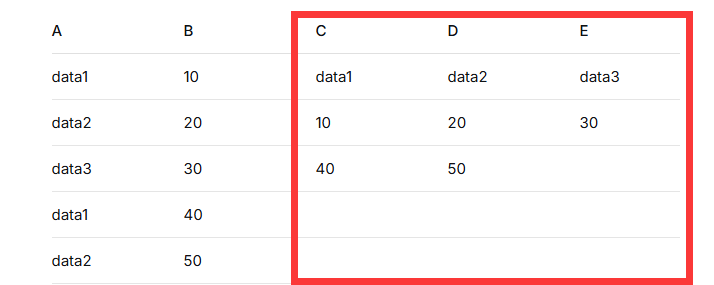
举例:如下图所示将AB列内容拆分为红色框内的格式方便绘制图表
cpp
Sub SplitCategoriesToColumns()
    Dim ws As Worksheet
    Dim lastRow As Long
    Dim startRow As Long
    Dim dict As Object
    Dim keyOrder As New Collection
    Dim i As Long, j As Long
    Dim key As Variant
    Dim val As Variant
    Dim maxCount As Long
    Dim colCount As Long
    Dim colOffset As Long

    ' 设置工作表(当前活动表)
    Set ws = ActiveSheet

    ' ***** 请根据实际情况修改起始行 *****
    ' 如果数据没有标题行,设置为 1
    ' 如果第一行是标题(如"分类","数值"),设置为 2
    startRow = 1

    ' A 列最后非空行
    lastRow = ws.Cells(ws.Rows.Count, "A").End(xlUp).Row
    If lastRow < startRow Then
        MsgBox "A 列没有数据!"
        Exit Sub
    End If

    ' 创建字典,存储每个类别对应的数值集合
    Set dict = CreateObject("Scripting.Dictionary")

    ' 遍历 A/B 列数据,按类别收集 B 列数值
    For i = startRow To lastRow
        key = Trim(ws.Cells(i, "A").Value)
        If key <> "" Then
            val = ws.Cells(i, "B").Value
            If Not dict.exists(key) Then
                dict.Add key, New Collection
                keyOrder.Add key   ' 记录类别首次出现的顺序
            End If
            dict(key).Add val
        End If
    Next i

    If dict.Count = 0 Then
        MsgBox "没有找到有效的分类数据!"
        Exit Sub
    End If

    ' 计算所有类别中数据个数的最大值(用于确定输出行数)
    maxCount = 0
    For Each key In dict.Keys
        If dict(key).Count > maxCount Then maxCount = dict(key).Count
    Next key

    colCount = dict.Count          ' 类别个数(输出列数)
    colOffset = 3                  ' 从 C 列开始输出

    ' 清除旧的输出区域(C 列开始,向右 colCount 列,向下 maxCount+1 行)
    With ws
        .Range(.Cells(1, colOffset), .Cells(maxCount + 1, colOffset + colCount - 1)).ClearContents
    End With

    ' 将每个类别的数据写入对应的列
    For i = 1 To keyOrder.Count
        key = keyOrder(i)
        ' 第一行写入类别名称(表头)
        ws.Cells(1, colOffset + i - 1).Value = key
        ' 将数值依次填入该列的第2行开始
        For j = 1 To dict(key).Count
            ws.Cells(j + 1, colOffset + i - 1).Value = dict(key)(j)
        Next j
    Next i

    ' 自动调整输出列的列宽
    ws.Range(ws.Cells(1, colOffset), ws.Cells(1, colOffset + colCount - 1)).EntireColumn.AutoFit

    MsgBox "处理完成!共转换 " & dict.Count & " 个类别。"
End Sub