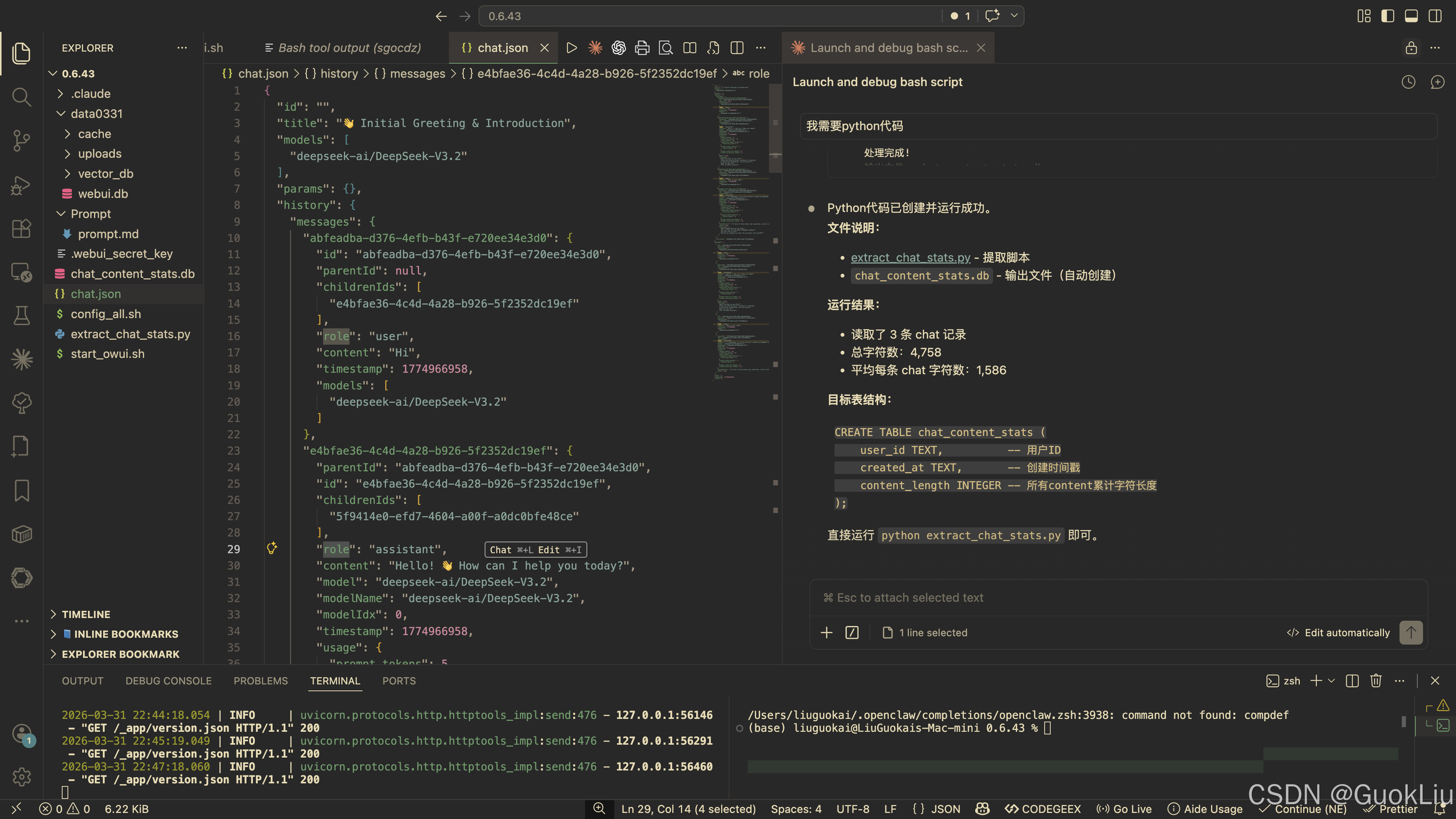
#!/usr/bin/env python3
"""
从webui.db提取chat表数据,计算每个chat中所有content的字符长度,保存到新sqlite文件
"""

import sqlite3
import json
import os

# 配置
SOURCE_DB = "data0331/webui.db"
TARGET_DB = "chat_content_stats.db"


def extract_content_length(chat_json: str) -> int:
    """
    从chat JSON中提取所有message的content字符长度总和
    """
    if not chat_json:
        return 0

    try:
        data = json.loads(chat_json)
    except json.JSONDecodeError:
        return 0

    total_length = 0

    # Open-WebUI的chat JSON结构: {"history": {"messages": {...}}}
    messages = data.get("history", {}).get("messages", {})

    for msg_id, msg in messages.items():
        if isinstance(msg, dict):
            content = msg.get("content", "")
            if content:
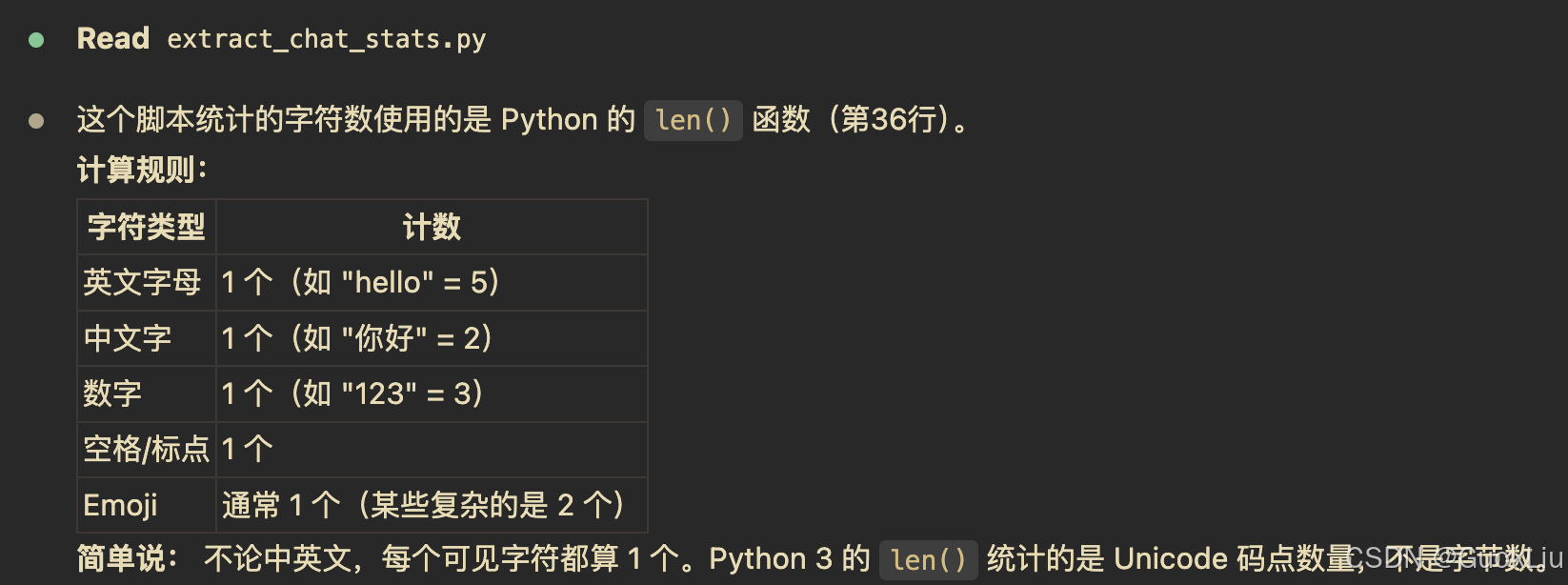
                total_length += len(str(content))

    return total_length


def main():
    # 检查源数据库是否存在
    if not os.path.exists(SOURCE_DB):
        print(f"错误: 源数据库不存在: {SOURCE_DB}")
        return

    # 连接源数据库
    source_conn = sqlite3.connect(SOURCE_DB)
    source_cursor = source_conn.cursor()

    # 获取所有chat记录
    source_cursor.execute("""
        SELECT user_id, created_at, chat
        FROM chat
        ORDER BY created_at
    """)
    rows = source_cursor.fetchall()
    print(f"从 {SOURCE_DB} 读取到 {len(rows)} 条chat记录")

    # 创建目标数据库
    if os.path.exists(TARGET_DB):
        os.remove(TARGET_DB)

    target_conn = sqlite3.connect(TARGET_DB)
    target_cursor = target_conn.cursor()

    # 创建目标表
    target_cursor.execute("""
        CREATE TABLE chat_content_stats (
            user_id TEXT NOT NULL,
            created_at TEXT NOT NULL,
            content_length INTEGER NOT NULL
        )
    """)

    # 插入数据
    processed = 0
    for user_id, created_at, chat_json in rows:
        content_length = extract_content_length(chat_json)
        target_cursor.execute("""
            INSERT INTO chat_content_stats (user_id, created_at, content_length)
            VALUES (?, ?, ?)
        """, (user_id, created_at, content_length))
        processed += 1

    target_conn.commit()

    # 显示统计信息
    target_cursor.execute("SELECT COUNT(*), SUM(content_length), AVG(content_length) FROM chat_content_stats")
    count, total, avg = target_cursor.fetchone()

    print(f"\n处理完成!")
    print(f"输出文件: {TARGET_DB}")
    print(f"总记录数: {count}")
    print(f"总字符数: {total:,}")
    print(f"平均每条chat字符数: {avg:.2f}")

    # 显示前5条示例
    print("\n前5条数据示例:")
    target_cursor.execute("SELECT user_id, created_at, content_length FROM chat_content_stats LIMIT 5")
    for row in target_cursor.fetchall():
        print(f"  user_id={row[0][:8]}..., created_at={row[1]}, content_length={row[2]:,}")

    # 关闭连接
    source_conn.close()
    target_conn.close()


if __name__ == "__main__":
    main()
#!/usr/bin/env python3
"""
从webui.db提取chat表数据,计算每个chat中所有content的字符长度,保存到新sqlite文件
"""

import sqlite3
import json
import os

import re


# 配置
SOURCE_DB = "data0331/webui.db"
TARGET_DB = "chat_content_stats.db"


def extract_content_stats(chat_json: str) -> dict:
    """
    从chat JSON中提取内容统计:中文字、英文字母、数字、标点符号、空格、emoji、其他
    """
    if not chat_json:
        return {
            "chinese": 0, "english": 0, "digit": 0,
            "punctuation": 0, "space": 0, "emoji": 0, "other": 0
        }

    try:
        data = json.loads(chat_json)
    except json.JSONDecodeError:
        return {
            "chinese": 0, "english": 0, "digit": 0,
            "punctuation": 0, "space": 0, "emoji": 0, "other": 0
        }

    chinese_count = 0
    english_count = 0
    digit_count = 0
    punctuation_count = 0
    space_count = 0
    emoji_count = 0
    other_count = 0

    # 标点符号定义
    punctuation_chars = set(".,;:!?-'\"()[]{}<>`~@#$%^&*+=_|\\/·,。;:!?、""''()【】《》「」『』〔〕~@#¥%......&*------+|\\")

    # Emoji范围检测
    def is_emoji(char):
        code = ord(char)
        return (
            0x1F600 <= code <= 0x1F64F or  # 表情符号
            0x1F300 <= code <= 0x1F5FF or  # 符号和象形文字
            0x1F680 <= code <= 0x1F6FF or  # 交通和地图符号
            0x1F700 <= code <= 0x1F77F or  # 其他符号
            0x1F780 <= code <= 0x1F7FF or  # 几何图形
            0x1F900 <= code <= 0x1F9FF or  # 补充符号
            0x1FA00 <= code <= 0x1FA6F or  # 扩展符号
            0x2600 <= code <= 0x26FF or    # 杂项符号
            0x2700 <= code <= 0x27BF or    # 装饰符号
            0x2B50 <= code <= 0x2B55 or    # 更多符号
            0x1F1E0 <= code <= 0x1F1FF    # 国旗
        )

    # Open-WebUI的chat JSON结构: {"history": {"messages": {...}}}
    messages = data.get("history", {}).get("messages", {})

    for msg_id, msg in messages.items():
        if isinstance(msg, dict):
            content = str(msg.get("content", ""))
            for char in content:
                if '\u4e00' <= char <= '\u9fff':  # 中文字符范围
                    chinese_count += 1
                elif char.isalpha():  # 英文字母
                    english_count += 1
                elif char.isdigit():  # 数字
                    digit_count += 1
                elif char.isspace():  # 空格、换行等空白字符
                    space_count += 1
                elif is_emoji(char):  # Emoji
                    emoji_count += 1
                elif char in punctuation_chars:  # 标点符号
                    punctuation_count += 1
                else:
                    other_count += 1

    return {
        "chinese": chinese_count,
        "english": english_count,
        "digit": digit_count,
        "punctuation": punctuation_count,
        "space": space_count,
        "emoji": emoji_count,
        "other": other_count
    }


def main():
    # 检查源数据库是否存在
    if not os.path.exists(SOURCE_DB):
        print(f"错误: 源数据库不存在: {SOURCE_DB}")
        return

    # 连接源数据库
    source_conn = sqlite3.connect(SOURCE_DB)
    source_cursor = source_conn.cursor()

    # 获取所有chat记录,包含user_id
    source_cursor.execute("""
        SELECT user_id, created_at, chat
        FROM chat
        ORDER BY created_at
    """)
    rows = source_cursor.fetchall()
    print(f"从 {SOURCE_DB} 读取到 {len(rows)} 条chat记录")

    # 获取所有用户的email映射 {user_id: email}
    source_cursor.execute("SELECT id, email FROM user")
    user_emails = dict(source_cursor.fetchall())
    print(f"从 user 表读取到 {len(user_emails)} 个用户")

    # 创建目标数据库
    if os.path.exists(TARGET_DB):
        os.remove(TARGET_DB)

    target_conn = sqlite3.connect(TARGET_DB)
    target_cursor = target_conn.cursor()

    # 创建目标表
    target_cursor.execute("""
        CREATE TABLE chat_content_stats (
            user_id TEXT NOT NULL,
            email TEXT,
            created_at TEXT NOT NULL,
            chinese INTEGER NOT NULL DEFAULT 0,
            english INTEGER NOT NULL DEFAULT 0,
            digit INTEGER NOT NULL DEFAULT 0,
            punctuation INTEGER NOT NULL DEFAULT 0,
            space INTEGER NOT NULL DEFAULT 0,
            emoji INTEGER NOT NULL DEFAULT 0,
            other INTEGER NOT NULL DEFAULT 0
        )
    """)

    # 插入数据
    processed = 0
    for user_id, created_at, chat_json in rows:
        stats = extract_content_stats(chat_json)
        email = user_emails.get(user_id, "unknown")
        target_cursor.execute("""
            INSERT INTO chat_content_stats
            (user_id, email, created_at, chinese, english, digit, punctuation, space, emoji, other)
            VALUES (?, ?, ?, ?, ?, ?, ?, ?, ?, ?)
        """, (user_id, email, created_at, stats["chinese"], stats["english"], stats["digit"],
              stats["punctuation"], stats["space"], stats["emoji"], stats["other"]))
        processed += 1

    target_conn.commit()

    # 显示统计信息
    target_cursor.execute("""
        SELECT
            COUNT(*),
            SUM(chinese),
            SUM(english),
            SUM(digit),
            SUM(punctuation),
            SUM(space),
            SUM(emoji),
            SUM(other),
            AVG(chinese + english + digit + punctuation + space + emoji + other)
        FROM chat_content_stats
    """)
    result = target_cursor.fetchone()
    count = result[0]
    total_chinese, total_english, total_digit, total_punct = result[1:5]
    total_space, total_emoji, total_other = result[5:8]
    avg = result[8]

    # 计算总计
    grand_total = sum([total_chinese, total_english, total_digit,
                       total_punct, total_space, total_emoji, total_other])

    print(f"\n处理完成!")
    print(f"输出文件: {TARGET_DB}")
    print(f"总记录数: {count}")
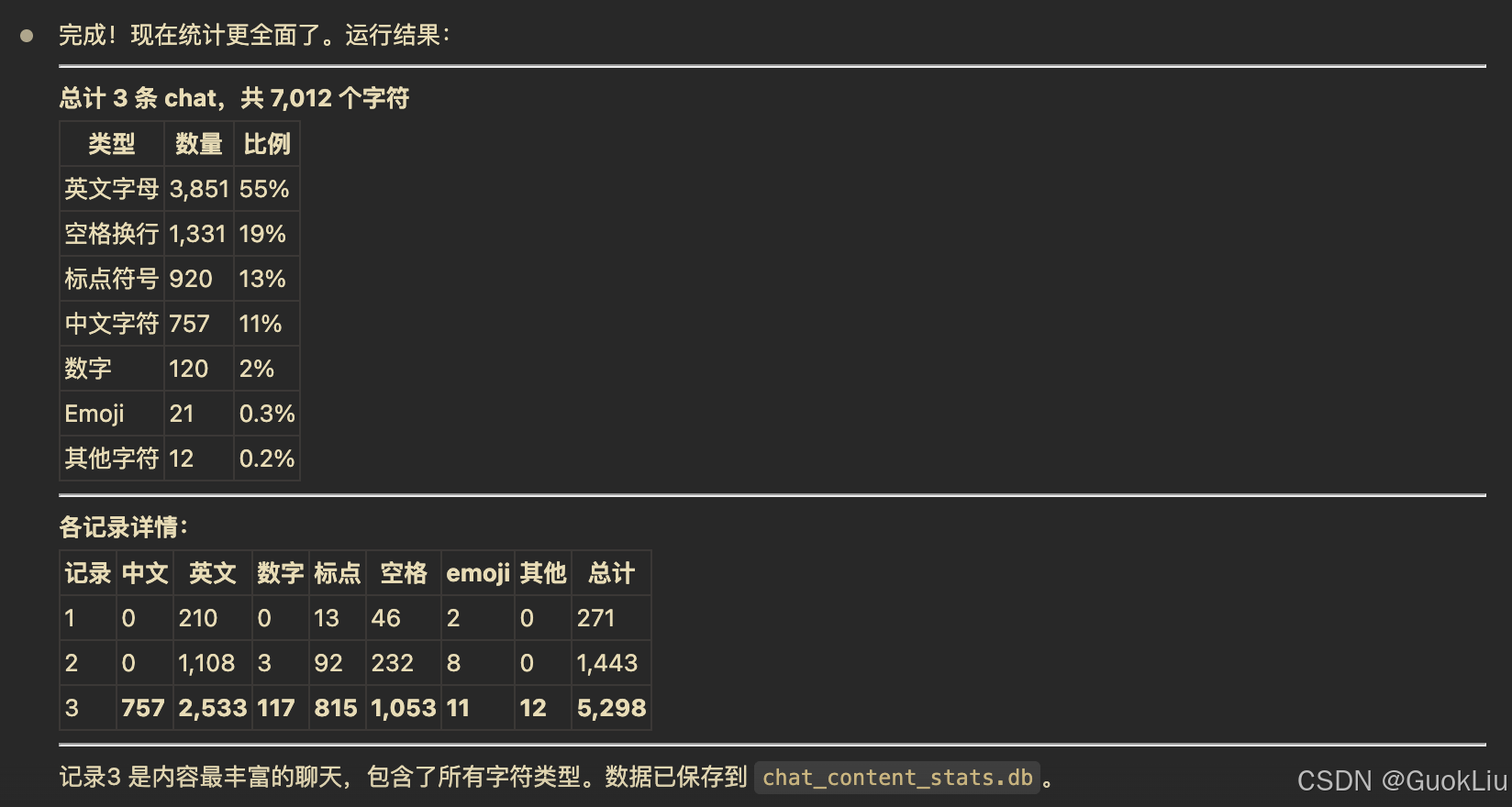
    print(f"\n【字符类型统计】")
    print(f"  中文字符: {total_chinese:,}")
    print(f"  英文字母: {total_english:,}")
    print(f"  数字:     {total_digit:,}")
    print(f"  标点符号: {total_punct:,}")
    print(f"  空格换行: {total_space:,}")
    print(f"  Emoji:    {total_emoji:,}")
    print(f"  其他字符: {total_other:,}")
    print(f"  ─────────")
    print(f"  总计:     {grand_total:,}")
    print(f"\n平均每条chat字符数: {avg:.2f}")

    # 显示前5条示例
    print("\n【前3条数据示例】:")
    target_cursor.execute("""
        SELECT user_id, email, created_at, chinese, english, digit,
               punctuation, space, emoji, other
        FROM chat_content_stats
        LIMIT 3
    """)
    for i, row in enumerate(target_cursor.fetchall()):
        total = sum(row[3:])
        print(f"\n  记录 {i+1}:")
        print(f"    user_id={row[0][:8]}..., email={row[1]}")
        print(f"    created_at={row[2]}")
        print(f"    中文={row[3]:,}, 英文={row[4]:,}, 数字={row[5]:,}")
        print(f"    标点={row[6]:,}, 空格={row[7]:,}, emoji={row[8]:,}, 其他={row[9]:,}")
        print(f"    总计={total:,}")

    # 关闭连接
    source_conn.close()
    target_conn.close()


if __name__ == "__main__":
    main()