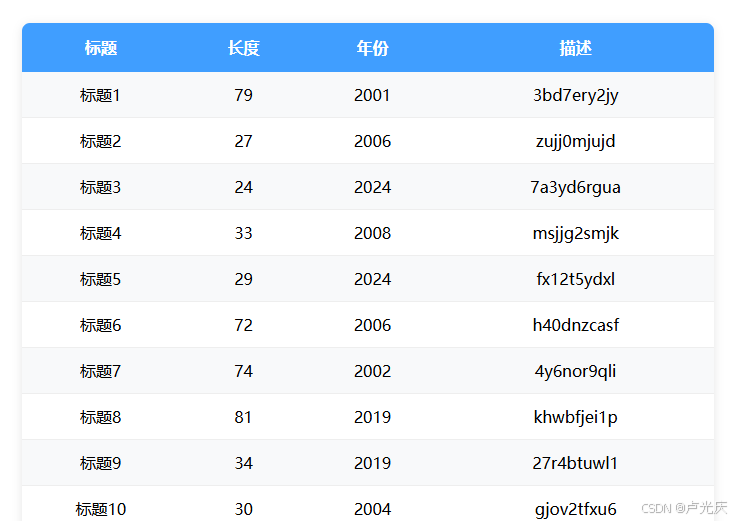
go
import win.ui;
/*DSG{{*/
var winform = win.form(text="远程屏幕控制服务器";right=500;bottom=320)
winform.add(
edit={cls="edit";left=20;top=20;right=480;bottom=280;edge=1;multiline=1;readonly=1;vscroll=1;z=1}
)
/*}}*/
winform.show()
thread.invoke(function(winform){
    import win.ui;
    import wsock.tcp.simpleHttpServer;
    import inet.adapter;
    // 获取本机局域网IP地址
    var localIp = wsock.getLocalIp();
    // 启动 HTTP 服务端
    var server = wsock.tcp.simpleHttpServer("0.0.0.0", 8081);
    // 在界面上显示服务器信息
    winform.edit.print(`
     📱 访问地址:
        本地访问: http://127.0.0.1:8081;
        局域网访问: http://` + localIp + `:8081
     📋 功能说明:
        🔴 演示远程sqlite表格的读取
    `)
    winform.show()

    // 在后台线程中运行服务器
    server.run(
        function(response, request){
            response.write(`
<!DOCTYPE html>
<html>
<head>
     <meta charset="UTF-8">
     <title>表格演示</title>
     <style>
         /* 表格整体样式 */
         table {
             width: 80%;
             margin: 30px auto;
             border-collapse: collapse; /* 合并边框 */
             font-family: "Microsoft YaHei", sans-serif;
             box-shadow: 0 2px 10px rgba(0,0,0,0.1); /* 轻微阴影 */
             border-radius: 8px;
             overflow: hidden;
         }

         /* 表头样式 */
         th {
             background-color: #409EFF;
             color: white;
             padding: 14px;
             text-align: center;
             font-weight: bold;
         }

         /* 单元格样式 */
         td {
             padding: 12px;
             text-align: center;
             border-bottom: 1px solid #eee;
         }

         /* 隔行变色 */
         tr:nth-child(even) {
             background-color: #f8f9fa;
         }

         /* 鼠标悬浮效果 */
         tr:hover {
             background-color: #e3f2fd;
             transition: 0.2s;
         }
     </style>
</head>
<body>
     <table>
         <tr>
             <th>标题</th>
             <th>长度</th>
             <th>年份</th>
             <th>描述</th>
         </tr>
`)
import sqlite
var db = sqlite("/test.db");
for title,length,year,starring in db.each("SELECT * FROM film") {
response.write(..string.format("<tr><td>%s</td><td>%s</td><td>%s</td><td>%s</td></tr>",title,length,year,starring));
}
db.close();
response.write(`</table>
</body>
</html>
`);
        }
    );

    // 窗口关闭时停止服务器
    winform.onClose = function(hwnd) {
        server.stop();
    }

    // 线程驻留
    while(true){
        thread.delay(1);
    }

},winform);

win.loopMessage();