目录
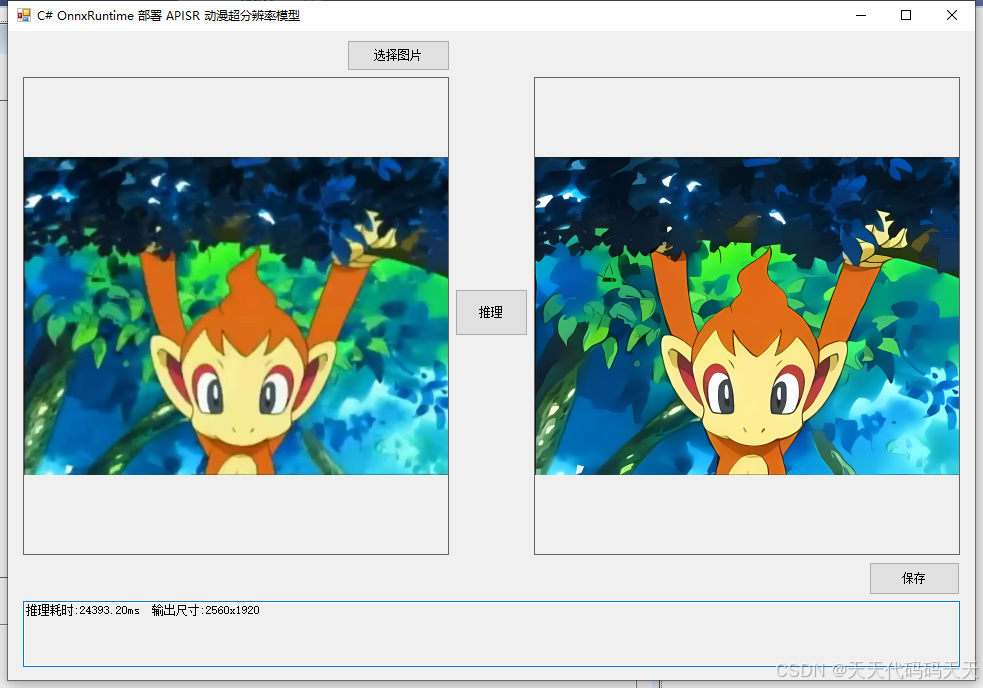
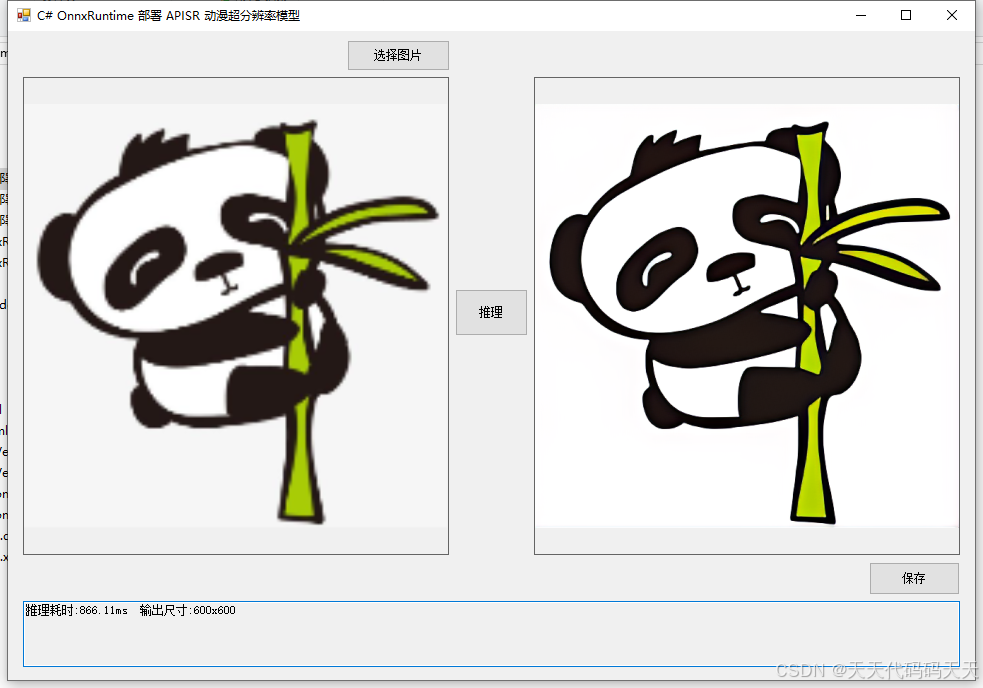
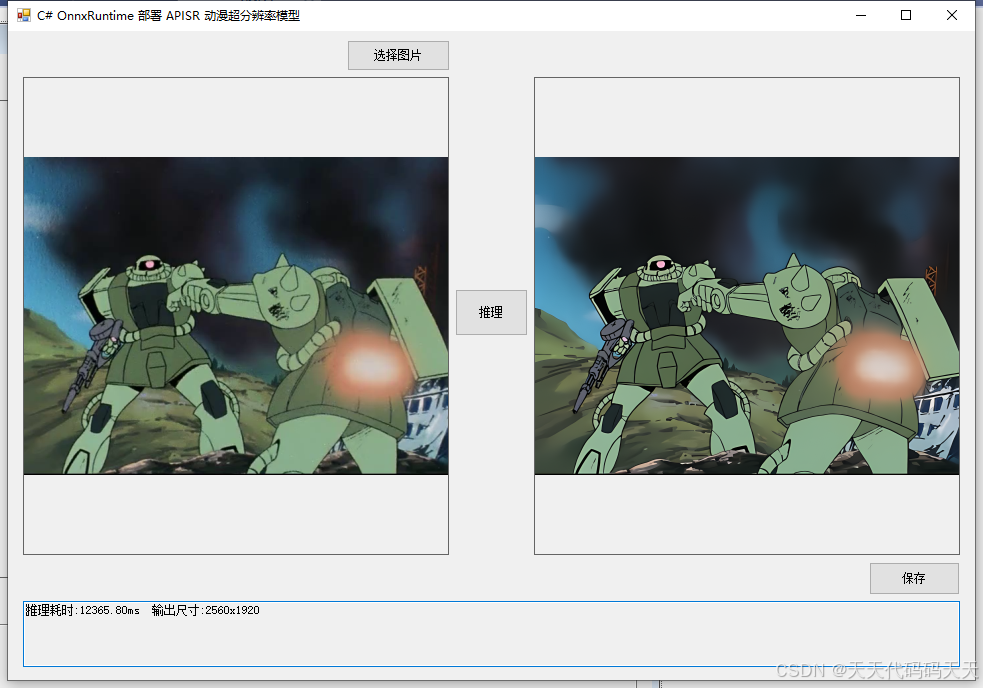
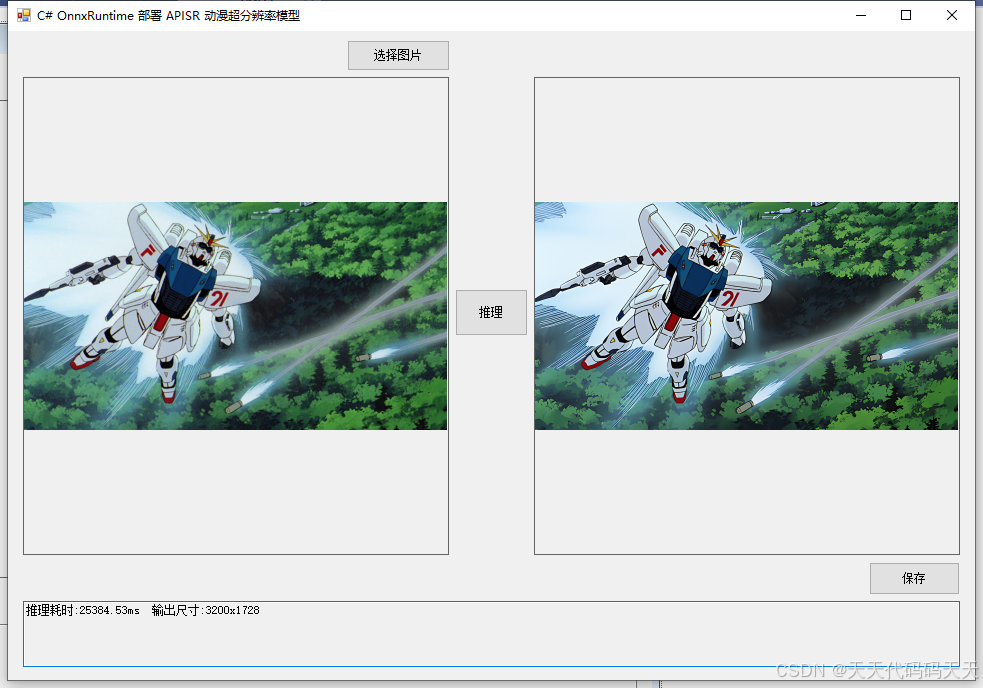
效果
模型信息
Model Properties
Inputs
name:pixel_values
tensor:Float-1, 3, -1, -1
Outputs
name:reconstruction
tensor:Float-1, 3, -1, -1
项目
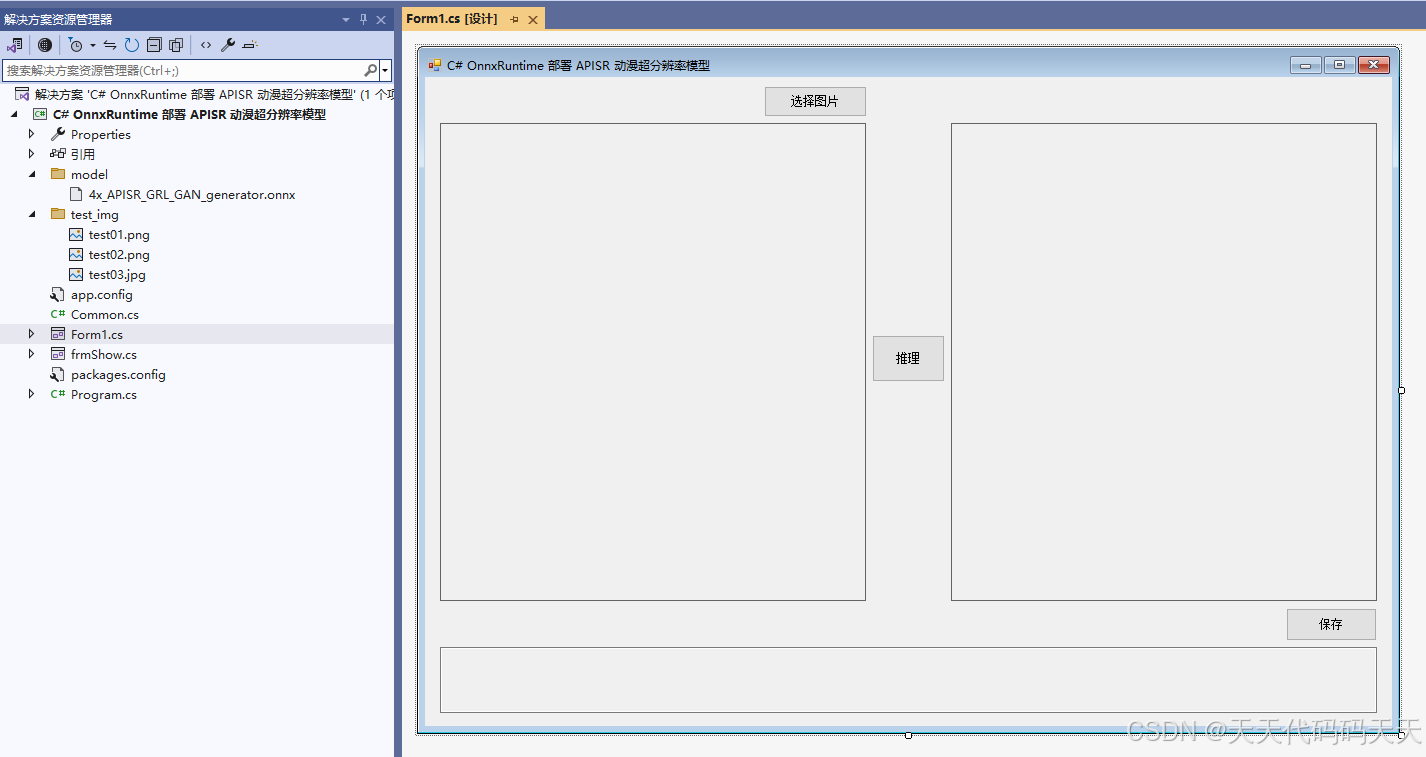
代码
using Microsoft.ML.OnnxRuntime;
using Microsoft.ML.OnnxRuntime.Tensors;
using OpenCvSharp;
using System;
using System.Collections.Generic;
using System.Drawing;
using System.Drawing.Imaging;
using System.Linq;
using System.Windows.Forms;
namespace Onnx_Demo
{
public partial class Form1 : Form
{
public Form1()
{
InitializeComponent();
}
string fileFilter = "*.*|*.bmp;*.jpg;*.jpeg;*.tiff;*.tiff;*.png";
string image_path = "";
string startupPath;
DateTime dt1 = DateTime.Now;
DateTime dt2 = DateTime.Now;
string model_path;
Mat image; // 原始图像(BGR)
Mat result_image; // 超分结果(BGR)
SessionOptions options;
InferenceSession onnx_session;
Tensor<float> input_tensor;
List<NamedOnnxValue> input_container;
IDisposableReadOnlyCollection<DisposableNamedOnnxValue> result_infer;
DisposableNamedOnnxValue\[\] results_onnxvalue;
Tensor<float> result_tensor;
private void button1_Click(object sender, EventArgs e)
{
OpenFileDialog ofd = new OpenFileDialog();
ofd.Filter = fileFilter;
if (ofd.ShowDialog() != DialogResult.OK) return;
pictureBox1.Image = null;
image_path = ofd.FileName;
pictureBox1.Image = new Bitmap(image_path);
textBox1.Text = "";
image = new Mat(image_path);
pictureBox2.Image = null;
}
private void button2_Click(object sender, EventArgs e)
{
if (image_path == "")
{
return;
}
button2.Enabled = false;
pictureBox2.Image = null;
textBox1.Text = "";
Application.DoEvents();
// 读取原始图像(BGR)
image = new Mat(image_path);
int originalWidth = image.Cols;
int originalHeight = image.Rows;
// ------------------ 预处理 ------------------
// 1. 转换为RGB
Mat rgb = new Mat();
Cv2.CvtColor(image, rgb, ColorConversionCodes.BGR2RGB);
// 2. 调整尺寸使宽高均为4的倍数(APISR要求输入能被4整除)
int padHeight = (int)Math.Ceiling((double)rgb.Height / 4) * 4;
int padWidth = (int)Math.Ceiling((double)rgb.Width / 4) * 4;
Mat padded = new Mat();
Cv2.CopyMakeBorder(rgb, padded, 0, padHeight - rgb.Height, 0, padWidth - rgb.Width, BorderTypes.Constant, new Scalar(0, 0, 0));
// 3. 归一化到 0,1 并转换为浮点
padded.ConvertTo(padded, MatType.CV_32FC3, 1.0 / 255.0);
// 4. 构建 CHW 张量
int height = padded.Height;
int width = padded.Width;
Mat\[\] channels = Cv2.Split(padded); // 顺序:R, G, B
List<float> dataList = new List<float>();
for (int c = 0; c < 3; c++)
{
float\[\] channelData = new floatheight \* width;
System.Runtime.InteropServices.Marshal.Copy(channelsc.Data, channelData, 0, height * width);
dataList.AddRange(channelData);
}
float\[\] inputData = dataList.ToArray();
input_tensor = new DenseTensor<float>(inputData, new\[\] { 1, 3, height, width });
// 输入容器清空并添加
input_container.Clear();
input_container.Add(NamedOnnxValue.CreateFromTensor("pixel_values", input_tensor)); // 修改输入名称
// ------------------ 推理 ------------------
dt1 = DateTime.Now;
result_infer = onnx_session.Run(input_container);
dt2 = DateTime.Now;
// 获取输出(修改为 float 类型)
results_onnxvalue = result_infer.ToArray();
result_tensor = results_onnxvalue0.AsTensor<float>(); // 改为 float
int\[\] outShape = result_tensor.Dimensions.ToArray();
int outChannels = outShape1; // 应为3
int outHeight = outShape2;
int outWidth = outShape3;
float\[\] predFloat = result_tensor.ToArray();
// 创建 OpenCV Mat 存储输出图像(RGB顺序)
Mat outputRgb = new Mat(outHeight, outWidth, MatType.CV_32FC3);
// 将 float 数组按 CHW 写入 Mat (OpenCV 是 HWC)
int index = 0;
for (int h = 0; h < outHeight; h++)
{
for (int w = 0; w < outWidth; w++)
{
Vec3f pixel;
pixel.Item0 = predFloatindex; // R
pixel.Item1 = predFloatindex + outHeight \* outWidth; // G
pixel.Item2 = predFloatindex + 2 \* outHeight \* outWidth; // B
outputRgb.Set<Vec3f>(h, w, pixel);
index++;
}
}
// 将像素值从 0,1 转换到 0,255 并转为 8UC3
outputRgb.ConvertTo(outputRgb, MatType.CV_8UC3, 255.0);
// 裁剪掉之前填充的部分(因为输出尺寸是填充后尺寸的4倍)
int cropHeight = originalHeight * 4;
int cropWidth = originalWidth * 4;
Rect roi = new Rect(0, 0, cropWidth, cropHeight);
Mat cropped = new Mat(outputRgb, roi);
// 将 RGB 转换为 BGR 以便 OpenCV 显示
Mat resultBgr = new Mat();
Cv2.CvtColor(cropped, resultBgr, ColorConversionCodes.RGB2BGR);
result_image = resultBgr.Clone();
// 显示结果
pictureBox2.Image = new Bitmap(result_image.ToMemoryStream());
textBox1.Text = $"推理耗时:{(dt2 - dt1).TotalMilliseconds:F2}ms 输出尺寸:{cropWidth}x{cropHeight}";
button2.Enabled = true;
}
private void Form1_Load(object sender, EventArgs e)
{
startupPath = System.Windows.Forms.Application.StartupPath;
model_path = "model/4x_APISR_GRL_GAN_generator.onnx";
// 创建会话,使用 CPU(可根据需要改为 CUDA)
options = new SessionOptions();
options.LogSeverityLevel = OrtLoggingLevel.ORT_LOGGING_LEVEL_INFO;
options.AppendExecutionProvider_CPU(0);
// 如需 GPU,取消下面注释并安装 Microsoft.ML.OnnxRuntime.Gpu
// options.AppendExecutionProvider_CUDA(0);
onnx_session = new InferenceSession(model_path, options);
input_container = new List<NamedOnnxValue>();
// 测试图片路径(可选)
image_path = "test_img/test01.png";
if (System.IO.File.Exists(image_path))
{
pictureBox1.Image = new Bitmap(image_path);
image = new Mat(image_path);
}
}
private void pictureBox1_DoubleClick(object sender, EventArgs e)
{
Common.ShowNormalImg(pictureBox1.Image);
}
private void pictureBox2_DoubleClick(object sender, EventArgs e)
{
Common.ShowNormalImg(pictureBox2.Image);
}
SaveFileDialog sdf = new SaveFileDialog();
private void button3_Click(object sender, EventArgs e)
{
if (result_image == null || result_image.Empty())
{
MessageBox.Show("请先进行推理!");
return;
}
sdf.Title = "保存超分图像";
sdf.Filter = "PNG图片 (*.png)|*.png|JPEG图片 (*.jpg)|*.jpg|BMP图片 (*.bmp)|*.bmp";
sdf.FilterIndex = 1;
if (sdf.ShowDialog() == DialogResult.OK)
{
string ext = System.IO.Path.GetExtension(sdf.FileName).ToLower();
ImageFormat format = ImageFormat.Png;
if (ext == ".jpg" || ext == ".jpeg")
format = ImageFormat.Jpeg;
else if (ext == ".bmp")
format = ImageFormat.Bmp;
using (var stream = result_image.ToMemoryStream())
using (var bitmap = new Bitmap(stream))
{
bitmap.Save(sdf.FileName, format);
}
MessageBox.Show("保存成功,位置:" + sdf.FileName);
}
}
}
}
using Microsoft.ML.OnnxRuntime;
using Microsoft.ML.OnnxRuntime.Tensors;
using OpenCvSharp;
using System;
using System.Collections.Generic;
using System.Drawing;
using System.Drawing.Imaging;
using System.Linq;
using System.Windows.Forms;

namespace Onnx_Demo
{
    public partial class Form1 : Form
    {
        public Form1()
        {
            InitializeComponent();
        }

        string fileFilter = "*.*|*.bmp;*.jpg;*.jpeg;*.tiff;*.tiff;*.png";
        string image_path = "";
        string startupPath;
        DateTime dt1 = DateTime.Now;
        DateTime dt2 = DateTime.Now;
        string model_path;
        Mat image;                       // 原始图像(BGR)
        Mat result_image;                // 超分结果(BGR)
        SessionOptions options;
        InferenceSession onnx_session;
        Tensor<float> input_tensor;
        List<NamedOnnxValue> input_container;
        IDisposableReadOnlyCollection<DisposableNamedOnnxValue> result_infer;
        DisposableNamedOnnxValue[] results_onnxvalue;
        Tensor<float> result_tensor;

        private void button1_Click(object sender, EventArgs e)
        {
            OpenFileDialog ofd = new OpenFileDialog();
            ofd.Filter = fileFilter;
            if (ofd.ShowDialog() != DialogResult.OK) return;
            pictureBox1.Image = null;
            image_path = ofd.FileName;
            pictureBox1.Image = new Bitmap(image_path);
            textBox1.Text = "";
            image = new Mat(image_path);
            pictureBox2.Image = null;
        }

        private void button2_Click(object sender, EventArgs e)
        {
            if (image_path == "")
            {
                return;
            }

            button2.Enabled = false;
            pictureBox2.Image = null;
            textBox1.Text = "";
            Application.DoEvents();

            // 读取原始图像(BGR)
            image = new Mat(image_path);
            int originalWidth = image.Cols;
            int originalHeight = image.Rows;

            // ------------------ 预处理 ------------------
            // 1. 转换为RGB
            Mat rgb = new Mat();
            Cv2.CvtColor(image, rgb, ColorConversionCodes.BGR2RGB);

            // 2. 调整尺寸使宽高均为4的倍数(APISR要求输入能被4整除)
            int padHeight = (int)Math.Ceiling((double)rgb.Height / 4) * 4;
            int padWidth = (int)Math.Ceiling((double)rgb.Width / 4) * 4;
            Mat padded = new Mat();
            Cv2.CopyMakeBorder(rgb, padded, 0, padHeight - rgb.Height, 0, padWidth - rgb.Width, BorderTypes.Constant, new Scalar(0, 0, 0));

            // 3. 归一化到 [0,1] 并转换为浮点
            padded.ConvertTo(padded, MatType.CV_32FC3, 1.0 / 255.0);

            // 4. 构建 CHW 张量
            int height = padded.Height;
            int width = padded.Width;
            Mat[] channels = Cv2.Split(padded);   // 顺序:R, G, B
            List<float> dataList = new List<float>();
            for (int c = 0; c < 3; c++)
            {
                float[] channelData = new float[height * width];
                System.Runtime.InteropServices.Marshal.Copy(channels[c].Data, channelData, 0, height * width);
                dataList.AddRange(channelData);
            }
            float[] inputData = dataList.ToArray();
            input_tensor = new DenseTensor<float>(inputData, new[] { 1, 3, height, width });

            // 输入容器清空并添加
            input_container.Clear();
            input_container.Add(NamedOnnxValue.CreateFromTensor("pixel_values", input_tensor));  // 修改输入名称

            // ------------------ 推理 ------------------
            dt1 = DateTime.Now;
            result_infer = onnx_session.Run(input_container);
            dt2 = DateTime.Now;

            // 获取输出(修改为 float 类型)
            results_onnxvalue = result_infer.ToArray();
            result_tensor = results_onnxvalue[0].AsTensor<float>();   // 改为 float

            int[] outShape = result_tensor.Dimensions.ToArray();
            int outChannels = outShape[1];        // 应为3
            int outHeight = outShape[2];
            int outWidth = outShape[3];

            float[] predFloat = result_tensor.ToArray();

            // 创建 OpenCV Mat 存储输出图像(RGB顺序)
            Mat outputRgb = new Mat(outHeight, outWidth, MatType.CV_32FC3);
            // 将 float 数组按 CHW 写入 Mat (OpenCV 是 HWC)
            int index = 0;
            for (int h = 0; h < outHeight; h++)
            {
                for (int w = 0; w < outWidth; w++)
                {
                    Vec3f pixel;
                    pixel.Item0 = predFloat[index];          // R
                    pixel.Item1 = predFloat[index + outHeight * outWidth];      // G
                    pixel.Item2 = predFloat[index + 2 * outHeight * outWidth];  // B
                    outputRgb.Set<Vec3f>(h, w, pixel);
                    index++;
                }
            }

            // 将像素值从 [0,1] 转换到 [0,255] 并转为 8UC3
            outputRgb.ConvertTo(outputRgb, MatType.CV_8UC3, 255.0);

            // 裁剪掉之前填充的部分(因为输出尺寸是填充后尺寸的4倍)
            int cropHeight = originalHeight * 4;
            int cropWidth = originalWidth * 4;
            Rect roi = new Rect(0, 0, cropWidth, cropHeight);
            Mat cropped = new Mat(outputRgb, roi);

            // 将 RGB 转换为 BGR 以便 OpenCV 显示
            Mat resultBgr = new Mat();
            Cv2.CvtColor(cropped, resultBgr, ColorConversionCodes.RGB2BGR);
            result_image = resultBgr.Clone();

            // 显示结果
            pictureBox2.Image = new Bitmap(result_image.ToMemoryStream());

            textBox1.Text = $"推理耗时:{(dt2 - dt1).TotalMilliseconds:F2}ms  输出尺寸:{cropWidth}x{cropHeight}";
            button2.Enabled = true;
        }

        private void Form1_Load(object sender, EventArgs e)
        {
            startupPath = System.Windows.Forms.Application.StartupPath;
            model_path = "model/4x_APISR_GRL_GAN_generator.onnx";

            // 创建会话,使用 CPU(可根据需要改为 CUDA)
            options = new SessionOptions();
            options.LogSeverityLevel = OrtLoggingLevel.ORT_LOGGING_LEVEL_INFO;
            options.AppendExecutionProvider_CPU(0);
            // 如需 GPU,取消下面注释并安装 Microsoft.ML.OnnxRuntime.Gpu
            // options.AppendExecutionProvider_CUDA(0);

            onnx_session = new InferenceSession(model_path, options);
            input_container = new List<NamedOnnxValue>();

            // 测试图片路径(可选)
            image_path = "test_img/test01.png";
            if (System.IO.File.Exists(image_path))
            {
                pictureBox1.Image = new Bitmap(image_path);
                image = new Mat(image_path);
            }
        }

        private void pictureBox1_DoubleClick(object sender, EventArgs e)
        {
            Common.ShowNormalImg(pictureBox1.Image);
        }

        private void pictureBox2_DoubleClick(object sender, EventArgs e)
        {
            Common.ShowNormalImg(pictureBox2.Image);
        }

        SaveFileDialog sdf = new SaveFileDialog();
        private void button3_Click(object sender, EventArgs e)
        {
            if (result_image == null || result_image.Empty())
            {
                MessageBox.Show("请先进行推理!");
                return;
            }

            sdf.Title = "保存超分图像";
            sdf.Filter = "PNG图片 (*.png)|*.png|JPEG图片 (*.jpg)|*.jpg|BMP图片 (*.bmp)|*.bmp";
            sdf.FilterIndex = 1;
            if (sdf.ShowDialog() == DialogResult.OK)
            {
                string ext = System.IO.Path.GetExtension(sdf.FileName).ToLower();
                ImageFormat format = ImageFormat.Png;
                if (ext == ".jpg" || ext == ".jpeg")
                    format = ImageFormat.Jpeg;
                else if (ext == ".bmp")
                    format = ImageFormat.Bmp;

                using (var stream = result_image.ToMemoryStream())
                using (var bitmap = new Bitmap(stream))
                {
                    bitmap.Save(sdf.FileName, format);
                }
                MessageBox.Show("保存成功,位置:" + sdf.FileName);
            }
        }
    }
}