Qt 5.15 LTS 的公开支持已于 2023 年 10 月结束。
Qt 5.15.14 是最后一个公开发布的版本。其它往后的版本均为社区维护更新的版本。考虑到军工项目稳定性与交付所以最终选择这个版本。
下载:
Qt源码: qt-everywhere-opensource-src-5.15.14.zip
msvc2019: vs_BuildTools.exe
python3.8: python-3.8.1rc1-amd64.exe 使用高版本可能存在,不兼容问题
安装VS2019
运行安装器,选择:
✅ "使用 C++ 的桌面开发"
✅ 勾选 "MSVC v142 - VS 2019 C++ x64/x86 生成工具"
✅ 勾选 "Windows 10/11 SDK"
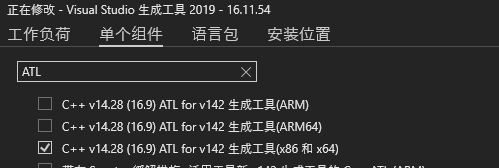
❌ 不需要勾选 ".NET"、"Python" 等无关组件- 选择ATL组件,解决qtspeech模块中缺少头文件问题
解压qt源码。
在开始菜单中找到 Visual Studio 2019 程序组,并运行 x64 Native Tools Command Prompt for VS 2019 命令行工具,切换到源码目录。
创建build目录
bash
mkdir build-qt5.15.14-msvc2019-x64
cd build-qt5.15.14-msvc2019-x64
-no-feature-qml-jit 选项是禁用 QML 的 JIT 正则引擎,不然编译会失败。
-skip qtspeech 禁用此模块 可以解决缺少ATL头文件相关编译错误
bash
..\qt-everywhere-src-5.15.14\configure -debug-and-release -confirm-license -opensource -platform win32-msvc -prefix "E:\\Qt-Build-5.15.14" -qt-sqlite -qt-pcre -qt-zlib -qt-libpng -qt-libjpeg -qt-freetype -qt-harfbuzz -opengl dynamic -skip qtspeech -skip qtwebengine -nomake tests -no-compile-examples -no-feature-qml-jit构建安装
bash
set CL=/MP;#开启多线程编译
nmake;# -j8
nmake install;
报错: error C2953: "_CrtEnableIf<true,_Ty>": 类模板已经定义 (编译源文件 xxx\qt-everywhere-src-5.15.14\qtdeclarative\src\qml\compiler\qv4codegen.cpp)
解决:检查系统中是否存在多个版本的windows SDK,确保只存在一个版本。如果存在多个删除多余后重启。