1、概念
共享内存(Shared Memory)就是允许多个进程访问同一个内存空间,是在多个进程之间共享和传递数据最高效的方式。操作系统将不同进程之间共享内存安排为同一段物理内存,进程可以将共享内存连接到它们自己的地址空间中,如果某个进程修改了共享内存中的数据,其它的进程读到的数据也将会改变。
2、创建共享内存
1.int shmget(key_t key, size_t size, int shmflg);
//用来获取或创建共享内存
参数:
        key:IPC_PRIVATE 或 ftok的返回值
        size:共享内存区大小
        shmflg:同open函数的权限位,也可以用8进制表示法
返回值:
        成功:共享内存段标识符‐‐‐ID‐‐‐文件描述符
        出错:‐1

#include<stdio.h>
#include <sys/ipc.h>
#include <sys/shm.h>
#include<stdlib.h>
int main()
{
	int shmid;
	shmid = shmget(IPC_PRIVATE,128,0755);
	if(shmid<-1)
	{
		printf("create share memory failed\n");
		return -1;
	}
	printf("create share memory succeed shmid =%d\n",shmid);
	system("ipcs -m");
	return 0;
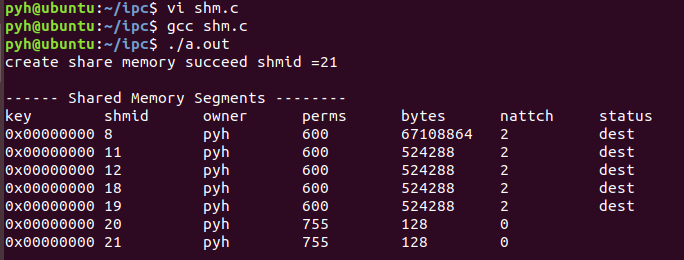
}
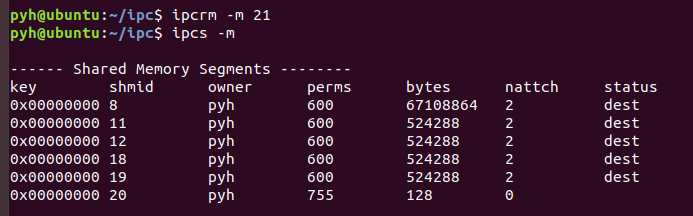
删除共享内存的指令:ipcrm -m <shmid>
3、单个进程读和写
void *shmat(int shm_id, const void *shm_addr, int shmflg);
//把共享内存连接映射到当前进程的地址空间
参数:
        shm_id:ID号
        shm_addr:映射到的地址,NULL为系统自动完成的映射
        shmflg:
                SHM_RDONLY共享内存只读
                默认是0,表示共享内存可读写
返回值:
        成功:映射后的地址
        失败:NULL

#include<stdio.h>
#include <sys/ipc.h>
#include <sys/shm.h>
#include<stdlib.h>
int main()
{
	int shmid;
    char *p;
	shmid = shmget(IPC_PRIVATE,128,0755);
	if(shmid<-1)
	{
		printf("create share memory failed\n");
		return -1;
	}
	printf("create share memory succeed shmid =%d\n",shmid);
	system("ipcs -m");

    p = (char *)shmat(shmid,NULL,0);
    if(p == NULL)
    {
        printf("shmat funtion failed\n");
        return -2;
    }
    //write to share memory
    fgets(p,128,stdin);
    //read from share memory
    printf("share memory data is %s\n",p);

	return 0;
}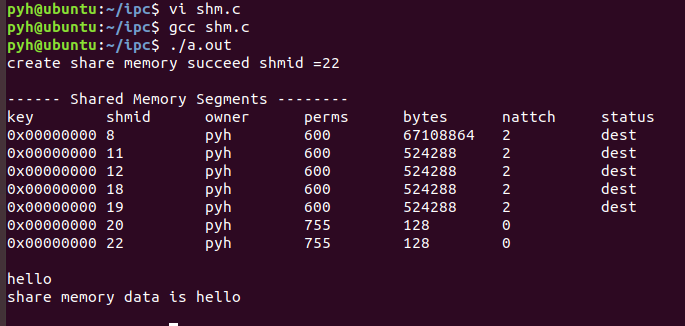
管道和消息队列都是一次性读取的,读一次之后内容就被删除了,而共享内存不一样,不论都多少次,那条消息都在。
| IPC 方式 | 读完是否消失 | 数据模型 | 适用场景 |
|---|---|---|---|
| 管道 / FIFO | ✅ 读走就没 | 字节流 | 单向临时传输 |
| 消息队列 | ✅ 读走就没 | 独立报文 (带 type) | 收发消息、一对一 |
| 共享内存 | ❌ 读一万次都在 | 内存区块 | 大数据、高频交互 |
3、删除地址映射
int shmdt(const void *shmaddr);
//将进程里的地址映射删除
参数:
        shmid:要操作的共享内存标识符
返回值:
        成功:0
        出错:‐1

#include<stdio.h>
#include <sys/ipc.h>
#include <sys/shm.h>
#include<stdlib.h>
#include<string.h>
int main()
{
	int shmid;
    char *p;
	shmid = shmget(IPC_PRIVATE,128,0755);
	if(shmid<-1)
	{
		printf("create share memory failed\n");
		return -1;
	}
	printf("create share memory succeed shmid =%d\n",shmid);
	system("ipcs -m");

    p = (char *)shmat(shmid,NULL,0);
    if(p == NULL)
    {
        printf("shmat funtion failed\n");
        return -2;
    }
    //write to share memory
    fgets(p,128,stdin);
    //read from share memory
    printf("share memory data is %s\n",p);
    shmdt(p);
    memcp(p,"hello",5);

	return 0;
}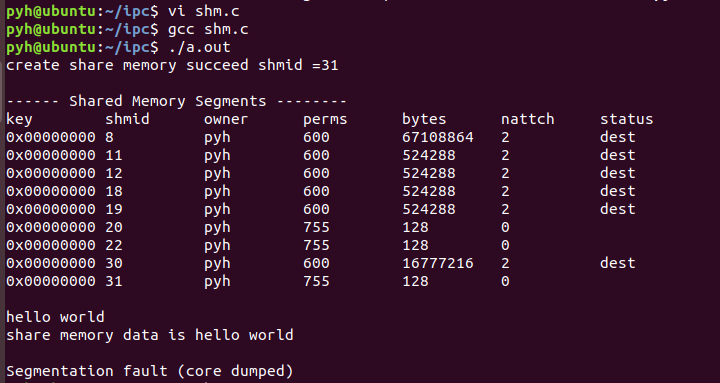
地址映射被删除了,所以最后写的hello,无处可写
4、删除共享内存对象
int shmctl(int shm_id, int command, struct shmid_ds *buf);
//删除共享内存对象
参数:
    shmid:要操作的共享内存标识符
    cmd :
        IPC_STAT  (获取对象属性)‐‐‐  实现了命令ipcs ‐m
        IPC_SET (设置对象属性)
        IPC_RMID (删除对象)   ‐‐‐实现了命令ipcrm ‐m
    buf :指定IPC_STAT/IPC_SET时用以保存/设置属性
返回值:
    成功:0
    出错:‐1

#include<stdio.h>
#include <sys/ipc.h>
#include <sys/shm.h>
#include<stdlib.h>
int main()
{
	int shmid;
    char *p;
	shmid = shmget(IPC_PRIVATE,128,0755);
	if(shmid<-1)
	{
		printf("create share memory failed\n");
		return -1;
	}
	printf("create share memory succeed shmid =%d\n",shmid);
	system("ipcs -m");

    p = (char *)shmat(shmid,NULL,0);
    if(p == NULL)
    {
        printf("shmat funtion failed\n");
        return -2;
    }
    //write to share memory
    fgets(p,128,stdin);
    //read from share memory
    printf("share memory data is %s\n",p);
    shmdt(p);
    shctl(shmid,IPC_RMID,NULL);
    system("ipcs -m");

	return 0;
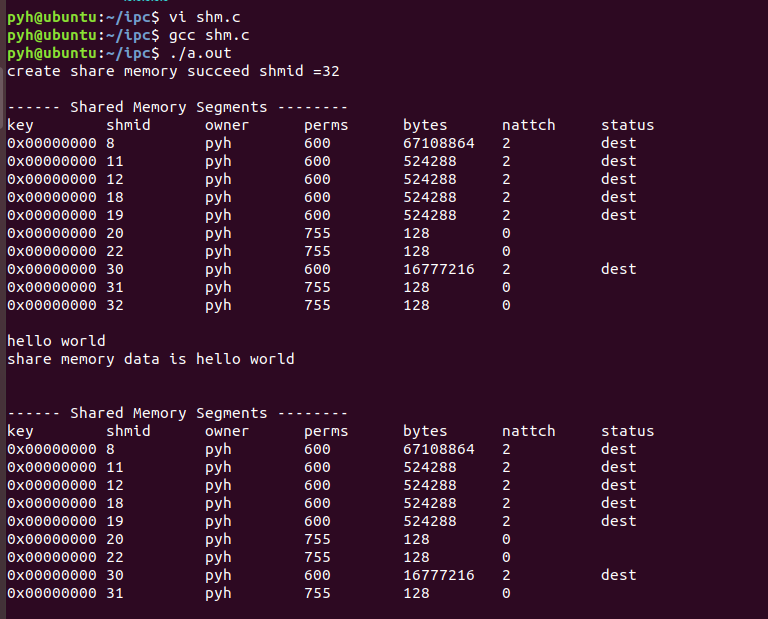
}
5、共享内存实现ipcrm
#include<stdio.h>
#include <sys/ipc.h>
#include <sys/shm.h>
#include<stdlib.h>
#include<string.h>

int main(int argc,char *argv[])
{
	int shmid;
	if(argc<3)
	{
		printf("input error\n");
		return -1;
	}
	if(strcmp(argv[1],"-m") == 0)
	{
		printf("delete share memory\n");
	}
	else
	{
		return -2;
	}
	shmid = atoi(argv[2]);
	printf("delete share memory id:%d\n",shmid);

	shmctl(shmid,IPC_RMID,NULL);
	system("ipcs -m");
	return 0;
}
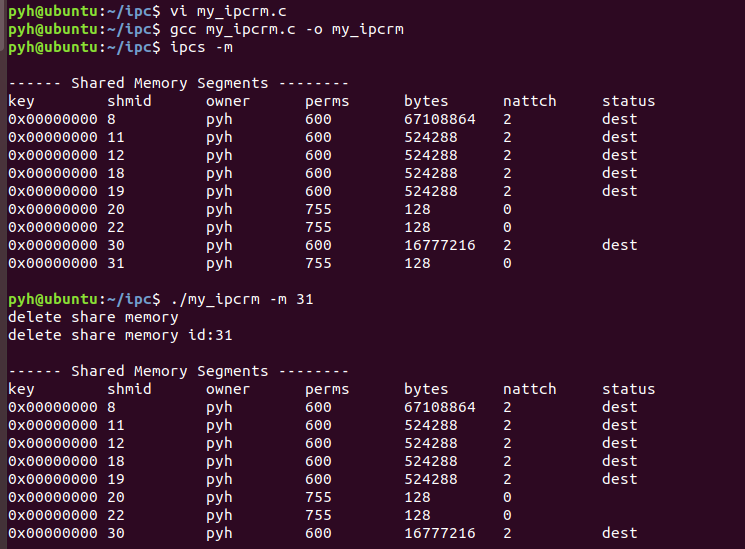
atoi是将输入的字符串转成数字,因为shmid是整型,而输入的是字符串
6、共享内存进程间通信
写端:
#include<stdio.h>
#include <sys/ipc.h>
#include <sys/shm.h>
#include<stdlib.h>
#include<string.h>
#include<unistd.h>

int main()
{
	int shmid;
	char *p;
	int pid;
	int key;

	key = ftok("a.c",1);
	if(key < 0)
	{
		printf("ftok failed\n");
		return -2;
	}
	printf("ftok succeed key:%x\n",key);

	shmid = shmget(key,128,IPC_CREAT|0777);
	if(shmid<0)
	{
		printf("create share memory failed\n");
		return -1;
	}
	printf("create share memory succeed shmid =%d\n",shmid);

	p = (char *)shmat(shmid,NULL,0);
	if(p == NULL)
	{
		printf("shmat funtion failed\n");
		return -3;
	}
	printf("please input to share memory:\n");
	//write to share memory
	fgets(p,128,stdin);
	sleep(3);

	shmdt(p);
	shmctl(shmid,IPC_RMID,0);
	return 0;
}
读端:
#include<stdio.h>
#include <sys/ipc.h>
#include <sys/shm.h>
#include<stdlib.h>
#include<string.h>

int main()
{
	int shmid;
	char *p;
	int pid;
	int key;

	key = ftok("a.c",1);
	if(key < 0)
	{
		printf("ftok failed\n");
		return -2;
	}
	printf("ftok succeed key:%x\n",key);

	shmid = shmget(key,128,0);
	if(shmid<0)
	{
		printf("create share memory failed\n");
		return -1;
	}
	printf("create share memory succeed shmid =%d\n",shmid);

	p = (char *)shmat(shmid,NULL,0);
	if(p == NULL)
	{
		printf("shmat funtion failed\n");
		return -3;
	}
	printf("share memory data:%s\n",p);
	shmdt(p);

	return 0;
}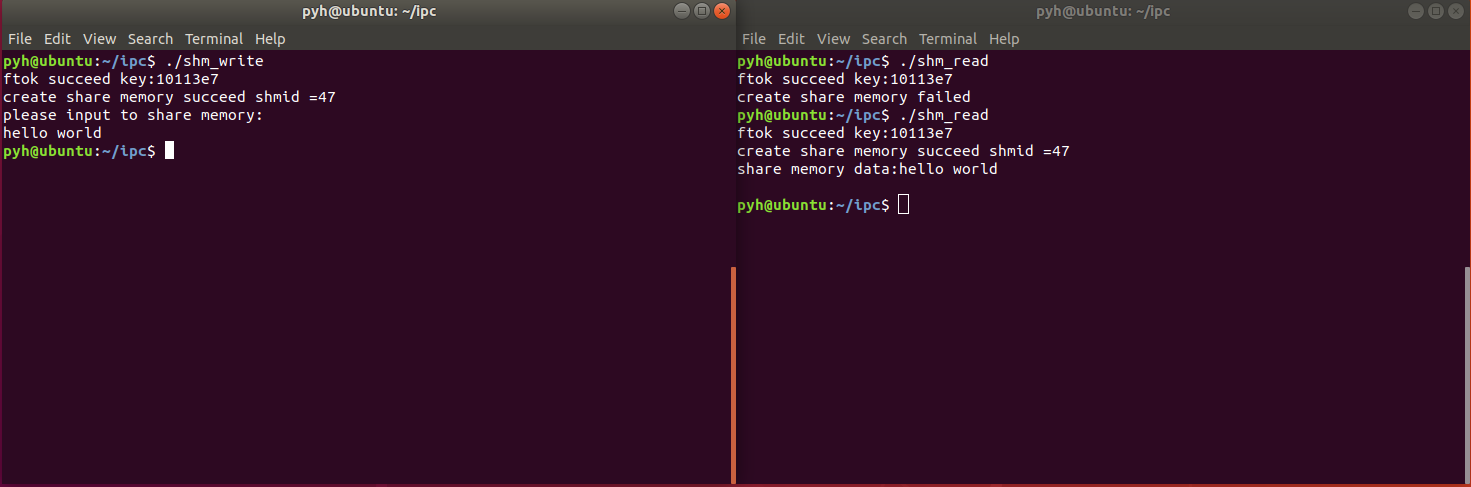
注意,我在写端延迟了3秒再删除地址映射,也就是说,写端输入完之后,3秒之内要在另一个终端执行读端,否则将什么也读不到。