文章目录
- 一、查看服务运行情况
- 二、查看具体日志
- [三、最开始启动 etcd 没有该问题](#三、最开始启动 etcd 没有该问题)
-
- [1. 配置变更或覆盖](#1. 配置变更或覆盖)
- [2. 环境变量或配置文件未正确加载](#2. 环境变量或配置文件未正确加载)
一、查看服务运行情况
bash
systemctl status etcd.service显示为:
bash
 etcd.service - etcd - highly-available key value store
     Loaded: loaded (/lib/systemd/system/etcd.service; enabled; vendor preset: enabled)
     Active: failed (Result: exit-code) since Sun 2026-03-15 22:29:57 CST; 24s ago
       Docs: https://github.com/coreos/etcd
             man:etcd
    Process: 22576 ExecStart=/usr/bin/etcd $DAEMON_ARGS (code=exited, status=1/FAILURE)
   Main PID: 22576 (code=exited, status=1/FAILURE)
二、查看具体日志
bash
journalctl -xe -u etcd显示为:
bash
-- An ExecStart= process belonging to unit etcd.service has exited.
--
-- The process' exit code is 'exited' and its exit status is 1.
Mar 15 22:31:39 VM-16-9-ubuntu systemd[1]: etcd.service: Failed with result 'exit-code'.
-- Subject: Unit failed
-- Defined-By: systemd
-- Support: http://www.ubuntu.com/support
--
-- The unit etcd.service has entered the 'failed' state with result 'exit-code'.
Mar 15 22:31:39 VM-16-9-ubuntu systemd[1]: Failed to start etcd - highly-available key value store.
-- Subject: A start job for unit etcd.service has failed
-- Defined-By: systemd
-- Support: http://www.ubuntu.com/support
--
-- A start job for unit etcd.service has finished with a failure.
--
-- The job identifier is 1800 and the job result is failed.
lines 204-220/220 (END)
从日志中可以清晰地看到 etcd 启动失败的原因:
1. 错误原因
bash
error verifying flags, --advertise-client-urls is required when --listen-client-urls is set explicitly.- 问题:etcd 配置中显式设置了 --listen-client-urls(监听客户端 URL),但未设置对应的 --advertise-client-urls(通告客户端 URL)。
- 背景:当 etcd 监听特定地址时,必须通过 --advertise-client-urls 告诉客户端如何访问它,否则客户端无法连接。
2. 解决方法
方案 1:修改 etcd 配置文件
- 找到配置文件(通常是 /etc/default/etcd 或 /etc/etcd/etcd.conf):
bash
sudo nano /etc/default/etcd- 添加缺失的参数(确保与 --listen-client-urls 一致):
bash
ETCD_ADVERTISE_CLIENT_URLS="http://localhost:2379"- 如果 --listen-client-urls 是 http://0.0.0.0:2379,则 --advertise-client-urls 应为 http://<服务器IP或域名>:2379(例如 http://VM-16-9-ubuntu:2379)。
- 重启 etcd:
bash
sudo systemctl daemon-reload
sudo systemctl restart etcd
sudo systemctl status etcd  # 检查是否成功
方案 2:直接修改 systemd 服务文件
如果配置通过 systemd 的 EnvironmentFile 传递:
- 编辑服务文件:
bash
sudo nano /lib/systemd/system/etcd.service- 在 Service 部分添加或修改 ExecStart:
bash
ExecStart=/usr/bin/etcd \
  --name=${ETCD_NAME} \
  --data-dir=${ETCD_DATA_DIR} \
  --listen-client-urls=${ETCD_LISTEN_CLIENT_URLS} \
--advertise-client-urls=${ETCD_ADVERTISE_CLIENT_URLS} # 确保此参数存在- 重新加载并重启:
bash
sudo systemctl daemon-reload
sudo systemctl restart etcd
方案 3:临时测试(不推荐生产环境)
如果只是想快速启动 etcd,可以手动运行并补充参数:
bash
sudo -u etcd /usr/bin/etcd \
  --name=VM-16-9-ubuntu \
  --data-dir=/var/lib/etcd/default \
  --listen-client-urls=http://localhost:2379 \
  --advertise-client-urls=http://localhost:2379  # 补充缺失的参数
3. 验证是否解决
- 检查服务状态:
bash
sudo systemctl status etcd- 应显示 active (running)。
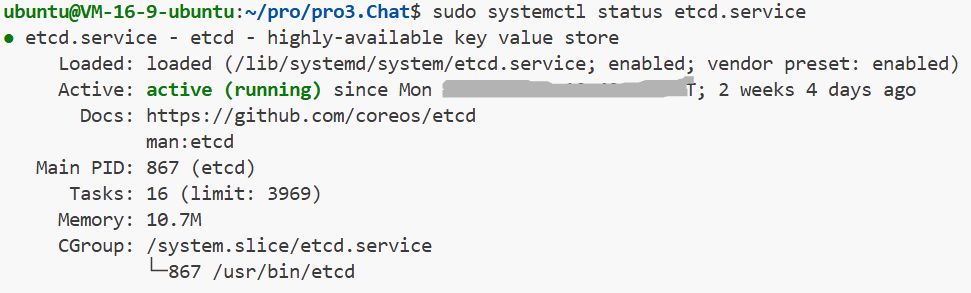
- 查看日志确认无报错:
bash
sudo journalctl -u etcd -n 20 --no-pager- 测试 etcd 是否响应:
bash
curl -v http://localhost:2379/version- 应返回 etcd 的版本信息。
4. 其他注意事项
配置一致性:
如果 etcd 是集群部署,确保 --initial-cluster 和 --initial-advertise-peer-urls 也正确配置。
防火墙:
如果监听 0.0.0.0,确保防火墙放行 2379 端口:
bash
sudo ufw allow 2379/tcp数据目录权限:
确保 /var/lib/etcd 属于 etcd 用户:
bash
sudo chown -R etcd:etcd /var/lib/etcd5. 总结
根本原因是 缺少 --advertise-client-urls 参数。通过补充该参数(与 --listen-client-urls 一致)即可解决。修改后务必重启服务并验证日志和连接性。
三、最开始启动 etcd 没有该问题
etcd 在最初启动时没有报错,但后续启动出现 --advertise-client-urls 缺失的问题,可能与以下原因有关:
1. 配置变更或覆盖
-
初始配置不完整但能启动:
- 首次启动时,etcd 可能使用了 默认值 或 环境变量中的部分配置(如仅设置了 --listen-client-urls,但未显式要求 --advertise-client-urls)。
- 某些版本的 etcd 在非集群模式下(单节点)可能对 --advertise-client-urls 的检查较宽松,允许省略(但这是不规范的)。
-
后续配置被修改:
- 如果手动或通过脚本修改了配置文件(如 /etc/default/etcd 或 systemd 服务文件),显式添加了 --listen-client-urls 但未补充 --advertise-client-urls,会导致启动失败。
- 例如,初始配置可能依赖环境变量自动填充,但后续配置被硬编码为部分参数。
2. 环境变量或配置文件未正确加载
-
初始启动依赖默认值:
- 如果初始时未通过配置文件或命令行参数指定 --listen-client-urls,etcd 可能使用默认值(如 http://localhost:2379),此时 --advertise-client-urls 也会默认匹配,无需显式设置。
- 但后续启动时,如果显式设置了 --listen-client-urls(例如通过配置文件),则必须同时设置 --advertise-client-urls。
-
环境变量未生效:
- 如果配置通过环境变量(如 ETCD_LISTEN_CLIENT_URLS)传递,但后续启动时环境变量未正确加载(如 EnvironmentFile 路径错误),可能导致 etcd 仅收到部分参数。
最后,如果对您有帮助,希望得到一个赞,谢谢!