Flutter谜语大全
欢迎加入开源鸿蒙跨平台社区: https://openharmonycrossplatform.csdn.net
项目概述
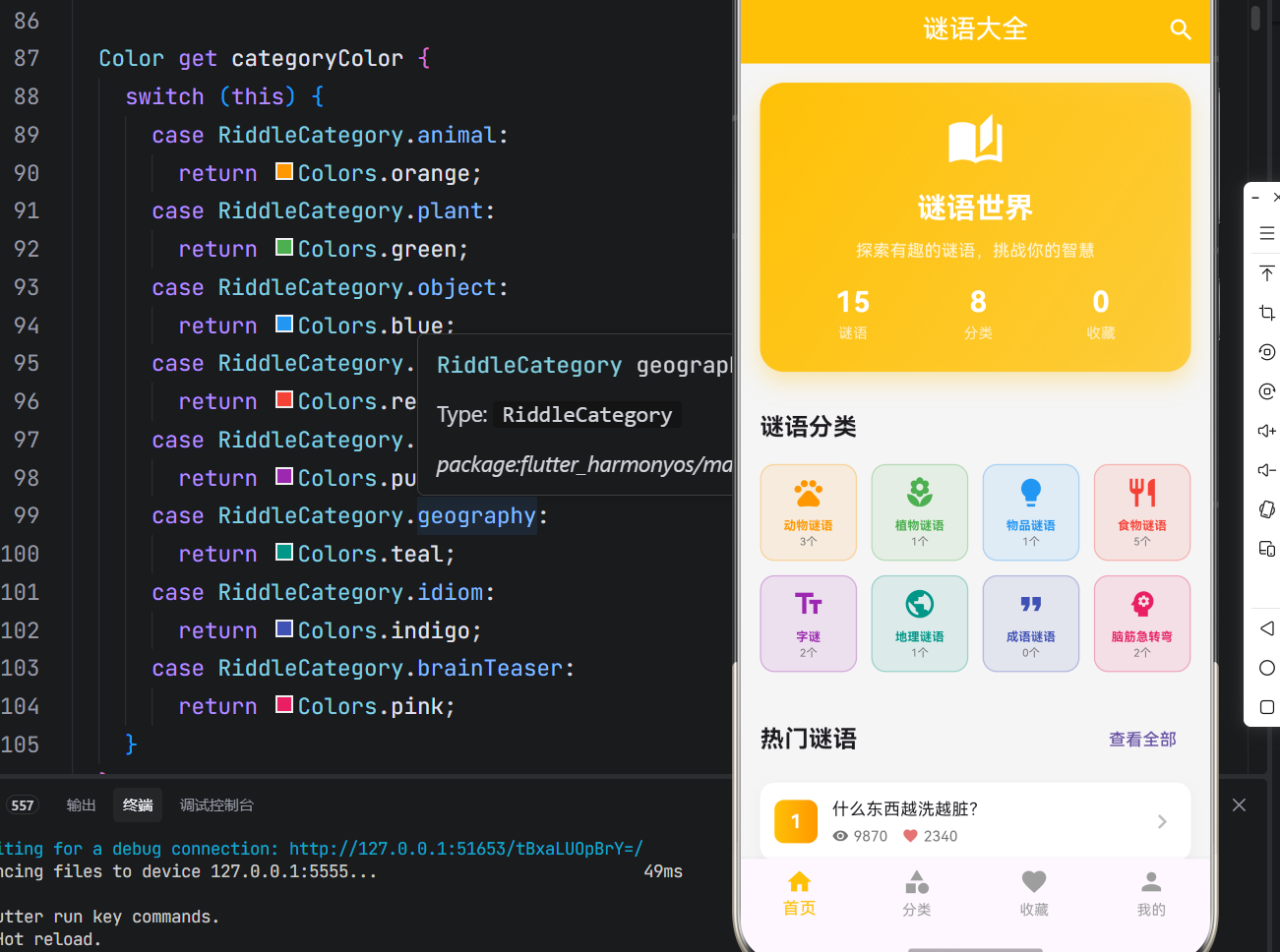
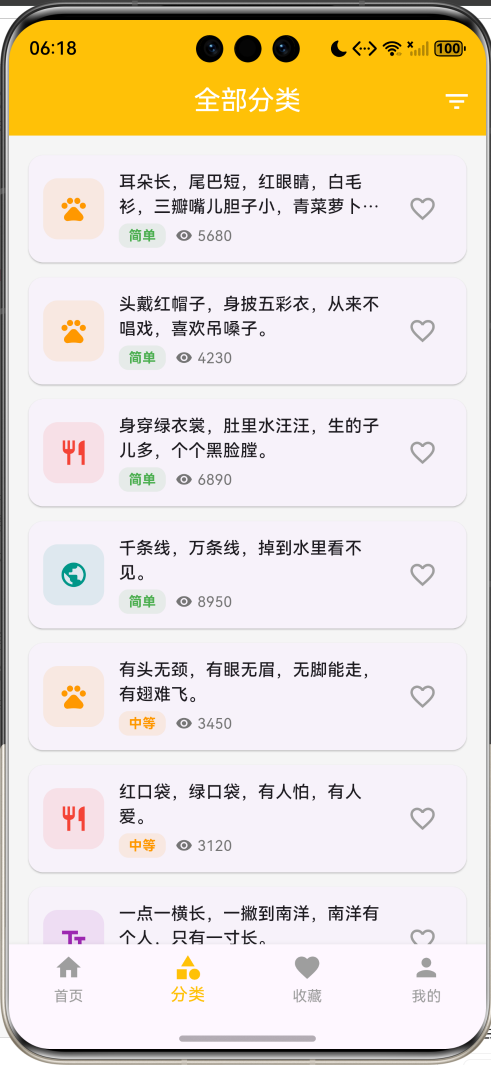
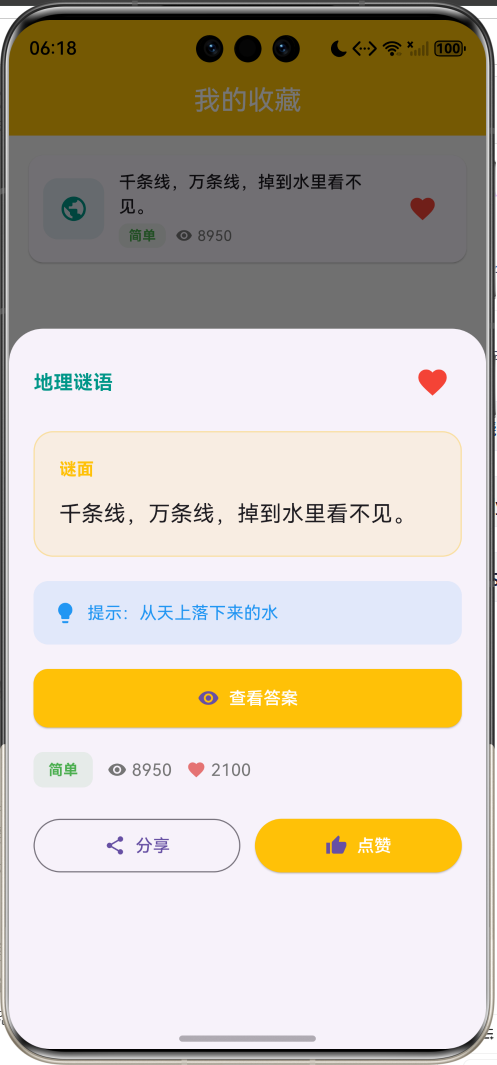
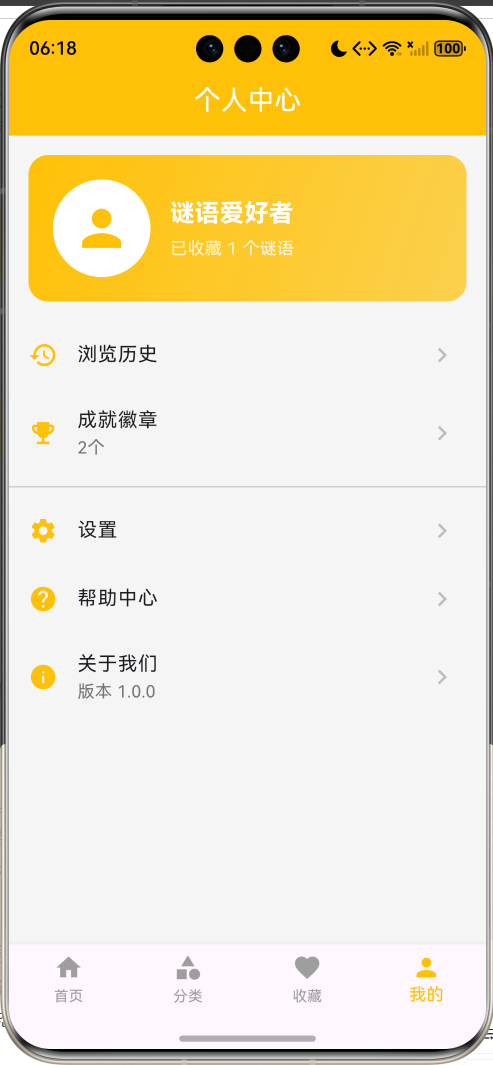
运行效果图
一、项目背景与目标
谜语作为中华民族传统文化的瑰宝,承载着丰富的智慧和趣味性。从古至今,谜语一直是人们喜闻乐见的娱乐形式,既能锻炼思维,又能增进知识。然而,随着数字化时代的到来,传统的谜语传播方式逐渐式微,年轻人接触谜语的机会越来越少。本项目基于Flutter框架开发一款谜语大全应用,旨在传承和弘扬谜语文化,为用户提供一个便捷、有趣的谜语学习平台。
项目的核心目标涵盖多个维度:构建完整的谜语数据库,实现分类化的谜语管理,设计趣味的答题体验,打造便捷的收藏和搜索功能,以及确保应用的用户体验和性能表现。通过本项目的开发,不仅能够深入理解Flutter在文化娱乐类应用中的应用,更能掌握分类管理、搜索过滤、状态管理等核心技术要点。
应用场景分析
| 应用场景 | 功能需求 | 实现方式 |
|---|---|---|
| 休闲娱乐 | 随机浏览谜语,消遣娱乐 | 分类浏览和热门推荐 |
| 学习教育 | 学习谜语知识,锻炼思维 | 难度分级和提示功能 |
| 社交互动 | 与朋友分享谜语,互动猜谜 | 分享功能和收藏管理 |
| 文化传承 | 了解传统文化,传承谜语艺术 | 多类型谜语和详细分类 |
核心价值主张
- 丰富内容:涵盖八大类谜语,内容丰富多样
- 难度分级:三级难度系统,适合不同水平用户
- 趣味体验:隐藏答案设计,增加猜谜乐趣
- 便捷管理:收藏和搜索功能,快速定位内容
二、技术选型与架构设计
技术栈分析
本项目选用Flutter作为开发框架,主要基于以下考量:
- 跨平台能力:Flutter的跨平台特性能够同时支持Android和iOS平台,降低开发成本
- 声明式UI:声明式UI编程范式能够高效构建复杂的谜语展示界面
- 丰富组件库:丰富的Widget组件库为应用UI开发提供了坚实基础
- 优秀性能:优秀的性能表现确保了列表滚动和动画的流畅性
Dart语言作为Flutter的开发语言,具备强类型、异步编程支持、优秀的性能表现等特性。项目采用单文件架构,将所有应用逻辑集中在main_riddle.dart文件中,这种设计既便于代码管理,又利于理解应用整体架构。
架构层次划分
应用架构采用分层设计思想,主要分为以下几个层次:
渲染表现层
状态管理层
业务逻辑层
数据模型层
Material Design组件
底部弹窗详情
卡片列表布局
谜语列表状态
分类筛选状态
收藏状态
搜索状态
分类管理
搜索过滤
收藏管理
答案展示
Riddle实体
RiddleCategory枚举
DifficultyLevel枚举
数据模型层 :定义应用中的核心数据结构,包括Riddle(谜语实体)、RiddleCategory(谜语分类)、DifficultyLevel(难度等级)等类和枚举。这些模型类封装了谜语的属性和行为,构成了应用逻辑的基础。
业务逻辑层:实现应用的核心功能逻辑,包括分类管理、搜索过滤、收藏管理、答案展示等。这一层是应用的心脏,决定了应用的功能性和可用性。
渲染表现层:负责应用界面的绘制和UI展示,使用Flutter的Material Design组件库实现现代化的界面设计,通过卡片、列表、网格等组件实现丰富的视觉效果。
状态管理层:管理应用的各种状态,包括谜语列表、分类筛选、收藏列表、搜索查询等,确保应用状态的一致性和可预测性。
核心功能模块详解
一、谜语数据模型
谜语属性定义
谜语实体封装了完整的信息:
dart
class Riddle {
  final String id;                  // 唯一标识符
  final String question;            // 谜面
  final String answer;              // 谜底
  final RiddleCategory category;    // 谜语分类
  final DifficultyLevel difficulty; // 难度等级
  final String? hint;               // 提示(可选)
  final int likes;                  // 点赞数
  final int views;                  // 浏览数
  final bool isFavorite;            // 是否收藏
  final List<String> tags;          // 标签列表
}
基础信息包括ID、谜面、谜底、分类、难度;扩展信息包括提示、点赞、浏览、收藏和标签。这种设计既满足了展示需求,又支持灵活的筛选和搜索。
谜语分类定义
应用支持八大谜语分类:
dart
enum RiddleCategory {
  animal,        // 动物谜语 - 橙色
  plant,         // 植物谜语 - 绿色
  object,        // 物品谜语 - 蓝色
  food,          // 食物谜语 - 红色
  character,     // 字谜 - 紫色
  geography,     // 地理谜语 - 青色
  idiom,         // 成语谜语 - 靛蓝色
  brainTeaser,   // 脑筋急转弯 - 粉色
}
每种类型对应不同的图标和颜色,便于用户快速识别谜语类型。
| 谜语分类 | 图标 | 颜色 | 典型谜语 |
|---|---|---|---|
| 动物谜语 | pets | 橙色 | 兔子、公鸡、鱼 |
| 植物谜语 | local_florist | 绿色 | 荷花、柳树 |
| 物品谜语 | lightbulb | 蓝色 | 肥皂、镜子 |
| 食物谜语 | restaurant | 红色 | 西瓜、花生、辣椒 |
| 字谜 | text_fields | 紫色 | 府、日 |
| 地理谜语 | public | 青色 | 雨、山川 |
| 成语谜语 | format_quote | 靛蓝 | 成语典故 |
| 脑筋急转弯 | psychology | 粉色 | 趣味问答 |
难度等级定义
应用支持三级难度:
dart
enum DifficultyLevel {
  easy,     // 简单 - 绿色
  medium,   // 中等 - 橙色
  hard,     // 困难 - 红色
}
难度等级帮助用户根据自己的水平选择合适的谜语。
二、分类管理系统
分类网格展示
首页使用网格布局展示八大分类:
dart
GridView.builder(
  shrinkWrap: true,
  physics: const NeverScrollableScrollPhysics(),
  gridDelegate: const SliverGridDelegateWithFixedCrossAxisCount(
    crossAxisCount: 4,
    crossAxisSpacing: 12,
    mainAxisSpacing: 12,
    childAspectRatio: 1,
  ),
  itemCount: RiddleCategory.values.length,
  itemBuilder: (context, index) {
    final category = RiddleCategory.values[index];
    final count = _riddles.where((r) => r.category == category).length;
    return _buildCategoryCard(category, count);
  },
)
每个分类卡片显示图标、名称和谜语数量,点击可进入分类详情页。
分类筛选功能
分类页面支持筛选功能:
dart
PopupMenuButton<RiddleCategory?>(
  icon: const Icon(Icons.filter_list),
  onSelected: (category) {
    setState(() {
      _selectedCategory = category;
    });
  },
  itemBuilder: (context) => [
    const PopupMenuItem(value: null, child: Text('全部')),
    ...RiddleCategory.values.map(
      (category) => PopupMenuItem(
        value: category,
        child: Text(category.categoryText),
      ),
    ),
  ],
)
用户可以通过菜单快速切换分类,查看不同类型的谜语。
三、搜索功能
搜索对话框
搜索功能通过对话框实现:
dart
void _showSearchDialog() {
  showDialog(
    context: context,
    builder: (context) => AlertDialog(
      title: const Text('搜索谜语'),
      content: TextField(
        controller: _searchController,
        decoration: const InputDecoration(
          hintText: '输入谜语内容或标签',
          prefixIcon: Icon(Icons.search),
        ),
        onChanged: (value) {
          setState(() {
            _searchQuery = value;
          });
        },
      ),
      actions: [
        TextButton(
          onPressed: () {
            _searchController.clear();
            setState(() {
              _searchQuery = '';
            });
            Navigator.pop(context);
          },
          child: const Text('取消'),
        ),
        ElevatedButton(
          onPressed: () {
            Navigator.pop(context);
            setState(() {
              _currentIndex = 1;
            });
          },
          child: const Text('搜索'),
        ),
      ],
    ),
  );
}
搜索支持谜面、谜底和标签匹配,实时更新搜索结果。
搜索过滤逻辑
dart
List<Riddle> get _filteredRiddles {
  var riddles = _riddles;

  // 分类筛选
  if (_selectedCategory != null) {
    riddles = riddles.where((r) => r.category == _selectedCategory).toList();
  }

  // 搜索筛选
  if (_searchQuery.isNotEmpty) {
    riddles = riddles.where((r) =>
        r.question.toLowerCase().contains(_searchQuery.toLowerCase()) ||
        r.answer.toLowerCase().contains(_searchQuery.toLowerCase()) ||
        r.tags.any((tag) => tag.toLowerCase().contains(_searchQuery.toLowerCase()))).toList();
  }

  return riddles;
}
过滤逻辑支持分类和搜索的组合筛选,确保用户能快速找到目标谜语。
四、收藏管理系统
收藏切换功能
用户可以一键收藏或取消收藏谜语:
dart
void _toggleFavorite(Riddle riddle) {
  setState(() {
    final index = _riddles.indexWhere((r) => r.id == riddle.id);
    if (index != -1) {
      _riddles[index] = Riddle(
        id: riddle.id,
        question: riddle.question,
        answer: riddle.answer,
        category: riddle.category,
        difficulty: riddle.difficulty,
        hint: riddle.hint,
        likes: riddle.likes,
        views: riddle.views,
        isFavorite: !riddle.isFavorite,
        tags: riddle.tags,
      );
    }
  });
}
收藏状态变化时,创建新的谜语实体对象,确保状态不可变性。
收藏列表展示
收藏页面展示所有已收藏的谜语:
dart
Widget _buildFavoritesPage() {
  return Scaffold(
    appBar: AppBar(title: const Text('我的收藏')),
    body: _favoriteRiddles.isEmpty
        ? Center(
            child: Column(
              mainAxisAlignment: MainAxisAlignment.center,
              children: [
                Icon(Icons.favorite_border, size: 64, color: Colors.grey.shade400),
                const SizedBox(height: 16),
                Text('还没有收藏的谜语'),
                ElevatedButton.icon(
                  onPressed: () => setState(() => _currentIndex = 0),
                  icon: const Icon(Icons.explore),
                  label: const Text('去探索'),
                ),
              ],
            ),
          )
        : ListView.builder(
            itemCount: _favoriteRiddles.length,
            itemBuilder: (context, index) {
              return _buildRiddleCard(_favoriteRiddles[index]);
            },
          ),
  );
}
收藏为空时显示引导提示,鼓励用户探索谜语。
五、答案展示系统
隐藏答案设计
答案默认隐藏,增加猜谜乐趣:
dart
bool showAnswer = false;

if (!showAnswer)
  ElevatedButton.icon(
    onPressed: () {
      setState(() {
        showAnswer = true;
      });
    },
    icon: const Icon(Icons.visibility),
    label: const Text('查看答案'),
  ),
用户需要点击"查看答案"按钮才能看到谜底,增加互动性。
提示功能
在查看答案前,可以显示提示:
dart
if (riddle.hint != null && !showAnswer) ...[
  Container(
    padding: const EdgeInsets.all(16),
    decoration: BoxDecoration(
      color: Colors.blue.withOpacity(0.1),
      borderRadius: BorderRadius.circular(12),
    ),
    child: Row(
      children: [
        Icon(Icons.lightbulb, color: Colors.blue, size: 20),
        const SizedBox(width: 8),
        Expanded(
          child: Text(
            '提示:${riddle.hint}',
            style: const TextStyle(color: Colors.blue),
          ),
        ),
      ],
    ),
  ),
]
提示使用灯泡图标和蓝色背景,帮助用户思考。
答案展示
答案使用醒目的绿色背景:
dart
Container(
  padding: const EdgeInsets.all(20),
  decoration: BoxDecoration(
    color: Colors.green.withOpacity(0.1),
    borderRadius: BorderRadius.circular(16),
    border: Border.all(color: Colors.green.withOpacity(0.3)),
  ),
  child: Column(
    crossAxisAlignment: CrossAxisAlignment.start,
    children: [
      const Text(
        '谜底',
        style: TextStyle(
          fontSize: 14,
          color: Colors.green,
          fontWeight: FontWeight.bold,
        ),
      ),
      const SizedBox(height: 12),
      Text(
        riddle.answer,
        style: const TextStyle(
          fontSize: 24,
          fontWeight: FontWeight.bold,
          color: Colors.green,
        ),
      ),
    ],
  ),
)
答案使用大号粗体字,视觉冲击力强。
六、热门排行榜
排行榜计算
根据浏览量排序生成排行榜:
dart
final popular = _riddles.toList()..sort((a, b) => b.views.compareTo(a.views));
final topRiddles = popular.take(5).toList();
排行榜展示浏览量最高的5个谜语。
排名卡片设计
排名卡片使用渐变背景标识前三名:
dart
Container(
  width: 36,
  height: 36,
  decoration: BoxDecoration(
    gradient: rank <= 3
        ? LinearGradient(
            colors: rank == 1
                ? [Colors.amber, Colors.orange]
                : rank == 2
                    ? [Colors.grey, Colors.blueGrey]
                    : [Colors.brown, Colors.orange.shade700],
          )
        : null,
    color: rank > 3 ? Colors.grey.shade300 : null,
    borderRadius: BorderRadius.circular(8),
  ),
  alignment: Alignment.center,
  child: Text(
    '$rank',
    style: const TextStyle(
      color: Colors.white,
      fontSize: 16,
      fontWeight: FontWeight.bold,
    ),
  ),
)
第一名金色渐变,第二名银色渐变,第三名铜色渐变,其他灰色。
UI界面开发
一、主界面布局
主界面采用底部导航栏设计,包含四个主要页面:
dart
BottomNavigationBar(
  currentIndex: _currentIndex,
  onTap: (index) => setState(() => _currentIndex = index),
  selectedItemColor: Colors.amber,
  unselectedItemColor: Colors.grey,
  type: BottomNavigationBarType.fixed,
  items: const [
    BottomNavigationBarItem(icon: Icon(Icons.home), label: '首页'),
    BottomNavigationBarItem(icon: Icon(Icons.category), label: '分类'),
    BottomNavigationBarItem(icon: Icon(Icons.favorite), label: '收藏'),
    BottomNavigationBarItem(icon: Icon(Icons.person), label: '我的'),
  ],
)
四个页面分别是首页、分类、收藏和个人中心,覆盖了应用的主要功能入口。
页面结构图
首页
欢迎卡片
分类网格
热门排行
最新谜语
分类页
筛选菜单
谜语列表
搜索功能
收藏页
收藏列表
空状态提示
我的页
个人信息
浏览历史
设置选项
二、欢迎卡片设计
欢迎卡片使用渐变背景和统计数据:
dart
Container(
  margin: const EdgeInsets.all(16),
  padding: const EdgeInsets.all(24),
  decoration: BoxDecoration(
    gradient: LinearGradient(
      colors: [Colors.amber, Colors.amber.withOpacity(0.7)],
      begin: Alignment.topLeft,
      end: Alignment.bottomRight,
    ),
    borderRadius: BorderRadius.circular(20),
    boxShadow: [
      BoxShadow(
        color: Colors.amber.withOpacity(0.3),
        blurRadius: 15,
        offset: const Offset(0, 8),
      ),
    ],
  ),
  child: Column(
    children: [
      Icon(Icons.auto_stories, color: Colors.white, size: 48),
      Text('谜语世界'),
      Text('探索有趣的谜语,挑战你的智慧'),
      Row(
        mainAxisAlignment: MainAxisAlignment.spaceAround,
        children: [
          _buildHeaderStat('谜语', '${_riddles.length}'),
          _buildHeaderStat('分类', '${RiddleCategory.values.length}'),
          _buildHeaderStat('收藏', '${_favoriteRiddles.length}'),
        ],
      ),
    ],
  ),
)
卡片展示谜语总数、分类数量和收藏数量,让用户快速了解应用内容。
视觉设计要点
- 渐变背景:琥珀色渐变背景,营造温暖智慧氛围
- 圆角设计:20px圆角,符合现代设计趋势
- 阴影效果:15px模糊半径,8px垂直偏移,营造悬浮感
- 图标设计:书本图标,强化文化主题
- 统计数据:三大统计数据,展示应用内容丰富度
三、谜语卡片设计
谜语卡片使用Material Design风格:
dart
Card(
  margin: const EdgeInsets.only(bottom: 12),
  shape: RoundedRectangleBorder(borderRadius: BorderRadius.circular(12)),
  child: InkWell(
    onTap: () => _showRiddleDetail(riddle),
    borderRadius: BorderRadius.circular(12),
    child: Padding(
      padding: const EdgeInsets.all(12),
      child: Row(
        children: [
          Container(
            width: 50,
            height: 50,
            decoration: BoxDecoration(
              color: riddle.categoryColor.withOpacity(0.1),
              borderRadius: BorderRadius.circular(12),
            ),
            child: Icon(riddle.categoryIcon, color: riddle.categoryColor, size: 24),
          ),
          const SizedBox(width: 12),
          Expanded(
            child: Column(
              crossAxisAlignment: CrossAxisAlignment.start,
              children: [
                Text(riddle.question, style: const TextStyle(fontSize: 14)),
                Row(
                  children: [
                    Container(
                      padding: const EdgeInsets.symmetric(horizontal: 8, vertical: 2),
                      decoration: BoxDecoration(
                        color: riddle.difficultyColor.withOpacity(0.1),
                        borderRadius: BorderRadius.circular(8),
                      ),
                      child: Text(riddle.difficultyText),
                    ),
                    Icon(Icons.remove_red_eye, size: 14),
                    Text('${riddle.views}'),
                  ],
                ),
              ],
            ),
          ),
          IconButton(
            icon: Icon(riddle.isFavorite ? Icons.favorite : Icons.favorite_border),
            onPressed: () => _toggleFavorite(riddle),
          ),
        ],
      ),
    ),
  ),
)
卡片左侧显示分类图标,中间显示谜面和难度,右侧显示收藏按钮。
性能优化方案
一、列表渲染优化
谜语列表使用ListView.builder实现按需渲染:
dart
ListView.builder(
  padding: const EdgeInsets.all(16),
  itemCount: _filteredRiddles.length,
  itemBuilder: (context, index) {
    return _buildRiddleCard(_filteredRiddles[index]);
  },
)
只有可见区域的卡片才会被创建和渲染,大幅降低了内存占用。
二、网格布局优化
分类网格使用shrinkWrap属性:
dart
GridView.builder(
  shrinkWrap: true,
  physics: const NeverScrollableScrollPhysics(),
  gridDelegate: const SliverGridDelegateWithFixedCrossAxisCount(
    crossAxisCount: 4,
  ),
  itemCount: RiddleCategory.values.length,
  itemBuilder: (context, index) {
    return _buildCategoryCard(category, count);
  },
)shrinkWrap确保网格只占用必要的高度,NeverScrollableScrollPhysics避免嵌套滚动冲突。
三、状态更新优化
收藏状态更新使用不可变对象:
dart
void _toggleFavorite(Riddle riddle) {
  setState(() {
    final index = _riddles.indexWhere((r) => r.id == riddle.id);
    if (index != -1) {
      _riddles[index] = Riddle(
        // 创建新对象
        isFavorite: !riddle.isFavorite,
      );
    }
  });
}
创建新对象而不是修改现有对象,确保状态的可预测性和可调试性。
测试方案与步骤
一、功能测试
分类管理测试:验证分类展示正确性;测试分类筛选功能;检查分类数量统计。
搜索功能测试:验证谜面搜索功能;测试谜底搜索功能;测试标签搜索功能;检查搜索结果准确性。
收藏管理测试:验证收藏切换功能;测试收藏列表展示;检查收藏状态同步。
答案展示测试:验证答案隐藏功能;测试提示展示功能;检查答案显示正确性。
二、边界测试
空列表测试:测试没有谜语时的界面展示。
搜索无结果测试:测试搜索不到结果时的提示。
收藏为空测试:测试收藏列表为空时的引导。
长文本测试:测试谜面过长时的显示。
三、用户体验测试
界面响应测试:测试页面切换的流畅性。
视觉体验测试:评估界面设计和颜色搭配。
操作便捷性测试:评估收藏和搜索的流程。
常见问题与解决方案
一、数据持久化问题
问题:应用重启后收藏丢失
解决方案 :使用shared_preferences或sqflite实现数据持久化
dart
// 使用shared_preferences
final prefs = await SharedPreferences.getInstance();
final favorites = _riddles.where((r) => r.isFavorite).map((r) => r.id).toList();
await prefs.setStringList('favorites', favorites);
二、搜索性能问题
问题:谜语数量过多时搜索卡顿
解决方案:使用防抖或异步搜索
dart
Timer? _debounceTimer;

void _onSearchChanged(String query) {
  _debounceTimer?.cancel();
  _debounceTimer = Timer(const Duration(milliseconds: 300), () {
    setState(() {
      _searchQuery = query;
    });
  });
}
三、列表滚动问题
问题:详情页滚动与列表页滚动冲突
解决方案 :使用DraggableScrollableSheet独立滚动控制器
dart
DraggableScrollableSheet(
  builder: (context, scrollController) => ListView(
    controller: scrollController,  // 使用独立控制器
    children: [...],
  ),
)
项目总结与展望
一、项目成果总结
本项目成功实现了一款功能完整、界面现代的谜语大全应用,涵盖了文化娱乐类应用开发的核心要素。通过Flutter框架的应用,实现了跨平台的应用体验,证明了Flutter在文化娱乐类应用开发领域的可行性。
项目采用模块化设计思想,将应用功能划分为分类管理、搜索过滤、收藏管理、答案展示等独立模块,各模块职责明确,耦合度低,便于维护和扩展。
二、技术亮点总结
分类管理:八大谜语分类,每个分类对应独特的图标和颜色,便于快速识别。
难度分级:三级难度系统,帮助用户根据自己的水平选择合适的谜语。
隐藏答案:答案默认隐藏,增加猜谜乐趣和互动性。
提示功能:提供提示帮助用户思考,提升用户体验。
排行榜:热门排行榜展示最受欢迎的谜语,引导用户发现优质内容。
收藏系统:一键收藏功能,方便用户保存感兴趣的谜语。
三、未来优化方向
数据持久化 :使用sqflite实现本地数据库存储,确保谜语和收藏数据不丢失。
云端同步:实现数据云端备份和同步,支持多设备共享。
用户系统:实现用户注册登录,支持学习进度同步。
社区功能:添加评论和分享功能,构建谜语爱好者社区。
用户投稿:支持用户上传谜语,丰富谜语库。
每日推荐:每日推荐精选谜语,增加用户粘性。
答题模式:增加答题闯关模式,提升趣味性。
语音播报:支持语音播报谜面,解放双眼。
四、开发经验总结
通过本项目的开发,积累了宝贵的Flutter应用开发经验:
分类设计的重要性:文化娱乐类应用的核心是内容分类,合理的分类设计能够帮助用户快速找到所需内容。
搜索功能的必要性:随着内容增多,搜索功能变得尤为重要,需要支持多种搜索方式。
用户体验的核心地位:文化娱乐类应用最终服务于用户的娱乐需求,从答案隐藏到提示功能,每个细节都需要精心打磨。
数据管理的必要性:用户的收藏和浏览历史是重要数据,需要考虑数据持久化和同步功能。
本项目为Flutter文化娱乐类应用开发提供了一个完整的实践案例,展示了如何实现分类管理、搜索过滤、收藏系统、答案展示等核心功能,希望能够为相关开发者提供参考和启发,推动Flutter在文化娱乐类应用开发领域的应用和发展。