效果
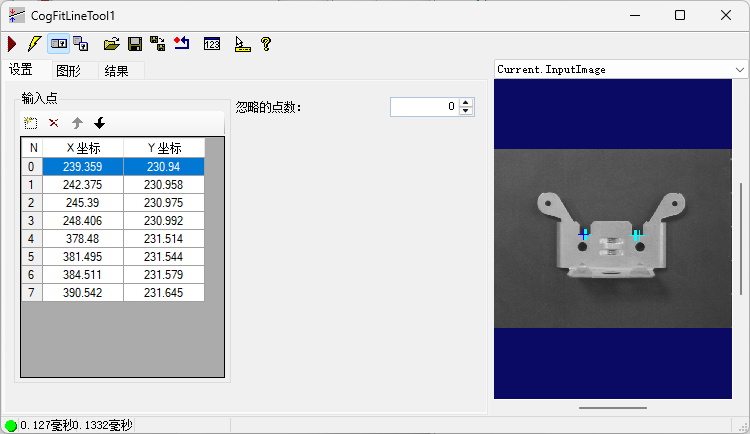
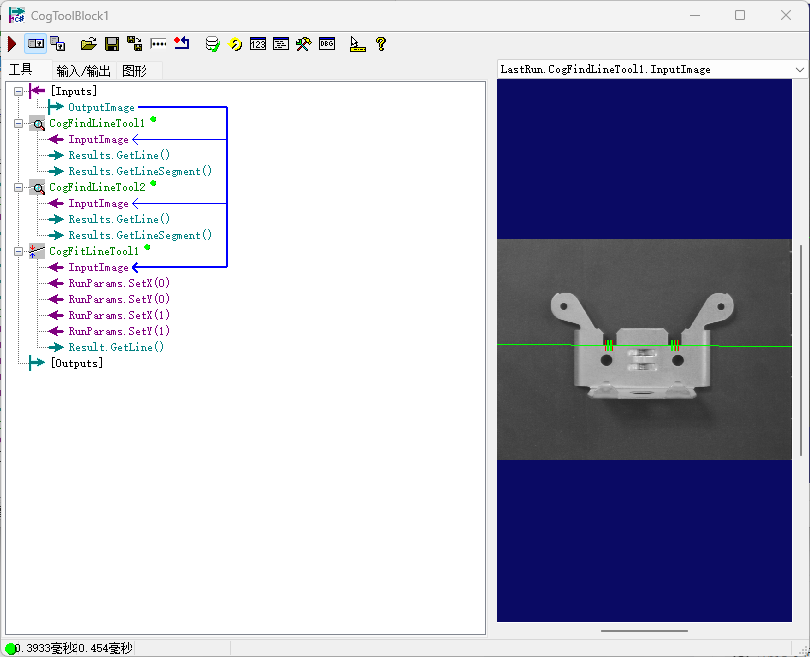
解析
上面的图像是利用找线的卡尺数量 根据卡尺数量来进行判定 收集有效得分的卡尺
由于在图像处理中 有些图像它不能完整的找到一个直线 故用两个找边 通过得出两个找边的有效分数 通过脚本传输给CogFitLineTool 里面
工具
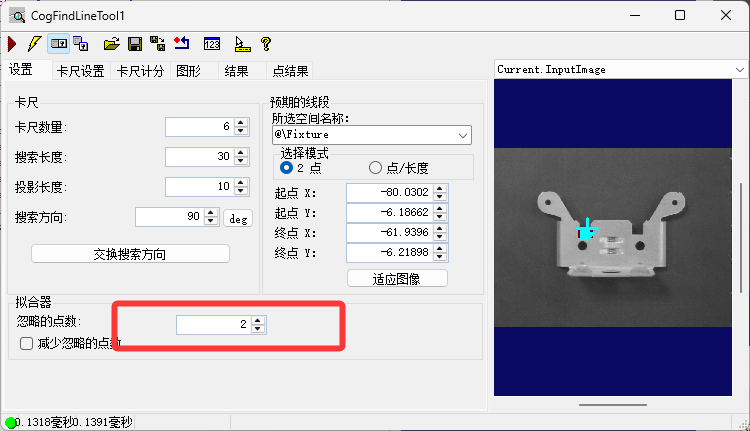
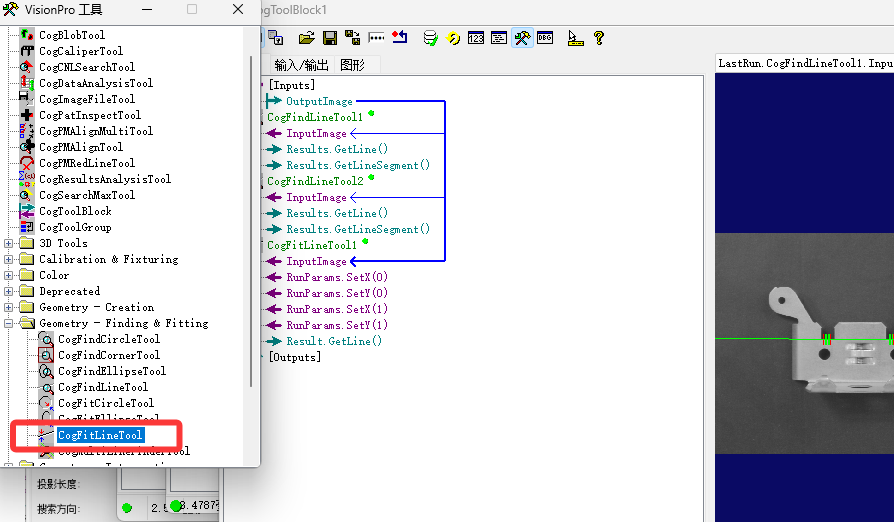
脚本解析
1.创建一个 class
cs
  public class Point
  {
    public double x;
    public double y;
  }
2.创建收集点和工具的List
cs
 private List<ICogTool>LFindtool = new List<ICogTool>();
  private List<Point>Lpoint = new List<Point>();
3.Clear 集合 声明工具
cs
LFindtool.Clear();
    Lpoint.Clear();
    CogFitLineTool fitline = mToolBlock.Tools["CogFitLineTool1"]as CogFitLineTool;
4.收集CogFindLineTool 工具
cs
foreach(ICogTool tool in mToolBlock.Tools)
    {
      if(tool is CogFindLineTool)
      {
        LFindtool.Add(tool);
      }
    }
5.遍历收集的工具&赋值
cs
 foreach(ICogTool items in LFindtool)
    {
       mToolBlock.RunTool(items, ref message, ref result);
      //如果result==我们接受的结果
      if(result == CogToolResultConstants.Accept)
      {
        //将所有找线工具声明成一个变量
        CogFindLineTool findline = items as CogFindLineTool;
        //遍历找线的得分结果
        foreach(CogFindLineResult s in findline.Results)
        {
          if(s.Used)
          {
            //声明赋值
            Point pointt = new Point();
            pointt.x = s.X;
            pointt.y = s.Y;
            Lpoint.Add(pointt);
          }
        }
      }
    }
6.清除CogFitLineTool 点数
cs
while(fitline.RunParams.NumPoints > 0)
    {
      fitline.RunParams.DeletePoint(0);
    }
7.赋值卡尺得分给 CogFitLineTool & Running
cs
foreach(Point sth in Lpoint)
    {
      fitline.RunParams.AddPoint(sth.x, sth.y);
    }

    fitline.Run();
8.All 脚本
cs
#region namespace imports
using System;
using System.Collections;
using System.Drawing;
using System.IO;
using System.Windows.Forms;
using Cognex.VisionPro;
using Cognex.VisionPro.ToolBlock;
using Cognex.VisionPro3D;
using Cognex.VisionPro.Caliper;
using System.Collections.Generic;
#endregion

public class CogToolBlockAdvancedScript : CogToolBlockAdvancedScriptBase
{
  #region Private Member Variables
  private Cognex.VisionPro.ToolBlock.CogToolBlock mToolBlock;
  #endregion
  public class Point
  {
    public double x;
    public double y;
  }
  private List<ICogTool>LFindtool = new List<ICogTool>();
  private List<Point>Lpoint = new List<Point>();

  /// <summary>
  /// Called when the parent tool is run.
  /// Add code here to customize or replace the normal run behavior.
  /// </summary>
  /// <param name="message">Sets the Message in the tool's RunStatus.</param>
  /// <param name="result">Sets the Result in the tool's RunStatus</param>
  /// <returns>True if the tool should run normally,
  ///          False if GroupRun customizes run behavior</returns>
  public override bool GroupRun(ref string message, ref CogToolResultConstants result)
  {
    // To let the execution stop in this script when a debugger is attached, uncomment the following lines.
    // #if DEBUG
    // if (System.Diagnostics.Debugger.IsAttached) System.Diagnostics.Debugger.Break();
    // #endif
    LFindtool.Clear();
    Lpoint.Clear();
    CogFitLineTool fitline = mToolBlock.Tools["CogFitLineTool1"]as CogFitLineTool;


    // Run each tool using the RunTool function
    foreach(ICogTool tool in mToolBlock.Tools)
    {
      if(tool is CogFindLineTool)
      {
        LFindtool.Add(tool);
      }
    }
    foreach(ICogTool items in LFindtool)
    {
       mToolBlock.RunTool(items, ref message, ref result);
      if(result == CogToolResultConstants.Accept)
      {
        CogFindLineTool findline = items as CogFindLineTool;
        foreach(CogFindLineResult s in findline.Results)
        {
          if(s.Used)
          {
            Point pointt = new Point();
            pointt.x = s.X;
            pointt.y = s.Y;
            Lpoint.Add(pointt);
          }
        }
      }
    }
    while(fitline.RunParams.NumPoints > 0)
    {
      fitline.RunParams.DeletePoint(0);
    }
    foreach(Point sth in Lpoint)
    {
      fitline.RunParams.AddPoint(sth.x, sth.y);
    }

    fitline.Run();


    return false;
  }

  #region When the Current Run Record is Created
  /// <summary>
  /// Called when the current record may have changed and is being reconstructed
  /// </summary>
  /// <param name="currentRecord">
  /// The new currentRecord is available to be initialized or customized.</param>
  public override void ModifyCurrentRunRecord(Cognex.VisionPro.ICogRecord currentRecord)
  {
  }
  #endregion

  #region When the Last Run Record is Created
  /// <summary>
  /// Called when the last run record may have changed and is being reconstructed
  /// </summary>
  /// <param name="lastRecord">
  /// The new last run record is available to be initialized or customized.</param>
  public override void ModifyLastRunRecord(Cognex.VisionPro.ICogRecord lastRecord)
  {
  }
  #endregion

  #region When the Script is Initialized
  /// <summary>
  /// Perform any initialization required by your script here
  /// </summary>
  /// <param name="host">The host tool</param>
  public override void Initialize(Cognex.VisionPro.ToolGroup.CogToolGroup host)
  {
    // DO NOT REMOVE - Call the base class implementation first - DO NOT REMOVE
    base.Initialize(host);


    // Store a local copy of the script host
    this.mToolBlock = ((Cognex.VisionPro.ToolBlock.CogToolBlock)(host));
  }
  #endregion

}