星座运势应用
欢迎加入开源鸿蒙跨平台社区:
https://openharmonycrossplatform.csdn.net
一、项目概述
运行效果图
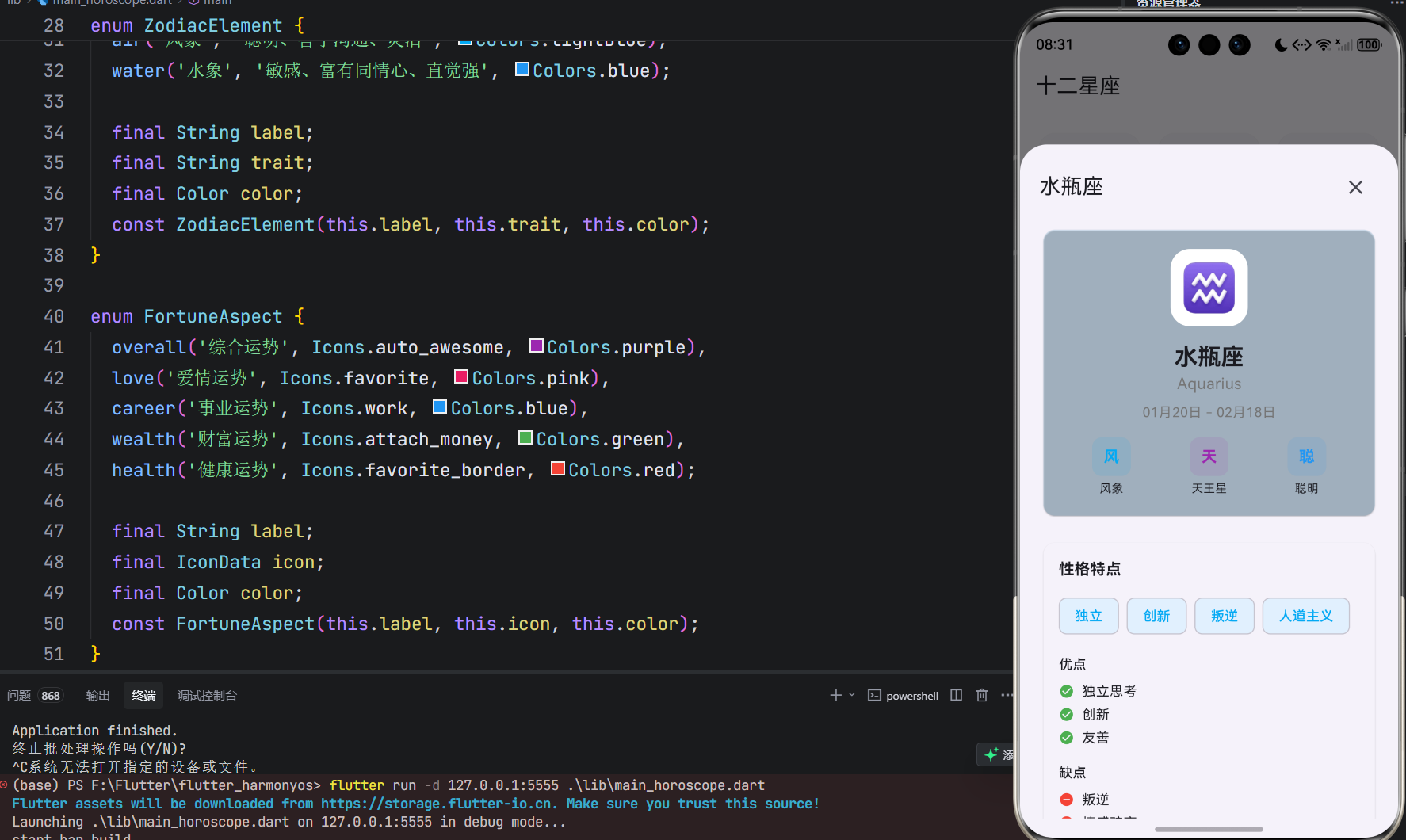
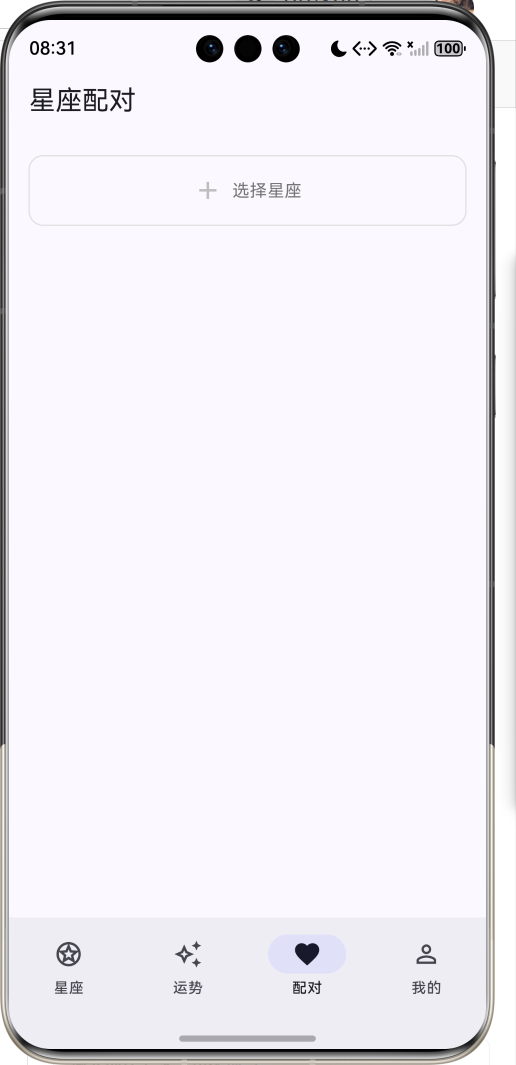
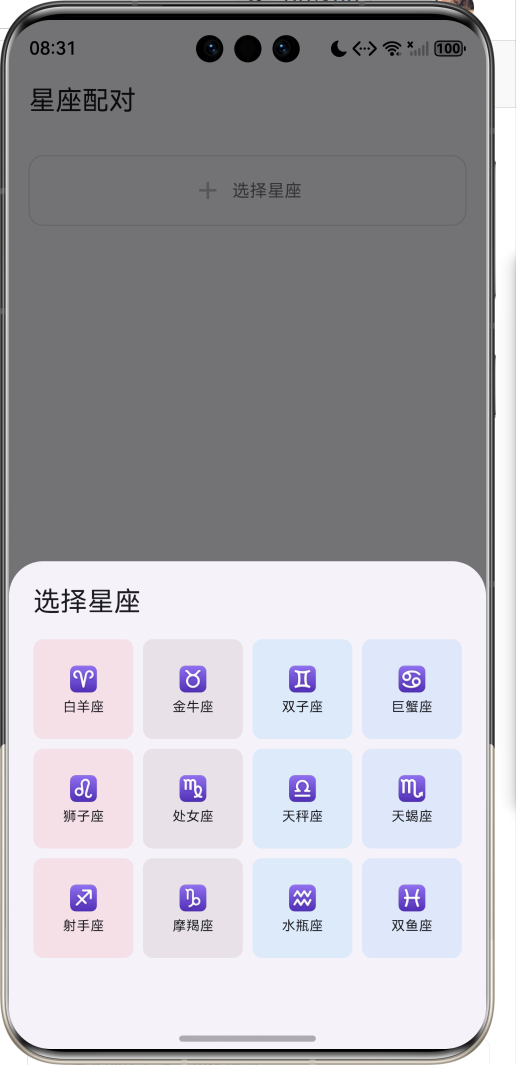
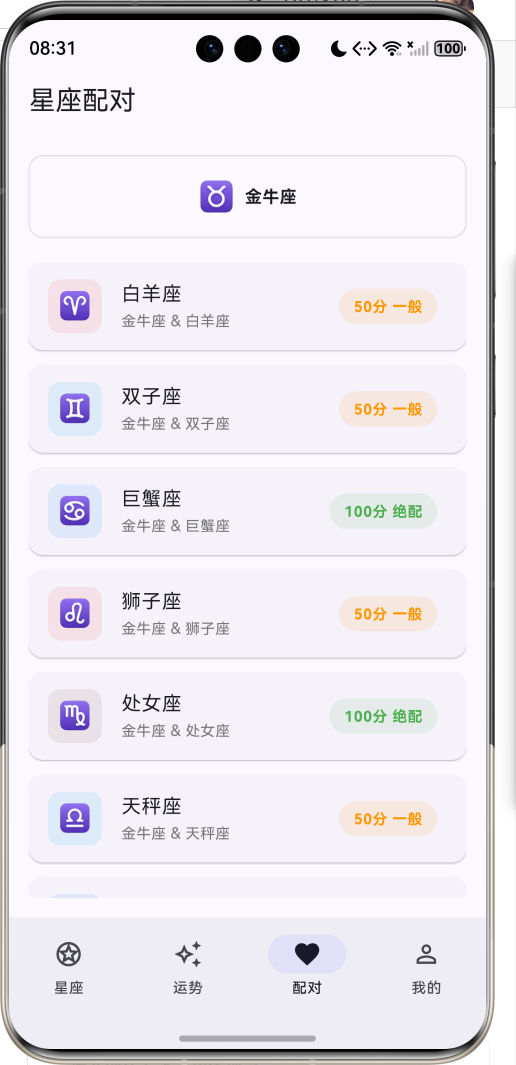
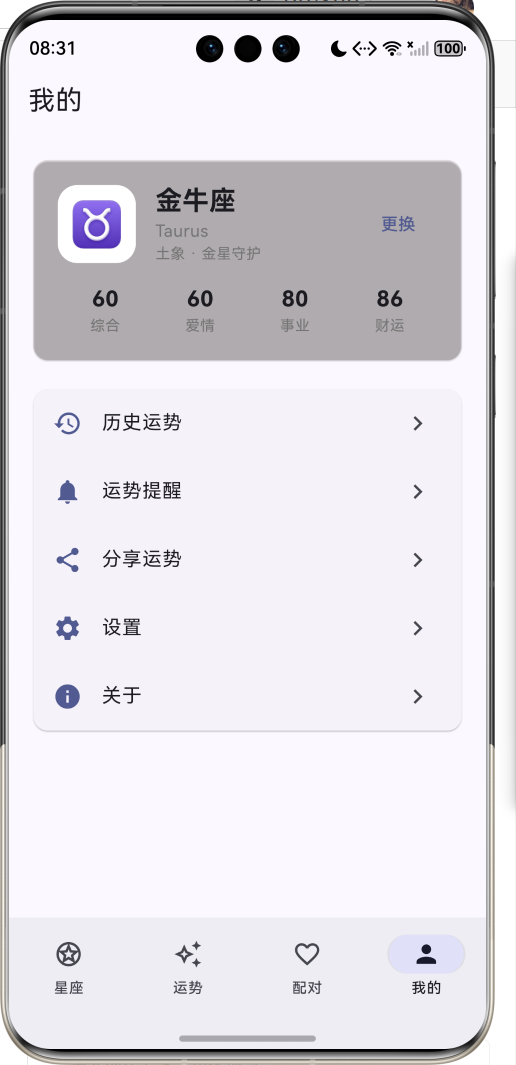
1.1 应用简介
星座运势是一款专注于星座文化与运势查询的移动应用,为用户提供专业、有趣的星座信息服务。星座文化源远流长,从古巴比伦到现代,人们对星空的探索从未停止。本应用帮助用户了解十二星座的性格特点、每日运势、星座配对等信息,让星座文化融入日常生活。
应用支持十二星座完整信息展示,每个星座包含性格特点、优缺点、幸运元素等详细资料。每日运势功能提供综合、爱情、事业、财富、健康五大维度的运势分析,帮助用户规划当日行程。星座配对功能通过科学的配对算法,分析两个星座之间的相容度,为用户提供情感参考。
1.2 核心功能
| 功能模块 | 功能描述 | 实现方式 |
|---|---|---|
| 星座列表 | 十二星座网格展示 | GridView |
| 星座详情 | 性格特点、幸运元素 | ModalBottomSheet |
| 每日运势 | 五大维度运势分析 | 进度条 + 卡片 |
| 星座配对 | 配对指数与分析 | ListView + 算法 |
| 个人中心 | 我的星座与设置 | ListView |
1.3 星座属性
| 属性 | 类型 | 说明 |
|---|---|---|
| 星座名称 | String | 中文名称 |
| 英文名称 | String | 英文名称 |
| 星座符号 | String | Unicode符号 |
| 日期范围 | DateTime | 起止日期 |
| 星座元素 | ZodiacElement | 火/土/风/水 |
| 守护星 | String | 守护行星 |
| 性格特点 | List | 主要特质 |
| 优点 | List | 性格优点 |
| 缺点 | List | 性格缺点 |
| 最佳配对 | List | 相配星座 |
| 幸运数字 | String | 幸运数字 |
| 幸运颜色 | String | 幸运颜色 |
| 幸运日 | String | 幸运星期 |
1.4 星座元素
| 元素 | 特质 | 颜色 | 包含星座 |
|---|---|---|---|
| 火象 | 热情、自信、有领导力 | 红色 | 白羊、狮子、射手 |
| 土象 | 务实、稳重、有耐心 | 棕色 | 金牛、处女、摩羯 |
| 风象 | 聪明、善于沟通、灵活 | 浅蓝 | 双子、天秤、水瓶 |
| 水象 | 敏感、富有同情心、直觉强 | 蓝色 | 巨蟹、天蝎、双鱼 |
1.5 运势维度
| 维度 | 图标 | 颜色 | 说明 |
|---|---|---|---|
| 综合运势 | auto_awesome | 紫色 | 整体运势概况 |
| 爱情运势 | favorite | 粉色 | 感情生活运势 |
| 事业运势 | work | 蓝色 | 工作发展运势 |
| 财富运势 | attach_money | 绿色 | 财运投资运势 |
| 健康运势 | favorite_border | 红色 | 身体健康运势 |
1.6 技术栈
| 技术领域 | 技术选型 | 版本要求 |
|---|---|---|
| 开发框架 | Flutter | >= 3.0.0 |
| 编程语言 | Dart | >= 2.17.0 |
| 设计规范 | Material Design 3 | - |
| 状态管理 | setState | - |
| 日期处理 | intl | ^0.19.0 |
| 目标平台 | 鸿蒙OS | API 21+ |
1.7 项目结构
lib/
└── main_horoscope.dart
    ├── HoroscopeApp              # 应用入口
    ├── ZodiacElement             # 星座元素枚举
    ├── FortuneAspect             # 运势维度枚举
    ├── Zodiac                    # 星座数据模型
    ├── DailyFortune              # 每日运势模型
    └── HoroscopeHomePage         # 主页面
        ├── _buildZodiacListPage()    # 星座列表页
        ├── _buildFortunePage()       # 运势展示页
        ├── _buildCompatibilityPage() # 星座配对页
        ├── _buildProfilePage()       # 个人中心页
        ├── _buildZodiacGridItem()    # 星座网格项
        ├── _buildFortuneScores()     # 运势评分
        └── _showZodiacDetail()       # 星座详情弹窗
二、系统架构
2.1 整体架构图
Business Logic
Presentation Layer
Data Layer
Zodiac
星座模型
DailyFortune
运势模型
ZodiacElement
元素枚举
FortuneAspect
维度枚举
主页面
星座列表Tab
运势展示Tab
星座配对Tab
个人中心Tab
星座详情弹窗
基本信息
性格特点
幸运元素
运势生成
随机算法
配对计算
相容度算法
星座选择
用户偏好
2.2 类图设计
contains
manages
manages
has
HoroscopeApp
+Widget build()
<<enumeration>>
ZodiacElement
fire
earth
air
water
+String label
+String trait
+Color color
<<enumeration>>
FortuneAspect
overall
love
career
wealth
health
+String label
+IconData icon
+Color color
Zodiac
+String name
+String englishName
+String symbol
+DateTime startDate
+DateTime endDate
+ZodiacElement element
+String ruler
+List<String> traits
+List<String> strengths
+List<String> weaknesses
+List<String> compatible
+String luckyNumber
+String luckyColor
+String luckyDay
DailyFortune
+String zodiacName
+DateTime date
+int overallScore
+int loveScore
+int careerScore
+int wealthScore
+int healthScore
+String overallAdvice
+String loveAdvice
+String careerAdvice
+String wealthAdvice
+String healthAdvice
+String luckyDirection
+String luckyItem
HoroscopeHomePage
-int _selectedIndex
-Zodiac _selectedZodiac
-Map<String,DailyFortune> _fortunes
-List<Zodiac> _zodiacs
+Widget build()
-void _generateFortunes()
-int _calculateCompatibility()
-void _showZodiacDetail()
2.3 数据流程图
选择星座
查看运势
星座配对
刷新运势
用户操作
操作类型
更新选中状态
获取运势数据
计算配对指数
重新生成运势
更新界面
显示运势详情
显示配对结果
更新运势数据
刷新显示
2.4 运势生成流程
运势数据 运势生成器 运势页面 用户 运势数据 运势生成器 运势页面 用户 查看运势 请求运势数据 计算随机种子 生成各维度分数 匹配运势建议 存储运势结果 返回运势对象 展示运势详情
三、核心模块设计
3.1 数据模型设计
3.1.1 星座元素枚举 (ZodiacElement)
dart
enum ZodiacElement {
  fire('火象', '热情、自信、有领导力', Colors.red),
  earth('土象', '务实、稳重、有耐心', Colors.brown),
  air('风象', '聪明、善于沟通、灵活', Colors.lightBlue),
  water('水象', '敏感、富有同情心、直觉强', Colors.blue);

  final String label;
  final String trait;
  final Color color;
  const ZodiacElement(this.label, this.trait, this.color);
}
3.1.2 运势维度枚举 (FortuneAspect)
dart
enum FortuneAspect {
  overall('综合运势', Icons.auto_awesome, Colors.purple),
  love('爱情运势', Icons.favorite, Colors.pink),
  career('事业运势', Icons.work, Colors.blue),
  wealth('财富运势', Icons.attach_money, Colors.green),
  health('健康运势', Icons.favorite_border, Colors.red);

  final String label;
  final IconData icon;
  final Color color;
  const FortuneAspect(this.label, this.icon, this.color);
}
3.1.3 星座模型 (Zodiac)
dart
class Zodiac {
  final String name;              // 星座名称
  final String englishName;       // 英文名称
  final String symbol;            // 星座符号
  final DateTime startDate;       // 起始日期
  final DateTime endDate;         // 结束日期
  final ZodiacElement element;    // 星座元素
  final String ruler;             // 守护星
  final List<String> traits;      // 性格特点
  final List<String> strengths;   // 优点
  final List<String> weaknesses;  // 缺点
  final List<String> compatible;  // 最佳配对
  final String luckyNumber;       // 幸运数字
  final String luckyColor;        // 幸运颜色
  final String luckyDay;          // 幸运日
}
3.1.4 每日运势模型 (DailyFortune)
dart
class DailyFortune {
  final String zodiacName;        // 星座名称
  final DateTime date;            // 日期
  final int overallScore;         // 综合评分
  final int loveScore;            // 爱情评分
  final int careerScore;          // 事业评分
  final int wealthScore;          // 财富评分
  final int healthScore;          // 健康评分
  final String overallAdvice;     // 综合建议
  final String loveAdvice;        // 爱情建议
  final String careerAdvice;      // 事业建议
  final String wealthAdvice;      // 财富建议
  final String healthAdvice;      // 健康建议
  final String luckyDirection;    // 幸运方位
  final String luckyItem;         // 幸运物品
}
3.2 运势生成逻辑
3.2.1 生成流程
是
否
开始生成
获取当前时间戳
遍历十二星座
计算随机种子
生成各维度分数
匹配运势建议
选择幸运元素
还有星座?
完成生成
3.2.2 生成实现
dart
void _generateFortunes() {
  final today = DateTime.now();
  final random = today.millisecondsSinceEpoch;

  for (var zodiac in _zodiacs) {
    final seed = random + zodiac.name.hashCode;
    _fortunes[zodiac.name] = DailyFortune(
      zodiacName: zodiac.name,
      date: today,
      overallScore: 60 + (seed % 40),
      loveScore: 50 + ((seed ~/ 100) % 50),
      careerScore: 55 + ((seed ~/ 200) % 45),
      wealthScore: 45 + ((seed ~/ 300) % 55),
      healthScore: 50 + ((seed ~/ 400) % 50),
      overallAdvice: _getOverallAdvice(seed),
      // ...
    );
  }
}
3.3 配对计算逻辑
3.3.1 配对算法
是
否
是
否
是
否
开始计算
基础分50分
元素相同?
+20分
元素互补?
+10分
继续
在最佳配对列表?
+25分
计算最终分数
返回配对指数
3.3.2 配对实现
dart
int _calculateCompatibility(Zodiac a, Zodiac b) {
  int score = 50;

  // 同元素加分
  if (a.element == b.element) {
    score += 20;
  }

  // 最佳配对加分
  if (a.compatible.contains(b.name)) {
    score += 25;
  }
  if (b.compatible.contains(a.name)) {
    score += 15;
  }

  // 元素互补加分
  final elementBonus = {
    ZodiacElement.fire: [ZodiacElement.air],
    ZodiacElement.earth: [ZodiacElement.water],
    ZodiacElement.air: [ZodiacElement.fire],
    ZodiacElement.water: [ZodiacElement.earth],
  };

  if (elementBonus[a.element]?.contains(b.element) == true) {
    score += 10;
  }

  return score.clamp(20, 100);
}
3.4 页面结构设计
3.4.1 主页面布局
主页面
底部导航栏
IndexedStack
星座Tab
运势Tab
配对Tab
我的Tab
星座网格页
运势详情页
配对列表页
个人中心页
3.5 状态管理
3.5.1 核心状态变量
dart
class _HoroscopeHomePageState extends State<HoroscopeHomePage> {
  int _selectedIndex = 0;                           // 当前Tab索引
  Zodiac? _selectedZodiac;                          // 选中的星座
  final Map<String, DailyFortune> _fortunes = {};   // 运势数据
  static final List<Zodiac> _zodiacs = [...];       // 星座列表
}
四、UI设计规范
4.1 配色方案
应用采用靛蓝色主题风格,体现神秘与智慧:
| 颜色类型 | 色值 | 用途 |
|---|---|---|
| 主色 | Indigo | AppBar、强调、按钮 |
| 火象 | Red | 白羊、狮子、射手 |
| 土象 | Brown | 金牛、处女、摩羯 |
| 风象 | LightBlue | 双子、天秤、水瓶 |
| 水象 | Blue | 巨蟹、天蝎、双鱼 |
4.2 运势维度颜色映射
| 维度 | 颜色 | 说明 |
|---|---|---|
| 综合 | 紫色 | 整体运势 |
| 爱情 | 粉色 | 感情运势 |
| 事业 | 蓝色 | 工作运势 |
| 财富 | 绿色 | 金钱运势 |
| 健康 | 红色 | 身体运势 |
4.3 组件规范
4.3.1 星座网格项
┌─────────────────┐
│    ┌────┐       │
│    │ ♈ │       │
│    └────┘       │
│    白羊座       │
│    Aries        │
└─────────────────┘
4.3.2 运势头部卡片
┌─────────────────────────────────────────────────────────────┐
│  ┌────┐  白羊座                              85            │
│  │ ♈ │  2024年03月15日                       综合评分     │
│  └────┘  ★★★★☆                                           │
└─────────────────────────────────────────────────────────────┘
4.3.3 运势评分条
┌─────────────────────────────────────────────────────────────┐
│  运势指数                                                   │
│                                                             │
│  ✨ 综合运势                                    85%        │
│  ████████████████████████████░░░░░░░░░░░░░░░░░░░░░░        │
│                                                             │
│  ❤️ 爱情运势                                    72%        │
│  █████████████████████████░░░░░░░░░░░░░░░░░░░░░░░░        │
│                                                             │
│  💼 事业运势                                    88%        │
│  ██████████████████████████████░░░░░░░░░░░░░░░░░░░        │
└─────────────────────────────────────────────────────────────┘
4.3.4 配对结果卡片
┌─────────────────────────────────────────────────────────────┐
│  ┌────┐  金牛座                                            │
│  │ ♉ │  白羊座 & 金牛座                      72分 相配    │
│  └────┘                                                    │
└─────────────────────────────────────────────────────────────┘
4.4 交互设计
4.4.1 操作方式
| 操作 | 手势 | 效果 |
|---|---|---|
| 查看星座详情 | 点击网格项 | 弹出详情面板 |
| 选择我的星座 | 点击选择按钮 | 更新选中状态 |
| 查看运势 | 切换到运势Tab | 显示运势详情 |
| 刷新运势 | 点击刷新按钮 | 重新生成运势 |
| 查看配对 | 切换到配对Tab | 显示配对列表 |
| 查看配对详情 | 点击配对项 | 弹出配对分析 |
五、核心功能实现
5.1 主页面构建
dart
@override
Widget build(BuildContext context) {
  return Scaffold(
    body: IndexedStack(
      index: _selectedIndex,
      children: [
        _buildZodiacListPage(),
        _buildFortunePage(),
        _buildCompatibilityPage(),
        _buildProfilePage(),
      ],
    ),
    bottomNavigationBar: NavigationBar(
      selectedIndex: _selectedIndex,
      onDestinationSelected: (index) {
        setState(() {
          _selectedIndex = index;
        });
      },
      destinations: const [
        NavigationDestination(icon: Icon(Icons.stars_outlined), label: '星座'),
        NavigationDestination(icon: Icon(Icons.auto_awesome_outlined), label: '运势'),
        NavigationDestination(icon: Icon(Icons.favorite_border), label: '配对'),
        NavigationDestination(icon: Icon(Icons.person_outline), label: '我的'),
      ],
    ),
  );
}
5.2 星座网格
dart
Widget _buildZodiacListPage() {
  return Scaffold(
    appBar: AppBar(title: const Text('十二星座')),
    body: GridView.builder(
      padding: const EdgeInsets.all(16),
      gridDelegate: const SliverGridDelegateWithFixedCrossAxisCount(
        crossAxisCount: 3,
        mainAxisSpacing: 12,
        crossAxisSpacing: 12,
        childAspectRatio: 1,
      ),
      itemCount: _zodiacs.length,
      itemBuilder: (context, index) {
        return _buildZodiacGridItem(_zodiacs[index]);
      },
    ),
  );
}
5.3 运势评分展示
dart
Widget _buildScoreItem(FortuneAspect aspect, int score) {
  return Padding(
    padding: const EdgeInsets.only(bottom: 12),
    child: Column(
      children: [
        Row(
          children: [
            Icon(aspect.icon, size: 20, color: aspect.color),
            const SizedBox(width: 8),
            Text(aspect.label),
            const Spacer(),
            Text('$score%', style: TextStyle(fontWeight: FontWeight.bold, color: aspect.color)),
          ],
        ),
        const SizedBox(height: 6),
        ClipRRect(
          borderRadius: BorderRadius.circular(4),
          child: LinearProgressIndicator(
            value: score / 100,
            backgroundColor: Colors.grey[200],
            valueColor: AlwaysStoppedAnimation<Color>(aspect.color),
            minHeight: 6,
          ),
        ),
      ],
    ),
  );
}
5.4 配对计算
dart
int _calculateCompatibility(Zodiac a, Zodiac b) {
  int score = 50;

  if (a.element == b.element) {
    score += 20;
  }

  if (a.compatible.contains(b.name)) {
    score += 25;
  }
  if (b.compatible.contains(a.name)) {
    score += 15;
  }

  final elementBonus = {
    ZodiacElement.fire: [ZodiacElement.air],
    ZodiacElement.earth: [ZodiacElement.water],
    ZodiacElement.air: [ZodiacElement.fire],
    ZodiacElement.water: [ZodiacElement.earth],
  };

  if (elementBonus[a.element]?.contains(b.element) == true) {
    score += 10;
  }

  return score.clamp(20, 100);
}
5.5 星座详情弹窗
dart
void _showZodiacDetail(Zodiac zodiac) {
  showModalBottomSheet(
    context: context,
    isScrollControlled: true,
    builder: (context) => DraggableScrollableSheet(
      initialChildSize: 0.85,
      maxChildSize: 0.95,
      minChildSize: 0.5,
      expand: false,
      builder: (context, scrollController) => Container(
        padding: const EdgeInsets.all(20),
        child: ListView(
          controller: scrollController,
          children: [
            _buildZodiacInfoCard(zodiac),
            _buildTraitsSection(zodiac),
            _buildLuckySection(zodiac),
            FilledButton(
              onPressed: () {
                setState(() {
                  _selectedZodiac = zodiac;
                  _selectedIndex = 1;
                });
                Navigator.pop(context);
              },
              child: const Text('查看今日运势'),
            ),
          ],
        ),
      ),
    ),
  );
}
六、星座知识拓展
6.1 十二星座日期对照
第一季度 水瓶座 1.20 - 2.18 双鱼座 2.19 - 3.20 白羊座 3.21 - 4.19 第二季度 金牛座 4.20 - 5.20 双子座 5.21 - 6.21 巨蟹座 6.22 - 7.22 第三季度 狮子座 7.23 - 8.22 处女座 8.23 - 9.22 天秤座 9.23 - 10.23 第四季度 天蝎座 10.24 - 11.22 射手座 11.23 - 12.21 摩羯座 12.22 - 1.19 十二星座日期分布
6.2 星座元素关系
| 元素 | 特点 | 相生 | 相克 |
|---|---|---|---|
| 火象 | 热情冲动 | 风助火势 | 水火不容 |
| 土象 | 稳重务实 | 水润土肥 | 木克土 |
| 风象 | 灵活多变 | 火借风势 | 土掩风 |
| 水象 | 感性敏感 | 土涵水源 | 火蒸水 |
6.3 守护星与性格
守护星
太阳 - 狮子座
自信、领导力
月亮 - 巨蟹座
情感、直觉
水星 - 双子/处女
沟通、分析
金星 - 金牛/天秤
美感、爱情
火星 - 白羊座
行动、勇气
木星 - 射手座
扩张、幸运
土星 - 摩羯座
责任、限制
天王星 - 水瓶座
创新、变革
海王星 - 双鱼座
梦幻、直觉
冥王星 - 天蝎座
转化、深度
6.4 星座配对原则
| 配对类型 | 分数范围 | 说明 |
|---|---|---|
| 绝配 | 80-100 | 天作之合,默契十足 |
| 相配 | 60-79 | 相处融洽,互补性强 |
| 一般 | 40-59 | 需要磨合,有成长空间 |
| 不合 | 20-39 | 差异较大,需要努力 |
七、扩展功能规划
7.1 后续版本规划
2024-01-07 2024-01-14 2024-01-21 2024-01-28 2024-02-04 2024-02-11 2024-02-18 2024-02-25 2024-03-03 2024-03-10 2024-03-17 2024-03-24 2024-03-31 星座信息功能 每日运势功能 星座配对功能 周/月运势 运势提醒推送 数据持久化 上升星座计算 星盘分析功能 社区分享功能 V1.0 基础版本 V1.1 增强版本 V1.2 进阶版本 星座运势应用开发计划
7.2 功能扩展建议
7.2.1 运势增强
| 功能 | 说明 |
|---|---|
| 周运势 | 每周运势预测 |
| 月运势 | 月度运势分析 |
| 年运势 | 年度运势总览 |
| 运势趋势 | 运势变化曲线 |
7.2.2 星盘功能
| 功能 | 说明 |
|---|---|
| 上升星座 | 根据出生时间计算 |
| 月亮星座 | 情感内在分析 |
| 星盘图 | 完整星盘展示 |
| 行星相位 | 行星关系分析 |
7.2.3 社交功能
| 功能 | 说明 |
|---|---|
| 运势分享 | 分享到社交平台 |
| 好友配对 | 与好友配对分析 |
| 星座社区 | 星座话题讨论 |
| 每日签语 | 生成精美签语 |
八、注意事项
8.1 开发注意事项
-
颜色处理 :使用
withValues(alpha:)替代已废弃的withOpacity() -
日期格式化:使用intl包的DateFormat进行日期格式化
-
状态同步:弹窗使用StatefulBuilder保持状态同步
-
随机算法:运势生成使用时间戳作为种子,保证同一天结果一致
-
数据模型:Zodiac类不使用const构造函数,因为DateTime不是const
8.2 用户体验优化
⭐ 用户体验建议 ⭐
- 星座信息一目了然
- 运势展示直观清晰
- 配对分析科学有趣
- 操作流程简单便捷
8.3 常见问题
| 问题 | 原因 | 解决方案 |
|---|---|---|
| 运势数据不更新 | 种子未变化 | 添加刷新按钮 |
| 配对分数异常 | 算法边界问题 | 使用clamp限制范围 |
| 弹窗状态不同步 | StatefulBuilder未使用 | 使用setModalState |
| 星座日期判断错误 | 年份跨年问题 | 使用固定年份计算 |
九、运行说明
9.1 环境要求
| 环境 | 版本要求 |
|---|---|
| Flutter SDK | >= 3.0.0 |
| Dart SDK | >= 2.17.0 |
| intl包 | ^0.19.0 |
| 鸿蒙OS | API 21+ |
9.2 运行命令
bash
# 查看可用设备
flutter devices

# 运行到鸿蒙设备
flutter run -d 127.0.0.1:5555 lib/main_horoscope.dart

# 运行到Windows
flutter run -d windows -t lib/main_horoscope.dart

# 代码分析
flutter analyze lib/main_horoscope.dart
十、总结
星座运势应用通过完善的功能设计,帮助用户了解星座文化与每日运势。应用支持十二星座完整信息展示,每个星座包含性格特点、优缺点、幸运元素等详细资料,让用户深入了解自己的星座特质。
每日运势功能提供综合、爱情、事业、财富、健康五大维度的运势分析,通过进度条直观展示各维度评分,配合详细的运势建议,帮助用户规划当日行程。幸运方位和幸运物品为用户带来额外的好运指引。
星座配对功能通过科学的配对算法,分析两个星座之间的相容度。算法综合考虑元素关系、最佳配对列表、元素互补等因素,给出合理的配对评分和分析建议,为用户提供情感参考。
界面设计采用靛蓝色主题风格,体现神秘与智慧。星座网格通过元素颜色区分不同类型,运势卡片通过维度颜色直观展示各维度状态。应用采用Material Design 3设计规范,遵循Flutter最佳实践,代码结构清晰,易于维护和扩展。
探索星空,了解自己!