环保知识应用
欢迎加入开源鸿蒙跨平台社区:
https://openharmonycrossplatform.csdn.net
一、项目概述
运行效果图
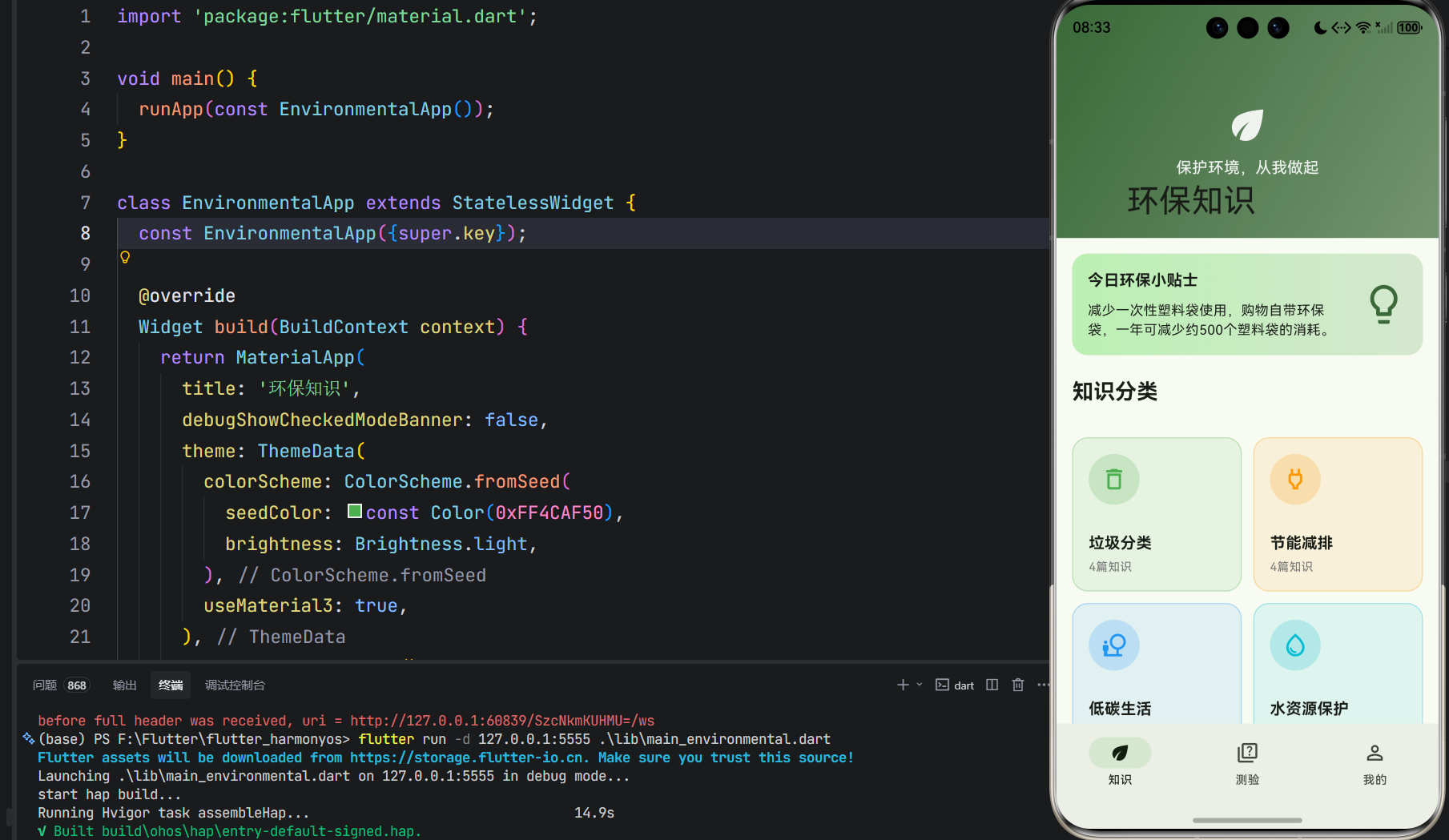
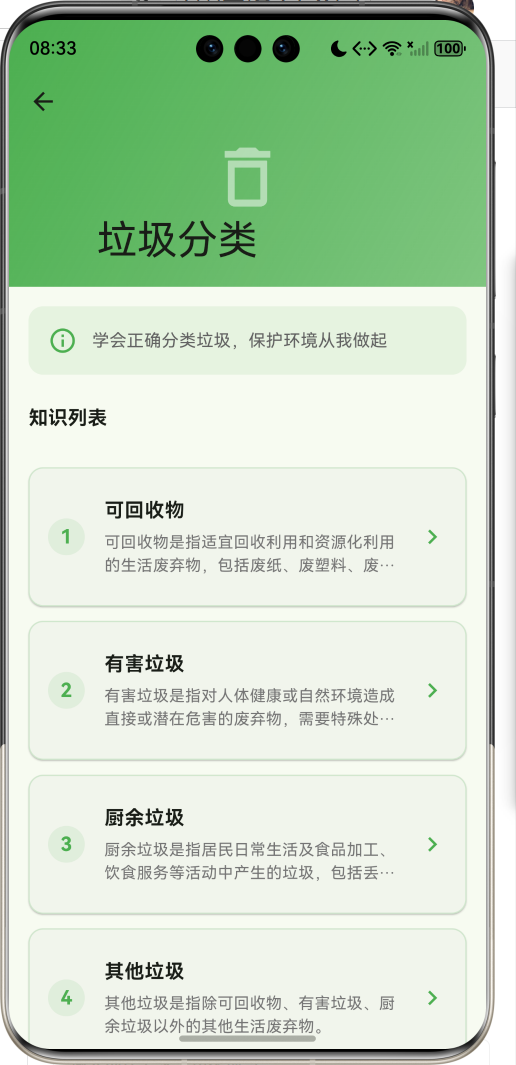
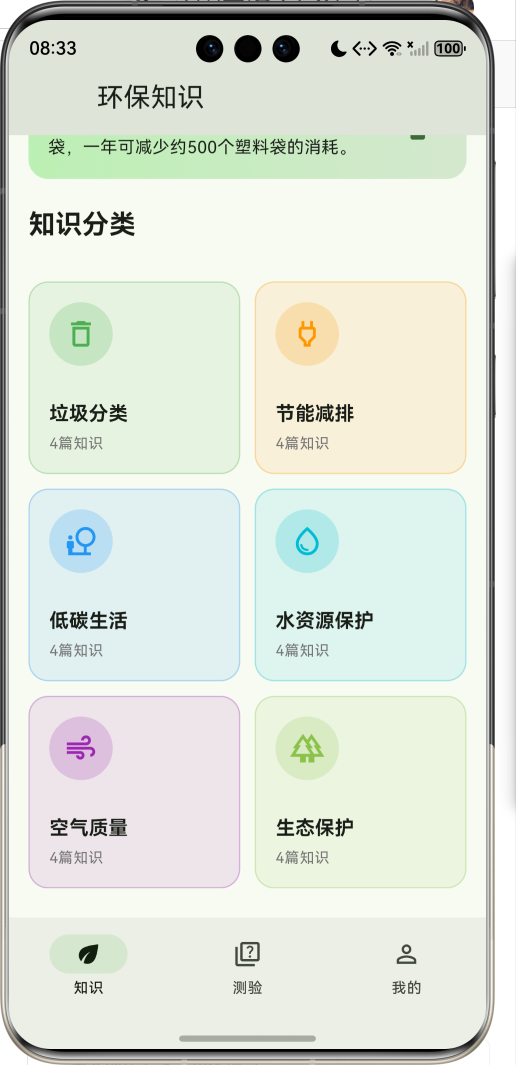
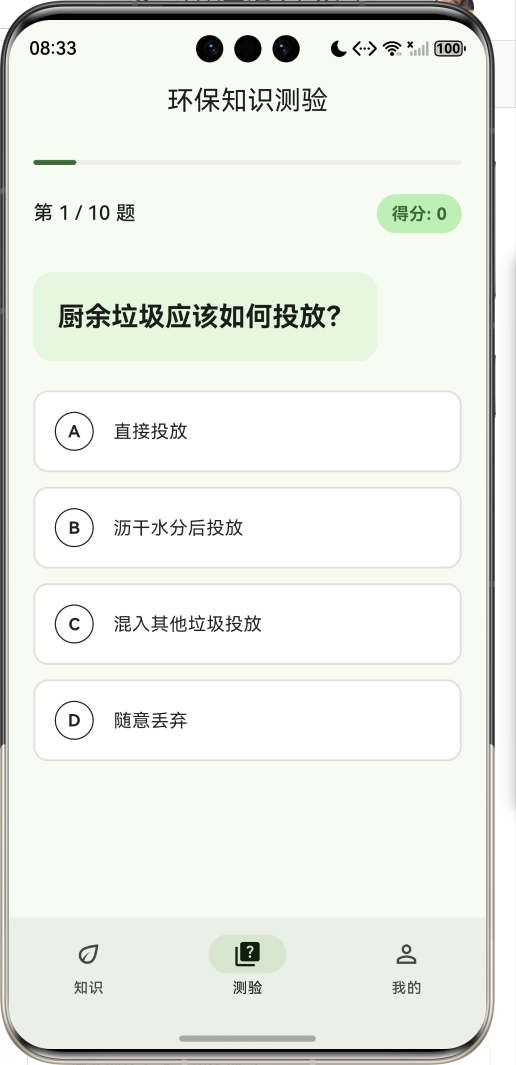
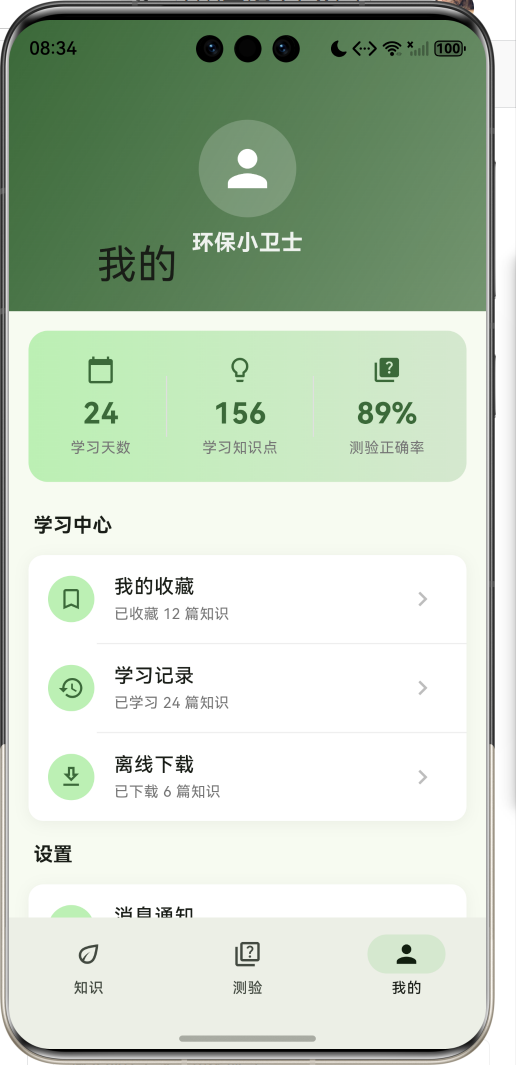
1.1 应用简介
环保知识应用是一款致力于普及环保知识、提升公众环保意识的科普类应用,旨在帮助环保爱好者和普通用户系统了解垃圾分类、节能减排、低碳生活、水资源保护、空气质量、生态保护六大知识领域。应用以绿色为主色调,营造清新自然的环保主题氛围。
应用涵盖了垃圾分类、节能减排、低碳生活、水资源保护、空气质量、生态保护六大分类,收录了24篇详细知识内容。通过知识学习、趣味测验、实用小贴士等模块,帮助用户全面提升环保意识和实践能力。
1.2 核心功能
| 功能模块 | 功能描述 | 实现方式 |
|---|---|---|
| 知识分类 | 六大环保领域展示 | 网格卡片布局 |
| 知识详情 | 完整知识内容展示 | 滚动页面+小贴士 |
| 环保测验 | 趣味知识测验 | 随机出题+即时反馈 |
| 测验结果 | 成绩评价与解析 | 分数统计+评语 |
| 个人中心 | 学习统计与设置 | 列表菜单 |
1.3 环保知识分类
| 序号 | 分类名称 | 知识数量 | 核心内容 |
|---|---|---|---|
| 1 | 垃圾分类 | 4篇 | 可回收物、有害垃圾、厨余垃圾、其他垃圾 |
| 2 | 节能减排 | 4篇 | 家庭节电、绿色出行、节约用水、低碳办公 |
| 3 | 低碳生活 | 4篇 | 低碳饮食、绿色购物、旧物利用、绿色家居 |
| 4 | 水资源保护 | 4篇 | 水污染来源、水环境保护、雨水利用、海洋保护 |
| 5 | 空气质量 | 4篇 | 空气污染来源、PM2.5防护、室内净化、改善空气 |
| 6 | 生态保护 | 4篇 | 生物多样性、森林保护、湿地保护、生态修复 |
1.4 技术栈
| 技术领域 | 技术选型 | 版本要求 |
|---|---|---|
| 开发框架 | Flutter | >= 3.0.0 |
| 编程语言 | Dart | >= 2.17.0 |
| 设计规范 | Material Design 3 | - |
| 状态管理 | setState | - |
| 目标平台 | 鸿蒙OS / Web | API 21+ |
1.5 项目结构
lib/
└── main_environmental.dart
    ├── EnvironmentalApp      # 应用入口
    ├── KnowledgeCategory     # 知识分类数据模型
    ├── KnowledgeItem         # 知识条目数据模型
    ├── QuizQuestion          # 测验题目数据模型
    ├── MainPage              # 主页面(底部导航)
    ├── HomePage              # 知识首页
    ├── CategoryDetailPage    # 分类详情页面
    ├── KnowledgeDetailPage   # 知识详情页面
    ├── QuizPage              # 测验页面
    └── ProfilePage           # 个人中心页面
二、系统架构
2.1 整体架构图
Data Layer
Presentation Layer
主页面
MainPage
知识首页
测验页面
个人中心
分类网格
今日贴士
分类详情
知识详情
测验界面
答案反馈
结果页面
学习统计
菜单设置
KnowledgeCategory
分类模型
KnowledgeItem
知识模型
QuizQuestion
测验模型
2.2 类图设计
manages
displays
displays
uses
EnvironmentalApp
+Widget build()
KnowledgeCategory
+String id
+String name
+IconData icon
+Color color
+String description
+List<KnowledgeItem> items
KnowledgeItem
+String id
+String title
+String content
+List<String> tips
+String imagePath
QuizQuestion
+String question
+List<String> options
+int correctIndex
+String explanation
MainPage
-int _currentIndex
-List<Widget> _pages
+Widget build()
HomePage
+Widget build()
-_buildCategoryCard()
CategoryDetailPage
+KnowledgeCategory category
+Widget build()
KnowledgeDetailPage
+KnowledgeItem item
+Color categoryColor
+Widget build()
QuizPage
-int _currentQuestionIndex
-int _score
-int _selectedAnswer
-bool _answered
-bool _quizCompleted
+void _startNewQuiz()
+void _selectAnswer()
+void _nextQuestion()
2.3 页面导航流程
知识
测验
我的
否
是
是
应用启动
主页面
底部导航
知识首页
测验页面
个人中心
点击分类卡片
分类详情页
点击知识条目
知识详情页
开始测验
答题过程
是否完成
结果页面
重新测验
返回上一页
2.4 测验数据流向图
结果页 状态管理 题目数据 测验页 用户 结果页 状态管理 题目数据 测验页 用户 loop 每道题目 开始测验 获取题目列表 返回10道题目 打乱题目顺序 选择答案 记录答案 显示正确答案 显示解析 点击下一题 传递得分 计算正确率 显示评价结果
三、核心模块设计
3.1 数据模型设计
3.1.1 知识分类模型 (KnowledgeCategory)
dart
class KnowledgeCategory {
  final String id;              // 唯一标识
  final String name;            // 分类名称
  final IconData icon;          // 分类图标
  final Color color;            // 主题颜色
  final String description;     // 分类描述
  final List<KnowledgeItem> items;  // 知识条目列表
}
3.1.2 知识条目模型 (KnowledgeItem)
dart
class KnowledgeItem {
  final String id;              // 唯一标识
  final String title;           // 知识标题
  final String content;         // 知识内容
  final List<String> tips;      // 实用小贴士
  final String imagePath;       // 图片路径
}
3.1.3 测验题目模型 (QuizQuestion)
dart
class QuizQuestion {
  final String question;        // 题目内容
  final List<String> options;   // 选项列表
  final int correctIndex;       // 正确答案索引
  final String explanation;     // 答案解析
}
3.1.4 知识分布
17% 17% 17% 17% 17% 17% 知识内容分布 垃圾分类 节能减排 低碳生活 水资源保护 空气质量 生态保护
3.2 页面结构设计
3.2.1 主页面布局
MainPage
IndexedStack
知识首页
测验页面
个人中心
NavigationBar
知识 Tab
测验 Tab
我的 Tab
3.2.2 知识首页结构
知识首页
头部区域
今日贴士卡片
知识分类网格
渐变背景
应用标题
环保标语
提示图标
提示内容
2列网格布局
分类卡片 x6
3.2.3 测验页面结构
测验页面
进度条
题目信息
选项列表
答案解析
下一题按钮
题号显示
当前得分
题目内容
选项A
选项B
选项C
选项D
3.2.4 结果页面结构
结果页面
评价图标
评价文字
得分展示
重新测验按钮
≥80%: 奖杯
≥60%: 点赞
<60%: 学习
3.3 测验流程设计
否
是
重新测验
返回
开始测验
打乱题目顺序
显示第1题
用户选择答案
显示正确答案
显示答案解析
是否最后一题?
下一题
计算得分
显示结果页面
用户选择
结束
四、UI设计规范
4.1 配色方案
应用采用绿色为主色调,营造清新自然的环保主题氛围:
| 颜色类型 | 色值 | 用途 |
|---|---|---|
| 主色 | #4CAF50 (Green) | 导航、强调元素 |
| 分类绿 | #4CAF50 | 垃圾分类 |
| 分类橙 | #FF9800 | 节能减排 |
| 分类蓝 | #2196F3 | 低碳生活 |
| 分类青 | #00BCD4 | 水资源保护 |
| 分类紫 | #9C27B0 | 空气质量 |
| 分类浅绿 | #8BC34A | 生态保护 |
4.2 字体规范
| 元素 | 字号 | 字重 | 颜色 |
|---|---|---|---|
| 页面标题 | 20px | Medium | #000000 |
| 分类名称 | 16px | Bold | #000000 |
| 知识标题 | 16px | Bold | #000000 |
| 知识内容 | 14px | Regular | #424242 |
| 小贴士 | 14px | Regular | #616161 |
| 测验题目 | 18px | Bold | #000000 |
4.3 组件规范
4.3.1 分类卡片
┌─────────────────────┐
│                     │
│    🗑️              │
│                     │
│   垃圾分类          │
│   4篇知识           │
│                     │
└─────────────────────┘
4.3.2 知识列表项
┌─────────────────────────────────────────────────┐
│ ┌────┐  可回收物                              > │
│ │ 1  │  可回收物是指适宜回收利用...              │
│ └────┘                                          │
└─────────────────────────────────────────────────┘
4.3.3 测验选项
┌─────────────────────────────────────────────────┐
│  A   塑料饮料瓶                                  │
│ ○                                               │
└─────────────────────────────────────────────────┘

正确答案样式:
┌─────────────────────────────────────────────────┐
│  A   塑料饮料瓶                          ✓      │
│ ●                                               │
└─────────────────────────────────────────────────┘
4.3.4 小贴士列表
┌─────────────────────────────────────────────────┐
│  ①  废纸应保持清洁干燥,避免污染               │
├─────────────────────────────────────────────────┤
│  ②  塑料瓶应清洗干净,压扁后投放               │
├─────────────────────────────────────────────────┤
│  ③  金属罐应清洗干净后投放                     │
└─────────────────────────────────────────────────┘
五、核心功能实现
5.1 知识分类卡片实现
dart
Widget _buildCategoryCard(BuildContext context, KnowledgeCategory category) {
  return GestureDetector(
    onTap: () {
      Navigator.push(
        context,
        MaterialPageRoute(
          builder: (context) => CategoryDetailPage(category: category),
        ),
      );
    },
    child: Container(
      decoration: BoxDecoration(
        color: category.color.withValues(alpha: 0.1),
        borderRadius: BorderRadius.circular(16),
        border: Border.all(
          color: category.color.withValues(alpha: 0.3),
        ),
      ),
      child: Column(
        children: [
          Container(
            padding: const EdgeInsets.all(12),
            decoration: BoxDecoration(
              color: category.color.withValues(alpha: 0.2),
              shape: BoxShape.circle,
            ),
            child: Icon(category.icon, color: category.color, size: 28),
          ),
          Text(category.name, style: TextStyle(fontWeight: FontWeight.bold)),
          Text('${category.items.length}篇知识'),
        ],
      ),
    ),
  );
}
5.2 测验核心逻辑实现
dart
class _QuizPageState extends State<QuizPage> {
  int _currentQuestionIndex = 0;
  int _score = 0;
  int? _selectedAnswer;
  bool _answered = false;
  bool _quizCompleted = false;
  List<int> _shuffledIndices = [];

  void _startNewQuiz() {
    _shuffledIndices = List.generate(_quizQuestions.length, (i) => i);
    _shuffledIndices.shuffle();
    _currentQuestionIndex = 0;
    _score = 0;
    _selectedAnswer = null;
    _answered = false;
    _quizCompleted = false;
    setState(() {});
  }

  void _selectAnswer(int index) {
    if (_answered) return;
    setState(() {
      _selectedAnswer = index;
      _answered = true;
      if (index == _currentQuestion.correctIndex) {
        _score++;
      }
    });
  }

  void _nextQuestion() {
    if (_currentQuestionIndex < _quizQuestions.length - 1) {
      setState(() {
        _currentQuestionIndex++;
        _selectedAnswer = null;
        _answered = false;
      });
    } else {
      setState(() {
        _quizCompleted = true;
      });
    }
  }
}
5.3 答案选项状态实现
dart
Widget _buildOptionButton(int index) {
  Color backgroundColor = Colors.white;
  Color borderColor = Colors.grey.shade300;
  Color textColor = Colors.black87;
  IconData? trailingIcon;

  if (_answered) {
    if (index == _currentQuestion.correctIndex) {
      backgroundColor = Colors.green.shade50;
      borderColor = Colors.green;
      textColor = Colors.green.shade700;
      trailingIcon = Icons.check_circle;
    } else if (index == _selectedAnswer) {
      backgroundColor = Colors.red.shade50;
      borderColor = Colors.red;
      textColor = Colors.red.shade700;
      trailingIcon = Icons.cancel;
    }
  } else if (_selectedAnswer == index) {
    backgroundColor = Theme.of(context).colorScheme.primaryContainer;
    borderColor = Theme.of(context).colorScheme.primary;
  }

  return GestureDetector(
    onTap: () => _selectAnswer(index),
    child: Container(
      decoration: BoxDecoration(
        color: backgroundColor,
        borderRadius: BorderRadius.circular(12),
        border: Border.all(color: borderColor, width: 1.5),
      ),
      child: Row(
        children: [
          Container(
            width: 32,
            height: 32,
            decoration: BoxDecoration(
              shape: BoxShape.circle,
              border: Border.all(color: textColor),
            ),
            child: Text(String.fromCharCode(65 + index)),
          ),
          Expanded(child: Text(_currentQuestion.options[index])),
          if (trailingIcon != null) Icon(trailingIcon, color: textColor),
        ],
      ),
    ),
  );
}
5.4 结果评价实现
dart
Widget _buildResultPage() {
  final percentage = (_score / _quizQuestions.length * 100).round();
  String message;
  IconData icon;
  Color color;

  if (percentage >= 80) {
    message = '太棒了!你是环保达人!';
    icon = Icons.emoji_events;
    color = Colors.green;
  } else if (percentage >= 60) {
    message = '不错!继续加油!';
    icon = Icons.thumb_up;
    color = Colors.orange;
  } else {
    message = '还需努力,多学习环保知识!';
    icon = Icons.school;
    color = Colors.blue;
  }

  return Center(
    child: Column(
      children: [
        Container(
          padding: const EdgeInsets.all(24),
          decoration: BoxDecoration(
            color: color.withValues(alpha: 0.1),
            shape: BoxShape.circle,
          ),
          child: Icon(icon, size: 64, color: color),
        ),
        Text('测验完成!'),
        Text(message),
        Text('$_score / ${_quizQuestions.length}'),
        Text('正确率 $percentage%'),
        ElevatedButton(
          onPressed: _startNewQuiz,
          child: Text('再来一次'),
        ),
      ],
    ),
  );
}
5.5 小贴士列表实现
dart
Widget _buildTipsList(KnowledgeItem item, Color categoryColor) {
  return Column(
    children: item.tips.asMap().entries.map((entry) {
      return Padding(
        padding: const EdgeInsets.only(bottom: 12),
        child: Row(
          crossAxisAlignment: CrossAxisAlignment.start,
          children: [
            Container(
              width: 28,
              height: 28,
              decoration: BoxDecoration(
                color: categoryColor,
                shape: BoxShape.circle,
              ),
              child: Center(
                child: Text(
                  '${entry.key + 1}',
                  style: TextStyle(color: Colors.white, fontWeight: FontWeight.bold),
                ),
              ),
            ),
            const SizedBox(width: 12),
            Expanded(
              child: Container(
                padding: const EdgeInsets.all(12),
                decoration: BoxDecoration(
                  color: Colors.grey.shade100,
                  borderRadius: BorderRadius.circular(8),
                ),
                child: Text(entry.value),
              ),
            ),
          ],
        ),
      );
    }).toList(),
  );
}
六、交互设计
6.1 答题交互流程
状态 选项组件 测验页 用户 状态 选项组件 测验页 用户 进入测验 初始化测验 点击选项 触发选择事件 更新答案状态 判断正确与否 更新选项样式 显示正确答案和解析 点击下一题 更新题目索引 刷新界面
6.2 知识浏览导航
首页
点击分类卡片
分类详情页
点击知识条目
知识详情页
浏览知识内容
查看小贴士
返回上一页
6.3 测验状态流转
开始测验
选择答案
下一题
最后一题
重新测验
准备状态
显示题目和选项
显示正确答案和解析
显示得分和评价
七、扩展功能规划
7.1 后续版本规划
2024-01-07 2024-01-14 2024-01-21 2024-01-28 2024-02-04 2024-02-11 2024-02-18 2024-02-25 2024-03-03 2024-03-10 2024-03-17 2024-03-24 知识分类展示 知识详情页面 趣味测验功能 搜索功能 收藏功能 学习打卡 环保日历 社区分享 AI环保助手 V1.0 基础版本 V1.1 增强版本 V1.2 进阶版本 环保知识应用开发计划
7.2 功能扩展建议
7.2.1 搜索功能
增强查找能力:
- 按知识标题搜索
- 按分类筛选
- 按关键词搜索
7.2.2 收藏功能
个人收藏管理:
- 收藏喜欢的知识
- 创建收藏夹
- 离线阅读
7.2.3 学习打卡
激励用户学习:
- 每日学习打卡
- 学习积分系统
- 成就徽章
八、注意事项
8.1 开发注意事项
-
数据模型:KnowledgeCategory包含KnowledgeItem列表
-
测验逻辑:使用shuffle打乱题目顺序
-
导航传参:详情页通过构造函数接收数据对象
-
颜色处理:使用withValues方法设置透明度
8.2 常见问题
| 问题 | 原因 | 解决方案 |
|---|---|---|
| 测验题目顺序固定 | 未打乱顺序 | 使用shuffle方法 |
| 选项状态不更新 | setState未调用 | 确保状态更新在setState中 |
| 颜色透明度报错 | 使用废弃API | 使用withValues替代withOpacity |
| 图标找不到 | 图标名称错误 | 检查Icons中的正确名称 |
8.3 使用提示
🌿 环保小贴士 🌿
垃圾分类:可回收物、有害垃圾、厨余垃圾、其他垃圾,分类投放从我做起。
节能减排:空调26°C最节能,随手关灯节约电,绿色出行少开车。
低碳生活:自带购物袋,减少一次性用品,践行光盘行动。
保护环境:人人有责,从身边小事做起,共建美丽家园。
九、运行说明
9.1 环境要求
| 环境 | 版本要求 |
|---|---|
| Flutter SDK | >= 3.0.0 |
| Dart SDK | >= 2.17.0 |
| 鸿蒙OS | API 21+ |
9.2 运行命令
bash
# 查看可用设备
flutter devices

# 运行到Web服务器
flutter run -d web-server -t lib/main_environmental.dart --web-port 8104

# 运行到鸿蒙设备
flutter run -d 127.0.0.1:5555 lib/main_environmental.dart

# 运行到Windows
flutter run -d windows -t lib/main_environmental.dart

# 代码分析
flutter analyze lib/main_environmental.dart
十、总结
环保知识应用通过系统化的环保知识展示,为环保爱好者提供了一个便捷的学习平台。应用涵盖了六大环保分类,收录了24篇详细知识内容,帮助用户全面了解环保知识。
核心功能涵盖知识分类、知识详情、趣味测验、个人中心四大模块。知识分类以网格卡片形式呈现六大领域;知识详情页完整呈现知识内容和实用小贴士;测验功能支持随机出题、即时反馈、详细解析;个人中心展示学习统计和设置菜单。
应用采用Material Design 3设计规范,以绿色为主色调,界面清新自然。通过本应用,希望能够帮助用户提升环保意识,践行绿色生活理念,为建设美丽中国贡献力量。
保护环境,从我做起