Ansible 是一款开源的自动化工具,广泛应用于配置管理、应用部署、任务自动化以及多节点管理等领域。
Ansible官方文档:https://docs.ansible.com/ansible/latest/
Ansible官方安装方法:https://docs.ansible.com/projects/ansible/latest/installation_guide/intro_installation.html#control-node-requirements
|----------------------|------------|---------------------------------------|
| 设备类型 | 默认连接方式 | 说明 |
| Linux系统 | SSH | 默认最常见方式,免密或密钥登录 |
| Windows系统 | WinRM | 需配置WinRM服务,支持HTTP/HTTPS |
| 网络设备 | SSH或API | 使用特点模块/Collection,部分设备需NETCONF |
| 云平台 | API(HTTPS) | 利用SDK/REST API,需提供Access Key、Token等 |
| Kubernetes/OpenShift | API Server | 连接kube-apiserver,使用kubeconfig或Token |
| Docker/Podman | 本地或远程API | 通过Unix socket或远程TCP端口 |
| 存储/虚拟化设备 | API或SSH | 如VMware使用vCenter API,Dell EMC用RESTAPI |
| HTTP服务 | URI模块 | ansible.builtin.uri 可调用REST接口 |
| 自定义服务 | 命令/脚本/API | 可用command,shell,script模块调用 |
本文以Linux系统为主。
一、环境准备
1、rhel 9.3
2、准备三台虚拟机,并配置网络
|---------|---------------|------------|-----------|
| 主机名 | IP | 系统 | 说明 |
| ansible | 192.168.72.63 | Redhat 9.3 | 安装ansible |
| node1 | 192.168.72.64 | Redhat 9.3 | |
| node2 | 192.168.72.65 | Redhat 9.3 | |
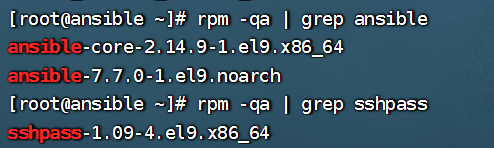
3、下载安装ansible和sshpass
sshpass简单来说就是设置免密登录
4、再ansible主机上映射被控节点并测试是否连通
排除网络故障,为了后续的ansible指令正常执行
[root@ansible ~]# cat /etc/hosts
127.0.0.1   localhost localhost.localdomain localhost4 localhost4.localdomain4
::1         localhost localhost.localdomain localhost6 localhost6.localdomain6
192.168.72.64 node1
192.168.72.65 node2
[root@ansible ~]# ping -c 2 node1
PING node1 (192.168.72.64) 56(84) bytes of data.
64 bytes from node1 (192.168.72.64): icmp_seq=1 ttl=64 time=1.83 ms
64 bytes from node1 (192.168.72.64): icmp_seq=2 ttl=64 time=0.711 ms

--- node1 ping statistics ---
2 packets transmitted, 2 received, 0% packet loss, time 1002ms
rtt min/avg/max/mdev = 0.711/1.272/1.833/0.561 ms
[root@ansible ~]# ping -c 2 node2
PING node2 (192.168.72.65) 56(84) bytes of data.
64 bytes from node2 (192.168.72.65): icmp_seq=1 ttl=64 time=1.57 ms
64 bytes from node2 (192.168.72.65): icmp_seq=2 ttl=64 time=0.587 ms

--- node2 ping statistics ---
2 packets transmitted, 2 received, 0% packet loss, time 1001ms
rtt min/avg/max/mdev = 0.587/1.076/1.565/0.489 ms
5、关闭防火墙
[root@ansible ~]# systemctl disable firewalld
[root@ansible ~]# systemctl status firewalld
○ firewalld.service - firewalld - dynamic firewall daemon
     Loaded: loaded (/usr/lib/systemd/system/firewalld.service; disabled; preset: enabled)
     Active: inactive (dead)
       Docs: man:firewalld(1)
6、关闭SELinux(防止出现未知问题)
[root@ansible ~]# sed -i "s/SELINUX=enforcing/SELINUX=permissive/g" /etc/selinux/config
[root@ansible ~]# grep permissive /etc/selinux/config
#     permissive - SELinux prints warnings instead of enforcing.
SELINUX=permissive
7、配置免密登录
生成.ssh文件,默认位置在~/.ssh/,文件夹中id_rsa为私钥,id_rsa.pub为公钥,其中-t rsa为设置加密的方式为rsa
[root@ansible ~]# ssh-keygen -t rsa
Generating public/private rsa key pair.
Enter file in which to save the key (/root/.ssh/id_rsa):
Created directory '/root/.ssh'.
Enter passphrase (empty for no passphrase):
Enter same passphrase again:
Your identification has been saved in /root/.ssh/id_rsa
Your public key has been saved in /root/.ssh/id_rsa.pub
The key fingerprint is:
SHA256:sk4vLhHUXg6r10w4rs83ZFBqEeyk5K7REnCxppYPhrU root@ansible
The key's randomart image is:
+---[RSA 3072]----+
|  .. o..         |
|. ..o * o        |
| o++ = X         |
|.+o.+ X o        |
|o=E+ =.*S        |
|o = = oo=        |
|   = +oo         |
|  . o+..o        |
|     +=o..       |
+----[SHA256]-----+
将pub公钥交给node1和node2以实现免密登录
[root@ansible ~]# ssh-copy-id node1
/usr/bin/ssh-copy-id: INFO: Source of key(s) to be installed: "/root/.ssh/id_rsa.pub"
The authenticity of host 'node1 (192.168.72.64)' can't be established.
ED25519 key fingerprint is SHA256:iWgbD/D/01ERqLbv0C9V+APJJ8t2fJ/Ysa/FKBSzcCY.
This key is not known by any other names
Are you sure you want to continue connecting (yes/no/[fingerprint])? yes
/usr/bin/ssh-copy-id: INFO: attempting to log in with the new key(s), to filter out any that are already installed
/usr/bin/ssh-copy-id: INFO: 1 key(s) remain to be installed -- if you are prompted now it is to install the new keys
root@node1's password:

Number of key(s) added: 1

Now try logging into the machine, with:   "ssh 'node1'"
and check to make sure that only the key(s) you wanted were added.

[root@ansible ~]# ssh-copy-id node2
/usr/bin/ssh-copy-id: INFO: Source of key(s) to be installed: "/root/.ssh/id_rsa.pub"
The authenticity of host 'node2 (192.168.72.65)' can't be established.
ED25519 key fingerprint is SHA256:iWgbD/D/01ERqLbv0C9V+APJJ8t2fJ/Ysa/FKBSzcCY.
This host key is known by the following other names/addresses:
    ~/.ssh/known_hosts:1: node1
Are you sure you want to continue connecting (yes/no/[fingerprint])? yes
/usr/bin/ssh-copy-id: INFO: attempting to log in with the new key(s), to filter out any that are already installed
/usr/bin/ssh-copy-id: INFO: 1 key(s) remain to be installed -- if you are prompted now it is to install the new keys
root@node2's password:

Number of key(s) added: 1

Now try logging into the machine, with:   "ssh 'node2'"
and check to make sure that only the key(s) you wanted were added.
测试是否设置成功
[root@ansible ~]# ssh node1
Register this system with Red Hat Insights: insights-client --register
Create an account or view all your systems at https://red.ht/insights-dashboard
Last login: Mon Apr  6 21:22:37 2026 from 192.168.72.63
[root@node1 ~]# exit
logout
Connection to node1 closed.
[root@ansible ~]# ssh node2
Register this system with Red Hat Insights: insights-client --register
Create an account or view all your systems at https://red.ht/insights-dashboard
Last login: Mon Apr  6 20:39:28 2026 from 192.168.72.1
[root@node2 ~]# exit
logout
Connection to node2 closed.
二、简单使用
[root@ansible ~]# mkdir demo1
[root@ansible ~]# cd demo1/
[root@ansible demo1]# ls
[root@ansible demo1]# vim ansible.cfg
[root@ansible demo1]# vim inventory
[root@ansible demo1]# ansible all -m ping
node2 | SUCCESS => {
    "ansible_facts": {
        "discovered_interpreter_python": "/usr/bin/python3"
    },
    "changed": false,
    "ping": "pong"
}
node1 | SUCCESS => {
    "ansible_facts": {
        "discovered_interpreter_python": "/usr/bin/python3"
    },
    "changed": false,
    "ping": "pong"
}
[root@ansible demo1]#
如果此处不是SUCCESS需检查网络配置是否正确
本文只做了简单的操作,为后续操作打基础,下篇将通过具体实验来运用ansible。