时光倒流应用
欢迎加入开源鸿蒙跨平台社区:
https://openharmonycrossplatform.csdn.net
一、项目概述
运行效果图
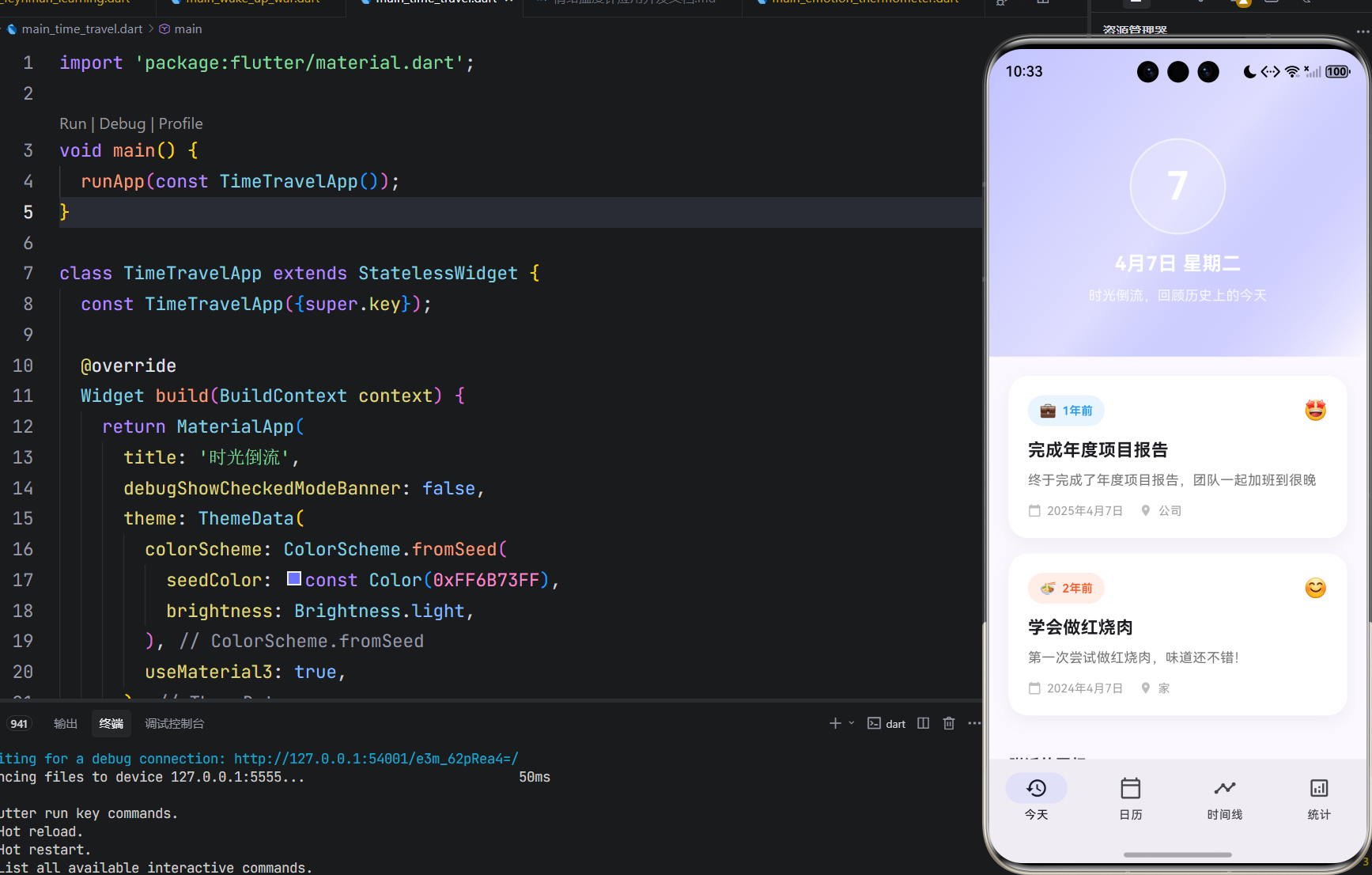

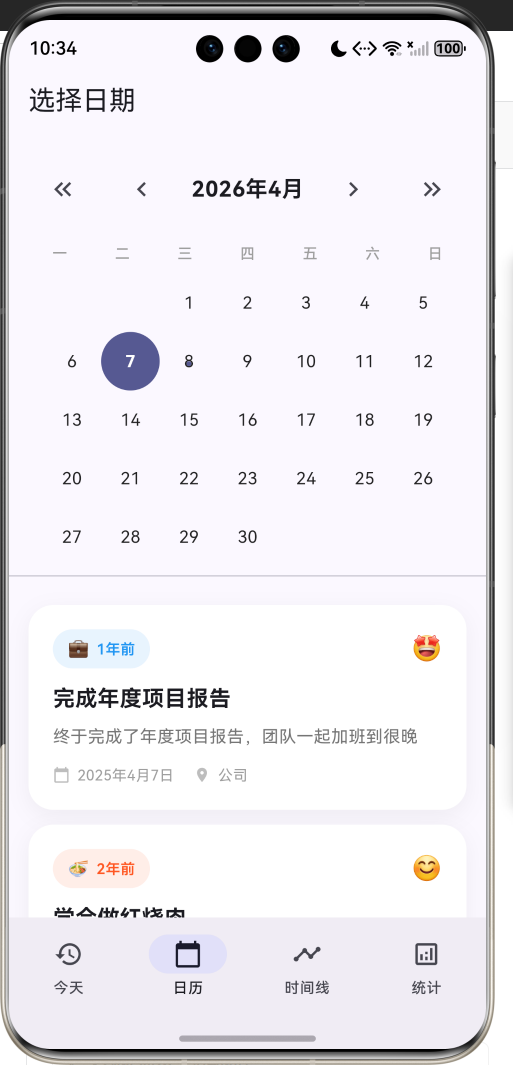

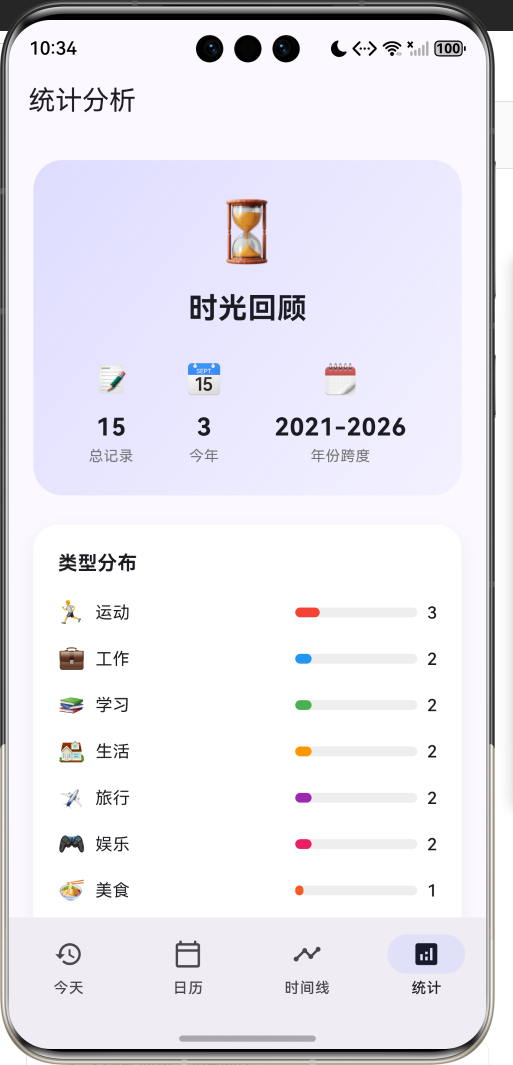
1.1 应用简介
时光倒流是一款帮助用户回顾历史的记忆管理应用。在这个快节奏的时代,我们常常忘记了过去的经历和成长。这款应用让用户能够轻松查看"历史上的今天"在做什么,重温那些珍贵的回忆。
应用以梦幻的紫蓝色为主色调,营造出时光穿梭的神秘氛围。用户可以记录生活中的重要时刻,包括工作、学习、旅行、运动等各种类型,并添加心情标签。通过日历视图、时间线和统计分析,全方位展示用户的成长轨迹。
1.2 核心功能
| 功能模块 | 功能描述 | 实现方式 |
|---|---|---|
| 历史上的今天 | 查看往年同日记录 | 日期筛选 |
| 日历视图 | 选择特定日期查看 | 自定义日历 |
| 时间线 | 按时间顺序展示 | 分组列表 |
| 记录管理 | 添加和管理记忆 | 底部弹窗 |
| 统计分析 | 类型和年度分布 | 自定义图表 |
1.3 记忆类型
| 序号 | 类型名称 | 图标 | 颜色 | 典型场景 |
|---|---|---|---|---|
| 1 | 工作 | 💼 | #2196F3 | 项目、加班、会议 |
| 2 | 学习 | 📚 | #4CAF50 | 读书、课程、考试 |
| 3 | 生活 | 🏠 | #FF9800 | 日常、搬家、纪念日 |
| 4 | 旅行 | ✈️ | #9C27B0 | 出游、景点、探索 |
| 5 | 运动 | 🏃 | #F44336 | 健身、跑步、比赛 |
| 6 | 娱乐 | 🎮 | #E91E63 | 游戏、追剧、音乐 |
| 7 | 美食 | 🍜 | #FF5722 | 烹饪、餐厅、美食 |
| 8 | 社交 | 👥 | #00BCD4 | 聚会、朋友、活动 |
| 9 | 其他 | 📝 | #607D8B | 杂项、记录、想法 |
1.4 心情类型
| 序号 | 心情名称 | 图标 | 颜色 |
|---|---|---|---|
| 1 | 开心 | 😊 | #FFEB3B |
| 2 | 兴奋 | 🤩 | #FF9800 |
| 3 | 平静 | 😌 | #8BC34A |
| 4 | 疲惫 | 😴 | #9E9E9E |
| 5 | 难过 | 😢 | #64B5F6 |
| 6 | 生气 | 😠 | #F44336 |
| 7 | 一般 | 😐 | #BDBDBD |
1.5 技术栈
| 技术领域 | 技术选型 | 版本要求 |
|---|---|---|
| 开发框架 | Flutter | >= 3.0.0 |
| 编程语言 | Dart | >= 2.17.0 |
| 设计规范 | Material Design 3 | - |
| 状态管理 | setState | - |
| 动画系统 | AnimationController | - |
| 目标平台 | 鸿蒙OS / Web | API 21+ |
1.6 项目结构
lib/
└── main_time_travel.dart
    ├── TimeTravelApp              # 应用入口
    ├── MemoryType                 # 记忆类型枚举
    ├── MoodType                   # 心情类型枚举
    ├── MemoryRecord               # 记忆记录模型
    ├── TimeTravelHomePage         # 主页面(底部导航)
    ├── _buildTodayPage            # 今天页面
    ├── _buildCalendarPage         # 日历页面
    ├── _buildTimelinePage         # 时间线页面
    ├── _buildStatsPage            # 统计页面
    └── YearChartPainter           # 年度图表绘制器
二、系统架构
2.1 整体架构图
Data Layer
Presentation Layer
主页面
TimeTravelHomePage
今天页
日历页
时间线页
统计页
历史记录展示
附近回忆
日历网格
选中日期记录
年份分组
时间线卡片
概览统计
类型分布
年度分布
MemoryType
类型枚举
MoodType
心情枚举
MemoryRecord
记录模型
2.2 类图设计
uses
uses
manages
uses
contains
contains
TimeTravelApp
+Widget build()
<<enumeration>>
MemoryType
+work 工作
+study 学习
+life 生活
+travel 旅行
+sport 运动
+entertainment 娱乐
+food 美食
+social 社交
+other 其他
+String label
+String emoji
+Color color
<<enumeration>>
MoodType
+happy 开心
+excited 兴奋
+calm 平静
+tired 疲惫
+sad 难过
+angry 生气
+neutral 一般
+String label
+String emoji
+Color color
MemoryRecord
+String id
+DateTime date
+String title
+String content
+MemoryType type
+MoodType? mood
+List<String> tags
+String? location
+int yearsAgo
TimeTravelHomePage
-int _selectedIndex
-List<MemoryRecord> _memories
-DateTime _selectedDate
-AnimationController _fadeController
-AnimationController _slideController
+List<MemoryRecord> _getMemoriesOnThisDay()
+List<MemoryRecord> _getMemoriesOnDate(DateTime)
+Map<String,dynamic> _getStatistics()
YearChartPainter
-List<MapEntry>int,int<> data
+void paint(Canvas, Size)
+bool shouldRepaint()
2.3 页面导航流程
今天
日历
时间线
统计
应用启动
主页面
底部导航
今天页面
日历页面
时间线页面
统计页面
查看历史记录
查看附近回忆
选择日期
查看该日记录
按年份浏览
查看详细记录
查看概览
查看类型分布
查看年度分布
2.4 数据查询流程时序图
记忆卡片 数据层 今天页 用户 记忆卡片 数据层 今天页 用户 打开应用 获取当前日期 返回日期 查询同月同日记录 筛选memories列表 返回匹配记录 渲染记录卡片 展示历史回忆 查看附近回忆 查询±7天记录 返回附近记录
三、核心模块设计
3.1 数据模型设计
3.1.1 记忆类型枚举 (MemoryType)
dart
enum MemoryType {
  work('工作', '💼', Color(0xFF2196F3)),
  study('学习', '📚', Color(0xFF4CAF50)),
  life('生活', '🏠', Color(0xFFFF9800)),
  travel('旅行', '✈️', Color(0xFF9C27B0)),
  sport('运动', '🏃', Color(0xFFF44336)),
  entertainment('娱乐', '🎮', Color(0xFFE91E63)),
  food('美食', '🍜', Color(0xFFFF5722)),
  social('社交', '👥', Color(0xFF00BCD4)),
  other('其他', '📝', Color(0xFF607D8B));

  final String label;
  final String emoji;
  final Color color;

  const MemoryType(this.label, this.emoji, this.color);
}
3.1.2 心情类型枚举 (MoodType)
dart
enum MoodType {
  happy('开心', '😊', Color(0xFFFFEB3B)),
  excited('兴奋', '🤩', Color(0xFFFF9800)),
  calm('平静', '😌', Color(0xFF8BC34A)),
  tired('疲惫', '😴', Color(0xFF9E9E9E)),
  sad('难过', '😢', Color(0xFF64B5F6)),
  angry('生气', '😠', Color(0xFFF44336)),
  neutral('一般', '😐', Color(0xFFBDBDBD));

  final String label;
  final String emoji;
  final Color color;

  const MoodType(this.label, this.emoji, this.color);
}
3.1.3 记忆记录模型 (MemoryRecord)
dart
class MemoryRecord {
  final String id;              // 唯一标识
  final DateTime date;          // 记录日期
  final String title;           // 标题
  final String content;         // 内容描述
  final MemoryType type;        // 记忆类型
  final MoodType? mood;         // 心情(可选)
  final List<String> tags;      // 标签列表
  final String? location;       // 地点(可选)

  int get yearsAgo => DateTime.now().year - date.year;
}
3.1.4 记忆类型分布
20% 13% 13% 13% 13% 13% 7% 7% 示例数据类型分布 工作 学习 旅行 运动 生活 娱乐 美食 社交
3.2 页面结构设计
3.2.1 主页面布局
TimeTravelHomePage
IndexedStack
今天页
日历页
时间线页
统计页
NavigationBar
今天 Tab
日历 Tab
时间线 Tab
统计 Tab
3.2.2 今天页面结构
今天页面
SliverAppBar
内容区域
渐变背景
日期显示
副标题
历史记录卡片
空状态提示
附近回忆
类型标签
标题内容
日期地点
心情图标
3.2.3 日历页面结构
日历页面
日历头部
日历网格
选中日期记录
年份切换
月份切换
当前年月
星期标题
日期格子
记忆标记点
记录列表
空状态
3.3 数据查询设计
找到匹配
未找到
查询今天记录
有记录
无记录
按年份排序
显示卡片
显示空状态
查询附近记录
显示附近回忆
四、UI设计规范
4.1 配色方案
应用采用梦幻的紫蓝色为主色调,营造时光穿梭的氛围:
| 颜色类型 | 色值 | 用途 |
|---|---|---|
| 主色 | #6B73FF | 导航、按钮、强调元素 |
| 渐变起始 | #6B73FF (40%透明) | 头部渐变 |
| 渐变结束 | #6B73FF (20%透明) | 头部渐变 |
| 工作色 | #2196F3 | 蓝色 |
| 学习色 | #4CAF50 | 绿色 |
| 生活色 | #FF9800 | 橙色 |
| 旅行色 | #9C27B0 | 紫色 |
| 运动色 | #F44336 | 红色 |
| 娱乐色 | #E91E63 | 粉色 |
| 美食色 | #FF5722 | 深橙 |
| 社交色 | #00BCD4 | 青色 |
| 其他色 | #607D8B | 灰色 |
4.2 字体规范
| 元素 | 字号 | 字重 | 颜色 |
|---|---|---|---|
| 应用标题 | 20px | Bold | #FFFFFF |
| 日期显示 | 40px | Bold | #FFFFFF |
| 记忆标题 | 18px | Bold | #000000 |
| 记忆内容 | 14px | Regular | #757575 |
| 年份标题 | 20px | Bold | #6B73FF |
| 类型标签 | 12px | Medium | 类型色 |
| 辅助文字 | 11-12px | Regular | #9E9E9E |
4.3 组件规范
4.3.1 记忆卡片
┌─────────────────────────────────────────────┐
│  💼 3年前                              😊   │
│                                             │
│  完成年度项目报告                           │
│                                             │
│  终于完成了年度项目报告,                   │
│  团队一起加班到很晚                         │
│                                             │
│  📅 2021年4月7日    📍 公司                │
└─────────────────────────────────────────────┘
4.3.2 日历格子
┌─────┬─────┬─────┬─────┬─────┬─────┬─────┐
│  一 │  二 │  三 │  四 │  五 │  六 │  日 │
├─────┼─────┼─────┼─────┼─────┼─────┼─────┤
│     │     │  1  │  2  │  3  │  4  │  5  │
│     │     │     │  ●  │     │     │     │
├─────┼─────┼─────┼─────┼─────┼─────┼─────┤
│  6  │  7  │  8  │  9  │ 10  │ 11  │ 12  │
│     │(●) │     │  ●  │     │     │     │
└─────┴─────┴─────┴─────┴─────┴─────┴─────┘
      ↑选中  ●有记录
4.3.3 时间线卡片
    ●──────────────────────────────
    │  💼 4月7日              😊
    │  完成年度项目报告
    │  终于完成了年度项目报告...
    │
────┴────────────────────────────────
五、核心功能实现
5.1 历史上的今天查询
dart
List<MemoryRecord> _getMemoriesOnThisDay() {
  final now = DateTime.now();
  return _memories.where((m) {
    return m.date.month == now.month && m.date.day == now.day;
  }).toList();
}

List<MemoryRecord> _getMemoriesOnDate(DateTime date) {
  return _memories.where((m) {
    return m.date.month == date.month && m.date.day == date.day;
  }).toList();
}
5.2 统计数据计算
dart
Map<String, dynamic> _getStatistics() {
  final now = DateTime.now();
  final thisYear = _memories.where((m) => m.date.year == now.year).toList();
  final lastYear = _memories.where((m) => m.date.year == now.year - 1).toList();

  final typeCounts = <MemoryType, int>{};
  for (var type in MemoryType.values) {
    typeCounts[type] = _memories.where((m) => m.type == type).length;
  }

  final moodCounts = <MoodType, int>{};
  for (var mood in MoodType.values) {
    moodCounts[mood] = _memories.where((m) => m.mood == mood).length;
  }

  final yearCounts = <int, int>{};
  for (var m in _memories) {
    yearCounts[m.date.year] = (yearCounts[m.date.year] ?? 0) + 1;
  }

  return {
    'total': _memories.length,
    'thisYear': thisYear.length,
    'lastYear': lastYear.length,
    'typeCounts': typeCounts,
    'moodCounts': moodCounts,
    'yearCounts': yearCounts,
    'oldestYear': _memories.isEmpty ? now.year : _memories.last.date.year,
    'newestYear': _memories.isEmpty ? now.year : _memories.first.date.year,
  };
}
5.3 日历网格实现
dart
Widget _buildCalendarGrid() {
  final weekdays = ['一', '二', '三', '四', '五', '六', '日'];
  final firstDayOfMonth = DateTime(_selectedDate.year, _selectedDate.month, 1);
  final lastDayOfMonth = DateTime(_selectedDate.year, _selectedDate.month + 1, 0);
  final startWeekday = firstDayOfMonth.weekday;

  return Padding(
    padding: const EdgeInsets.symmetric(horizontal: 16),
    child: Column(
      children: [
        Row(
          children: weekdays.map((day) => Expanded(
            child: Center(
              child: Text(day, style: TextStyle(fontSize: 12, color: Colors.grey[500])),
            ),
          )).toList(),
        ),
        const SizedBox(height: 8),
        Wrap(
          children: List.generate(
            lastDayOfMonth.day + startWeekday - 1,
            (index) {
              if (index < startWeekday - 1) {
                return const SizedBox(width: 48, height: 48);
              }

              final day = index - startWeekday + 2;
              final date = DateTime(_selectedDate.year, _selectedDate.month, day);
              final isSelected = day == _selectedDate.day;
              final hasMemory = _memories.any((m) =>
                m.date.month == date.month && m.date.day == date.day);

              return GestureDetector(
                onTap: () {
                  setState(() {
                    _selectedDate = date;
                  });
                },
                child: Container(
                  width: 48,
                  height: 48,
                  decoration: BoxDecoration(
                    color: isSelected
                        ? Theme.of(context).colorScheme.primary
                        : null,
                    shape: BoxShape.circle,
                  ),
                  child: Center(
                    child: Stack(
                      alignment: Alignment.center,
                      children: [
                        Text('$day', style: TextStyle(fontSize: 14)),
                        if (hasMemory && !isSelected)
                          Positioned(
                            bottom: 6,
                            child: Container(
                              width: 4,
                              height: 4,
                              decoration: BoxDecoration(
                                color: Theme.of(context).colorScheme.primary,
                                shape: BoxShape.circle,
                              ),
                            ),
                          ),
                      ],
                    ),
                  ),
                ),
              );
            },
          ),
        ),
      ],
    ),
  );
}
5.4 时间线实现
dart
Widget _buildTimelinePage() {
  final sortedMemories = List<MemoryRecord>.from(_memories)
    ..sort((a, b) => b.date.compareTo(a.date));

  return Scaffold(
    appBar: AppBar(title: const Text('时间线')),
    body: ListView.builder(
      padding: const EdgeInsets.all(20),
      itemCount: sortedMemories.length,
      itemBuilder: (context, index) {
        final memory = sortedMemories[index];
        final showYear = index == 0 ||
            sortedMemories[index - 1].date.year != memory.date.year;

        return Column(
          crossAxisAlignment: CrossAxisAlignment.start,
          children: [
            if (showYear)
              Padding(
                padding: const EdgeInsets.only(bottom: 16, top: index == 0 ? 0 : 24),
                child: Text(
                  '${memory.date.year}年',
                  style: const TextStyle(
                    fontSize: 20,
                    fontWeight: FontWeight.bold,
                    color: Color(0xFF6B73FF),
                  ),
                ),
              ),
            _buildTimelineItem(memory),
          ],
        );
      },
    ),
  );
}
5.5 年度图表绘制
dart
class YearChartPainter extends CustomPainter {
  final List<MapEntry<int, int>> data;

  YearChartPainter(this.data);

  @override
  void paint(Canvas canvas, Size size) {
    if (data.isEmpty) return;

    final paint = Paint()
      ..color = const Color(0xFF6B73FF)
      ..strokeWidth = 2
      ..style = PaintingStyle.stroke;

    final fillPaint = Paint()
      ..color = const Color(0xFF6B73FF).withValues(alpha: 0.1)
      ..style = PaintingStyle.fill;

    final maxVal = data.map((e) => e.value).reduce((a, b) => a > b ? a : b);
    final stepX = size.width / (data.length - 1);

    final path = Path();
    final fillPath = Path();

    for (int i = 0; i < data.length; i++) {
      final x = i * stepX;
      final y = size.height - (data[i].value / maxVal) * size.height * 0.8 - size.height * 0.1;

      if (i == 0) {
        path.moveTo(x, y);
        fillPath.moveTo(x, size.height);
        fillPath.lineTo(x, y);
      } else {
        path.lineTo(x, y);
        fillPath.lineTo(x, y);
      }
    }

    fillPath.lineTo(size.width, size.height);
    fillPath.close();

    canvas.drawPath(fillPath, fillPaint);
    canvas.drawPath(path, paint);

    // 绘制数据点和年份标签
    for (int i = 0; i < data.length; i++) {
      final x = i * stepX;
      final y = size.height - (data[i].value / maxVal) * size.height * 0.8 - size.height * 0.1;
      canvas.drawCircle(Offset(x, y), 4, Paint()..color = const Color(0xFF6B73FF));
    }
  }

  @override
  bool shouldRepaint(covariant CustomPainter oldDelegate) => false;
}
六、交互设计
6.1 日历选择交互流程
记录列表 日历网格 日历头部 用户 记录列表 日历网格 日历头部 用户 点击切换月份 更新显示月份 显示新月份 点击日期 更新选中状态 查询该日记录 显示记录列表
6.2 时间线浏览流程
是
否
是
否
打开时间线
加载所有记录
按日期降序排序
遍历记录
需要显示年份?
显示年份标题
跳过
显示时间线卡片
还有更多记录?
完成渲染
6.3 页面切换状态
点击日历Tab
点击时间线Tab
点击统计Tab
点击今天Tab
点击时间线Tab
点击统计Tab
点击今天Tab
点击日历Tab
点击统计Tab
点击今天Tab
点击日历Tab
点击时间线Tab
今天页
日历页
时间线页
统计页
七、扩展功能规划
7.1 后续版本规划
2024-01-07 2024-01-14 2024-01-21 2024-01-28 2024-02-04 2024-02-11 2024-02-18 2024-02-25 2024-03-03 2024-03-10 2024-03-17 历史上的今天 日历视图 时间线展示 统计分析 添加记录 照片附件 搜索功能 云端同步 分享功能 AI回忆推荐 V1.0 基础版本 V1.1 增强版本 V1.2 进阶版本 时光倒流开发计划
7.2 功能扩展建议
7.2.1 添加记录功能
用户主动记录:
- 添加新的记忆记录
- 上传照片附件
- 设置提醒回顾
7.2.2 搜索功能
快速查找回忆:
- 按关键词搜索
- 按类型筛选
- 按时间范围筛选
7.2.3 分享功能
社交分享能力:
- 生成精美卡片
- 分享到社交平台
- 创建回忆相册
八、注意事项
8.1 开发注意事项
-
日期处理:注意时区问题,使用DateTime.now()获取本地时间
-
动画控制:两个AnimationController需要在dispose时释放
-
状态管理:使用setState管理本地状态,注意_selectedDate更新
-
日历计算:注意月份第一天是星期几的计算
8.2 常见问题
| 问题 | 原因 | 解决方案 |
|---|---|---|
| 日历显示错误 | 月份起始计算问题 | 检查weekday计算 |
| 记录不显示 | 筛选条件问题 | 检查where条件 |
| 年份不显示 | 排序问题 | 检查sort逻辑 |
| 图表不显示 | 数据为空 | 检查yearCounts |
8.3 使用提示
⏳ 时光倒流使用小贴士 ⏳
记录生活中的重要时刻。
定期回顾,重温美好回忆。
通过时间线,见证自己的成长。
珍惜每一天,创造更多回忆!
九、运行说明
9.1 环境要求
| 环境 | 版本要求 |
|---|---|
| Flutter SDK | >= 3.0.0 |
| Dart SDK | >= 2.17.0 |
| 鸿蒙OS | API 21+ |
9.2 运行命令
bash
# 查看可用设备
flutter devices

# 运行到Web服务器
flutter run -d web-server -t lib/main_time_travel.dart --web-port 8123

# 运行到鸿蒙设备
flutter run -d 127.0.0.1:5555 lib/main_time_travel.dart

# 运行到Windows
flutter run -d windows -t lib/main_time_travel.dart

# 代码分析
flutter analyze lib/main_time_travel.dart
十、总结
时光倒流是一款帮助用户回顾历史的记忆管理应用,通过"历史上的今天"功能让用户轻松重温过去的经历。应用内置九大记忆类型和七种心情标签,用户可以全方位记录生活中的重要时刻。
核心功能涵盖历史上的今天、日历视图、时间线展示、统计分析四大模块。历史上的今天自动展示往年同日的记录;日历视图支持选择特定日期查看回忆;时间线按年份分组展示所有记录;统计分析提供类型分布和年度分布图表。
应用采用Material Design 3设计规范,以梦幻的紫蓝色为主色调,营造时光穿梭的神秘氛围。通过本应用,希望能够帮助用户珍惜每一天,记录成长轨迹,创造更多美好回忆。
时光倒流,重温美好回忆