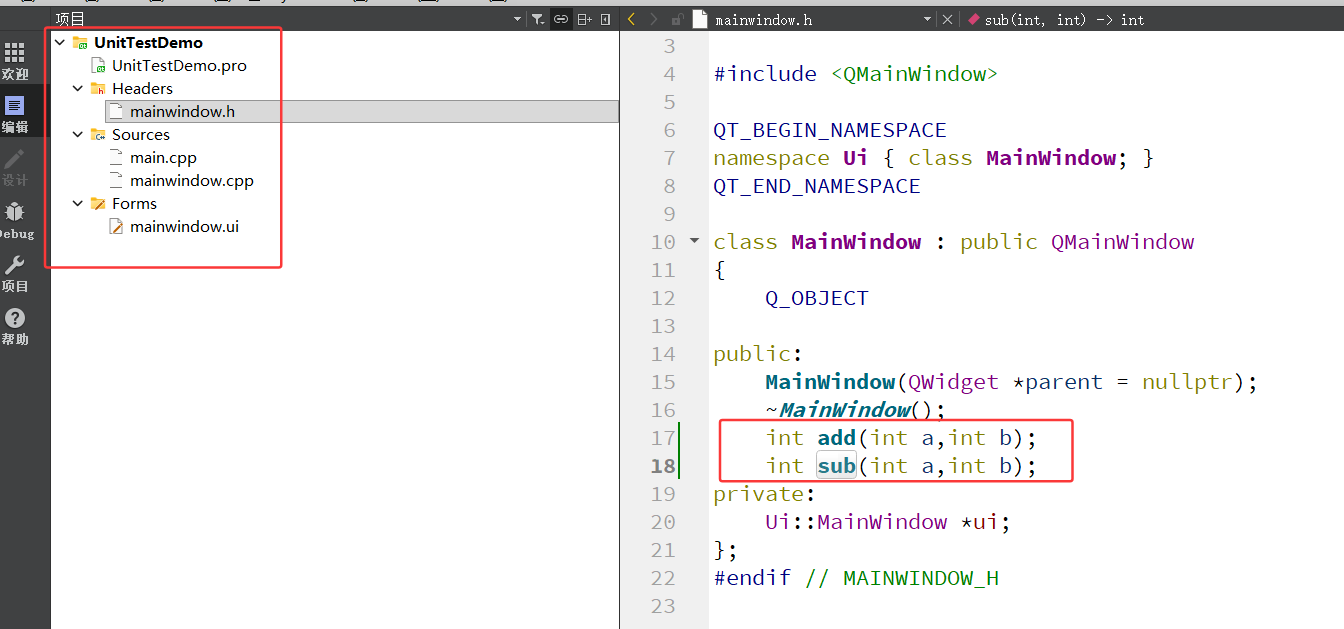
测试工程:UnitTestDemo
单元测试工程:UnitTestDemo_Test
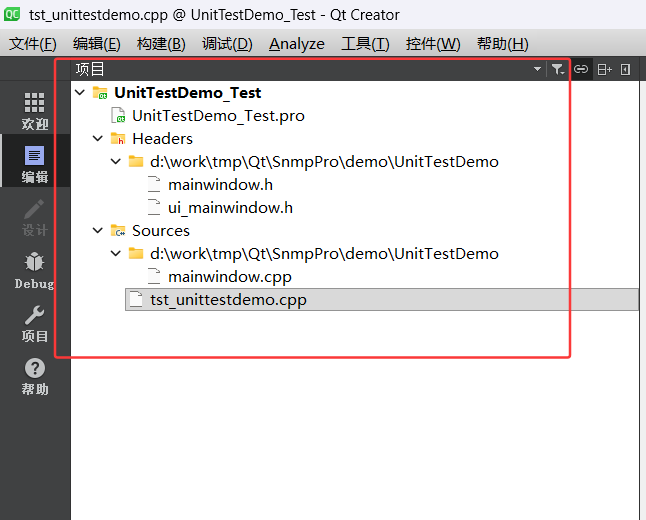
UnitTestDemo_Test.pro:
QT += core widgets testlib
CONFIG += c++11

# The following define makes your compiler emit warnings if you use
# any Qt feature that has been marked deprecated (the exact warnings
# depend on your compiler). Please consult the documentation of the
# deprecated API in order to know how to port your code away from it.
DEFINES += QT_DEPRECATED_WARNINGS

# You can also make your code fail to compile if it uses deprecated APIs.
# In order to do so, uncomment the following line.
# You can also select to disable deprecated APIs only up to a certain version of Qt.
#DEFINES += QT_DISABLE_DEPRECATED_BEFORE=0x060000    # disables all the APIs deprecated before Qt 6.0.0

SOURCES += \
    tst_unittestdemo.cpp \
    d:/work/tmp/Qt/SnmpPro/demo/UnitTestDemo/mainwindow.cpp

HEADERS += \
    d:/work/tmp/Qt/SnmpPro/demo/UnitTestDemo/mainwindow.h \
    d:/work/tmp/Qt/SnmpPro/demo/UnitTestDemo/ui_mainwindow.h

INCLUDEPATH += d:/work/tmp/Qt/SnmpPro/demo/UnitTestDemo

DESTDIR = ./release
OBJECTS_DIR = ./release
MOC_DIR = ./release

TARGET = tst_unittestdemo
tst_unittestdemo.cpp:
#include <QtTest>
#include "../../UnitTestDemo/mainwindow.h"

class UnitTestDemoTest : public QObject
{
    Q_OBJECT

private slots:
    void initTestCase();
    void testAdd();
    void testSub();
    void cleanupTestCase();

private:
    MainWindow *mainWindow;
};

void UnitTestDemoTest::initTestCase()
{
    mainWindow = new MainWindow();
}

void UnitTestDemoTest::testAdd()
{
    QVERIFY(mainWindow->add(1, 2) == 3);
    QVERIFY(mainWindow->add(-1, 1) == 0);
    QVERIFY(mainWindow->add(0, 0) == 0);
    QVERIFY(mainWindow->add(100, 200) == 300);
}

void UnitTestDemoTest::testSub()
{
    QVERIFY(mainWindow->sub(5, 3) == 2);
    QVERIFY(mainWindow->sub(1, 1) == 0);
    QVERIFY(mainWindow->sub(0, 0) == 0);
    QVERIFY(mainWindow->sub(100, 50) == 50);
}

void UnitTestDemoTest::cleanupTestCase()
{
    delete mainWindow;
}

QTEST_MAIN(UnitTestDemoTest)

#include "tst_unittestdemo.moc"
执行流程说明:
# UnitTestDemo 测试工程搭建流程

## 1. 准备工作
- 确保已安装 Qt 5.14.2 及以上版本
- 确保 Qt Creator 已安装并配置好
- 确认 `D:\work\tmp\Qt\SnmpPro\demo\UnitTestDemo` 目录存在且包含完整的项目文件

## 2. 创建测试工程
1. **进入测试目录**:
   ```
   cd D:\work\tmp\Qt\SnmpPro\demo\UnitTestDemo_Test
   ```

2. **使用 qmake 创建测试工程**:
   ```
   C:/tools/install/Qt5142/5.14.2/mingw73_64/bin/qmake.exe -project -template app
   ```

## 3. 配置工程文件
编辑 `UnitTestDemo_Test.pro` 文件,添加以下内容:

```pro
QT += core widgets testlib
CONFIG += c++11

# The following define makes your compiler emit warnings if you use
# any Qt feature that has been marked deprecated (the exact warnings
# depend on your compiler). Please consult the documentation of the
# deprecated API in order to know how to port your code away from it.
DEFINES += QT_DEPRECATED_WARNINGS

# You can also make your code fail to compile if it uses deprecated APIs.
# In order to do so, uncomment the following line.
# You can also select to disable deprecated APIs only up to a certain version of Qt.
#DEFINES += QT_DISABLE_DEPRECATED_BEFORE=0x060000    # disables all the APIs deprecated before Qt 6.0.0

SOURCES += \
    tst_unittestdemo.cpp \
    d:/work/tmp/Qt/SnmpPro/demo/UnitTestDemo/mainwindow.cpp

HEADERS += \
    d:/work/tmp/Qt/SnmpPro/demo/UnitTestDemo/mainwindow.h \
    d:/work/tmp/Qt/SnmpPro/demo/UnitTestDemo/ui_mainwindow.h

INCLUDEPATH += d:/work/tmp/Qt/SnmpPro/demo/UnitTestDemo

DESTDIR = ./release
OBJECTS_DIR = ./release
MOC_DIR = ./release

TARGET = tst_unittestdemo
```

## 4. 创建测试文件
创建 `tst_unittestdemo.cpp` 文件,添加以下内容:

```cpp
#include <QtTest>
#include "../../UnitTestDemo/mainwindow.h"

class UnitTestDemoTest : public QObject
{
    Q_OBJECT

private slots:
    void initTestCase();
    void testAdd();
    void testSub();
    void cleanupTestCase();

private:
    MainWindow *mainWindow;
};

void UnitTestDemoTest::initTestCase()
{
    mainWindow = new MainWindow();
}

void UnitTestDemoTest::testAdd()
{
    QVERIFY(mainWindow->add(1, 2) == 3);
    QVERIFY(mainWindow->add(-1, 1) == 0);
    QVERIFY(mainWindow->add(0, 0) == 0);
    QVERIFY(mainWindow->add(100, 200) == 300);
}

void UnitTestDemoTest::testSub()
{
    QVERIFY(mainWindow->sub(5, 3) == 2);
    QVERIFY(mainWindow->sub(1, 1) == 0);
    QVERIFY(mainWindow->sub(0, 0) == 0);
    QVERIFY(mainWindow->sub(100, 50) == 50);
}

void UnitTestDemoTest::cleanupTestCase()
{
    delete mainWindow;
}

QTEST_MAIN(UnitTestDemoTest)

#include "tst_unittestdemo.moc"
```

## 5. 生成 Makefile
运行 qmake 生成 Makefile 文件:

```
C:/tools/install/Qt5142/5.14.2/mingw73_64/bin/qmake.exe
```

## 6. 编译和运行测试
### 使用 Qt Creator 编译和运行
1. **打开测试工程**:
   - 启动 Qt Creator
   - 选择 "文件" > "打开文件或项目"
   - 选择 `D:\work\tmp\Qt\SnmpPro\demo\UnitTestDemo_Test\UnitTestDemo_Test.pro` 文件

2. **构建测试工程**:
   - 点击左侧工具栏的 "构建" 按钮(或按 Ctrl+B)

3. **运行测试**:
   - 点击左侧工具栏的 "运行" 按钮(或按 Ctrl+R)
   - 查看测试结果输出

### 使用命令行编译和运行(如果有构建工具)
如果系统中安装了 MinGW 或其他构建工具,可以使用以下命令:

```
# 编译
mingw32-make

# 运行测试
./release/tst_unittestdemo.exe
```

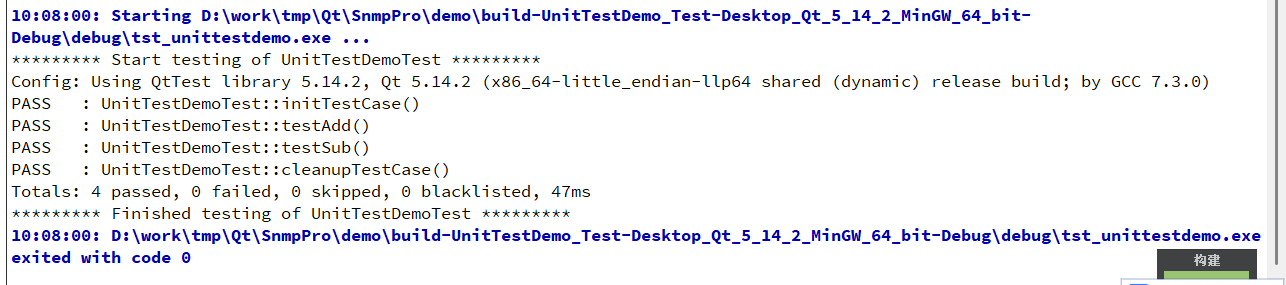
## 7. 测试结果
测试运行后,会输出类似以下结果:

```
********* Start testing of UnitTestDemoTest *********
Config: Using QtTest library 5.14.2, Qt 5.14.2 (x86_64-little_endian-llp64 shared (dynamic) release build; by GCC 7.3.0)
PASS   : UnitTestDemoTest::initTestCase()
PASS   : UnitTestDemoTest::testAdd()
PASS   : UnitTestDemoTest::testSub()
PASS   : UnitTestDemoTest::cleanupTestCase()
Totals: 4 passed, 0 failed, 0 skipped, 0 blacklisted, 1ms
********* Finished testing of UnitTestDemoTest *********
```

## 8. 常见问题及解决方案
### 问题1:QMainWindow: No such file or directory
**解决方案**:在工程文件中添加 widgets 模块依赖
```pro
QT += core widgets testlib
```

### 问题2:undefined reference to `MainWindow::add(int, int)`
**解决方案**:在工程文件中添加 mainwindow.cpp 的依赖
```pro
SOURCES += \
    tst_unittestdemo.cpp \
    d:/work/tmp/Qt/SnmpPro/demo/UnitTestDemo/mainwindow.cpp
```

### 问题3:ui_mainwindow.h: No such file or directory
**解决方案**:在工程文件中添加 ui_mainwindow.h 的依赖
```pro
HEADERS += \
    d:/work/tmp/Qt/SnmpPro/demo/UnitTestDemo/mainwindow.h \
    d:/work/tmp/Qt/SnmpPro/demo/UnitTestDemo/ui_mainwindow.h
```

### 问题4:QApplication: No such file or directory
**解决方案**:使用 QTEST_MAIN 宏替代 QTEST_APPLESS_MAIN 宏
```cpp
QTEST_MAIN(UnitTestDemoTest)
```

## 9. 测试覆盖范围
测试用例覆盖了 MainWindow 类的以下功能:
- `add(int a, int b)` - 加法功能,测试了正负数、零等边界情况
- `sub(int a, int b)` - 减法功能,测试了正负数、零等边界情况

通过以上步骤,您可以成功搭建并运行 UnitTestDemo 的测试工程,验证其核心功能的正确性。
截图: