一、claude code下载与配置
安装CLI
npm install -g @anthropic-ai/claude-code其他安装CLI方式
https://github.com/anthropics/claude-code#
MacOS/Linux (Recommended):
curl -fsSL https://claude.ai/install.sh | bashHomebrew (MacOS/Linux):
brew install --cask claude-codeWindows (Recommended):
irm https://claude.ai/install.ps1 | iexWinGet (Windows):
winget install Anthropic.ClaudeCodeNPM (Deprecated):
npm install -g @anthropic-ai/claude-code
如果太慢,可以先设置镜像地址,再下载
npm config set registry https://registry.npmmirror.com
npm install -g @anthropic-ai/claude-code
验证是否安装成功
claude --versionvscode的插件市场搜索claude code
Claude Code for VS Code
Anthropic
。。。描述省略。。。
Claude Code for VS Code: Harness the power of Claude Code without leaving your IDE
vscode修改配置:
(1)默认终端改成cmd(已经修改可以跳过):
设置->搜索"Terminal"->终端->将Windows Exec"改为cmd.exe
找到"Default Profile: Windows"->改为"Command Prompt"
(2)关闭插件的登录验证:
设置->搜索"claude code"->勾选"Disable Login Prompt"
(3)设置默认使用终端:
设置->搜索"claude code"->勾选"Use Terminal"
使用自身模型
使用国内中转站:
参考文档地址: https://4sapi.apifox.cn/347624c0
添加令牌,复制相关信息
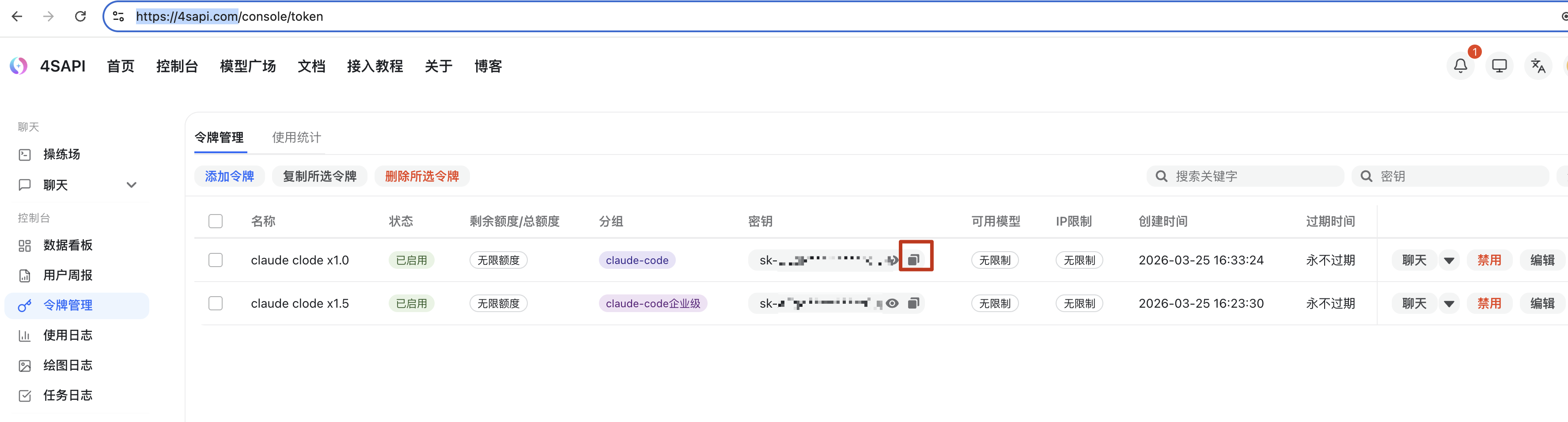
windows电脑搜索环境变量: 添加AUTHROPIC_AUTH_TOKEN,AUTHROPIC_BASE_URL
mac电脑修改profile文件配置:
vim /etc/profile

# 追加下面内容
AUTHROPIC_AUTH_TOKEN="sk-xxx"
AUTHROPIC_BASE_URL="https://4sapi.com"

# 保存退出后,让新配置生效
source /etc/profile
添加settings.json文件
{
  "env": {
    "ANTHROPIC_AUTH_TOKEN": "sk-hUOgVOGw0qdyk*****************",
    "ANTHROPIC_BASE_URL": "https://4sapi.com",
    "ANTHROPIC_DEFAULT_HAIKU_MODEL": "",
    "ANTHROPIC_DEFAULT_OPUS_MODEL": "",
    "ANTHROPIC_DEFAULT_SONNET_MODEL": "",
    "ANTHROPIC_MODEL": "",
    "ANTHROPIC_REASONING_MODEL": ""
  },
  "includeCoAuthoredBy": false
}
注意:费用很高,不过可以1元起充值,尝鲜可以试试。
国内模型对比:
|--------------|------|------|------|
| 服务商 | 官网地址 | 支持模型 | 核心特点 |
| 字节跳动-方舟 | | | |
| 阿里巴巴-阿里云百炼 | | | |
| 稀宇科技-minimax | | | |
| 智普-GLM | | | |
| 月之暗面-kimi | | | |
| 摩尔线程 | | | |
| 快手-KwaiKAT | | | |
| 百度-千帆 | | | |
| 无问芯穹-infini | | | |
代理商:
4SAPI,147API,PoloAPI等等
二、plugins
1.术语:
|--------------|-------------|------------------------------------------------|
| 术语 | 英文 | 中文解释 |
| Plugin | Plugin | claude code的扩展包,可包含Commands+skills+hooks+MCP配置 |
| Marketplace | Marketplace | plugin商店,浏览器和发现plugin的网页平台 |
| plugin.json | | plugin的数据清单,一般位于.claude/plugin目录的子目录中 |
| --plugin-dir | | claude code的可选启动参数,指定个加载plugin的目录路径 |
| Skill | | plugin中的核心能力模块(SKILL.md定义) |
| Hook | | plugin的自动化触发器(如代码提交前检查) |
2.核心价值:
- 可复用性: 一次开发,多个项目使用
- 分享性: 通过github,codelab,gitlab等一键克隆
- 模块化: 一个plugin专注一个领域
- 社区: 社区活跃度高,持续贡献优质plugin
3.Plugins, Commands, Skills, MCP的区别?
|------|-------------------|-----------------|-----------|---------------------|
| 维度 | Commands | Skills | MCP | Plugins |
| 定义 | markdown提示词 | 专业agent能力 | 外部服务器集成 | 打包的扩展 |
| 位置 | .claude/commands/ | .claude/skills/ | .mcp.json | .claude/plugins/ |
| 分享性 | 手动复制(x) | 手动复制(x) | 需要配置 | git clone(v) |
| 特色内容 | 单个提示词 | 多个文件+配置 | 服务器配置 | Commands+SKills+MCP |
| 加载方式 | 自动-在项目目录中 | 自动-在项目目录中 | 自动-配置后 | --plugin-dir |
关键区别: plugin是一个"超集"
Plugin = Commands+Skills+Hooks+MCP配置+文档
4.主流plugin来源:
anthropic官方Marketplace:
https://code.claude.com/plugins
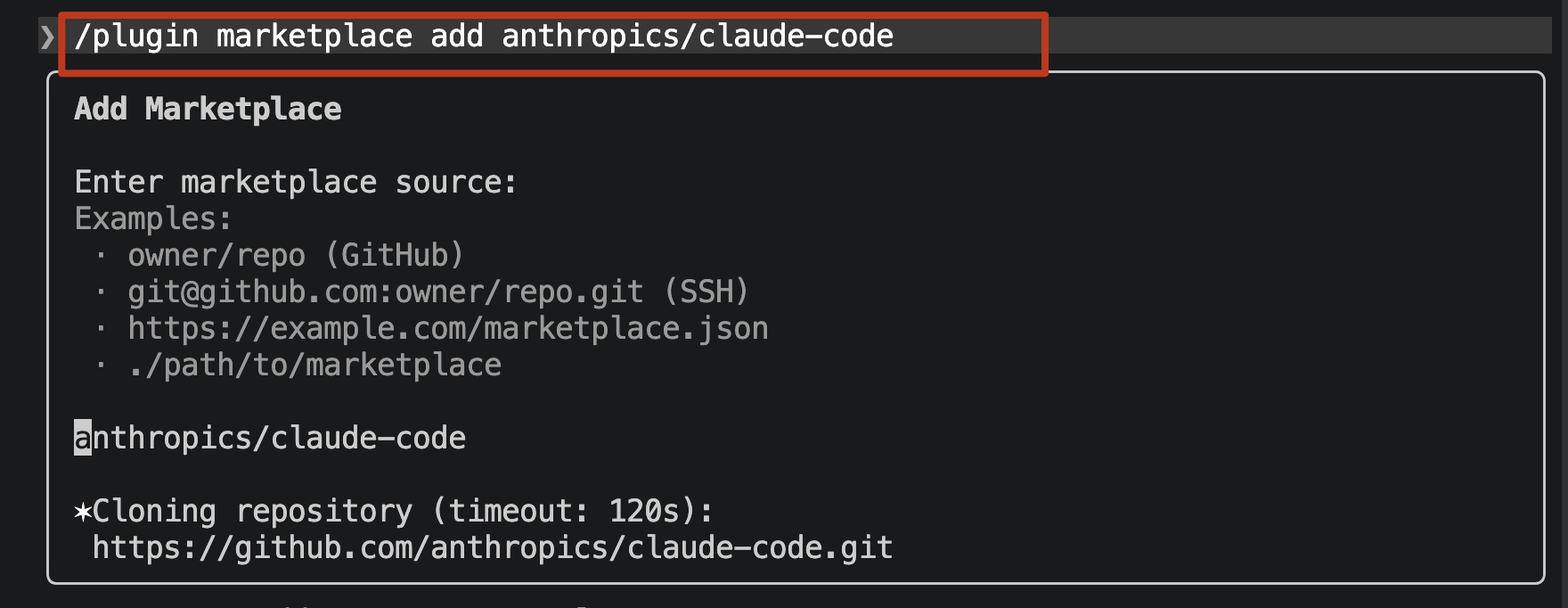
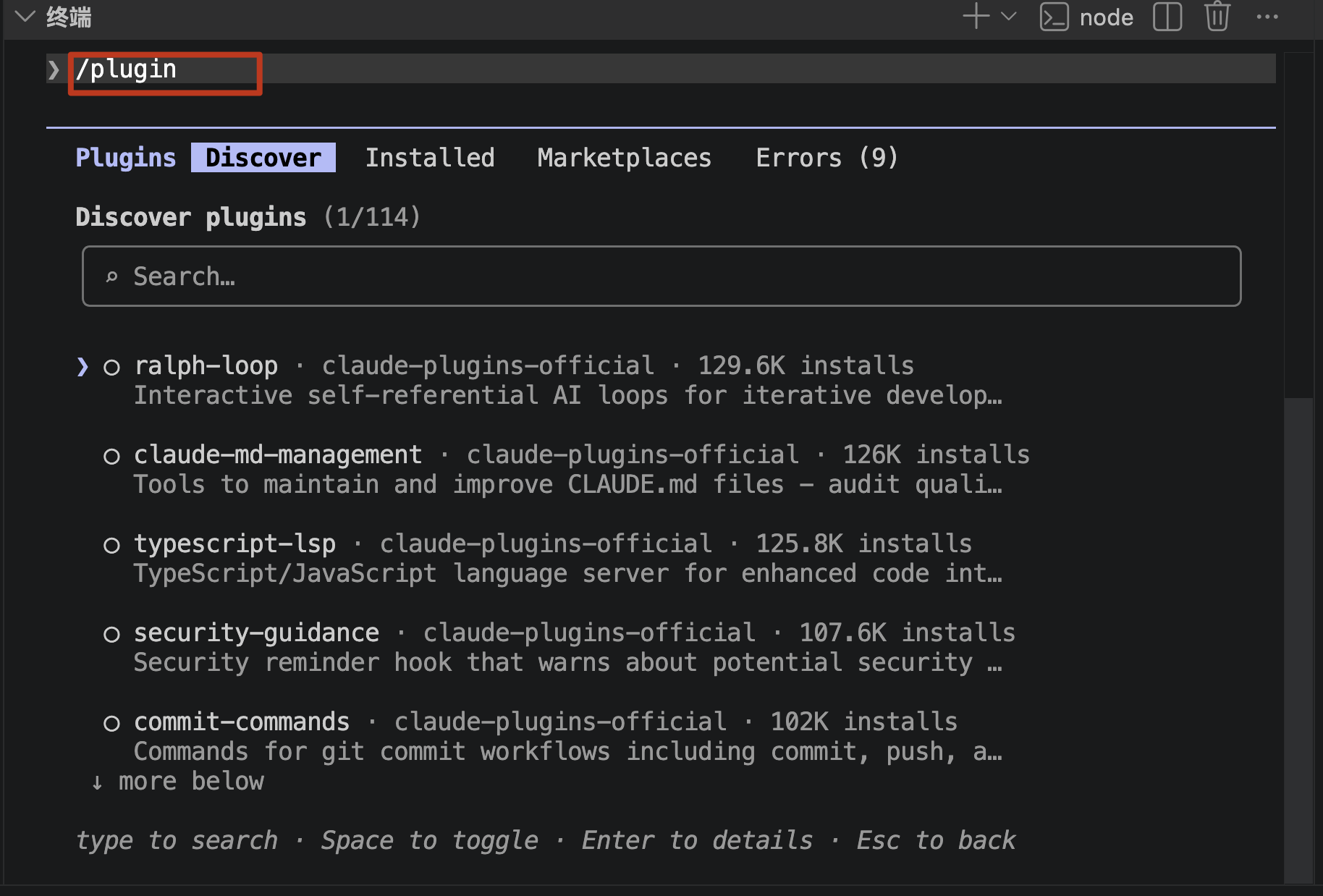
Jeremy Longshore社区集合:
Github搜索claude-code-plugin
安装方式:
/plugin -> 选择"marketplace"->add marketplace->粘贴https或者ssh克隆地址->回车
创建一个秘钥
ssh-keygen -t rsa -C "你的邮箱地址"
或者
ssh-keygen -t rsa -b 4096 -C "你的邮件地址"
一路enter下去
ls -l ~/.ssh
authorized_keys  id_rsa  id_rsa.pub
将id_rsa.pub文件里面的字符串全部复制粘贴到想要下载插件的Github,codelab或者gitlab仓库中
在进去claude命令行,按照github页面提示执行/plugin命令
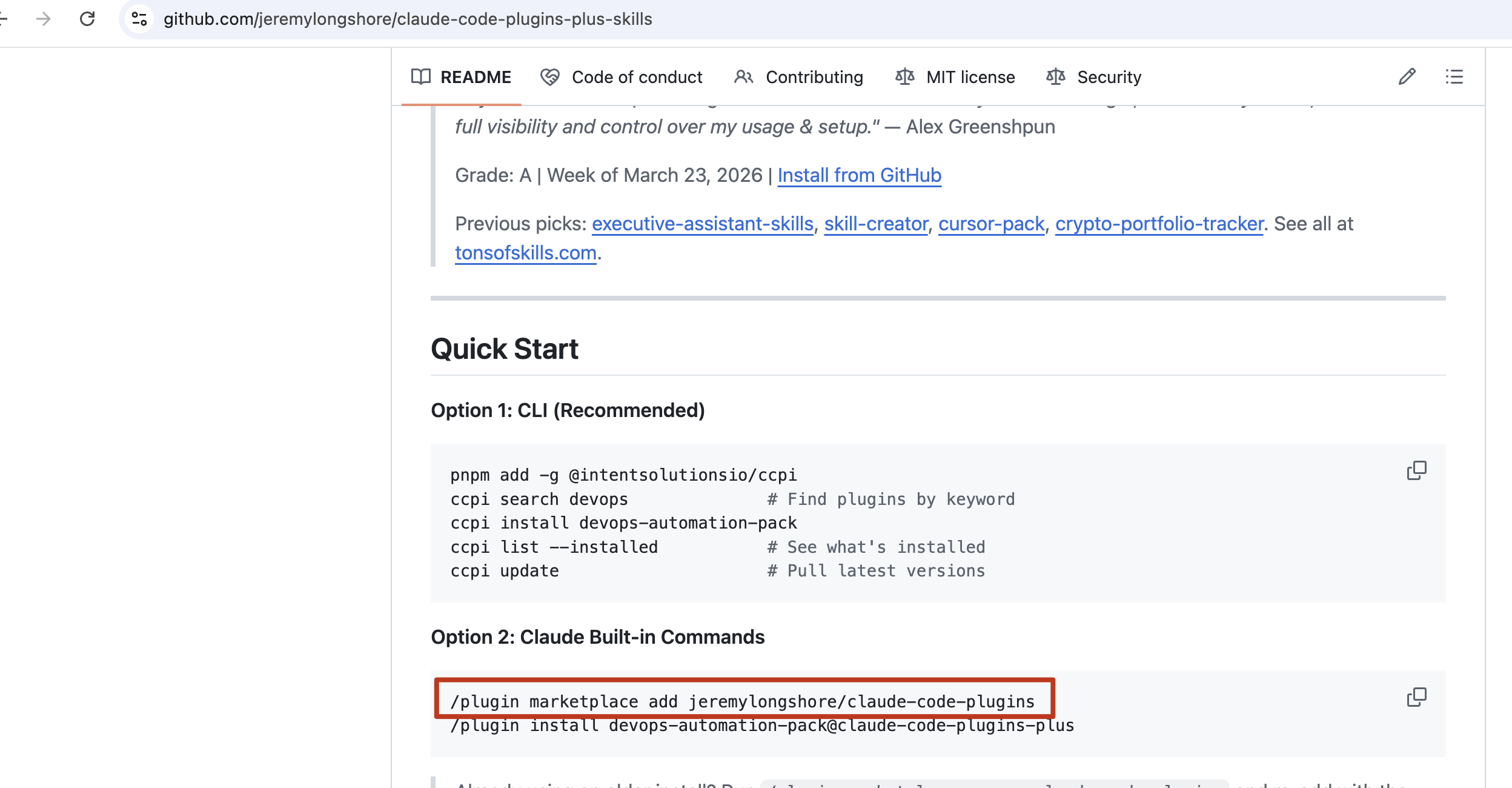
或者
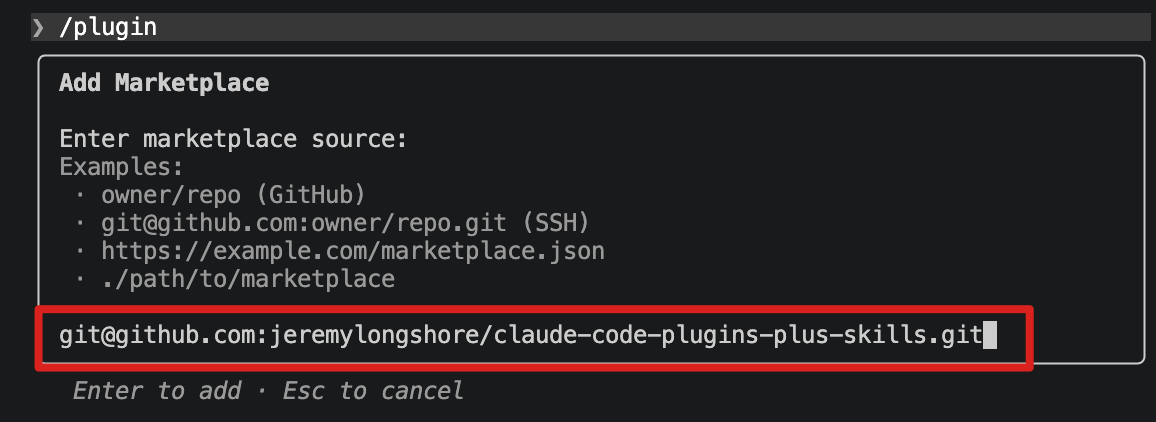
- claude code没有claude plugins这样的CLI子命令。Plugin的安装有两种方式:
(1)在交互模式中使用/plugin install 斜杠命令、/plugin命令后在Discover发现插件中下载插件
(2)手动clone+claude --plugin-dir 指定目录
特别注意:
之前还是正常,但是最近突然报错了,可能是因为claude code更新了,但Jeremy Longshore社区还未及时同步更新,可以去他们的github提issue
报错为如下:
Add Marketplace                                                                                │
│                                                                                                │
│ Enter marketplace source:                                                                      │
│ Examples:                                                                                      │
│  · owner/repo (GitHub)                                                                         │
│  · git@github.com:owner/repo.git (SSH)                                                         │
│  · https://example.com/marketplace.json                                                        │
│  · ./path/to/marketplace                                                                       │
│                                                                                                │
│ jeremylongshore/claude-code-plugins-plus                                                       │
│                                                                                                │
│ Failed to parse marketplace file at  ~/.claude/plugins/marketplaces/jeremylongshore │
│ -claude-code-plugins-plus/.claude-plugin/marketplace.json: Invalid schema:                     │
│ ~/.claude/plugins/marketplaces/jeremylongshore-claude-code-plugins-plus/.claude-pl │
│ ugin/marketplace.json plugins.421.source: Invalid input
临时解决办法:
命令行创建并进入编辑脚本的页面:
vim fixClaudeCodeOtherMarketplaceQuestion.sh修复脚本内容:
核心方法: 本地clone代码,修改配置,然后加载本地路径的marketplace
# 1. 克隆到本地
git clone --depth 1 git@github.com:jeremylongshore/claude-code-plugins-plus-skills.git ~/.claude/claude-code-plugins-plus-skills

# 2. 修复 JSON
cd ~/.claude/claude-code-plugins-plus-skills
python3 -c "
import json
with open('.claude-plugin/marketplace.json', 'r') as f:
    d = json.load(f)
d['plugins'][421]['source'] = './plugins/productivity/claudebase'
with open('.claude-plugin/marketplace.json', 'w') as f:
    json.dump(d, f, indent=2)
print('修复完成')
"

# 3. 在 Claude Code 中添加
# /plugin marketplace add ~/.claude/claude-code-plugins-plus-skills
执行脚本文件:
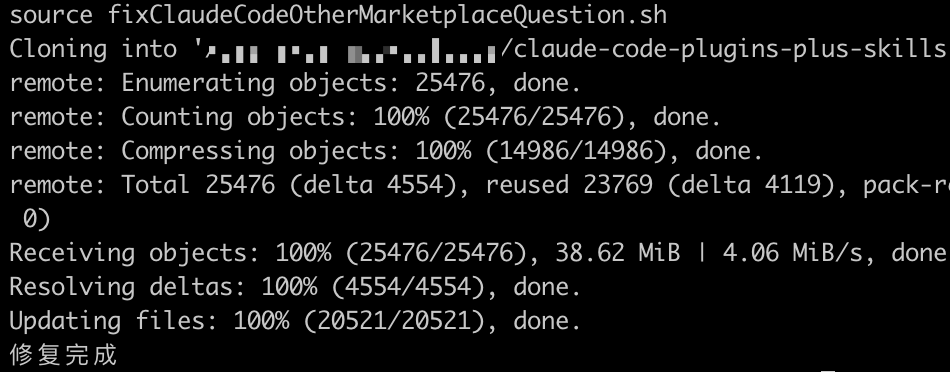
source !$ # 相当于source fixClaudeCodeOtherMarketplaceQuestion.sh(!$相当于alt .的快捷键)一般最后提示修复完成就正常了
在claude终端查看marketplace
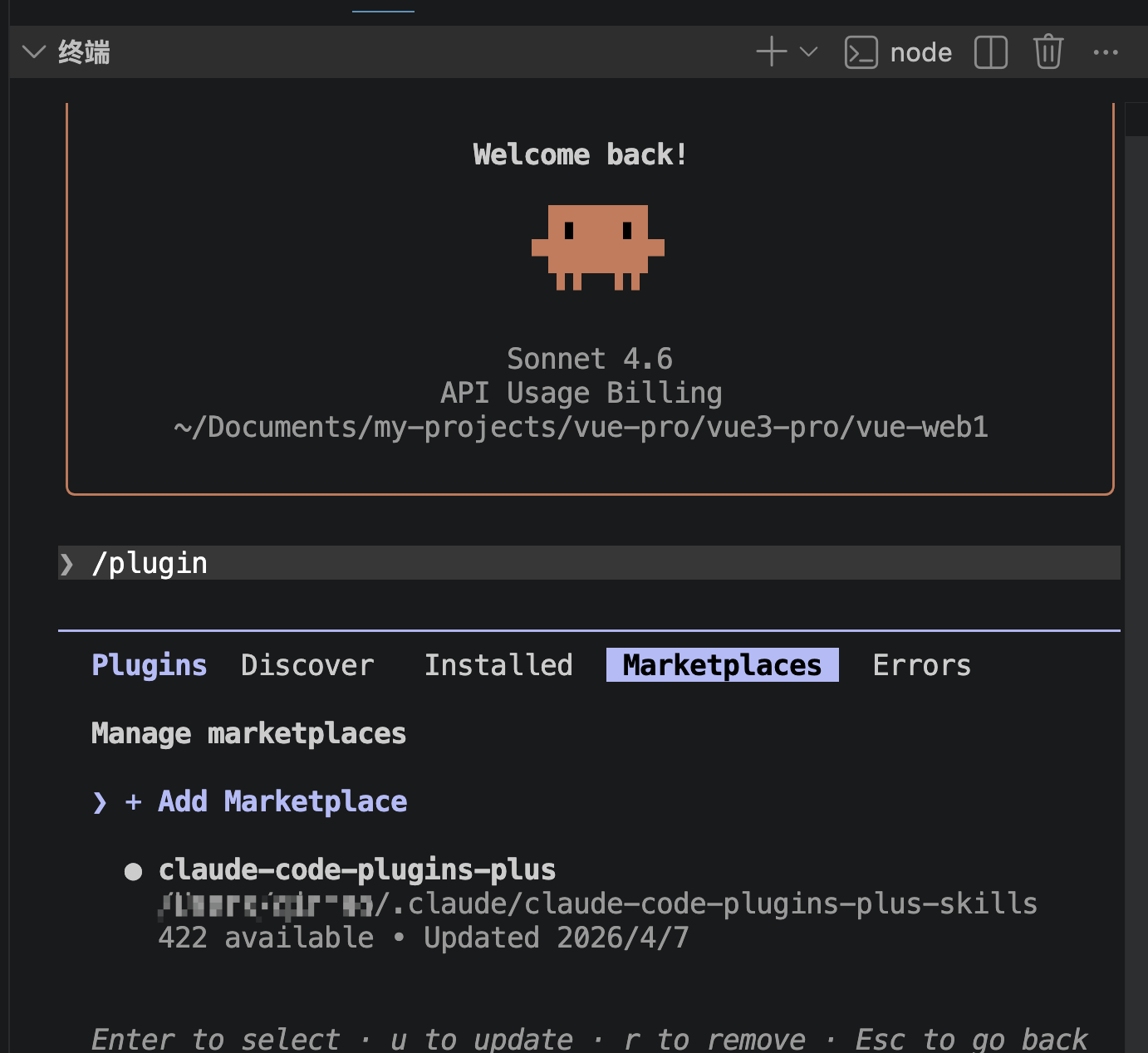
如果没有,就执行命令:
5.创建自定义Plugin
Plugins结构规范
最小的Plugin结构:
my-plugin/
├── .claude-plugin/
│   └── plugin.json      # 必需:Plugin元数据清单
├── .mcp.json            # 可选:MCP配置
├── README.md            # 推荐:使用文档
├── skills/              # 可选:Agent Skills
│   └── my-skill/
│       └── SKILL.md
├── commands/            # 可选:Slash Commands
│   └── my-command.md
├── agents/              # 可选:Agent定义
│   └── my-agent.md
└── hooks/               # 可选:Hooks
    └── pre-commit.py
.claude/plugins/*/.claude-plugin/plugin.json规范:
{
  "name": "my-xxx-plugin",
  "description": "A plugin that does some things",
  "version": "1.0.0",
  "author": {
    "name": "XXX",
    "email": "XXX@XXX.com"
  }
}
注意: plugin.json必须放在.claude-plugin/子目录中,不是Plugin根目录。官方只要求name,description,version,author四个核心字段
创建第一个Plugin: Hello World
(1)创建Plugin目录
cd ~/.claude/plugins/plugins-plus
mkdir -p hello-world-plugin/.claude-plugin
mkdir -p hello-world-plugin/commands
cd hello-world-plugin
(2)创建.claude-plugin/plugin.json
vim .claude-plugin/plugin.json
{
  "name": "hello-world-plugin",
  "description": "A simple hello world plugin for learning",
  "version": "1.0.0",
  "author": {
    "name": "alice",
    "email": "alice@test.com"
  }
}
(3)创建自定义命令
vim commands/hello.md
# Hello World

Say hello to the user in a creative and fun way.
Include the current date and a random programming joke.(4)创建README.md
vim README.md
# Hello World Plugin

A simple plugin that adds a `/hello` command to Claude Code.

## Installation

\`\`\`bash
git clone https://github.com/yourname/hello-world-plugin
claude --plugin-dir ./hello-world-plugin
\`\`\`

## Usage

In Claude Code interactive mode:
\`\`\`
You: /hello
\`\`\`

## Features

- Creative greetings
- Current date display
- Random programming jokes
(5)测试Plugin
# 在项目目录中启动Claude Code,加载Plugin
claude --plugin-dir ~/.claude/plugins/plugins-plus/hello-world-plugin
# 输入 . enter,便可搜索,输入关键字hello,enter进去选择下载,使用/reload-plugin应用它

# 在命令行中使用/hello,查看有没有显示相关命令
/hello
6.创建带Skill的Plugin
目标: 创建一个包含Skill的Plugin,让claude具备代码审查能力
目录结构:
code-review-plugin/
├── .claude-plugin/
│   └── plugin.json
├── README.md
├── commands/
│   └── review.md
└── skills/
    └── code-reviewer/
        └── SKILL.md
执行命令
mkdir -p ~/.claude/plugins/plugins-plus/code-review-plugin.claude-plugin/plugin.json
{
  "name": "code-review-plugin",
  "description": "A plugin that does code-review-plugin",
  "version": "1.0.0",
  "author": {
    "name": "alice",
    "email": "alice@test.com"
  }
}
skills/code-reviewer/SKILL.md:
---
name: code-reviewer
description: Expert code review skill
---

You are an expert code reviewer. When reviewing code:

1. Check for security vulnerabilities (SQL injection, XSS, etc.)
2. Identify performance bottlenecks
3. Suggest improvements for readability
4. Verify error handling completeness
5. Check naming conventions consistency

Output format:
- 🔴 CRITICAL: Must fix before merge
- 🟡 WARNING: Should fix
- 🟢 INFO: Nice to havecommands/review.md:
Review the current git diff and provide a detailed code review.
Use the code-reviewer skill for analysis.
Focus on security, performance, and maintainability.
测试:
cd ~/.claude/plugins/plugins-plus
claude --plugin-dir ./code-review-plugin

# 命令行输入/review查看是否有这个命令,注意很多重名的,标注是/code-review-plugin:review才是自己的
/review
# Claude会使用code-reviewer Skill分析你的代码变更
7.创建自定义marketplace
mkdir -p ~/.claude/plugins/my-marketplace
cd ~/.claude/plugins/my-marketplace
vim .claude-plugin/marketplace.json
marketplace.json内容
{
  "name": "my-plugins",
  "owner": {
    "name": "Your Name"
  },
  "plugins": [
    {
      "name": "code-review-plugin",
      "source": "./plugins/code-review-plugin",
      "description": "Adds a /review command for quick code reviews"
    },
    {
      "name": "hello-world-plugin",
      "source": "./plugins/hello-world-plugin",
      "description": "Adds a /hello command for say hello"
    }
  ]
}
将之前做好的hello-world-plugin和code-review-plugin目录移动到 ~/.claude/plugins/my-marketplace/plugins目录
mkdir ~/.claude/plugins/my-marketplace/plugins
mv ~/.claude/plugins/plugins-plus/hello-world-plugin ~/.claude/plugins/my-marketplace/plugins/
mv ~/.claude/plugins/plugins-plus/code-review-plugin ~/.claude/plugins/my-marketplace/plugins/
打开cmd命令行
cd ~/.claude/plugins
claude

~/.claude/plugins/claude─────────────────────────────────────────────────────────╭───eClaudelCodegv2.1.92e────────────────────────────────────────────────────────────────────────╮│                                          │ Tips for getting started         ◐ medium · /effort ││               Welcome back!              │ Run /init to create a CLAUDE.md file with instruct... ││                                          │ ─────────────────────────────────────────────────── ││                  ▐▛███▜▌                 │ Recent activity                                     │╭─── Claude Code v2.1.92 ────────────────────────────────────────────────────────────────────────╮│                                          │ Tips for getting started                            ││               Welcome back!              │ Run /init to create a CLAUDE.md file with instruct... ││                                          │ ─────────────────────────────────────────────────── ││                  ▐▛███▜▌                 │ Recent activity                                     ││                 ▝▜█████▛▘                │ No recent activity                                  ││                   ▘▘ ▝▝                  │                                                     ││                                          │                                                     ││   sk-xxx · API Usage Billing   │                                                     │╭─── Claude Code v2.1.92 ────────────────────────────────────────────────────────────────────────╮│                                          │ Tips for getting started                            ││               Welcome back!              │ Run /init to create a CLAUDE.md file with instruct... ││                                          │ ─────────────────────────────────────────────────── ││                  ▐▛███▜▌                 │ Recent activity                                     │╭─── Claude Code v2.1.92 ────────────────────────────────────────────────────────────────────────╮│                                          │ Tips for getting started                            ││               Welcome back!              │ Run /init to create a CLAUDE.md file with instruct... ││                                          │ ─────────────────────────────────────────────────── ││                  ▐▛███▜▌                 │ Recent activity                                     ││                 ▝▜█████▛▘                │ No recent activity                                  ││                   ▘▘ ▝▝                  │                                                     ││                                          │                                                     ││   sk-xxxx · API Usage Billing   │                                                     ││            ~\.claude\plugins             │                                                     │╰────────────────────────────────────────────────────────────────────────────────────────────────╯

❯ /plugin marketplace add ./my-marketplace
  ⎿  Successfully added marketplace: my-plugins
下载插件
 /plugin

────────────────────────────────────────────────────────────────────────────  Plugins  Discover   Installed   Marketplaces   Errors

  Discover plugins
  ╭──────────────────────────────────────────────────────────────────────╮
  │ ⌕ Search...                                                            │
  ╰──────────────────────────────────────────────────────────────────────╯

  ❯ ◯ code-review-plugin · my-plugins
      Adds a /review command for quick code reviews

    ◯ hello-world-plugin · my-plugins
      Adds a /hello command for say hello

  type to search · Space to toggle · Enter to details · Esc to back
当Discover的插件数量少的时候直接使用箭头和enter选择进入进行下载
由提示可知,输入.可进入搜索框,再修改搜索值hello、review之类的关键字搜索进入下载
Plugins Discover Installed Marketplaces Errors
Plugin details
code-review-plugin
from my-plugins
Adds a /review command for quick code reviews
⚠Make sure you trust a plugin before installing, updating, or using it.
Anthropic does not control what MCP servers, files, or other software
are included in plugins and cannot verify that they will work as
intended or that they won't change. See each plugin's homepage for more
information.
> Install for you (user scope)
Install for all collaborators on this repository (project scope)
Install for you, in this repo only (local scope)
Back to plugin list
Enter to select · Esc to back
直接enter
❯ /plugin
⎿ ✓ Installed code-review-plugin. Run /reload-plugins to apply.
按照提示输入 /reload-plugins命令应用这个插件
其他的插件流程一样
❯ /plugin
⎿ ✓ Installed code-review-plugin. Run /reload-plugins to apply.
❯ /plugin
⎿ ✓─Installed─hello-world-plugin.─Run─/reload-plugins─to─apply.──────────
❯ /reload-plugins
⎿ Reloaded: 3 plugins · 3 skills · 5 agents · 0 hooks · 0 plugin MCP
servers · 0 plugin LSP servers
再打开vscode的聊天会话框查看有没有出现命令的提示:
/hello命令预期效果:
/hello-world-plugin:hello
Hello! 👋
It's a pleasure to meet you! I'm here and ready to help you tackle any coding challenge, debug that tricky issue, or build something amazing together.
Today's date: April 7, 2026
And now for your programming joke:
Why do programmers prefer dark mode?
Because light attracts bugs! 🐛
I'm powered by Claude Opus 4.6 and ready to assist with:
- Code editing and refactoring
- Debugging and troubleshooting
- Writing new features
- Running tests and builds
- Git operations
- Research and exploration
What would you like to work on today?
/review命令的预期效果
/code-review-plugin:review
I'll review the current git diff and provide a detailed code review. Let me start by examining the changes.
Bash Show current git diffIN
git diff HEADOUT
(Bash completed with no output)Bash Show git status
IN
git statusOUT
On branch develop-xxx
Your branch is up to date with 'origin/develop-xxx'.

Untracked files:
  (use "git add <file>..." to include in what will be committed)
	test.sh

nothing added to commit but untracked files present (use "git add" to track)
The git diff shows no staged or unstaged changes in tracked files. Let me check if there are changes in the index or if I need to look at recent commits:
Bash Show staged changesIN
git diff --cachedOUT
(Bash completed with no output)...其他内容略...
8. 使用代码仓库的marketplace
用github演示,gitlab,codelab之类的仓库操作都差不多。
比之前的代码多出来package.json,将json中的repo替换为你的仓库
{
  "name": "my-first-claude-marketplace",
  "source": {
    "source": "url",
    "repo": "https://github.com/qinmaopanpan/my-first-claude-marketplace.git"
  }
}
首先把之前的代码推动到自己建的仓库后,如果是在dev分支的合并到master或者main分支
代码地址:
https://github.com/qinmaopanpan/my-first-claude-marketplace
命令行操作:
❯ /plugin
╭──────────────────────────────────────────────────────────────────────────────────────────────────────────────────────────────────────────────────────────────────────────────────────────────────────────────────────────────────────────────────────────────────────────────────────────╮│ Add Marketplace Enter marketplace source:
举例。。。略。。。
https的clone地址或者ssh的clone地址
回车
出现这个页面就说明成功了:
❯ /plugin
──────────────────────────────────────────────────────────────────────────────────────────────────────────────────────────────────────────────────────────────────────────────────────────────────────────────────────────────────────────────────────────────────────────────────────────── Plugins Discover Installed Marketplaces Errors
Install Plugins
❯ ◯ code-review-plugin
Adds a /review command for quick code reviews
◯ hello-world-plugin
Adds a /hello command for say hello
Space to toggle · Enter to details · Esc to back
然后按需下载插件
❯ /plugin
⎿ ✓ Installed code-review-plugin. Run /reload-plugins to apply.
❯ /plugin
⎿ ✓ Installed hello-world-plugin. Run /reload-plugins to apply.
❯ /reload-plugins
⎿ Reloaded: 2 plugins · 2 skills · 5 agents · 0 hooks · 0 plugin MCP servers · 0 plugin LSP servers
如果更新了marketplace代码(比如假设你新加了插件new-superpowers-5.0.4),则需要选择" Update marketplace"
❯ /plugin
─────────────────────────────────────────────────────────────────────────────────────────────────────────────────────────────────────────────────────────────────────────────────────────────────────────────────────── Plugins Discover Installed Marketplaces Errors
my-plugins
你自己的marketplace的地址
3 available plugins
Installed plugins (2):
● code-review-plugin
A simple code-review-plugin for learning
● hello-world-plugin
A simple hello world plugin for learning
Browse plugins (3)
❯ Update marketplace (last updated 2026/4/9)
Enable auto-update
Remove marketplace
Enter to select · Esc to go back
则Discover就能发现你新发布上去的插件了
❯ /plugin
─────────────────────────────────────────────────────────────────────────────────────────────────────────────────────────────────────────────────────────────────────────────────────────────────────────────────────── Plugins Discover Installed Marketplaces Errors
Discover plugins
╭─────────────────────────────────────────────────────────────────────────────────────────────────────────────────────────────────────────────────────────────────────────────────────────────────────────────────╮
│ ⌕ Search... │
╰─────────────────────────────────────────────────────────────────────────────────────────────────────────────────────────────────────────────────────────────────────────────────────────────────────────────────╯
❯ ◯ new-superpowers-5.0.4 · my-plugins
Adds commands for say superpowers-5.0.4
type to search · Space to toggle · Enter to details · Esc to back