效果图
默认状态: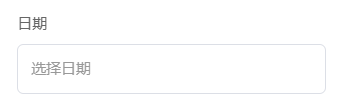
日期选择: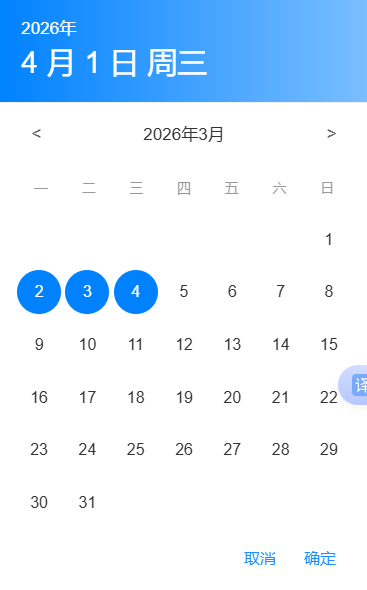
选择后状态: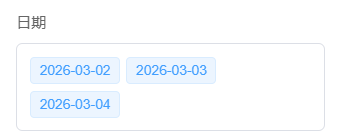
干货
chooseMoreData.vue
html
<template>
<div v-if="visible" class="calendar-overlay" @click.self="handleCancel">
<div class="calendar-dialog-center">
<!-- 弹窗顶部:选中的日期 -->
<div class="calendar-top">
<div class="top-date-display">{{ displayYear }}年</div>
<div class="top-day-week">
{{ displayMonth }} 月 {{ displayDay }} 日 {{ displayWeekday }}
</div>
</div>
<!-- 日历主体 -->
<div
class="calendar-body"
@touchstart="handleTouchStart"
@touchmove="handleTouchMove"
@touchend="handleTouchEnd"
>
<!-- 月份切换 -->
<div class="month-nav">
<span class="nav-btn prev-btn" @click="goToPrevMonth"><</span>
<span class="current-month">{{ currentYear }}年{{ currentMonth + 1 }}月</span>
<span class="nav-btn next-btn" @click="goToNextMonth">></span>
</div>
<!-- 星期行 -->
<div class="weekdays">
<div class="weekday">一</div>
<div class="weekday">二</div>
<div class="weekday">三</div>
<div class="weekday">四</div>
<div class="weekday">五</div>
<div class="weekday">六</div>
<div class="weekday">日</div>
</div>
<!-- 日期网格容器 - 用于固定高度 -->
<div class="days-grid-wrapper">
<transition :name="transitionName" mode="out-in">
<div :key="currentYear + '-' + currentMonth" class="days-grid-container">
<div class="days-grid">
<div
v-for="(day, index) in daysInMonth"
:key="index"
class="day-item"
:class="{
today: isToday(day),
selected: isSelected(day),
empty: day === 0
}"
@click="day !== 0 && selectDate(day)"
>
<span v-if="day !== 0" class="day-text">{{ day }}</span>
</div>
</div>
</div>
</transition>
</div>
</div>
<!-- 操作按钮 -->
<div class="calendar-actions">
<div class="calendar-box">
<button class="cancel-btn" @click="handleCancel">取消</button>
<button class="confirm-btn" @click="handleConfirm">确定</button>
</div>
</div>
</div>
</div>
</template>
<script setup>
import { ref, computed, watch, onMounted, onUnmounted } from 'vue'
import { useModalStore } from '@/stores/modal'
const props = defineProps({
visible: {
type: Boolean,
default: false
},
selectedDate: {
type: Date,
default: () => new Date()
},
chooseDate: {//选中的日期数据回显
type: Array,
default: () => []
}
})
const emit = defineEmits(['update:visible', 'confirm', 'cancel'])
const modalStore = useModalStore()
// 当前显示的年份和月份
const currentYear = ref(props.selectedDate.getFullYear())
const currentMonth = ref(props.selectedDate.getMonth())
// 内部选中的日期
const internalSelectedDate = ref(new Date(props.selectedDate))
const chooseData = ref([])
// 触摸滑动相关
const transitionName = ref('slide-left')
const touchStartX = ref(0)
// 计算显示的日期部分
const displayYear = computed(() => {
return internalSelectedDate.value.getFullYear()
})
const displayMonth = computed(() => {
return internalSelectedDate.value.getMonth() + 1
})
const displayDay = computed(() => {
return internalSelectedDate.value.getDate()
})
const displayWeekday = computed(() => {
const weekdays = ['周日', '周一', '周二', '周三', '周四', '周五', '周六']
return weekdays[internalSelectedDate.value.getDay()]
})
// 监听props变化
watch(
() => props.visible,
val => {
if (val) {
const date = new Date(props.selectedDate)
internalSelectedDate.value = date
currentYear.value = date.getFullYear()
currentMonth.value = date.getMonth()
modalStore.pushModal(close)
} else {
modalStore.popModal(close)
}
}
)
watch(
() => props.selectedDate,
val => {
if (val) {
const date = new Date(val)
internalSelectedDate.value = date
currentYear.value = date.getFullYear()
currentMonth.value = date.getMonth()
}
}
)
watch(
() => props.chooseDate,
val => {
if (val) {
chooseData.value = []
for (const data of val) {
const d = new Date(data + 'T00:00:00+08:00')
chooseData.value.push(d)
}
}
}
)
// 计算当月天数
const daysInMonth = computed(() => {
const year = currentYear.value
const month = currentMonth.value
const firstDay = new Date(year, month, 1)
const lastDay = new Date(year, month + 1, 0)
const daysCount = lastDay.getDate()
const firstDayWeekday = firstDay.getDay()
// 调整星期几的显示:如果是周日,显示在第7位;如果是周一,显示在第1位
const firstDayOffset = firstDayWeekday === 0 ? 6 : firstDayWeekday - 1
const days = []
// 添加前面的空位
for (let i = 0; i < firstDayOffset; i++) {
days.push(0)
}
// 添加当月日期
for (let i = 1; i <= daysCount; i++) {
days.push(i)
}
return days
})
// 检查是否是今天
const isToday = day => {
if (day === 0) return false
const today = new Date()
return (
day === today.getDate() &&
currentMonth.value === today.getMonth() &&
currentYear.value === today.getFullYear()
)
}
// 检查是否选中
const isSelected = day => {
if (day === 0) return false
for (const data of chooseData.value) {
const d = data.getDate()
if (
d === day &&
currentMonth.value === data.getMonth() &&
currentYear.value === data.getFullYear()
) {
return true
}
}
}
// 选择日期
const selectDate = day => {
const date = new Date(currentYear.value, currentMonth.value, day)
internalSelectedDate.value = date
const index = chooseData.value.findIndex(data => data.getTime() === date.getTime())
if (index === -1) {
chooseData.value.push(date)
} else {
chooseData.value.splice(index, 1)
}
}
// 上个月
const goToPrevMonth = () => {
transitionName.value = 'slide-right'
if (currentMonth.value === 0) {
currentMonth.value = 11
currentYear.value--
} else {
currentMonth.value--
}
}
// 下个月
const goToNextMonth = () => {
transitionName.value = 'slide-left'
if (currentMonth.value === 11) {
currentMonth.value = 0
currentYear.value++
} else {
currentMonth.value++
}
}
// 触摸事件
const handleTouchStart = e => {
touchStartX.value = e.changedTouches[0].screenX
}
const handleTouchMove = () => {
// 空函数,防止默认滚动行为冲突
}
const handleTouchEnd = e => {
if (!touchStartX.value) return
const touchEndX = e.changedTouches[0].screenX
const diff = touchStartX.value - touchEndX
if (Math.abs(diff) > 50) {
if (diff > 0) {
// 向左滑
goToNextMonth()
} else {
// 向右滑
goToPrevMonth()
}
}
touchStartX.value = 0
}
// 确定
const handleConfirm = () => {
//单选用这个
emit('confirm', new Date(internalSelectedDate.value))
//多选用这个
emit('confirm', chooseData.value)
closeModal()
}
// 取消
const handleCancel = () => {
emit('cancel')
closeModal()
}
// 关闭弹窗
const closeModal = () => {
emit('update:visible', false)
}
onMounted(() => {
chooseData.value = []
for (const data of props.chooseDate) {
const d = new Date(data + 'T00:00:00+08:00')
chooseData.value.push(d)
}
})
onUnmounted(() => {
modalStore.popModal(close)
})
</script>
<style scoped lang="scss">
// === 弹窗动画 (保持原样) ===
.calendar-overlay {
position: fixed;
top: 0;
left: 0;
right: 0;
bottom: 0;
background-color: rgba(0, 0, 0, 0.5);
display: flex;
align-items: center;
justify-content: center;
z-index: 1000;
animation: fadeIn 0.3s ease;
}
.calendar-dialog-center {
width: 92%;
max-width: 360px;
background-color: #fff;
box-shadow: 0 4px 20px rgba(0, 0, 0, 0.15);
animation: zoomIn 0.3s ease;
overflow: hidden;
}
// === 顶部样式 (保持原样) ===
.calendar-top {
background: linear-gradient(to right, #0082ff, #7abeff);
padding: 15px 20px;
border-bottom: 1px solid #f0f0f0;
}
.top-date-display {
font-size: $font-size-md;
color: #fff;
font-weight: normal;
}
.top-day-week {
font-size: 28px;
color: #fff;
}
// === 日历主体 ===
.calendar-body {
padding: 16px;
overflow: hidden; // 保证滑动时裁剪内容
}
// 月份导航 (保持原样)
.month-nav {
display: flex;
justify-content: space-between;
align-items: center;
margin-bottom: 20px;
padding: 0 4px;
}
.nav-btn {
width: 28px;
height: 28px;
display: flex;
align-items: center;
justify-content: center;
cursor: pointer;
user-select: none;
font-size: 16px;
color: #666;
border-radius: 4px;
transition: background-color 0.2s;
}
.nav-btn:hover {
background-color: #f5f5f5;
}
.current-month {
font-size: 16px;
font-weight: 500;
color: #333;
flex: 1;
text-align: center;
}
// 星期行 (保持原样)
.weekdays {
display: grid;
grid-template-columns: repeat(7, 1fr);
margin-bottom: 12px;
}
.weekday {
text-align: center;
font-size: 13px;
color: #999;
padding: 6px 0;
font-weight: 400;
}
// === 核心:固定高度与滑动效果 ===
// 1. 设置一个容器固定高度,防止6周变5周时弹窗抖动
.days-grid-wrapper {
position: relative;
min-height: 290px;
overflow: hidden;
}
// 2. 过渡动画样式
.slide-left-enter-active,
.slide-right-leave-active {
transform: translateX(100%);
opacity: 0;
}
.slide-left-leave-active,
.slide-right-enter-active {
transform: translateX(-100%);
opacity: 0;
}
.slide-left-enter-to,
.slide-right-leave-to {
transform: translateX(0);
opacity: 1;
}
// 3. 给日期网格添加过渡动画
.days-grid-container {
position: absolute;
width: 100%;
top: 0;
left: 0;
transition:
transform 0.3s ease,
opacity 0.3s ease;
}
.days-grid {
display: grid;
grid-template-columns: repeat(7, 1fr);
gap: 8px 4px;
}
.day-item {
aspect-ratio: 1;
display: flex;
align-items: center;
justify-content: center;
cursor: pointer;
user-select: none;
border-radius: 50%;
transition: all 0.2s;
}
// .day-item:hover:not(.empty) {
// // background-color: #f5f5f5;
// }
.day-text {
font-size: 15px;
color: #333;
font-weight: 400;
}
.day-item.empty {
cursor: default;
visibility: hidden;
}
.day-item.today .day-text {
color: #1890ff;
font-weight: 500;
}
.day-item.selected {
background-color: #0082ff;
}
.day-item.selected .day-text {
color: #fff;
font-weight: 500;
}
/* 操作按钮 */
.calendar-actions {
padding: 45px;
padding-top: 0;
// border-top: 1px solid #f0f0f0;
gap: 12px;
position: relative;
// background-color: blue;
}
.calendar-box {
display: flex;
justify-content: space-between;
position: absolute;
right: 30px;
bottom: 20px;
width: 25%;
}
.cancel-btn,
.confirm-btn {
font-size: 15px;
}
.cancel-btn {
color: #1890ff;
}
.cancel-btn:hover {
background-color: #e8e8e8;
}
.confirm-btn {
color: #1890ff;
}
.confirm-btn:hover {
background-color: #0e80e6;
}
// === 原有动画定义 ===
@keyframes fadeIn {
from {
opacity: 0;
}
to {
opacity: 1;
}
}
@keyframes zoomIn {
from {
transform: scale(0.9);
opacity: 0;
}
to {
transform: scale(1);
opacity: 1;
}
}
</style>使用
html
<template>
<div>
<div class="form-item">
            <label>日期</label>
			<!-- 多选组件 -->
            <div class="time-comm fil-comm" @click="showSkPicker = true">
              <div v-if="skTime.length === 0" class="time-s">选择日期</div>

              <template v-else>
                <span v-for="(label, index) in skTime" :key="index" class="selected-tag">
                  {{ label }}
                </span>
              </template>


              <div class="cancle" v-if="skTime.length !== 0 && false" @click="cancleFn()">
                <van-icon name="cross" />
              </div>
            </div>
			<!-- 单选组件 -->
			<div class="time-s" @click="showStartPicker = true">
                {{ skTime2 == '' ? '选择日期' : formatDate(skTime2) }}
            </div>
			<div class="cancle" v-if="skTime.length !== 0 && false" @click="cancleFn()">
                <van-icon name="cross" />
            </div>

          </div>
<!-- 日历弹窗组件 -->
      <chooseMoreData
        v-model:visible="showSkPicker"
        :choose-date="skTime"
        @confirm="handleConfirmS"
        @cancel="handleCancel"
        :key="keyID"
      />
</div>
</template>
<script setup>
import chooseMoreData from './chooseMoreData.vue'
const keyID = ref(0)
const showSkPicker = ref(false)
const skTime2 = ref()
const skTime = ref([])
// 确认选择
//单选
const handleConfirmS = date => {
  keyID.value += 1
  skTime2 = formatDate(date)
  console.log('选择的日期', skTime2.value)
}
//多选
const handleConfirmS = dateArray => {
  keyID.value += 1
  skTime.value = []
  for (const date of dateArray) {
    skTime.value.push(formatDate(date))
  }
  console.log('选择的日期', skTime.value)
}
// 取消选择
const handleCancel = () => {
  keyID.value += 1
  console.log('取消选择')
}
// 格式化日期显示
const formatDate = date => {
  if (!date) return ''
  let d = new Date(date)
  let year = d.getFullYear()
  let month = d.getMonth() + 1
  if (month < 10) {
    month = '0' + month
  }
  let day = d.getDate()
  if (day < 10) {
    day = '0' + day
  }
  return `${year}-${month}-${day}`
}
const cancleFn = () => {
  skTime.value = []
}
</script>
<style scoped lang="scss">

.form-item {
  margin-bottom: 16px;
}

.form-item label {
  display: block;
  margin-bottom: 8px;
  font-size: 14px;
  color: #666;
}

.form-item input[type='text'],
.form-item input[type='datetime-local'] {
  width: 100%;
  padding: 12px;
  border: 1px solid #ddd;
  border-radius: 8px;
  font-size: 14px;
  box-sizing: border-box;
}

.form-item input:focus {
  outline: none;
  border-color: #007bff;
  box-shadow: 0 0 0 2px rgba(0, 123, 255, 0.2);
}
.time-comm {
  flex: 2;
}
.fil-comm {
  position: relative;
  padding: 12px 12px;
  border: 1px solid #dcdfe6;
  border-radius: 6px;
  // width: 160px;
  font-size: 14px;
  margin-right: 8px;
  background-color: #fff;
  display: flex;
  flex-wrap: wrap;
  gap: 6px;
}
.time-s {
  width: 100%;
  height: 100%;
  font-size: 14px;
  color: #999;
}
.selected-tag {
  display: inline-flex;
  align-items: center;
  background-color: #ecf5ff; /* 选中项在输入框中的背景色 (浅蓝) */
  color: #409eff;
  padding: 2px 8px;
  border-radius: 4px;
  font-size: 13px;
  border: 1px solid #d9ecff;
}
.cancle {
  position: absolute;
  font-size: 18px;
  right: 0;
  top: 0;
  height: 100%;
}
.van-icon {
  border-radius: 10px;
  color: #ccc;
  border: 1px solid #cccccc;
}
</style>