被 Cloudflare 403 阻止
【WAX云钱包】Cloudflare反爬虫突破(SSL指纹识别)
在之前的文章中,我们使用 Python 的 Requests 进行一些网页游戏的自动化操作,其中涉及到一个WAX云钱包的签名操作
import requests
resp = requests.get("https://public-wax-on.wax.io/wam/sign")
print(resp.text)
正常情况下,这个GET请求应该返回一个json,可以在 Chrome 浏览器中直接访问以验证这点
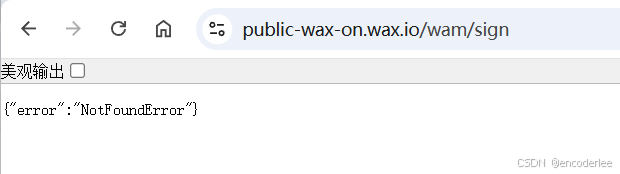
但是我们使用 Python 发送请求后,却收到了 403 Forbidden 错误,并且返回一个这样的页面:
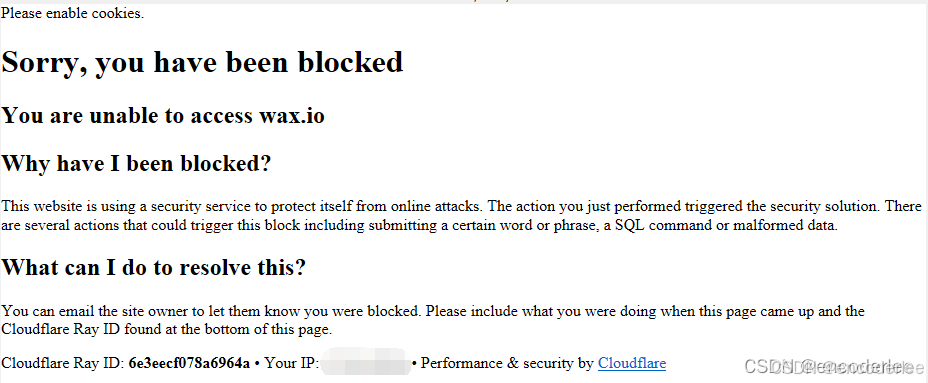
Please enable cookies.
Sorry, you have been blocked
You are unable to access wax.io
Why have I been blocked?
This website is using a security service to protect itself from online attacks. The action you just performed triggered the security solution. There are several actions that could trigger this block including submitting a certain word or phrase, a SQL command or malformed data.
What can I do to resolve this?
You can email the site owner to let them know you were blocked. Please include what you were doing when this page came up and the Cloudflare Ray ID found at the bottom of this page.
Cloudflare Ray ID: 711e5eaf6819980c • Your IP: * • Performance & security by Cloudflare
显然,这个 URL 使用了 Cloudflare 做 CDN 加速,而我们被 Cloudflare 的反爬虫机制制裁了。
经过一番研究,我们终于知道 Cloudflare 是通过 TLS 指纹把我们识别出来了,它通过 TLS 特征,判断我们是脚本、机器人,而不是正常的浏览器,从而403阻止我们访问。
解决方案
在之前的文章中,我们通过修改 Python 的 urllib3 的 SSL 配置来影响我们的 TLS 特征,但这种做法过一段时间仍然被 Cloudflare 识别出来了,原因很简单,这些 TLS 特征仍然和正常的 Chrome / Edge 浏览器差异过大,Cloudflare 认为你并不是用浏览器在访问。
我们也使用过 cloudscraper 和 cloudflare-scrape 等开源项目,来修改 TLS 特征,这虽然对WAX云钱包的这个URL有用,但是根据网友反馈,这些方案在别的URL上仍然会被 Cloudflare 识别并拦截。
当时我们想到的终极方案是借助 selenium 启动一个 Chrome 浏览器,然后借助 Chrome 浏览器来发送 HTTP 请求,这样它的 TLS 特征就完全和 Chrome 一致了,因为本来就是 Chrome 发出的 HTTP 请求嘛。
当时网上也有了现成的开源方案:
【undetected-chromedriver】https://github.com/ultrafunkamsterdam/undetected-chromedriver
但这个方法还是太笨重了,它需要启动一个 Chrome 进程,如果你的脚本需要并发作业的话,就要启动多个 Chrome 进程,太消耗资源了。
上篇文章的最后,我们提到了一个思路,就是借助 WinHTTP 来发送请求,由于 WinHTTP 在 Windows 上是 IE / Edge 浏览器的底层库,它发出的 HTTP 请求的 TLS 指纹与 IE / Edge 浏览器完全一致,所以可以躲过 Cloudflare 的检测。
当时我用 VC++ 调用 WinHTTP 进行了测试,验证了可行性,但由于项目上没有需求,没有时间,就暂时没有进一步研究了。
后来最近有空了,我终于基于 WinHTTP 库实现了一个 Python 的 http client。
pywinhttp
我将其命名为 pywinhttp 并放到 github 上开源:
【pywinhttp】https://github.com/encoderlee/pywinhttp
当然我也上传到了 PYPI ,可以直接用 PIP 安装
pip install pywinhttp
实现原理大概就是使用 Python 内建的 ctypes 直接调用 winhttp.dl 的 C 语言接口,没有第三方依赖,纯 Python 实现。
当然 WinHTTP 这玩意儿只在 Windows 上有,代码也只能在 Windows 上运行,无法在 Linux 上运行。
示例代码
两个例子搞懂 pywinhttp 的用法:
python
import pywinhttp

user_agent = "Mozilla/5.0 (Windows NT 10.0; Win64; x64) AppleWebKit/537.36 (KHTML, like Gecko) Chrome/146.0.0.0 Safari/537.36 Edg/146.0.0.0"
client = pywinhttp.Session(user_agent)

url = "https://public-wax-on.wax.io/wam/sign"

resp = client.get(url)
print(resp.text)

post_data = {
    "serializedTransaction": "xxxxxxxxxxxxxxxxxxxxxxx",
    "description": "jwt is insecure",
    "freeBandwidth": False,
    "website": "play.alienworlds.io",
}
headers = {"x-access-token": "xxxxxxxxxxxxxxxxxxxxxxx"}
resp = client.post(url, json = post_data, headers = headers)
print(resp.text)
user_agent 要完全模仿 Edge ,支持 GET / POST 请求
经过对 https://public-wax-on.wax.io/wam/sign 的测试,没有再被 Cloudflare 403 拦截,返回了正常的 JSON 值
python
import pywinhttp
from pywinhttp import HttpProxy

def main():
    client = pywinhttp.Session()
    client.proxy = HttpProxy("127.0.0.1", 8443, "user", "password")
    # set timeout 30 seconds
    client.timeout = 30 * 1000

    url = "https://httpbin.org/get"

    resp = client.get(url)
    print(resp.text)

if __name__ == '__main__':
    main()
支持 HTTP/HTTPS 代理,支持用户名密码验证,可以设置 HTTP 超时值
但不支持 SOCKS5 代理,因为 WinHTTP 本来就不支持。。