使用VBA代码直接修改
使用方式,ppt界面,同时按住Alt + F11两个键 ,弹出的页面中,点击文件名称,然后右键创建模块 ,见下图
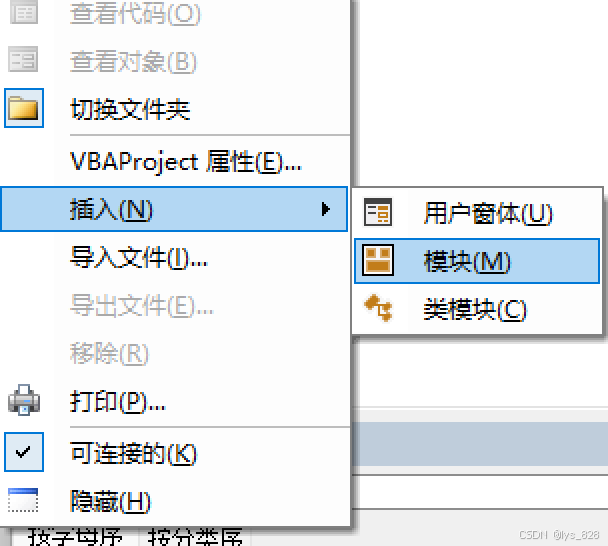
接着把下面的代码复制粘贴到模块文件中,再点击F5键即可。
vba
Sub AddFooter()
    Dim s As Slide
    Dim sh As Shape
    Dim n As Integer
    Dim i As Integer

    ' 获取总页数
    n = ActivePresentation.Slides.Count

    ' 遍历所有幻灯片
    For i = 1 To n
        Set s = ActivePresentation.Slides(i)

        ' ==============================================
        ' 【关键修复】强力删除所有旧页脚,不管内容是什么
        ' ==============================================
        For j = s.Shapes.Count To 1 Step -1
            Set sh = s.Shapes(j)
            If sh.Type = msoTextBox Then
                ' 判断位置:只要是你页脚的位置,就全部删除
                If sh.Top > 500 And sh.Left > 800 Then
                    sh.Delete
                End If
            End If
        Next j

        ' 添加新页脚
        Set sh = s.Shapes.AddTextbox(msoTextOrientationHorizontal, Left:=755, Top:=515, Width:=300, Height:=30)

        ' 内容:日期 + 时间 + 页码
        With sh.TextFrame.TextRange
            .Text = Format(Date, "yyyy-mm-dd") & "   第 " & CStr(i) & "/" & CStr(n) & " 页"
            .Font.Name = "微软雅黑"
            .Font.Size = 16
            .Font.Color = vbWhite   ' 白色字体
        End With

        ' 垂直居中
        sh.TextFrame2.VerticalAnchor = msoAnchorMiddle

    Next i

    MsgBox "✅ 所有幻灯片页脚更新完成!"
End Sub