基本信息
在一个大型网络中,可能使用了多种路由协议,为了实现多种协议之间协同工作,路由器使用路由重发布将从一种路由协议学习到的路由分发进另外一种路由协议
配置时要注意管理距离(AD)和种子度量值(metric),不同的协议都有不同的metric,所以配置时要手动指定一个合适的metric
不同的协议在配置时的指令亦不相同
RIP作为目标协议 #必须要metric,1-15
| 指令 | 作用 |
|---|---|
| redistribute ospf 1 metric 1 | OSPF → RIP |
| redistribute eigrp 1 metric 1 | EIGRP → RIP |
| redistribute static metric 1 | 静态 → RIP |
| redistribute connected metric 1 | 直连 → RIP |
OSPF作为目标协议 #metric可选,默认为20
| 指令 | 作用 |
|---|---|
| redistribute rip subnets | RIP → OSPF |
| redistribute eigrp 1 subnets | EIGRP → OSPF |
| redistribute static subnets | 静态 → OSPF |
| redistribute connected subnets | 直连 → OSPF |
EIGRP 作为目标协议 #metric必须指定,五个值:带宽 延迟 可靠性 负载 MTU
| 作用 | 指令 |
|---|---|
| redistribute ospf 1 metric 1544 2000 255 1 1500 | OSPF → EIGRP |
| redistribute rip metric 1544 2000 255 1 1500 | RIP → EIGRP |
| redistribute static metric 1544 2000 255 1 1500 | 静态 → EIGRP |
| redistribute connected metric 1544 2000 255 1 1500 | 直连 → EIGRP |
IS-IS 作为目标协议 #metric可选,默认为0
| 指令 | 作用 |
|---|---|
| redistribute ospf 1 metric 10 | OSPF → IS-IS |
| redistribute rip metric 10 | RIP → IS-IS |
| redistribute static metric 10 | 静态 → IS-IS |
静态/直连
其他协议都通用,只有RIP和OSPF分别要加metric和subnets
bash
router ospf 1
redistribute connected subnets
router rip
redistribute connected metric 1
RIP与OSPF的路由重发布
这里实例讲RIP与OSPF的重发布
命令格式
OSPF再发布进RIP
bash
router rip		#进入RIP配置模式
redistribute ospf [进程号] metric(1-15)
#RIP跳数不能超过15,metric也不能
RIP再发布进OSPF
bash
router ospf [进程号]	#进入OSPF配置模式
redistriubte rip subnets [metric值]
#路由注入ospf时默认metric为20,类型为OE2- 实例
第一步,设好设备与链路
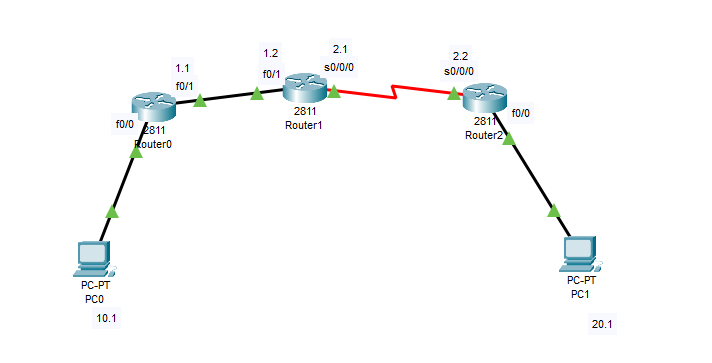
第二步,按图配置PC,路由器的网关和ip
| 设备 | ip | 掩码 | 网关 |
|---|---|---|---|
| PC0 | 192.168.10.1 | 255.255.255.0 | 192.168.10.254 |
| PC1 | 192.168.20.1 | 255.255.255.0 | 192.168.20.254 |
R0
Router(config)#interface f0/0
Router(config-if)#no shutdown
Router(config-if)#ip address 192.168.10.254 255.255.255.0
Router(config-if)#ex
Router(config)#interface f0/1
Router(config-if)#no shutdown
Router(config-if)#ip address 192.168.1.1 255.255.255.0
Router(config-if)#
R1
Router(config)#interface f0/1
Router(config-if)#no shutdown
Router(config-if)#ip address 192.168.1.2 255.255.255.0
Router(config-if)#ex
Router(config)#interface s0/0/0
Router(config-if)#no shutdown
Router(config-if)#ip address 192.168.2.1 255.255.255.0
Router(config-if)#clock rate 128000
Router(config-if)#ex
R2
Router(config)#interface f0/0
Router(config-if)#no shutdown
Router(config-if)#ip address 192.168.20.254 255.255.255.0
Router(config-if)#ex
Router(config)#interface s0/0/0
Router(config-if)#no shutdown
Router(config-if)#ip address 192.168.2.2 255.255.255.0
Router(config-if)#
第三步,配置RIP与OSPF基础配置,并验证
R0
Router(config)#router rip
Router(config-router)#version 2
Router(config-router)#no auto-summary
Router(config-router)#network 192.168.10.0
Router(config-router)#network 192.168.1.0
Router(config-router)#
R1
Router(config)#router rip
Router(config-router)#version 2
Router(config-router)#no auto-summayr
Router(config-router)#network 192.168.1.0
Router(config-router)#ex
Router(config)#router ospf 1
Router(config-router)#router-id 1.1.1.1
Router(config-router)#network 192.168.2.0 0.0.0.255 area 0
R2
Router(config)#router ospf 1
Router(config-router)#router-id 2.2.2.2
Router(config-router)#network 192.168.20.0 0.0.0.255 area 0
Router(config-router)#network 192.168.2.0 0.0.0.255 area 0
Router(config-router)#
验证 192.168.10.1 ping 192.168.20.1
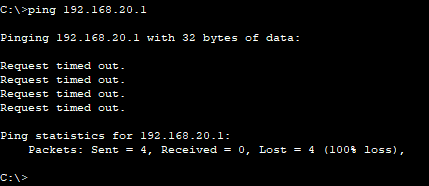
第四步,配置路由重发布(主
R1 #路由协议交界处
Router(config)#router ospf 1
Router(config-router)#redistribute rip subnets
Router(config-router)#ex
Router(config)#router rip
Router(config-router)#redistribute ospf 1 metric 2
Router(config-router)#ex
第五步,验证
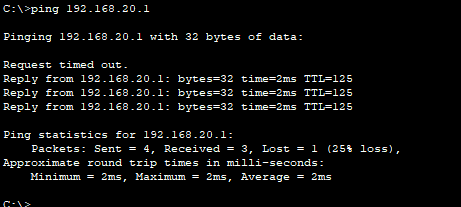
总结
路由重发布的命令其实就是一个固定的开头加上这个协议对应的一些值,大多情况下只需要背过最后的那一点就可以