一、案例展示
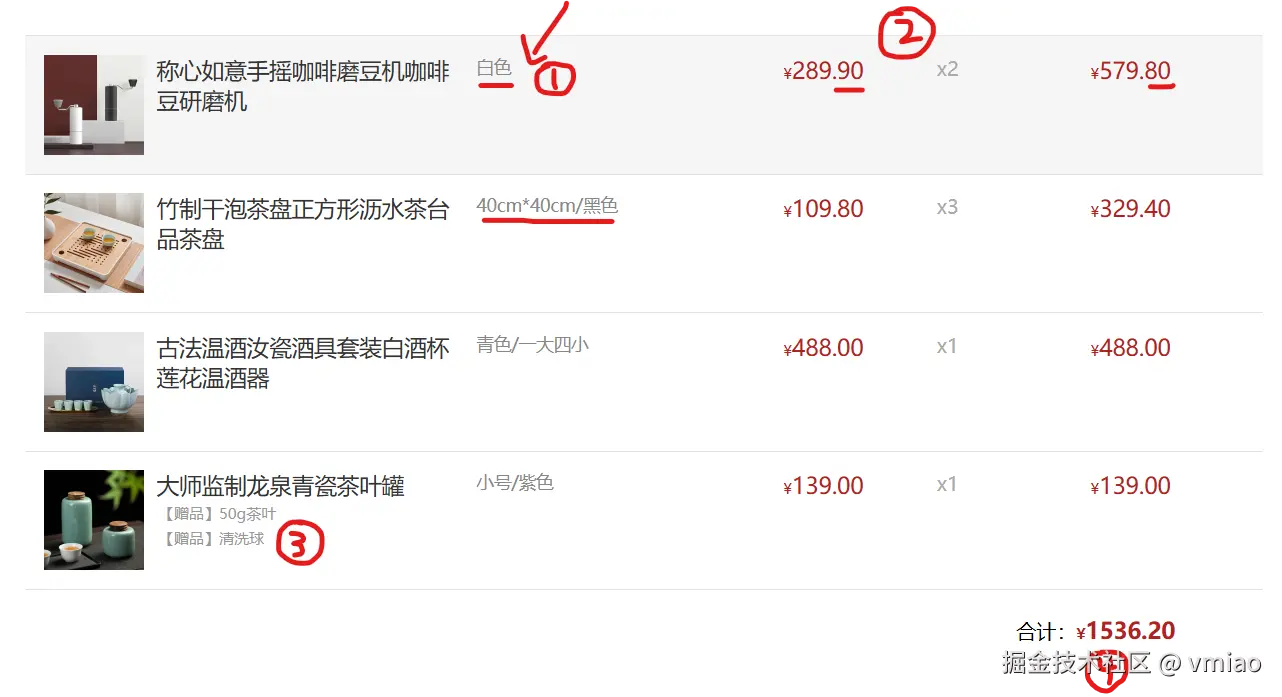
二、部分数据展示
yaml
     const goodsList = [
            {
                id: '4001172',
                name: '称心如意手摇咖啡磨豆机咖啡豆研磨机',
                price: 289.9,
                picture: 'https://yanxuan-item.nosdn.127.net/84a59ff9c58a77032564e61f716846d6.jpg',
                count: 2,
                spec: { color: '白色' }
            },
            {
                id: '4001009',
                name: '竹制干泡茶盘正方形沥水茶台品茶盘',
                price: 109.8,
                picture: 'https://yanxuan-item.nosdn.127.net/2d942d6bc94f1e230763e1a5a3b379e1.png',
                count: 3,
                spec: { size: '40cm*40cm', color: '黑色' }
            },
]- ① 处为spec属性,是一个对象,在渲染时需要转换成字符串的形式
- ② ④处为price和.amount模块中数据,需要保留两位小数
- ③ 处为gift属性,渲染时要先判断是否有该属性,初始是字符串类型
三、前置知识点
1.数组转换为字符串方法:join();字符串转换为数组的方法:split()
2.累加器,用于数组求和的方法:reduce()
3.对象解构
4.模板字符串的使用
四、练习素材提供
xml
<!DOCTYPE html>
<html lang="en">

<head>
    <meta charset="UTF-8">
    <meta http-equiv="X-UA-Compatible" content="IE=edge">
    <meta name="viewport" content="width=device-width, initial-scale=1.0">
    <title>Document</title>
    <style>
        * {
            margin: 0;
            padding: 0;
            box-sizing: border-box;
        }

        .list {
            width: 990px;
            margin: 100px auto 0;
        }

        .item {
            padding: 15px;
            transition: all .5s;
            display: flex;
            border-top: 1px solid #e4e4e4;
        }

        .item:nth-child(4n) {
            margin-left: 0;
        }

        .item:hover {
            cursor: pointer;
            background-color: #f5f5f5;
        }

        .item img {
            width: 80px;
            height: 80px;
            margin-right: 10px;
        }

        .item .name {
            font-size: 18px;
            margin-right: 10px;
            color: #333;
            flex: 2;
        }

        .item .name .tag {
            display: block;
            padding: 2px;
            font-size: 12px;
            color: #999;
        }

        .item .price,
        .item .sub-total {
            font-size: 18px;
            color: firebrick;
            flex: 1;
        }

        .item .price::before,
        .item .sub-total::before,
        .amount::before {
            content: "¥";
            font-size: 12px;
        }

        .item .spec {
            flex: 2;
            color: #888;
            font-size: 14px;
        }

        .item .count {
            flex: 1;
            color: #aaa;
        }

        .total {
            width: 990px;
            margin: 0 auto;
            display: flex;
            justify-content: flex-end;
            border-top: 1px solid #e4e4e4;
            padding: 20px;
        }

        .total .amount {
            font-size: 18px;
            color: firebrick;
            font-weight: bold;
            margin-right: 50px;
        }
    </style>
</head>

<body>
    <div class="list">
        <!-- <div class="item">
      <img src="https://yanxuan-item.nosdn.127.net/84a59ff9c58a77032564e61f716846d6.jpg" alt="">
      <p class="name">称心如意手摇咖啡磨豆机咖啡豆研磨机 <span class="tag">【赠品】10优惠券</span></p>
      <p class="spec">白色/10寸</p>
      <p class="price">289.90</p>
      <p class="count">x2</p>
      <p class="sub-total">579.80</p>
    </div> -->
    </div>
    <div class="total">
        <div>合计:<span class="amount"></span></div>
    </div>
    <script>
        const goodsList = [
            {
                id: '4001172',
                name: '称心如意手摇咖啡磨豆机咖啡豆研磨机',
                price: 289.9,
                picture: 'https://yanxuan-item.nosdn.127.net/84a59ff9c58a77032564e61f716846d6.jpg',
                count: 2,
                spec: { color: '白色' }
            },
            {
                id: '4001009',
                name: '竹制干泡茶盘正方形沥水茶台品茶盘',
                price: 109.8,
                picture: 'https://yanxuan-item.nosdn.127.net/2d942d6bc94f1e230763e1a5a3b379e1.png',
                count: 3,
                spec: { size: '40cm*40cm', color: '黑色' }
            },
            {
                id: '4001874',
                name: '古法温酒汝瓷酒具套装白酒杯莲花温酒器',
                price: 488,
                picture: 'https://yanxuan-item.nosdn.127.net/44e51622800e4fceb6bee8e616da85fd.png',
                count: 1,
                spec: { color: '青色', sum: '一大四小' }
            },
            {
                id: '4001649',
                name: '大师监制龙泉青瓷茶叶罐',
                price: 139,
                picture: 'https://yanxuan-item.nosdn.127.net/4356c9fc150753775fe56b465314f1eb.png',
                count: 1,
                spec: { size: '小号', color: '紫色' },
                gift: '50g茶叶,清洗球'
            }
        ]

    </script>
</body>

</html>
五、渲染实现
1.封装一个渲染函数
scss
    function render(arr){
    }
    render(goodsList) //调用这个函数
2.map函数遍历数组,动态渲染div数量 (这是写在封装函数里的,单拿出来为了逻辑更清晰)
ini
     document.querySelector(".list").innerHTML =arr.map(item => {
                  return `<div class="item">
                                 <img src="https://yanxuan-item.nosdn.127.net/84a59ff9c58a77032564e61f716846d6.jpg" alt="">
                                  <p class="name">称心如意手摇咖啡磨豆机咖啡豆研磨机 <span class="tag">【赠品】10优惠券</span></p>
                                  <p class="spec">白色/10寸</p>
                                  <p class="price">289.90</p>
                                  <p class="count">x2</p>
                                  <p class="sub-total">579.80</p>
                          </div>`
    } ).join("")
    //由于map返回的是数组,要转换成字符串,然后添加到.list的div里面去
    //此时数据是写死的
3.对象解析后,添加到模板字符串中
ini
    const { picture, name, price, count, spec, gift } = item
     return `
                    <div class="item">
                        <img src=${picture} alt="">
                        <p class="name">${name}<span class="tag">【赠品】10优惠券</span></p>
                        <p class="spec">白色/10寸</p>
                        <p class="price">${price.toFixed(2)}</p>
                        <p class="count">x${count}</p>
                        <p class="sub-total">${(price * 10 * count / 10).toFixed(2)}</p>
                    </div>
                `
4.处理spec对象
vbnet
     const text = Object.values(spec).join("/")
<p class="spec">${text}</p>- 首先用Object.values获取到spec中的数据,此时数据是数组的形式存在
- 然后用join()拼接成字符串,用变量text接受
- 最后填写到模板字符串中即可
5.赠品部分数据处理
ini
    const str = gift ? gift.split(",").map(item => `<span class="tag">【赠品】${item}</span>`).join("") : ""
<p class="name">${name} ${str}</p>- 首先要用三元运算符判断gift属性是否存在,不存在则为空
- 然后gift是字符串类型,利用split()转换成数组然后map()遍历,原理等同于渲染函数render
- 最后填写到模板字符串中
6.总计模块处理
javascript
    const total = goodsList.reduce((prev, item) => prev + (item.price * 100 * item.count) / 100, 0)
document.querySelector(".amount").innerHTML = total.toFixed(2)- 利用ruduce()求和,千万不要忘记写初值
- *100/100的做法是为了解决精度问题
六、JS部分完整代码
ini
     function render(arr) {
            document.querySelector(".list").innerHTML = arr.map(item => {
                const { picture, name, price, count, spec, gift } = item
                const text = Object.values(spec).join("/")
                const str = gift ? gift.split(",").map(item => `<span class="tag">【赠品】${item}</span>`).join("") : ""
                return `
                    <div class="item">
                        <img src=${picture} alt="">
                        <p class="name">${name} ${str}</p>
                        <p class="spec">${text}</p>
                        <p class="price">${price.toFixed(2)}</p>
                        <p class="count">x${count}</p>
                        <p class="sub-total">${(price * 10 * count / 10).toFixed(2)}</p>
                    </div>
                `
            }
            ).join("")

            const total = goodsList.reduce((prev, item) => prev + (item.price * 100 * item.count) / 100, 0)
            document.querySelector(".amount").innerHTML = total.toFixed(2)
        }
        render(goodsList)